1
400-141-000-B ENG.fm Page 4 Friday, February 1, 2008 2:19 PM
q
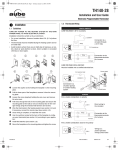
Select the heating, air conditioning, or mixed mode
4.
Use the Heat/Cool button to select one of the following modes:
Heating:
Air-conditioning:
Mixed:
Controls the heating unit.
Controls the air-conditioning unit.
The TH141 analyzes the temperature pattern and
automatically alternates between heating mode and
air-conditioning mode.
To avoid needless switching, the automatic mode change will take at
least 2 minutes if it is required by a manual setting change and at least 15
minutes if it is due to a quick temperature change.
Furthermore, to protect your heating and air-conditioning system, it is
impossible to shut down and restart the system within a period equal to
10% of the cycle.
r
Fan control
5.
Use the Fan On/Auto button to force continuous air circulation (
appears) or to synchronize the fan with the heating or air-conditioning
demand ( disappears).
Please note that if you set the TH141 in Vacation mode using the
telephone controller or a house automation system, the continuous air
circulation will be automatically deactivated during your absence.
s
Telephone controller ( )
6.
The TH141 incorporates a telephone controller interface which allows
you to switch from the normal operating mode to the Vacation setting
( ), and vice versa, using the telephone keypad (stationary or portable).
You can, for example, heat your country house from your office on Friday,
or your house from the airport or from your car on your way back from
vacation.
6.1
Connection to the CT240
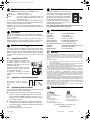
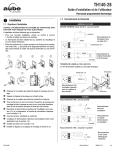
The TH141 is designed to connect directly to
the CT240 telephone controller. This
combination allows the activation and
deactivation of the Vacation mode from the
CT240 or the telephone.
Connect the CT240’s terminals A and C to
the TH141's terminals X and C respectively.
You must respect the polarity.
For details on operating the telephone
controller, refer to the CT240’s Instruction
Manual.
6.2
Connection to a house automation system
The Vacation setting can also be
activated from a house automation
system.
6.3
Operating the telephone interface
You can activate the Vacation setting using the Vacation button of the
telephone controller or using the telephone itself.
n
To activate the Vacation setting, press the Vacation button of the
CT240. The Vacation setting will be displayed on the thermostat
during 5 seconds and the
icon will flash on the screen. You no
longer have access to the TH141 keypad if this function is activated
by the telephone controller.
o
To deactivate the function and return to the previous mode, press
the Vacation button of the telephone controller again. The red light
will go off and the
icon will disappear from the thermostat within a
maximum of 5 seconds.
To modify the Vacation setting, refer to section 2.2.
TH141-HC-28
t
Battery replacement
7.
The TH141 will display an icon indicating that
the batteries must be replaced. This icon will
flash for 60 days. After this delay, the thermostat
will shut down your heating unit. During battery
replacement, the data is kept for of 15 seconds.
The time and the programs will not be lost.
After this delay, the TH141 runs a sequence of
tests and a complete reset to zero as for the
initial installation of the batteries.
Even if the thermostat indicates that the batteries are good, it is
recommended to replace them once a year.
u
Technical specifications
Power supply:
Connection:
Maximum load:
Auxiliary input:
Number of programs:
Heating setting range:
Air-conditioning setting range:
Anticipation:
Regulation:
Regulation periods:
;
8.
2 AA size alkaline batteries
2, 3, 4 or 5 wires
1.5 A/30 VAC per output
12 VDC ± 10%, 2.3 mA
4 programs/day, 28 programs total
5 °C to 30 °C (40 °F to 85 °F)
16 °C to 40 °C (60 °F to 105 °F)
electronic anticipation independent of the load
proportional or conventional
5, 10, 15 or 20 minutes
Warranty
9.
AUBE warrants this product, excluding battery, to be free from defects in the workmanship or materials, under normal use and service, for a period of three (3) years from the
date of purchase by the consumer. If at any time during the warranty period the product is
determined to be defective or malfunctions, AUBE shall repair or replace it (at AUBE's
option).
If the product is defective,
(i)
return it, with a bill of sale or other dated proof of purchase, to the place from
which you purchased it, or
(ii)
contact AUBE. AUBE will make the determination whether the product should be
returned, or whether a replacement product can be sent to you.
This warranty does not cover removal or reinstallation costs. This warranty shall not
apply if it is shown by AUBE that the defect or malfunction was caused by damage which
occurred while the product was in the possession of a consumer.
AUBE's sole responsibility shall be to repair or replace the product within the terms stated
above. AUBE SHALL NOT BE LIABLE FOR ANY LOSS OR DAMAGE OF ANY KIND,
INCLUDING ANY INCIDENTAL OR CONSEQUENTIAL DAMAGES RESULTING,
DIRECTLY OR INDIRECTLY, FROM ANY BREACH OF ANY WARRANTY, EXPRESS
OR IMPLIED, OR ANY OTHER FAILURE OF THIS PRODUCT. Some provinces, states
or regions do not allow the exclusion or limitation of incidental or consequential damages,
so this limitation may not apply to you.
THIS WARRANTY IS THE ONLY EXPRESS WARRANTY AUBE MAKES ON THIS
PRODUCT. THE DURATION OF ANY IMPLIED WARRANTIES, INCLUDING THE WARRANTIES OF MERCHANTABILITY AND FITNESS FOR A PARTICULAR PURPOSE, IS
HEREBY LIMITED TO THE THREE-YEAR DURATION OF THIS WARRANTY. Some
provinces, states or regions do not allow limitations on how long an implied warranty
lasts, so the above limitation may not apply to you.
This warranty gives you specific legal rights, and you may have other rights which vary
from one province, state or region to another.
Technical Assistance
705 Montrichard Avenue
Saint-Jean-sur-Richelieu, Quebec
J2X 5K8
Canada
Tel.: (450) 358-4600
Toll-free: 1-800-831-AUBE
Fax: (450) 358-4650
Email: [email protected]
10.
Service Centre
10 rue Ampère
95500 Gonesse, France
Tel.: 33 (0) 1 34 07 99 00
Fax: 33 (0) 1 34 07 99 19
Email: [email protected]
For more information on our products, go to
www.aubetech.com
400-141-000-B
2008-02-01
4/4