1
Operation
14.2
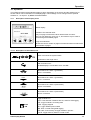
Operation of the main keys
14.2.1 Concept for key operation
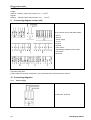
- 4.0 °Ftd
• use these keys to browse and select different items in the menu and
scroll through different pages of measurement values
• use these keys to alter or adjust the setting option or numbering
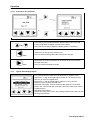
Back
Enter
14.3
• use this key to exit the current menu level
• use it to leave all setting state without saving the changes
• use this key to enter the submenu or next menu level of the currently
selected menu item
• use it to confirm the setting changes
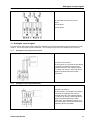
Typical menu display layout
• The currently selected menu item will be shown in negative colour
• If there is a ">“ sign at the right edge it means we can exit the current
menu or go to the next higher level
• It there is a "<“ sign at the left edge it means we can go into the
submenu of the currently selected menu
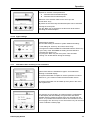
• Selectable menu item. It shows 4 items at the same time. If the total
items in the current menu are more than 4 items the menu items can be
scrolled through
• Indication at the bottom:
Shows how many items exist in the currently selected menu and it shows
the current menu item
14
Data Display DD109