1
Mounting
7
Mounting
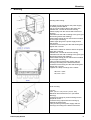
Mounting wall housing:
The cables for sensors and for the power supply
are already wired at DD10:
• Do not connect mains cable to the power line
• Release the 4 screws at the front housing
• Remove plug from the reverse side of the front
housing
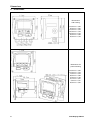
• Drill holes into the wall according to the given grid
dimension (please see drawing)
• Mount wall housing (anchor and screws included
in the scope of delivery)
• Attach again plug for the power supply and for
the sensors
• Insert the front housing into the wall housing and
tighten the 4 screws
At DD109 the cables for sensors and for the power
supply are not wired:
• Release the 4 screws at the front housing
• Drill holes into the wall according to the given grid
dimension (please see drawing)
• Mount wall housing (anchor and screws included
in the scope of delivery)
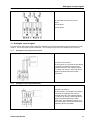
• Carry out wiring of the power supply and the
sensor(s) according to the below instructions
• Insert the front housing into the wall housing and
tighten the 4 screws
• Tighten the clamp screwings of the cables
98,8 mm = 3,89”
84,0 mm = 3,31”
Panel mounting
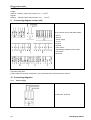
• Cut-out
3,62” (+0,03” -0,0”) x 3,62” (+0,03” -0,0”)
Maximum sheet thickness 0,31” (see above
drawing)
• Insert front housing for panel mounting into the
prepared cut-out
• Insert the fixing clips and fix the housing by
twisting the thread rods
• Carry out wiring of the power supply and the
sensor(s) according to the below instructions
Data Display DD109
9