1
Standard Initialization Sequence for Hercules Microcontrollers
2.3
www.ti.com
Enable Clock Sources
2.3.1
Available Clock Sources on Hercules Microcontrollers
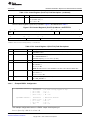
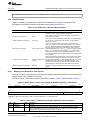
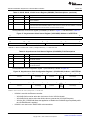
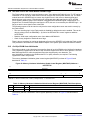
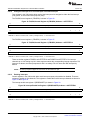
The Hercules microcontrollers support seven different clock sources, as listed in Table 3.
Table 3. Clock Sources on Hercules Microcontrollers
Clock
Source
Number
Clock Source Name
Description
OSCIN
This is the primary oscillator, typically driven by an external resonator or crystal. This
is the only available input to the FMPLL and the FMPLL2 macros. The OSCIN
frequency must be between 5 MHz and 20 MHz.
1
FMPLL#1 output
This is the output of the FMPLL, which is generated using the OSCIN as the input
clock. The FMPLL output clock frequency must not exceed the maximum device
frequency specified in the specific part's datasheet. The FMPLL features a modulation
mode where a modulation frequency is superimposed on the FMPLL output signal.
2
Not implemented
No clock signal is connected to source # 2. This clock source must not be enabled or
chosen for any clock domain.
3
EXTCLKIN1
External clock input # 1. This clock source must only be enabled if there is an actual
external clock source connected to the identified device terminal for EXTCLKIN1. For
more information, see the specific part's datasheet.
4
LF LPO
This is the low-frequency output of the internal reference oscillator. The LF LPO is
typically an 80 KHz signal, and is generally used for low-power mode use cases.
5
HF LPO
This is the high-frequency output of the internal reference oscillator. The HF LPO is
typically a 10 MHz signal, and is used as a reference clock for monitoring the main
oscillator.
6
FMPLL#2 output
This is the output of the secondary FMPLL, which is generated using the OSCIN as
the input clock. The FMPLL output clock frequency must not exceed the maximum
device frequency specified in the specific part's datasheet.
7
EXTCLKIN2
External clock input # 2. This clock source must only be enabled if there is an actual
external clock source connected to the identified device terminal for EXTCLKIN2. For
more information, see the specific part's datasheet.
0
2.3.2
Control Registers for Enabling and Disabling Clock Sources
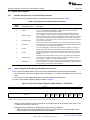
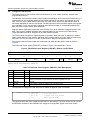
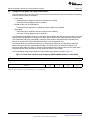
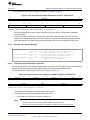
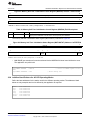
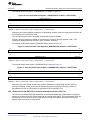
Figure 6 shows the default states of the clock sources supported on the Hercules microcontrollers:
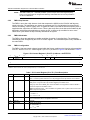
• Clock sources 0, 4 and 5 are enabled, while clock sources 1, 3, 6 and 7 are disabled upon any system
reset.
• Clock source 2 is not implemented and must not be enabled in the application.
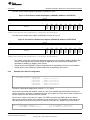
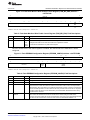
The clock source disable register (CSDIS) is shown in Figure 6.
Figure 6. Clock Source Disable Register (CSDIS) Address = 0xFFFFFF30
31
16
Reserved
R-0
15
8
7
6
5
4
3
2
1
0
Reserved
CLK
SR7
OFF
CLK
SR6
OFF
CLK
SR5
OFF
CLK
SR4
OFF
CLK
SR3
OFF
CLK
SR2
OFF
CLK
SR1
OFF
CLK
SR0
OFF
R-0
R/WP-1
R/WP-1
R/WP-D
R/WP-0
R/WP-1
R/WP-1
R/WP-1
R/WP-0
LEGEND: R = Read in all modes; WP = Write in priviledged mode only; -n = value after reset; D = Device-specific reset value
•
•
8
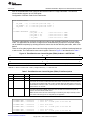
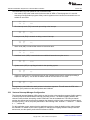
Each bit of the CSDIS controls the clock source of the same number: bit 0 controls clock source 0, bit
1 controls clock source 1, and so on.
Setting any bit commands, the corresponding clock source to be disabled.
– The clock source can only be disabled once there is no clock domain or secondary clock source
(FMPLL, FMPLL#2) using the clock source to be disabled.
Initialization of Hercules™ ARM® Cortex™-R4F Microcontrollers
Copyright © 2011, Texas Instruments Incorporated
SPNA106 – September 2011
Submit Documentation Feedback