1
Setting the Internal DIP Switches
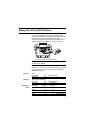
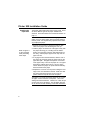
A set of four DIP switches is located under the paper
holder on the bottom of your Printer 900. Make sure that
these switches are set as indicated below before
connecting and operating the printer. The printer will not
operate properly if the switches are not set correctly.
ON
Figure 3. Location of DIP Switches
CAUTION: Always disconnect the power before changing
the DIP switch settings.
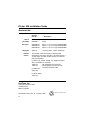
Refer to the table below for the proper DIP switch
settings. If you are not sure of which settings to use, refer
to the reference manual for your terminal or computer’s
application program.
Switch 1
Switch 2
Switches 3
and 4
Parity
Even Parity
Odd Parity
on
off
Word Length (data bits)
7 bit word
off
8 bit word
on
Baud Rate
1200
2400
4800
9600
(default setting)
(default setting)
(no parity)
Switch 3
Switch 4
on
on
off
off
on
off
on
off
(default setting)
5