1
GB USA
Quick Installation and Operation Guide
QUICK INSTALLATION
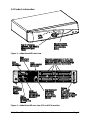
Power off all your computers and connect them to the ORANGE ports on the rear
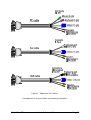
of the AdderView MP. Adder 3-in-1 keyboard/video/mouse combination cables
are recommended for convenience.
Connect your keyboard, monitor and mouse to the GREY port on the rear of the
AdderView.
OPERATION GUIDE SUMMARY
The AdderView's default configuration is suitable for most systems.
A computer may be selected using the front panel key, a three button mouse or a
keyboard hotkey combination. To select a computer using the mouse press and
release the left or right hand buttons whilst holding down the central button. To
select a computer using the keyboard hotkeys hold down the CTRL and ALT
keys, press and release the required port key (e.g. 1) and then release the CTRL
and ALT keys.
Safety information
For use in dry, oil free indoor environments only.
Do not attempt to service the AdderView MP yourself.
Follow all warnings and instructions marked on the AdderView MP, its optional
power adapter and its accessories.
Warning - live parts contained within optional power adapter.
No user serviceable parts within optional power adapter - do not dismantle.
Replace the optional power adapter with a manufacturer approved type only.
If you use a power extension cord with the AdderView MP, make sure the total
ampere rating of the devices plugged into the extension cord does not exceed the
cord’s ampere rating. Also, make sure that the total ampere rating of all the
devices plugged into the wall outlet does not exceed the wall outlet’s ampere
rating.
AdderView MP
ENGLISH