1
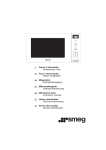
The control panel
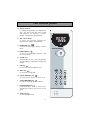
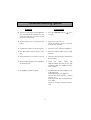
A Display window :
to simplify programming, the display indicates : the time of day, the types of food
and functions, the minutes / seconds,
weight or temperature programmed.
B The selector knob :
to choose the food type, function, programme time, weight or temperature.
A
C FOOD TYPE key
:
to choose the food type, with the selector
knob.
D FUNCTION key
:
to choose the appropriate function, with
the selector knob.
B
E “AUTO” key :
automatically sets the correct programme
time according to a specified food type and
weight.
F
FAN key
:
to cook as if with a traditional oven.
G GRILL key
:
to select low or high grill.
H ”Speed DEFROST” key
:
to quickly defrost all types of frozen food.
I
J
STOP-TURNTABLE key
:
to stop the turntable from revolving.
PAUSE/CANCEL key
:
to interrupt (press once) or cancel a programme (press twice). Also used to set the
clock.
K START key
:
to start all programmes.
6
C
D
E
F
G
H
I
J
K