1
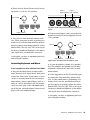
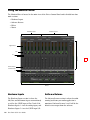
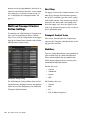
Pad Button
About Phantom Power
All analog input channels offer a Pad button. If
your input signal is too high or “hot” even with
the Gain knob at a low setting, press that channel’s Pad button to reduce the input signal by
approximately 20dB.
Dynamic microphones (such as a Shure SM57)
do not require phantom power to operate, but
are not harmed by it. Most condenser microphones (such as M-Audio Solaris™) do require
phantom power to operate.
Gain Controls
These knobs adjust the input gain levels of their
corresponding Input channels. Turn a knob
clockwise to increase the gain, and counterclockwise to decrease it.
Signal/Clip LED Meters
The 8-segment LED meters illuminate to help
you set correct gain levels when recording instruments or vocals. These meters receive signals
from the Fast Track C600's analog-to-digital
converter and are very precise. If the red LED (at
the top) illuminates, it means that your signal
has overloaded (or “clipped”) the converter and
that your recording may contain audible distortion. If the red LED does illuminate, decrease the
input level using the channel's Gain Knob to
prevent any additional clipping.
48V Switch and LED
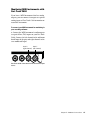
Phantom power is activated by the switches labeled 48V on the top panel of Fast Track C600.
The switch on the left controls channels 1-2,
whereas the right controls channels 3-4. When a
48V button is pressed, the LED directly below it
illuminates and phantom power is supplied to
the corresponding XLR inputs.
4
Fast Track C600 User Guide
Although phantom power can be used
safely with most microphones, it is possible
to damage some ribbon microphones with
it. Always turn off phantom power and wait
at least ten seconds before connecting or disconnecting a ribbon microphone.
When Fast Track C600 is powered using
the supplied 5V power adapter, all input
channels are active and the interface can
provide as much phantom power as required to your microphones.
If the interface is using USB bus power, analog inputs 3/4 are disabled and Fast Track
C600 can provide up to 4mA of current on
channels 1 and 2, or up to 8mA if only one
channel is used. This is more than sufficient for most modern microphones, as well
as many vintage microphones.
If you are not sure about the phantom power requirements for your microphone, consult your
microphone’s documentation or contact the
manufacturer.