1
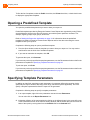
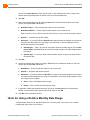
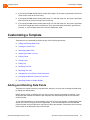
3 Analyzing Trends Automatically Generating a Report (Scheduling a Report) Every Week — Run the report once a week, on the day specified in the associated field. Every Month — Run the once a month, on the date specified in the associated field. Specific — Generate the report on this specific day only. Every Hour — Generate the report every number of specified hours. Specific — Generate the report at this specific hour only. 4. If you want to generate the report to a printer, click the Destination tab and check Printer. The report is sent to your default printer. To select a different printer from the list defined in the Contact Center server, click Browse. You can choose the report page orientation from the Orientation area. Default uses the specified printer’s default orientation. Note Make sure the printer does not require that you specify a filename before printing (for example the Microsoft Office Document Image Writer). Devices that require you to specify a filename before printing will cause the Contact Center Scheduler to hang, since user input is required. 5. If you want to generate the report to a file, click the Destination tab, check File, and select the appropriate file options: File Path — The location the file is to be saved on the Contact Center server. Click Browse to navigate to and select a location. Base File Name — By default, the report is saved with the name of the schedule. You can change the report name or restore the default name. Full File Name — Specify the full file name. You can include the base file name, file Format, a Suffix, and the file extension. Type — The file format type of the report. Note that if you want to export the report to PDF, your administrator has to first install a required component on your machine. If you are unable to export reports to PDF, contact your administrator. Note As of ECC 8, reports are generated in the following formats: comma separated values (*.csv files) enhanced metafile format (*.emf files) Microsoft Excel format Portable Document Format (PDF) SQL syntax Text with HTML format If you have upgraded from a version prior to ECC 8 and you have created scheduled reports that generate in any other file format, you may get a report generation error. To correct this issue, update Type for the affected report. ShoreTel Enterprise Contact Center ShoreTel Contact Center Supervisor Guide 42