1
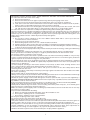
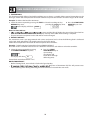
MANUAL OPERATION
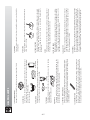
Opening the door:
To open the oven door, pull the door handle.
Starting the oven:
Prepare and place food in a suitable container onto the turntable or place directly onto the
turntable. Close the door and press the START/AUTO MINUTE key after selecting the desired
cooking mode.
Once the cooking programme has been set and the START/AUTO MINUTE key is not pressed
in 1 minute, the setting will be cancelled.
The START/AUTO MINUTE key must be pressed to continue cooking if the door is opened during
cient press will be no response.
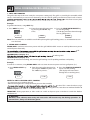
Use the STOP/CLEAR key to:
1. Erase a mistake during programming.
2. Stop the oven temporarily during cooking.
3. Cancel a programme during cooking, press the STOP/CLEAR key twice.
4. To set and to cancel the child lock (refer to page GB-11).
BEFORE OPERATION
MICROWAVE
COOKING
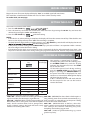
Your oven can be programmed for up 99 minutes 50 seconds (99.50).
MANUAL COOKING/ MANUAL DEFROSTING
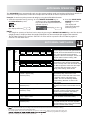
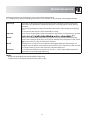
• Enter the cooking time and use microwave power levels 100P to 10P to cook or defrost (refer to page 5).
• Stir or turn the food, where possible, 2 - 3 times during cooking.
• After cooking, cover the food and leave to stand, where recommended.
• After defrosting, cover the food in foil and leave to stand until thoroughly defrosted.
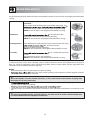
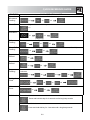
Example:
To cook 2 minutes and 30 seconds on 70% microwave power.
3. Press the START/AUTO MINUTE key
to start the timer.
(The display will count down through
the set cooking/defrosting time.)
NOTE:
• When the oven starts, the oven lamp will light and the turntable will rotate clockwise or anticlockwise.
• If the door is opened during cooking/defrosting to stir or to turn over food, the cooking time on the display
stops automatically. The cooking/ defrosting time starts to count down again when the door is closed and
the START/AUTO MINUTE key is pressed.
• When cooking/defrosting is complete, open the door or press STOP/CLEAR key and the time of day will
reappear on the display, if the clock has been set.
nger is
• If you wish to know the power level during cooking, press the POWER LEVEL
touching the POWER LEVEL key, the power level will be displayed.
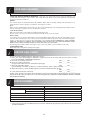
IMPORTANT:
• Close the door after cooking / defrosting. Please note that the light will remain on when the door is open,
this is for safety reasons to remind you to close the door.
• Continuous use of your microwave oven in high powered cooking modes over an extended time may cause
excessive heat to be generated. As a safety precaution, a power down in the oven will automatically activate.
6
ENGLISH
1. Input the power level by pressing 2. Enter the cooking time by
pressing the 1 min. key
the POWER LEVEL key 4 times
twice and then the 10 sec.
for 70 P.
key 3 times.
x4