1
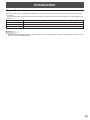
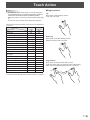
Touch Action
Scroll left or right with two fingers / Swipe with two or
three fingers
Use cross page swipe.
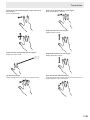
Swipe left or right with three or four fingers
Move an application to the front.
Swipe up with three or four fingers
Display Mission Control.
Swipe left from the right edge with two fingers
Display the notice center.
Tap with three fingers
Check the tapped text in a dictionary or other resource.
Swipe down with three or four fingers
Display Application Exposé.
Pinch with thumb and three fingers
Touch the screen with 4 fingers, and move your thumb and 3
fingers together to open Launchpad.
13
E