1
PAGE 33
Selecting Rating Level and Password
This is to prohibit the playing of specified
DVDs which are unsuitable for children.
● Some DVD discs contain a restriction level
which enables parents to remove scenes or
prevent playback of discs by children. DVD
players are equipped with a password
designed to prevent children from changing
the level.
POWER
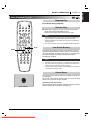
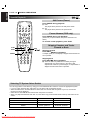
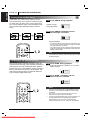
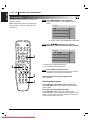
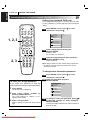
Selecting rating level (DVD only)
1
At the SETUP screen, press
“Rating” and press G.
D/E
Disc Audio
8
Disc Subtitle
7
Disc Menu
6
Rating
5
Password
4
TV Aspect
3
Menu Language
2
Progressive Scan
1
Digital Audio Output
Unlock
to select
5.1 Speaker Setup
OPEN/CLOSE
Others
SETUP
REPEAT
A-B
RANDOM
AUDIO
SUBTITLE
ANGLE
SURR.
2
TOP MENU
1, 2
MENU
SELECT
/ENTER
OSD
RETURN
ZOOM
MARKER — SEARCH
SCAN
PLAY
SKIP
STOP
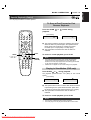
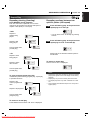
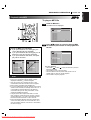
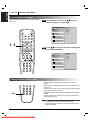
Press D/E to select the desired level and
press SELECT/ENTER.
Disc Audio
8 Blocked
Disc Subtitle
7 Blocked
Disc Menu
6
Rating
5
Password
4
TV Aspect
3
Menu Language
2
Progressive Scan
1
Digital Audio Output
Unlock
5.1 Speaker Setup
PAUSE
SLOW
1
2
3
4
5
6
7
8
CLEAR
9
Others
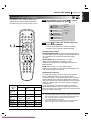
You cannot play DVD video discs rated higher than the level
you selected unless you cancel the parental lock function.
For example, when you select level 7, discs rated higher than
level 7 are blocked and cannot be played.
PROGRAM
0
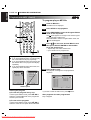
The parent lock level is equivalent to the following USA movie
ratings.
Level 7: NC-17
Level 3: PG
Level 6: R
Level 1: G
Level 4: PG 13
• Some titles do not match with the rating level described as
above.
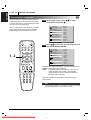
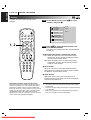
If you change the level and enter a password, playback of all
DVDs with ratings higher than your selection will be blocked,
unless the correct password is entered again. For example: if
you change the level to “5”, the DVD player will not play discs
with ratings of “6”, “7” or “8” unless the correct password is
entered on the remote control.
Downloaded From DvDPlayer-Manual.com Marantz Manuals
ENGLISH
INITIAL SETTINGS