1
ENGLISH
PAGE 8
INTRODUCTION
Identification of Controls (Cont’d)
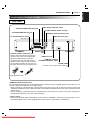
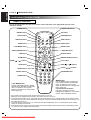
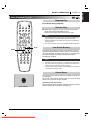
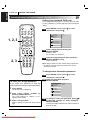
REMOTE CONTROL
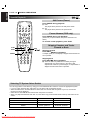
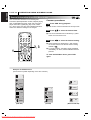
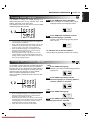
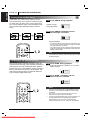
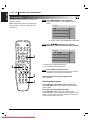
You will find instructions for each of the remote control functions in the appropriate sections of this
instruction manual.
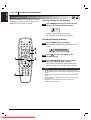
POWER button
OPEN/CLOSE button
REPEAT button
A-B button
POWER
OPEN/CLOSE
RANDOM button
SETUP button
SETUP
REPEAT
A-B
RANDOM
AUDIO
SUBTITLE
ANGLE
SURR.
SUBTITLE button
ANGLE button
SURR. button
AUDIO button
TOP MENU
MENU
*MENU button
***TOP MENU button
**ARROW buttons
SELECT/ENTER button
SELECT
/ENTER
RETURN button
OSD button
OSD
RETURN
MARKER-SEARCH buttons
ZOOM button
ZOOM
SCAN (
/
MARKER — SEARCH
PLAY button
) buttons
SCAN
STOP button
PLAY
SKIP
SKIP (
STOP
PAUSE button
PAUSE
SLOW
/
) buttons
SLOW (F V / V G) buttons
PROGRAM button
Number buttons
1
2
3
4
5
6
7
8
CLEAR button
CLEAR
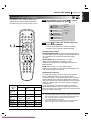
***TOP MENU button
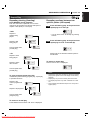
Use the TOP MENU button to display
the title screen included on DVD video
discs. To operate a menu screen,
follow the instructions in “Using a Title
Menu” (page 22).
9
PROGRAM
0
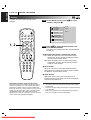
*MENU button
Use the MENU button to display the
menu screen included on DVD video
discs. To operate a menu screen,
follow the instructions in “Using a DVD
Menu” (page 22).
** Directional arrow buttons
(up, down, left, right) for use in
highlighting a selection on a GUI menu
screen, TITLE and MENU screen.
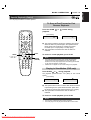
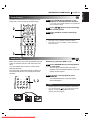
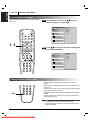
• This remote control supports two remote control codes: C1 and C2.
• When the unit is shipped from the factory, the remote control is set to C1.
• To set the remote control to C2, hold down both the STOP button and "2" number button on the remote control
for at least five seconds. (If the batteries in the remote control are replaced while the remote control is set to C2,
the setting will revert C1.)
• To set the remote control back to C1, hold down both the STOP button and "1" number button on the remote
control for at least five seconds.
• Also set the remote control codes of the player to the same setting as the remote control. (This setting is set to
C1, when the unit is shipped from the factory.)
Downloaded From DvDPlayer-Manual.com Marantz Manuals