1
PAGE 21
Detailed Description of each GUI Menu Icon
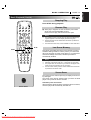
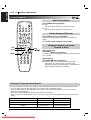
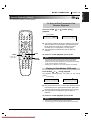
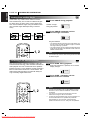
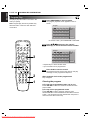
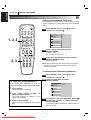
You can view information about a disc and its operational status on the TV screen.
Press OSD during
playback.
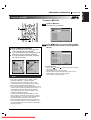
FUNCTION
(Press D/E to select desired item)
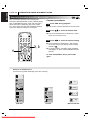
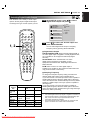
[TV screen] DVD GUI
1
1
0:16:57
1 ENG
D
6 CH
OFF
1
NORM.
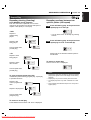
To show the current title number
and to jump to the desired title number
To show the current chapter number
and to jump to the desired chapter number
To show the elapsed time
and directly select scenes by the desired time.
To show the current audio soundtrack language,
encoding method, channel number
and to change the settings.
To show the current subtitles language
and to change the setting.
F/G, or
Numeric
SELECT/ENTER
F/G, or Numeric
SELECT/ENTER
SKIP
Numeric
SELECT/ENTER
F/G,
AUDIO
F/G,
SUBTITLE
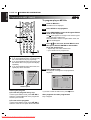
To show the current angle number
and to change the angle.
F/G,
ANGLE
To show the current sound (NORMAL or 3D SURROUND)
and to change the setting.
F/G,
SURR.
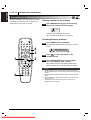
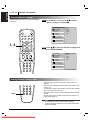
Press OSD during
playback.
FUNCTION
(Press D/E to select desired item)
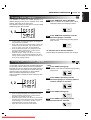
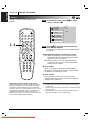
[TV screen] CD GUI
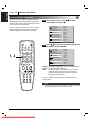
To show the current track number
1
SELECTION
METHOD
and to jump to the desired track number
SELECTION
METHOD
F/G, or Numeric
SELECT/ENTER
SKIP
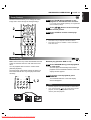
To show the elapsed time.
0:16:57
(Display only)
To show the current audio (STEREO, LEFT, RIGHT)
STER.
NORM.
and to select to the desired audio channel.
To show the current sound (NORMAL or 3D SURROUND)
and to change the setting.
Note
❍
Some DVD discs may not provide all of the above GUI menu icons.
Downloaded From DvDPlayer-Manual.com Marantz Manuals
F/G,
AUDIO
F/G,
SURR.
ENGLISH
OPERATION USING GUI MENU ICONS