1
Contents
Your DVD hardware . . . . . . . . . . . . . . . . . . . . . . . . . . . . . . . . . . . . . . . . . 3
ZV-DVD PC Card . . . . . . . . . . . . . . . . . . . . . . . . . . . . . . . . . . . 4
Your DVD software . . . . . . . . . . . . . . . . . . . . . . . . . . . . . . . . . . . . . . . . . . 6
Playing a DVD movie . . . . . . . . . . . . . . . . . . . . . . . . . . . . . . . . 6
Using the DVD Player control panel . . . . . . . . . . . . . . . . . . . . . 7
Setting parental controls . . . . . . . . . . . . . . . . . . . . . . . . . . . . . 12
DVD region coding . . . . . . . . . . . . . . . . . . . . . . . . . . . . . . . . . 15
Reinstalling the DVD Player software . . . . . . . . . . . . . . . . . . . 15
Care and Maintenance . . . . . . . . . . . . . . . . . . . . . . . . . . . . . . . . . . . . . . 17
System care . . . . . . . . . . . . . . . . . . . . . . . . . . . . . . . . . . . . . . . 17
Disc care . . . . . . . . . . . . . . . . . . . . . . . . . . . . . . . . . . . . . . . . . 18
Troubleshooting . . . . . . . . . . . . . . . . . . . . . . . . . . . . . . . . . . . . . . . . . . . . 19
The disc will not play . . . . . . . . . . . . . . . . . . . . . . . . . . . . . . . . 20
Video is jerky and dropping frames . . . . . . . . . . . . . . . . . . . . . 20
Screen resolution looks bad . . . . . . . . . . . . . . . . . . . . . . . . . . . 21
There is no picture . . . . . . . . . . . . . . . . . . . . . . . . . . . . . . . . . . 22
Language, angle, title, subtitle, and parental
control features will not work . . . . . . . . . . . . . . . . . . . . . . . . . 22
No audio or audio is low . . . . . . . . . . . . . . . . . . . . . . . . . . . . . 22
Your forgot the password for parental control . . . . . . . . . . . . . 22
Notices . . . . . . . . . . . . . . . . . . . . . . . . . . . . . . . . . . . . . . . . . . . . . . . . . . . 23
Regulatory Compliance Statements . . . . . . . . . . . . . . . . . . . . . . . . . . . . 25
i
ii Using Your DVD Player
Your DVD hardware
Depending on your notebook model, your DVD hardware is either
integrated into your system or you have a ZV-DVD PC Card that
came with your notebook.
◆
If you have the ZV-DVD PC Card, the card is already inserted
in the Zoomed Video slot of your notebook (usually the
bottom PC Card slot).
Go to “ZV-DVD PC Card” on page 4 for information about
using the card and go to “Your DVD software” on page 6 for
information about using your DVD software.
◆
If you do not have a ZV-DVD PC Card in your notebook, your
DVD hardware is integrated into your system. Go to “Your
DVD software” on page 6 for information about using your
DVD software.
Your DVD hardware
3
ZV-DVD PC Card
The ZV-DVD PC Card is already inserted in the Zoomed Video
(ZV-enabled) slot of your notebook. Press its eject button if you
need to remove the PC Card.
Your ZV-DVD PC Card supports hot insertion, which means you
can put the card in the ZV-enabled slot of your notebook when it is
running. The system automatically makes any necessary
adjustments and allocates resources.
Important:
This product incorporates copyright protection technology that
is protected by method claims of certain U.S. patents and other
intellectual property rights owned by Macrovision Corporation
and other rights owners. Use of this copyright protection
technology must be authorized by Macrovision Corporation,
and is intended for home and other limited viewing uses only
unless otherwise authorized by Macrovision Corporation.
Reverse engineering or disassembly is prohibited.
4 Using Your DVD Player
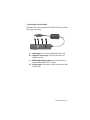
Connecting the media cable
The media cable can be attached to the ZV-DVD PC Card to provide
four output connections:
A
B
C
D
A. Audio output is for external, amplified speakers only.
B. Composite Video output can be used to connect to a
standard television.
C. SPDIF (Dolby Digital) output can be connected to an
external Dolby Digital (AC-3) decoder.
D. S-Video output can be used to connect to a television with
S-Video input.
Your DVD hardware
5
Your DVD software
The DVD Player software is already installed on your notebook. If
you need to reinstall the software at some point, see “Reinstalling
the DVD Player software” on page 15.
Playing a DVD movie
Some notebooks (such as the Solo 9100) require you to change the
video source to DVD before playing a DVD disc.
To change the video source to DVD:
1. Press the FN key and the VIDEO SOURCE key (F7 on the Solo
9100) simultaneously. The video source menu opens.
2. Continue to press the key combination until the option “DVD”
appears. The video source menu closes automatically.
To play a DVD disc:
1. Press the eject button on the front of the DVD drive or click
on the DVD Player control panel. The DVD drive opens.
2. Place the disc in the tray.
3. Push in the DVD tray to close it.
4. Clicking Start, Programs, DVDPlay, then DVDplay. The DVD
Player control panel opens.
5. The disc may begin playing automatically. If it does not, click
on the DVD Player control panel. The disc begins playing.
6 Using Your DVD Player
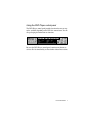
Using the DVD Player control panel
The DVD Player control panel provides functions that may or may
not be available depending on the DVD disc manufacturer. See the
disc packaging for information on functions.
Because the DVD Player control panel contains many buttons to
achieve all of its functionality, we have broken it down into sections.
Your DVD software
7
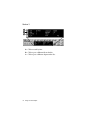
Section 1
D
E
F
G
A
B
C
A. Click to play the disc from the beginning.
B. Click to open a file to play back.
C. Click to configure available settings.
D. Click to increase volume.
E. Click to toggle Mute on and off.
F.
Click to decrease volume.
G. Click to toggle the vocal track on a karaoke disc on and off.
Available only with karaoke discs.
8 Using Your DVD Player
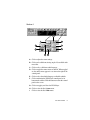
Section 2
A
B
C
D
E
F
G
H
A. Click to play a DVD disc, Video CD, or MPEG file.
B. Click to pause the video. Click the play button to continue.
C. Click to stop playing the video. Click the play button to
start playing at the beginning of the video.
D. Click to play the video in slow motion.
E. Click to rewind through the video. Click the play or stop
button to stop rewinding.
F.
Click to forward through the video. Click the play or stop
button to stop forwarding.
G. Click to advance the video frame by frame. The video is
advanced one frame per click.
H. Click to open the disc tray.
Your DVD software
9
Section 3
A
B
C
A. Click to search by time.
B. Click to go to a different title on the disc.
C. Click to go to a different chapter on the disc.
10 Using Your DVD Player
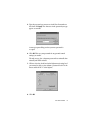
Section 4
F
G
C
A
H
B
I
D
E
A. Click to adjust the zoom settings.
B. Click to select different viewing angles. Not available with
most titles.
C. Click to select a different audio language.
D. Click to toggle the menu arrows on and off. When toggled
on, the menu arrows appear in a section to the right of the
control panel.
E. Click to select the subtitle language or disable subtitles.
F.
Click to minimize the DVD Player control panel to its
button on the taskbar. Click the button to restore the control
panel to the screen.
G. Click to stop play and close the DVD Player.
H. Click to view the disc’s Scene menu.
I.
Click to view the disc’s Main menu.
Your DVD software
11
Setting parental controls
Parental controls are designed to allow you to set viewing limits for
a disc based on its rating by using a password. You can set parental
controls using the DVD Player control panel.
How parental controls actually work with a disc depends on the disc
manufacturer. If you set parental controls, be aware that they are not
an absolute method for making sure a particular movie cannot be
watched through the DVD Player.
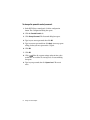
To set the parental control settings:
1. If you have a movie playing, stop it. Parental controls cannot be
set while a movie is playing.
2. In the DVD Player control panel, click
. The Configuration
dialog box opens.
3. Click the Parental Control tab. The Password dialog box opens.
4. Type welcome in the Default Password text box, then click OK.
The characters in the word “welcome” appear as asterisks.
12 Using Your DVD Player
5. Type the password you want to use in the New Password text
box, then click Apply. The characters in the password you type
appear as asterisks.
A message opens telling you that your new password is
accepted.
6. Click OK. This sets your password for any parental control
settings you enable.
The only way to clear a forgotten password is to uninstall, then
reinstall your DVD software.
7. Click to select the check box for the highest movie rating level
you want to be able to view without a password (level G is the
lowest and level NC-17 is the highest).
8. Click OK.
Your DVD software
13
To change the parental control password:
1. In the DVD Player control panel, click the configuration
button. The Configuration dialog box opens.
2. Click the Parental Control tab.
3. Click Change Password. The Password dialog box opens.
4. Type in your current password, then click OK.
5. Type in your new password, then click Apply. A message opens
telling you that your new password is accepted.
6. Click OK.
7. Click OK.
8. Click
. If the disc supports ratings and restriction codes
and the disc exceeds the set viewing level, a Password dialog
box opens.
9. Type in your password, then click Ignore Level. The movie
starts.
14 Using Your DVD Player
DVD region coding
DVD region coding is a standard set by the DVD industry. Region
codes are built into both the DVD discs and the DVD hardware. To
be able to play a DVD disc, the disc’s region code and your DVD
drive region code must match.
The region code of the system is determined by the delivery
address. The region code for the disc is on the disc, disc
documentation, or packaging.
Reinstalling the DVD Player software
We installed the DVD Player software for you. If you need to
reinstall the DVD Player software, first uninstall it using the steps
on page 16 , then continue with the steps in this section.
You need the Portable Restoration CD that you received with your
notebook to reinstall the DVD Player software.
To reinstall the software:
1. Place the Portable Restoration CD in your DVD drive. The
Portable Restoration CD window opens.
If the CD does not play automatically, double-click the My
Computer icon, double-click the DVD drive icon, then doubleclick the autorun.exe icon.
2. Follow the on-screen instructions to reinstall the software from
the CD. For more information about using the CD, see the
booklet that shipped with it.
Your DVD software
15
Uninstalling the DVD Player software
If you are reinstalling the DVD Player software, make sure it is
completely uninstalled by using the following procedure.
To uninstall the DVD Player software:
1. Click Start, Settings, Control Panel. The Control Panel opens.
2. Double-click the Add/Remove Programs icon. The
Add/Remove Programs Properties dialog box opens.
3. Select DVDPlay, then click Add/Remove. A Confirm File
Deletion dialog box opens.
4. Click Yes. A Remove Shared File dialog box opens.
5. Click No To All. The software is uninstalled.
6. Click OK.
7. Click Start, Shut Down, then Restart. The system restarts.
16 Using Your DVD Player
Care and Maintenance
There are a few things that you can do to help keep your system
clean and trouble-free.
System care
◆
See your user’s guide and maintenance guide for general
system care.
◆
Avoid heat, cold, condensation, dust, and humidity.
◆
Do not block system ventilation.
◆
Clean the exterior of the system with a soft, slightly damp
cloth. Do not use thinner, benzine, or other commercial
solvents.
◆
Do not play cracked or warped discs. They could damage the
DVD drive.
◆
Do not touch the laser lens in the DVD player.
Care and Maintenance
17
Disc care
◆
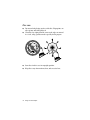
Do not touch the playing surfaces of the disc. Fingerprints can
affect picture and audio playback.
◆
Clean discs by wiping from the center to the edge, not around
in a circle, using a product made especially for the purpose.
◆
Store discs in their cases in an upright position.
◆
Keep discs away from moisture, dust, and excessive heat.
18 Using Your DVD Player
Troubleshooting
Your system is designed for trouble-free operation, but if you do
encounter difficulties, you can try a few simple things before calling
Client Care.
◆
Make sure the video source is set to DVD by pressing the FN
and VIDEO SOURCE keys simultaneously.
◆
Make sure there is power to your notebook.
◆
Make sure all of the required drivers are loaded.
◆
Check for hardware conflicts.
To check for hardware conflicts:
1. Click Start, Settings, Control Panel. The Control Panel opens.
2. Double-click the System icon. The System Properties dialog
box opens.
3. Click the Device Manager tab. A yellow circle with an
exclamation point over a device indicates a conflict
.
4. Double-click the conflicting device. The properties dialog box
for that device opens.
5. Click the Resources tab, Set Configuration Manually, then
Change Settings.
6. Click the options under Resource type one at a time until you
see a message stating that no conflicts are found in the
Conflicting device list area of the dialog box.
7. Click OK. The System Settings Change dialog box opens telling
you that you need to restart your system for the changes to take
effect.
8. Click Yes. The system restarts.
Troubleshooting
19
The disc will not play
◆
Make sure the DVD Player application is open.
◆
Make sure the video source is set to DVD.
◆
Make sure the disc is placed correctly in the tray. In general,
discs are placed shiny side down, label side up.
◆
Make sure the disc is not warped or damaged.
◆
Make sure the disc has the correct regional restriction code for
your area.
◆
Try another disc.
Video is jerky and dropping frames
◆
Make sure that the disc is clean.
◆
Make sure that the disc is not warped or damaged.
◆
Make sure that the DMA option is enabled.
To verify that DMA is enabled:
1. Click Start, Settings, Control Panel. The Control Panel opens.
2. Double-click the System icon. The System Properties dialog
box opens.
3. Click the Device Manager tab.
4. Double-click the CD-ROM icon, then the (Manufacturer) DVDROM icon. The (Manufacturer) DVD-ROM Properties dialog
box opens.
5. Click the Settings tab.
20 Using Your DVD Player
6. If a check appears in the DMA check box, click OK.
- OR If a check does not appear in the DMA check box, click in the
check box. then click OK.
7. Close the System Properties and Control Panel dialog boxes.
8. Click Start, Shut Down, Restart the computer?, then Yes. The
system restarts.
Screen resolution looks bad
The screen resolution has changed. For best performance, use the
screen resolution recommended in your notebook’s documentation.
To change screen resolution:
1. If your system has QuickRes, click
in the status area of the
taskbar. A menu appears.
2. Click the desired setting.
- OR Click Start, Settings, Control Panel. Then go to the next step.
3. Double-click the Display icon. The Display Properties dialog
box opens.
4. Click the Settings tab.
5. Verify the Color palette settings. Click the down arrow to view
options. Click an option to set it.
6. Verify the Desktop area settings. Drag the slider to set screen
resolution.
Troubleshooting
21
There is no picture
◆
Make sure the DVD Player application is open.
◆
Make sure the video source is set to DVD.
Language, angle, title, subtitle, and parental
control features will not work
◆
These features may not be available in some titles.
No audio or audio is low
◆
Make sure the mute button in the DVD Player control panel is
not turned on.
◆
Adjust the volume control wheel on your notebook.
◆
Adjust the DVD Player control panel volume buttons, speaker
volume, or Windows 95 and Windows 98 volume controls.
Your forgot the password for parental control
The only way to clear a forgotten parental control password is to
uninstall, then reinstall your DVD Player software. See
“Reinstalling the DVD Player software” on page 15.
22 Using Your DVD Player
Notices
Copyright © 1998 Gateway 2000, Inc. All Rights Reserved
610 Gateway Drive, N. Sioux City, SD 57049 USA
All Rights Reserved
This publication is protected by copyright and all rights are reserved. No
part of it may be reproduced or transmitted by any means or in any form,
without prior consent in writing from Gateway 2000.
The information in this manual has been carefully checked and is believed
to be accurate. However, changes are made periodically. These changes are
incorporated in newer publication editions. Gateway 2000 may improve
and/or change products described in this publication at any time. Due to
continuing system improvements, Gateway 2000 is not responsible for
inaccurate information which may appear in this manual. For the latest
product updates, consult the Gateway 2000 web site at
www.gateway.com. In no event will Gateway 2000 be liable for direct,
indirect, special, exemplary, incidental, or consequential damages
resulting from any defect or omission in this manual, even if advised of the
possibility of such damages.
In the interest of continued product development, Gateway 2000 reserves
the right to make improvements in this manual and the products it
describes at any time, without notices or obligation.
Trademark Acknowledgments
AnyKey, black-and-white spot design, CrystalScan, Destination, EZ Pad,
EZ Point, Field Mouse, Solo, TelePath, Vivitron, stylized “G” design, and
“You’ve got a friend in the business” slogan are registered trademarks and
GATEWAY, Gateway Solo, green stylized GATEWAY, green stylized
Gateway logo, and the black-and-white spotted box logo are trademarks of
Gateway 2000, Inc. Intel, Intel Inside logo, and Pentium are registered
trademarks and MMX is a trademark of Intel Corporation. Microsoft, MS,
MS-DOS, and Windows are trademarks or registered trademarks of
Microsoft Corporation. All other product names mentioned herein are
used for identification purposes only, and may be the trademarks or
registered trademarks of their respective companies.
Notices
23
Copyright © 1998 Advanced Logic Research, Inc. (ALR)
All Rights Reserved
9401 Jeronimo Irvine, CA 92618 USA
All Rights Reserved
This publication is protected by copyright and all rights are reserved. No
part of it may be reproduced or transmitted by any means or in any form,
without prior consent in writing from ALR.
The information in this manual has been carefully checked and is believed
to be accurate. However, changes are made periodically. These changes are
incorporated in newer publication editions. ALR may improve and/or
change products described in this publication at any time. Due to
continuing system improvements, ALR is not responsible for inaccurate
information which may appear in this manual. For the latest product
updates, consult the ALR web site at www.alr.com. In no event will ALR
be liable for direct, indirect, special, exemplary, incidental, or
consequential damages resulting from any defect or omission in this
manual, even if advised of the possibility of such damages.
In the interest of continued product development, ALR reserves the right
to make improvements in this manual and the products it describes at any
time, without notices or obligation.
Trademark Acknowledgments
ALR is a registered trademark of Advanced Logic Research, Inc. All other
product names mentioned herein are used for identification purposes only,
and may be the trademarks or registered trademarks of their respective
companies.
24 Using Your DVD Player
Regulatory Compliance Statements
American Users:
This device has been tested and found to comply with
the limits for a Class B digital device, pursuant to
Part 15 of the FCC rules. These limits are designed to
provide reasonable protection against harmful interference in a residential
installation. This equipment generates, uses and can radiate radio
frequency energy and, if not installed and used in accordance with the
instructions, may cause harmful interference to radio or television
reception. However, there is no guarantee that interference will not occur
in a particular installation. If this equipment does cause interference to
radio and television reception, which can be determined by turning the
equipment off and on, the user is encouraged to try to correct the
interference by one or more of the following measures:
• Reorient or relocate the receiving antenna
• Increase the separation between the equipment and receiver
• Connect the equipment into an outlet on a circuit different from
that to which the receiver is connected
• Consult the dealer or an experienced radio/TV technician for help.
Warning!
This equipment has been tested and found to comply with the
limits of a Class B digital device. The accessories associated with
this equipment are as follows:
• Shielded video cable
• Shielded power cord.
These accessories are required to be used in order to ensure
compliance with FCC rules.
Changes or modifications not expressly approved by the
manufacturer could void the user’s authority to operate the
equipment.
Regulatory Compliance Statements
25
Caution!
Since the laser beam used in this DVD-ROM drive unit is
harmful to the eyes, do not attempt to disassemble the cabinet.
Refer servicing to qualified personnel only. Use of controls or
adjustments or performance of procedures other than those
specified herein may result in hazardous radiation exposure.
Canadian Users:
This digital apparatus does not exceed the Class B
limits for radio noise emissions from digital
apparatus as set out in the radio interference
regulations of Industry Canada.
Le présent appareil numérique n’émet pas de bruits radioélectriques
dépassant les limites applicables aux appareils numériques de Classe B
prescrites dans le règlement sur le brouillage radioélectrique édicté par
Industrie Canada.
European Users:
This Information Technology Equipment has been
tested and found to comply with the following
European directives:
[i] EMC Directive 89/336/EEC amending directive 92/31/EEC & 93/68
EEC as per
- EN 50081-1:1992 according to
EN 55022:1995 Class B
EN 61000-3-2:1995 or EN 60555-2:1986
EN 61000-3-3: 1995
- EN50082-1:1992 according to
EN 61000-4-2:1995 or IEC 801-2:1984
ENV 50140:1994 or IEC 801-3:1984
EN 61000-4-4:1988 or IEC 801-4:1998
[ii] Low Voltage Directive (Safety) 73/23/EEC as per EN 60950: 1992
26 Using Your DVD Player
Japanese Users:
This equipment is in the Class 2 category
(Information Technology Equipment to be used in
a residential area or an adjacent area thereto) and
conforms to the standards set by the Voluntary Control Council for
Interference by Information Technology Equipment aimed at preventing
radio interference in such residential area.
When used near a radio or TV receiver, it may become the cause of radio
interference. Read instructions for correct handling.
Australian and New Zealand Users:
This device has been tested and found to comply
with the limits for a Class B digital device, pursuant
to the Australian/New Zealand standard AS/NZS
3548 set out by the Spectrum Management Agency.
Compact Disc Information.
This DVD-ROM drive is classified
as a Class 1 LASER product. The
Class 1 LASER PRODUCT label is
located on the top of the drive unit.
This unit uses compact discs with the following marks:
*
Regulatory Compliance Statements
27