1
4100_Ch4_eng
6/15/05
8:36 AM
Page 2
User Guide
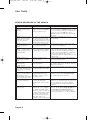
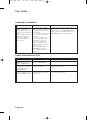
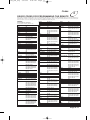
ERROR MESSAGES IN THE MENUS
What is Happening
The receiver displays an
“ERROR” message on the
TV screen.
ERROR message text: “The
number of password entry
retries has been exceeded.
Please try again later.”
Possible Reasons Why
ERROR message text: “The
front panel buttons are
locked.”
ERROR message text:
The receiver is not receiving a
“Unable to acquire signal.” or strong enough signal to maintain
“Unable to acquire program an uninterrupted, clean picture.
guide information.”
ERROR message text:
“Please insert your Smart
Card.”
ERROR message text:
“Smart Card not
inserted correctly.”
ERROR message text: “The
Smart Card currently inserted
is not valid for use with this
receiver.”
ATTENTION: Your Smart
Card does not currently have
authorization to view or
purchase this program. Please
wait or channel up or down.
ERROR: “Your receiver has
not yet been authorized.”
Smart card is missing or not
inserted correctly.
ATTENTION: “Acquiring
satellite signal.”
The receiver may have just been
plugged in. If so, it is acquiring
the satellite signal. The satellite
dish may have moved so that it is
no longer picking up the satellite
signal. The coaxial cables may
have loosened or have moisture
inside. There may be an
interruption of the satellite signal.
Page 4-2
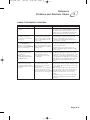
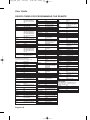
What to Do
In most cases, the ERROR message explains the
error. Sometimes, the ERROR message prompts
you to do something. However, usually all you
need to do is select the OK option on the
ERROR message to clear the message from the
TV screen.
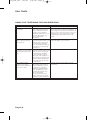
You may try to enter the password Wait until several minutes have passed,
and try again.
three times. If you do not enter
the correct password any of those
times, then you must wait several
minutes until you may try again.
You must use the remote control to unlock the
You or someone else locked the
receiver front panel buttons.
receiver front panel buttons.
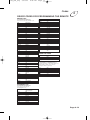
When the receiver finds a
problem, it displays an ERROR
message on the TV screen.
Smart card is inserted upside
down or backwards.
The receiver will work only with
the Smart Card that came with it.
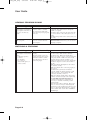
Check the condition of all the coaxial cables and
cable connections in the system. Check the
condition of the dish mounting and aiming. If
needed, contact your installer to re-aim the dish.
If the system is OK, then there may be a
weather-related problem with transmission of the
satellite signal.
Check that the Smart Card is fully inserted into
the receiver front panel slot.
Check that the Smart Card is inserted right side
up, with the picture on top and the arrow facing
in the correct direction.
Insert the Smart Card that came with the system.
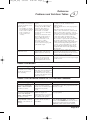
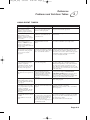
There is a problem with the
Program Guide information
transmitted to the receiver via
the satellite signal.
You cannot watch the selected program, even
though it is displayed in the Program Guide.
Try a different program or channel.
The receiver has not yet been
electronically linked with
the Smart Card, via the satellite
signal.
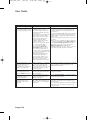
If you have authorized your system, wait a few
minutes to see if the message is removed. If you
have not authorized your system, call Bell
ExpressVu Customer Service Call Centre for
assistance.
Wait a few minutes to see if the message is
removed. Check that the Signal Strength bar in
the Point Dish and Signal Strength menu is
green and displays the word “Locked.” If not,
contact your installer to re-aim the satellite dish.