1
4100_Ch4_eng
6/15/05
8:36 AM
Page 4
User Guide
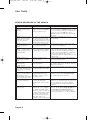
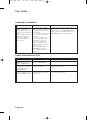
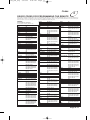
HEARING PROGRAM SOUND
What is Happening
Possible Reasons Why
The receiver front panel
Power light is on and there is
a good picture on the TV set,
but you do not hear any
sound.
You may have muted the sound,
or set the volume so low that
you cannot hear it. The audio
connections may not be properly
connected.
You hear a foreign language
with a program.
You may have programmed the
receiver to select an alternate
audio language.
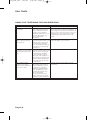
What to Do
Check the volume level on the TV or audio
equipment. Turn off the mute or turn up the
volume, as required.
Check the audio connectors and cables from the
receiver to the TV or the sound system you are
using.
Check the TV speakers or the sound system you
are using.
Use the System Setup menu to open the
Alternate Audio menu, where you can select the
language you prefer.
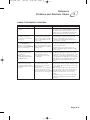
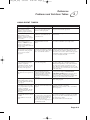
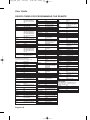
WATCHING A PROGRAM
What is Happening
The receiver front panel
Power light is on, but the TV
image:
is black (no picture),
is frozen,
has breakups,
has “snow,” or
shows small squares of
various colours.
Page 4-4
Possible Reasons Why
The TV set may not be working
properly.
If the TV and the receiver are
working properly, there may be
interference with the satellite
signal. The TV may be wired
to the wrong input.
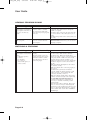
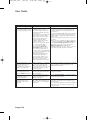
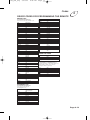
What to Do
Make sure that the TV set is plugged into an
electrical outlet. Make sure the outlet has
electrical power. Make sure that the TV is
turned on. If the receiver is connected to the TV
using only the RF or VHF connections, make
sure that the TV is tuned to channel 3 or 4
(whichever works best in your area) and that the
modulator output is set to the same channel as
the TV.
Make sure that the TV brightness and contrast
are adjusted correctly.
Make sure that the TV is connected properly to
the receiver.
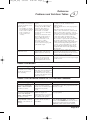
Check that the system has been installed
correctly. Make sure that all required coaxial
cables are in place, and check that all cable
connectors are firmly connected.
Make sure that the satellite dish is aimed at the
satellite. Check the strength of the signal using
the Point Dish and Signal Strength menu.
Consult your installer to re-aim the dish, if
necessary, to obtain the maximum possible
signal strength.
Note the local weather conditions. Heavy rain,
snow, or cloud cover may be interfering with
transmission of the satellite signal. Remove any
snow or other debris which may have collected
on the satellite dish. Set the TV to SVIDEO or
VIDEO input.