1
+%9&5.#4)/.3#ONT
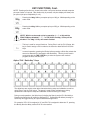
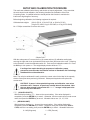
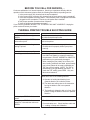
NOTE! Pressing a fraction key, shown below, after a unit price has been entered computes
price per fraction of a pound. After fraction key is pressed, unit price display will show price
per pound (unit price multiplied by 2 or 4).
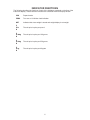
Pressing the Gkey computes price per 100g or 1/4lb depending on the
scale mode.
Pressing the Gkey computes price per 250g or 1/2lb depending on the
scale mode.
./4%7ITHTHESCALEMODESETFORKGOPERATION"3?OR.OANDTHE
&2!#4)/.KEYSDISABLED:?OR.O/.,9THEGKEYWILLBE
DISABLED4HEGKEYWILLREMAINENABLED
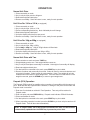
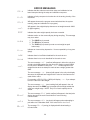
This key is used for several functions. During Price Look Up (PLU) Setup, this
key is used to assign a PLU number to the second or alternate level of QuickKeys.
In normal operation, pressing the &N key before pressing a Quick-Key selects the
second or alternate PLU assigned to that Quick-Key. This key is also used in
conjunction with the 4)-%$!4% key to enter the system clock mode to
program the time, date and year.
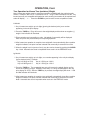
!LPHA0,5h1UICK+EYv+EYS
The alpha keys are used to enter alpha characters during setup and calibration as well as
during Price Look Up (PLU) setup. The space is used to enter a blank space during
alphanumeric data input for setup and calibration as well as during PLU setup.
During normal operations, the Alpha keys (including the Space) are the PLU Quick-Keys.
Pressing the Quick-Key will output its assigned PLU. Pressing the &N before pressing an
Quick-Key will toggle the key to output its alternate assigned PLU.
For example, if PLU 23 is assigned to “A” and PLU 79 is assigned to alternate “A”, pressing
the &Nkey then the ! key causes PLU 79 to be recalled.
5