1
I.B. ATS-I005
Page 13
Upon test initiation, a generator start of the non-preferred
source is engaged after TDES timeout. If a full test is programmed, a transfer with all programmed timers occurs.
The test engine run timer will hold the load for the required
timeout and the test is concluded with a re-transfer cycle.
For an engine run only test, no transfer will occur and the
engine will run for the programmed run time.
NOTICE
The optional Plant Exerciser Feature allows for
automatic programming of the desired test cycle on
a weekly basis. If the switch is unable to process
either a Plant Exerciser request or the Engine Test
Pushbutton itself due to transfer switch status, the
request is ignored.
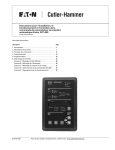
3.3.6 INCREASE AND DECREASE PUSHBUTTONS
These pushbuttons, when pressed and released for step
by step changes or held depressed for scrolling, increase
or decrease setpoints while in the Programming Mode or
make Time/Date changes. While historical information is
being displayed, the Increase Pushbutton will scroll
through events, and the Decrease Pushbutton will scroll
through the actual time and date of the event. In addition,
if both buttons are pressed and released simultaneously
while viewing any of the historical logged values, the value
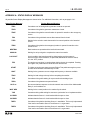
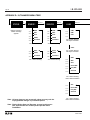
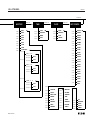
resets to zero. Refer to paragraph 3.4.4 and Appendix B
for additional information pertaining to accessing historical
information and historical data definitions. Simultaneously
pressing and releasing the Increase and Decrease
Pushbuttons will also reset an alarm condition.
3.4 DISPLAY WINDOW
3.3.4 DISPLAY SELECT PUSHBUTTON
As the Display Select Pushbutton is pressed and
released, IQ Transfer steps through the following display categories:
• Status
• Source 1
• Source 2
• Load
• History
• Time
• Date
• Setpoints
3.3.5 STEP PUSHBUTTON
The Step Pushbutton steps through the different available information within the display category selected as
the pushbutton is pressed and released.
When Source 1 is the category displayed for example,
use of the Step Pushbutton will step the display through
the voltages, frequency and status condition associated
with Source 1. In the Time/Date category, however, this
pushbutton has an additional purpose. The Step
Pushbutton is also used to permit programming of the
time and date by stepping through the different time and
date categories (Hours, Minutes, Month, Day and Year).
The actual time or date category is moved up or down
using the Decrease or Increase Pushbuttons described
next.
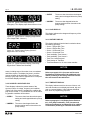
The IQ Transfer provides a comprehensive array of monitored parameters, setpoints and messages via its easy
to read Display Window. Up to eight large characters are
used to convey a wealth of information. Eight different
displays can be presented via the Display Window:
• Status Display
• Source 1 Display
• Source 2 Display
• Load Display
• History Display
• Time/Date Display
• Setpoints Display
• Help Display
NOTICE
Although a wide variety of parameters and setpoints
can be displayed, they are not displayed if they were
not originally ordered and programmed.
NOTICE
Whether viewing or programming, the alpha-numeric display is blanked if no pushbutton activity is
detected for approximately 2 1/2 minutes.
3.4.1 STATUS DISPLAY
This display provides messages regarding anything
that is presently changing or happening to the switches
Effective 6/00