1
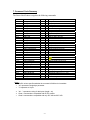
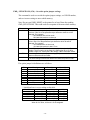
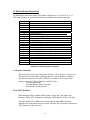
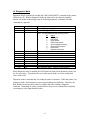
7. Command Code Summary
The Smart Label Printer recognizes the following commands:
Hex Code
00
01
02
03 nn
04 nn dd ...
05 nn dd ...
06 nn
07
08
09 nn
0A
0B nn
0C
0D nn
0E nn
0F
10
11 nn
12
Mnemonic
CMD_NOP
CMD_STATUS
CMD_VERSION
CMD_BAUDRATE
CMD_PRINT
CMD_PRINTRLE
CMD_MARGIN
CMD_REPEAT
Class
1
1
1
1
1
1
1
1
B/I
I
I
I
I
B
B
B
B
CMD_TAB
CMD_LINEFEED
CMD_VERTTAB
CMD_FORMFEED
CMD_SETSPEED
CMD_DENSITY
CMD_RESET
CMD_CHECKPOINT
CMD_REVFEED
CMD_MODEL
1
1
1
1
2
1
1
1
1
1
B
B
B
B
B
B
I
B
B
I
Description
No operation
Request printer status
Request firmware version
Change baud rate to nn
Print literal (binary) data
Print compressed (RLE) data
Image offset (in mm) from left side
Repeat last print command
(reserved)
Tab nn dots to the right
Feed label one line (one dot)
Feed label nn lines (dots)
Feed to top of next label
Set print speed mode
Set print density to nn
Reset printer
Send checkpoint response
Feed paper backward nn lines (dots)
Request printer model number
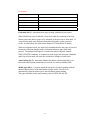
16 nn
17 nn
18 nn
19 nn
1A 01
1B ii
1C nn
1D nn
1E nn
1E FF
1F nn
A5
CMD_INDENT
CMD_FINEMODE
CMD_XOFF_THRESH
CMD_XON_THRESH
CMD_DIAGNOSTIC
CMD_SETSERIALNUM
CMD_SETOPTIONS
CMD_GETOPTIONS
CMD_SETMODE
CMD_GETMODE
CMD_LENGTH
CMD_CHECK
1
1
1
1
1
2
1
1
1
1
1
1
B
B
I
I
I
I
I
I
I
I
B
I
Set image offset (in dots) from left side
Set anti-banding mode on/off
Set XOFF threshold
Set XON threshold
Enable diagnostic mode
Set serial number
Change option settings
Request option settings
Set printer mode (nn = 0, 1, or 2)
Get printer mode
Set label length to nn millimeters
Check for correct baud rate
Notes:
• The B/I column specifies whether the command is Buffered or Immediate
• "nn" represents a single byte parameter
• "ii" represents a 9 byte.
•
•
•
"dd ..." represents a string of data bytes (length = nn)
Class 1 commands are compatible with all SLP models.
Class 2 commands are compatible with only SLP 440 and SLP 450.
-6-