1
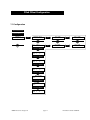
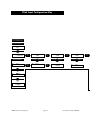
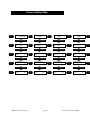
Factory Settings Map
Press
LEFT/RIGHT
Button
IN 1:
Input 1
5.1 SURROUND
Press
LEFT/RIGHT
Button
Press UP/DOWN Button
Press
LEFT/RIGHT
Button
Press UP/DOWN Button
Press
LEFT/RIGHT
Button
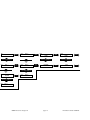
Set Volume
Input 1
65.0
SOFT MUTE OFFSET
Input 1
-20.0
Press
LEFT/RIGHT
Button
SET ZONE2 Volume
Input 1
65.0
© 2002 bel canto design, Ltd.
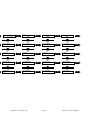
Set Volume
Input 4
65.0
Press
LEFT/RIGHT
Button
SOFT MUTE OFFSET
Input 4
-20.0
Press
LEFT/RIGHT
Button
SET ZONE2 Volume
Input 4
65.0
page 14
Press
LEFT/RIGHT
Button
Edit Input Name
IN 5:
Input 5
Set Volume
Input 5
65.0
Press
LEFT/RIGHT
Button
SOFT MUTE OFFSET
Input 5
-20.0
SET ZONE2 Volume
Input 5
65.0
Press
LEFT/RIGHT
Button
Input 6
STEREO
Press
LEFT/RIGHT
Button
Edit Input Name
IN 6:
Input 6
Press UP/DOWN Button
Press
LEFT/RIGHT
Button
Set Volume
Input 6
65.0
Press
LEFT/RIGHT
Button
Press UP/DOWN Button
Press
LEFT/RIGHT
Button
Press UP/DOWN Button
Press
LEFT/RIGHT
Button
IN 6:
Press UP/DOWN Button
Press UP/DOWN Button
Press UP/DOWN Button
Press
LEFT/RIGHT
Button
Press
LEFT/RIGHT
Button
Input 5
STEREO
Press UP/DOWN Button
Press UP/DOWN Button
Press UP/DOWN Button
Press
LEFT/RIGHT
Button
Press
LEFT/RIGHT
Button
Edit Input Name
IN 4: Input 4
IN 5:
Press UP/DOWN Button
Press UP/DOWN Button
Press UP/DOWN Button
Press
LEFT/RIGHT
Button
Press
LEFT/RIGHT
Button
Input 4
STEREO
Press UP/DOWN Button
Press
LEFT/RIGHT
Button
Edit Input Name
IN 1:
Input 1
IN 4:
SOFT MUTE OFFSET
Input 6
-20.0
Press
LEFT/RIGHT
Button
Press UP/DOWN Button
Press
LEFT/RIGHT
Button
SET ZONE2 Volume
Input 6
PRe6 User’s Guide rev082102
65.0
Press
LEFT/RIGHT
Button