1
Appendix A: Modifications
These remarks are only for authorized service personal. If you open the device (removing the keyboard or
the rear panel) the warranty will be lost. In case of a destroyed warranty seal, any warranty claim will be
rejected. Every modification has to be carried out only at the manufacturer or an authorized service
company. Any modification not released by the manufacturer leads to the extinction of the operation
permission. For details you may ask for the PK88 service manual available at 10.- US$ (only in German
language).
1. Foot switch type
On the connector board behind the rear panel there is a jumper that defines the type of foot switch used in
combination with the PK88. Two types of foot switches available:
• "contacts open at rest": this means that the contact(s) inside the foot switch are open at rest and will
close when the foot switch is actuated. In this case the jumper has to be open (i.e. removed or put to
only one of the two pins)
• "contacts closed at rest": this means that the contact(s) inside the foot switch are closed at rest and will
open when the foot switch is actuated. In this case the jumper is has to be put on the 2-pin connector on
the pc board. This is the factory setting (e.g. for VFP2).
If the behaviour of the foot switch used with the PK88 is reverse the foot switch type setting has to be
changed. To get at the jumper the rear panel has to be removed (4 screws). The connector board is fixed to
the rear panel. The jumper is a small black or red plastic part located to the 10-pin connector leading to the
keyboard.
Remark: For all PK88 devices manufactured until end of 1999 the jumper had a different meaning (piano
mode on/off). If you are not able to change the foot switch type with the jumper as described above you
probably own a PK88 manufactured in 1999 or earlier. In this case the former user manual (without V2) is
valid !
2. MIDI channel
On the scanner board below the keyboard there are 4 solder bridges (J5...J8) to adjust the MIDI channel.
With these jumpers any MIDI channel between 1 and 16 can be selected. For this the keyboard has to be
dismounted and the jumpers in question have to be set with solder wire. If J5...J8 are left open MIDI channel
1 is selected. If J5...J8 are closed the MIDI channel is 16. For details you may ask for the PK88 service
manual available at 10.- US$. The factory setting is MIDI channel 1 (J5...J8 left open).
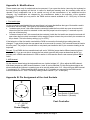
Appendix B: Pin Assignment of the Jack Sockets
1
2
Foot Switch 2 (Soft Pedal)
Foot Switch 1 (Sustain)
Foot Controller
1 = +7...12V DC
2 = GND
Power Supply
PK88 User's Guide V2 - Page 4