1
CONTROL & OPERATION
I
ANTENNA
The flexible antenna radiates and receives radio
signals. Screw the antenna base all the way into
the threaded bushing on top of the radio.
NOTE: Use only the type of antenna furnished
with the radio. VHF and UHF antennas are
not interchangeable.
2
ON / VOLUME UP
To switch the unit On, press the On / Volume Up
button; the speaker will emit a turn on beep. If the
radio turns on to the Scan Channel it will emit the
Scan Beep. Once the radio is On, press this
button to increase volume.
3
VOLUME DOWN / OFF
Press the Volume Down / Off button to decrease
volume. To switch Off the unit, press and hold this
button until the speaker emits a double beep.
4
PUSH-TO-TALK SWITCH (PTT)
Press and hold the PTT when transmitting; release
it to receive.
5
CHANNEL SELECTOR
Press the button and the radio will emit the
channel beep, advance the channel, and the
channel display will show the new operating
channel. When the Scan Channel is selected the
radio will emit the Scan Beep and the radio will
begin scanning.
6
BATTERY ACCESS DOOR
(CASE BOTTOM)
The battery access door may be removed to
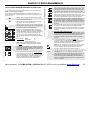
access the battery pack. Refer to “FIG-7: Battery
Access & Installation” on page 14.
7
JACK COVER
This rubber cover seals out dust and moisture, etc.
Snap the cover into the audio accessory jack and
charge jack openings when the jacks are not in
use.
8
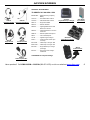
AUDIO ACCESSORY JACK
The audio accessory jack is used to plug in
earphone options, and, in conjunction with the
charge jack, to connect an optional remote
speaker / microphone or a single-or dual ear
headset. This jack is also used for PC
programming.
13
DROP-IN CHARGING
CAPABILITY
Two contacts, in the bottom of the
radio, permit charging the battery pack
with an optional drop-in charger. Refer
to “Optional Charging Accessories” on
page 14.
9
CHARGE JACK
The battery pack may be charged through this jack
using the RITRON charger cube. Refer to
Accessories, page ii, for additional charging
options.
10 CHANNEL DISPLAY
The channel display will indicate the current
operating channel. When the Scan Channel is
selected the display will rapidly flash the channels
being scanned, and will stop when a channel is
received.
11 SPEAKER
The speaker, located behind the front grille, allows
you to hear calls on your channel.
12 MICROPHONE
The microphone allows your voice to be heard in
transmissions to other radios. Speak in a normal
tone; shouting does not improve your listener’s
reception.
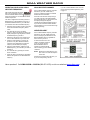
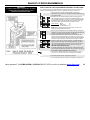
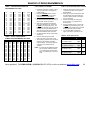
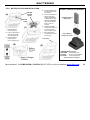
FIG-1: RADIO CONTROLS &
CONNECTORS
IMPORTANT: CHARGE THE BATTERY PACK before using the radio for the first time. Refer to Batteries, pages 14 and 15.
Have questions? Call 800-USA-1-USA (800-872-1872) or visit our website at www.ritron.com
3