1
OPERATION
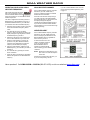
To activate Tone Squelch or Carrier Squelch and to Monitor
the channel - simultaneously press both the volume buttons
and hold briefly before releasing.
•
•
If the radio emits a SINGLE beep, then Tone Squelch is
turned ON and you will only hear radio transmissions on
that channel with the same QC or DQC tone codes as your
radio.
If the radio emits a DOUBLE beep, then you are in Carrier
Squelch and you can Monitor all broadcasts on the
channel. To exit Carrier Squelch press and hold both
volume buttons until you hear the SINGLE beep.
TRANSMIT
Normally, you should not transmit until the channel is quiet.
This can be determined by monitoring the channel prior to
transmitting.
To transmit - hold down the Push-To-Talk button and with the
radio four inches away talk into the microphone. Speak in a
normal tone, since talking louder will not improve the listener’s
reception.
Keep talk times as short and infrequent as possible to
conserve battery, minimize radio frequency exposure, and
allow others to use the channel.
Note: It is possible that the beginning of a call might be
missed while the radio is in battery saver mode. If this
happens, ask the caller to repeat the message.
RADIO ALERT TONES
If you are unable to activate Carrier Squelch - the radio has
been optionally programmed for Monitor Lockout. See your
Ritron dealer or contact Ritron directly to disable this option.
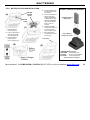
The handheld responds to certain instructions by sounding a
beep or series of tones. These tones can tell you that the radio
is working as you expect.
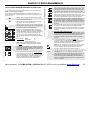
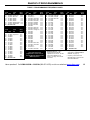
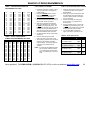
QC TONE CODES
(Interference Eliminator Codes)
Tone codes help filter out the “chatter” of others that
share your radio channel. When you operate on a
frequency with a tone code, you screen out most
Interference. This allows you to hear only those users in
your radio group.
IMPORTANT! All radios in the talk group must operate on
the same frequency and tone code.
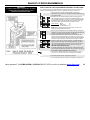
Power On / Self Check “OK”
When it is first turned on, the radio runs a quick “self test” to
confirm basic functions. When complete the radio will emit the
channel beep and the Channel Display will show the operating
channel. The radio is then ready to use.
Error Tones
However, if the “self test” detects a diagnostic error, an error
tone sounds. The error tone indicates the radio frequency
synthesizer is malfunctioning. Turn off the radio and try again.
The error tone will also sound if a channel has been
programmed for an invalid frequency. A long, low-pitched tone
means the battery voltage is too low to operate the radio. In
this case, recharge the battery. If you cannot correct a
problem, consult an authorized Ritron service facility or Ritron.
Have questions? Call 800-USA-1-USA (800-872-1872) or visit our website at www.ritron.com
5