1
User’s Guide for
Magna™ Printers
ImageCard® Color Printers
UltraGrafix® Monochrome Printers
May 2003
Part No. 539177-101
ii
Please note and heed the WARNING and CAUTION labels that have been placed on
the equipment for your safety. Please do not attempt to operate or repair this
equipment without adequate training.
Liability statement
This Datacard® product has been built to the high standards of DataCard Corporation.
See “Safety and compliance” on page A-1 for the statement of liability.
Regulatory compliance
This Datacard product conforms to regulatory requirements as specified in North
America, Europe and Asia. See “Safety and compliance” on page A-1 for detailed
regulatory compliance information.
Trademark acknowledgments
Trademark, service mark, and copyright acknowledgments are listed in “Safety and
compliance” on page A-1.
Proprietary Notice
All drawings and information herein are the property of DataCard Corporation.
Copyright © 2003 DataCard Corporation. All rights reserved.
Revision Log: User’s Guide for Magna™ Platinum Series™ Printers
Revision
Date
Affected Pages
Description of Changes
A
Jan 2003
All
Initial release
B
May 2003
p. ii, Ch 1, Ch 3, Ch 5, Ch 7,
Ap B, Ap D
Update phone number, driver information, supplies
information, and smart card information.
Datacard
11111 Bren Road West
Minnetonka, MN 55343-9015
www.datacard.com
952.933.1223
Fax: 952.933.7971
© 1999-2003 Datacard Corporation. All rights reserved. Printed in the United States of America.
User’s Guide for Magna™ Platinum Series™ Printers
iii
Contents
Section 1: Operating the Printer
Chapter 1: Overview . . . . . . . . . . . . . . . . . . . . . . . . . . . . . . . . . . 1-1
About this manual . . . . . . . . . . . . . . . . . . . . . . . . . . . . . . . . 1-2
Audience . . . . . . . . . . . . . . . . . . . . . . . . . . . . . . . . . . . . . . . . 1-2
About the Magna printer . . . . . . . . . . . . . . . . . . . . . . . . . . . 1-2
Printer models . . . . . . . . . . . . . . . . . . . . . . . . . . . . . . . . . 1-3
Printer features . . . . . . . . . . . . . . . . . . . . . . . . . . . . . . . . 1-6
Who to call for assistance . . . . . . . . . . . . . . . . . . . . . . . 1-11
Chapter 2: Using the printer . . . . . . . . . . . . . . . . . . . . . . . . . . . 2-1
Tips for success . . . . . . . . . . . . . . . . . . . . . . . . . . . . . . . . . . 2-2
Loading cards . . . . . . . . . . . . . . . . . . . . . . . . . . . . . . . . . . . . 2-3
Loading the print ribbon . . . . . . . . . . . . . . . . . . . . . . . . . . . 2-5
Loading the overlay or topcoat material . . . . . . . . . . . . . . 2-7
Removing the supply cartridge . . . . . . . . . . . . . . . . . . . . 2-7
Loading supply in the cartridge . . . . . . . . . . . . . . . . . . . . 2-8
Replacing the supply cartridge . . . . . . . . . . . . . . . . . . . 2-10
Verifying the debower position . . . . . . . . . . . . . . . . . . . . 2-11
Powering on the printer and PC . . . . . . . . . . . . . . . . . . . . 2-13
Ready button . . . . . . . . . . . . . . . . . . . . . . . . . . . . . . . . . . . 2-14
Status light . . . . . . . . . . . . . . . . . . . . . . . . . . . . . . . . . . . . . 2-14
Making cards . . . . . . . . . . . . . . . . . . . . . . . . . . . . . . . . . . . 2-15
Operating tips . . . . . . . . . . . . . . . . . . . . . . . . . . . . . . . . 2-18
Removing cards . . . . . . . . . . . . . . . . . . . . . . . . . . . . . . . . . 2-18
Responding to messages . . . . . . . . . . . . . . . . . . . . . . . . . 2-19
Shutting down the printer and PC . . . . . . . . . . . . . . . . . . 2-21
Chapter 3: Using the printer driver . . . . . . . . . . . . . . . . . . . . . . 3-1
Working with Properties and other driver dialog boxes . 3-2
Tips for Properties, Printing Preferences, and
Default Document Properties . . . . . . . . . . . . . . . 3-2
Properties for Windows Me & 98 . . . . . . . . . . . . . . . . . . . 3-3
Properties & Printing Preferences for
Windows 2000 & XP . . . . . . . . . . . . . . . . . . . . . . 3-4
Properties and Default Document Properties for
Windows NT . . . . . . . . . . . . . . . . . . . . . . . . . . . . 3-7
Using the Printer Toolbox . . . . . . . . . . . . . . . . . . . . . . . . . 3-10
Opening and using the Printer Toolbox . . . . . . . . . . . . . 3-12
Viewing Printer Toolbox information . . . . . . . . . . . . . . . 3-13
Chapter 4: Maintaining the printer . . . . . . . . . . . . . . . . . . . . . .
Running a cleaning cycle . . . . . . . . . . . . . . . . . . . . . . . . . .
Using the printer cleaning card . . . . . . . . . . . . . . . . . . . .
Replacing the cleaning roller sleeve . . . . . . . . . . . . . . . .
Using the magnetic stripe cleaning card . . . . . . . . . . . . . .
Cleaning the printer rollers . . . . . . . . . . . . . . . . . . . . . . . . .
User’s Guide for Magna™ Platinum™ Series Printers
4-1
4-2
4-2
4-3
4-5
4-6
iv
Using the duplex/laminator cleaning card . . . . . . . . . . . . . 4-9
Cleaning the supply tracker . . . . . . . . . . . . . . . . . . . . . . . 4-10
Cleaning the heated roller . . . . . . . . . . . . . . . . . . . . . . . . . 4-12
Cleaning tips . . . . . . . . . . . . . . . . . . . . . . . . . . . . . . . . . . . . 4-13
Cleaning the printhead . . . . . . . . . . . . . . . . . . . . . . . . . . . 4-14
Replacing the printhead cartridge . . . . . . . . . . . . . . . . . . 4-15
Chapter 5: Troubleshooting . . . . . . . . . . . . . . . . . . . . . . . . . . . . 5-1
Troubleshooting guide . . . . . . . . . . . . . . . . . . . . . . . . . . . . 5-2
If you think the printer is not working . . . . . . . . . . . . . . . . 5-3
Making and evaluating test cards . . . . . . . . . . . . . . . . . . . . 5-3
Printer test card . . . . . . . . . . . . . . . . . . . . . . . . . . . . . . . . 5-5
Windows test page . . . . . . . . . . . . . . . . . . . . . . . . . . . . . 5-6
Magnetic stripe test card . . . . . . . . . . . . . . . . . . . . . . . . . 5-7
Problems with card appearance . . . . . . . . . . . . . . . . . . . . . 5-8
Print module . . . . . . . . . . . . . . . . . . . . . . . . . . . . . . . . . . . 5-9
Topcoat (T panel) applied using the print module . . . . . 5-15
Optional topcoat module . . . . . . . . . . . . . . . . . . . . . . . . 5-17
Optional overlay module . . . . . . . . . . . . . . . . . . . . . . . . 5-19
Obtaining service . . . . . . . . . . . . . . . . . . . . . . . . . . . . . . . . 5-23
When to obtain service . . . . . . . . . . . . . . . . . . . . . . . . . 5-23
Packing the printer for shipping . . . . . . . . . . . . . . . . . . . . 5-23
Section 2: Installing the Printer
Chapter 6: Before you install . . . . . . . . . . . . . . . . . . . . . . . . . . .
Installation audience . . . . . . . . . . . . . . . . . . . . . . . . . . . . . .
General requirements . . . . . . . . . . . . . . . . . . . . . . . . . . . . .
Selecting the site . . . . . . . . . . . . . . . . . . . . . . . . . . . . . . . . .
Environmental requirements . . . . . . . . . . . . . . . . . . . . . .
Electrical requirements . . . . . . . . . . . . . . . . . . . . . . . . . .
Physical requirements . . . . . . . . . . . . . . . . . . . . . . . . . . .
PC and software specifications . . . . . . . . . . . . . . . . . . . . .
ID system installation sequence . . . . . . . . . . . . . . . . . . . . .
6-1
6-2
6-2
6-3
6-3
6-3
6-3
6-5
6-6
Chapter 7: Install the printer . . . . . . . . . . . . . . . . . . . . . . . . . . . 7-1
Unpacking the printer . . . . . . . . . . . . . . . . . . . . . . . . . . . . . 7-2
Who to call for assistance . . . . . . . . . . . . . . . . . . . . . . . . . . 7-4
Connecting cables . . . . . . . . . . . . . . . . . . . . . . . . . . . . . . . . 7-5
Connecting an optional smart card cable . . . . . . . . . . . . 7-7
Preparing the printer for driver installation . . . . . . . . . . . . 7-9
Installing the printer driver . . . . . . . . . . . . . . . . . . . . . . . . 7-10
Installation choices . . . . . . . . . . . . . . . . . . . . . . . . . . . . 7-10
Changing required printer settings . . . . . . . . . . . . . . . . . 7-19
Printing sample cards . . . . . . . . . . . . . . . . . . . . . . . . . . . . 7-20
Setup tips . . . . . . . . . . . . . . . . . . . . . . . . . . . . . . . . . . . . . . 7-20
Changing optional settings . . . . . . . . . . . . . . . . . . . . . . . . 7-21
Setting printer permissions . . . . . . . . . . . . . . . . . . . . . . . 7-22
User’s Guide for Magna™ Platinum™ Series Printers
v
Section 3: Reference Information
Appendix A: Safety and compliance . . . . . . . . . . . . . . . . . . . . .
Regulatory compliance . . . . . . . . . . . . . . . . . . . . . . . . . . . .
Notice for USA (FCC notice) . . . . . . . . . . . . . . . . . . . . . .
Notice for Canada . . . . . . . . . . . . . . . . . . . . . . . . . . . . . .
Notice for the European Union . . . . . . . . . . . . . . . . . . . .
Notice for Taiwan and China . . . . . . . . . . . . . . . . . . . . . .
Notice for Japan . . . . . . . . . . . . . . . . . . . . . . . . . . . . . . . .
Notice to Users of Printers Equipped with
Contactless Smart Card Coupler . . . . . . . . . . . .
Liability statement . . . . . . . . . . . . . . . . . . . . . . . . . . . . . . . .
Safety . . . . . . . . . . . . . . . . . . . . . . . . . . . . . . . . . . . . . . . . . .
Safe environment . . . . . . . . . . . . . . . . . . . . . . . . . . . . . . .
Safe human interface . . . . . . . . . . . . . . . . . . . . . . . . . . . .
Acknowledgments . . . . . . . . . . . . . . . . . . . . . . . . . . . . . . . .
A-1
A-1
A-1
A-1
A-1
A-2
A-2
A-2
A-2
A-2
A-3
A-3
A-3
Appendix B: Supplies and cards . . . . . . . . . . . . . . . . . . . . . . . . B-1
Personalization supplies . . . . . . . . . . . . . . . . . . . . . . . . . . . B-2
Print ribbons . . . . . . . . . . . . . . . . . . . . . . . . . . . . . . . . . . . B-2
Laminate material . . . . . . . . . . . . . . . . . . . . . . . . . . . . . . B-3
Topcoat material . . . . . . . . . . . . . . . . . . . . . . . . . . . . . . . B-5
Supply roll storage . . . . . . . . . . . . . . . . . . . . . . . . . . . . . . B-5
Cards . . . . . . . . . . . . . . . . . . . . . . . . . . . . . . . . . . . . . . . . . . . B-6
Card specifications . . . . . . . . . . . . . . . . . . . . . . . . . . . . . B-6
Card quality guidelines . . . . . . . . . . . . . . . . . . . . . . . . . . B-8
Card storage specifications . . . . . . . . . . . . . . . . . . . . . . . B-9
Cleaning supplies . . . . . . . . . . . . . . . . . . . . . . . . . . . . . . . . B-9
Printer cleaning card . . . . . . . . . . . . . . . . . . . . . . . . . . . . B-9
Replaceable cleaning sleeve . . . . . . . . . . . . . . . . . . . . . B-10
Cleaning kits (optional) . . . . . . . . . . . . . . . . . . . . . . . . . B-10
Magnetic stripe cleaning card . . . . . . . . . . . . . . . . . . . . B-11
Duplex/laminator cleaning card . . . . . . . . . . . . . . . . . . . B-11
Cleaning pen . . . . . . . . . . . . . . . . . . . . . . . . . . . . . . . . . B-11
Heated roller cleaning stick . . . . . . . . . . . . . . . . . . . . . . B-11
Printer driver CD-ROM . . . . . . . . . . . . . . . . . . . . . . . . . . . . B-12
Printer components . . . . . . . . . . . . . . . . . . . . . . . . . . . . . . B-14
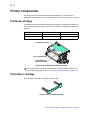
Printhead cartridge . . . . . . . . . . . . . . . . . . . . . . . . . . . . B-14
Print ribbon cartridge . . . . . . . . . . . . . . . . . . . . . . . . . . . B-14
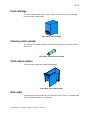
Card cartridge . . . . . . . . . . . . . . . . . . . . . . . . . . . . . . . . B-15
Cleaning roller spindle . . . . . . . . . . . . . . . . . . . . . . . . . . B-15
Card output stacker . . . . . . . . . . . . . . . . . . . . . . . . . . . . B-15
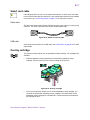
Data cable . . . . . . . . . . . . . . . . . . . . . . . . . . . . . . . . . . . B-15
Power cable . . . . . . . . . . . . . . . . . . . . . . . . . . . . . . . . . . B-16
Smart card cable . . . . . . . . . . . . . . . . . . . . . . . . . . . . . . B-17
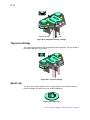
Overlay cartridge . . . . . . . . . . . . . . . . . . . . . . . . . . . . . . B-17
Topcoat cartridge . . . . . . . . . . . . . . . . . . . . . . . . . . . . . . B-18
Spool cap . . . . . . . . . . . . . . . . . . . . . . . . . . . . . . . . . . . . B-18
Replacement keys for optional locks . . . . . . . . . . . . . . . B-19
Optional security lock . . . . . . . . . . . . . . . . . . . . . . . . . . . B-19
Related publications . . . . . . . . . . . . . . . . . . . . . . . . . . . . . B-19
User’s Guide for Magna™ Platinum™ Series Printers
vi
Appendix C: PC port settings . . . . . . . . . . . . . . . . . . . . . . . . . . C-1
PC port settings for all operating systems . . . . . . . . . . . . C-2
PC settings for Windows 2000, XP & NT. . . . . . . . . . . . . . . C-5
Setting parallel port values . . . . . . . . . . . . . . . . . . . . . . . C-5
Setting a smart card serial port—Windows 2000,
XP, and NT . . . . . . . . . . . . . . . . . . . . . . . . . . . . . C-6
PC settings for Windows Me and 98 . . . . . . . . . . . . . . . . . C-9
Setting parallel port values—Windows Me and 98 . . . . . C-9
Setting a smart card port for Windows Me & 98 . . . . . . C-10
Appendix D: Magnetic stripe encoding . . . . . . . . . . . . . . . . . .
Magnetic stripe setup . . . . . . . . . . . . . . . . . . . . . . . . . . . . .
Magnetic stripe escapes . . . . . . . . . . . . . . . . . . . . . . . . . . .
Enabling magnetic stripe escapes . . . . . . . . . . . . . . . . . .
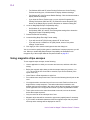
Using magnetic stripe escapes . . . . . . . . . . . . . . . . . . . .
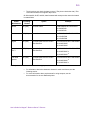
IATA, ABA, and TTS character sets . . . . . . . . . . . . . . . . . .
NTT character set . . . . . . . . . . . . . . . . . . . . . . . . . . . . . . . . .
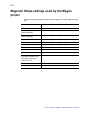
Magnetic Stripe settings used by the Magna printer . . . .
D-1
D-1
D-3
D-3
D-4
D-6
D-7
D-8
Index . . . . . . . . . . . . . . . . . . . . . . . . . . . . . . . . . . . . . . . . . . . . . . . . . 1
User’s Guide for Magna™ Platinum™ Series Printers
Overview
1
This chapter presents the following:
•
The purpose of this manual
•
Who should use this manual
•
The Datacard® Magna™ Platinum™ Series photo ID printer, including a
description of the printer, the models available, and their components
•
How information about optional features is identified in this manual
User’s Guide for Magna™ Platinum Series™ Printers
1-2
Overview
About this manual
This manual provides detailed information about the Datacard® Magna™ Platinum™
Series photo ID printer. The first section provides operators with information about the
printer and how to use it. The second section provides installers with requirements for
installation and installation procedures. The third section provides reference
information.
This User Guide works with the online e-Guide, which you can see using the desktop
icon installed with the printer driver. Figure 1-1 shows the e-Guide icon.
Figure 1-1: Desktop icon for the e-Guide
This guide describes the current printer driver. (At the time of printing, the current
printer driver is the SmartDriver version 5.1.)
Audience
This manual is intended for persons using a Magna Platinum Series printer. To
operate the printer, you must have the following skills:
•
Ability to read and understand written and graphical instructions
•
Ability to operate a personal computer (PC)
•
Experience with Microsoft® Windows® 2000, Windows XP, Windows 98,
Windows Me, or Windows NT®
•
Ability to load supplies
•
Ability to perform simple troubleshooting using written and graphical instructions
For the skills needed for installation, see “Installation audience” on page 6-2.
About the Magna printer
The Magna photo ID printer includes the printer and a printer driver which runs on a
PC. The printer uses supplies when printing cards, including:
•
Platinum™ Series print ribbon
•
Replaceable cleaning sleeves
•
Blank cards
•
Optional topcoat or overlay supply material
The Magna printer prints full-color or monochrome images on one or both sides of
PVC cards. The images printed can include photos, text, logos, barcodes and
digitized signatures. The printer can perform additional personalization tasks, such as
encoding magnetic stripe data and sending data to smart card chips. With the optional
overlay module, the printer can apply a durable polyester patch (laminate) to one or
both sides of the personalized card. With the optional topcoat module, the printer can
User’s Guide for Magna™ Platinum Series™ Printers
1-3
Overview
apply a protective clear topcoat or a secure holographic topcoat to the surface of the
card. Magnetic stripe encoding, smart card programming, overlay, and topcoat are
options that can be purchased as part of the printer. See “Printer models” on page 1-3
for details about which combinations are supported.
The printer driver receives digital information from a card creation application and
processes the data to send to the printer. When the printer receives the data, it prints
the card. The driver keeps track of the progress of the card in the printer and sends
data for the next card as soon as the printer is ready and the data is available.
See “PC and software specifications” on page 6-5 for more information about the
printer driver and the PC on which it runs.
The Datacard® Magna™ Platinum™ Series photo ID printer uses Advanced Imaging
Technology™. Three features of the printer work together to provide the benefits of
Advanced Imaging Technology:
Print ribbon: Platinum Series print ribbon must be used in the Magna Platinum Series
printer
Printer unit: The printer includes enhancements to provide optimal color printing.
Printer driver: The printer driver includes color settings. “Using the Printer Toolbox”
on page 3-10 provides more information about color settings.
Printer models
Several models of the printer are available. ImageCard printers can print full-color or
monochrome images, while UltraGrafix printers can print only monochrome images.
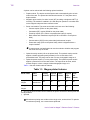
The printer label provides information about the options in your printer (see
Figure 1-2). The label also includes the printer serial number.
Printer label
Figure 1-2: Printer label
User’s Guide for Magna™ Platinum Series™ Printers
1-4
Overview
A printer can be ordered with the following optional modules:
•
Duplex module. The duplex module flips the card to automatically print on both
sides of the card. The printer label includes the number “2” if the printer has a
duplex module.
•
Magnetic stripe module, for either 3-track (IAT) encoding or single-track NTT (J)
encoding. The module is installed in-line with the print operation. It encodes data
on the magnetic stripe and then verifies the data.
•
Smart card module. The smart card module can have one of the following:
–
Contact coupler (SC4xx on the printer label)
–
Contactless (RF) coupler (SC680 on the printer label)
–
Proximity coupler (SC-x, where x represents the brand of coupler)
–
Both contact and contactless couplers (SC4/6 or SC4/SC-x on the printer
label)
–
Contact station (SCCS on the printer label) with external coupler
–
Smart card ready (SCR on the printer label), which is shipped without a
coupler installed
i A custom smart card application can use the module to initialize and program
the smart card chip on a card.
•
Optional overlay module (LO on the printer label). The optional overlay module
applies a durable polyester patch (laminate) to one or both sides of the
personalized card. The patch can be clear or have a holographic image on it.
•
Optional topcoat module (LT on the printer label). The optional topcoat module
applies a protective film to the card surface. The topcoat can be clear, which
protects images, or have a tamper-evident holographic image on it.
Table 1-1 lists the models and their features.
Table 1-1: Magna printer features
Model name
Colors
printed
Overlay
module
#†
Topcoat Duplex
module
#†
module
†
Magnetic Smart
stripe
card
module†
module†
ImageCard
Magna
Full color or
monochrome
Yes†
Yes†
Yes†
Yes†
Yes†
Ultragrafix
Magna
Monochrome
No
No
Yes†
Yes†
No
#. Only one of these modules can be installed; the printer cannot have both topcoat and
overlay modules.
†. Optional
i Monochrome printing uses a ribbon with a single color, such as black. To optimize
monochrome printing, use a monochrome printhead.
User’s Guide for Magna™ Platinum Series™ Printers
1-5
Overview
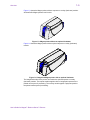
Figure 1-3 shows the Magna printer without a topcoat or overlay (laminator) module.
All UltraGrafix Magna printers look like this.
Figure 1-3: Magna printer without an optional laminator
Figure 1-4 shows the Magna printer with an optional topcoat or overlay (laminator)
module.
Figure 1-4: ImageCard Magna printer with an optional laminator
The ImageCard model of the printer can include the optional topcoat or overlay
(laminator) module. The topcoat module applies clear or holographic topcoat to the
printed card as part of processing. The overlay module applies a polyester patch to
the printed card as part of processing.
User’s Guide for Magna™ Platinum Series™ Printers
1-6
Overview
Printer features
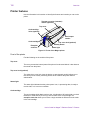
Use the information in this section to identify the features and controls you use on the
printer.
Topcoat or overlay (laminator)
module (optional)
Top cover
Card cartridge
locks (optional)
Card output
stacker
Card cartridge
Top cover lock (optional)
Ready button
Exception
card slot
Status light
Figure 1-5: Front of the Magna printer
Front of the printer
Find the following on the outside of the printer:
Top cover
The cover protects the internal parts of the printer from dust and debris. It also lessens
the sound from the printer.
Top cover lock (optional)
The optional top cover lock (near the duplex or pass-through module) allows you to
lock the top cover closed, preventing access to the inside of the printer without
authorization.
Status light
The status light indicates that the printer power is on, is processing data, is ready to
receive data, or is in an error condition.
Card cartridge
The card cartridge holds blank cards to print. It holds about 100 cards (with a nominal
thickness of 0.030 inches (0.76 mm)). At the bottom of the card cartridge, the
exception card slot allows you to insert a single card that is different from the cards
in the card cartridge.
User’s Guide for Magna™ Platinum Series™ Printers
1-7
Overview
Card cartridge lock (optional)
The optional card cartridge lock allows you to lock the card cartridge into position,
preventing cards from being removed without authorization. Some printers have two
locks to meet the security requirements of the organization.
Card output stacker
The card output stacker holds the cards after they have been processed. Both
completed cards and rejected cards go to the card output stacker.
Optional laminator module
The optional laminator module applies a protective surface to the card. A printer can
have a topcoat module or an overlay module, but not both. “Laminator” is the general
term that describes the module that applies the protective surface.
Overlay module (optional)
The overlay module is available on ImageCard Magna printers. It applies a laminate
(die-cut polyester patch) to one or both sides of the card after it has been
personalized. You can choose the DuraGard™ protective laminate or a holographic
laminate. Both provide a durable and long-lasting protective surface to the card. The
holographic laminate includes a tamper-evident image.
Topcoat module (optional)
The topcoat module is available on ImageCard Magna printers. It applies a protective
film to one or both sides of the card surface to protect card images. The topcoat
applied can be clear or it can include a hologram or other images that make the card
resistant to tampering.
Ready button
The Ready button allows you to pause the printer while printing a card, to clear an
error condition, to cancel a print job and delete all data for the job, or to create a
printer test card.
Inside the printer
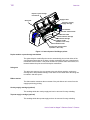
Open the cover to find the following on the inside of the printer.
User’s Guide for Magna™ Platinum Series™ Printers
1-8
Overview
Duplex or pass-through
mechanism
Supply tracker
Swing arm
Topcoat or overlay
supply cartridge
Debower
Laminator advance knob
Printer label
Print ribbon cartridge
Printhead cartridge
RIbbon tracker
(hidden in this view)
Card advance knob
Continuous cleaning roller
(hidden in this view)
Figure 1-6: Internal parts of the Magna printer
Duplex module or pass-through mechanism
The optional duplex module flips the card to automatically print on both sides of the
card. Magna printers that do not have a duplex mechanism will have a pass-through
mechanism in this location. If the printer includes an optional smart card module, it is
located between the print area and the duplex mechanism.
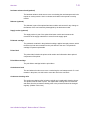
Swing arm
The swing arm opens to give you access to the print ribbon cartridge, continuous
cleaning roller, and printhead cartridge. Push down on the raised end of the swing arm
to unlatch it and then open it.
Ribbon tracker
The ribbon tracker measures the movement of the print ribbon as it moves from the
supply spool during printing.
Overlay supply cartridge (optional)
This cartridge holds the overlay supply and can be removed for easy reloading.
Topcoat supply cartridge (optional)
This cartridge holds the topcoat supply and can be removed for easy reloading.
User’s Guide for Magna™ Platinum Series™ Printers
1-9
Overview
Laminator advance knob (optional)
The laminator advance knob turns to move a card along the card transport track in the
topcoat or overlay module. Use it to release stuck cards in the topcoat or overlay
module.
Debower (optional)
The debower is part of the optional laminator module and corrects for any change to
the flatness of the card caused by heat applied by the laminator module.
Supply tracker (optional)
The supply tracker is part of the optional laminator module and measures the
movement of the supply material as it moves from the supply spool.
Printhead cartridge
The printhead, contained in the printhead cartridge, applies heat and pressure, which
transfers dye and other material from the print ribbon to the card. The printhead
cartridge is operator-replaceable.
Printer label
The printer label includes the printer serial number and information about optional
components of the printer.
Print ribbon cartridge
The print ribbon cartridge holds the print ribbon.
Card advance knob
The card advance knob turns to move a card along the card transport track. If a card
remains in the printer, use this knob to move the card in the card track.
Continuous cleaning roller
The continuous cleaning roller includes a spindle and a replaceable cleaning sleeve.
The spindle holds the roller in place. The replaceable cleaning sleeve removes dirt
and debris from the permanent cleaning roller in the printer and should be changed
regularly. (Hidden in this view.)
User’s Guide for Magna™ Platinum Series™ Printers
1-10
Overview
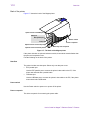
Back of the printer
Figure 1-7 shows the back of the Magna printer:
Optional smart card USB port
Data port
ECP parallel port
Power switch
USB port
Power receptacle
Optional smart card serial port
Security lock receptacle
Optional smart card serial port
Figure 1-7: The back of the Magna printer
If the printer includes an optional laminator module, that module extends farther than
the ports and receptacles area.
Find the following on the back of the printer:
Data Port
The printer includes two data ports. Select only one data port to use.
•
ECP parallel port
Use the ECP parallel port to connect the printer's data cable to the PC, if the
printer was ordered with a parallel cable.
•
USB data port
Use the USB data port to connect the printer's data cable to the PC, if the printer
was ordered with a USB cable.
Power switch
Use the Power switch to power on or power off the printer.
Power receptacle
This is the receptacle for connecting the power cable.
User’s Guide for Magna™ Platinum Series™ Printers
1-11
Overview
Smart card port(s)
On printers equipped with the smart card option, use one or more of these connectors
for the cable from the PC or contact station that carries the data to encode on the
smart card chip. If the printer does not have any smart card options, the ports will not
be installed in the printer.
Security lock receptacle
Included on all printers, an optional printer security lock can be inserted in this
receptacle to secure the printer to the work surface.
How options are identified in this manual
This manual describes all of the features of the Magna printer, including all the
options. Because many printers do not have all options, the following method is used
to help you identify information that applies to an option.
The icons for each option are:
Magnetic stripe encoding module
Smart card module
Overlay station or topcoat module
When you see the icon for an option, use the section or follow the step if you have the
option installed in your printer. If your printer does not have the option, you can ignore
the section or step.
Who to call for assistance
If you work with a Datacard-authorized dealer, distributor, or value-added reseller,
contact them for assistance. A value-added reseller provides the Magna printer as
part of an overall system.
i If any contents of the box are missing, contact your Datacard-authorized dealer,
distributor or reseller. If you purchased your printer directly from Datacard, contact
Datacard. Contact the Datacard Customer Care Center at 1.800.328.3996 for
service in the United Stated and Canada. For worldwide service, call the Datacard
Customer Care Center directly at 952.988.2316. Make sure you have the serial
number, located inside the printer, when you call (see Figure 1-2 ).
User’s Guide for Magna™ Platinum Series™ Printers
1-12
Overview
User’s Guide for Magna™ Platinum Series™ Printers
Using the printer
2
This section describes how to perform basic tasks required to
operate the Datacard® Magna™ Platinum™ Series photo ID
printer. It describes:
•
Tips for success
•
Loading cards
•
Loading print ribbon
•
Loading topcoat or overlay supply
•
Powering on the printer and PC
•
The ready button and status light on the printer
•
Making cards
•
Removing cards
•
Responding to messages
•
Powering off the printer and PC
Begin with the printer set up and the printer driver installed. If the printer is not set up,
see “Before you install” on page 6-1 and “Install the printer” on page 7-1 to set up the
printer and install the driver.
User’s Guide for Magna™ Platinum Series™ Printers
2-2
Using the printer
Tips for success
To achieve the best quality cards and to maintain optimum performance of your
printer, follow these tips for success:
•
Use the best quality cards available. Good quality cards have a smooth, glossy
PVC surface (with no debris embedded in the surface), a mylar signature panel
(optional), a flush magnetic stripe (optional), are not pre-punched, and are printed
only once. See “Card quality guidelines” on page B-8.
•
Match the card design, the supplies you use, and the printer to obtain the results
you want.
–
Edge-to-edge printing requires high-quality cards and can require fine-tuning
the printer and the card design.
–
Do not place an important image, such as a photo, on the front of the card in
the same area as a magnetic stripe. Frequent use of a card in a magnetic
stripe reader can wear away the image on the opposite side of the card. (Or,
apply overlay to the front of the card to protect it from wear.)
–
Locate bar codes at least 0.25 inch (6.3 mm) from other printing and from the
edge of the card. Make sure the color used to print the bar code works in your
bar code readers. (Infrared readers require that the K panel be used to print
the bar code.)
–
Do not print closer than 0.1 inch (2.5 mm) from a signature panel, magnetic
stripe, or smart card chip.
–
Avoid placing a photo directly on the other side of a signature panel. Residue
from the panel can cause printing problems on an adjacent card.
–
Avoid placing a photo or other critical information directly on the other side of
a smart card chip. The card might not be as flat in that area and printing voids
can occur.
–
Do not apply topcoat or overlay over a magnetic stripe or over a smart card
chip.
•
Follow instructions carefully when replacing supplies, correcting problems,
cleaning the printer, and replacing parts.
•
Use the correct cables, connect them correctly, and keep them out of the way.
See “Connecting cables” on page 7-5 for information on connecting cables.
•
Keep a stock of supplies on hand and store them safely. See “Supplies and cards”
on page B-1.
•
Keep the printer clean and keep the area around the printer clean.
User’s Guide for Magna™ Platinum Series™ Printers
2-3
Using the printer
Loading cards
Load cards when beginning work or when the card cartridge is low on cards or empty.
You can load cards when the printer power is on or off. You can also load cards while
the printer is printing.
To order more cards, contact your card vendor. For information on card requirements,
see “Supplies and cards” on page B-1.
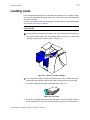
Load cards
i If the printer has a locking card cartridge, unlock the cartridge before removing it.
1
Pull up on the lower edge of the card cartridge (step 1 in Figure 2-1). Lift the card
cartridge up and out of the printer (step 2 in Figure 2-1).
1
2
Figure 2-1: Remove the card cartridge
i Do not touch the surface of cards before printing them. Oils on hands can cause
discolored printing. Handle cards by the edges or wear gloves to protect cards.
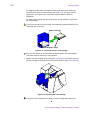
2
Fan cards to separate the edges of the cards (see Figure 2-2).
Figure 2-2: Fan cards
3
Place up to 100 blank cards into the card cartridge. (If cards are thicker or thinner
than 0.030 inch (0.76 mm), the maximum number of cards you can load varies.)
User’s Guide for Magna™ Platinum Series™ Printers
2-4
Using the printer
For magnetic stripe cards, the magnetic stripe faces down and is positioned
toward the side of the printer that opens (see Figure 2-3). (For some custom
applications, you might receive instructions to place cards in a different
orientation.)
For smart cards, position the card so the chip is up and toward the open end of
the card cartridge.
! If you use a topcoat or overlay module, use cards with a nominal thickness of at
least 0.030 inch (0.76 mm).
Smart Card Chip
Magnetic Stripe
Figure 2-3: Load cards into the card cartridge
i Do not run the printer for an extended time without cards in the card cartridge.
Load more cards as soon as you are prompted.
4
Replace the card cartridge in the cavity (step 1 in Figure 2-4). Push the bottom of
the card cartridge toward the printer until it clicks into place (step 2 in Figure 2-4).
1
2
Figure 2-4: Replacing the card cartridge
i If the printer has a locking card cartridge, lock the cartridge after replacing it.
♦
User’s Guide for Magna™ Platinum Series™ Printers
2-5
Using the printer
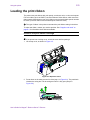
Loading the print ribbon
The printer uses print ribbon with color panels, continuous color, or color and topcoat.
Full-color ribbon (such as YMCKT) must be Platinum Series ribbon, which uses blue
ribbon spools. Monochrome (one color) ribbon on teal-colored ribbon spools can also
be used. (Full-color ribbon on teal-colored spools cannot be used.)
i The type of ribbon in the printer must match the print ribbon setting in the driver.
To order new ribbon, contact your service provider. See “Supplies and cards” on
page B-1 for information about ribbons available.
Remove the print ribbon cartridge
i If the printer has a locking cover, unlock the cover before opening it.
1
Lift the top cover, as shown in Figure 2-5.
Figure 2-5: Open the cover
2
Press down on the swing arm until it clicks (step 1 in Figure 2-6). The push latch
releases the swing arm. Lift the swing arm until it is fully open (step 2 in
Figure 2-6).
2
1
Figure 2-6: Open the swing arm
User’s Guide for Magna™ Platinum Series™ Printers
2-6
Using the printer
3
Grasp the ribbon cartridge handle, and lift up to remove the print ribbon cartridge
(see Figure 2-7). Avoid touching the printhead cartridge and ribbon tracker.
Figure 2-7: Remove the print ribbon cartridge
i Some users run a cleaning cycle whenever the print ribbon is changed. If your site
follows this policy, see “Running a cleaning cycle” on page 4-2 for the steps to
follow, and then return to this section.
♦
Load the print ribbon
1
Remove the used ribbon and the used ribbon spools from the ribbon cartridge
shafts.
i The print ribbon has a negative image of the information printed on the card.
Dispose of print ribbon according to your policy for protecting the data that might
be visible on it.
2
Unwrap the new print ribbon.
3
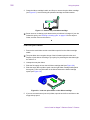
Slide the full supply roll onto the left ribbon cartridge shaft (see Figure 2-8).
4
Slide the empty take-up ribbon spool onto the right ribbon cartridge shaft (which
has a gear). Leave very little slack in the ribbon between the ribbon cartridge
spools (see Figure 2-8).
Figure 2-8: Load new print ribbon on the ribbon cartridge
5
If you use a monochrome (one-color) ribbon, tape the end of the new ribbon to the
empty take-up spool.
User’s Guide for Magna™ Platinum Series™ Printers
2-7
Using the printer
6
Make sure print ribbon unwinds over the top of the print ribbon cartridge, not from
the bottom.
♦
Replace the print ribbon cartridge
1
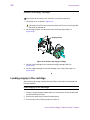
Place the ribbon cartridge onto the ribbon cartridge supports (see Figure 2-9).
Make sure the cartridge is securely seated. Avoid touching the printhead cartridge
and ribbon tracker.
2
1
Figure 2-9: Replace the print ribbon cartridge
2
Close the swing arm, pressing it down until the push latch clicks into place.
3
Close the cover.
i If the printer has a locking cover, lock the cover after closing it.
♦
Loading the overlay or topcoat material
If your printer includes an optional overlay or topcoat module, the module uses supply
material. For information about material, see “Supplies and cards” on page B-1.
This section describes the three steps of changing the supply material:
•
Remove the supply cartridge
•
Load material in the cartridge
•
Replace the supply cartridge
E If you change the type of supply material you use, see the e-Guide for
ImageCard® Magna™ and UltraGrafix® Magna™ Printers for more information.
Removing the supply cartridge
Remove the supply cartridge when a "Supply empty" message appears, or when
setting up the printer.
User’s Guide for Magna™ Platinum Series™ Printers
2-8
Using the printer
Remove the supply cartridge
E If the printer has a locking cover, unlock the cover before opening it.
1
Lift the top cover, as shown in Figure 2-5.
! The module is HOT to the touch and remains HOT for up to 30 minutes after
the printer is powered off.
2
Lift the supply tracker, and then push until it clicks into place (step 1 in
Figure 2-10).
Supply tracker
2
3
Figure 2-10: Remove the supply cartridge
3
Pull out on the cartridge lock to release the supply cartridge (step 2 in
Figure 2-10).
4
Pull the supply cartridge out until the cartridge is out of the printer (step 3 in
Figure 2-10).
♦
Loading supply in the cartridge
After removing the supply cartridge from the printer, remove the used material and
load new material.
Load supply in the cartridge
1
Place the supply cartridge upside down on a level surface, such as a table, with
the wide side away from you.
2
Remove the spool caps (if used) from both spools.
3
Pull up firmly on the full take-up spool to remove it.
User’s Guide for Magna™ Platinum Series™ Printers
2-9
Using the printer
4
Remove the end of the supply material from the empty supply spool if needed.
Dispose of the used supply according to your policy.
E On a regular basis, such as weekly, use the cleaning pen to clean deposits
from the guides of the supply cartridge and clean the supply tracker.
5
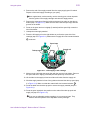
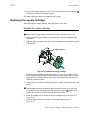
Remove the empty spool from the holder and press it into place on the take-up
holder (step 1 in Figure 2-11). Make sure the ribs inside the spool align with the
grooves in the holder.
6
Press on the spool and turn it slightly (if needed) until the spool fully covers the
ribs of the holder.
7
Unwrap the new supply material.
8
Place the full supply roll on the right holder as you face the open side of the
cartridge (step 2 in Figure 2-11). Make sure the supply will unroll counterclockwise
, as shown.
Spool caps
5
Supply roll
Guides
Take-up spool
4
1
2
3
Figure 2-11: Load supply in the cartridge
9
Make sure the ribs inside the spool align with the grooves in the holder. Press on
the spool and turn it slightly (if needed) until the spool fully covers the ribs.
10 Lift the label on the supply roll and unroll about 8 inches from the supply roll.
11 Wind the supply material in front of the guides and around the take-up spool (step
3 in Figure 2-11). Make sure that the material will wind counterclockwise
.
12 Press the label onto the take-up spool to secure the supply material (step 4 in
Figure 2-11).
13 Press the spool caps back into position on the ends of the take-up spool and
supply roll (step 5 in Figure 2-11).
E If you use an adjustable overlay cartridge, do not use spool caps. They
interfere with the operation of the adjustable overlay cartridge.
User’s Guide for Magna™ Platinum Series™ Printers
2-10
Using the printer
14 Pick up the supply cartridge and turn it over. Turn the take-up knob clockwise
to remove any slack in the supply material.
The supply cartridge is ready to be replaced in the printer.
Replacing the supply cartridge
When replacing the supply cartridge, begin with the top cover open.
Replace the supply cartridge
E
Make sure the supply tracker is raised and out of the way. See Figure 2-10.
1
Hold the loaded supply cartridge next to the module, with the cartridge handle
toward you.
2
Align the supply cartridge so the spools in the cartridge are even with the spindles
in the module.
Supply tracker
3
2
1
Figure 2-12: Replace the supply cartridge
3
Push the supply cartridge into the printer (step 1 in Figure 2-12). Make sure the
supply material passes between the heated roller and the platen roller. Turn the
supply knobs if needed to take up slack so the material does not wrinkle as the
cartridge is pushed in place.
4
Hold the back of the printer and push firmly on the supply cartridge to seat it in the
printer.
E
If the cartridge becomes stuck part of the way into the module, pull it out a few
inches and then turn the supply and take-up knobs clockwise
spindle ribs fit between the ribs. Push the cartridge in again.
slightly so the
5
Press the cartridge lock to secure the supply cartridge in the printer (step 2 in
Figure 2-12).
6
Lower the supply tracker until it rests on the supply material (step 3 in
Figure 2-12).
User’s Guide for Magna™ Platinum Series™ Printers
2-11
Using the printer
7
Verify that the cartridge is replaced correctly by making sure the locating posts
come through the locating holes in the cartridge (Figure 2-12).
E
If needed, release the cartridge lock and seat the cartridge completely. Press
the cartridge lock again.
E If you use an adjustable overlay cartridge, follow the steps provided with the
cartridge to produce a patch placement that meets specifications.
8
Close the top cover.
E
E
If the printer has a locking cover, lock the cover after closing it.
♦
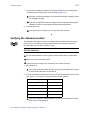
Verifying the debower position
The debower in the optional topcoat or overlay module should be set for the type of
cards you print. The debower assures that the heat used to apply the topcoat or
laminate does not leave cards bowed or curled.
Set the debower
! Do not use the debower in the On position with proximity cards or smart cards.
1
E
Make sure power to the printer is off.
E
If the printer has a locking cover, unlock the cover before opening it.
Lift the top cover.
! The overlay or topcoat module is HOT to the touch and remains HOT for up to
30 minutes after the printer is powered off.
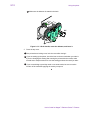
2
Pull out the handle for the debower and move it to the desired position for the card
type. Figure 2-13 shows the on and off positions for the debower.
Card or module type
Debower position
0.030 inch (0.76 mm) card
on
0.050 (1.27 mm) cards
off
Smart card
off
Proximity card
off
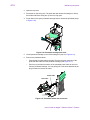
Topcoat module
off
! If you use a topcoat or overlay module, you must use cards that are at least
0.030 inch or 0.760 mm thick.
User’s Guide for Magna™ Platinum Series™ Printers
2-12
Using the printer
E
Make sure the debower is seated in the latch.
Off
On
Figure 2-13: Lift the handle, move the debower, and lower it
3
Close the top cover.
E
E If the printer has a locking cover, lock the cover after closing it.
E
If you are setting up the printer, check the bow on the test card when you make it.
If you are changing this setting after running the printer with other cards, make
several test or sample cards to be sure the setting produces the result you want.
If you are switching to proximity cards or use smart cards, be sure to test the
function of the card after applying the overlay or topcoat.
♦
User’s Guide for Magna™ Platinum Series™ Printers
2-13
Using the printer
Powering on the printer and PC
Use the following procedure to power on the printer and attached PC.
Power on the printer and PC
i If the printer is connected over a network using a print server, make sure the
driver is installed and configured on the PC before using it.
1
Make sure cards and all other supplies are loaded. See other sections of this
chapter for more information.
2
Remove any printed or rejected cards from the output stacker. See “Removing
cards” on page 2-18 for more information.
3
Make sure the power cord and data cable are connected. If needed, see
“Connecting cables” on page 7-5 for more information.
4
Press the printer Power switch to turn on power. Observe the printer status light
which lights with a sequence of colors and then becomes steady green. See
“Status light” on page 2-14 for more information. The printer initializes
components and makes audible sounds.
Figure 2-14: Power on the printer
Ei The optional overlay or topcoat module in some Magna printers requires about 10
minutes to reach operating temperature before printing a card. If you send a card
to print before the module is ready, a message appears on the PC and processing
waits until the module is ready. If the printer power was on recently, warm-up time
is shorter. The overlay or topcoat module makes a series of beeps while it is
warming up.
5
Press the PC Power switch to turn on the power to the PC. Turn on power to any
other equipment needed.
♦
User’s Guide for Magna™ Platinum Series™ Printers
2-14
Using the printer
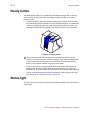
Ready button
The Ready button allows you to pause the printer while printing a card, to clear an
error condition, to cancel a print job and delete all data for the job, or to create a
printer test card.
•
To pause the printer, press and hold the Ready button for three seconds or less.
Any cards being printed complete the current operation and stop. The status light
continues to blink green while the printer is paused with jobs in the queue. The
status light is amber when the printer is paused with no jobs in the print queue.
Figure 2-15: Ready button
Ei If the printer is paused and a message box is displayed on the PC, use the
buttons on the message box to clear the message. If you press the Ready button
to clear a message, the current print job is cancelled. If you press the Ready
button to clear a pause condition, the job is not cancelled.
•
To cancel and clear the current print job, press and hold the Ready button for
between three and ten seconds. When the sound changes tone, release the
Ready button. The job is cleared from the printer memory and the card is ejected.
•
You can verify that the printer is working correctly by making a printer test card.
See “Making and evaluating test cards” on page 5-3.
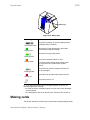
Status light
The front corner of the printer has a light that provides information about the printer’s
current state.
User’s Guide for Magna™ Platinum Series™ Printers
2-15
Using the printer
Status light
Figure 2-16: Status light
Status Light
Red Amber Green
Steady green
Description
The printer is starting. The printer displays colors
repeatedly while it initializes.
The printer is ready and waiting to print cards.
(The laminator might be heating.)
The printer is busy printing cards.
Blinking green
The printer is paused without an error.
Steady amber
Blinking amber
If the light remains steady amber during powerup, the printer has a problem that requires
service.
The printer has issued a message. See the PC
for the message.#
The printer has a problem that requires service.
Steady red
The printer power is off.
Off
#. If the light blinks amber but no message appears on the PC, the
following might have occurred:
* You used the Power-on/Ready sequence to print a test card. Messages
are not reported.
* You changed the name of the printer driver. Power the PC off and on.
Making cards
This section describes several ways to make cards using the Magna printer.
User’s Guide for Magna™ Platinum Series™ Printers
2-16
Using the printer
•
Usually, cards are sent from a card creation application such as Datacard’s ID
Works™ which captures, organizes, and formats the information on the card. A
card creation application is special software that handles the types of information
used on cards. See “Use a card creation application” for the steps to follow.
•
If you do not have a card creation application, you can use another PC application
to format the information to print on cards. If you are encoding magnetic stripe
data, be sure to use an application in which you can save the result and edit it
again, such as Windows WordPad™ or Word. See “Print from a PC application”
for the steps to follow.
E With any application, test your card design to verify the results.
Use a card creation application
1
Follow the instructions for the card creation application to capture, format, and
save the data for the card.
2
In the card creation application, send cards to the printer (usually, use the Print
button).
The printer driver receives data for each card, prepares the card for printing, and
sends each card to the printer in the order received. The printer driver keeps
cards in a queue if the printer is busy. For a directly networked printer, the print
server manages jobs from any PCs that send jobs to the printer.
E Developers can write card creation applications using the SmartDriver™ Software
Developer’s Kit. This kit can be found on the SmartDriver CD-ROM or
downloaded from www.datacard.com.
♦
Print from a PC application
1
In the application, choose the SmartDriver as the current printer.
E The default name for the Magna printer, when it is installed, is SmartDriver.
Your printer might have a different name than SmartDriver.
2
Choose the printer settings that correspond to the cards to print. See “Working
with Properties and other driver dialog boxes” on page 3-1 for more information.
Settings might include the following:
–
Enable two-sided printing if you plan to print the front and back of the card.
The printer must have a duplex module to print on both sides of the card.
–
Set the margins for the area to print on the card. A setting of Edge-to-Edge is
the same as a margin of 0.
–
Set the orientation for the card design—either portrait or landscape.
–
Set the magnetic stripe format and coercivity if you plan to encode magnetic
stripe data.
User’s Guide for Magna™ Platinum Series™ Printers
2-17
Using the printer
3
–
Enable or disable topcoat or overlay, depending on the options in the printer
and the features you want for this card.
–
For a shared printer, choose the Ribbon Type to match the ribbon installed in
the printer. (Do not use the autodetect setting.)
Using the application's page setup feature, set the following:
–
Set the paper size to CR80 Card 2.13" x 3.38".
–
Set all the margins to the same value as the driver. (You can set the margins
in the application wider than the driver, if desired.)
–
Set the orientation for the card design—either portrait or landscape.
4
Format the text to print using only a TrueType (
) font. To print using the K
(solid black) panel of the print ribbon, choose the Black color in the application. All
other colors are printed using the color panels of the print ribbon (if you use a
color print ribbon).
5
To print on the front of the card, keep data on one page. To print the front and back
of the card, send a two-page document. (Make sure Print on Both Sides is set to
Automatic.)
6
To encode magnetic stripe data, do one of the following:
–
–
Also on the front of the card, enter the information to be encoded on the
magnetic stripe and format the text using one of the following fonts:
•
Track 1—Magnetic Stripe
•
Track 2—Magnetic Stripe
•
Track 3—Magnetic Stripe
•
Track NTT—Magnetic Stripe (use only on a PC running a Japanese
language Windows operating system)
If your application does not allow you to select fonts, use magnetic stripe
escapes to identify data. See “Magnetic stripe encoding” on page D-1 for
details.
E You must select the SmartDriver as the printer in the application for magnetic
stripe fonts to be visible. In addition, Windows must be set to display all fonts.
(Some PC’s are set to display TrueType fonts only.) See Windows help for
more information.
E The text should use a small type size to keep characters on the same line. In
many applications, you can type a smaller value, such as 4 points, for the type
size. To view the characters in a small type size, zoom in on the text. Also,
follow these guidelines:
•
Avoid formatting characters, such as tabs and returns, in the data for one
magnetic stripe track. In some cases, these characters are converted to
spaces, which might not be valid characters for the track.
•
Do not use typographic features, such as letter spacing, on magnetic
stripe text.
•
The paragraph style must be Normal.
User’s Guide for Magna™ Platinum Series™ Printers
2-18
Using the printer
•
7
The magnetic stripe text, along with graphics and text to print on the front
of the card, must be on the first page.
When the card data is captured and formatted correctly, select the application’s
print function to send the card to print. The printer driver keeps cards in a queue if
the printer is busy. For a directly networked printer, the print server manages jobs
from any PCs that send jobs to the printer.
♦
Operating tips
•
For the most current information about messages, see the online help for each
message.
•
Whenever you are encoding magnetic stripe data or programming smart cards, be
sure to handle incomplete cards according to your policy for handling the
confidential data that might be on the card.
•
Used print ribbon contains negative images of data printed on cards. Be sure to
handle used print ribbon according to your policy for handling the confidential data
that might be on the card.
Removing cards
The card output stacker holds both completed cards and rejected cards. Remove
completed cards from the output stacker to distribute printed cards. The output
stacker holds up to 100 cards with a nominal thickness of 0.030 inch (0.76 mm).
Remove rejected cards as soon as they are ejected from the printer so you do not
need to sort through all cards to locate them. Cards are rejected when a print job is
cancelled or when a problem occurs while personalizing a card.
You can remove cards when the printer power is on or off, or while the printer is
printing. Completed and rejected cards are removed in the same way.
Remove cards
1
Lift the cards from the card output stacker.
User’s Guide for Magna™ Platinum Series™ Printers
2-19
Using the printer
Figure 2-17: Remove cards
2
Dispose of partly processed cards according to your policies for handling the
confidential data that might be on the cards.
♦
Responding to messages
The printer provides information to the printer driver about the status of cards being
processed. If the printer is not able to process and print a card, the printer driver
generates a message on the PC in response to this situation. In most cases, the
message is displayed on the PC. Some applications manage printer driver messages,
and those messages might be different than described in this section.
In some circumstances, the printer might beep and the status light blink amber without
a message appearing on the PC. The most likely causes are:
•
Renaming the printer (Restart Windows to fix the problem)
•
Printing a test card in a printer with a magnetic stripe module, when the card does
not have a magnetic stripe (use a card with a magnetic stripe and make sure the
stripe is oriented correctly)
Messages issued by the printer at startup and some communication messages can be
displayed on more than one directly networked PC with a SmartDriver installed. In
most cases, a message appears on the PC that sent the card job that has a problem.
Messages include a Help button, where information about recovering from the
situation is available. Typical messages might indicate that the print ribbon needs to
be replaced or that a card is stuck. See the “Fix a printer problem” procedure that
follows.
i When a message box appears, only use the buttons on the message box, so that
both the printer driver and printer can return to normal operation.
User’s Guide for Magna™ Platinum Series™ Printers
2-20
Using the printer
Figure 2-18: Typical message
If a message appears repeatedly and you cannot reliably correct the situation, service
might be required.
E Before you call your service representative, write down the following:
–
The message and message number.
–
The model of the printer, such as “Magna ImageCard Platinum Series.”
–
The serial number of the printer, located on the inside panel. See “Printer
label” on page 1-3.
–
The driver version and firmware version, described in “Using the Printer
Toolbox” on page 3-10.
For more information about obtaining service, see “Obtaining service” on page 5-22.
Fix a printer problem
1
When a message is displayed on the PC, follow the suggested action. Click the
Help button to identify the likely cause of the problem and the possible solution.
2
From the help topic, click the “Click for error recovery procedures” link to view a
list of printers. Click the link for the printer you are using and follow the procedure
provided in the e-Guide to fix the problem.
Most parts of the printer designed to be used by the operator are colored green.
These parts include knobs for clearing jams and handles of supply cartridges.
3
After fixing the problem, close the cover of the printer.
E If the printer has a locking cover, lock the cover after closing it.
4
Depending on the situation, the message box might be removed automatically or
you might need to respond. Cards still in the printer might be ejected.
The message box can have one or more of these buttons:
–
Retry: Clears the card from the printer. The driver sends the card or cards to
the printer again. If the problem is corrected, normal operation resumes.
–
Cancel: Clears the card from the printer. The card is not sent to print again. If
the problem is corrected, normal operation resumes.
–
OK: Used for a message that occurs when no card was being printed, a status
message, or an equipment failure message. If the problem is corrected,
User’s Guide for Magna™ Platinum Series™ Printers
2-21
Using the printer
normal operation resumes. (Power cycle the printer if operation does not
resume.)
5
If the message box disappears automatically, decide whether to return to the card
creation application to send the card to print again.
♦
Shutting down the printer and PC
Shut down the printer and the PC to which it is attached when you are done making
cards for the day or will be away from the system for an extended period of time.The
printer and PC can be left on during lunch time and other short breaks. Follow your
security procedures when leaving the printer.
Shut down the printer and PC
1
Make sure all cards have completed processing before turning off the power.
(Choose Suspend in the Printer Toolbox to stop communication between the
printer and driver. See “Using the Printer Toolbox” on page 3-10.)
2
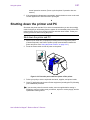
Press the Power switch to turn off power to the printer.
Figure 2-19: Press the power switch to power off the printer
3
Follow your policy to secure unprinted card stock, supplies, and printed cards.
4
Close PC applications and power off other equipment (including the PC) following
your established procedure.
i If you store the printer for several months, remove supplies before storing it.
Supplies to remove include cards, print ribbon, topcoat or overlay supply, and the
replaceable cleaning sleeve.
♦
User’s Guide for Magna™ Platinum Series™ Printers
2-22
Using the printer
User’s Guide for Magna™ Platinum Series™ Printers
Using the printer driver
3
This chapter provides information to help you use the printer
driver for the Datacard® Magna™ Platinum™ Series photo ID
printer effectively and efficiently. It describes:
•
How to work with printer settings and data
•
How to use the Printer Toolbox
User’s Guide for Magna™ Platinum Series™ Printers
3-2
Using the printer driver
Working with Properties and other driver dialog
boxes
Printer driver settings and data are organized in a set of dialog boxes or pages where
settings for the printer are displayed and can be changed. Printer driver settings and
data are organized differently for Windows Me and 98, Windows 2000, Windows XP,
and Windows NT. Use the section that applies to the operating system you use.
The printer driver allows you to connect one of the following printer types to the same
port:
•
Select Class with Advanced Imaging Technology (including Platinum™ series)
•
Magna Class with Advanced Imaging Technology (including Platinum™ series)
•
SP35 card printer
•
ImageCard IV
The default printer name when the driver is installed is SmartDriver. References in this
guide to the printer driver refer to the SmartDriver. For most installations, the driver
detects the type of printer attached and displays a status icon that matches the printer
type.
Tips for Properties, Printing Preferences, and Default
Document Properties
When you use settings, consider the following for greatest success:
•
When it is installed, the SmartDriver printer driver uses default settings for the
printer. Make sure that driver settings match printer features and supplies used.
•
For settings that affect the printer, such as print ribbon type, make sure that the
printer and PC are connected so the value you select is sent to the printer and
saved. (For printers used over a network, see the e-Guide for ImageCard®
Magna™ and UltraGrafix® Magna™ Printers. For printers connected over a
network using a print server, change settings from the Administrative PC first.)
•
For settings that affect only the card format, such as landscape or portrait
orientation, the printer does not need to be connected and powered on.
•
The Printer Type affects the settings that are available. See the e-Guide for
ImageCard® Magna™ and UltraGrafix® Magna™ Printers for more information
about the printer type.
•
Select the Print on Both Sides setting before selecting the Print Ribbon Type and
Print Blocking Pattern. The choices available for Print Ribbon Type and Print
Blocking Pattern depend on the Print on Both Sides setting.
•
The card creation application might include settings that override driver settings.
Also, you can access printer settings through the application’s print feature.
(Depending on the application and operating system, settings might apply only to
the current document or session.)
•
If you change the card design, review all settings and make changes as needed to
reflect the new card design.
User’s Guide for Magna™ Platinum Series™ Printers
3-3
Using the printer driver
•
When the printer is installed, the default spool setting is “Spool printing so
program finishes printing faster.” Use this setting, not “Print directly to printer.”
•
When the printer is installed, “Enable bi-directional support” is selected. This
setting is required to display messages, print test cards, and for normal printerdriver communication. The printer or driver might stop operating if bi-directional
communication is disabled.
•
When the printer is directly networked to a PC, the Color Settings page can be
used from all PCs. The Laminator Material page of the Printer Toolbox and
Printhead and Laminator pages of Advanced Setup should be used only from the
administrative PC.
•
When the printer is networked to more than one PC, make sure to select the same
ribbon type on all network-connected PCs.
•
A user with Full Control permission on Windows NT, or a user with Allow
permission for Print, Manage Printer, and Manage Documents (on Windows 2000
or XP) should use the Properties or Printing Preferences dialog boxes. A user with
administrator rights also can use these dialog boxes. On the client PC when a
printer is shared, a user with Print permission can use these dialog boxes.
Properties for Windows Me & 98
The Properties dialog box includes the following settings or data:
•
Print on both sides (duplex printing)
•
Print ribbon type
•
Card design settings, such as landscape or portrait orientation
•
Print blocking pattern
•
Whether to apply topcoat or overlay material to the front of the card, back of the
card, or both
•
Magnetic stripe encoding formats and coercivity
•
Printer type
•
Port to which the printer is attached
•
Cleaning interval
Use the Properties dialog box
Make sure the printer power is on and the printer is connected to the PC.
1
Select Start from the Windows taskbar.
2
From the Windows Start menu, select Settings and then Printers. The Printers
window appears.
3
Click once on the SmartDriver icon.
4
Select File from the Printers menu bar, and then select Properties. The
SmartDriver Properties dialog box appears.
User’s Guide for Magna™ Platinum Series™ Printers
3-4
Using the printer driver
i If you have the Printer Toolbox open, you can click the Properties button on the
Status page to open the Properties dialog box. The General, Details, Color
Management and Sharing tabs are not displayed.
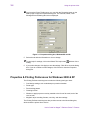
Figure 3-1: Properties dialog box, Windows Me and 98
5
E
Select the tab with the information to view or change.
6
To view help for settings, click on the What's This help button
setting.
and then click a
If you make changes, click Apply to save the settings. Click OK to close the dialog
box. If you do not want to make changes, click Cancel to close the Properties
dialog box.
♦
Properties & Printing Preferences for Windows 2000 & XP
The Printing Preferences dialog box includes the following settings or data:
•
Card design settings, such as landscape or portrait orientation
•
Printer type
•
Print blocking pattern
•
Cleaning interval
•
Whether to apply topcoat or overlay material to the front of the card, back of the
card, or both
•
Magnetic stripe encoding formats, coercivity, and other settings
The Printing Preferences dialog box also provides access to the About dialog box,
which shows the printer driver version.
User’s Guide for Magna™ Platinum Series™ Printers
3-5
Using the printer driver
Settings that control the non-printing operation of the printer are in the Properties
dialog box for the printer. These settings include:
•
Port to which the printer is attached
•
Permissions for other users of the PC
•
Printer sharing
E The SmartDriver provides help for the Printing Preferences dialog box, and
Windows 2000 or XP provides help for the Properties dialog box. Help provides
information about specific settings of the printer driver. Help does not include stepby-step procedures or detailed conceptual information.
Use the Properties dialog box
Make sure the printer power is on and the printer is connected to the PC.
1
Select Start from the Windows 2000 or XP taskbar.
2
From the Windows Start menu, select Settings and then Printers (2000) or
Printers and Faxes (XP). The Printers (and Faxes) window appears.
3
Click once on the SmartDriver icon.
4
Select File from the Printers menu bar, and then select Properties. The
SmartDriver Properties dialog box appears.
Figure 3-2: Properties dialog box, Windows 2000 and XP
5
Select the tab that contains the information you want to view or change.
6
If you make changes, click OK to save the settings and close the dialog box. If you
do not want to make changes, click Cancel to close the Properties dialog box.
User’s Guide for Magna™ Platinum Series™ Printers
3-6
Using the printer driver
7
If you change the port, reboot the PC and power the printer off and on.
♦
Use the Printing Preferences dialog box
Make sure the printer power is on and the printer is connected to the PC.
1
Select Start from the Windows 2000 or XP taskbar.
2
From the Windows Start menu, select Settings and then Printers (2000) or
Printers and Faxes (XP). The Printers (and Faxes) window appears.
3
Click once on the SmartDriver icon.
4
Select File from the Printers menu bar, and then select Printing Preferences. The
SmartDriver Printing Preferences dialog box appears.
Figure 3-3: Printing Preferences dialog box, Windows 2000 and XP
5
If the setting you want to change appears, select the setting.
6
If the setting you want to change does not appear, click the Advanced button to
display the Advanced Options dialog box (Figure 3-4). Click the plus sign (+) if
needed to see all selections. When you click a selection, a list of choices appears
next to the selection. Click the arrow on the box to see the selections available.
i If you have the Printer Toolbox open, you can click the Printing Preferences button
on the Status page to open the Printing Preferences Advanced dialog box.
User’s Guide for Magna™ Platinum Series™ Printers
3-7
Using the printer driver
Figure 3-4: Advanced Options, Windows 2000 and XP
E
E
If the selections you want to use are not available (are grayed out), make sure the
feature is available in the printer. Also make sure that the printer is powered on
and connected to the PC, and then resume the Printer Toolbox. See “Opening and
using the Printer Toolbox” on page 3-11. For a network-connected printer, see eGuide for ImageCard® Magna™ and UltraGrafix® Magna™ Printers.
7
To view help for settings, click on the What's This help button
and then click
any setting in the Printer Features list. A list of settings is displayed. Select the
setting for which you want help.
If you make changes, click OK on each dialog box to save the settings and close
the dialog box.
♦
Properties and Default Document Properties for Windows NT
Settings that control the printing and personalization of the card are in the Default
Document Properties dialog box for the printer. These settings include:
•
Print on both sides (duplex printing)
•
Print ribbon type
•
Card design settings, such as landscape or portrait orientation
•
Print blocking pattern
•
Printer type
User’s Guide for Magna™ Platinum Series™ Printers
3-8
Using the printer driver
•
Cleaning interval
•
Whether to apply topcoat or overlay material to the front of the card, back of the
card, or both
•
Magnetic stripe encoding formats and coercivity
E If you use a card creation application specifically designed to create cards, that
application might include settings with cards that override driver settings.
Settings that control the non-printing operation of the printer are in the Properties
dialog box for the printer. These settings include:
•
Port to which the printer is attached
•
Permissions for other users of the PC
•
Printer sharing
E The SmartDriver provides help for the Default Document Properties dialog box,
and Windows NT provides help for the Properties dialog box. Help provides
information about specific settings of the printer driver. Help does not include stepby-step procedures or detailed conceptual information.
Use the Properties dialog box
Make sure the printer power is on and the printer is connected to the PC.
1
Select Start from the Windows NT taskbar.
2
From the Windows NT Start menu, select Settings and then Printers. The Printers
window appears.
3
Click once on the SmartDriver icon.
4
Select File from the Printers menu bar, and then select Properties. The
SmartDriver Properties dialog box appears.
User’s Guide for Magna™ Platinum Series™ Printers
3-9
Using the printer driver
Figure 3-5: Properties dialog box, Windows NT
5
Select the tab that contains the information you want to view or change.
6
If you make changes, click OK to save the settings and close the dialog box. If you
do not want to make changes, click Cancel to close the Properties dialog box.
7
If you change the port, restart Windows and power cycle the printer.
♦
Use the Default Document Properties dialog box
Make sure the printer power is on and the printer is connected to the PC.
1
Select Start from the Windows NT taskbar.
2
From the Windows NT Start menu, select Settings and then Printers. The Printers
window appears.
3
Click once on the SmartDriver icon.
4
Select File from the Printers menu bar, and then select Document Defaults. The
SmartDriver Default Document Properties dialog box appears.
i If you have the Printer Toolbox open, you can click the Default Document
Properties button on the Status page to open the Default Document Properties
dialog box.
User’s Guide for Magna™ Platinum Series™ Printers
3-10
Using the printer driver
Figure 3-6: Default Document Properties dialog box, Windows NT
5
E
Select the tab that contains the information you want to view or change. On the
Advanced tab, click the plus sign (+) if needed to see all selections available.
When you click a selection, choices appear in the “Change. . . “ box. Click the
value you want.
E
If the selections you want to use are not available (are grayed out), make sure the
feature is available in the printer. Also make sure that the printer is powered on
and connected to the PC and resume communication using the Printer Toolbox.
6
To view help for settings, click on the What's This help button
and then click
any setting in the Printer Features list. A list of settings is displayed. Select the
setting for which you want help.
If you make changes, click OK to save the settings and close the dialog box.
♦
Using the Printer Toolbox
The Status page of the Printer Toolbox tracks communication between the Magna
printer and its printer driver. The Printer Toolbox icon is located in the lower right
corner of the Windows desktop (see Figure 3-7).
Figure 3-7: Printer Toolbox icon
User’s Guide for Magna™ Platinum Series™ Printers
3-11
Using the printer driver
The Printer Toolbox starts as part of Windows startup and is displayed by default. If
you exited the Printer Toolbox, it starts again after a card is printed or after the
Properties, Printing Preferences, or Default Document Properties dialog box is
opened.
The Printer icon shows the state of communication between the printer and driver,
listed in the table below.
Icon
Description
Indicates
This printer icon is white with The driver and printer are communicating.
a green dot.
The printer and PC are connected using a
USB or parallel cable.
This printer icon is gray.
Communication between the driver and
printer is suspended. The driver is not
reporting printer information such as errors.
The printer and PC are connected using a
USB or parallel cable.
This printer icon is white with The Printer Toolbox is active but is not
a white exclamation point in a communicating with the printer. The printer
red circle.
might be off, cables might be loose, or a
problem might exist. The printer and PC are
connected using a USB or parallel cable.
This printer icon is white with The Printer Toolbox is in advanced setup
a blue magnifying glass.
mode. Use advanced setup when changing
printing intensity, the position of printing, or
settings for laminator material.
The printer icon is white,
includes a PC, and has a
green stripe on top.
The Printer Toolbox is running on a client PC
using printer sharing over a network. The
Printer Toolbox displays the client status and
provides access to color settings.
The printer icon is white with
a green stripe and dot.
The driver and printer are communicating.
The driver is installed on a PC that uses a
direct network connection to the printer. The
printer is not currently printing cards.
The printer icon is white with
a green stripe and yellow
hourglass.
The driver is active but is not communicating
with the printer. The driver is installed on a
PC that uses a direct network connection to
the printer.
The printer icon is gray with a Communication between the driver and the
green stripe.
network is temporarily suspended. The
driver is installed on a PC that uses a direct
network connection to the printer.
Use the Help button on the Printer Toolbox for more information about each window.
User’s Guide for Magna™ Platinum Series™ Printers
3-12
Using the printer driver
Opening and using the Printer Toolbox
You can use the Printer Toolbox to do the following:
•
•
View information about the printer and driver
•
•
•
•
•
Run a cleaning cycle (see “Maintaining the printer” on page 4-1)
Print sample cards
Suspend communication between the printer and driver
Minimize the Printer Toolbox dialog box
Use color settings
Start or quit advanced setup
Open the Printer Toolbox
The Printer Toolbox dialog box is open by default when you start Windows. You can
display the Printer Toolbox dialog box (if it is minimized) by double-clicking the icon in
the system tray that looks like your printer.
If the Printer icon is not visible, do one of the following:
•
Open Properties (Windows 98 and Me), select the Printer Info tab, and click the
"Open Toolbox" button.
•
Open Printing Preferences (Windows 2000 and XP), click the Advanced button,
and select "Printer Toolbox:Open".
•
Open Document Default Properties (Windows NT), and select "Printer
Toolbox:Open".
Figure 3-8: Printer Toolbox
User’s Guide for Magna™ Platinum Series™ Printers
3-13
Using the printer driver
Viewing Printer Toolbox information
The Printer Toolbox displays the following status information:
•
The top line displays the current printer or driver status.
•
If the printer is directly connected to this PC, the second line displays any
messages. If the printer is shared through a network, this line indicates where to
find information about messages. (This line is blank on a locally connected PC
when there are no errors or when any message has been cleared and processing
resumes.)
•
The third line displays information about how the printer and PC are connected,
which can be “parallel,” “USB,” “client PC,” or “directly networked.” If printer is
connected using a parallel port that is not supported, the line also instructs you to
change the port mode to ECP. See “Setting parallel port values” on page C-6.
•
The fourth line displays the printer type.
•
At the bottom of the dialog box, the Printer Toolbox displays the driver version and
the printer firmware version.
•
At the bottom of the dialog box, the “Display Printer Toolbox when the PC starts”
checkbox allows you to determine whether the Printer Toolbox is displayed when
Windows starts.
Suspending the Printer Toolbox
To suspend communication, do one of the following:
•
Right-click on the printer icon in the lower right corner of the Windows desktop.
From the pop-up menu, click Suspend.
•
On the Printer Toolbox, click Suspend.
E You cannot suspend communication while printing a card.
Suspend communication before power off to avoid interrupted communication.
Communication automatically resumes when you print a card, or when you open
Properties, Document Default Properties, or Printing Preferences.
Exiting the Printer Toolbox
Exiting the Printer Toolbox stops the Printer Toolbox program and closes the dialog
box. The icon does not appear in the lower right corner of the Windows desktop.
To exit or stop communication, right-click on the printer icon in the lower right corner of
the Windows desktop. From the pop-up menu, select Exit. You should exit the Printer
Toolbox when you receive instructions to do so.
E You cannot exit from the Printer Toolbox while printing a card.
The Printer Toolbox automatically restarts when you print a card, or when you open
Properties, Document Default Properties, or Printing Preferences. If you need to
restart the Printer Toolbox, open Properties, as described in “Working with Properties
and other driver dialog boxes” on page 3-2.
User’s Guide for Magna™ Platinum Series™ Printers
3-14
Using the printer driver
Minimizing the Printer Toolbox
The Minimize button closes the Printer Toolbox dialog box. The program continues to
run.
Starting or quitting Advanced Setup
The Advanced Setup button on the Printer Toolbox changes the printer driver from
printing mode to Advanced Setup mode. After you start Advanced Setup, additional
tabs appear on the Printer Toolbox where you can change printing intensity, position of
printing, and laminator settings.
E You cannot start Advanced Setup while printing a card. Wait until all cards are
printed, and then click Advanced Setup.
For information about using the features available in Advanced Setup, see the
e-Guide for ImageCard® Magna™ and UltraGrafix® Magna™ Printers.
While in Advanced Setup, the button on the Status page is named “Quit Advanced
Setup.” Click the Quit Advanced Setup button to remove the additional tabs and return
to printing mode.
E For directly networked PCs, Datacard recommends that you use Advanced Setup
only from an Administrative PC, and that you suspend communication at other
PCs connected to the printer.
Color settings
The Color Settings tab is available from the Printer Toolbox at any time. Color settings
(see Figure 3-9) are one of the features of Advanced Imaging Technology. For directly
networked and shared PCs, color settings affect cards sent from the PC.
Figure 3-9: Color Settings page and preview
User’s Guide for Magna™ Platinum Series™ Printers
Maintaining the printer
4
This chapter provides information to help you maintain the
Datacard® Magna™ Platinum™ Series photo ID printer for
optimal performance. It describes:
•
How to run a cleaning cycle, including the cleaning card
and cleaning roller
•
How to use the magnetic stripe cleaning card
•
How to clean the rollers in the printer
•
How to use the duplex/laminator cleaning card
•
How to clean the supply tracker in the optional overlay or topcoat module
•
How to clean the heated roller in the optional overlay or topcoat module
•
How to clean the printhead
•
How to replace the printhead cartridge
User’s Guide for Magna™ Platinum Series™ Printers
4-2
Maintaining the printer
Running a cleaning cycle
A cleaning cycle includes replacing the sleeve of the continuous cleaning roller and
running a cleaning card. Replace the cleaning roller first, and then run a cleaning card.
Select one of the following primary methods to make sure cleaning occurs regularly.
•
You can set the cleaning interval in the driver to indicate when it is time to clean.
The default “Cards between cleaning” value is 250 cards. You can change the
number of cards between cleaning in the printer Properties, Printing Preferences,
or Default Document Properties dialog box. See “Working with Properties and
other driver dialog boxes” on page 3-1 for the steps to follow.
•
You can clean the printer when you change the print ribbon, when you load cards
in the card cartridge, or at another regular interval you determine.
You might want to run a cleaning cycle more often if:
•
The cards, especially magnetic stripe cards or cards with signature panels, have
particles on them
•
A monochrome ribbon is used
•
The printer is operated in a relatively dirty environment
•
Printed cards have defects in the printing because of residue on the cards
Using the printer cleaning card
Use the printer cleaning card when prompted or according to schedule. You can run a
printer cleaning card whenever you are not printing, whether or not you have been
prompted. See “Supplies and cards” on page B-1 for information about ordering the
printer cleaning card.
Run a printer cleaning card
E
1
If the printer has a locking card cartridge, unlock the cartridge before
removing it.
Remove the card cartridge and set it aside.
E
2
If the print ribbon sticks to the printer cleaning card, remove the print ribbon
and repeat this procedure with a new printer cleaning card.
Peel the protective paper backing from both sides of the printer cleaning card (see
Figure 4-1).
Figure 4-1: Printer cleaning card
User’s Guide for Magna™ Platinum Series™ Printers
4-3
Maintaining the printer
3
Insert the printer cleaning card on the input rollers, which you can see after
removing the card cartridge (see Figure 4-2).
Figure 4-2: Insert the printer cleaning card
4
Start a cleaning cycle by doing one of the following:
–
Click the OK button when the printer driver displays the “printer has reached
the cleaning count” message. (If you do not click OK, the message appears
each time you print a card, until you use the printer cleaning card.)
–
Open the Printer Toolbox by double-clicking the icon. Click the Clean Printer
button and then the OK button.
The printer pulls in the cleaning card and moves it back and forth to clean the print
area.
5
The cleaning card is ejected on the left side of the printer directly under the card
cartridge area.
6
Discard the used printer cleaning card.
7
Replace the card cartridge. Push the bottom of the card cartridge until it clicks into
place. The printer module is cleaned and the printer is ready to resume normal
operation.
E
If the printer has a locking card cartridge, lock the cartridge after replacing it.
♦
Replacing the cleaning roller sleeve
Replace the sleeve of the continuous cleaning roller when prompted or according to
your schedule. You can change the replaceable cleaning sleeve at any time, whether
or not you have been prompted. See “Supplies and cards” on page B-1 for information
about ordering the replaceable cleaning sleeve.
User’s Guide for Magna™ Platinum Series™ Printers
4-4
Maintaining the printer
Replace the cleaning roller
E
1
If the printer has a locking cover, unlock the cover before opening it.
Lift the top cover to open the printer.
E
2
The printer power can be on or off when you replace the cleaning roller.
Press down on the swing arm until it clicks (step 1 in Figure 4-3). The push latch
releases the swing arm. Lift the swing arm by firmly grasping the handle and
pulling up until it is fully open (step 2 in Figure 4-3).
2
1
Figure 4-3: Open the swing arm
3
Remove the print ribbon cartridge.
4
Lift the continuous cleaning roller unit out of the printer (step 1 in Figure 4-4).
2
1
Figure 4-4: Lift the roller out of the printer
5
Slide the used sleeve off the cleaning roller spindle (step 2 in Figure 4-4). Discard
the used sleeve.
User’s Guide for Magna™ Platinum Series™ Printers
4-5
Maintaining the printer
6
Slide a new replaceable cleaning sleeve onto the spindle (step 1 in Figure 4-5).
2
3
1
3
Figure 4-5: Replace the cleaning roller sleeve
7
Hold the replaceable cleaning roller spindle by the ends and remove the
protective cover from the sleeve (step 2 in Figure 4-5). Discard the protective
cover.
i Avoid touching the sticky surface of the replaceable sleeve. Oils from your
fingers could reduce cleaning and could affect card quality.
8
Continue to hold the spindle by the ends. Replace the spindle with sleeve in the
printer (step 3 in Figure 4-5).
9
Replace the print ribbon cartridge.
10 Close the swing arm, pressing it down until the push latch clicks into place.
11 Close the printer top cover.
i If the printer has a locking cover, lock the cover after closing it.
♦
Using the magnetic stripe cleaning card
The printer’s magnetic stripe module should be cleaned when the printer has
displayed several magnetic stripe errors that list running the magnetic stripe cleaning
card as a solution. See “Supplies and cards” on page B-1 for information about
ordering magnetic stripe cleaning cards.
! Do not use the magnetic stripe cleaning card more than once every 2000 cards or
excessive wear can result.
User’s Guide for Magna™ Platinum Series™ Printers
4-6
Maintaining the printer
Run the magnetic stripe cleaning card
1
Insert a magnetic stripe cleaning card into the exception card slot. Make sure the
arrow is on top and pointing into the printer (see Figure 4-6). (You can also
remove the card cartridge and place the cleaning card on the card input rollers.)
Figure 4-6: Insert the magnetic stripe cleaning card
! Do not peel off the blue stripe on the back of the card.
2
Open the Printer Toolbox.
3
Click the Clean Mag Stripe button in the Clean area.
The printer automatically runs the magnetic stripe cleaning process and ejects the
card in the output stacker when it is complete.
4
Remove the used magnetic stripe cleaning card. The card can be used again.
♦
Cleaning the printer rollers
The printer rollers move the card during printing or cleaning operations. Clean the
rollers once a week or when problems occur such as repeated card jams or cards not
being picked.
Clean printer rollers
1
Open the Printer Toolbox if needed. See “Opening and using the Printer Toolbox”
on page 3-11.
i Make sure that printing of cards is complete before cleaning the rollers.
User’s Guide for Magna™ Platinum Series™ Printers
4-7
Maintaining the printer
2
Clean the two pick rollers:
E
If the printer has a locking card cartridge, unlock the cartridge before
removing it.
a
Remove the card cartridge.
b
Remove the cap from the cleaning pen. Hold the end of the cleaning pen
against the first pick roller (step 1 in Figure 4-7).
2
1
Figure 4-7: Clean the pick rollers
3
c
Click the Clean Printer button in the Printer Toolbox. Click OK on the prompt
that appears. Do not insert a cleaning card! The driver sends a command to
the printer to run the printer cleaning card. The printer moves rollers when it
attempts to pick the card.
d
Slowly move the pen on the pick roller.
e
Lightly wipe any dirt from the end of the cleaning pen onto a clean cloth or
paper. Move the cleaning pen to another area of the roller.
f
Repeat steps c through e until no more dirt appears on the pen.
g
Repeat steps c through f, placing the cleaning pen on the second pick roller
(step 2 in Figure 4-7).
Clean the transport area rollers:
i If the printer has a locking cover, unlock the cover before opening it.
a
Open the printer cover and remove the print ribbon cartridge. The card
cartridge should stay out of the printer.
User’s Guide for Magna™ Platinum Series™ Printers
4-8
Maintaining the printer
b
Place the cleaning pen on top of the first transport roller (location 1 in
Figure 4-8).
1
2
3
4
D
L
Figure 4-8: Roller locations in the card track
i Do not place the pen next to the black transport base. The pen can get
pinched between the roller and the transport base.
c
4
Do one of the following to turn the rollers in the printer.
•
Click the Clean Printer button in the Printer Toolbox. Click OK on the
prompt that appears. Do not insert a cleaning card! The driver sends a
command to the printer to run the printer cleaning card. The printer moves
rollers when it attempts to pick the card.
•
Turn the card advance knob to move rollers by hand.
d
Move the pen on the roller.
e
Lightly wipe any dirt from the end of the cleaning pen onto a clean cloth or
paper. Move the cleaning pen to another area of the roller.
f
Repeat steps c through e for the roller at location 1 until no more dirt appears
on the pen or cloth.
g
Move the cleaning pen to location 2 (in Figure 4-8). Repeat steps c through f.
h
If the printer has a magnetic stripe module, move the cleaning pen to location
3 (in Figure 4-8). Repeat steps c through f.
i
Replace the print ribbon cartridge and close the swing arm.
Clean the exit roller.
a
Begin with the swing arm down and latched.
b
Hold the end of the cleaning pen against the top of the lower exit roller
(location 4 in Figure 4-8).
c
Do one of the following to turn the rollers in the printer.
d
•
Click the Clean Printer button in the Printer Toolbox. Click OK on the
prompt that appears. Do not insert a cleaning card! The driver sends a
command to the printer to run the printer cleaning card. The printer moves
rollers when it attempts to pick the card.
•
Turn the card advance knob to move rollers by hand.
Move the pen on the roller.
User’s Guide for Magna™ Platinum Series™ Printers
4-9
Maintaining the printer
e
Lightly wipe any dirt from the end of the cleaning pen onto a clean cloth or
paper. Move the cleaning pen to another area of the roller.
f
Repeat steps c through e for the roller at location 4 until no more dirt appears
on the pen or cloth.
i You can also clean the rollers in the duplex or pass-through mechanism
(location D in Figure 4-8), and in the laminator (location L in Figure 4-8). Turn
the black duplex wheel to move rollers in the duplex or pass-through
mechanism. Turn the laminator advance knob to turn the wheels in the
laminator.
5
Close the printer cover.
i If the printer has a locking top cover, lock the cover after closing it.
6
Replace the card cartridge.
E
7
If the printer has a locking card cartridge, lock the cartridge after replacing it.
Print a card to verify the quality of printing. You can print a printer test card, a
sample card, or a card using your card creation application.
♦
Using the duplex/laminator cleaning card
If your printer includes a duplex module, a topcoat module, or an overlay module, use
the duplex/laminator cleaning card to maintain card quality and reduce the likelihood
of jammed cards in the duplex and laminator modules.
Use the duplex/laminator cleaning card once a month or when problems occur, such
as repeated card jams in the overlay or topcoat module. See “Supplies and cards” on
page B-1 for ordering information.
Use the duplex/laminator cleaning card
i If the printer has a locking card cartridge, unlock the cartridge before removing it.
1
Remove the card cartridge and set it aside.
i If the print ribbon sticks to the duplex/laminator cleaning card, remove the
print ribbon and repeat this procedure with a new cleaning card.
2
Peel the middle strip of protective paper from both sides of the duplex/laminator
cleaning card (see Figure 4-9).
i The outside protective paper strips must stay on the card.
User’s Guide for Magna™ Platinum Series™ Printers
4-10
Maintaining the printer
Keep
Remove
Keep
Figure 4-9: Duplex/laminator cleaning card
3
Insert the duplex/laminator cleaning card near the bottom of the card cartridge
cavity (see Figure 4-10).
Figure 4-10: Insert the duplex/laminator cleaning card
4
Open the Printer Toolbox if needed.
5
Click the Clean Duplex/Laminator button in the Clean area.
The printer automatically runs the duplex/laminator cleaning process and ejects
the card in the output stacker when it is complete.
6
Remove the used cleaning card and discard it.
7
Replace the card cartridge. Push the bottom of the card cartridge until it clicks into
place.
i If the printer has a locking card cartridge, lock the cartridge after replacing it.
The duplex and laminator modules are clean and the printer is ready to resume
normal operation.
♦
Cleaning the supply tracker
The supply tracker in the optional overlay or topcoat module can become slippery,
which might cause messages to appear. Clean the supply tracker weekly or when
needed.
Use a printer cleaning card to clean the supply tracker. You can also use a duplex/
laminator cleaning card; however, with this card, it is more difficult to clean the full
width of the supply tracker.
User’s Guide for Magna™ Platinum Series™ Printers
4-11
Maintaining the printer
Clean the supply tracker
1
Power off the printer.
! The heated roller in the overlay or topcoat module operates at 400° F (200°
C). Wait 30 minutes or until the heated roller area is cool.
2
Lift the top cover.
E If your printer has a locking cover, unlock the cover before opening it.
3
Prepare a printer cleaning card.
–
If you just used a printer cleaning card in the printer, you can use that card to
complete this procedure.
–
If you have not run a printer cleaning card, remove the protective paper from
one side of the card.
Figure 4-11: Remove the protective paper from the cleaning card
4
Lift the supply tracker until it stops and is held in place.
E
5
Remove the supply cartridge for easier access to the supply tracker. See
“Removing the supply cartridge” on page 2-7 for steps to follow.
Roll the sticky surface of the cleaning card against the supply tracker. Rotate the
supply tracker to clean all sides.
! Do not touch the surface of the supply tracker with your fingers. Oils from the skin
can cause the supply tracker to slip or can affect card quality.
Figure 4-12: Clean the supply tracker
User’s Guide for Magna™ Platinum Series™ Printers
4-12
Maintaining the printer
E
Replace the supply cartridge if it was removed. See “Replacing the supply
cartridge” on page 2-10 for steps to follow.
6
Lower the supply tracker.
7
Close the cover.
E If the printer has a locking cover, lock the cover after closing it.
8
Dispose of the used cleaning card.
♦
Cleaning the heated roller
At times, the heated roller in the optional overlay or topcoat module can have deposits
that affect card appearance. Clean the heated roller to remove deposits and improve
card appearance.
Clean the heated roller
1
Power off the printer. The heated roller in the overlay or topcoat module operates
at 400° F (200° C). Wait 30 minutes or until the heated roller area is cool.
! The cleaning stick can withstand the operating temperature of the heated
roller. However, your hands will be close to the heated roller. Wait until the
heated roller is cool to avoid burning your hands.
E If your printer has a locking cover, unlock the cover before opening it.
2
Lift the top cover.
3
Remove the supply cartridge to access the heated roller. See “Removing the
supply cartridge” on page 2-7.
! Use only the cleaning stick on the heater roller. Tools and sharp objects can
permanently scratch the heated roller and reduce card quality.
4
Use the cleaning stick to remove deposits from the heated roller.
a
Push the cleaning stick back and forth on the heated roller (step 1 in
Figure 4-13).
E The heated roller is above the card track, mounted in a pivoting frame.
b
Use the cleaning stick to move the heated roller and make another area
available for cleaning (step 2 in Figure 4-13).
c
Repeat steps a and b to clean the entire area of the heated roller.
User’s Guide for Magna™ Platinum Series™ Printers
4-13
Maintaining the printer
1
Heated roller
2
Figure 4-13: Clean the heated roller
5
Replace the supply cartridge. See “Replacing the supply cartridge” on page 2-10.
6
Close the printer cover.
E If the printer has a locking cover, lock the cover after closing it.
7
Power on the printer to resume card production.
E If these steps do not fix the problem, contact your service provider.
♦
Cleaning tips
Follow these tips to clean your printer effectively and maintain optimum operation.
•
Clean the ribbon tracker using the printer cleaning pen. The ribbon tracker is
located on the swing arm (see Figure 4-14).
Figure 4-14: Clean the ribbon tracker
•
Some card features can require more frequent cleaning of the printer, especially if
the cards are not high quality. Signature panels and magnetic stripes can deposit
User’s Guide for Magna™ Platinum Series™ Printers
4-14
Maintaining the printer
particles on rollers. Set the prompted cleaning cycle more often than the default of
every 250 cards.
•
Clean printer rollers regularly, such as weekly, or every 1000 cards. If your printer
is connected over a network using a print server, the cleaning frequency set in the
printer will apply to cards sent from all attached PCs.
•
If you use StickiCards™, clean the card tracks after every 100 cards. Use the
cleaning pen to reach most areas of the card track. Use an isopropyl alcohol swab
(not included in the cleaning kit) to reach hidden areas of the card track.
•
If the printer includes an optional topcoat or overlay module, use the cleaning pen
to remove deposits from the guides of the supply cartridge. Clean the guides on a
regular basis, such as weekly.
Cleaning the printhead
The printhead can have contamination stuck to it. You might notice it as unprinted
lines on printed cards. Clean the printhead only when needed, such as:
•
The printhead has been accidently touched, such as when changing supplies or
clearing a card jam
•
You have replaced the printhead
•
Your observe problems with card appearance, as described in “Troubleshooting”
on page 5-1.
! Do not touch the printing edge of the printhead cartridge with your fingers. The oils
on your fingers can reduce print quality.
! Do not bump the printing edge of the printhead cartridge with any sharp objects.
Sharp objects can permanently damage the printhead.
Use the cleaning pen to clean the printhead. Do not use a cotton swab. The fibers
from the cotton can stick to the printhead.
Clean the printhead
1
Power off the printer and disconnect it from the power source.
i If your printer has a locking cover, unlock the cover before opening it.
2
Open the printer cover.
3
Press down on the swing arm. The push latch will release the swing arm. Using
the handle, lift the swing arm until it is fully open.
4
Open the cleaning pen.
5
Using gentle pressure, move the cleaning pen back and forth along the full length
of the printhead edge (see Figure 4-15). Be sure to clean the rounded edge of the
printhead completely.
User’s Guide for Magna™ Platinum Series™ Printers
4-15
Maintaining the printer
Edge of the printhead
Figure 4-15: Clean the printing surface of the printhead
E
If the cleaning pen does not remove all contamination from the printhead,
contact your service provider for additional assistance.
6
Close the swing arm by grasping the handle, lowering it into position, and
pressing it down until the push latch clicks into place.
7
Close the printer cover.
i If your printer has a locking cover, lock the cover after closing.
8
Connect the power cable to the power source and power on the printer.
Print a card to verify the quality of printing. You can print a Windows test page or a
sample card. If card quality is still inadequate, see “Problems with card appearance”
on page 5-8.
♦
Replacing the printhead cartridge
The printer uses an operator-replaceable printhead cartridge. For more information
about printhead cartridges, see “Supplies and cards” on page B-1.
Remove the printhead cartridge
! Do not touch the printing edge of the printhead cartridge. If you do, clean it using
the cleaning pen, as described in “Cleaning the printhead” on page 4-14.
! Do not bump the printing edge of the printhead cartridge with any sharp objects.
Sharp objects can permanently damage the printhead.
1
Power off the printer.
i If your printer has a locking cover, unlock the cover before opening it.
User’s Guide for Magna™ Platinum Series™ Printers
4-16
Maintaining the printer
2
Open the top cover.
3
Push down on the swing arm. The push latch will release the swing arm. Grasp
the handle and lift the swing arm up until it is fully open.
4
Press down on the green printhead cartridge latch to release the printhead (step 1
in Figure 4-16).
Figure 4-16: Printhead cartridge latch lever
5
Lift the printhead cartridge up and off the swing arm (step 2 in Figure 4-16).
6
Remove the printhead cables.
–
Push the black locking tabs to the side. Remove the gray connector of the
printhead data cable from the printhead cartridge (see Figure 4-17).
–
Pull firmly on the white connector of the printhead power cable to remove it
from the printhead cartridge. You can gently pull on the wires attached to the
plug if needed to remove the cable.
Power cable
Data cable
Ground cable
Figure 4-17: Printhead cables and connectors
User’s Guide for Magna™ Platinum Series™ Printers
4-17
Maintaining the printer
7
Remove the ground cable connector from the ground tab of the swing arm by
pulling on the red sleeve (see Figure 4-18).
Figure 4-18: Printhead ground cable
♦
Replace the printhead cartridge
1
Carefully align the openings on the (white) power cable plug with the wires of the
power receptacle on the printhead. Push the cable’s plug all the way onto the
receptacle (see Figure 4-17).
2
Push the (gray) data cable plug into the new printhead cartridge (see
Figure 4-17). Make sure the locking tabs are in place.
! Do not press on the wires of the printhead cables.
3
If the printhead has a ground cable, slide the ground cable connector onto the
ground tab of the swing arm (see Figure 4-18).
4
Align the printhead cartridge pins with the printhead cartridge slots on the swing
arm (see Figure 4-19).
5
Slide the new printhead cartridge onto the swing arm, so the pins slide into the
slots (see Figure 4-19).
1
1
Figure 4-19: Align pins with slots on the swing arm
User’s Guide for Magna™ Platinum Series™ Printers
4-18
Maintaining the printer
i The notches on the printhead cartridge should align with the notches on the
spring bar (A in Figure 4-20).
A
2
1
Figure 4-20: Secure the printhead cartridge
6
Hold the printhead cartridge latch lever down (step 1 in Figure 4-20) and pivot the
printhead cartridge down toward the swing arm (step 2 in Figure 4-20). Release
the latch lever when the printhead cartridge is in place.
7
Clean the printhead. Move the cleaning pen back and forth along the length of the
printhead edge. (See Figure 4-15 on page 4-15.) Be sure to completely clean the
rounded edge of the printhead.
8
Close the swing arm, pressing it down until the push latch clicks into place.
9
Close the printer cover.
i If the printer has a locking cover, lock the cover after closing it.
10 Power on the printer.
11 Print a card to verify the quality of printing. You can print a sample card or a card
using your card creation application. If card quality is still inadequate, see
“Troubleshooting” on page 5-1.
♦
User’s Guide for Magna™ Platinum Series™ Printers
Troubleshooting
5
This chapter explains how to troubleshoot the Datacard®
Magna™ Platinum™ Series photo ID printer and how to obtain
service. It explains:
•
What to do if you think the printer is not working
•
How to make test cards
•
Problems you might see in the appearance of cards
•
How to obtain service
•
How to package the printer to return for service
User’s Guide for Magna™ Platinum Series™ Printers
5-2
Troubleshooting
When you experience problems using the printer, follow these guidelines:
•
Record the printer model and serial number. The model and configuration are
displayed on a label that is visible when you open the top cover.
•
Keep notes on the problem, including the message number and the solutions you
attempt.
•
Obtain information about the supplies used, including:
–
Card stock and type (such as composite or PVC, three-track magnetic stripe,
manufacturer, and so on). This information is located on the packaging for
cards.
–
Type of ribbon (such as YMCKT) and the lot number used for personalizing
cards. This information is located on the package of the ribbon.
–
Lot number of the laminate (overlay) supply roll if used. This information is
located on the package or label of the supply.
If you need to call for service, this information will help your service representative
address your concerns.
Troubleshooting guide
Use the following to help you locate information about different types of problems.
Problem
Location
Printer beeps without a message
displayed on the PC
See “Responding to messages” on
page 2-19.
Installation problems
See “Install the printer” on page 7-1.
Appearance of printed cards
See “Problems with card appearance”
on page 5-8.
Communication between PC and
printer (parallel port)
See “Setup tips” on page 7-20.
Communication between PC and
printer (USB)
See the e-Guide for ImageCard®
Magna™ and UltraGrafix® Magna™
Printers.
Messages displayed on the PC
Click the Help button on the message
box.
Printer beeps because of a problem
and a message is displayed on the
PC
Click the Help button on the message
box.
Card did not print as expected
See “Working with Properties and
other driver dialog boxes” on page 3-2
and the e-Guide for ImageCard®
Magna™ and UltraGrafix® Magna™
Printers.
User’s Guide for Magna™ Platinum Series™ Printers
5-3
Troubleshooting
If you think the printer is not working
The printer, printer driver, and card creation application work together to produce
cards. If the system is not working as you expect and does not display messages,
follow these steps to isolate the source of the problem before contacting your service
representative.
1
Make a printer test card, following the steps in “Making and evaluating test cards”
on page 5-3.
If the printer does not make a test card, the printer is likely not working properly.
2
Print a sample card, following the steps in “Printing sample cards” on page 7-19.
As an alternative, you can print a Windows test page, following the steps in
“Windows test page” on page 5-6.
If the sample card or Windows test page does not print, but the printer test card
prints, the printer driver or PC is likely not set or operating properly.
3
Check “Setup tips” on page 7-20 to make sure the PC and printer are set up
correctly.
4
Make sure the printer is the selected printer in the card creation application.
5
Use the card creation application to print a card. See “Making cards” on
page 2-15.
If the card creation application does not print the card as expected, but the test
card and sample card print, the card creation application is likely not set or
operating properly.
Making and evaluating test cards
You can make the following types of test cards.
•
Printer test cards verify the function of the printer. You print them using controls on
the printer. The personalization of the card is determined by the printer, the print
ribbon, and modules (such as magnetic stripe, duplex, overlay, or topcoat)
installed in the printer.
•
The Windows test page, which you can print on a card, verifies that the PC and
printer work together. You print them using the printer Properties dialog box on the
PC. The appearance of the card is determined by Windows.
•
Printer magnetic stripe test cards, which verify that the driver sends magnetic
stripe information to the printer and verifies that it is encoded. Use controls in the
Printer Toolbox to print magnetic stripe test cards.
E
You can also make sample cards, using the driver sample card or your card
creation application to test print quality and card design. Do not make sample
cards until you are sure the printer and driver work properly (by printing a printer
test card and Windows test page). See “Printing sample cards” on page 7-19.
Follow these steps to make printer test cards on all supported Windows operating
systems.
User’s Guide for Magna™ Platinum Series™ Printers
5-4
Troubleshooting
Make a printer test card
E
The Magna printer does not need to be connected to a PC to print this card.
1
Power off the Magna printer.
2
Confirm that all supplies are loaded: cards, print ribbon, and optional overlay or
topcoat material. See “Using the printer” on page 2-1 if needed.
E
3
If the printer has a magnetic stripe module, the cards for a printer test card
must have a magnetic stripe. If it is a three-track module, be sure to use the
high coercivity blank cards shipped in the supplies kit.
Press and hold the Ready button (1), and then power on the printer (2) as shown
in Figure 5-1. Hold the Ready button until the printer sounds three tones, usually 5
to 10 seconds.
2
1
Figure 5-1: Press and hold Ready button (1) and then Press Power switch (2)
4
Release the Ready button. You hear the internal components initialize. Allow 30 to
60 seconds for the printer to begin printing the test card. The status light will flash
green while the printer is processing the data.
Ei If the printer includes a topcoat or overlay module, the module might require time
to heat up. The card pauses and the module makes a series of beeps while it is
warming up.
5
Remove the card from the card output stacker. A printer test card is shown in
Figure 5-2.
If the printer test card did not print successfully, see if there are problems with the
printer such as jammed cards or an out of ribbon condition. If needed, turn to
“Troubleshooting” on page 5-1.
♦
User’s Guide for Magna™ Platinum Series™ Printers
5-5
Troubleshooting
Printer test card
The printer test card is designed to perform most functions available in the printer.
Red
Blue Cyan
Magenta
Green
Dark Blue
Yellow
Black
Black
Black Border
Figure 5-2: ImageCard printer test card (using color ribbon)
E
Your service provider might ask you to use a different procedure to make a
printer test card. The card printed might have additional areas printed on it.
For UltraGrafix printers, the test card is printed with one color, such as black.
Check the following:
•
The test card has the pattern shown on the front of the card. The back of the card
will be printed with a similar pattern if the printer includes a duplex module.
•
If a magnetic stripe module is installed in the printer and enabled, the following
data is encoded on the card:
Track
Format
Data
Track 1
(IATA)
TEST PATTERN IATA CHARACTER
SUBSET 0123456789
Track 2
(ABA)
012345678012345678990123456789
Track 3
(TTS)
0123456789=9876543210
Track 3
(NTT)
0123456789=9876543210
See “Magnetic stripe encoding” on page D-1 for more information about magnetic
stripe tracks.
•
The tracks available depend on the type of module installed.
•
The magnetic stripe data on the printer test card is generated by the printer and
does not test driver-to-printer communication.
•
If a topcoat module is installed in the printer, topcoat is applied to the front of the
card. If the printer includes a duplex module, topcoat is also applied to the back.
User’s Guide for Magna™ Platinum Series™ Printers
5-6
Troubleshooting
•
If an overlay module is installed in the printer, an overlay patch is applied to the
front of the card. If the printer includes a duplex module, an overlay patch is also
applied to the back.
If you are not satisfied with the appearance of the test card, see “Problems with card
appearance” on page 5-8 to identify the problem and possible solutions.
Windows test page
Follow these steps to print a Windows test page on all supported operating systems.
Print the Windows test page
Ei The printer must be connected to the PC with the driver installed, and both printer
and PC must be running.
1
Select Start from the Windows taskbar.
2
Select Settings and then Printers (Printers and Faxes on Windows XP) from the
Windows Start menu. The Printers (and Faxes) window appears.
3
Click once on the printer icon.
4
Select File from the Printers menu bar, and then select Properties. The Properties
dialog box appears.
5
Select the Print Test Page button on the General tab. Wait while Windows creates
a test page image. The card will print when the PC and printer are connected, and
the printer and driver are working together.
Ei After you select the Print Test Page button, Windows displays a wizard asking if
the page printed correctly. Click “Yes” on this dialog box to end the Wizard. The
“Setup tips” on page 7-20 provide the information you need to address problems
with PC to printer communication.
6
Remove the card from the card output stacker.
The card should look similar to the cards shown in Figure 5-3 and Figure 5-4. The
exact appearance depends on the operating system and selections made on the
PC (some cards have more characters printed while others have fewer
characters).
If it does not print at all, see “Setup tips” on page 7-20.
User’s Guide for Magna™ Platinum Series™ Printers
5-7
Troubleshooting
Microsoft
Windows 9 8
Congratulat
If you can
read this
information
you have
win98tp
Figure 5-3: Windows test page, portrait orientation
Microsoft
Windows N T
Win
NT
Print
winNTtp
Figure 5-4: Windows test page, landscape orientation
The Windows test page can have a different appearance, depending on the
operating system and how the printer is connected to the PC.
E
The Windows test page is generated by Microsoft Windows. The small size of the
card, compared to printer paper, means that some of the text is not printed on the
card.
♦
Magnetic stripe test card
If the printer includes a magnetic stripe module, you can print a magnetic stripe test
card. The card uses the magnetic stripe settings in the Properties, Default Document
Properties, or Printing Preferences dialog box.
Use this card to verify that the printer encodes a card correctly.
Ei If the printer is set to print a custom magnetic stripe format, it will not print this test
card successfully. The driver will display a message indicating that the data does
not meet the requirements for the magnetic stripe track or that it cannot read the
data.
User’s Guide for Magna™ Platinum Series™ Printers
5-8
Troubleshooting
Print a magnetic stripe test card
Ei The printer must be connected to the PC with the driver installed, and both printer
and PC must be running.
1
Open the Printer Toolbox if needed. “Opening and using the Printer Toolbox” on
page 3-11.
2
Make sure that magnetic stripe cards are loaded in the card cartridge. (See
“Loading cards” on page 2-3 for information on loading cards.)
3
Click once on the Print Mag Stripe Card button in the Printer Toolbox. The printer
driver formats card data for the type of module installed, as follows:
–
Three-track: IAT formatted data (IATA data on track 1, ABA data on track 2,
and TTS data on track 3). See “Magnetic stripe encoding” on page D-1 for
more magnetic stripe information.
–
NTT track: NTT formatted data on the track.
4
Remove the card from the card output stacker.
5
Test the card by passing it through a card reader that will display the data encoded
on the card. The encoded data should match the data printed on the test card.
♦
Problems with card appearance
Problems with card appearance can be the result of the following:
•
Image capture tools, such as the camera
•
Card creation application, which displays the image
•
Limitations in technology, such as differences between how an image looks on the
monitor and how it looks after it is printed
•
Printer maintenance or PC settings
i Magna Platinum Series printers include Datacard’s Advanced Imaging
Technology™ (AIT). Cards printed with Advanced Imaging Technology have a
different appearance than cards printed with earlier Magna printers, including
those with Tru Image™.
User’s Guide for Magna™ Platinum Series™ Printers
5-9
Troubleshooting
This section describes possible problems you might observe with the quality of cards
you produce with the Magna printer. To diagnose and fix card quality problems, find
the symptom in the tables that follow. For each possible cause, attempt the solutions
listed.
Problem
Troubleshooting
Print quality
Table 5-1 on page 5-9
Topcoat quality—print ribbon
Table 5-2 on page 5-15
Topcoat quality—optional topcoat
module
Table 5-3 on page 5-17
Overlay quality—optional overlay
module
Table 5-4 on page 5-19
Print module
Table 5-1 describes problems that can originate in the print module.
Table 5-1: Print quality problems
What you see
Possible causes
Solutions
One or more unprinted
lines run the entire length
of the card.
The printhead might be
dirty or damaged.
Clean the printhead. See
Chapter 4.
Run a test card. See this
chapter.
If cleaning does not solve
the problem, replace the
printhead. See Chapter 4.#
Part of the printed card is
blank.
#
Cards might not meet
specifications.
Obtain and use a different
supply of cards. See
Appendix B.
Cards might be dirty.
Increase the frequency of
cleaning. See Chapter 3.
Run a cleaning cycle. See
Chapter 4.
The printhead cartridge
might not be installed
properly.
Remove and reinstall the
printhead cartridge. See
Chapter 4.
Obtain guidance from service before performing this task.
User’s Guide for Magna™ Platinum Series™ Printers
5-10
Troubleshooting
Table 5-1: Print quality problems
What you see
Possible causes
Solutions
Text is not printed on the
card.
Text to print on the card
was formatted using a
non-TrueType font.
Format text to print using
only TrueType fonts.
The leading or trailing
edge of the printed card is
not the expected color.
Cards might be slipping in
the card track.
Run a printer cleaning
cycle, then clean the
rollers. See Chapter 4.
Two cards might have
been picked.
Fan cards before inserting
them in the card cartridge.
The print ribbon might not
be DatacardPlatinum
Series ribbon.
Obtain and use Datacard
Platinum Series print
ribbon. See Appendix B.
The ribbon registration
might be incorrect.
Change the ribbon panel
length. See the e-Guide.#
The ribbon is loaded
incorrectly.
Remove and replace the
ribbon. See Chapter 2.
The printhead cartridge
power cable might be
loose.
Power off the printer.
Make sure the printhead
power cable is securely
connected. See
Chapter 4.
The printhead cable or
printhead cartridge might
be damaged.
Replace the printhead.
See Chapter 4.#
ic4tcpnl
No image is printed on the
card or the printing is very
light.
If the problem persists,
contact your service
representative.
#
Obtain guidance from service before performing this task.
User’s Guide for Magna™ Platinum Series™ Printers
5-11
Troubleshooting
Table 5-1: Print quality problems
What you see
Possible causes
Solutions
One color panel is not
aligned correctly with
other panels.
Cards might be slipping in
the card track.
Run a printer cleaning
cycle, then clean the
rollers. See Chapter 4.
The card registration
might be incorrect.
Set the position of printing.
See the e-Guide.#
If the problem persists,
contact your service
representative.
ic4tcaln
Printed card images
(photos) are blurry.
The image capture system
needs adjustment.
See the information for the
image capture system.
Printed cards, including
text, are blurry.
The rollers may be dirty.
Run a printer cleaning
cycle, then clean the
rollers. See Chapter 4.
The cards may not meet
specifications.
Obtain and use a different
supply of cards. See
Appendix B.
The printhead may be
dirty.
Clean the printhead. See
Chapter 4.
If the problem persists,
contact your service
representative.
All card data is positioned
unevenly on the card.
The card registration
might be incorrect.
Set the position of printing.
See the e-Guide.#
If the problem persists,
contact your service
representative.
#
Obtain guidance from service before performing this task.
User’s Guide for Magna™ Platinum Series™ Printers
5-12
Troubleshooting
Table 5-1: Print quality problems
What you see
Possible causes
Solutions
Card is printed upside
down (the image is rotated
180 degrees).
The card creation
application has rotated the
card.
See the information for the
card creation application.
The card rotation setting
might be incorrect.
Set the card rotation using
the Properties (98),
Printing Preferences
(2000 or XP), or Default
Document Properties (NT)
dialog box. See Chapter 3.
Printed card images
(photos) look faded.
The image capture system
needs adjustment.
See the information for the
image capture system.
Printed cards, including
text, look faded.
Print ribbon may have
been stored improperly or
damaged.
Change the print ribbon
and then print a test card.
See Chapter 2.
Color settings might not
be set for the card design.
Change color settings.
See the e-Guide.
The cards may not meet
specifications.
Obtain and use a different
supply of cards. See
Appendix B.
The printhead may be
dirty.
Clean the printhead. See
Chapter 4.
The print ribbon is not
Datacard-recommended
Platinum Series ribbon.
Use only Datacard
Platinum Series ribbon in
the Magna printer.
If the problem persists,
contact your service
representative.
#
Obtain guidance from service before performing this task.
User’s Guide for Magna™ Platinum Series™ Printers
5-13
Troubleshooting
Table 5-1: Print quality problems
What you see
Possible causes
Solutions
Part of the printed image
is discolored.
Cards might have
fingerprints or other dirt on
them.
Handle cards without
touching the surface to be
printed. Wear gloves when
handling unprinted cards.
The cards might be
contaminated or otherwise
not meet specifications.
Obtain and use a different
supply of cards. See
Appendix B.
The rollers might be dirty.
Run a printer cleaning
card, change the cleaning
sleeve, then clean the
rollers. See Chapter 4.
A signature panel is
located on the other side
of the card.
Redesign the card to
avoid printing photos over
signature panel residue.
The card is scratched, the
card surface is uneven, or
the card edge has burrs.
If the problem occurs
frequently, obtain and use
a different supply of cards.
See Appendix B.
The replaceable cleaning
sleeve might be dirty.
Run a printer cleaning
card and then change the
cleaning sleeve. See
Chapter 4.
The printer rollers might
be dirty.
Run a printer cleaning
card, change the cleaning
sleeve, and then clean the
rollers. See Chapter 4.
The print ribbon is not
loaded correctly.
Load the print ribbon
again. Make sure the
cartridge is firmly seated.
See Chapter 2.
The printhead is not
aligned correctly.
Contact your service
representative.
The printed card shows
small unprinted spots.
The printed card shows
wavy lines along the
length of the card
(woodgrain).
#
Obtain guidance from service before performing this task.
User’s Guide for Magna™ Platinum Series™ Printers
5-14
Troubleshooting
Table 5-1: Print quality problems
What you see
Possible causes
Solutions
The card shows irregular
lighter or darker spots.
The printhead is not
aligned correctly.
Contact your service
representative.
The card shows wrinkles
in dark areas of printing.
The printhead intensity is
too high.
Decrease the printhead
intensity setting. See the
e-Guide.#
The printhead is not
aligned correctly.
Contact your service
representative.
The printhead is not
installed properly.
Remove and reinstall the
printhead cartridge. See
Chapter 4.
Part or all of the printed
image is expanded.
If the problem persists,
contact your service
representative.
Part or all of the printed
image is compressed.
The card path may be
obstructed.
Check the card transport
track for jams. or passthrough module (if
present) for jams. Clear
any card jams.
The rollers might be dirty.
Run a printer cleaning
cycle, then clean the
rollers. See Chapter 4.
The cards might not meet
specifications.
Obtain and use a different
supply of cards. See
Appendix B.
If the problem persists,
contact your service
representative.
#
Obtain guidance from service before performing this task.
User’s Guide for Magna™ Platinum Series™ Printers
5-15
Troubleshooting
Table 5-1: Print quality problems
What you see
Possible causes
Solutions
Black-and-white images
are poorly dithered.
The image capture system
needs adjustment.
See the information for the
image capture system.
Brightness, contrast, or
sharpness might not be
set for the card design.
Change settings on the
Color Settings tab of the
Printer Toolbox. See the
e-Guide.
Topcoat (T panel) applied using the print module
You might apply topcoat to the card using a T panel as part of the print ribbon or using
an optional topcoat module. Holographic topcoat can be applied only in the topcoat
module.
When you apply topcoat, you might see problems. See the appropriate table for the
application method for the problem you observe. Use this table to address problems
you see with topcoat (T panel) applied using the print ribbon.
Table 5-2: Topcoat (T panel) quality problems—print ribbon
What you see
Random scratches appear
in the topcoat of the printed
card.
Possible causes
The inside of the printer
might be dirty.
Supplies were mishandled.
The topcoat shows bands
across the width of the card.
#
Solutions
Run a printer cleaning cycle
and a duplex/laminator
cleaning card. Clean the
rollers. See Chapter 4.
Store supplies in a clean
environment. Keep supplies
in their packaging until
loaded in the cartridge.
The printhead intensity is
too low.
Increase the printhead
intensity setting for topcoat.
See the e-Guide.#
The printhead is not aligned
correctly.
Contact your service
representative.
Obtain guidance from service before performing this task.
User’s Guide for Magna™ Platinum Series™ Printers
5-16
Troubleshooting
Table 5-2: Topcoat (T panel) quality problems—print ribbon
What you see
The topcoat shows lines
along the length of the card.
A short edge of the topcoat
does not stick to the card.
The card shows irregular
lighter or darker spots.
Possible causes
Solutions
The printhead intensity is
too high.
Lower the printhead
intensity setting for topcoat.
See the e-Guide.#
The printhead is not aligned
correctly.
Contact your service
representative.
The printhead intensity is
too low.
Increase the printhead
intensity setting for topcoat.
See the e-Guide.#
The printhead is not aligned
correctly.
Contact your service
representative.
The topcoat panel of print
ribbon is wrinkling because
the intensity setting is too
high.
Lower the printhead
intensity setting for topcoat.
See the e-Guide.#
The printhead is not aligned
correctly.
Contact your service
representative.
#
Obtain guidance from service before performing this task.
User’s Guide for Magna™ Platinum Series™ Printers
5-17
Troubleshooting
Optional topcoat module
This section describes problems that might originate in the topcoat module.
Table 5-3: Topcoat quality problems—topcoat module
What you see
#
Possible causes
Solutions
Random scratches appear
in the topcoat of the
printed card.
The inside of the printer is
dirty.
Run a printer cleaning
cycle. See Chapter 4.
Supplies were
mishandled.
Store supplies in a clean
environment. Keep
supplies in their packaging
until loaded in the
cartridge.
Repeating scratches or
marks appear in the
topcoat of the printed
card.
The heated roller is dirty or
damaged.
Clean the heated roller.
See Chapter 4.
The topcoat shows one or
more bands across the
width of the card.
The topcoat supply is not
loaded correctly in the
cartridge or the cartridge
is not fully seated in the
topcoat module.
Load the topcoat supply in
the cartridge again. When
replacing the topcoat
cartridge, make sure it is
fully seated in the module
and locked. See
Chapter 2.
The topcoat shows wavy
lines along the length of
the card (woodgrain).
The guide bars in the
cartridge are bent or
misaligned.
Use a new topcoat
cartridge. See
Appendix B.
The topcoat module needs
fine tuning.
Contact your authorized
service representative.
In the problem persists,
contact your service
representative.
Obtain guidance from service before performing this task.
User’s Guide for Magna™ Platinum Series™ Printers
5-18
Troubleshooting
Table 5-3: Topcoat quality problems—topcoat module
What you see
Possible causes
The hologram of the
topcoat does not appear
on the card.
Particles of topcoat
appear under the
holographic topcoat or
laminate.
i All topcoat materials
release particles. Cleaning
the inside of the printer
can help control topcoat
particles.
A long edge of the topcoat
does not stick to the card.
(It might have a gray
appearance.)
#
Solutions
The Apply Material setting
is No.
Change the setting. See
Chapter 3.
Clear topcoat or laminate
supply is installed in the
topcoat cartridge.
Remove the topcoat
cartridge and change the
supply material to the
desired type. See
Chapter 2.
The topcoat supply is not
loaded correctly in the
cartridge.
Remove the topcoat
cartridge. Load the supply
in the cartridge again. See
Chapter 2.
The inside of the printer
contains topcoat particles.
Run the duplex/ laminator
cleaning card. See
Chapter 4.
The supply is not a
Datacard-approved supply
material.
Obtain Datacard-approved
topcoat material.
The lot number of supply
material produces
particles excessively.
Contact your Datacard
supplies vendor.
The temperature of the
heated roller is too low.
Contact your service
representative.
The card has a T-panel
applied as part of the print
ribbon.
Holographic topcoat is not
designed to be applied to
cards with a printed
topcoat (T panel). Switch
your ribbon type or stop
using holographic topcoat.
The heated roller is tilted
and is prevented from
pivoting.
Contact your service
representative.
Obtain guidance from service before performing this task.
User’s Guide for Magna™ Platinum Series™ Printers
5-19
Troubleshooting
Optional overlay module
This section describes problems originating in the optional overlay module.
Holographic or clear laminate can be applied in the overlay module.
When you apply laminate, you might see problems. Use this table to address
problems you see with laminate.
i If your printer has the optional topcoat module, see Table 5-3.
Table 5-4: Overlay quality problems
What you see
Supply material sticks to
leading edge of the card.
Supply material pulls the
card from the track.
Possible causes
Solutions
Temperature is too high.
Decrease temperature for
the overlay module. See the
e-Guide. #
The overlay station needs
fine tuning.
Contact your service
representative.
Supply is loaded
incorrectly.
Load supply correctly. See
Chapter 2.
Temperature is too high.
Decrease temperature for
the overlay module. See the
e-Guide.#
You have switched to a
different card stock.
Change settings for the
overlay module. See the eGuide.#
The overlay module needs
adjustment.
Contact your service
representative.
Proximity cards do not
work after laminate is
applied.
Debower is not set for the
cards you are processing.
Set the debower to off. See
Chapter 2.
Cards are bowed (curved)
too much.
Debower is not set for the
cards you are processing.
Set the debower to on. See
Chapter 2.
Temperature is too high
for the card stock.
Decrease temperature for
the overlay module. See the
e-Guide.#
If the temperature is correct
for the material, the material
is 1.0 or 1.1-mil laminate,
and you are using all-PVC
cards, switch to composite
cards.
#
Obtain guidance from service before performing this task.
User’s Guide for Magna™ Platinum Series™ Printers
5-20
Troubleshooting
Table 5-4: Overlay quality problems
What you see
Possible causes
Solutions
Overlay patch comes off
the card when it is flexed.
Temperature is too low for
the overlay material.
Increase the temperature
for the overlay module. See
the e-Guide.#
Laminate patch is off a
long edge of the card.
Supply material is not
loaded correctly in the
cartridge.
Load the supply roll
correctly. See Chapter 2.
Supply material is wound
loosely on supply roll,
possibly because of hand
winding.
Remove used supply from
the take-up spool. Place
spool caps on both supply
and take-up spools. See
Chapter 2.
Jane Doe
If the problem does not go
away, change the supply
roll. See Chapter 2.
Laminate patch is not
parallel to card edges.
Jane Doe
Supply material is not
loaded correctly in the
cartridge, the spool caps
are missing, or the
cartridge is not firmly
seated in the module.
Load the supply roll
correctly using the spool
caps. See Chapter 2. Make
sure there are no
obstructions when replacing
the cartridge.
Supply material is wound
loosely on supply roll,
possibly because of hand
winding.
Remove used supply from
the take-up spool. Place
spool caps on both supply
and take-up spools. See
Chapter 2.
If the problem does not go
away, change the supply
roll. See Chapter 2.
The guide bars in the
cartridge are bent or
misaligned.
#
Use a new overlay
cartridge.
Obtain guidance from service before performing this task.
User’s Guide for Magna™ Platinum Series™ Printers
5-21
Troubleshooting
Table 5-4: Overlay quality problems
What you see
Laminate patch is off the
trailing edge of the card.
Possible causes
There was slack in the
supply material.
Apply laminate on another
card. If problem repeats, go
to the next solution.
The supply roll and
machine settings do not
match.
Change supply rolls. If that
fixes the problem, request a
new supply roll. If it does
not, change the supply
advance. See the e-Guide.#
Supply material is upside
down after hand winding.
Load the laminate supply
correctly. See Chapter 2.
Machine settings were
changed during service.
Contact your service
representative.
The heated roller does not
move.
Contact your service
representative.
An overlay patch is on the
driver roller.
Use a duplex/laminator
cleaning card. See
Chapter 4.
The rollers are dirty.
Use a duplex/laminator
cleaning card. See
Chapter 4.
The supply tracker is
slipping.
Clean the supply tracker.
See Chapter 4.
Jane Doe
Laminate patch is off the
leading edge of the card.
Jane Doe
Solutions
Be sure your hands and the
materials used are clean
and free of grease or oil.
The supply roll and
machine settings do not
match.
Machine settings were
changed during service.
Laminate patch is wrinkled
on the card.
Jane Doe
#
Change supply rolls. If that
does not fix the problem,
adjust the supply advance.
See Chapter 4.#
Contact your service
representative.
Supply roll is not pushed
firmly onto supply spindle
or take-up spool is not
pushed firmly onto take-up
spindle.
Load the laminate supply
again. See Chapter 2.
The supply spindle needs
adjustment.
Contact your service
representative.
Obtain guidance from service before performing this task.
User’s Guide for Magna™ Platinum Series™ Printers
5-22
Troubleshooting
Table 5-4: Overlay quality problems
What you see
Possible causes
Solutions
Particles appear between
card and laminate patch.
The inside of the printer is
dirty.
Use a printer cleaning card
and then use a duplex/
laminator cleaning card.
See Chapter 4.
The heated roller is dirty.
Clean the heated roller. See
Chapter 4.
The supplies were
mishandled.
Store supplies in a clean
environment. Keep supplies
in packaging until loaded in
the cartridge.
The supplies are not
Datacard-recommended.
Obtain and use Datacardrecommended supplies.
The printer is being used
in a dirty environment.
Move the printer to a clean
environment or clean the
environment.
The temperature setting is
too high.
Change the temperature
setting. See the e-Guide.#
The heated roller is
damaged.
Turn off the power to the
printer. Contact your service
representative.
The card stock is not
compatible with the
laminate material.
Obtain and use cards that
meet specifications or stop
using laminate.
The supply was missing a
laminate patch.
Remake the card. If the
problem occurs frequently,
contact your representative
for supplies.
The surface of the card or
laminate appears uneven.
The surface of the card
has ridges, and the
laminate is missing. The
printer makes a sound
when the card is
processed.
User’s Guide for Magna™ Platinum Series™ Printers
5-23
Troubleshooting
Obtaining service
For repair assistance, contact your service provider. Place the service call from a
telephone close to the printer so that you can access the printer and the PC running
the driver while talking to the service provider.
Before you call for service, make sure you have the information recorded during
troubleshooting, as described on page 5-1. Also, make sure you have the serial
number of the printer. It is located on a label that is visible when you open the top
cover of the printer.
When to obtain service
Perform the steps at the beginning of this chapter before obtaining service. Call for
service if:
•
A troubleshooting process instructs you to call service
•
A troubleshooting process does not produce the expected result
•
You experience a problem repeatedly
Packing the printer for shipping
When service requests that you return the printer to a service center for repair, pack
the printer for shipping. You might also need to pack the printer to send it to another
location.
Pack the printer
1
Turn off power to the printer. If the printer includes a laminator module, allow the
module to cool before packing.
2
Remove the power cord from the printer and power receptacle. Remove the data
cable and any other cables attached to the printer.
–
If you are shipping the printer to use at another location, pack the power cord,
data cable, and any other cables in the accessories box.
–
If you are shipping the printer for service, do not ship cables with the printer
unless asked to do so.
3
Remove all cards from the card cartridge, card output stacker, and printer.
4
Remove the card output stacker (step 1 in Figure 5-5) and the replaceable
cleaning sleeve (step 2 in Figure 5-5). Keep the cleaning spindle at your location
or follow the instructions from your service provider. Discard the used cleaning
sleeve.
User’s Guide for Magna™ Platinum Series™ Printers
5-24
Troubleshooting
3
1
2
Figure 5-5: Prepare the printer for packaging
5
Secure the print ribbon cartridge. Leave the print ribbon cartridge in place or apply
packing tape. See Figure 7-3 for the location of the tape. Avoid applying tape to
labels in the printer.
6
Place the packaging support on the printer cover (step 3 in Figure 5-5). If the
packaging support is not available, place bubble wrap or crumpled newspaper
between the inside of the printer and cover, so that the cover will be slightly raised
when you close it.
7
Make sure all other supply cartridges are secured in place.
8
Close the cover.
9
Use the original shipping carton, plastic bag, and shipping support wrap.
10 Place the plastic bag around the printer and close it.
11 Open the shipping support wrap. Place the printer in the wrap so the foam will
touch three sides of the printer (step 1 in Figure 5-6). (The foam runners are on
the outside of the wrap and under the printer.)
12 Close the shipping support wrap around the printer (steps 2 and 3 in Figure 5-6).
The top flaps must be closed in the correct sequence. Tape the wrap in place.
User’s Guide for Magna™ Platinum Series™ Printers
5-25
Troubleshooting
6
3
1
7
2
5
4
Figure 5-6: Pack a Magna printer for shipping
13 Slide the wrapped printer into the shipping carton (step 4 in Figure 5-6).
14 Place the accessories box along the end of the shipping cushion, near the front of
the printer (step 5 in Figure 5-6).
i If you are transporting the printer to another location for use, be sure to pack the
User’s Guide, card output stacker, cleaning spindle, data cable, power cord, any
smart card serial cables, printer driver CD-ROM, cleaning pen, warranty, and
declaration of conformity in the accessories box.
i Your service provider might ask you to ship cards or additional samples of your
current supplies. If service requests cards or supply samples, place them in an
envelope, plastic bag, or in the accessory box to prevent damage to the printer.
15 Close the shipping carton (step 6 and 7 in Figure 5-6). Close the left and right side
flaps first, and then the top and bottom flaps.
16 Secure the carton with shipping tape. Be sure to wrap around the shipping carton
several times to secure it.
17 Put a shipping label on the carton. If you are returning the printer for service, use
the address provided by service.
18 Ship the carton. If you are returning the printer for service, follow the instructions
provided by service to ship the carton to a service center.
♦
User’s Guide for Magna™ Platinum Series™ Printers
5-26
Troubleshooting
User’s Guide for Magna™ Platinum Series™ Printers
Before you install
6
This chapter presents the following:
•
Skills that installers need
•
Physical, electrical, and other requirements for the site
•
Requirements for the PC used with the Datacard® Magna™ Platinum™ Series
photo ID printer
•
The preferred sequence for installing this printer as part of an identification system
User’s Guide for Magna™ Platinum Series™ Printers
6-2
Before you install
Installation audience
This manual is intended for persons using a Magna printer. To perform the procedures
in the installation section of this guide, you need the following skills:
•
Ability to read and understand written and graphical instructions
•
Experience and comfort installing hardware (such as a printer, scanner, expansion
card, etc.) in a personal computer (PC)
•
Experience with configuring applications and ports
•
Experience installing and using Microsoft® Windows® 98, Windows Me, Windows
2000, Windows XP, or Windows NT® (for Windows 2000, XP and NT the installer
must have administrator access to the PC)
•
Ability to perform simple troubleshooting using written and graphical instructions
If you do not feel comfortable with installing the printer, find a network support or other
technical professional to install the printer. Datacard-authorized service personnel
also install printers.
General requirements
When choosing a site for the Magna printer and its supplies, consider the following
general requirements:
•
Keep all dust, dirt, food, liquids, etc. away from the Magna printer at all times.
•
Keep the top cover closed at all times, except when changing supplies, fixing
problems, or performing maintenance.
•
Do not use supplies or cards that have been dropped on the floor or have
otherwise become contaminated.
•
Keep paper and foreign materials off the Magna printer.
•
Place the Magna printer on a stable platform; keep it off the floor.
•
Place the Magna printer away from direct sunlight.
•
Place the Magna printer away from heating ducts, blowers, or other air vents.
•
Do not use the Magna printer for purposes other than its intended use.
•
When cleaning around the Magna printer, prevent debris from entering the printer.
•
Place the Magna printer in a clean office environment, protected from any type of
construction.
•
Store all supplies (ribbons, cards, etc.) in the original packaging until loaded in the
cartridges. Keep the original packaging closed.
•
Store all supplies in a clean, cool, dry location. See “Card storage specifications”
on page B-9 and “Supply roll storage” on page B-5 for information about the
storage environment for Magna supplies.
User’s Guide for Magna™ Platinum Series™ Printers
6-3
Before you install
Selecting the site
After meeting general requirements, the site for the Magna printer should meet the
electrical, physical, and environmental requirements of the printer.
Environmental requirements
The Magna printer requires the following environmental conditions for optimal
operation:
•
Operating relative humidity: 20% to 80% non-condensing
•
Operating temperature range: 55° F to 95° F (13° C to 35° C)
i The maximum operating temperature might be different from the recommended
storage temperature.
If you store the Magna printer, provide an environment with the following conditions:
•
Storage relative humidity: 20% to 80% non-condensing
•
Storage temperature range: 0° F to 100° F (-17.8° C to 37.8° C)
Remove all supplies from the printer before storing.
Electrical requirements
The Magna printer requires the following electrical conditions for optimal performance:
•
100-230 VAC (+/- 10%) at 50/60 Hz (The Magna printer automatically adjusts to
any power within this range.)
•
Single phase, 3-wire grounded receptacle only
The rated input current for the Magna printer is 3 amps at 100 VAC applied.
Physical requirements
The Magna printer requires an environment that accommodates its physical
dimensions and weight.
The printer weighs between 35 and 46 pounds or 15.9 and 20.9 kilograms. The weight
varies depending on the options installed in the printer.
i The surface holding the printer might also need to bear the weight of other
equipment such as a PC and camera.
The dimensions are:
•
Width of 29.5 inches (74.9 cm) for printers without a laminator module
•
Width of 36.5 inches (92.7 cm) for printers with a laminator module
•
Depth of 11 inches (27.9 cm)
•
Height of 12 inches (30.5 cm)
Do not block the back, left- and right-side air vents or fan opening on the Magna
printer.
User’s Guide for Magna™ Platinum Series™ Printers
6-4
Before you install
13.25 in
(33.7 cm)
3 in
(7.5 cm)
2 in
(5.1 cm)
6 in
12 in (15.3 cm)
(30.5 cm)
11 in
(27.9 cm)
29.5 in
(74.9 cm)
Figure 6-1: Magna printer without laminator, dimensions and clearance
13.25 in
(33.7 cm)
2 in
(5.1 cm)
3 in
(7.5 cm)
6 in
12 in
(30.5 cm) (15.3 cm)
11 in
(27.9 cm)
36.5 in
(92.7 cm)
Figure 6-2: Magna printer with laminator, dimensions and clearance
The clearance required is:
•
3 inches (7.5 cm) at the back of the printer, for access to the power switch and for
ventilation.
•
2 inches (5.1 cm) on the right side of the printer to remove the card output tray.
•
6 inches (15.3 cm) on the left side of the printer to remove and replace the card
cartridge.
User’s Guide for Magna™ Platinum Series™ Printers
6-5
Before you install
•
13.25 inches (33.7 cm) above the printer to allow the cover to open and to change
supplies.
•
If you plan to use the optional security lock, make sure the area includes a place
for the cable to wrap around a table leg or other secure object.
PC and software specifications
The Magna printer must be used with a PC that runs the printer driver. The PC also
runs a card creation application that captures and organizes the data to appear on
each card.
To support the printing speed that the Magna printer can deliver, the PC must meet
the following requirements:
•
Have a 233 MHz (or faster) Pentium MMX-, Pentium II-, Pentium III-, or Pentium
IV-compatible processor. Datacard recommends a 500 MHz (or faster) processor.
•
Have at least 128 MB of memory (RAM). Datacard recommends 256 MB or more
of memory.
•
Have 60 MB or more of hard disk space available to store the printer driver and
provide working space for preparing card data. (Additional components, such as
Diagnostics, might require more space.) Datacard recommends at least 100 MB
of hard disk space before installing the printer driver.
i The PC, including processor speed, memory, operating system, applications
running, and available hard disk space, can have a dramatic effect on card
processing speed. The operating system or applications can require more or
faster resources than the printer driver. Meet the most demanding requirements
for the operating system, application, and drivers running on the PC.
•
Have one of the following ports or connections:
–
An ECP parallel port (any operating system)
•
The port should be configured as an ECP port (using the PC's BIOS). If
the existing parallel port is not ECP capable, obtain and install an ECP
capable parallel port for printer use. For information on configuring the
parallel port, “PC port settings” on page C-1.
•
If your card creation application uses a security key, put the security key
on a different parallel port, if available. The security key can be on a
compatible-mode (IBM AT-mode) port. The printer data cable must
remain on the ECP parallel port (usually LPT1). You might receive
“security key not found” messages, “parallel port data error” messages, or
might notice that the card creation application operates slowly. If the
security key requires a compatible-mode port, obtain and install a
separate parallel port so you have a compatible-mode port for the security
key and an ECP port for the printer.
•
Some parallel communication devices use a cable with a plug that allows
another device to be attached, so that two parallel devices are attached to
one PC parallel port, known as a pass-through or piggy-back plug. The
printer and printer driver cannot communicate reliably through such a
plug. Install a second parallel port in the PC if needed.
User’s Guide for Magna™ Platinum Series™ Printers
6-6
Before you install
–
USB port (used with the Windows XP, Windows 2000, Windows Me, or
Windows 98 operating system)
•
The PC might have more than one USB port, or USB devices already
attached to the PC might provide USB ports to use.
i Datacard recommends using the Windows 2000 or XP operating systems if
you plan to connect more than one printer to a PC using USB ports or using a
USB port and other connection methods.
–
A network connection to support printer sharing or direct networking
•
Have a CD-ROM drive to install the printer driver
•
Have one of the following operating systems:
–
E
Windows Me (recommended)
The Windows Me printer driver is also designed to work on Windows 98 or
Windows 98 Second Edition.
–
Windows XP with service pack 1 (recommended)
–
Windows 2000 with service pack 3
–
Windows NT 4.0 with service pack 5 or higher
E
The printer cannot be connected to a PC running Windows NT using a USB
port.
The PC must also have a card creation application that formats and prepares the card
data. For the PC requirements of your card creation application, see the application's
documentation.
ID system installation sequence
You might use this printer as part of an identification system (with a camera) or you
might use it with existing data and applications. When you set up this printer along
with other system components, install the printer driver after setting up the PC and
before installing the card creation application and capture software and devices. Verify
the success of each installation step before continuing.
User’s Guide for Magna™ Platinum Series™ Printers
Install the printer
7
This section describes how to install and set up the Datacard®
Magna™ Platinum™ Series photo ID printer . It describes:
•
•
•
•
•
•
•
Unpacking the printer
Connecting the cables
Preparing for printer driver installation
Installing the printer driver
Changing required and optional settings
Setup tips
Printing sample cards
User’s Guide for Magna™ Platinum™ Series Printers
7-2
Install the printer
Unpacking the printer
Select a site that meets the requirements described in “Before you install” on
page 6-1. Unpack the printer, following these steps.
You need scissors or another cutting device to unpack the printer.
i Make sure you have one or more people to assist with unpacking the printer. One or
two people can lift the printer while another person assists with removing packaging.
Unpack the printer
1
Place the shipping carton on a firm level surface.
2
Use a scissors to open the taped area on the end of the shipping carton.
3
Open the shipping carton (steps 1 and 2 in Figure 7-1).
2
5
6
5
1
3
4
3
Figure 7-1: Unpack the printer
4
Remove the Quick Install Chart and the accessories box (step 3 in Figure 7-1).
The options included with the printer are checked on the chart.
5
Slide the wrapped printer out of the shipping carton (step 4 in Figure 7-1).
6
Open the shipping support wrap (step 5 in figure Figure 7-1).
! The printer weighs 35 to 46 pounds (15.9 to 20.9 kg.). Use proper lifting
techniques. Make sure you have enough people to lift the printer comfortably.
7
Lift the printer (step 6 in Figure 7-1) and place it on a counter or other solid
surface.
8
Remove the printer from the plastic bag.
User’s Guide for Magna™ Platinum™ Series Printers
7-3
Install the printer
i Save all packing material, including the plastic bag, shipping carton, shipping
support wrap, and accessories box.
9
Open the accessories box and remove the contents. The accessories box
contains:
–
Power cable
–
Data cable
–
Optional smart card cable(s)
–
Cleaning kit with printer cleaning card and replaceable cleaning sleeve
–
Card output stacker
–
Continuous cleaning roller spindle
–
Cleaning pen
–
Optional spool caps if the printer has a topcoat or overlay module
–
Warranty, declaration of conformity, and installation feedback report
–
User’s Guide
–
Printer driver CD-ROM
–
Supplies kit if one was ordered with this printer
10 Open the printer cover and then place the card output stacker on the right end of
the printer (Figure 7-2). The card output stacker hooks into the printer.
Figure 7-2: Place the card output stacker on the printer
11 Make sure the card cartridge is securely seated in the printer. If needed, move it
gently to seat it.
12 Remove the packaging material and printhead packing tape.
a
Lift the top cover.
b
Slide the packaging material off the edge of the cover (step1 in Figure 7-3).
User’s Guide for Magna™ Platinum™ Series Printers
7-4
Install the printer
1
2
Figure 7-3: Remove internal packaging
c
Lift an edge of the packing tape and pull it off the swing arm and chassis (step
2 in Figure 7-3). Discard the tape.
13 If you use the printer security lock, wrap the cable through a secure opening,
insert the lock through the loop, and then insert the lock in the printer security lock
receptacle.
Figure 7-4: Connect the printer security lock
14 Turn the key one-quarter turn to engage the lock and remove the key.
♦
Who to call for assistance
If you work with a Datacard-authorized dealer, distributor, or value-added reseller,
contact your reseller for assistance. A value-added reseller provides the Magna
printer as part of an overall system.
If any contents of the box are missing, contact your Datacard-authorized dealer,
distributor, or reseller. If you purchased your printer directly from Datacard, contact
Datacard. Contact the Datacard Customer Care Center at 1.800.328.3996 for service
User’s Guide for Magna™ Platinum™ Series Printers
7-5
Install the printer
in the United Stated and Canada. For worldwide service, call the Datacard Customer
Care Center directly at 952.988.2316. Make sure you have the serial number, located
on the inside of the printer, when you call.
Connecting cables
The printer requires a data cable and a power cable. The printer also uses one or
more smart card cable(s) if a smart card module is installed. This section explains how
to connect the printer cables.
i If the printer is connected over a network using a print server, see e-Guide for
Magna™ Printers for information about connecting and using the printer.
The printer panel has several ports, and some printers (with smart card modules)
have ports installed in optional locations. Figure 7-5 shows the printer ports.
USB port for optional smart card
module (NOT for data cable)
Use only ONE data cable! Attach to:
ECP Parallel port
OR
USB port
Serial port for optional contactless
smart card module
Serial port for optional contact
smart card module or contact station
Figure 7-5: Ports on the printer
!
The data cable can be a USB cable or a parallel port cable. Use only one data
cable to connect the printer and PC.
Connect a parallel port data cable
!
1
When using a parallel port data cable, make sure that no USB cables are
connected between the printer and PC until after the driver is installed.
Attach the parallel port cable to the ECP parallel port on the printer.
i The parallel port cable must be a shielded, Type C, IEEE 1284 parallel port cable,
up to a maximum of 6.5 feet or 2 meters long. A longer cable might result in
electrical interference.
User’s Guide for Magna™ Platinum™ Series Printers
7-6
Install the printer
2
Figure 7-6: Connect the parallel port cable
Attach the other end of the cable to the parallel port on the PC (see Figure 7-6).
Press the cable connector all the way onto the port, and then turn the posts to
secure the cable to the PC.
i Some parallel communication devices use a cable with a plug that allows
another device to be attached, so that two parallel devices are attached to
one PC parallel port, known as a pass-through or piggy-back plug. The printer
and printer driver cannot communicate reliably through such a plug. Install an
additional parallel port in the PC if needed.
♦
Connect a USB data cable
i The USB cable must be a type CM 30V cable, up to a maximum of 6.5 feet or 2
meters long. A longer cable might result in electrical interference.
1
Attach the flat end of the USB cable to the USB port on the PC (see Figure 7-7) or
to a device attached to the PC through a USB port.
i If the printer has two USB ports, the upper USB port should be identified with
a smart card label and pink plug. Do not use the upper USB port; use the USB
port toward the center of the panel.
User’s Guide for Magna™ Platinum™ Series Printers
7-7
Install the printer
PC
Printer
Figure 7-7: Connect the USB cable
–
WAIT to attach the other end of the USB cable to the printer: Connect the
printer to the PC after the printer is powered on and ready. (Using this
method, Windows will keep track of the printer if you move the cable to
another physical USB port on the PC.)
i USB devices can be connected to the PC through another USB device (daisychained). USB hubs allow multiple USB devices (including other hubs) to be
connected (cascaded). Up to five hubs can be used between the printer and the
PC. (In a daisy chain, at least every other hub needs to be powered.) Datacard
printers do not have ports to support daisy chaining. If you need to connect two
Datacard printers to a PC with one USB port, obtain a USB hub to which both
printers can be connected.
♦
Connecting an optional smart card cable
The ports available on the printer (Figure 7-5 on page 7-5) and the model information
on the label (Figure 1-2 on page 1-3) are keys to what modules are installed. (If no
smart card ports are installed in the printer, no cable is needed. Skip this procedure.)
The following table lists the modules, codes, port type, and port location.
Module
Code (label)
Port type
Port position on back panel
Contact
SC410
Serial
Bottom port on panel
Contact
SC430
USB
Top of panel (pink plug)
Contactless/RF
SC680
Serial
Lower port
Contactless/RF
SC-xxx
USB
Top of panel (pink plug)
Contact station
SCCS
Serial
Lower port
Combination
SC4/6
Serial
Bottom two ports
User’s Guide for Magna™ Platinum™ Series Printers
7-8
Install the printer
Combination
SC4/SC-x
USB
Top of panel (pink plug)
Hub inside printer
i If the smart card module uses a USB cable, wait until the driver is installed and a
sample card has been printed before setting up the smart card module.
If your printer has a smart card USB port, see the e-Guide for Magna™ Printers for
information about the files you need before connecting the smart card USB port and
the steps to follow. Use the following procedure if your printer has one or more serial
ports.
Connect an optional smart card serial cable
1
Connect a serial cable to the upper smart card serial port (Figure 7-8) if a
contactless smart card module is installed in the printer.
i The smart card serial cable must be a shielded DB9 serial cable, up to a
maximum of 9.8 feet or 3 meters long.
2
Connect a serial cable to the lower smart card serial port (Figure 7-8) if a contact
module or a contact station is installed in the printer.
Figure 7-8: Connect the smart card serial cable
3
Use two smart card serial cables if both ports are installed on the printer. (The
smart card module contains both contactless (upper port) and contact (lower port)
couplers.)
4
Connect the other end of the smart card cable(s) to the appropriate port on the
PC. See information for your smart card application for the correct PC port(s) to
use.
5
Verify that port settings are correct. See “PC port settings” on page C-1.
♦
User’s Guide for Magna™ Platinum™ Series Printers
7-9
Install the printer
Connect the power cord
1
Attach the power cord to the power receptacle on the back of the printer (step 1 in
Figure 7-9).
1
2
Figure 7-9: Connect the power cord
2
Plug the other end of the power cord into a single-phase, 3-wire grounded
receptacle with 90-130V AC or 195-254V AC at 50 or 60 Hz (step 2 in Figure 7-9).
i The printer power supply automatically adjusts to the voltage of the input power.
3
Do not power on the printer until supplies are loaded.
♦
Preparing the printer for driver installation
After connecting the printer and PC and before installing the driver, do the following:
•
•
Load cards in the card cartridge. See “Loading cards” on page 2-3.
•
Install the print ribbon. See “Loading the print ribbon” on page 2-5. When installing
a new printer, there is no used ribbon to remove.
•
If the printer includes an optional topcoat or overlay module, install the supply
material. See “Loading the overlay or topcoat material” on page 2-7.
•
•
Power on the printer and PC. See “Powering on the printer and PC” on page 2-13.
Install the continuous cleaning roller in the printer. See “Replacing the cleaning
roller sleeve” on page 4-3. There is no used sleeve to remove.
The topcoat or overlay (laminator) module must warm up before printing a card. If
you complete driver installation and print the sample card before the laminator is
ready, a message box appears asking you to wait while the laminator warms up.
The card will complete processing as soon as all modules in the printer are ready.
User’s Guide for Magna™ Platinum™ Series Printers
7-10
Install the printer
Installing the printer driver
The Magna printer includes a CD-ROM that contains the printer drivers for the
supported Windows operating systems. The supported operating systems are:
•
•
•
•
•
Windows Millennium Edition (Me) (recommended)
Windows XP with Service Pack 1 (recommended)
Windows 2000, with Service Pack 3
Windows 98 Second Edition (SE)
Windows NT 4.0, with Service Pack 5 or 6
See “PC and software specifications” on page 6-5 for details on operating system
support and limitations.
Installation choices
•
If the PC does not have a CD-ROM drive, request diskettes from your service
provider. (Service providers can obtain the driver as diskette images from the
partner page.) You also can download the printer driver from the Datacard Web
site, at www.datacard.com. See the e-Guide for Magna™ Printers for instructions
on installing from diskettes or a downloaded file.
•
If you have installed the printer driver and want to update to the most recent
driver, follow the steps in the e-Guide for Magna™ Printers.
•
Several other connection methods are available, including printer sharing over a
network, installing two printers on parallel ports on a PC, and installing multiple
printers to a PC using the USB port. See the e-Guide for Magna™ Printers
(located in the e-Guide folder of the driver CD-ROM, or through the e-Guide icon
on the desktop) for information on these installation alternatives.
•
You can also directly connect the printer to a network using a print server. See the
SmartDriver Direct Network Guide for more information.
•
See the e-Guide for Magna™ Printers for information on printer pooling on the
Windows 2000 and XP operating systems.
Find the section that applies to the type of port and operating system on the PC:
•
Parallel port and Windows 2000 or XP all operating system
–
•
Parallel port and Windows ME, 98 or NT operating system
–
•
“Install the printer driver to a parallel port on Windows ME, 98 or NT” on
page 7-13
USB port and Windows 2000 or XP operating system
–
•
“Install the printer driver to a parallel port on Windows XP/2000” on page 7-11
“Install the printer driver to a USB port on Windows 2000 or XP” on page 7-15
USB port and Windows ME or 98 operating system
–
“Install the printer driver to a USB port on Windows Me or 98” on page 7-17
User’s Guide for Magna™ Platinum™ Series Printers
7-11
Install the printer
Install the printer driver to a parallel port on Windows XP/2000
1
Close all applications. Do not close Windows.
2
Log in as the Administrator when you install the printer driver.
3
Make sure the printer is powered on and ready.
4
Make sure the printer is connected to the PC.
5
Insert the CD-ROM in the PC's drive.
6
If the operating system detects the printer and displays the Found/Detected New
Hardware Wizard, go to step 12.
Figure 7-10: Datacard Group program
7
Click “To Install Driver.” The License Agreement page appears.
8
Click “Agree” to accept the license agreement. The “Connect the Printer and PC”
page appears.
9
Click “Parallel Cable (LPT).” The “To use a Parallel Cable (LPT)” page appears.
10 Click “Add Printer” to start the Add Printer Wizard.
11 Click “Next” on the first page of the Add Printer Wizard.
12 Make sure the correct choices are checked on the Add Printer Wizard:
–
For Windows 2000, check “Local printer” and “Automatically detect and install
. . .”
–
For Windows XP, check “Install the software automatically (recommended)”
13 Click “Next.” The PC searches the CD-ROM for files to install. For Windows XP,
go to step 16.
14 Make sure that “Search for a suitable driver . . . “ is selected, and then click Next.
User’s Guide for Magna™ Platinum™ Series Printers
7-12
Install the printer
15 Make sure that “CD-ROM drives” is selected and then click Next.
16 When the wizard has found the dspnp.inf file, the Next button is enabled. Click
Next.
17 A Windows message appears:
–
For Windows 2000, the Digital Signature Not Found message appears. Click
Yes to continue with installation. Security on the PC might be set to prevent
installation without a digital signature. See Windows help for “digital signature”
to change the security setting.
–
For Windows XP, the Windows Logo Signing message appears. Click
“Continue Anyway” to continue with installation. Security on the PC might be
set to prevent installation without a digital signature. See Windows help for
“Logo signing” to change the security setting.
–
If installation is cancelled or cannot continue, see the e-Guide for Magna™
Printers for steps to follow.
18 The installation program copies files to the PC and updates entries for the printer.
Click “Finish” to close the wizard.
19 Be sure to restart Windows before performing any other actions. If Windows does
not restart automatically, do the following:
a
Click “Start” to display the Windows Start menu.
b
Click “Shut Down” to display the Shut Down Windows dialog box.
c
Choose “Restart” from the list and click OK to restart Windows.
20 When Windows has restarted, remove and insert the CD-ROM in the PC's drive.
The Datacard Group window opens automatically.
E
If the installation program does not start, make sure the CD-ROM is installed
correctly. If needed, start the Demo32.exe application on the CD-ROM.
21 Click “User Information” to view the Release Notes (optional) and install
information.
22 From the User Information page, click “View Release Notes” if you want to view
detailed information about the printer driver installed. The WordPad application
opens and displays the release notes. Click the Close or Exit button when you are
done viewing release notes.
23 From the User Information page, click “e-Guide for Magna™ Printers.” The
SmartDriver e-Guide Installation dialog box opens.
24 Click OK to start the self-extraction (zip) program. The WinZip . . . dialog box
appears.
25 Use the default path to extract the files (or specify another location). Click Unzip to
extract files and then click OK to start the e-Guide installation program.
26 The installation program detects whether the Adobe Acrobat Reader program is
installed on the PC. If it is not, the installation program reminds you to install it.
Continue with these steps and be sure to perform step 19.
Click OK to close the message box if it appears.
User’s Guide for Magna™ Platinum™ Series Printers
7-13
Install the printer
27 The program installs the files for the e-Guide for Magna™ Printers. Click Finish
when it is complete.
28 If a message appeared as described in step 17, click “Acrobat Reader” on the
User Information page. Follow the prompts to install Acrobat Reader.
29 If you will be using more than one type of printer on this PC, install e-Guides for
each printer type, following steps 14 through 18.
The SmartDriver supports the Magna Platinum series printer, the SP35 card
printer, Magna Class printer with AIT, the Select Class printer with AIT, the Select
Platinum series printer, and the ImageCard IV printer.
30 Click Exit to close the Datacard Group program, and then remove the CD-ROM
from the PC’s drive.
31 Driver installation is complete. Go to “Changing required printer settings” on
page 7-19, and then print a sample card to verify driver installation. See “Printing
sample cards” on page 7-20.
♦
Install the printer driver to a parallel port on Windows ME, 98
or NT
1
Close all applications. Do not close Windows.
2
Make sure the printer is connected to the PC.
3
Make sure the printer is powered on.
E
4
For Windows NT, log in as the Administrator when you install the printer
driver.
With Windows running, insert the CD-ROM in the PC's drive. The Datacard Group
window opens automatically.
E
If the installation program does not start, make sure the CD-ROM is installed
correctly. If needed, start the Demo32.exe application on the CD-ROM.
User’s Guide for Magna™ Platinum™ Series Printers
7-14
Install the printer
Figure 7-11: Driver installation program
5
Click “Install Driver.” The SmartDriver installation program starts.
Figure 7-12: SmartDriver installation dialog box
6
Click Next on the first Printer Driver Setup dialog box.
E
7
The installation program automatically detects the operating system on your
PC and selects the driver for that operating system.
Review the License Agreement and click Yes to continue.
E
If you used a different sequence to start installation, you might have a slightly
different sequence of prompts.
User’s Guide for Magna™ Platinum™ Series Printers
7-15
Install the printer
8
9
The installation program displays a question asking whether you would like to
view the Release Notes. Do one of the following:
–
Click Next to continue.
–
Click Yes and then Next to open the Release Notes in WordPad. Close the
Release Notes when you have viewed the information.
Choose the e-Guides to install. You can choose the Magna e-Guide, the Select
e-Guide, ImageCard IV e-Guide, or the SP35 e-Guide. Install the Magna e-Guide.
(You can install additional e-Guides if you are likely to use more than one type of
printer with this PC.) Click Next to install the e-Guide(s) you selected.
10 Use the default name for the printer or enter a name of your choice. Click Next.
11 Select the port to which the printer is connected and click Next.
E
Select only one port for printer connection.
12 Select whether this printer should be the default printer.
E
The small page size for cards might cause unexpected results with some
applications if the Magna printer is the default.
13 Click Next to copy the files to the PC and update entries to enable the printer.
14 The installation program detects whether the Adobe Acrobat Reader program is
installed on the PC. If it is not, the installation program asks if you want to install
Acrobat Reader. If you see this prompt, make sure Yes is chosen and then click
Next to install it.
15 Follow the prompts to install Acrobat Reader.
16 The Restart Windows dialog box appears after a moment.
17 Click Finish to close the installation. The installation program will restart Windows
when you click Finish.
18 Driver installation is complete. Go to “Changing required printer settings” on
page 7-19, and then print a sample card to verify installation. See “Printing sample
cards” on page 7-20.
E
On Windows Me and 98, the Add New Hardware Wizard can appear when
you restart Windows. Windows will associate the printer and driver, and close
the Add New Hardware Wizard automatically.
♦
Install the printer driver to a USB port on Windows 2000 or
XP
E
For Windows 2000 or XP, make sure you are logged in as the Administrator when
you install the printer driver.
1
Close all applications. Do not close Windows.
2
Make sure printer is powered on.
User’s Guide for Magna™ Platinum™ Series Printers
7-16
Install the printer
3
Connect the printer to the PC using the USB data cable. The operating system
detects the printer and displays the Found New Hardware Wizard.
4
With Windows running, insert the CD-ROM in the PC's drive.
–
On Windows XP, the Windows Add New Hardware Wizard should read the
CD-ROM and suppress the Datacard Group installation program. Use the Add
New Hardware wizard to run the driver installation process. Do not use the
Datacard Group installation program if it starts automatically. The wizard
might perform several steps automatically. It will require your action at step 8.
–
On Windows 2000, the Datacard Group installation program opens. Click on
the Found New Hardware Wizard to use the Wizard.
5
Click Next. On the next page of the wizard, make sure that “Search for a suitable
driver for my device (recommended).” is selected and click Next.
6
On the Locate Driver Files page, choose “CD-ROM drives” and then click Next to
continue with installation.
If you specified a location, a dialog box in which you can browse appears. Browse
to find the DsPnp.inf file. Click Open and OK.
7
The wizard searches for the file to start installation. When it has found the
DsPnp.inf file, click Next to continue.
8
A Windows message appears.
9
–
On Windows 2000, the Digital Signature Not Found message appears. Click
Yes to continue with installation. Security on the PC might be set to prevent
installation without a digital signature. See Windows help for “digital signature”
to change the security setting.
–
On Windows XP, the Windows Logo Signing message appears. Click
Continue Anyway to continue with installation. Security on the PC might be
set to prevent installation without a digital signature. See Windows help for
“Logo signing” to change the security setting.
–
If installation is cancelled or cannot continue, see the e-Guide for Magna™
Printers steps to follow.
The installation program copies files to the PC and updates entries to enable the
printer.
10 A message appears telling you that installation is complete. It also reminds you of
important tasks to perform. Click OK to restart Windows. If needed, click Finish on
the Found New Hardware Wizard to close it.
11 After the PC restarts, the Printer Toolbox is displayed. You will use the Printer
Toolbox when you follow the steps in “Print sample cards” on page 7-20.
12 Start the driver installation program to install information.
–
Remove the CD-ROM from the PC drive, and then insert it again. The
Datacard Group installation program appears.
–
If the Datacard Group installation program does not start, locate the
Demo32.exe file in the base directory of the CD-ROM.
13 Click “User Information” to view the Release Notes (optional) and install
information.
User’s Guide for Magna™ Platinum™ Series Printers
7-17
Install the printer
14 From the User Information page, click “View Release Notes” if you want to view
detailed information about the printer driver installed. The WordPad application
opens and displays the release notes. Click the Close or Exit button when you are
done viewing release notes.
15 From the User Information page, click “Magna Platinum Series e-Guide.” The
SmartDriver e-Guide Installation dialog box opens.
16 Click OK to start the self-extraction (zip) program. The WinZip . . . dialog box
appears.
17 Use the default path to extract the files (or specify another location). Click Unzip to
extract files and then click OK to start the e-Guide installation program.
18 The installation program detects whether the Adobe Acrobat Reader program is
installed on the PC. If it is not, the installation program reminds you to install it.
Continue with these steps and be sure to perform step 19.
Click OK to close the message box if it appears.
19 The program installs the files for the Magna Platinum Series e-Guide. Click Finish
when it is complete.
20 If a message appeared as described in step 17, click “Acrobat Reader” on the
User Information page. Follow the prompts to install Acrobat Reader.
21 If you will be using more than one type of printer on this PC, install e-Guides for
each printer type, following steps 15 through 19.
The SmartDriver supports the Magna Platinum series printer, the SP35 card
printer, Magna Class printer with AIT, the Select Class printer with AIT, the Select
Platinum series printer, and the ImageCard IV printer.
22 Click Exit to close the Datacard Group program, and then remove the CD-ROM
from the PC’s drive.
23 Go to “Print sample cards” on page 7-20 to print a sample card and verify
installation.
♦
Install the printer driver to a USB port on Windows Me or 98
1
Close all applications. Do not close Windows.
2
Make sure printer is powered on.
3
Connect the printer to the PC using the USB data cable. The operating system
detects the printer and displays the Add New Hardware wizard.
4
With Windows running, insert the CD-ROM in the PC's drive.
–
The Windows "Add New Hardware" wizard should read the CD-ROM and
suppress the Datacard Group installation program. Use the Add New
Hardware wizard to run the driver installation process. Do not use the
Datacard Group installation program if it starts automatically.
–
If you are using diskettes, extract the files to the PC’s hard drive.
User’s Guide for Magna™ Platinum™ Series Printers
7-18
Install the printer
5
On Windows Me, the Wizard might open the SmartDriver installation program and
display the License Agreement. If it does, go to step 9.
6
On Windows 98, click Next on the Wizard and do one of the following:
7
–
Make sure that “Search for a suitable driver for my device (recommended).” is
selected if you are installing from CD-ROM.
–
If you are installing from files on the hard drive, click “Specify the location of
the driver.”
For Windows 98 on the next page, select “Search for the best driver for your
device” and “Specify a location.” Browse to find the DsPnp.inf file and click OK.
Click Next.
–
Windows Me searches automatically.
E
For some Windows Me and 98 PCs, Windows finds USBPrint.inf and installs
USB printer support. If this occurs, the Add New Hardware wizard appears
again. Repeat these steps, beginning with step 4.
8
The wizard loads the installation program.
9
Click Yes to accept the software license.
10 The installation program displays a question asking whether you would like to
view the Release Notes. Do one of the following:
–
Click Next to continue.
–
Click Yes and then Next to open the Release Notes in WordPad. Close the
Release Notes when you have viewed the information.
11 Choose the e-Guides to install. You can choose the Magna Class e-Guide, the
Select Class e-Guide, ImageCard IV e-Guide, or the SP35 e-Guide. Install the
Magna Class e-Guide. (You can install additional e-Guides if you are likely to use
a different type of printer attached to this PC.) Click Next to install the e-Guide(s)
you selected.
12 The installation program copies files to the PC and updates entries to enable the
printer.
13 The installation program detects whether the Adobe Acrobat Reader program is
installed on the PC. If it is not, the installation program asks if you want to install
Acrobat Reader. If you see this prompt, make sure Yes is chosen and then click
Next to install it.
14 Follow the prompts to install Acrobat Reader.
15 You must restart the PC before the driver can work with the printer. Click Finish to
close the installation and restart Windows.
i If the Windows Add New Hardware wizard is open, click Finish to close it and
restart the PC.
♦
User’s Guide for Magna™ Platinum™ Series Printers
7-19
Install the printer
Changing required printer settings
After installing the printer driver, there are several other tasks you might need to
perform. The required tasks are:
•
For Windows 2000, XP, and NT, set permissions to the printer for other users of
the PC. See “Setting printer permissions” on page 7-22 for the steps to follow.
•
For Windows 2000, XP, and NT, make sure that users of the printer have
permission to write files to the temp file location specified in the PC configuration.
If the temp file location is not specified, the driver uses the root location, such as
Win2K or WINNT. See Windows help for more information.
•
View and change settings in the Properties, Default Document Properties, or
Printing Preferences dialog box. See “Working with Properties and other driver
dialog boxes” on page 3-2 for steps to follow.
i Open the Properties, Printing Preferences, or Default Document Properties
dialog box using the Printers window so the settings apply to all applications.
•
–
Select whether to print on both sides (duplex printing). Select and apply this
setting before making other changes. A duplex module is required to print on
two sides.
–
Select the print ribbon type. This setting is optional for a locally attached
printer. This setting must be selected for a printer used over a network. See
“Print ribbons” on page B-2 for information on supported print ribbons.
–
If the printer has a topcoat or overlay module, select whether to apply the
material to the front of the card, the back of the card, or both.
–
If the printer has a magnetic stripe module, select the magnetic stripe
coercivity and encoding format.
For a networked printer, change settings first on the administrative or host PC and
then on user or client PCs:
–
Printer type (for shared printers only)
–
Print on both sides (must correspond with the printer features)
–
Print ribbon type (must match ribbon in the printer)
–
If the printer has a topcoat or overlay module, select whether to apply the
material to the front of the card, the back of the card, or both.
–
Mag stripe coercivity and encoding format can be set from the administrative
or host PC. The client or user PCs can use the “Use printer settings” values if
all cards will use the same encoding format. Make sure that mag stripe
settings on all PCs result in readable cards.
i Optional settings, such as orientation and print margin, can also be changed.
♦
User’s Guide for Magna™ Platinum™ Series Printers
7-20
Install the printer
Printing sample cards
The printer is shipped with cards that are printed in the factory. You can also print a
sample card, which looks like one of the factory-printed cards, using the Printer
Toolbox.
Print sample cards
1
Begin with the printer powered on and connected to the PC, supplies loaded, the
printer driver installed, and Windows running.
2
By default, the Printer Toolbox is open when Windows starts. If needed, doubleclick the icon for the Printer Toolbox. It is located in the lower right corner of the
Windows desktop. See “Using the Printer Toolbox” on page 3-11 if needed.
3
Click the Sample Card button.
The driver identifies the type of printer, whether it prints color or monochrome
images, and whether it has a duplex module, and then sends the appropriate
sample card to print.
i If the printer is a color printer and is using a monochrome (K) ribbon, the
printed sample card will be mostly black, not full-color.
4
Compare the cards you printed with the cards shipped with the printer.
5
When you have printed the card and are satisfied that it matches the factoryprinted card, you can minimize the Printer Toolbox.
6
Use the card to evaluate how well the printer is operating:
–
If you have just completed installation, use the comparison to complete the
Installation Report and mail or fax the report to Datacard.
–
If you are checking the operation of the printer, see “Problems with card
appearance” on page 5-8.
♦
Setup tips
Make sure that:
•
•
The card cartridge is in place and contains cards.
•
If the PC has more than one port, the port to which the printer is assigned (such
as LPT1) is the same as the port to which it is connected.
•
The parallel port (if used) is configured as an ECP parallel port in the PC’s BIOS.
See “PC port settings” on page C-1 for more information.
The data cable is connected to the parallel or USB port of the printer and the
corresponding port of the PC. Make sure that the ports used for each printer are
the same as were installed. (For example, a printer cannot be installed through a
parallel port and then used through a USB port or through a different parallel port)
User’s Guide for Magna™ Platinum™ Series Printers
7-21
Install the printer
•
The settings for the USB port (if used) are correct. See “PC port settings” on
page C-1 for more information.
•
Supplies are installed in all cartridges and cartridges are loaded correctly. “Using
the printer” on page 2-1 for more information.
•
The printer is ready to print. The status light on the printer should be steady green
before you send a sample card. “Status light” on page 2-7 for more information.
•
Use the driver sample card, not a card from a card creation application, to verify
that the printer and driver are working together.
•
For a directly networked printer, see the SmartDriver Direct Network Guide for
guidance on setting up the printer and PC.
•
For a shared printer, see the e-Guide for Magna™ Printers.
Changing optional settings
Depending on your card design and operating environment, you might change
settings for optimal print quality. Print the sample cards before changing optional
settings. The optional settings include:
•
Set the print margin if needed. The printer has a default of Edge-to-Edge, which is
the same as a margin of 0.
•
Choose the cleaning interval in the printer driver. See “Working with Properties
and other driver dialog boxes” on page 3-2 for steps to follow. You can use the
default interval of cleaning after every 2500 cards, or select a longer or shorter
interval. If you choose a value of 0, the printer driver will not prompt for cleaning.
Make sure you clean the printer regularly, such as every time you change ribbon
or each work day. For networked printing, the user who prints the most cards
should set the cleaning interval (set the cleaning interval to 0 on other PCs).
•
•
Dithering for monochrome (K) printing.
•
Change color settings. After the card design is defined and other components of
an identification system are set up, you might want to change color settings for
maximum color quality. See the e-Guide for Magna™ Printers for steps to
follow.
•
For a networked printer, most optional settings on the administrative or host PC
and the user or client PCs can be changed independently and should match the
card design. Settings on the Laminator Settings, Printhead, and Laminator
Advanced tabs should be changed only from the host or administrative PC.
•
You might also want to change print registration. See the e-Guide for Magna™
Printers or contact your service provider for guidance.
Fine-tune black (K-panel) printing if you print barcodes or fine text. See the eGuide for Magna™ Printers for steps to follow. For networked printers, perform
this task from the host or administrative PC.
User’s Guide for Magna™ Platinum™ Series Printers
7-22
Install the printer
Setting printer permissions
If the PC to which the printer is attached has other users, set permissions that:
•
Make all features of the printer and driver available to users, including messages.
(Messages inform users when they need to change the ribbon, load cards, and fix
problems.)
•
Prevent any access to the printer by unauthorized users.
Set printer permissions for Windows 2000 and XP
1
From the Windows taskbar select Start, then Settings, and then Printer. The
Printers window appears.
2
Highlight the SmartDriver icon by clicking on it once.
3
From the menu bar, select File and then Properties. The Properties dialog box for
the SmartDriver appears.
4
Choose the Security tab.
i If the Security tab is not visible, open any folder and choose Tools:Folder
Options from the menu bar. In the Advanced Settings list, make sure "Use
simply file-sharing" is not checked. Close the Properties dialog box and open
it again to view the Security tab.
5
Review the Names list. If the names for which you want to specify permissions do
not appear in the list, add the names.
a
Select the Add button to open the Users and Groups dialog box.
b
Click on the name and click Add. Repeat for each name to add.
c
When done adding names, click OK. The Users and Groups dialog box
closes.
6
In the Names list, select the name for which you want to specify permissions.
7
From the Permissions list, select the access:
–
–
For a local user of a local printer and for a user of a directly networked printer:
•
To enable printing, select "Allow" for Print, Manage Printers, and Manage
Documents.
•
For a user who should not print on the SmartDriver printer, select "Deny"
for all permissions.
•
Single permissions, such as the Print permission, are not supported.
For a user of a shared printer:
•
For a local user of the printer on the PC connected to the printer, select
Allow for Print, Manage Printers, and Manage Documents. The user will
be able to see all messages. The user will also be able to perform other
actions, such as deleting the printer driver. (Single permissions, such as
Print, are not supported for local users of the printer driver.)
•
For a user who should not print on the printer, select Deny for all
permissions.
User’s Guide for Magna™ Platinum™ Series Printers
7-23
Install the printer
•
For a user connected through a network using Printer Sharing, select
Allow only for the Print permission. (Select Deny for Manage Printers and
Manage Documents.)
8
Select Apply to save the change. Save changes for each name.
9
Repeat steps 5 through 8 to add other users or groups.
10 Select OK to close the Properties dialog box.
♦
Set printer permissions for Windows NT
1
From the Windows taskbar select Start, Settings, and then Printers. The Printers
window appears.
2
Highlight the SmartDriver icon by clicking on it once.
3
From the menu bar, select File and then Properties. The Properties window for the
SmartDriver appears.
4
Select the Security tab.
5
Click the Permissions button to open the Printer Permissions dialog box.
6
Select the Add button to open the Add Users and Groups dialog box.
7
Select the Show Users button.
8
Select the name of the user (or group) to add and click the Add button.
9
From the Type of Access list, select the access:
–
For a local user of a local printer or for a user of a directly networked printer:
•
For a user connected to a directly networked printer, select Full Control.
•
For a local user of a printer, select Full Control.
•
For a user who should not print on the printer, select No Access.
i Other user permissions, such as the Print permission, are not supported
–
For a user of a shared printer:
•
For a user of the printer on the PC connected to the printer, select Full
Control. The user will be able to see all messages. The user will also be
able to perform other actions, such as deleting the printer driver. (Other
user permissions, such as the Print permission, are not supported for
local users of the printer driver.)
•
For a user who should not print on the printer, select No Access.
•
For a user connected through a network using Printer Sharing, select
Print permission.
10 Select OK to save the change and close the Add Users and Groups window.
11 Repeat steps 6 through 10 to add other users or groups.
12 Select OK to save the changes and close the Printer Permissions window.
♦
User’s Guide for Magna™ Platinum™ Series Printers
7-24
Install the printer
User’s Guide for Magna™ Platinum™ Series Printers
Safety and compliance
A
This appendix presents:
•
Regulatory compliance information
•
Safety information
•
Trademark acknowledgments
Regulatory compliance
Notice for USA (FCC notice)
This equipment generates, uses, and can radiate radio frequency energy. If it is not
installed and used in accordance with this instruction manual, it may interfere with
radio communications. This equipment has been tested and found to be within the
limits for Class A computing devices, pursuant to Subpart J of Part 15 of FCC rules,
designed to provide reasonable protection against radio interference in a commercial
environment. Operation of this equipment in a residential environment may possibly
cause interference. In the event of interference, the user, at their own expense, will be
required to take whatever measures are necessary to correct the problem.
Notice for Canada
This digital apparatus does not exceed the Class A limits for radio noise for digital
apparatus set out in the Radio Interference Regulations of the Canadian Department
of Communications.
Le présent appareil numérique n'émet pas de bruits radioélectriques dépassant les
limites applicables aux appareils numériques de la classe A prescrites dans le
Règlement sur le brouillage radioélectrique édicté par le ministère des
Communications du Canada.
Notice for the European Union
We hereby certify that the Datacard® ImageCard® IV photo ID printer complies with
EMC Directive 89/336/EEC and R&TTE Directive 1999/5/EC.This printer conforms to
Class A of EN 55022 and to EN 301 489-5. Operation of this equipment in a
residential environment may possibly cause interference. In the event of interference,
the user, at their own expense, will be required to take whatever measures are
necessary to correct the problem.
User’s Guide for the ImageCard® IV Printer
A-2
Notice for Taiwan and China
警告使用者:
這是甲類的資訊產品,在居住的
環境中使用時,可能會造成射頻
干扰,在這种情況下,使用者會
被要求采用某些适當的對策。
Notice for Japan
This equipment is in the Class A category of information technology equipment based
on the rules of the Voluntary Control Council for Interference by Information
Technology Equipment (VCCI). When used in a residential area, radio interference
may be caused. In this case, the user may be required to take appropriate corrective
actions.
この装置は , クラス A 情報技術装置です。この装置を家庭環境で使用する
と電波妨害を引き起こすことがあります。この場合には使用者が適切な対策
VCCI - A
を講ずるよう要求されることがあります。
Notice to Users of Printers Equipped with Contactless Smart
Card Coupler
The contactless smart card coupler emits radio-frequency waves and must be used as
installed and recommended by Datacard, the printer manufacturer. You may not
modify the coupler or how it is used without the written permission of Datacard. You
may not operate the printer after modifying the coupler or its method of operation.
Liability statement
This Datacard® product has been built to the high standards of DataCard Corporation
(doing business as Datacard® Group). Please note and heed the WARNING and
CAUTION labels that have been placed on the equipment for your safety. Please do
not attempt to operate or repair this equipment without adequate training. Any use,
operation or repair in contravention of this document is at your own risk. By
acceptance of this system you hereby assume all liability consequent to your use or
misuse of this equipment. DataCard Corporation assumes no liability for incidental,
special or consequential damage of any kind. Equipment specifications, applications
and options are subject to change at the sole discretion of DataCard Corporation
without notice.
Safety
All Datacard® products are built to strict safety and reliability specifications in
accordance with UL60950 and Canadian requirements, and the Low Voltage Directive
User’s Guide for the ImageCard® IV Printer
A-3
73/23/EEC. Therefore, safety issues pertaining to operation and repair of Datacard®
equipment are primarily environmental and human interface.
The following basic safety tips are given to ensure safe installation, operation and
maintenance of Datacard® equipment and are not to be considered as
comprehensive on all matters of safety.
Safe environment
•
Connect equipment to a grounded facility power source. Do not defeat or bypass
the ground lead.
•
Place the equipment on a stable surface (table) and ensure floors in the work area
are dry and non-slip. Insulated rubber floor mats are preferred.
•
Know the location of equipment branch circuit interrupters or circuit breakers and
how to turn them on and off in case of emergency.
•
Know the location of fire extinguishers and how to use them. ABC type
extinguishers may be used on electrical fires.
•
Know local procedures for first aid and emergency assistance at the customer
facility.
•
Use adequate lighting at the equipment.
•
Maintain the recommended range of temperature and humidity in equipment area.
Safe human interface
•
Use proper lifting techniques when moving or installing the equipment.
•
Use standard electrostatic discharge (ESD) precautions when working on or near
electrical circuits.
•
Operate the printer with the cover closed.
Acknowledgments
Microsoft, Windows NT, and Windows are trademarks or registered trademarks of
Microsoft Corporation.
Datacard, ImageCard, UltraGrafix, Express, Select, Magna, DuraGard, Tru Image,
Advanced Imaging Technology, Platinum, SmartDriver, ID Works, Preface, HiFX,
ViaNet, and StickiCards are trademarks or registered trademarks of DataCard
Corporation.
All other trademarks are the property of their respective owners.
User’s Guide for the ImageCard® IV Printer
A-4
User’s Guide for the ImageCard® IV Printer
Supplies and cards
A
This appendix describes specifications, part numbers, and
handling for supplies and components used with the
Datacard® Magna™ Platinum™ Series photo ID printer. It
includes:
•
Personalization supplies, including print ribbons, optional laminate material, and
optional topcoat material
•
Cards to print
•
Cleaning supplies, including cleaning cards replaceable cleaning roller sleeve,
and the printhead cleaning pen
•
Printer driver CD-ROM
•
Printer components, including cables, supply cartridges, and the replaceable
printhead cartridge
User’s Guide for Magna™ Platinum Series™ Printers
B-2
Personalization supplies
Print ribbon and optional topcoat and laminate supplies are used to personalize cards.
This section describes Datacard®-certified personalization supplies for the Datacard®
Magna™ Platinum™ Series photo ID printer with Advanced Imaging Technology™
and how to store them.
i Use Datacard-certified supplies in the Magna printer.
Print ribbons
You must use one of the following Platinum Series print ribbons in color (ImageCard)
Magna™ Platinum Series printers:
Panel
description
Colors Printed
One panel set
prints:
549081-202
Three colors
and true black
Full color and
true black
One side of a
card
YMCKT
549081-204
Three colors,
true black, and
topcoat
Full color, true
black, and
topcoat
One side of a
card
YMCKTKT
549081-206
Three colors,
true black,
topcoat, true
black, and
topcoat
Full color, true
black, and
topcoat
Front–full color,
true black &
topcoat;
Back–true black
& topcoat
Ribbon type
Part number
YMCK#
#.
Topcoat or overlay required.
Magna Platinum Series card printers feature Datacard proprietary Platinum Series
ribbons which are designed specifically for Magna and Select Platinum Series
printers. If another color ribbon is installed, the printer will continue to prompt the user
to install Datacard’s proprietary Platinum Series ribbons. The printer will only
successfully print cards when Platinum Series ribbon are installed. Datacard is your
exclusive source for Platinum Series ribbons.
For color or monochrome Magna printers, you can use the following single-color
(monochrome) print ribbons:
Ribbon
type
Part
number
KT
806124-109
K black
K white
K red†
#
Images
printed
Panel description
Colors
One panel set
prints:
True black and topcoat
Black
One side of card
596230-001
1,800
Continuous black
Black
Not applicable
5962300103
1,800
Continuous white
White
Not applicable
5962300104
1,800
Continuous red
Red
Not applicable
User’s Guide for Magna™ Platinum Series™ Printers
B-3
Ribbon
type
Part
number
Images
printed
K process
blue†
596230-005
K green
596230-006
K scratch-off 548237-001
Panel description
Colors
One panel set
prints:
1,800
Continuous process (light)
blue
Blue
Not applicable
1,800
Continuous green
Green
Not applicable
800
Continuous scratch-off panel Scratch-off
Not applicable
#.
This ribbon is larger than the printer capacity. Remove 7 yards (6.5 m) of ribbon before loading this roll
in the printer.
†. For color printers, set ribbon type to K; do not use the Always Autodetect setting.
i If you change the type of ribbon you use, be sure to make the appropriate
changes to the printer driver. See “Changing the type of print ribbon” in the
e-Guide for ImageCard® Magna™ and UltraGrafix® Magna™ Printers.
i When you use a monochrome-only print ribbon, use a printhead cartridge
designed for monochrome printing for optimum results. When you use a color
ribbon that includes a K (monochrome or black) panel, use a color printhead
cartridge. See “Printhead cartridge” on page B-14.
Laminate material
Use Datacard DuraGard® laminate material in the Magna printer if the printer includes
an optional overlay module. (Laminate is also called overlay.) If you use 1.0 mil or 1.1
mil laminate, you must also use composite (not PVC) cards because of the heat
required to apply 1.0 mil or 1.1 mil material.
i If the printer has an optional topcoat module, see “Topcoat material” on page B-5.
The following describes the laminate materials you can use:
Name
Part number
Heater roller
DuraGard
0.6 mil
Holographic
Laminate
547562-001
Either
DuraGard
0.6 mil
Smart Card
Holographic
Laminate
547562-052
Description
Die-cut polyester patches on a
carrier material with a tamperevident image.
About 300 uses.
Either
Die-cut polyester patches on a
carrier material with a tamperevident image. Patch covers all
of the card except the area of the
smart card chip.
About 300 uses.
User’s Guide for Magna™ Platinum Series™ Printers
B-4
Name
DuraGard
1.0 mil Clear
Laminate
Part number
Heater roller
553277-101
Metal only
Description
Full-card die-cut polyester
patches, 1 mil thick, on a carrier
material.
About 250 uses.
DuraGard
Smart Card
1.0 mil Clear
Laminate
553277-102
Metal only
Die-cut polyester patches, 1 mil
thick, on a carrier material. Patch
covers all of the card except the
area of the smart card chip.
About 250 uses.
DuraGard
0.5 mil Clear
Laminate
557171-001
Either
Full-card die-cut polyester
patches, 0.5 mil thick, on a
carrier material.
About 300 uses.
DuraGard
Smart Card
0.5 mil Clear
Laminate
557171-002
Either
Die-cut polyester patches, 0.5
mil thick, on a carrier material.
Patch covers all of card except
the area of the smart card chip.
About 300 uses.
i Datacard recommends that laminate patches not be applied over magnetic stripes
or signature panels.
i Full-card laminate can be applied to contactless (RF) smart cards.
Genuine
Authentic
ICIV082U
Figure B-1: "Genuine Authentic" holographic laminate or topcoat
Custom material, including custom holograms, are available on topcoat or laminate
material. Contact your Datacard representative for more information.
User’s Guide for Magna™ Platinum Series™ Printers
B-5
Topcoat material
Use Datacard-approved topcoat material in the Magna printer, if the printer includes
an optional topcoat module. The following describes the topcoat supply to use:
i If the printer has an optional overlay module, see “Laminate material” on
page B-3.
Name
Part number
Description
"Genuine Authentic"
holographic topcoat
557104-500
Single roll of continuous topcoat
for about 625 cards.
Clear topcoat
557105-001
Single roll of continuous topcoat
for about 625 cards.
Tips for success
•
Topcoat material covers the full surface of the card. You cannot use the topcoat
module to apply topcoat in selected areas of the card.
•
Clear or holographic topcoat can be applied to contactless (RF) smart cards.
•
To apply topcoat to selected areas of a card, such as around a magnetic stripe or
contacted smart card, use a print ribbon with a topcoat (T) panel, such as YMCKT.
Choose print blocking in the SmartDriver so topcoat is not applied over the
magnetic stripe, smart card chip or other feature.
Supply roll storage
Follow these guidelines when storing supply rolls:
•
The print ribbon, topcoat and laminate supply rolls maintain their quality for about
a year. For optimal card quality, purchase and store quantities that you can use up
in less than a year.
•
The print ribbon, card stock, and laminator supply might require secure storage
and tracking. Follow your policy for storing and tracking the supplies used to make
cards.
•
Select a location away from direct sunlight and heat sources, with a temperature
between 32° F and 77° F or between 0° C and 25° C. A humidity range from 40%
to 60% (non-condensing) is recommended.
•
Supply rolls should be at room temperature when they are installed in the printer
and used. If supplies are stored in a cooler environment than the printer, allow
supplies to reach room temperature before using.
•
If the printer will not be used for an extended period of time, remove supplies from
the printer and store them with your supplies inventory.
User’s Guide for Magna™ Platinum Series™ Printers
B-6
Cards
This section describes specifications and quality guidelines for card stock to use with
the Magna printer. It also describes the environmental specifications for storage of
card stock.
Card specifications
For best results with the Magna printer, use high-quality card stock that meets the
specifications and recommendations described in this section.
Card size
Use CR-80 size cards with the following nominal dimensions:
Length
3.37 inches
85.60 mm
Width
2.125 inches
53.98 mm
Thickness with smart card chip
0.027 to 0.040 inches
0.685 to 1.016 mm
Thickness (all other cards)
0.020 to 0.050 inches
0.508 to 1.27 mm
i Actual card thickness can vary by up to ten percent from the sizes listed. Smart
card chips can be raised slightly from the printing surface.
! If you use an overlay or topcoat module, you must use cards that are at least
0.030 inch or 0.76 mm thick. If you apply 1.0 mil or 1.1 mil laminate to cards, you
must use composite cards with a PVC surface, not 100% PVC cards.
Card bow must be less than the thickness of the card.
Figure B-2: Excessive card bow
Card material
Use cards made of the following types of material:
•
Glossy PVC surface, either 100% PVC cards or composite cards with a PVC
surface.
•
Cards with a magnetic stripe on one side of the card.
•
Cards with a smart card chip on the top of the card. Depending on the module
installed in the printer, contact-type, contactless, or both types of smart card chips
can be programmed.
i Embossed cards cannot be processed in the Magna printer.
User’s Guide for Magna™ Platinum Series™ Printers
B-7
StickiCards
StickiCards™ adhesive-backed plastic cards, part number 597640-001, can be used.
StickiCards are used to make personalized cards that can be adhered to proximity
cards when the card surface is not flat enough to print. The printing surface of the
StickiCard (white side) meets the material requirements for use in the printer.
When using StickiCards, follow these guidelines:
•
Store cards in a cool place (such as a refrigerator) to avoid adhesive migration.
•
Fan cards before loading them in the card cartridge.
•
Clean the printer’s card tracks often to remove any adhesive residue. The
printhead cleaning pen or an isopropyl alcohol swab will remove the residue.
•
Use a print margin of 0.1 or 0.05 inch with StickiCards.
•
Do not apply material to StickiCards using a topcoat or overlay (laminator)
module.
Contactless smart cards
Contactless smart cards are also called RF (radio frequency) cards and proximity
cards. Contactless smart cards can have an irregular surface where the internal
components of the card are located. You might modify the card design to avoid
printing photos or other images over the internal components of the card.
Pre-punched cards
Datacard recommends that you punch cards after printing them. However, you can
use pre-punched cards with the Magna printer as long as the hole is free of raised
areas or burrs. Figure B-3 shows where punched areas are not allowed.
0.2 in (0.51 cm)
Magnetic stripe on back
0.45 in (1.14 cm)
Figure B-3: Pre-punched card block-out areas
The dimensions show how far from the edge any punched areas must be (dimensions
include any tolerance):
•
The cards cannot have a punched area closer than 0.2 in (0.51 cm) from the lefthand edge (as loaded in the card cartridge).
•
The cards cannot have a punched area closer than 0.45 in (1.14 cm) from the
right edge (as loaded in the card cartridge).
•
If the card has a magnetic stripe, the card cannot be punched anywhere in the
stripe.
User’s Guide for Magna™ Platinum Series™ Printers
B-8
New cards preferred
The Magna printer is designed to print on new card stock. If you print on cards twice,
be careful to avoid getting dirt, fingerprints, or other contamination on cards before the
second printing. Printing on cards that have been issued might introduce substances
that interfere with card printing or damage the printer. See “Problems with card
appearance” on page 5-8 to address card appearance problems with pre-printed
cards.
i If a previously printed card has topcoat (from the T-panel of print ribbon or from
the laminator) or laminate applied, the card cannot be printed a second time.
Card quality guidelines
Your cards must meet the following card quality guidelines for the Magna printer to
print high quality graphics on them successfully.
Card surface
•
The card must be free of irregularities such as particles embedded in the surface.
•
The card surface must be smooth and even. Surface irregularities can cause loss
of contact, resulting in printing voids.
•
The printing surface must be glossy. It cannot have a matte finish (see other
sections in this appendix for more information).
•
Card edges must be free of raised burrs, which can cause unprinted areas on
cards (printing voids). This is especially true when printing Edge-to-Edge. Raised
burrs can also cause more than one card to be picked, resulting in card jams.
Card handling
These guidelines apply to unprinted cards. Any debris or particles on an unprinted
card’s surface can reduce print quality and damage the printhead. Grease or oils,
such as oils from your fingers, also reduce print quality.
•
Keep cards completely clean.
•
Do not touch the print surface of a card with your fingers or hands.
•
Do not use a rubber band to bind blank cards together.
•
If you drop a card on the floor, do not insert it into the Magna printer.
Card storage
These guidelines apply to both printed and unprinted cards.
•
Cards must be stacked so that they will not shift and rub against each other.
•
When storing cards, make sure that no two cards contain images or blocks of
color that will come in contact with each other.
•
Make sure that the magnetic stripe on one card does not come in contact with the
magnetic stripe on another card.
User’s Guide for Magna™ Platinum Series™ Printers
B-9
•
Make sure that cards with magnetic stripes are stored away from magnets and
other magnetic objects.
Card storage specifications
The cards should be stored in a cool, dry, and dark place. Excessive light can cause
yellowing of cards on exposed edges. Keep cards in their original packaging.
Cards should be at room temperature when they are installed in the printer and used.
If cards are stored in a cooler environment than the printer, allow them to reach room
temperature before using.
Cleaning supplies
The Magna printer uses the following cleaning supplies.
•
Printer cleaning cards
•
Replaceable cleaning sleeves
•
Magnetic stripe cleaning card (only for printers with a magnetic stripe module)
•
Printhead cleaning pen
•
/laminator cleaning cards (if the printer includes an optional topcoat or overlay
(laminator) module)
•
Heated roller cleaning stick (if the printer includes an optional topcoat or overlay
module)
Printer cleaning card
Use a printer cleaning card to remove particles left by printing supplies inside the
Magna printer. Use a printer cleaning card at the interval you set, such as every 250
cards (see “Working with Properties and other driver dialog boxes” on page 3-1).
Printer cleaning cards are sold in packages of 10. The package part number is
557297-001. Printer cleaning cards are also sold as part of cleaning kits, described
below.
Figure B-4: Printer cleaning card
i If the printer does not have a magnetic strip module, you can use cleaning card
part number 548714-001.
User’s Guide for Magna™ Platinum Series™ Printers
B-10
Replaceable cleaning sleeve
Use a replaceable cleaning sleeve on the continuous cleaning roller. Change the
replaceable cleaning sleeve before you run a printer cleaning card.
Figure B-5: Replaceable cleaning sleeve
The replaceable cleaning sleeve is sold in packages of 5. The package part number is
549716-001. The replaceable cleaning sleeve is also available as part of a cleaning
kit, described below.
Figure B-6: Package of replaceable cleaning sleeves
Cleaning kits (optional)
Cleaning kits include 5 printer cleaning cards and 5 replaceable cleaning sleeves. The
following cleaning kits are an available option:
Printer features
Part number
For printers with magnetic stripe modules#
549718-001
For printers without magnetic stripe modules
549717-001
#.
The magnetic stripe cleaning card is required to clean the magnetic stripe
module: the printer cleaning cards for printers with magnetic stripe modules
are designed for the different features of the card track.
Figure B-7: Cleaning kit
User’s Guide for Magna™ Platinum Series™ Printers
B-11
Magnetic stripe cleaning card
Use the magnetic stripe cleaning card if the printer has a magnetic stripe module. The
card is part number 590408-002. Do not use more than once every 2000 cards.
Figure B-8: Magnetic stripe cleaning card
Duplex/laminator cleaning card
Use the duplex/laminator cleaning card if the printer has automatic two-sided printing
(duplex module) or an optional topcoat or overlay (laminator) module. The duplex/
laminator cleaning card number is 557668-001.
Figure B-9: Duplex/laminator cleaning card
The automatic cleaning function uses cleaning tape. You set how often the automatic
cleaning function runs in the printer driver. The printer also runs the automatic
cleaning function each time you turn the printer power. If you use the default value
(after every 20 cards) and keep the printer running, you use one roll of cleaning tape
for every 1300 cards you print.
Cleaning pen
To maintain print quality and prolong the life of the printhead and other parts, use a
cleaning pen. The cleaning pen is part number 557492-001. Each pen can be used up
to eight times.
Heated roller cleaning stick
To correct quality problems with topcoat or laminate applied to cards, use the heated
roller cleaning stick. The cleaning stick is part number 548369-001. The cleaning stick
is reusable.
User’s Guide for Magna™ Platinum Series™ Printers
B-12
Printer driver CD-ROM
The Magna printer drivers are delivered on a CD-ROM. The CD-ROM also contains
associated files and utilities you might need. The following table lists the contents of
the CD-ROM, the path, and the purpose of the program, file, or utility:
Path
Purpose
Datacard SmartDriver
Printer Software
CD-ROM
D:\DEMO32.EXE#
User-friendly access to
all of the applications on
the CD-ROM
Printer driver for
Windows 2000 and XP
D:\DsPnp.inf#
Installation for Windows
2000 and XP that meets
Microsoft Plug-and-Play
requirements (Use the
Add Printer wizard)
Printer driver for
Windows Me and 98
D:\Me-98\SETUP.EXE#
Custom installation for
Windows Me and
Windows 98 (Use
Demo32.exe)
Printer driver for
Windows NT
D:\Nt\ SETUP.EXE#
Custom installation for
Windows NT 4.0 (Use
Demo32.exe)
Network port monitor
installation
D:\XP-2000\Net Port Mon
Install\ SETUP.EXE#
Network port monitor for
use with a directly
networked printer and
Windows 2000 or XP
(Use Demo32.exe)
e-Guide installation
D:\e-Guide\
IC4_e-Guide_v.exe#†
Installation program for
ImageCard IV e-Guide.
e-Guide installation
D:\e-Guide\
Mag_e-Guide_v.exe#†
Installation program for
Magna e-Guide.
e-Guide installation
D:\e-Guide\
Sel_e-Guide_v.exe#†
Installation program for
Select e-Guide.
e-Guides (use the eGuide(s) that match the
printer(s) installed on the
PC)
D:\e-Guide\ Magna Class
with AIT\DM-e-Guide.pdf#
and other files with names
in the M_xxx.pdf format
Magna e-Guide files,
which contains error
recovery procedures
linked to help.
D:\e-Guide\ Select Class
with AIT\DS-e-Guide.pdf#
and other files with names
in the S_xxx.pdf format
Select e-Guide files,
which contains error
recovery procedures
linked to help.
#. Where D is the drive letter of the CD_ROM drive
†. Where v is the current version, such as B or 5.1
User’s Guide for Magna™ Platinum Series™ Printers
B-13
Path
Purpose
D:\e-Guide\ ImageCard IV
D4-e-Guide.pdf# and other
files with names in the
4_xxx.pdf format
ImageCard IV e-Guide,
which contains error
recovery procedures
linked to help.
D:\e-Guide\SP Series\
SP_Info_Central.chm and
other files with names in the
SP_xxxxx.chm format.
SP35 e-Guide and Info
Central which contains
advanced information for
the printer.
Adobe Acrobat Reader
installation
D:\Adobe\
ARvvvENU.EXE#† (and files
with other language
designations such as jpn)
Installation program for
Adobe Acrobat Reader,
Version 5.00. The
Reader (version 3 or
higher) is required to
view the e-Guides, part
of the help system.
SmartDriver Diagnostics
Utility
D:\Support\Diagnostics\
SD_Diagnosticsvvv.EXE#†
Installation program for
the SmartDriver
Diagnostics Utility, used
to identify or fix printer
problems
Cleanup Utility
D:\Support\Diagnostics\
SD_CLEANUPvvv.EXE#†
Installation program for
the Cleanup Utility, used
after removing some
versions of the driver or
to correct problems.
Support files
D:\Support\color.prn
Files used at the
direction of service for
troubleshooting.
D:\Support\mono.prn#
SmartDriver SDK
#.
†.
D:\Support\SDK\
SmartDriver SDK.exe#
Self-extracting file for the
SmartDriver SDK which
is used to write
applications that work
with the printer.
Where D is the drive letter of the CD-ROM drive
Where v is the current version, such as B or 5.1
The printer drivers are updated from time to time to provide optimal functionality. You
can obtain the most recent printer driver for the PC operating system you use from the
Datacard Web site at www.datacard.com. You also can request the newest release of
the printer driver on CD-ROM. The part number changes with each release. The
e-Guides are also updated from time to time and can be downloaded from the
Datacard Web site at www.datacard.com.
User’s Guide for Magna™ Platinum Series™ Printers
B-14
Printer components
The Magna printer has a replaceable printhead cartridge. You can also order
additional or replacement parts. This section describes the printer parts you can order.
Printhead cartridge
The Magna printer has a replaceable printhead cartridge. The printhead is subject to
wear or damage and has a direct impact on print quality. The following printheads are
available.
Printhead type
Printhead type label
Part number
Full color
Three colors
551953-999
Monochrome
All black
549284-999
Printhead type label
Color printhead only
Printhead-do not
touch this surface
Figure B-10: Replaceable printhead cartridge
! Do not touch the printing edge of the printhead in the printhead cartridge. If you
do, use the cleaning pen to clean it. See “Cleaning the printhead” on page 4-14.
Print ribbon cartridge
The print ribbon cartridge is part number 555545-998.
Figure B-11: Print ribbon cartridge
User’s Guide for Magna™ Platinum Series™ Printers
B-15
Card cartridge
The card cartridge is part number 549311-999. If you have a locking card cartridge,
the part number is 549311-998.
Figure B-12: Card cartridge
Cleaning roller spindle
The cleaning roller spindle holds the replaceable cleaning sleeve. The part number is
549130-001.
Figure B-13: Cleaning roller spindle
Card output stacker
The card output stacker part number is 550939-001.
Figure B-14: Card output stacker
Data cable
The Magna printer uses a data cable to connect the printer to the PC. The data cable
can be a parallel port cable or a USB cable.
User’s Guide for Magna™ Platinum Series™ Printers
B-16
Parallel port cable
The parallel port cable must be a shielded, Type C, IEEE 1284 parallel port cable, up
to 2 meters long, maximum. The part number is 550093-001.
Figure B-15: Parallel port cable
USB cable
The USB cable must be a Type CM 30V, up to a maximum of 2 meters long. The part
number is 807614-001.
Figure B-16: USB cable
Power cable
The Magna printer uses one of the following power cords:
•
U.S. power cable (part number 804517-001)
Figure B-17: U.S. power cable
•
European power cable (part number 806842-001)
•
Australian power cable (part number 806842-002)
•
United Kingdom power cable (part number 806842-003)
•
Danish power cable (part number 806842-004)
•
Indian power cable (part number 806842-005)
•
Israeli power cable (part number 806842-006)
•
Italian power cable (part number 806842-007)
•
Swiss power cable (part number 806842-008)
•
Japanese power cable (part number 806913-001)
•
Chinese power cable (part number 806842-009)
User’s Guide for Magna™ Platinum Series™ Printers
B-17
Smart card cable
If the Magna printer has one or more smart card modules, it uses a smart card cable
to connect the smart card port and the PC. Use a cable that matches the port installed
in the printer. See “Connecting cables” on page 7-5 for information on ports.
Serial cable
The smart card serial cable must be a DB9 serial cable, up to 2 feet (1.8 meters) long
maximum. The smart card serial cable is part number 805815-004.
iciv176u
Figure B-18: Smart card serial cable
USB cable
Some smart card modules use a USB cable. See “USB cable” on page B-16 for USB
cable details.
Overlay cartridge
The optional overlay module uses a replaceable overlay cartridge. Two cartridges are
available:
•
Datacard supported overlay materials are used with the standard overlay
cartridge. The part number for the overlay cartridge is 551215-001.
Figure B-19: Overlay cartridge
•
If your service provider advises you to use an adjustable overlay cartridge, you
can order a replacement adjustable overlay cartridge. The part number for the
adjustable overlay cartridge kit is 553402-001. Follow instructions provided with
the cartridge to use it.
User’s Guide for Magna™ Platinum Series™ Printers
B-18
Adjustment Knob
Clip
Figure B-20: Adjustable overlay cartridge
Topcoat cartridge
The optional topcoat module uses a replaceable topcoat cartridge. The part number of
the topcoat cartridge is 551215-002.
Figure B-21: Topcoat cartridge
Spool cap
The spool cap maintains alignment of the supply material in the optional overlay or
topcoat cartridge. The spool cap is part number 556900-001.
Figure B-22: Spool cap
User’s Guide for Magna™ Platinum Series™ Printers
B-19
Replacement keys for optional locks
The optional lock(s) for the card cartridge and/or cover use keys, for which
replacements are available. Contact your service provider to obtain replacement keys.
Be sure to have the model number of the printer, located on the printer label.
Optional security lock
The optional security lock is part number 807913-001.
Figure B-23: Security lock
Related publications
This section describes publications for the Datacard® Magna™ Platinum™ Series
photo ID printer.
•
User’s Guide for Magna™ Platinum Series™ Printers, Part Number 539177-101
This manual provides basic information about using the printer and driver, and
how to care for the printer. The index of this manual includes entries for both the
User’s Guide and the e-Guide.
•
Quick Install Chart for the Magna™ ImageCard® and Magna™ UltraGrafix®
Printer, Part Number 539176-101
This sheet provides a streamlined installation process for typical one-printer-to-aPC installation. It also shows supplies and equipment shipped with the printer.
•
e-Guide for ImageCard® Magna™ and UltraGrafix® Magna™ Printers, Part
Number 539178-001
The online e-Guide provides information about how to fix problems. It also
provides advanced information, such as how to connect two printers to one PC.
•
SmartDriver API Software Developer's Manual, Part Number 526720-001
This manual is part of the SmartDriver Software Developer's Kit (557214-001) and
provides information to programmers who are developing applications to print to
Datacard printers, including the Magna printer. This manual is available only as
part of the kit, which is available on the Datacard Web site.
•
ImageCard Magna Service Manual, Part number 539086-001
This manual is delivered on CD-ROM and provides information to service
providers who maintain or repair the Magna printer.
•
SmartDriver Direct Network Guide, Part Number 539171-001
This manual is part of the Direct Network Kit (550749-001) and is available on the
Datacard Web site.
User’s Guide for Magna™ Platinum Series™ Printers
B-20
User’s Guide for Magna™ Platinum Series™ Printers
PC port settings
A
This appendix provides information about the PC on which
the printer driver for the Datacard® Magna™ Platinum™
Series photo ID printer is installed. It describes:
•
Configuring the ECP parallel port
•
Setting port values
•
Configuring the optional smart card serial port
This appendix includes a section for settings that are handled the same way in all
operating systems and also includes sections for each PC operating system
supported by the printer driver.
User’s Guide for Magna™ Platinum Series™ Printers
C-2
PC port settings for all operating systems
This section describes how to configure ports.
i See the information that accompanies your PC for details about changing the
BIOS settings.
Configuree the ECP parallel port
For most PCs, the parallel port is configured as an ECP parallel port in the PC's BIOS.
The following applies to some PCs and to the Windows 2000, Windows XP, Windows
Me, Windows 98, and Windows NT operating systems.
1
Close all open applications.
2
Reboot the PC. Observe the screen for instructions on entering Setup.
3
Enter Setup and follow the instructions that display early in the reboot sequence.
The setup screen will appear.
4
In Setup, check to see that the Parallel Port Mode field is set to ECP. If it is not, set
it to ECP.
i If the PC has more than one parallel port, make sure you check the setting for
the parallel port to which the printer is attached (LPT1 or LPT2).
i An ECP port is required for the printer to operate at its maximum processing
speed. The printer will operate in compatible or IBM AT mode; however, the
printer might not operate as fast or communication messages might appear.
5
Save the setting and exit Setup, following the instructions in the Setup screen.
Continue with the “Set port values” procedure for your operating system.
♦
Set up two ECP parallel ports
1
Follow the instructions provided with the port to install it and set the jumpers.
Record the jumper settings.
i The jumper settings must match the settings you choose in the Resources tab.
2
Right-click on the My Computer icon on the desktop and then choose Properties
from the popup menu. The System Properties dialog box appears.
3
Choose the Device Manager tab to view a list of devices. (On Windows 2000 and
Windows XP, choose the Hardware tab and then click the Device Manager
button.)
4
Choose “View devices by type” if needed.
User’s Guide for Magna™ Platinum Series™ Printers
C-3
5
Click the + next to Ports (COM and LPT) to display the port entries. Usually the
second installed port is LPT2.
6
Click Printer Port (LPT2), or other entry for the installed port, and then choose the
Properties button. The Printer Port (LPT2) Properties dialog box appears (see
Figure C-1).
7
Click the Resources tab.
–
Make sure that “Use automatic settings” is not chosen.
–
The “Conflicting device list” should show No conflicts.
–
If you are using a DMA channel for the second printer, the Resources settings
list should show Direct Memory Access and its channel setting.
Figure C-1: Printer Port (LPT) Properties dialog box
If the Resources tab shows conflicts, choose another configuration or change the
settings for the port, following port instructions.
8
Click OK on the Printer Port (LPT2) Properties dialog box and on the System
Properties dialog box to save settings and close the dialog boxes.
i If you install the second parallel port and receive Windows errors, or if the printer
does not print reliably (without displaying errors), the port might have an
unresolved hardware conflict. Contact the port manufacturer or the PC
manufacturer if you need assistance.
♦
User’s Guide for Magna™ Platinum Series™ Printers
C-4
Set up a Universal Serial Bus (USB) port
These steps apply to the USB data port and to an optional smart card USB port. If the
printer includes two USB ports, follow these steps for each port. The ports are not
connected inside the printer, which preserves the data security of the smart card port.
1
Right-click on the My Computer icon on the desktop and then choose Properties
from the popup menu. The System Properties dialog box appears.
2
Choose the Device Manager tab to view a list of devices. (On Windows 2000 and
Windows XP, choose the Hardware tab and then click the Device Manager
button.)
3
Choose “View devices by type” if needed.
4
Click the + next to Universal Serial Bus controllers to display the USB port
controllers.
5
Click USB Root Hub, and then choose the Properties button. (On Windows 2000
and Windows XP, right-click USB Root Hub and then choose Properties from the
pop-up menu.) The USB Root Hub Properties dialog box appears.
6
Make sure that the device is enabled.
–
For Windows 2000, Me, and 98 make sure that “Disable in this hardware
profile” is not chosen.
–
On Windows XP, make sure that "Use this device (enable)" is chosen from the
Device Usage drop-down menu.
7
Click OK to close the dialog box.
8
Click the other entry, which includes the name of the installed USB device and
ends with “Host Controller,” and then choose the Properties button. (On Windows
2000 and Windows XP, right-click USB Host Controller and then choose
Properties from the pop-up menu.) The Properties dialog box appears.
–
–
Make sure that the device is enabled:
•
For Windows 2000, Me, and 98 make sure that “Disable this hardware
profile” is not chosen.
•
On Windows XP, make sure that "Use this device (enable)" is chosen
from the Device Usage drop-down menu.
Click the Resources tab (see Figure C-2). The “Conflicting device list” should
show "No conflicts."
User’s Guide for Magna™ Platinum Series™ Printers
C-5
Figure C-2: USB Root Hub Properties dialog box
If the Resources tab shows conflicts, choose another configuration or change the
settings for the port, following port instructions.
9
Click OK on the Properties dialog box and on the System Properties dialog box to
save settings and close the dialog boxes.
♦
PC settings for Windows 2000, XP & NT 4.0
This section describes the following for PCs running Windows 2000, XP, or NT 4.0.
•
Setting parallel port values
•
Setting USB port values
•
Setting serial port values
Setting parallel port values
Port values include the port to which the printer is assigned, the communication mode
for the port, and printer spooling.
Set parallel port values for Windows 2000, XP & NT
1
From the Windows taskbar choose Start, Settings, and then Printers (Printers and
Faxes for Windows XP). The Printers (and Faxes) window appears.
2
Highlight the SmartDriver icon by clicking on it once.
3
From the menu bar, choose File and then Properties. The Properties dialog box
for the SmartDriver appears.
User’s Guide for Magna™ Platinum Series™ Printers
C-6
4
Choose the Ports tab.
5
Make sure the correct port (usually LPT1) is chosen in the Port list. “SmartDriver“
should appear in the Printer column for the checked port.
6
Make sure that "Enable Bidirectional Support" is checked.
i Do not choose "Enable Printer Pooling." To set up a printer pool on Windows
2000 or XP, see "Advanced Information" in the e-Guide for ImageCard®
Magna™ and UltraGrafix® Magna™ Printers.
7
Choose OK to save the settings and close the Properties window.
8
Close the Printers window.
9
On Windows NT, settings are complete. On Windows 2000 and XP, continue with
step 10.
10 Right-click on the My Computer icon on the desktop and then choose Properties
from the popup menu. The System Properties dialog box appears.
11 Choose the Hardware tab and then click the Device Manager button.
12 Click the + next to Ports (COM and LPT) to display the port entries.
13 Right-click Printer Port (LPT1) (or the entry for the parallel port) and then choose
the Properties button. The Printer Port (LPT1) Properties dialog box appears (see
Figure C-1).
14 Click the Port Settings tab.
15 In the Filter Resource Method box, choose "Use any interrupt assigned to the
port."
16 Click OK on the Printer Port (LPT1) Properties dialog box and on the System
Properties dialog box to save settings and close the dialog boxes.
♦
Setting a smart card serial port—Windows 2000, XP, and NT
For some smart card applications, you connect the PC to the printer’s smart card
serial port. The PC should be set to match the printer’s smart card serial port settings.
This section describes how to set the PC serial port in the Windows 2000, Windows
XP, or Windows NT 4.0 operating systems.
These settings apply to serial ports for both contact and contactless smart card
modules. If you use a contact station with the printer, see the information about the
contact station for port settings. If you use a USB port for smart card communication,
see “Set up a Universal Serial Bus (USB) port” on page C-4.
Set the serial port on Windows 2000 and NT
1
From the Control Panel, choose Ports.
2
From the Ports dialog box, choose the port, such as COM1 or COM2 (Figure C-3).
User’s Guide for Magna™ Platinum Series™ Printers
C-7
Figure C-3: Ports dialog box
3
Choose the Settings button to display the port settings.
i If the PC has more than one serial port, make sure you view the settings for
the serial port to which the smart card module is attached.
Figure C-4: Settings dialog box
4
5
Choose the following settings:
Setting
Value
Baud rate
9600
Data bits
8
Parity
None
Stop bits
1
Flow control
None
When the settings are correct, click OK to save settings and close the dialog box.
♦
User’s Guide for Magna™ Platinum Series™ Printers
C-8
Set the serial port on Windows XP
1
From the Start menu, choose Settings and then Control Panel.
2
From the Control Panel, choose the System icon.
3
Choose the Hardware tab, and then choose the Device Manager button.
4
Press the "+" next to Ports and double click the Communications Port to open the
Communications Port Properties dialog box (Figure C-5).
Figure C-5: Communications Port Properties dialog box
5
Choose the Port Settings tab.
i If the PC has more than one serial port, make sure you view the settings for
the serial port to which the smart card module is attached.
6
7
Choose the following settings:
Setting
Value
Baud rate
9600
Data bits
8
Parity
None
Stop bits
1
Flow control
None
When the settings are correct, click OK to save settings and close the dialog box.
♦
User’s Guide for Magna™ Platinum Series™ Printers
C-9
PC settings for Windows Me and 98
This section describes the following for PCs running Windows Me and 98.
•
Setting parallel port values
•
Setting USB port values
•
Setting serial port values
Setting parallel port values—Windows Me and 98
Parallel port values include the port to which the printer is assigned, the
communication mode for the port, and printer spooling.
Verify port assignment and settings
1
From the Windows taskbar choose Start, Settings, and then Printers. The Printers
window appears.
2
Highlight the SmartDriver icon by clicking on it once.
3
From the menu bar, choose File and then Properties. The SmartDriver Properties
window appears.
4
Choose the Details tab and view the port in the Print to the Following Port list.
Make sure this is the ECP parallel port.
5
Click Spool Settings to display the Spool Settings dialog.
6
Make sure that Enable Bidirectional Support is checked. Also make sure that
Spool Print Jobs so Program Finishes Printing Faster is checked.
7
Choose OK to save the settings and close the Spool Settings dialog.
8
Choose OK to save the settings and close the Properties dialog box.
9
Close the Printers window.
♦
Verify the communication mode
1
From the Windows taskbar, choose Start, Settings, and then Control Panel. The
Control Panel window appears.
2
Double-click the System icon. The System Properties dialog box appears.
3
Choose the Device Manager tab.
4
Make sure View Devices by Type is chosen.
5
Click the Plus sign + next to Ports (COM & LPT) to show the available ports. The
list should include an entry such as "ECP Printer port (LPT1)."
User’s Guide for Magna™ Platinum Series™ Printers
C-10
6
Click the entry for the port to which the printer is assigned (such as LPT1 or
LPT2).
7
Choose the Properties button to display the Properties dialog box.
8
Choose the Driver tab, and then Choose the Update Driver button to display the
Select Device dialog box.
9
Make sure "Show all devices" is chosen.
10 In the Manufacturers list, choose (Standard port types). In the Models list, choose
ECP Printer Port, if available.
11 Choose OK or Close on each window to select the choice and close the window. If
the Version Conflict dialog box appears, choose Yes to keep the existing version.
12 Choose OK to close the System dialog box and make the changes take effect.
♦
Setting a smart card port for Windows Me & 98
For some smart card applications, you connect the PC to the serial port on the Magna
printer. The PC should be set to match the printer serial port settings. This section
describes how to set the PC serial port in the Windows 98 and Windows Me operating
systems.
These settings apply to serial ports for both contact and contactless smart card
modules. If you use a contact station with the printer, see the information about the
contact station for port settings. If you use a USB port for smart card communication,
see “Set up a Universal Serial Bus (USB) port” on page C-4.
Set the serial port on Windows Me & 98
1
From the Start menu, choose Settings and then Control Panel.
2
From the control panel, choose System.
3
On the system Properties dialog box, choose the Device Manager tab.
User’s Guide for Magna™ Platinum Series™ Printers
C-11
Figure C-6: Device Manager tab of System Properties dialog box
4
Click the Plus sign + next to Ports (COM & LPT) to display a list of ports.
5
From the Ports list, choose the port, such as COM1 or COM2 (Figure C-6).
6
Choose the Properties button to display the port settings.
i If the PC has more than one serial port, make sure you view the settings for
the serial port to which the smart card module is attached.
User’s Guide for Magna™ Platinum Series™ Printers
C-12
Figure C-7: Settings dialog box
7
Choose the Port Settings tab.
8
Choose the following settings:
9
Setting
Value
Bits per second
9600
Data bits
8
Parity
None
Stop bits
1
Flow control
None
When the settings are correct, click OK to save settings and close the dialog box.
♦
User’s Guide for Magna™ Platinum Series™ Printers
Magnetic stripe encoding
A
This appendix describes the specifications and characters
you can encode on a magnetic stripe in the Datacard®
Magna™ Platinum™ Series photo ID printer, including:
•
IATA, ABA, and TTS character sets
•
NTT character sets
This appendix also describes basic steps required to set up for magnetic stripe
encoding.
i To use custom magnetic stripe formats (frequently sent as binary data), contact
your service provider for more information. To use custom magnetic stripe
formats, such as IATA on track 1 and a proprietary format on tracks 2 and 3, your
application must use the SmartDriver Software Developer’s Kit (SDK). You can
obtain the SDK from the SmartDriver CD-ROM or download the SDK from the
Datacard Web site at www.datacard.com.
Magnetic stripe setup
Do the following to set up the printer and driver to encode magnetic stripes on cards:
•
Use cards with magnetic stripes when making a printer test card.
•
Identify the encoding format and how it will be formatted.
•
Determine whether to send coercivity and encoding format data with each card or
whether to set values in the printer. If you are using a custom format, you might
want to set values in the printer and choose "Use printer settings" in the
Properties, Printing Preferences, or Default Document Properties dialog box.
•
Determine the coercivity to use. Usually, the coercivity is a system-wide decision:
magnetic stripe readers which will read the cards encoded by the printer are likely
to require a specific coercivity value. Card stock is purchased to match that
coercivity value. Set the coercivity in the Properties, Printing Preferences, or
Default Document Properties dialog box.
•
Select the encoding format. If a custom format, such as triple-IATA, is used, select
"Binary" or “Use Printer Coercivity” in the printer driver.
•
Determine the order for encoding magnetic stripe and printing. Typically, the
magnetic stripe is encoded first, and then the card is printed. In some cases, a
card design works most efficiently when the magnetic stripe side of the card is
printed, the magnetic stripe data is encoded, and then the reverse side of the card
is printed. The "Print and Encode Sequence" choices allow you to choose which
way to process cards. If you choose to encode first, be sure to load cards with the
magnetic stripe up and toward the front of the printer.
User’s Guide for Magna™ Platinum Series™ Printers
D-2
• The following table lists formatting choices available and provides information
about setup:
Format
IAT
NTT
Triple IATA
Proprietary
Custom
Printer
Magnetic stripe
Module
IAT
Data can be
formatted by:
Data is
verified by:
Use
Diagnostics
?
ID Works
Driver
IAT
No
Magnetic Stripe Fonts
(includes Preface)
Printer
IAT
No
Escape Codes
Printer
IAT
No
ID Works
Driver
NTT
Coercivity
Magnetic Stripe Fonts
(includes Preface)
Printer
NTT
Coercivity
Driver
Use printer
settings
Yes
Magnetic Stripe Fonts
(includes Preface)
Printer
Use printer
settings
Yes
Some Escape Code
formats
Printer
Use printer
settings
Yes
Printer
Use printer
settings
Yes
Magnetic Stripe Fonts
Driver
Use printer
settings
Yes
Custom Application
Application
Use printer
settings
Yes
IAT (three track) Custom Application
Application
Binary or
Use printer
settings
Optional
--
Binary or
Use printer
settings
Optional
ID Works
Binary
No
Application
Binary
No
J (single track)
IAT (three-track) ID Works
IAT (three track) ID Works
J (single track)
Magnetic Stripe Fonts
(includes Preface)
Binary
Driver
format
setting
IAT (three track) ID Works
J (single track)
•
Custom Application
If you plan to use a custom magnetic stripe format, your service provider or valueadded reseller (VAR) must make changes to printer settings to set up a custom
format. Follow the guidance of your service provider or VAR when using a custom
magnetic stripe format.
User’s Guide for Magna™ Platinum Series™ Printers
D-3
•
Proprietary formats, used for applications such as driver’s licenses or hotels, can
be used with the printer. Obtain the guidance of your service provider or VAR
when using proprietary formats.
•
See the Release Notes file for the operating system you use to identify any
limitations that might apply to magnetic stripe encoding.
•
On Windows 98 and Me, data formatted with magnetic stripe fonts or escape
codes cannot be located in rotated fields.
Magnetic stripe escapes
Customers have the ability to use magnetic stripe escape codes with the SmartDriver,
version 5.0 and higher, and the Magna printer. Magnetic stripe escape codes are used
by card printers from several other manufacturers. To support existing custom
applications, Datacard has implemented magnetic stripe escapes. To use magnetic
stripe escapes with the SmartDriver, a custom application must send data to the
driver, not directly to the printer. Magnetic stripe escapes can also be used when an
application cannot format magnetic stripe data and when the application does not
allow you to select the SmartDriver’s magnetic stripe fonts for formatting magnetic
stripe data.
Magnetic stripe escapes are most commonly used for the IAT format, which encodes
IATA (International Air Transport Association) data on Track 1, ABA (American
Banker’s Association) data on Track 2, and TTS (Thrift Third Shift) data on Track 3.
Other card printer manufacturers sometimes refer to this format as ISO format. Using
information in this section, you can also use magnetic stripe escapes to encode
variations to the AIT format.
Enabling magnetic stripe escapes
The SmartDriver includes a setting to enable magnetic stripe escapes. Enable
magnetic stripe escapes on each PC that will use magnetic stripe escapes to send
data to a printer. Also, enable magnetic stripe escapes for each printer attached to a
PC if you will send magnetic stripe data to the printer.
To enable magnetic stripe escapes, do the following:
1
Make sure the printer power is on and the printer is connected to the PC. Also
make sure the driver is installed on the PC and communicates with the printer.
2
Select Start from the Windows task bar.
3
From the Windows Start menu, select Settings and then Printers. The Printers
window appears.
4
Click once on the SmartDriver icon.
5
Select File from the Printers menu bar, and then:
–
For Windows 9x, select Properties. The SmartDriver Properties dialog box
appears.
User’s Guide for Magna™ Platinum Series™ Printers
D-4
6
–
For Windows 2000 and XP, select Printing Preferences. On the Printing
Preferences dialog box, click Advanced to display Advanced settings.
–
For Windows NT, click Document Default Settings. Click the Advanced tab to
display Advanced settings.
–
If you have the Printer Toolbox open, you can click the Properties (9x),
Printing Preferences (2000 and XP), or Default Document Properties (NT)
button on the Status page to open the Properties or Advanced dialog box.
Locate the Mag Stripe Escape Compatibility setting.
–
On Windows 9x, choose the Mag Stripe tab.
–
On Windows 2000, XP, and NT, scroll through the settings list to locate the
Mag Stripe Escape Compatibility setting.
7
Choose Enabled for the setting.
8
Locate the Mag Stripe Encoding Format setting.
9
–
If you will encode IAT (ISO) format, choose IAT for the format.
–
If you will encode a variation to IAT (ISO) format, choose "Use printer
settings" for the format.
Click Apply or OK to save the settings and close the dialog box.
You do not need to specify which syntax or manufacturer’s escape sequence you will
use. When you enable Mag Stripe Escape Compatibility, the SmartDriver will
recognize any of the escape character sequences listed on page D-5.
Using magnetic stripe escapes
To use magnetic stripe escapes, do the following:
•
Use an application in which you can enter and save text, and then edit it after
saving.
•
Before the magnetic stripe data, provide the escape sequence (such as ~1 or
~1?). The rest of the line of text will be encoded, up to an End Sentinel (if the
syntax uses one).
•
Use a Return or Enter keystroke to end a line.
•
Do not allow text to wrap to two lines. The text on the following line will print on the
card.
•
You might be able to send two lines of text to one track. Each line of text must
begin with the escape sequence. Test cards made with this method to see
whether the lines are encoded in the order in which the lines appear on the page.
Some applications do not support this method or produce unpredictable results.
•
Text to print can be on the same line as data to encode, but must be located
before the escape sequence.
•
Only one track can be encoded per line of text.
•
Magnetic stripe data will be converted to uppercase (capital) letters if necessary.
•
If you include not-allowed characters within the magnetic stripe data, the printer
will beep and a message will be displayed on the PC.
User’s Guide for Magna™ Platinum Series™ Printers
D-5
•
The driver does not check the data you send. (The printer checks the data.) This
is the same behavior as magnetic stripe fonts.
On Windows 98, 98 SE, and Me, data formatted with escape codes cannot be located
in rotated fields.
Printer
Manufacturer
Eltron®
Encoding
Format
IAT (ISO)
Syntax
~<track#><data>
Example
~1ENCODING WITH ESCAPES
~21234567890
~31234567890
Atlantek
IAT (ISO)
~<track#>=<data>
~1=ENCODING WITH ESCAPES
~2=1234567890
~3=1234567890
Fargo®
IAT (ISO)
~<track#>(Start Sentinel><Data>
<End Sentinel>
~1%ENCODING WITH ESCAPES?
~2;1234567890?
~3;1234567890?
Datacard
HiFX™
IAT (ISO)
~<track#>(Start Sentinel><Data>
<End Sentinel>
~1%ENCODING WITH ESCAPES?
~2;1234567890? #
~3;1234567890? #
Victor Data
Systems
IAT (ISO)
~<track#>(Start Sentinel><Data>
<End Sentinel>
~1%ENCODING WITH ESCAPES?
~2;1234567890? #
~3;1234567890? #
#. Only the default start sentinel, a semicolon (;), is permitted.
•
For information about the characters allowed for each track format, see the
following section.
•
For more information about requirements for using escapes, see the
documentation for the non-Datacard printer.
User’s Guide for Magna™ Platinum Series™ Printers
D-6
IATA, ABA, and TTS character sets
The IAT encoding format selection for the Magna printer encodes IATA data on track
1, ABA data on track 2, and TTS data on track 3.
IATA (International Air Transport Association)
The maximum field length for IATA format is 76 characters. IATA allows spaces, upper
case alphabetic characters, numeric characters, and the following special characters:
!#$%'()*+,-./;:<@>=^]\["&_
ABA (American Bankers Association)
The maximum field length for ABA format is 37 characters. ABA allows numeric
characters and the following special characters:
:;<=>
TTS (Thrift Third Standard)
The maximum field length for TTS format is 104 characters. TTS allows numeric
characters and the following special characters:
:;<=>
User’s Guide for Magna™ Platinum Series™ Printers
D-7
NTT character set
The maximum field length for NTT (Nippon Telephone & Telegraph) format is 69
characters. NTT allows spaces, numeric characters, upper case alphabetic
characters, lower case alphabetic characters, and special characters. From a PC
running a Japanese edition of a supported Windows operating system, NTT also
supports 55 Katakana characters.
The special characters include:
!"#$%&'()*+,-./:;<=>?@[ ]^_`{|}~
and the following Japanese-language special characters: (a Japanese edition of a
supported Windows operating system is required.)
The 55 Katakana characters include the following 45 Katakana characters:
and the following 10 Katakana characters:
Each time you start using Japanese-language characters, or stop using them, the
driver adds a hidden character. Each hidden character reduces by one the number of
characters you can encode.
User’s Guide for Magna™ Platinum Series™ Printers
D-8
Magnetic Stripe settings used by the Magna
printer
The following table presents technical details that apply to encoding magnetic stripe
data.
IATA
ABA
TTS
NTT
Binary
Character Differential
32
48
48
0
0
Start Sentinel (SS)
(ASCII character)
% (37)
; (59)
; (59)
127
None
End Sentinel (ES)
(ASCII character)
? (63)
? (63)
? (63)
127
None
Lowest ASCII Character
space (32)
0 (48)
0 (48)
(1)
0
Highest ASCII Character
_ (95)
? (63)
? (63)
(126)
255
Character-level parity (VRC)
Odd
Odd
Odd
Even
None
Cumulative parity (LRC)
Even
Even
Even
Even
None
Density in bits per inch
210
75
210
210
210
Data bits per character
6
4
4
7
8
Maximum number of
encodable characters (not
including start and end
sentinel or LRC)
76
37
104
69
33
Encoding direction
SS first
SS first
SS first
SS last
SS first
Start sentinel adjustment
310
320
310
450
310
User’s Guide for Magna™ Platinum Series™ Printers
Index
A
AC power 1-10
AC power cord B-16
administrator
settings 3-2
Windows 2000 and XP 7-11
Windows 2000, XP and NT 7-21, C-6
Windows NT 7-13
Adobe Acrobat Reader B-13
Advanced Imaging Technology
about 1-3
card appearance 5-8
color settings 3-14
advanced setup 3-12, 3-14
anti-static wrist strap B-14
application
cards 1-13, 2-16, 6-6
application programming interface (API) 2-16, D-1
B
bar code quality 2-2
black panel
printing test 2-17
blocking
print 3-2, 3-4, 3-7
bowed cards 2-11
box
accessories 7-3
opening 7-2
button
on message box 2-19
Ready 1-7, 5-4
C
cable
connecting 7-6
data 7-5, 7-6, B-15
parallel 7-6, B-16
parallel port specifications 7-5
power cord B-16
serial 7-8, B-17
smart card 7-8, B-17
USB 7-6, B-16
call for assistance 1-13, 7-4
card
advance knob 1-9
appearance problems 4-14
application 1-13, 2-16, 6-6
User’s Guide for Magna™ Platinum™ Series Printers
completed 2-18
composite 2-4, B-6
contactless specifications B-7
debower 2-11
design 2-2, 2-16, 3-2, 5-3
duplex cleaning 4-9
exception 1-6
factory-printed 7-19
handling 2-3, B-8
incomplete 2-18
laminator cleaning 4-9
loading 2-3
magnetic stripe orientation 2-4
magnetic stripe test 5-7
making 2-15
material B-6
orientation 2-4, 3-2, 3-4, 3-7
pre-punched B-7
printer test 5-5
printing twice B-8
proximity 2-11, B-7
quality 2-2, 5-8, B-8
remove 2-18
sample 5-3, 7-20
signature panel 4-13
size B-6
specifications B-6
StickiCards 4-14, B-7
storage B-8
test 5-3
thickness 2-3, B-6
type required for test card 5-4
card cartridge
about 1-6
locking 2-3, 2-4
part B-15
removing 2-3
replacing 2-4
card creation application 1-3, 2-16, 2-19, 3-2, 5-3
card output stacker 1-7, B-15
cartridge
card B-15
load laminate 2-7
load topcoat or laminate 2-8
print ribbon 2-5, B-14
remove laminator supply 2-7
remove topcoat or overlay 2-7
replace supply 2-10
2
cascade USB devices 7-7
character sets
magnetic stripe D-6
choices 3-12
cleaning
continuous cleaning roller 1-9, 4-3
duplex 4-9
heated roller 4-12
heated roller cleaning stick B-11
interval 3-2, 3-4, 3-8
kit B-10
laminator 4-9
magnetic stripe module 4-5
more often 4-2
overlay module 4-9
pen 4-13, B-11
printer 4-2
printer cleaning card 4-2
printer rollers 4-14
printhead 4-14
prompt 4-2
replaceable cleaning sleeve 1-9, 4-3, B-10
rollers 4-6
run cleaning cycle 3-12, 4-2
spindle part number B-15
StickiCards 4-14, B-7
supply tape B-11
supply tracker 4-10
tips 4-13
topcoat module 4-9
topcoat or overlay 4-9
when changing print ribbon 2-6, 4-2
clear topcoat B-5
clearance 6-4
codes,magnetic stripe escape D-3
color
printer icon 3-11
ribbon, see print ribbon B-2
settings 3-12
communication
bi-directional 3-2
ECP mode C-2
completed cards
removing 2-18
contactless smart card 1-4, B-7
continuous cleaning roller 1-9, 4-3, 7-3
cord
data cable 7-5, B-15
power B-16
serial cable B-17
smart card B-17
Index
cover
locking 2-5
D
daisy-chain USB devices 7-7
data cable 7-5, B-15
data port
types 1-10
Datacard Web site 7-10, B-13, D-1
debower
setting 2-11
Default Document Properties
Windows NT 3-9
dimensions 6-3
direct networking 7-10, B-19
driver, See printer driver 1-11, 6-5
duplex module 1-8
about 1-4
cleaning card 4-9
location 1-6
DuraGard laminate
See also laminate B-3
DuraGard overlay 1-7
E
ECP parallel port 1-10, 7-6, C-2
e-Guide
CD-ROM location B-12
fixing problems 2-20
icon 1-2
electrical requirements 6-3
electrostatic discharge (ESD) strap B-14
EMC directive A-1
encoder
laminator supply tracker 4-10
ribbon tracker 1-8, 4-13
encoding
magnetic stripe 2-17, D-1
environmental conditions 6-3
errors
fixing 2-19, 5-3
escape codes
magnetic stripe 2-17, D-3
exception card slot 1-6
F
factory-printed cards 7-19
faded cards 5-12
FCC notice A-1
firmware version number 3-13
User’s Guide for Magna™ Platinum™ Series Printers
Index
3
printer 7-2
printer driver 7-10
problems 5-2
report 7-20
sequence 6-6
set up tips 7-20
fixing problems 2-19, 5-3
fonts
displaying 2-17
magnetic stripe 2-17, D-2
TrueType 2-17
H
handling cards 2-3
heated roller cleaning stick B-11
help
Default Document Properties 3-8
message 2-20
Printing Preferences 3-4
Properties 3-3, 3-4, 3-8
holographic topcoat B-5
hopper
card output B-15
hopper, card output 1-7
humidity 6-3, B-5, B-9
I
icon
e-Guide 1-2
options 1-11
printer 3-1
Printer Toolbox 3-10
image quality
bar code 2-2
blank card 5-10
blank spots 5-9
blurry image 5-11
blurry text 5-11
card design 2-2
card stock 2-2
data unevenly positioned 5-11
discolored image 5-12
faded image 5-12
image not printed 5-10
image upside down 5-11
misaligned colors 5-10
spots 5-13
unexpected colors 5-10
unprinted lines 5-9
unprinted spots 5-13
wavy lines 5-13
woodgrain 5-13
ImageCard model 1-3
installation
Adobe Acrobat Reader B-13
audience 6-2
User’s Guide for Magna™ Platinum™ Series Printers
L
laminate
apply 3-4
roller cleaning stick B-11
supply part numbers B-3
laminator
advance knob 1-9
cleaning card 4-9
definition 1-7
LED, status 1-6, 2-14
light
status 1-6, 2-14
loading cards 2-3
lock
card cartridge 1-7
top cover 1-6
LPT printer port 7-6
M
magnetic stripe
character sets D-6
coercivity D-1
default settings D-8
escapes 2-17, D-3
fonts 2-17
icon for option 1-11
setup D-1
test card 5-7
test card data 5-5
track formats D-1
magnetic stripe module
about 1-4
cleaning 4-5
load cards 2-4
making cards 2-15
manual feed knob 1-9
messages
buttons 2-20
help 2-19
number 2-20
status light 2-15
understanding 2-19
4
N
network
guide B-19
installation 7-10
permissions 7-23
Printer Toolbox 3-14
O
on switch 1-10
one-color ribbon B-2
operating systems
supported 1-12, 6-6
optional modules 1-3
options
icons 1-11
laminator module 1-7
overlay module 1-7
test card 5-5
top cover lock 1-11
topcoat module 1-7
overlay module
See also laminate
about 1-7
adjustable cartridge B-17
apply material 3-4
card debower 2-11
card thickness 2-4, B-6
cartridge B-17
cleaning 4-9
cleaning heated roller 4-12
cleaning supply tracker 4-10
icon 1-11
laminate supply B-3
load cartridge 2-7
roller cleaning stick B-11
supply cartridge 1-8
P
parallel cable
pass-through not supported 1-12, 6-5, 7-6
parallel port
connect cable 7-5
ECP mode C-2
install driver 7-11, 7-13
settings C-2
pass-through mechanism 1-8
patch
See laminate B-3
PC
application 2-16
Index
card creation application 1-11, 2-16, 6-5
environment 6-3
messages 2-19, 5-2
ports 7-6
power off 2-21
power on 2-13
requirements 1-11, 6-5
settings C-2
pen, cleaning B-11
permissions 7-21
physical requirements 6-3
pick rollers 4-7
Platinum Series
print ribbon 1-2, B-2
printer 1-1
polyester patch 1-7, B-3
port
data 1-10, 1-12, 6-5
ECP capable parallel port 1-12, 6-5, 7-6, C-2
PC requirement 1-12, 6-5
smart card serial 7-7, C-7, C-11
USB 1-12, 6-6, 7-6
USB settings C-4
position of laminate B-17
power
cord 7-9, B-16
PC 2-13
printer on 2-13
receptacle 1-10, 6-3
switch 1-10, 2-13, 5-4
print
blocking 3-2, 3-4, 3-7
edges and quality B-7
print quality
blank card 2-2, 5-9, 5-10
See also image quality 5-9
setup tips 7-20
text missing 5-9
troubleshooting 5-8
print ribbon
cartridge 1-9, 2-5, B-14
changing 2-5
choices depend on duplex setting 3-2
driver setting 3-1
lot numbers 5-2
part numbers B-2
Platinum Series 1-2, 1-3, 2-5, B-2
replacing 2-5
security 2-18
storing B-5
tracker 1-8, 4-13
User’s Guide for Magna™ Platinum™ Series Printers
Index
print ribbon (continued)
type 2-5, B-2
type setting 3-2, 3-4, 3-7
visible data 2-6
print spooler
default setting 3-2
printer
about 1-2
access (Windows) 7-21
beeping 5-2
cleaning 4-2
clearance 6-4
components B-14
configuration 1-9
connecting smart card 7-7
dimensions 6-3
firmware version 3-13
icon 3-1, 3-5
ImageCard 1-3
label 1-3, 1-9
models 1-3
optional modules 1-3
package for return 5-22
packing for shipment 5-22
pause 2-15
Platinum series 1-1
pooling 7-10
power off 2-21
power on 2-13
problems 2-19
recommended supplies B-2
serial number 1-3
setting permissions 7-21
sharing 7-10
status 3-12
test card 5-5
troubleshooting 5-3
type 3-1
type setting 3-1, 3-2
UltraGrafix 1-3
unpack 7-2
printer driver
about 1-3
CD-ROM 7-3, B-12
change settings 3-1
install using parallel port 7-11, 7-13
install using USB port 7-15, 7-17
installation choices 7-10
installing 7-10
messages 2-19
User’s Guide for Magna™ Platinum™ Series Printers
5
PC requirements 1-11, 6-5
printer type setting 3-2
required settings 7-18
settings 3-1, 7-18
troubleshooting 5-3
printer parts
adjustable overlay cartridge B-17
card advance knob 1-9
card cartridge 1-6, 2-3, B-15
card output stacker 1-7, 2-18, B-15
cleaning roller spindle B-15
continuous cleaning roller 4-3
data cable 1-12, 6-5, 7-6, B-15, B-16
data port 1-10
duplex module 1-6, 1-8
ECP parallel cable 1-12, 6-5, 7-5, 7-6
ECP parallel port 1-10
exception card slot 1-6
laminator advance knob 1-9
laminator module 1-7
locking card cartridge 1-7
overlay module 1-7
overlay supply cartridge 1-8
parallel port 1-10
power cord 7-9, B-16
power receptacle 1-10, 7-9
power switch 1-10, 2-13
print ribbon cartridge 1-9, B-14
printhead cartridge 1-9, 4-15, B-14
ready button 1-7
replaceable cleaning sleeve 4-3
ribbon tracker 4-13
smart card module 1-6
smart card serial port 1-11, 7-8
spool caps B-18
status light 1-6, 2-14
supply cartridges B-14
swing arm 1-8, 2-5
top cover 1-6, 2-5
USB cable 7-6
USB port 1-10
Printer Toolbox 3-12
about 3-10
advanced setup 3-14
color settings 3-14
exit 3-12, 3-13
minimize 3-13
suspend 3-13
using 3-12
view details 3-13
6
printhead cartridge
about 1-9
cleaning 4-14
part number B-14
replacing 4-15
printing
discolored 2-3
distance from features 2-2
duplex 2-16, 2-17, 3-2
front only 2-17
full-color 1-2, 1-3
monochrome 1-2, 1-3, B-3
text 2-17
used cards B-8
Printing Preferences
user permissions 3-2
Windows 2000 and XP 3-5
problems
card quality 2-2, 4-14
discolored printing 2-3
fixing 2-19, 5-3
isolating 5-3
repeated card jams 4-6
program
card creation 1-13, 2-16, 6-6
PC, to format cards 2-16
printer driver 1-11, 6-5
Properties
Windows 2000 and XP 3-4
Windows Me and 98 3-3
Windows NT 3-8
Windows permissions 3-2
proximity card
card specifications B-7
coupler 1-4
debower 2-11
punched card 2-2, B-7
Q
quality
cards B-6
printing 5-8
supplies B-5
troubleshooting 5-1
R
radio frequency (RF)
coupler 1-4
cards B-7
ready button 1-7, 5-4
Index
recommended supplies B-2
regulatory compliance A-1
remove cards 2-18
repairs 5-22
replace printhead cartridge 4-15
replaceable cleaning sleeve 1-9, 4-3, 7-3, B-10
replacement parts B-14
requirements
card storage B-9
data cable 7-5
electrical 6-3
environmental 6-3
PC 1-11, 6-5
physical 6-3
site 6-2
supplies storage 6-2
ribbon tracker 1-8, 4-13
ribbon, See print ribbon
rollers
cleaning 4-6
S
safety A-2
sample cards 5-3
security
data on print ribbon 2-6
incomplete cards 2-18, 2-19
key 1-12, 6-5
print ribbon 2-18
supplies 2-21
serial cable
smart card 7-8, B-17
serial number 1-3, 1-9
serial port 1-11, 7-7
service
obtaining 5-22
who to call 1-13, 5-1, 7-4
Service Pack
Windows 2000 7-10
Windows NT 4.0 7-10
Windows XP 7-10
settings
bi-directional support 3-2
color 1-3
default 3-1
not available 3-7, 3-10
required 7-18
sequence 3-2
spool 3-2
setup tips 7-20
ship the printer 5-22
User’s Guide for Magna™ Platinum™ Series Printers
Index
shipping
carton 7-2
signature panel 2-2, 4-13
site requirements 6-2
smart card
about 1-4
combination 7-8
contact 1-4, 7-8
contact station 1-4, 7-8
contactless 1-4, 7-8, B-7
debower 2-11
icon 1-11
loading cards 2-4
module 1-6
module location 1-8
port 1-11, 7-7
proximity module 1-4
proximity cards B-7
RF 1-4, B-7
serial cable B-17
SmartDriver
see printer driver 3-1
Software Developer’s Kit 2-16, B-13, B-19, D-1
spool caps B-18
Start menu 7-14
status light
about 1-6
blink amber without message 2-19
description 2-14
Status Monitor
see Printer Toolbox
StickiCards B-7
storage
cards B-9
conditions 6-2
supplies 6-2, B-5
supplies
authorized B-2
cards B-2
cleaning pen B-11
cleaning tape B-11
laminate B-3
laminator roller cleaning stick B-11
print ribbon B-2
quality B-5
storage 6-2, B-5
topcoat B-5
supply cartridges
additional B-14
supply tracker
cleaning 4-10
User’s Guide for Magna™ Platinum™ Series Printers
7
swing arm 1-8
switch
Power 1-10, 2-13
power 5-4
symbol
printer 3-10
T
temperature 6-3, B-5
test card
card type required 5-4
magnetic stripe 5-3, 5-8
magnetic stripe data 5-5
options 5-5
printer 5-3, 5-5
purposes 5-3
test page
Windows 5-6, 5-7
text
magnetic stripe 2-17
TrueType fonts 2-17
top cover
lock 1-6
topcoat
apply 3-4
card thickness B-6
cartridge B-18
cleaning 4-9
cleaning heated roller 4-12
cleaning supply tracker 4-10
icon 1-11
load cartridge 2-8
part numbers B-5
remove cartridge 2-8
replace cartridge 2-10
roller cleaning stick B-11
supply cartridge 1-8
supply part numbers B-5
tracker
print ribbon 1-8
trademarks A-3
transport area rollers 4-7
troubleshooting
guide 5-2
print quality 5-8
type style 2-17
U
UltraGrafix models 1-3
Universal Serial Bus (USB) port 1-10
8
USB
cable B-16
connect cable 7-6
maximum number of hubs 7-7
port 1-10
port settings C-4
utilities
Cleanup B-13
SmartDriver Diagnostics B-13
W
weight 6-3
who to call for assistance 1-13, 7-4
Windows
supported operating systems 1-12, 6-6
test page 5-6, 5-7
Index
Windows 2000 and XP
PC settings C-2, C-6
permissions 7-19, 7-22
printer pooling 7-10
Printing Preferences 3-5
Properties 3-4
Service Pack 1-12, 6-6
USB port 1-12, 6-6, C-4
Windows Me and 98
PC settings C-2, C-9
Properties 3-3
USB port 1-12, 6-6
Windows NT
Default Document Properties 3-9
PC settings C-2, C-6
permissions 7-19, 7-23
Properties 3-8
User’s Guide for Magna™ Platinum™ Series Printers