1
FO-3800M
CODE: 00ZFO380USF1E
DIGITAL LASER
MULTIFUNCTION
MODEL
FO-3800M
CONTENTS
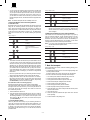
[ 1 ] SYSTEM CONFIGURATION . . . . . . . . . . . . . . . . . . . . . . . . . . . 1-1
[ 2 ] SPECIFICATIONS . . . . . . . . . . . . . . . . . . . . . . . . . . . . . . . . . . . 2-1
[ 3 ] CONSUMABLE PARTS . . . . . . . . . . . . . . . . . . . . . . . . . . . . . . . 3-1
[ 4 ] SET UP . . . . . . . . . . . . . . . . . . . . . . . . . . . . . . . . . . . . . . . . . . . 4-1
[ 5 ] EXTERNAL VIEW AND INTERNAL STRUCTURE . . . . . . . . . . 5-1
[ 6 ] MACHINE OPERATION . . . . . . . . . . . . . . . . . . . . . . . . . . . . . . 6-1
[ 7 ] ADJUSTMENTS, SETTING . . . . . . . . . . . . . . . . . . . . . . . . . . . . 7-1
[ 8 ] SIMULATION (Test Command) ⋅ USER PROGRAM . . . . . . . . 8-1
[ 9 ] DISASSEMBLY, ASSEMBLY, MAINTENANCE . . . . . . . . . . . . 9-1
[10] TROUBLESHOOTING . . . . . . . . . . . . . . . . . . . . . . . . . . . . . . . 10-1
This document has been published to be used
for after sales service only.
The contents are subject to change without notice.
FO-3800M
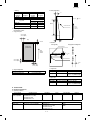
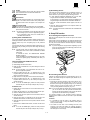
At the production line, the output power of
the scanner unit is adjusted to 0.33
M ILL I-WAT T P L US 2 0 P C TS an d is
maintained constant by the operation of the
Automatic Power Control (APC).
Even if the APC circuit fails in operation for
some reason, the maximum output power
will only be 15 MILLI-WATT 0.1 MICROSEC. giving an acceptable emission level
of 42 MICRO-WATT which is still-less than
the limit of CLASS-1 laser product.
Caution
The fusing unit is hot. Exercise care when inspecting it.
Do not switch the printer rapidly on and off. After turning the printer off,
wait 10 to 15 seconds before turning it back on.
Printer power must be turned off before installing any supplies.
Laserstrahl
LASER RADIATION WHEN OPEN AND INTERLOCKS
CAUTION INVISIBLE
DEFEATED AVOID EXPOSURE TO BEAM.
UNSICHTBARE LASERSTRAHLUNG WENN ABDECKUNG GEÖFFNET UND SICHVORSICHT ERHEITSVERRIEGELUNG ÜBERBRÜCKT. NICHT DEM STRAHL AUSSETZEN.
LASERSTRÅLNING VED ÅBNING. NÅR SIKKERHEDSBRYDERE ER UDE AF FUNKTION. UNDGÅ UDSAETTELSE FOR STRÅLNING.
ADVARSEL USYNLIG
USYNLIG LASERSTRÅLING NÅR DEKSEL ÅPNES OG SIKKERHEDSLÅS BRYTES.
ADVERSEL UNNGÅ EKSPONERING FOR STRÅLEN.
LASERSTRÅLNING NÄR DENNA DEL ÄR ÖPPNAD OCH SPÄRRAR ÄR
VARNING OSYNLIG
URKOPPLADE. STRÅLEN ÄR FARLIG. BETRAKTA EJ STRÅLEN.
AVATTAESSA JA SUOJALUKITUS OHITETTAESSA OLET ALTTIINA
VARO!
NÄKYMÄTÖNTÄ LASERSÄTEILYLLE. ÄLÄ KATSO SÄTEESEEN.
VAROITUS! LAITTEEN KÄYTTÄMINEN MUULLA
KUIN TÄSSÄ KÄYTTÖOHJEESSA MAINITULLA
TAVALLA SAATTAA ALTISTAA KÄYTTÄJÄN
TURVALLISUUSLUOKAN 1 YLITTÄVÄLLE
NÄKYMÄTTÖMÄLLE LASERSÄTEILYLLE.
VARNING - OM APPARATEN ANVÄNDS PÅ ANNAT
SÄTT ÄN I DENNA BRUKSANVISNING
SPECIFICERATS, KAN ANVÄNDAREN UTSÄTTAS
FÖR OSYNLIG LASERSTRÅLNING, SOM
ÖVERSKRIDER GRÄNSEN FÖR LASERKLASS 1.
CLASS 1
LASER PRODUCT
LASER KLASSE 1
LUOKAN 1 LASERLAITE
KLASS 1 LASER APPARAT
The foregoing is applicable only to the 220V
model, 230V model and 240V model.
Caution
This product contains a low power laser
device. To ensure continued safety do not
remove any cover or attempt to gain access
to the inside of the product. Refer all
servicing to qualified personnel.
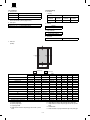
Wave length
780 ± 15nm
Pulse times
(9.3 ± 2µs)/7mm
Output Power 0.4mW ± 0.05mW
FO-3800M
Contents
[1] SYSTEM CONFIGURATION . . . . . . . . . . . . . . . . . . . . . . . . . . . . . . . . . . . . . . . . . . . . . . . . . . . . . . . . . . . . . . . . . .
1. LINEUP . . . . . . . . . . . . . . . . . . . . . . . . . . . . . . . . . . . . . . . . . . . . . . . . . . . . . . . . . . . . . . . . . . . . . . . . . . . . . . . . .
2. STRUCTURE . . . . . . . . . . . . . . . . . . . . . . . . . . . . . . . . . . . . . . . . . . . . . . . . . . . . . . . . . . . . . . . . . . . . . . . . . . . .
3. SOFTWARE . . . . . . . . . . . . . . . . . . . . . . . . . . . . . . . . . . . . . . . . . . . . . . . . . . . . . . . . . . . . . . . . . . . . . . . . . . . . .
4. OPERATING ENVIRONMENT . . . . . . . . . . . . . . . . . . . . . . . . . . . . . . . . . . . . . . . . . . . . . . . . . . . . . . . . . . . . . . .
1-1
1-1
1-2
1-2
1-2
[2] SPECIFICATIONS . . . . . . . . . . . . . . . . . . . . . . . . . . . . . . . . . . . . . . . . . . . . . . . . . . . . . . . . . . . . . . . . . . . . . . . . . . 2-1
1. BASIC SPECIFICATIONS . . . . . . . . . . . . . . . . . . . . . . . . . . . . . . . . . . . . . . . . . . . . . . . . . . . . . . . . . . . . . . . . . . 2-1
2. OPERATION (PERFORMANCE) . . . . . . . . . . . . . . . . . . . . . . . . . . . . . . . . . . . . . . . . . . . . . . . . . . . . . . . . . . . . . 2-1
3. Basic speficifications of facsimile . . . . . . . . . . . . . . . . . . . . . . . . . . . . . . . . . . . . . . . . . . . . . . . . . . . . . . . . . . . . . . 2-5
4. ENGINE SPECIFICATION . . . . . . . . . . . . . . . . . . . . . . . . . . . . . . . . . . . . . . . . . . . . . . . . . . . . . . . . . . . . . . . . . 2-13
[3] CONSUMABLE PARTS . . . . . . . . . . . . . . . . . . . . . . . . . . . . . . . . . . . . . . . . . . . . . . . . . . . . . . . . . . . . . . . . . . . . . .
1. Configuration . . . . . . . . . . . . . . . . . . . . . . . . . . . . . . . . . . . . . . . . . . . . . . . . . . . . . . . . . . . . . . . . . . . . . . . . . . . . .
2. List . . . . . . . . . . . . . . . . . . . . . . . . . . . . . . . . . . . . . . . . . . . . . . . . . . . . . . . . . . . . . . . . . . . . . . . . . . . . . . . . . . . .
3. Details . . . . . . . . . . . . . . . . . . . . . . . . . . . . . . . . . . . . . . . . . . . . . . . . . . . . . . . . . . . . . . . . . . . . . . . . . . . . . . . . . .
4. Paper specifications . . . . . . . . . . . . . . . . . . . . . . . . . . . . . . . . . . . . . . . . . . . . . . . . . . . . . . . . . . . . . . . . . . . . . . .
5. Standard density sample . . . . . . . . . . . . . . . . . . . . . . . . . . . . . . . . . . . . . . . . . . . . . . . . . . . . . . . . . . . . . . . . . . .
6. Environmental conditions . . . . . . . . . . . . . . . . . . . . . . . . . . . . . . . . . . . . . . . . . . . . . . . . . . . . . . . . . . . . . . . . . . .
3-1
3-1
3-1
3-1
3-3
3-4
3-5
[4] SET UP . . . . . . . . . . . . . . . . . . . . . . . . . . . . . . . . . . . . . . . . . . . . . . . . . . . . . . . . . . . . . . . . . . . . . . . . . . . . . . . . . . .
1. Installing conditions . . . . . . . . . . . . . . . . . . . . . . . . . . . . . . . . . . . . . . . . . . . . . . . . . . . . . . . . . . . . . . . . . . . . . . . .
2. Unpacking . . . . . . . . . . . . . . . . . . . . . . . . . . . . . . . . . . . . . . . . . . . . . . . . . . . . . . . . . . . . . . . . . . . . . . . . . . . . . . .
3. Parts and consumable parts setup . . . . . . . . . . . . . . . . . . . . . . . . . . . . . . . . . . . . . . . . . . . . . . . . . . . . . . . . . . . .
4. Cable connection . . . . . . . . . . . . . . . . . . . . . . . . . . . . . . . . . . . . . . . . . . . . . . . . . . . . . . . . . . . . . . . . . . . . . . . . .
5. Installing the printer and TWAIN (Scanner) driver software . . . . . . . . . . . . . . . . . . . . . . . . . . . . . . . . . . . . . . . . .
6. Setup FAX section . . . . . . . . . . . . . . . . . . . . . . . . . . . . . . . . . . . . . . . . . . . . . . . . . . . . . . . . . . . . . . . . . . . . . . . . .
7. Note for transport . . . . . . . . . . . . . . . . . . . . . . . . . . . . . . . . . . . . . . . . . . . . . . . . . . . . . . . . . . . . . . . . . . . . . . . . . .
4-1
4-1
4-1
4-2
4-4
4-4
4-6
4-7
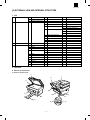
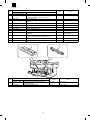
[5] EXTERNAL VIEW AND INTERNAL STRUCTURE . . . . . . . . . . . . . . . . . . . . . . . . . . . . . . . . . . . . . . . . . . . . . . . . . 5-1
1. List . . . . . . . . . . . . . . . . . . . . . . . . . . . . . . . . . . . . . . . . . . . . . . . . . . . . . . . . . . . . . . . . . . . . . . . . . . . . . . . . . . . . 5-1
2. Contents . . . . . . . . . . . . . . . . . . . . . . . . . . . . . . . . . . . . . . . . . . . . . . . . . . . . . . . . . . . . . . . . . . . . . . . . . . . . . . . . 5-1
[6] MACHINE OPERATION . . . . . . . . . . . . . . . . . . . . . . . . . . . . . . . . . . . . . . . . . . . . . . . . . . . . . . . . . . . . . . . . . . . . . .
(1) Operation mode . . . . . . . . . . . . . . . . . . . . . . . . . . . . . . . . . . . . . . . . . . . . . . . . . . . . . . . . . . . . . . . . . . . . . . . .
(2) Machine status and display . . . . . . . . . . . . . . . . . . . . . . . . . . . . . . . . . . . . . . . . . . . . . . . . . . . . . . . . . . . . . . . .
(3) Relationship between the power save mode and the display and machine operations . . . . . . . . . . . . . . . . . .
(4) Consumable parts life and operation . . . . . . . . . . . . . . . . . . . . . . . . . . . . . . . . . . . . . . . . . . . . . . . . . . . . . . . .
(5) Selection between the ON LINE mode and the OFF LINE mode . . . . . . . . . . . . . . . . . . . . . . . . . . . . . . . . . . .
(6) Paper width detection and machine operation . . . . . . . . . . . . . . . . . . . . . . . . . . . . . . . . . . . . . . . . . . . . . . . . .
(7) Auto copy function . . . . . . . . . . . . . . . . . . . . . . . . . . . . . . . . . . . . . . . . . . . . . . . . . . . . . . . . . . . . . . . . . . . . . . .
(8) AE level adjustment procedure . . . . . . . . . . . . . . . . . . . . . . . . . . . . . . . . . . . . . . . . . . . . . . . . . . . . . . . . . . . . . .
(9) Toner save mode setup and cancel . . . . . . . . . . . . . . . . . . . . . . . . . . . . . . . . . . . . . . . . . . . . . . . . . . . . . . . . . .
(10) Operation mode and priority . . . . . . . . . . . . . . . . . . . . . . . . . . . . . . . . . . . . . . . . . . . . . . . . . . . . . . . . . . . . . . . .
(11) Multi access operation table . . . . . . . . . . . . . . . . . . . . . . . . . . . . . . . . . . . . . . . . . . . . . . . . . . . . . . . . . . . . . . . .
(12) Machine errors and operations in each operation mode . . . . . . . . . . . . . . . . . . . . . . . . . . . . . . . . . . . . . . . . . . .
(13) Pre-heat mode, shut off mode operations . . . . . . . . . . . . . . . . . . . . . . . . . . . . . . . . . . . . . . . . . . . . . . . . . . . . . .
(14) Others . . . . . . . . . . . . . . . . . . . . . . . . . . . . . . . . . . . . . . . . . . . . . . . . . . . . . . . . . . . . . . . . . . . . . . . . . . . . . . . . .
6-1
6-1
6-1
6-3
6-3
6-2
6-3
6-3
6-3
6-3
6-4
6-4
6-5
6-6
6-6
[7] ADJUSTMENTS, SETTING . . . . . . . . . . . . . . . . . . . . . . . . . . . . . . . . . . . . . . . . . . . . . . . . . . . . . . . . . . . . . . . . . . . 7-1
1. List . . . . . . . . . . . . . . . . . . . . . . . . . . . . . . . . . . . . . . . . . . . . . . . . . . . . . . . . . . . . . . . . . . . . . . . . . . . . . . . . . . . . 7-1
2. Details . . . . . . . . . . . . . . . . . . . . . . . . . . . . . . . . . . . . . . . . . . . . . . . . . . . . . . . . . . . . . . . . . . . . . . . . . . . . . . . . . . 7-1
[8] SIMULATION (Test Command) – USER PROGRAM . . . . . . . . . . . . . . . . . . . . . . . . . . . . . . . . . . . . . . . . . . . . . . . 8-1
1. Simulation . . . . . . . . . . . . . . . . . . . . . . . . . . . . . . . . . . . . . . . . . . . . . . . . . . . . . . . . . . . . . . . . . . . . . . . . . . . . . . . 8-1
2. User program . . . . . . . . . . . . . . . . . . . . . . . . . . . . . . . . . . . . . . . . . . . . . . . . . . . . . . . . . . . . . . . . . . . . . . . . . . . 8-14
3. Printing Out Reports . . . . . . . . . . . . . . . . . . . . . . . . . . . . . . . . . . . . . . . . . . . . . . . . . . . . . . . . . . . . . . . . . . . . . . . 8-15
4. FAX simulations . . . . . . . . . . . . . . . . . . . . . . . . . . . . . . . . . . . . . . . . . . . . . . . . . . . . . . . . . . . . . . . . . . . . . . . . . . 8-16
5. Software switch for FAX . . . . . . . . . . . . . . . . . . . . . . . . . . . . . . . . . . . . . . . . . . . . . . . . . . . . . . . . . . . . . . . . . . . . 8-21
[9] DISASSEMBLY, ASSEMBLY, MAINTENANCE . . . . . . . . . . . . . . . . . . . . . . . . . . . . . . . . . . . . . . . . . . . . . . . . . . . 9-1
1. List . . . . . . . . . . . . . . . . . . . . . . . . . . . . . . . . . . . . . . . . . . . . . . . . . . . . . . . . . . . . . . . . . . . . . . . . . . . . . . . . . . . . 9-1
[10] TROUBLESHOOTING . . . . . . . . . . . . . . . . . . . . . . . . . . . . . . . . . . . . . . . . . . . . . . . . . . . . . . . . . . . . . . . . . . . . . . 10-1
1. Self diag message and troubleshooting . . . . . . . . . . . . . . . . . . . . . . . . . . . . . . . . . . . . . . . . . . . . . . . . . . . . . . . 10-1
2. Troubleshooting of print operation (Printer mode) . . . . . . . . . . . . . . . . . . . . . . . . . . . . . . . . . . . . . . . . . . . . . . 10-18
3. Troubleshooting of copy/print quality . . . . . . . . . . . . . . . . . . . . . . . . . . . . . . . . . . . . . . . . . . . . . . . . . . . . . . . . 10-19
FO-3800M
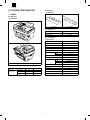
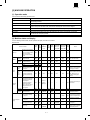
B. Supplies
[1] SYSTEM CONFIGURATION
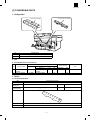
(1) Appearance
1. LINEUP
A. Main Unit
(1) Appearance
TD cartridge
Drum cartridge
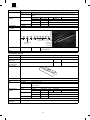
(2) Supplies List
Items
Model/Parts code
Drum cartridge
FO-29DR
TD cartridge
FO-29ND
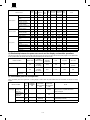
C. Accessories
Accessories list
Model
FO-3800M
Tray (Universal)
Included
Drum cartridge
Installed
TD cartridge (1.5K)
Included
Original cover
Included
AC power cord
Included UL, CSA PLG
Printer cable
IEEE1284
USB
Included
Driver soft
CD-ROM
Item
Function/
Equipment
Copier
Included (SEC*)
Printer
Included (SEC*)
FAX
Warranty card (Registration card)
(2) Function/Equipment
MSDS sheets
FO-3800M
POP label
Notes
N/A
Phone cable
Operation manual
FO-3800M
Included
Included
Included (SEC*) in manual
Included
N/A
Copy (SPF)
Yes
Dust cover
N/A
FAX (SPF)
Yes
User card (Aiyousya card)
N/A
Printer
Yes
Digital logo
N/A
1–1
FO-3800M
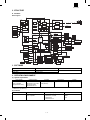
2. STRUCTURE
A. Hardware
Block diagram
FAX PWB
RTC
LCD PWB
LIU PWB
1-chip
CPU
LCD
Controller
FX200
ASIC
DRAM
LIU control
Fax
SPF relay PWB
SPF solenoid
SRAM
Driver
Scanner motor
Compress
/Expand
LC8213
CPU/DSP
FX164
Speaker control
Speaker
Motor driver
DRAM
ROM
ASIC
DRAM
SRAM
Document
detection SW
I/F PWB
Paper in sensor
Driver
Main control PWB
Open/Close SW
CCD PWB
USB converter
chip
CCD
Amplifier
LSU unit
Image
process
ASIC
A/D
Laser
Laser beam
sensor
High voltage PWB
DRAM
1M 16 2
SRAM
32k 8 2
Paper in sensor
Polygon-motor
Paper exit sensor
Cover SW
Scanner motor
CPU
H8S
Motor driver
Pick-up solenoid
Driver
FAN motor
Motor driver
RAM
ROM
Main motor
EEPROM
Home position sensor
High voltage unit
Operation panel
Paper size sensor
Heat roller
Developing cartridge
Thermistor
Transfer roller
Doctor
Main charger roller
Toner sensor
Heater lamp
Paper exit
sensor
Lamp
Inverter
Power supply
unit
Temperature
fuse
Developing
roller
Earth sheet
Drum
OPC drum cartridge
Separation
electrode
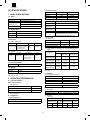
3. SOFTWARE
Items
Contents
GDI Printer driver
Printer driver
Twain driver
Scanner driver
Media
CD-ROM
4. OPERATING ENVIRONMENT
(1) System requirements
Host computer
IBM PC/AT or
100% compatible
(Supported ECP mode)
∗
Operating system
MS-DOS 3.3 +
MS-Windows 3.1X or later
MS-Windows 95/98
MS-Windows NT 4.0
Emulation
Plug and play
Sleek type GDI (Printer)
Twain (Scanner)
Network
Supported
Not supported
MS-DOS 3.3 + (Printer only)
(2) Interface
Type
IEEE1284P × 1
Host computer
IBM PC/AT or
100% compatible
Operating system
MS-DOS 3.3 +
MS-Windows 3.1X or later
MS-Windows 95
MS-Windows NT 4.0
1–2
Protocol
Peppy
Nibble
ECP
FO-3800M
(2) Exposure mode
[2] SPECIFICATIONS
Exposure mode
Automatic
1. BASIC SPECIFICATIONS
(1) Types
Model type
Desktop type
Scanning type
SPF/Flat bed/Monochrome type
Printing type
(Emulation type)
Electronic photographic type
—
Available
Manual
5 steps
Available
Photo
5 steps
Non
Copy ratio
G3
(2) Target users
Print Volume
Average
Zoom ratio range/fixed ratio
Zoom mode
50% to 200% (151 steps in 1% increments)
Fixed ratio mode
(AB system)
50, 70, 86, 100, 141, 200%
Fixed ratio mode
(Inch system)
50, 64, 78, 100, 129, 200%
Zooming accuracy
Same size copying: 100% ± 1.0%
Enlargement copying : Set copy ratio ± 1.0%
Reduction copying: Set copy ratio ± 1.0%
600 sheet/month
Maximum
1,000 sheet/month
(4) Job speed
(3) Operating environment
a. First copy time
Printer mode
Mode
<1> System requirements
Host computer
Operating system
IBM PC/AT or
MS-DOS 3.3 +
100% compatible MS-Windows 3.1X or later
MS-Windows 95/98
MS-Windows NT 4.0
Emulation
Sleek type
GDI
Twain
Network
Not
supported
SPF mode
Platen mode
Normal mode
13 sec
10 sec
Preheat mode
21 sec
21 sec
Auto power shut-off mode
23 sec
23 sec
b. Copying speed for each paper size and reduction/enlargement
(CPM)
<2> Interface
Type
IEEE1284 P
(1 ports)
∗
Toner save mode
(3) Copy ratio
GDI
FAX type
Steps for exposure
Copy ratio
Host computer
Operating system
IBM PC/AT or
MS-DOS 3.3 +
100% compatible MS-Windows 3.1X or later
MS-Windows 95/98
MS-Windows NT 4.0
Paper size
Protocol
Peppy
Nibble
ECP
MS-DOS 3.3 + (Printer only)
(4) Outer dimensions
Machine
460 × 425 × 307 mm (18.2" × 16.8" × 12.1")
(5) Weight
Same size
Reduction
(50% to 99%)
Enlargement
(101% to 200%)
A4
(Short edge feed)
8 CPM
8 CPM
8 CPM
B5
(Short edge feed)
8 CPM
8 CPM
8 CPM
8-1/2" × 14"
(Short edge feed)
7 CPM
7 CPM
7 CPM
8-1/2" × 11"
(Short edge feed)
8 CPM
8 CPM
8 CPM
Packaged
15.10 Kg
(5) Max. number of continuous copies
Machine
13.30 Kg
50 copies
(6) Machine life
(6) Exposure
60K prints or 5 years
a. Exposure mode/Processing
Exposure mode
2. OPERATION (PERFORMANCE)
A. Common operation
Warm-up/Jam recovery
Function
Automatic
Error diffusion
Manual
Error diffusion
Photo
Error diffusion
b. Toner save
a. Warm-up time
Warm-up time after power ON
0 sec
Recovery time from power save mode
0 sec
Jam recovery time
0 sec
Yield of Toner save mode
5% area coverage
(When using 3K toner cartridge)
c. Zooming type
b. Jam recovery time
B. Copy mode
Main scanning direction
Software computation
Sub scanning direction
Scanning speed/Document feed speed
d. Resolution
∗ Scanning
(1) Max. original size
Main scanning direction
8-1/2" × 14", A4 (210 × 356 mm) (SPF mode)
Sub scanning direction
Virtual
Virtual
Standard resolution
Standard resolution
resolution
resolution
8-1/2" × 11", A4 (210 × 297 mm) (Platen mode)
2–1
Scanner
400 dpi
—
Scanner
600 dpi
—
Copier
600 dpi
—
Copier
600 dpi
—
FO-3800M
∗
Printing
h. Skew (Diagonality)
Main scanning direction
Sub scanning direction
Standard
resolution
Virtual
resolution
Standard
resolution
Virtual
resolution
600 dpi
—
600 dpi
—
D1
| D1-D2 |
1.7mm
Position
Copy ratio
Center
Corner
Same size
5.0 line/mm
4.5 line/mm
Enlargement (101% to 200%)
5.0 line/mm
4.5 line/mm
Reduction (50% to 99%)
4.0 line/mm
4.0 line/mm
269mm
Printed vertical line
Paper
transfer
direction
e. Exposure gradient
Error diffusion method.
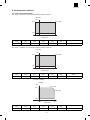
f. Copy (Print) Area
2.0 mm (Std)
3.0 mm (Max)
D2
(Top)
1 ~ 5.0 mm
i.
Distortion
Orthogonality
Printed image
(printable area)
Image phase misalignment
Print horizonal line
Paper
transfer
direction
D
|D|
1mm
203mm
Printed vertical line
2.5 mm (Std)
5.0 mm (Max)
(Bottom)
60µm
2.0 mm (Std)
3.0 mm (Max)
j.
Original size
g. Image misalignment
Off center
0 ± 2.0 mm or below
Horizontal misalignment
0 ± 2.0 mm or below
Minimum
Maximum
AB system
A6 (105 × 148.5 mm)
A4 (210 × 297 mm)
Inch system
3-7/8" × 5-7/8"
8-1/2" × 14" (SPF mode)
8-1/2" × 11" (Platen mode)
k. Paper size
Minimum
Maximum
AB system
A6 (105 × 148.5 mm)
A4 (210 × 297 mm)
Inch system
3-7/8" × 5-7/8"
8-1/2" × 14" (SPF mode)
8-1/2" × 11" (Platen mode)
C. Printer mode
(1) System requirements
a. Operating conditions
Host computer
IBM PC/AT or
100% compatible
Operating system
MS-DOS 3.3 +
MS-Windows 3.1X or later
MS-Windows 95/98
MS-Windows NT 4.0
Emulation
Sleek type GDI
Driver
GDI printer driver
Host computer
IBM PC/AT or 100% compatible
Operating system
MS-DOS 3.3 +
MS-Windows 3.1X or later
MS-Windows 95/98
MS-Windows NT 4.0
Plug and play
Supported
Network
Not supported
b. Interface
Type
IEEE1284 P × 1
2–2
Protocol
Peppy
Nibble
FO-3800M
(2) Job speed
(3) Image quality
a. First print time
Mode
a. Resolution
∗ Printing
Paper feed mode
Normal
20 sec
Power save
20 sec
Main scanning direction
(A4 (8-1/2" × 11"), Not including the communication time to the
host PC and the set up time of polygon mirror)
b. Print speed
Sub scanning direction
Standard
resolution
Virtual
resolution
Standard
resolution
600 dpi∗
—
600 dpi∗
Virtual
resolution
—
∗ 300 dpi selectable
b. Gradient
Paper size
8 ppm (A4, 8-1/2" × 11", Sharp standard paper)
Gradient
Binary (Dither pattern method)
c. Image treatment
Image treatment
Dither pattern method
d. Toner save
Yield of toner save mode
5% area coverage
e. Print area
(Portrait)
G
E
F
D B
H
C
A
Physical Page
Paper size
Logical Page
Value
A
B
C
D
E
F
G
H
LETTER
2550/5100
3300/6600
2456/4904
3200/6400
50/100
44/96
50/100
50/100
LEGAL
2550/5100
4200/8400
2456/4904
4100/8200
50/100
44/96
50/100
50/100
EXECUTIVE
2175/4350
3150/6300
2080/4152
3050/6100
50/100
45/98
50/100
50/100
A4
2480/4960
3507/7015
2384/4760
3407/6815
50/100
46/100
50/100
50/100
A5
1748/3496
2480/4960
1648/3296
2380/4760
50/100
50/100
50/100
50/100
COM-10
1236/2473
2850/5700
1136/2280
2750/5500
50/100
50/93
50/100
50/100
MONARCH
1161/2323
2250/4500
1064/2128
2150/4300
50/100
47/95
50/100
50/100
C5
1912/3825
2703/5407
1816/3632
2603/5207
50/100
46/93
50/100
50/100
DL
1299/2598
2598/5196
1200/2400
2498/4996
50/100
49/98
50/100
50/100
B5
2149/4299
3035/6070
2056/4104
2935/5870
50/100
43/95
50/100
50/100
FOOLSCAP
2550/5100
3720/7440
2456/4904
3620/7240
50/100
44/96
50/100
50/100
FOLIO
2550/5100
3900/7800
2456/4904
3800/7600
50/100
44/96
50/100
50/100
Government Printed Postcard
1181/2362
1748/3496
1088/2168
1648/3296
50/100
43/94
50/100
50/100
Japanese Envelop (Choukei 3)
1417/2834
2775/5551
1320/2640
2675/5351
50/100
47/94
50/100
50/100
A.
B.
C.
D.
Physical page width
Physical page height
Logical page width
Width difference between Physical page and HP-GL-2 picture
frame
E. Height difference between Physical page and Logical page
F. Height difference between Physical page and HP-GL-2 picture
frame
G. Printable width
H. Distance between Top edge and Bottom edge in Physical page
2–3
FO-3800M
(Landscape)
G
E
F
D B
H
C
A
Physical Page
Paper size
LETTER
LEGAL
EXECUTIVE
A4
A5
COM-10
MONARCH
C5
DL
B5
FOOLSCAP
FOLIO
Government Printed Postcard
Japanese Envelope (Choukei 3)
A
3300/6600
4200/8400
3150/6300
3507/7015
2480/4960
2850/5700
2250/4500
2703/5407
2598/5196
3035/6070
3720/7440
3900/7800
1748/3496
2775/5551
B
2550/5100
2550/5100
2175/4350
2480/4960
1748/3496
1236/2473
1161/2323
1912/3825
1299/2598
2149/4299
2550/5100
2550/5100
1181/2362
1417/2834
Logical Page
C
3200/6400
4100/8200
3050/6100
3407/6815
2380/4760
2750/5500
2150/4300
2603/5207
2498/4996
2935/5870
3620/7240
3800/7600
1648/3296
2675/5351
A.
B.
C.
D.
Physical page width
Physical page height
Logical page width
Width difference between Physical page and HP-GL-2 picture
frame
E. Height difference between Physical page and Logical page
Value
D
2456/4904
2456/4904
2080/4152
2384/4760
1648/3296
1136/2280
1064/2128
1816/3632
1200/2400
2056/4104
2456/4904
2456/4904
1088/2168
1320/2640
E
50/100
50/100
50/100
50/100
50/100
50/100
50/100
50/100
50/100
50/100
50/100
50/100
50/100
50/100
F
50/100
50/100
50/100
50/100
50/100
50/100
50/100
50/100
50/100
50/100
50/100
50/100
50/100
50/100
G
50/100
50/100
50/100
50/100
50/100
50/100
50/100
50/100
50/100
50/100
50/100
50/100
50/100
50/100
H
44/96
44/96
45/98
46/100
50/100
50/93
47/95
46/93
49/98
43/95
44/96
44/96
43/94
47/94
F. Height difference between Physical page and HP-GL-2 picture
frame
G. Printable width
H. Distance between Top edge and Bottom edge in Physical page
h. Distortion
f. Image misalignment
0 ± 2.0 mm or below
0 ± 2.0 mm or below
Off center
Horizontal misalignment
Orthogonality
Image phase misalignment
Print horizonal line
g. Skew (Diagonality)
D1
D
|D|
| D1-D2 |
1mm
203mm
1.7mm
Printed vertical line
269mm
60µm
Printed vertical line
Paper
transfer
direction
i.
Paper size
AB system
Inch system
D2
2–4
Minimum
A6 (105 × 148.5 mm)
3-7/8" × 8-7/8"
Maximum
A4 (210 × 297 mm)
8-1/2" × 14"
FO-3800M
(2) Image quality
D. Scanner mode
∗
(1) System requirements
Resolution
a. Operating conditions
Host
computer
IBM PC/AT
or compatible
(Supported
ECP mode)
Operating
system
Windows 3.1x
Windows 95/98
Software/
Driver
Twain
driver
Plug and
play
Network
Supported
∗
Main scanning direction
300/400/600
600 dpi (Vertual)
Sub scanning
300/400/600
—
Scanning mode
Not
supported
Monochrome
8 bit Scan
Windows nt 4.0
Image density adjustment
Type
Host computer
Scan mode and
Image process
IEEE 1284 P
IBM PC/AT or
compatible
b. Interface
Operating
Windows 3.1x
Protocol
ECP
Windows 95/98
∗
Windows nt 4.0
1 bit Output to
5 levels
Scan mode
Image process
Text & Picture
Error diffusion method
Text
Error diffusion method
Picture
Error diffusion method
Scan size
8.5" × 14" (SPF mode only)
8.5" × 11"
A4
B5
A5
3. Basic specifications of facsimile
Large Item
Communication
system
Middle Item
Transmission
method
Small Item
Transmission time
Transmission Method
Compression method
Modem speed
Mutual transmission
Sub Item
Line used
Number of lines used
ECM
Max. document width
Unscannable region
Document size
Scanning
system
Automatic
document
detection
Transmission
mode
Document
loading capacity,
scanning cycle
(SPF
performance)
Transmitted document size
Document designation
Two-sided document
designation
Long document
SPF
Spec.
Approx. 6 sec. (G3 ECM/14,400bps)
V17, V29, V27TER, V33 (Only Receiving)
MH, MR, MMR
14,400bps → 2,400bps automatic fall back
G3
Public Switched Telephone Network (PSTN), Private
Branch exchange (PBX),
1 line (cannot be added)
YES
OC: 210mm
SPF: 216mm
Leading edge 1 to 4 mm, trailing edge: 4mm max., left
end + right end: either 4mm max.
SPF: Max. 8.5" × 14"
SPF: Min. 8.5" × 5.5" (Inch System)
SPF:
210 × 148mm (AB System)
YES
NO
14"
YES
OC
NO
SPF/OC transmission
changeover
Continuous, automatic feed
compatibility
Document loading capacity
NO
NO
SPF: 30 sheets (MAX)
8 sheets/min. (Standard mode, A4R memory
transmission)
Document scanning cycle
2–5
FO-3800M
Large Item
Image
processing
system
Middle Item
Half tone
reproduction
Small Item
Half tone (photo mode)
Sub Item
Resolution
Contrast
adjustment
Contrast selection
Manual in 3 stages (AE)
Resolution
selection
Standard
Fine
Super fine
Finest
8 dot / mm × 3.85 line / mm
8 dot / mm × 7.7 line / mm
8 dot / mm × 15.4 line / mm
NO
Printer section
resolution
Printing size
600dpi
Max. printing width
Print paper size detection
215.9 mm
YES (Only width): A4/Letter or small size
Letter/Legal (Inch System)
A4 (AB System)
250 × 1
Printing size
Print system
Print paper
Easy dialing
function
Cassette capacity
Print paper absence
detection
Exit Paper Tray Full censor
Feed
By failing paper pick up
NO
Paper cassette
Rapid key dialing
20 other parties
Speed dialing
Chain dialing
Redialing
Program
Mode recall
100 other parties
20 groups (including the other parties registered to
rapid key dialing)
By using the SEARCH key: Any other parties
registered to speed dialing and rapid key dialing can
be searched for using the first letter.
YES
The last number dialed is saved
NO
NO
Time specified
transmission/polling
Time of day specified for transmission or polling.
Max.3
Group dialing
Easy dialing
function
Transmission
function
system
Spec.
Equivalent to 256 scales
8 dot /mm × 7.7 line / mm (Fixed)
Time
designation
function
Phonebook transmission
Automatic recall mode
when other party is busy
Recall mode when
communication error occurs
Recall mode
Intervals
Count
Intervals
Count
Transmitted
Pages
Number of transmissions
counted in recall mode
simultaneously
Subsequent transmission
reservation override in
recall mode
1
1
1
1
to
to
to
to
15
14
15
14
minutes
times/0: no re-transmission
minutes
times/0: no re-transmission
Beginning with the page where error occurred
Max. 20 transmissions
YES
2 – 6
FO-3800M
Large Item
Middle Item
Memory Transmission/direct
transmission
Small Item
Sub Item
Memory
Transmission
Number of
transmission
Reservations
that can be
made
Processing
when memory
is full
Memory transmission
Setting change
After
Transmission
Setting
Line sound
monitoring
function
Priority function
Multiple
message
transmission
function
Rotational
Transmission
Book
document
transmission
Transmission is cancelled when using Timer, Group
or Broadcast function. Only scanned’ data is
transmitted.
∗ The number of pages to be actually sent does not
always correspond to the one passing through the
SPF in case of communication error.
∗ The transmission is cancelled when communication
error occurs.
∗ If the reverse sending is selected, the transmission
is cancelled.
NO
Dialing confirmation
monitoring
YES (Service Man diagnostic.)
Relay transmission
Relay transmission
Confidential
function
Batch
transmission
function
Max. 20
YES
By Memory All Clear
Number of
destinations
Transmission
method
Usable
numbers
Confidential transmission
50 destinations (Including the Group Dial)
Broadcast key, group key
Rapid or Speed keys
Transmitted to group registered to rapid keys or
speed dial.
Group dialing
Broadcast
function
YES
Direct transmission
Default setting
Broadcast transmission
Transmission
function
system
Spec.
Instructing
Station
Relay station
Multiple relay
Number of
relay groups
Number of
Receiving
stations that
may be
Specified per
Group
Other party’s
Station
Batch transmission
NO
NO
NO
NO
NO
NO
NO
Transmission reservation
interrupt
Broadcast interrupt
Recall mode interrupt
NO
YES
YES
Multiple message
transmission
NO
Rotational transmission
Paper size
NO
Book document
transmission
Transmission
method
YES (From OC mode)
2 – 7
FO-3800M
Large Item
Middle Item
Book
document
transmission
Small Item
Book document
transmission
OK stamp
Remote transmission
(Memory Polling)
Transmission
function
system
Remote
transmission
(polling
transmission
function)
Protective function
Sub Item
Consecutive
page
transmission
(page splitting)
OK stamp
Remote
Transmission
Check by
other Party’s
number
Check by
Matching of
System
number (user’s
own machine)
and ID number
(other party’s
Machine)
(between
Sharp
machines only)
Reverse
sending
Number of calls
Automatic receiving
Manual receiving
Manual receiving
Receiving mode
Receiving
function
system
Telephone message
receiver connection
Automatic
phone/fax
switching
Manual
receiving setting
Number of
Switching calls
to automatic
Receiving in
manual
receiving mode
Answering
Machine mode
Automatically
switch to
automatic
receive
Quiet detect
time
Receiving
mode timer
switching
Variable scale
factor receiving
NO
YES (From Memory)
NO
NO
Automatic receiving (can be switched to A.M mode or
manual receiving in key operator program)
0 to 9 times (factory-set to twice: can be changed in
key operator program)
- The external telephone rings once if set the
number of calls for automatic receiving to 0 times.
NO
YES
OFF/1 to 9 times
YES
ON / OFF
OFF/ 1 to 10 sec.
NO
Reduction
Reduction
made within
Regular size
By received
data print size
Designation
Enlargement
Memory
receiving
function
NO
YES
Default setting
Receiving mode
Spec.
Substitute receiving into
memory
YES (ON/OFF in key operator program)
YES
NO
Substitute
Receiving into
Memory
Forced
memory
receiving
Received data
override Output
2 – 8
Only when data cannot be output
NO
NO
FO-3800M
Large Item
Middle Item
Transfer
Number
specified
receiving
Confidential
function
Receiving
function
system
Small Item
Transfer at occurrence of
trouble
Receiving of only specified
number enabled
Anti junk fax mode
Confidential receiving
Sub Item
YES
NO
Sender
Mailbox
Mailbox name
Confidential ID
code
Rotational
receiving
Split receiving setting
NO
NO
Transmission request
Transmission
Request
Resolution at
transmission
Request
Turnaround
transmission
YES
Depends on the Sending Machine.
NO
Speed dialing
Speed dialing
Registration
system
NO
YES
YES (according to paper selection condition in key
operator program)
Two-sided
document
receiving
2-in-1 receiving
Transmission
request (polling
receiving
function)
YES (ON/OFF) 10 group, 20 letters
NO
NO
NO
NO
Split size
Split receiving
Spec.
Number
registration
Rapid key dialing
Number of
other parties
Number of
other party’s
Number digits
Registered
name
earched letters
User tag
Classification
International
communication
mode setting
Transmission
method
Number of
other parties
Number of
other party’s
Number digits
Registered
name
Searched letters
User tag
Classification
International
communication
mode setting
Transmission
method
2 – 9
100 other parties
20 digits
20 letters (may be omitted)
Up to 1 letter
NO
NO
Speed dialing key + (00 to 99) + start key
20 other parties
20 digits
20 letters (may be omitted)
Up to 1 letter
NO
NO
Rapid key dialing
FO-3800M
Large Item
Middle Item
Small Item
Group dialing
Number
registration
Program
Registration
system
Batch
Sender
Registration
Transmission
request/remote
transmission
enable number
registration
Transmission
request/remote
transmission
enable number
registration
Letter input
Sender registration
Transmission request
enable number
System number
ID number
Input method
Letters that may be input
Sub Item
Registration
keys
Max. number
of registered
other parties
per group
Registrable
Number
Registered
name
Searched letters
User tag
Classification
Transmission
method
Number of
programs
Registerable
item
Registered
name
Calling method
Setting change
After calling
Registration key
Number of
other parties
Registration
method
Sender’s name
Sender’s
number
Transmission
Request
source Number
Registration
System
number
Registration
ID number
Registration
Key input
Characters
Registered
data read-out,
read-in
Date & time
adjustment
Date indication
change
Backup
Telephone
Function
System
Spec.
Rapid keys
50 other parties
Numbers registered to speed dialing and rapid key
dialing.
20 letters (may be omitted)
NO
NO
Group dialing
NO
NO
NO
NO
NO
NO
NO
NO
24 letters, registered in key operator program
20 digits, registered in key operator program
NO
NO
NO
YES
Alphanumeric characters, symbols
NO
Registered in key operator program
Support terms is from 1990 to 2089.
NO
Registered data backup at
power failure
SRAM used, built-in battery-backed
Handset
On-hook
Hold
Pause
Phone
transmission at
power failure
Ringer volume
NO
YES
NO
YES (2 second fixed)
NO
Adjusted in key operator program
Adjusted by pressing arrow keys on the fax control
panel
Switched between 10 pps and TONE in key operator
program (North America)
Speaker volume
Tone pulse
switching
2 – 10
FO-3800M
Large Item
Telephone
Function
System
Middle Item
External
telephone
connection
Automatic
telephone/fax
switching
Memory
capacity
Fax
Memory
Memory Back
up
Memory
Contents
(transmission
reservation)
confirmation
Small Item
Sub Item
Remote receiving switching
YES (switching number in 1 digit +**) 0 to 9
Audio response
Response voice recording
Standard
Option
NO
NO
NO
2MB (Approx. 120 pages/A4)
NO
NO
LCD indication
NO
Print out
YES
Memory
remain
indication
Page counter
YES (Memory available percent display 3 digits in %
on LCD
NO
YES (Year: month: day/ year in 4 digits)
LCD: 2 digits / Print: 4 digits
NO
Date printing
Date indication change
Additional
information
printing
function for
transmission
Cover function
Transmission
message
Sender printing
function
Additional
printing
function for
receiving
Cover item
Other party’s
name
Other party’s
number
Sender’s name
Sender’s
number
Transmission
message
User message
Sender’s number
Sender’s name
Index printing
YES
YES
YES
YES
YES
Communication record
memory capacity
Number of
communications
Time-specified
output
Communication
record function
YES
NO MESSAGE/URGENT/
IMPORTANT/CONFIDENTIAL/PLS.DISTRIBUTE/PLS.
CALL BACK
NO
20 digits
24 letters
Regular message
Communication record
table size
Record
table
system
Spec.
YES
Communication record
table
When
recording
Memory is full
Printing
sequence
Department-bydepartment
output
Time-specified
communication table
Confidential receiving
confirmation table
A4: AB System
LETTER, Legal: Inch System
(not output if size setting is not A4, LETTER, legal or
larger)
50 communications for transmission/receiving
respectively
50 communications for transmission/receiving
respectively
YES 5 kinds, Every day, Each 2 day, Each 4 day,
Once a week, OFF
The print time is fixed at 00:00.
NO
FIRST IN FIRSTOUT
NO
Common to transmission record table
NO
2 – 11
FO-3800M
Large Item
Middle Item
Communication
result report
function
Record
table
system
Other report/list
Other party
confirmation
function
CSI function
Department
management
Department
management
Others
Operation
panel display
Auto startup
mode
Distinctive
Ring (Only
North America
and Australia)
FAST (Only for
U.S.A.)
Power
consumption
Automatic
Summer Set
(Only Europe)
PBX setting
(Only Europe)
Small Item
Communication result
table (transmission)
Broadcast transmission
report
Communication result
table (receiving)
Document image printing
when memory
transmission is not yet
made
Rapid key dialing list
Speed dialing list
Group dialing list
Transmission activity list
ID/sender list
Batch transmission
confirmation list
Confidential ID list
Option setting list
Telephone list
Timer list
Anti junk fax number list
Receptions activity List
Memory image erasure list
Sub Item
Spec.
YES (ALWAYS PRINT, ERROR/ TIMER, SEND
ONLY, NEVER PRINT, ERROR ONLY)
YES (ALWAYS PRINT, ERROR ONLY, NEVER
PRINT)
YES
NO
YES (output as telephone number list)
YES (output as telephone number list)
YES
YES
NO
NO
NO
YES
YES
YES
YES
YES
NO
Other party confirmation
display
NO
CSI
Department-by-department
user restriction
Number of set departments
Department-by-department
charge management
function
YES
NO
LCD
20 letters by 2 lines
NO
NO
NO
YES
YES
Energy star compatibility
YES
YES
YES
2 – 12
FO-3800M
4. ENGINE SPECIFICATION
A. Operation/display section
Display type
LED display/LCD display (FAX section)
Operation type
Button/switch
B. Paper feed/transfer/finishing
(1) Details of paper feed section
AB system
Paper size
Capacity
A4, B5, A5, B6, A6
Paper weight
Special paper
250 sheets
56–80g/m2
—
200 sheets
81–90g/m2 Standard
condition
—
1 sheet
52–130 g/m2
(104 ∼ 130 g/m2 is available
for A4 size or smaller.)
Notes
Paper guide are to be
changed by user.
Recycled paper/
Transparency film/
Label sheet/Envelope
Inch system
Paper size
Capacity
8-1/2" × 14"
8-1/2" × 11"
8-1/2" × 5-1/2"
8-1/2" × 13"
8-7/8" × 12.4"
Paper weight
Special paper
250 sheets
15–21 lbs.
—
200 sheets
22–24 lbs. Standard
condition
—
1 sheet
14–34 lbs.
(28 ∼ 34.5 lbs. is available
for Letter size or smaller.)
(2) Details of finishing
Notes
Paper guide are to be
changed by user.
Recycled paper/
Transparency film/
Label sheet/Envelope
(5) Readable area/size
Paper receiving tray
Paper size
Paper weight
Capacity
A4 (8-1/2" × 11")
52–80g/m2 (15–21 lbs.)
50 sheets
81–90g/m2 (22–24 lbs.)
40 sheets
a. Maximum readable size
(210 × 356 mm)
AB system
Inch system
A4
8-1/2" × 14"
b. Scanning area
Under standard condition
2.0 mm (Std)
3.0 mm (Max)
C. Scanner (reading) section
(1)
Type
(Top)
Flat bed and SPF type/Monochrome
1 ~ 5.0 mm
(2) Original positioning
Top left
Printed image
(printable area)
4.0 mm
356 mm
Paper
transfer
direction
2.5 mm (Std)
5.0 mm (Max)
(Bottom)
2.0 mm (Std)
3.0 mm (Max)
(3) Resolution
216 mm
Main scanning direction
Sub scanning direction
Standard
resolution
Virtual
resolution
Standard
resolution
Virtual
resolution
400 dpi
—
600 dpi (∗)
—
(6) Scanning speed
Copy ratio
100%
(4) Gradient
Scan (8 bit)
Scanning
Speed
50 mm/sec.
(7) Light source (Lamp)
Output (1 bit)
Power voltage
2 – 13
AC 800 V (rms) 48 kHz
FO-3800M
(8) Scanning sensor
Type
(2) Lamp
Reduction optical image sensor (CCD)
Main unit
power supply
Voltage
Power
consumption
100/120/230 V
100/120/230 V
500 W
Type
Monochrome
Fluorescent
lamp
D. Scanner (Exposure) section
(3) Fusing temperature
(1) Type
(2) Resolution
Main scanning direction
Sub scanning direction
600 dpi
600 dpi
Ready mode/
Print mode
Power save mode
160°C
80°C
Print mode (after
20th sheet in the
multi print mode)
155°C
(4) Heat roller
(3) Gradient
Type
2 steps
Teflon coated roller
(5) Pressure roller
Type
(4) Details of Laser unit
Revolution
(6) Separation method
11,811 rpm
Number of mirrors
Forced separation by separation pawl
6
Laser power
0.35 mw
G. Power drive
75 × 65 µm
Laser beam size
Laser wave length
Silicone rubber roller
Stepping motor (Main motor)
785 nm
H. Engine control MCU (PCU)
E. Imaging process section
Processor
(1) Imaging speed
50 mm/sec.
CPU (H8S2350FP)
ASIC (HG73C025FD)
I. FAX control
(2) Photoconductor (Drum)
Processor
ASIC (LZ9FH19)
Type
OPC (φ 24 mm)
CPU (FX164)
Life time
20,000 sheets
Controller (FX200)
ASIC (SG46533N)
(3) Toner
Type
Developer cartridge color: black
Capacity/Life time
3,000 sheets (1,500 sheets with initially
installed cartridge) (A4 5% cover ratio)
J. Memory
(4) Charging
Method
Brush charging method
Voltage
DC-850 V AC 600 V (P-P)
Transfer roller method
Voltage
DC+3.5 kV AC 600 V (P-P)
Voltage
Location
2 M bit
Program
MCU (PCU) PWB
16 M bit × 3
Copy image data
MCU (PCU) PWB
2 K bit
Control data
MCU (PCU) PWB
32 K bytes × 2
Line image data
MCU (PCU) PWB
RAM
265 K bit × 2
Work memory
MCU (PCU) PWB
DRAM
16 M bit × 3
Image data/for
Work RAM
FAX control PWB
SRAM
256 K M bit × 2
Line image data
FAX control PWB
ROM
8 M bit
Program
FAX control PWB
SRAM
Semiconductor laser method
K. Interface
(7) Develop
Method
Contents
EEPROM
(6) Exposure
Method
Capacity
DRAM
(5) Transfer
Method
Type
ROM
(EPROM)
Type
Mono component non-magnetic method
–310 V
IEEE1284P
(8) Separation
Method
Separation charger type/method
Data transfer speed
3 Mbit/sec (Max)
Discharge brush type
Method
By developing roller
Voltage
+200 V
—
L. Power supply
Type
(10) Cleaning
DC power
supply
F. Fusing
High voltage
power supply
(1)
Method
Operating system
Peppy/Nibble/ECP
Connector type
(9) Discharge (Japan only)
Method
Items
Protocol
Quick heat-up with pressure roller method
2 – 14
Output
Voltage
Current
+24 V
+12 V
+5 V
+3.3 V
2.0 A
0.13 A
1.1 A
0.25 A
DC –310 V (+200 V)
DC +3.5 KV (AC 600 V P-P)
DC –850 V (AC 600 V P-P)
—
Notes
FO-3800M
(3) Storage conditions (packed in the packing material)
M. Operating voltage/power consumption
Power consumption
Power
supply
voltage/
frequency
Subsidiaries
Power
save
mode
Power
shutdown
mode
Ready
mode
Machine
Humidity
Average
(during
printing)
RH
Max.
—
120V
50/60Hz
29 Wh/h 55 Wh/h 17 Wh/h 171 Wh/h 600 W
—
220–240V
50/60Hz
35 Wh/h 64 Wh/h 18 Wh/h 175 Wh/h 600 W
40˚C, 90%
90%
50˚C, 60%
(Within Rated voltage ± 10% and Rated frequency ± 2%)
10%
N. Safety/environmental standard
(1) Safety/environmental standard
Item
Standard name
Safety standard
Radio wave noise
standard
Energy standard
SEMKO
Sweden
NEMKO
Norway
DEKRA (GS MARK)
Germany
BSI
U.K
Supply
RH
USA/Canada
USA
CE MARK
Europe
C-TICK
Australia
FCC
USA/CANADA
ENERGY STAR
World wide
(Printer only)
10%
—
–10˚C
40˚C
Temperature
(4) Transport condition (packed in the packing material)
(2) Ozon level
Machine
Very low (unmeasurable level)
Humidity
(3) Noise level
RH
Individual
30˚C, 90%
90%
Operating
mode
Ready mode
Power
shut-down
mode
Sound power
level
66
40
0 dB
Sound
pressure level
54.8 dB
—
0 dB
Noise mode
40˚C, 90%
90%
FDA
—
50˚C
Temperature
Humidity
CUL UL
Environmental
standard
–10˚C
Country
40˚C, 60%
15%
O. Ambient conditions
−25˚C
(1) Occupied area
Supply
460 × 650 mm (18.2 × 29.53 in.)
Main unit
40˚C
Temperature
Humidity
(2) Operating conditions
RH
Humidity
RH
40˚C, 90%
90%
30˚C, 85%
85%
35˚C, 60%
10%
20%
−10˚C
40˚C
Temperature
(5) Atmospheric pressure
10˚C
595 mmHg or above
35˚C
Temperature
(6) Standard condition
20 to 25°C 65±5% RH, Rating for different countries
2 – 15
FO-3800M
[3] CONSUMABLE PARTS
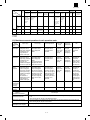
1. Configuration
2. Developer cartridge
No.
1. Photoconductor cartridge
Part name (Item)
1
Photoconductor cartridge
2
Developer cartridge
2. List
A. Consumable parts for exclusive use
(Single form)
No.
Part name (Item)
Model name
(Compound form)
Content
Q’ty
Life
1
Photoconductor
cartridge
FO-29DR
Photoconductor
cartridge
Parts item
1
20K
Model name
Q’ty
10
2
Developer cartridge
FO-29ND
Developer cartridge
1
3K
10
3. Details
(1) Photoconductor drum
Item
Specifications/Descriptions
Part name
Photoconductor cartridge
Model name
(Single unit)
FO-29DR
Model name
(Compound form)
—
Photo (Picture)
Type (Kind)
OPC
Form
Cartridge
3–1
Quantity
1
Quantity
10
Note
FO-3800M
Item
Life
Weight/Capacity/
Quantity
Specifications/Descriptions
Print quantity
20K
Effective use period
36 months from production when sealed, or 20 months when unsealed. (Shorter one, max. 36
months)
Weight
Single unit
Weight (g/kg)
Compound form
Wright (g/kg)
Quantity
241 g
Weight (lbs)
Weight (lbs)
Single unit
Compound form
Capacity
Applied model
(Litter)
AL-800/840
Compatibility
information
Product No. content
Ver.
Version
Fixed to 1. Form
Serial No. in each
production month
Production year
(End digit)
Guarantee period
(Month)
Production
month
0: October
X: November
Y: December
24
Counted from the production month. Stored under storage environment
conditions (sealed).
Note
(2) Developer cartridge
Item
Specifications/Descriptions
Part name
Developer cartridge
Model name
(Single unit)
FO-29ND
Model name
(Compound form)
—
Quantity
1
Quantity
10
Photo (Picture)
Type (Kind)
Mono-component toner
Form
Cartridge
Life
Print quantity
3K (A4, 5% cover ratio)
Effective use period
24 months from the production month when sealed, or 12 months when unsealed. (Shorter one,
max. 24 months)
Others
Weight/Capacity/
Quantity
Weight
Quantity
Single unit
Weight (g/kg)
Compound form
Wright (g/kg)
Single unit
Compound form
Capacity
Applied model
90 g
FO-3800M
Compatibility
information
3–2
473 g
Weight (lbs)
Weight (lbs)
FO-3800M
Item
Specifications/Descriptions
Product No. content
Production
Production
Version
month
place
Destination
Production
Production year
form
day
(End digit)
0: October
X: November
Y: December
Guarantee period
(Month)
24
Counted from the production month. Stored under the storage environment
conditions (sealed).
Note
* Replace when print density becomes low.
(2) Envelope
4. Paper specifications
Size
To assure print quality and normal paper handling, the following
specifications of paper should be satisfied.
(1) Paper
Standard and Applicable Paper
Item
Standard paper
Applicable paper
Weight
60 – 90 g/m2
60 – 120 g/m2
Smoothness
face; ≥ 20 s
back; ≥ 20 s
(BEKK method)
face; ≥ 20 s
back; ≥ 18 s
(BEKK method)
Porosity
≥7s
(BEKK method)
same as left
Opacity
≥ 77%
same as left
Surface
resistivity
1 × 10¹⁰ – 5 × 10¹⁰
(20 ± 1°C
65 ± 2% RH)
Stiffness
vertical; ≥ 17 cm
horizontal; ≥ 13 cm
(CLARK method)
same as left
Moisture
content
4.5% – 7.0%
same as left
Thickness
75 µm – 110 µm
same as left
Dimension
B5 (182 ± 1 × 257 ± 1mm)
B6 (128 ± 1 × 182 ± 1mm)
A4 (210 ± 1 × 297 ± 1mm)
A5 (148 ± 1 × 210 ± 1mm)
A6 (105 ± 1 × 148 ± 1mm)
8.5" ± 5/128 × 14" ± 5/128"
8.5" ± 5/128 × 11" ± 5/128"
5.5" ± 5/128 × 8.5" ± 5/128"
8.5" ± 5/128 × 13" ± 5/128"
same as left
Dimensions
Weight
International DL
110 × 220 mm
60 g/m2 (16 lbs.) to
90 g/m2 (24 lbs.)
International C5
162 × 229 mm
Same as above
Monarch
3-7/8" × 7-1/2"
Same as above
Commercial 10
(business)
4-1/8" × 9-1/2"
(104.78 × 241.3 mm)
Same as above
Envelopes
Do not use envelopes which have any of the following.
• Metal tabs, snaps, strings, perforations, windows or holes
• Open flaps on which adhesive is exposed
• Glossy surfaces
• A particularly rough texture or embossing
• Envelopes made from recycled paper
• Envelopes that are not flat due to damage, folds or bending, or
which are not straight with square corners
• Envelopes which are curled
• Two or more flaps
• Labels that have already been attached
• Flaps that have not been folded
• Creases or folds on the leading edge
• Adhesive that sticks without moisture when pressed closed
• Envelopes that stick together due to exposed adhesive
• Envelopes that have already been printed on in a laser printer
• Envelopes that expand or shrink without fine creases
• Envelopes which are inflated with air
(3) OHP film
A4 (210 × 297 mm) Letter size (8.5" × 11")
(Paper Types That Should Not be Used)
Paper that has any of the following should not be used for printing.
• Paper with special coating on the surface
• Paper with particularly rough or smooth surface
• Paper which has been glued together and which could become
separated.
• Paper with tears, folds, embossing, dryness, moisture or curl
• Paper with metal tabs or clips
• Paper with holes, windows or perforations
• Paper which has been pre-printed using a laser printer or
photocopier
(Note) Before printing, try one of the pieces of paper to be used and
confirm that it can be printed successfully.
(Values at 20 ± 1°C, 65 ± 2% RH)
3–3
FO-3800M
5. Standard density sample
The ratio of the image area for the total area of paper is 5%.
The life of every consumable part is based on this ratio.
Standard density sample
3–4
FO-3800M
6. Environmental conditions
(1) Transit environment (sealed)
Max. change: Temperature 15°C/hour, Relative humidity 15%RH/hour, without dew
Humidity
RH
90%
40°C, 90%
10%
-10°C
40°C
Temperature
Temperature
(min)
Humidity
(min)
–10°C
10%
Temperature
(mid)
Humidity
(mid)
Temperature
(max)
Humidity
(max)
40°C
90%
Period
(2) Storage environment (sealed)
Max. change: Temperature 15°C/hour, Relative humidity 15%RH/hour, without dew
Humidity
RH
90%
40°C, 90%
10%
-20°C
40°C
Temperature
Temperature
(min)
Humidity
(min)
–10°C
10%
Temperature
(mid)
Humidity
(mid)
Temperature
(max)
Humidity
(max)
40°C
90%
Period
(Unsealed condition)
Humidity
RH
30°C, 90%
90%
35°C, 60%
10%
0°C
35°C
Temperature
Temperature
(min)
Humidity
(min)
Temperature
(mid)
Humidity
(mid)
Temperature
(max)
Humidity
(max)
0°C
10%
30°C
60%
35°C
90%
3–5
Period
FO-3800M
CAUTIONS ON HANDLING
[4] SET UP
Be careful in handling the copier as follows to maintain the performance of this copier.
1. Installing conditions
Do not expose the drum cartridge to direct sunlight.
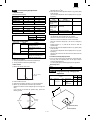
Improper installation may damage the copier. Please note the following during initial installation and whenever the copier is moved.
CAUTION: If the copier is moved from a cool place to a warm place,
condensation may form inside the copier. Operation in
this condition will cause poor copy quality and malfunctions. Leave the copier at room temperature for at least 2
hours before use.
Doing so will damage the surface (green portion) of the drum
cartridge, causing smudges on copies.
Do not install your copier in areas that are:
•
damp, humid, or very dusty
•
exposed to direct sunlight
Store spare supplies such as drum cartridges and TD
cartridges in a dark place without removing from the
package before use.
If they are exposed to direct sunlight, smudges on copies may result.
Do not touch the surface (green portion) of the drum
cartridge.
Doing so will damage the surface of the cartridge, causing smudges
on copies.
•
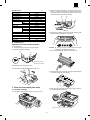
2. Unpacking
poorly ventilated
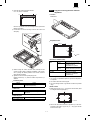
A. Packing list
Open the carton and check if the following components and accessories are included.
•
subject to extreme temperature or humidity changes, e.g., near an
air conditioner or heater.
Be sure to allow the required space around the machine
for servicing and proper ventilation.
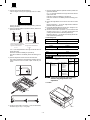
8" (20cm)
4"
(10cm)
8" (20cm)
4"
(10cm)
4–1
FO-3800M
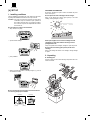
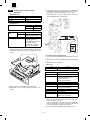
2) Remove the protective material (c), and slowly pull the protective
sheet (d) and protective material (e) together toward you to
remove. Be careful not to break the protective sheet (d) midway
and not to remain torn part inside the machine.
Accessories list
Model
Tray (Universal)
Drum cartridge
TD cartridge (1.5K)
Original cover
AC power cord
Printer cable
IEEE1284
USB
Phone cable
Driver soft
Operation manual Copier
Printer
FAX
Warranty card (Registration card)
MSDS sheets
POP label
Dust cover
User card (Aiyousya card)
Digital logo
FO-3800M
Included
Installed
Included
Included
Included UL, CSA PLG
Included
N/A
Included
CD-ROM
Included (SEC*)
Included (SEC*)
Included
Included (SEC*) in manual
Included
N/A
N/A
N/A
N/A
(d)
(e)
(c)
3) Remove the TD cartridge from the bag. Hold the cartridge on both
sides and shake it horizontally four or five times.
B. Releasing lock
REMOVING PROTECTIVE PACKING MATERIALS
1) Remove tape (a).
2) Turn and remove the lock screw in the arrow direction.
3) Remove the protective material (b).
(a)
CAUTION: Be sure to remove the protective paper from the drum
cartridge before installing the TD cartridge.
4) Remove the protective tape and then the protective cover.
(b)
Do not remove with
the front cover closed.
Keep the fixing screw inside the front cover.
Store the lock screw at the right side inside the front cover.
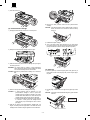
5) Hold the handle of the TD cartridge so that the stamped marking
on top of the cartridge are facing upward.
3. Parts and consumable parts setup
6) Gently insert the TD cartridge into the copier along the guides in
the direction indicated by the arrow.
(1) Developer cartridge
1) Push gently on both sides of the front cover to open the cover.
Align the projections on both sides with the guides.
4–2
FO-3800M
7) Close the front cover.
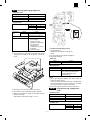
6) Remove the black protective sheet from the photoconductor
cartridge.
CAUTION: If the black protective sheet is pulled forcibly, it may be
broken, Be careful not to break the sheet and slowly
remove it.
(2) Photoconductor cartridge
1) Gently press the both sides of the front cover and open it.
7) Install the developer cartridge.
8) Turn on the power switch. While pressing the copy mode select
key and the clear key, open and close the operation panel section.
(The photoconductor counter is reset by the above operation.)
2) Slowly remove the developer cartridge from the copier.
3) Hold two knobs of the photoconductor cartridge with your fingers,
and slowly pull out it.
WARNING: The fusing section is heated to a high temperature.
When removing the photoconductor cartridge, be careful
not to touch the fusing section to avoid a burn.
CAUTION: Dispose the photoconductor cartridge as an incombustible.
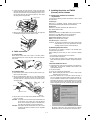
(3) Paper tray
1) Hold the paper tray so that the paper guide of the paper tray is
facing front and then insert the paper tray into the copier’s paper
tray slots.
2) Pull the paper release lever at the right of the paper tray toward
you.
CAUTION: If the paper is inserted without doing this, paper misfeeds
will occur.
4) Remove a new photoconductor cartridge from the bag.
CAUTION:
•
•
A black protective sheet is attached to a new
photoconductor cartridge in order to protect the
cartridge from light. Install the cartridge in the copier
with this black sheet attached to it. If it is removed, the
cartridge surface (green section) may be damaged.
Keep the photoconductor cartridge in a clean place. If
it is stored in a dusty place, the cartridge surface
(green section) may be damaged to cause a dirt on
print paper.
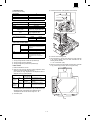
View from the
back of machine
Paper tray
5) Hold the two knobs of the photoconductor cartridge with your
fingers, and slowly insert the projections on the both ends of the
cartridge into the machine along the guides in the arrow direction.
Paper release lever
4–3
FO-3800M
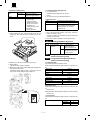
3) If extra-long paper (such as legal size) is used, raise the paper
support to support the paper. Fan the copy paper and place it into
the paper tray with the side to be printed facing toward you. Position the paper along the right end of the paper tray. Then adjust
the paper guide to the paper width.
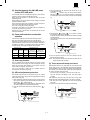
5. Installing the printer and TWAIN
(Scanner) driver software
(1) Checking the hardware and software
requirements
Paper support
You will need the following hardware and software in order to install
the printer driver.
Computer type
IBM PC/AT or compatible computer equipped with ECP modeequivalent bi-directional parallel interface and CD-ROM drive
Windows type
Windows 3.1x, Windows 95, Windows 98, Windows NT 4.0
CPU 486DX 66MHz or better
Physical RAM
Windows 95, Windows 3.1x: 8MB (16MB or more is recommended.)
Windows NT 4.0: 12MB (16MB or more is recommended.)
Windows 98: 16MB (32MB or more is recommended.)
Virtual storage (swap file) 8MB or more
Display 640 x 480 dots (VGA) or better
Hard disk free space 11MB or more
CAUTION: The printer driver included in this product cannot be used
under Windows NT 3.5x, OS/2, pure MS-DOS and other
operating systems which are not described above.
Side to be printed
Paper guide
4) Make sure the paper release lever is pushed back. The paper will
be clamped by the paper feed roller inside the copier.
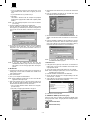
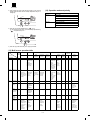
(2) Installing the printer driver
The software for your machine is provided on the CD-ROM which
was packed with your machine.
Before installing the printer driver, be sure to check the following
items.
4. Cable connection
(1) Power cable
•
•
•
Ensure that the power switch of the copier is in the OFF position.
Insert the attached power cord into the power cord socket at the rear
of the copier.
Is the machine connected properly to the computer?
Does the machine have paper?
Is there another GDI printer driver or Windows Printing System
printer driver already installed? If installed, change the printer port
setting.
a. Windows 95/Windows NT 4.0:
1) Load paper into the paper tray of the machine. For instructions on
loading paper, see the section LOADING COPY PAPER in the
copier operation manual.
2) Turn on the machine.
3) Turn on your computer and start Windows.
NOTE: Before installing the printer driver, be sure to close all other
applications which may be open.
4) When using Windows 95 on a personal computer with plug &
play*, the "Update Device Driver Wizard" window will appear. Insert the installation CD-ROM into the CD-ROM drive. Click the
Next button and follow the on-screen instructions. If the "Copying
Files" window appears during this operation, enter R:\ (if the CDROM is designated as drive R), click the OK button and follow the
on-screen instructions.
(2) Interface cable
1) Check that the power switches of both the printer and the computer are in the OFF position.
2) Plug the parallel interface cable into one of the printer interface
connectors (whichever connector you want to use). Fasten the two
bail chips at the side of the printer connector to hold the interface
connector in place.
Connecter
Cable
Interface connector
Bail clip
3) Plug the other end of the cable into the parallel interface connector of your computer.
CAUTION: The printer sends and receives data bi-directionally and
at high speed. Some switch boxes and pass-through
devices cannot support high-speed, bi-directional transfer of data, and using them may cause printing errors.
CAUTION: Some printer selectors (which allows to use two or more
computers and printers by selection) are not compatible
to this machine.
•
4–4
If you use Windows 95 and the "New Hardware Found" window
will appear, select Driver from Disk Provided by Hardware
Manufacturer and then click the OK button. Proceed to step 6.
FO-3800M
•
If you use Windows 95 and the screen shown above or the
"New Hardware Found" window does not appear, proceed to
step 5.
5) Select Search for the best driver for your device and click the Next
button.
6) Insert the installation CD-ROM into the CD-ROM drive. Select
CD-ROM drive and click the Next button.
•
If you use Windows NT 4.0, proceed to step 5.
Plug & Play
This feature is effective if both the computer and peripheral
equipment are equipped with an IEEE 1284 compliant parallel
interface.
NOTE: The screen displayed depends on the version of Windows
you are using.
5) Insert the installation CD-ROM into the CD-ROM drive.
Click the Start button and select Run. When the screen shown
below appears, type R:\SETUP (if the CD-ROM is designated as
drive R) and click the OK button. Follow the on-screen instructions.
∗
7) Windows driver file search will find the device "SHARP FO3800M". Click the Next button and follow the on-screen instructions.
8) Insert the installation CD-ROM into the CD-ROM drive. Click the
Start button and select Run. When the window shown below appears, type R:\SETUP (if the CD-ROM is designated as drive R)
and click the OK button. Follow the on-screen instructions.
6) The "Install From Disk" window will appear. Insert the installation
CD-ROM into the CD-ROM drive. Type R:\ (if the CD-ROM is
designated as drive R) and click the OK button. Follow the onscreen instructions.
NOTE: If you have any problem with the test print, see
TROUBLESHOOTING on page 20.
NOTE: If you have any problem with the test print, see
TROUBLESHOOTING on page 20 and check the symptoms
and solutions. Print the test page again after removing the
problem.
c. Windows 3.1x:
1) Load paper into the paper tray of the machine. For instructions on
loading paper, see the section LOADING COPY PAPER in the
copier operation manual.
2) Turn on the machine and then start Windows on your computer.
NOTE: Before installing the printer driver, be sure to close all other
applications which may be open.
3) Insert the installation CD-ROM into the CD-ROM drive.
4) Choose File from the Menu bar in Program Manager, and then
choose the Run... command.
5) Type R:\SETUP (if the CD-ROM is designated as drive R) in the
command line box and then click the OK button.
b. Windows 98:
1) Load paper into the paper tray of the machine. For instructions on
loading paper, see the section LOADING COPY PAPER in the
copier operation manual.
2) Turn on the machine.
3) Turn on your computer and start Windows.
NOTE: Before installing the printer driver, be sure to close all other
applications which may be open.
4) When using Windows 98 on a personal computer with plug &
play*, the "Add New Hardware Wizard" window will appear. Click
the Next button and follow the on-screen instructions.
• If the "Add New Hardware Wizard" window does not appear,
proceed to step 8.
∗ Plug & Play: For plug & play information, see page 6.
6) Follow the on-screen instructions.
d. "SHARP FO-3800M" printer driver group
When the printer driver is installed, the SHARP FO-3800M printer
driver group will be created. This group allows the following functions
to be executed.
DOS Emulation HELP
DOS Emulation Setup
4–5
FO-3800M
Readme
The latest information on the printer driver and the TWAIN
driver is included in this note. Read the Readme first.
Status Monitor HELP
(4) Uninstalling drivers
If the printer driver and TWAIN driver are not installed correctly or if
you no longer use this machine, uninstall the printer driver and
TWAIN driver from your computer using the following procedure.
1) If using Windows 95/Windows 98/Windows NT 4.0, click Start,
Program, SHARP FO-3800M, and Uninstall FO-3800M.
If using Windows 3.1x, double-click the SHARP FO-3800M icon in
Program Manager and double-click the Uninstall FO-3800M icon.
2) When the "Confirm File Deletion" window appears, click the Yes
button.
3) When the "Remove Programs From Your Computer" window appears, click the OK button.
NOTE: The printer driver and the TWAIN driver are uninstalled at the
same time.
Status Monitor
The printer state and information on current printing are displayed on the status monitor window. When printing starts,
the status monitor screen will appear on the computer display.
Uninstall FO-3800M
The printer driver and the TWAIN driver can be uninstalled.
If the drivers are uninstalled, printing and scanning cannot be
performed on the machine.
NOTE: • Be sure to read "Readme" found in the printer driver group
before starting to print or scan from application programs.
• If you uninstall the printer driver, the TWAIN driver is
uninstalled at the same time.
6. Setup FAX section
A. Connecting the Telephone Line Cord
Plug one end of the telephone line cord into the jack on the machine
marked "LINE."
Plug the other side into a standard (RJ11C) single-line telephone wall
jack. Be sure not to plug this telephone line cord into the "TEL" jack.
The "TEL jack" is used to attach an extension telephone or answering
machine to the machine.
Note: If your area experiences a high incidence of lightning or power
surges, we recommend that you install surge protectors for the
power and telephone lines.
(3) Using other installed drivers
If you use another GDI printer or Windows Printing Systems printer,
including the SHARP AL-800 series and AL-1000 series, interference
between printers may occur and printing may not be performed
properly.
To use another GDI printer or a Windows Printing System printer, you
must change the port setting of the printer driver using the following
procedure.
NOTE: If another printer does not operate properly when the FO3800M printer driver is set to "FILE", uninstall the FO-3800M
printer driver.
To uninstall the driver, see UNINSTALLING PRINTER
DRIVER on page 23.
If after uninstalling the FO-3800M printer driver, the printer
still does not operate properly, reinstall the printer driver you
are using.
a. Windows 95/Windows 98/Windows NT 4.0:
1) Click the Start button.
2) Select Settings and then click Printers.
3) Right-click the FO-3800M icon in the printer dialog box and then
click Properties.
NOTE: For this description, it is assumed that the mouse is configured for right hand operation.
4) Click the Details tab (Ports tab – on Windows NT4.0) in the
Properties dialog box, select FILE: in the Print to the following port
list box, and click the OK button.
5) Right-click the icon of the printer to be used and click Properties.
6) Click the Details tab (Ports tab – on Windows NT4.0) in the
Properties window, select LPT1 (or the currently used port), and
click the OK button.
NOTE: To use the FO-3800M again, perform the same procedure
but select the port to be used (for example, LPT1) in step 4.
LI
NE
TE
L
B. Connecting Other Devices
If desired, an answering machine or external telephone can be connected to the machine through the telephone jack, labeled TEL, on
the rear of the machine.
• Connecting an answering machine to the machine allows you to
receive both voice and fax messages when you are out. To use
this feature, first change the outgoing message of your answering
machine, and then set the reception mode of the machine to
"A.M." (Answering Machine mode) when you go out.
Note: If you are using distinctive ringing with an answering machine,
you do not need to follow the procedure described below.
(Please note that when distinctive ringing is used, the answering machine must be distinctive ring compatible.)
The outgoing message of your answering machine should be
changed to inform callers who want to send a fax to press their FAX
START key.
Comments:
1. It is advisable to keep the length of the message under 10
seconds. If it is too long, you may have difficulty receiving faxes
sent by automatic dialing.
2. Your callers can even leave a voice message and send a fax
message on the same call. Modify your outgoing message to
explain that this can be done by pressing their FAX START key
after leaving their voice message.
b. Windows 3.1x:
1) Double-click the Control Panel icon in the Main window of Program Manager.
2) Double-click the Printers icon. The Printers window will then open.
3) Select FO-3800M, and then click the Connect button.
4) Select File from the list of options in the Ports window, and then
click the OK button.
5) Select the new printer you would like to use from the list in the
Installed Printers window, and then click the Connect button.
6) Select the printer port to use for the new printer, and then click the
OK button.
7) Click the Set As Default Printer button, and then click the Close
button.
NOTE: To use the FO-3800M again, perform the same procedure
but select the port to be used (for example, LPT1) in step 4.
4–6
FO-3800M
•
You can connect an extension phone to the machine to make and
receive calls like any other extension phone on your line. Even if
you pick up the extension phone and hear a fax tone, the machine
will automatically cut in and take over the line. Note, however, if
you also have a PC modem on the same line, you must turn on the
Remote Reception function, and deactivate the Fax Signal Receive
function.
Note: The Remote Reception function is initially set to "ON".
Factory setting: 2 (OFF)
Step
FUNCTION
2
ABC
4
a. Quiet Detect Time
Quiet Detect Time is the function that enables the machine to be used
along with an answering machine for both phone messages and
faxes. After the answering machine has answered, any duration of
silence longer than a certain threshold time will prompt the machine
to take over the line and prepare to receive a fax. The Quiet Detect
Time can be set from 00 to 10 seconds, following the procedure
below.
1
TUV
FUNCTION
3
Enter the Quiet Detect Time in
seconds, from 00 to 10.
(Setting “00” turns off Quiet Detect
Time)
to
Step
5
“STORED” will appear in the display.
ENTER
STOP
STOP
STOP
STOP
Press 1 to turn Auto Receive on, or
2 to turn it off.
Press the STOP key twice to exit.
Factory setting: 1 (ON)
1
4
or
The machine is set to automatically begin reception if you pick up
from an extension telephone and the machine detects a fax tone.
However, if you are using a modem on the same line, you must
deactivate this function: otherwise the machine will mistakenly attempt to receive the transmission from your computer. To turn off the
Fax Signal Receive function, follow the procedure below.
Note: If you turn off the Fax Signal Receive function, be sure to
activate the Remote Reception function.
“A.M. MODE” will appear in the
display.
“QUIET DETECT TIME” will appear in
the display.
“SELECT AUTO RECEIVE” will
appear in the display.
(2) Setting Up the Machine for Use with a PC Modem
Comments
2
Comments
“A.M. MODE” will appear in the
display.
Note: If you are using Auto Receive, make sure that your answering
machine is set to answer on four rings or less. Otherwise, the
machine will take over all calls, preventing callers from leaving
voice messages.
Factory setting: 05
Press these keys
TUV
ABC
3
(1) Using the Machine with an Answering Machine
Step
Press these keys
1
Press these keys
GHI
FUNCTION
Press the STOP key twice to exit.
4
•
The machine has been set at the factory for a Quiet Detect Time of
5 seconds, which gives the best performance for most answering
machines. However, you may have to adjust the Quiet Detect Time
depending on your answering machines disconnect time, the time
before the machine disconnects the line after a period of silence. If
your machine has a short disconnect time, you may have to shorten the Quiet Detect Time. However, if the machine is interrupting
callers in the middle of messages, you should set a longer Quiet
Detect Time.
• If there is a pause at the end of your answering machine message,
make sure that the Quiet Detect Time is longer than this pause.
• Setting Quiet Detect Time to 00 turns the function off. However,
the machine will not be able to receive faxes sent using manual
dialing (picking up the receiver, dialing the number, and pressing
the FAX START key when the fax tone is heard).
b. If Quiet Detect Time is not working properly...
With some answering machines, there is simply no Quiet Detect
Time that will allow both reception of faxes and uninterrupted voice
messages. Even in this case, however, you can set up the machine to
receive both phone and fax messages from callers on touch-tone
lines. Follow this procedure:
1. Set the Quiet Detect Time to 00.
2. Using the Remote Reception Number (factory set to 5) to start fax
reception, change your answering machine message to include
the following information. "If you want to send a fax press 5 and
then press the (
) key twice, after you hear the fax tone press
your FAX START key".
c. Answering Machine Backup
There may be times when the tape on your answering machine becomes full, or when the answering machine itself malfunctions. It is
still possible to receive faxes even under these conditions, however,
by turning on the Auto Receive function. The machine will automatically answer all calls after five rings. To use this function, follow the
procedure below.
“FAX SIGNAL RCV.” will appear in the
display.
ABC
3
Notes:
“OPTION SETTING” will appear in the
display.
ABC
2
or
STOP
Comments
STOP
Press 1 to turn Fax Signal Receive
on, or 2 to turn it off.
Press the STOP key twice to exit.
7. Note for transport
When transporting this machine, follow the following packing procedures before moving.
•
To transport this machine, be sure to use the original packing case
and the protective material.
If another packing case is used, the machine may be damaged.
• Be sure to remove the developer cartridge before transport.
1. Turn off the power switch and disconnect the power cord.
2. Remove the interface cable from the machine.
3. Gently press the both sides and open the front cover.
4. Remove the developer cartridge from the machine.
5. Remove paper from the paper feed tray.
6. Remove the paper feed tray from the machine.
7. Return the paper feed tray slowly to the bottom.
8. Attach the fixing screw (which is keep inside the machine) to the
left side of the machine.
9. Close the front cover.
10. Attach the protective material and tapes which were removed
when unpacking.
11. Put the machine in the packing case.
4–7
FO-3800M
[5] EXTERNAL VIEW AND INTERNAL STRUCTURE
1. List
A
B
External, operation parts
Internal parts
(1)
External, operation parts
(2)
Internal operation parts
(3)
Operation, display parts
(1)
Parts in each section
a
Operation section
b
Paper feed, transport section
c
Optical section
d
C
Lock position
D
Functional parts
(1)
Sensor, detector
(2)
Switch
(3)
Clutch, solenoid
(4)
Motor
(5)
PWB
(6)
Fuse, thermostat
(7)
Lamp
(8)
Interface (connector)
(9)
Belt, wire
(10)
Power
(11)
Adjustment volume
Image process section
e
Fusing, paper exit section
f
Drive section
g
Printer section
h
FAX section
i
Cross sectional view
a
Drive motor
b
Fan (motor)
<1>
Scanner (reading) section
<2>
Scanner (writing) section
<1>
OPC drum section
<2>
Developing section
<3>
Transfer, separation section
2. Contents
A. External, operation parts
(1) External, operation parts
1)
7)
6)
5)
11)
4)
8)
10)
9)
2)
3)
12)
5–1
13)
FO-3800M
Parts
No.
Name
Model
Function/Operation
1
SPF unit (Document cover)
2
Front cover
Opened when installing or removing the OPC cartridge and
the developer cartridge or removing a paper jam.
3
Paper exit tray
Receives printed paper.
4
Operation panel
Allows various setting in the copy mode and test command
operations.
5
Document table
A document is set to the left corner reference.
6
Paper feed tray
Sets print paper.
7
Paper guide
Adjusts the paper width.
8
Power switch
Turns on/off the main power.
9
Power connector
Connects with the AC power cord.
10
Printer interface connector
Connects with the host computer. (Parallel interface)
(IEEE-1284)
11
Paper release lever
Put the lever straight when setting paper to release paper
feed drive. Put the lever down to allow paper feed.
12
LINE jack
Used to connect with the TEL line.
13
TEL jack
Used to connect with the external TEL line.
Note
Allows connection with two
host computers.
(2) Internal operation parts
1)
No.
2)
Parts
Name
Model
Function/Operation
Note
1
Developer cartridge
Converts latent electrostatic images into visible
images (toner images).
Common
Life (3K print)
2
OPC cartridge
Forms latent electrostatic images.
Common
Life (20K print)
5–2
FO-3800M
(3) Operation, display parts
a. Main body section
1)
2)
3) 4) 5)
6)
7)
8)
12)
Parts
No.
Name
Function/Operation
9)
13)
Model
10)
14)
11)
15)
Note
1
Copy image mode select
key/Copy image mode
display lamp
Selects the copy image mode in auto, character,
photo, toner save mode. Displays the copy image
mode.
2
Copy density adjustment
key/Copy density level
display lamp
Selects the copy density. Used to set the power
save mode. Displays the copy density mode
(level).
3
SPF display lamp
Lights up when a document is set on the SPF
document feed tray.
4
SPF jam lamp
Lights up when a document jam or mis-feed
occurs in the SPF section.
5
Developer cartridge warning
lamp
Turns on or blinks to show that the consumable
part (developer cartridge) must be replaced.
Turns on when there is little toner, and
blinks when there is no toner to
disable printing.
OPC cartridge warning lamp
Turns on or blinks to show that a consumable
part (developer cartridge, OPC cartridge) or that
there is a paper jam.
At 19,000 print, the lamp lights up to
show the life is up. At 20,000 print, the
lamp lights up to disable printing.
Paper jam warning lamp
Turns on or blinks when there is a paper jam.
6
Copy magnification ratio
select key/Copy magnification
ration display lamp
Selects the copy magnification ratio.
7
Zoom mode display lamp
Turns on when the zoom key is used to set the
coy magnification ratio.
8
Copy magnification display
key
Used to display the copy magnification ratio set
by the zoom key on the value display.
9
Value, code display LED
Displays the value information (copy quantity,
copy magnification ratio, etc.) and codes (error
code, test command code and its information).
10
On-line lamp
Turns on during operation in the printer mode.
(Print data is received from the host in the printer
enable state or during printing.)
11
Pre-heat mode display lamp
Blinks in the pre-heat mode.
12
Zoom key
Sets the copy magnification ratio in the range of
50% ∼ 200% by the increment of 1%.
13
Value setting key
Used to input various set values (copy quantity,
test command setting, power save mode setting,
etc.). Used to set the power save mode.
14
Clear key
Cancels various setting and operations.
15
Start key
Starts operations and stores various set data.
Ready lamp
Turns on when in print ready state.
5–3
FO-3800M
b. FAX section
Left arrow key ( ) and right arrow key ( )
Press these keys to scroll through a menu. During input
mode, these keys are also sometimes used to move
the cursor.
ENTER key
FUNCTION key
Press this key to
enter function
mode.
Press this key to decide an
item in a menu, or to enter
numbers and letters you
have typed in.
Liquid crystal display
AUTO light
Shows various messages during fax
operation and programming.
This light indicates that the
machine will answer the
machine automatically.
BOOK SEND key
MANUAL light
Press this key to fax a
original from the original
table.
This light indicates that the
machine must be answered
manually.
ENTER
RESOLUTION key
Press this key to
adjust the resolution
before sending faxes.
BOOK SEND
A.M. light
AUTO
MANUAL
A.M.
FUNCTION
RESOLUTION CONTRAST BROADCAST RECEPTION MODE
This light indicates the
answering machine will answer
the line if properly connected.
RECEPTION MODE key
CONTRAST key
Press this key to adjust
the contrast before
sending faxes.
01
02
03
04
05
06
07
08
09
10
11
12
13
14
15
16
17
18
19
20/POLL
Rapid keys
Press one of these keys to
dial a fax or telephone
number automatically.
Press Rapid key 20 to start
polling if programmed.
(Note that you must attach
the Rapid key labels.)
ABC
DEF
DOCUMENT
GHI
JKL
MNO
SPEED/SEARCH
PQRS
TUV
WXYZ
REDIAL/PAUSE
Press this key to send
originals to a group of
receiving fax machines.
Press this key to perform a
direct send fax transmission.
SPEED/SEARCH key
SPEAKER
STOP
FAX START
/
Press these keys to enter
symbols during the name
storing procedure.
Press the " " key to
change
from pulse dialling to tone
dialling mode.
STOP key
BROADCAST key
DOCUMENT key
Number keys
Press these keys to dial
numbers, and enter
numbers and letters
during number/name
storing procedures.
Press this key to select
the mode of reception.
Press this key to dial a two
digit Speed Dial number.
During character inputting,
use this key to delete an
incorrect entry.
Also, press this key twice to
search for an automatic
dialling number.
REDIAL/PAUSE key
Press this key to
automatically redial the last
number you dialed. Also,
press this key to insert a
pause when entering
numbers.
FAX START key
Press this key to stop an operation Press this key to begin
before it is completed, or to delete sending a fax or manually
receiving a fax.
the number that was last input.
This key is also used to close the
line when manually dialling.
5–4
SPEAKER key
Press this key to begin
manual dialling. (To close the
line, press the SPEAKER
key again.)
FO-3800M
B. Internal parts
(1) Parts in each section
a. Operation section
2)
1)
No.
Parts
Name
Model
Function/Operation
1
Operation control PWB
Displays various number information and messages.
Outputs the key operation signal.
2
Number display
Displays various value information and messages.
Note
b. Paper feed, transport section
2)
3)
1) PE SENSOR
9) PAPER SIZE SW
10)
4)
11)
4)
5) PUS
6)
8)
6)
7) PIN SENSOR
13)
12)
13)
16)
14)
16)
18)
19)
15)
8)
17)
12)
19)
5–5
FO-3800M
No.
1
Parts
Code
PE SENSOR
Signal name
PEMP IN
Name
Paper empty
detector
Note
Type
Function/operation
Photo
transmission
sensor
Detects paper on the paper tray.
2
Paper guide
Adjust the paper width.
3
Paper feed tray
Sets the print paper. (Capacity:
XXX sheets)
4
Paper release
lever
Put this lever straight to set paper
to release paper feed. Put this
lever down to enable paper feed.
Paper feed clutch
solenoid
Controls (on/off) the main motor
drive for the paper feed roller.
Paper feed
release lever
When the paper feed lever is put
straight, this lever releases paper
feed solenoid drive. This lever
reduces stress to the paper feed
roller clutch in removing paper.
5
PUS
PUS
6
7
PIN SENSOR PIN
Paper in detector
PAPER SIZE
SW
Paper width
detector
8
9
Photo
transmission
sensor
Detects whether the fed paper is
transported to the transfer position
or not. By the timing of this
detector signal, the relative
positions of paper and print image
are controlled.
Mechanical
switch (Micro
switch)
Detects the paper width. This
signal controls the laser beam
radiation area.
Paper feed roller
PAPER SIZE
IN
Active condition
LOW (0V) when
paper is detected.
LOW (0V) when
paper is detected.
Feeds paper.
10
Paper pressure
plate
Presses paper onto the paper
feed roller.
11
Paper pressure
spring
Presses paper onto the paper
feed roller.
12
Paper separator
Separates paper in paper feed
operation.
13
Paper feed clutch
14
Paper feed clutch
lever
Driven by the paper feed clutch
solenoid to control ON/OFF of the
paper feed clutch. Prevents
against reverse rotation of the
paper feed roller.
15
Paper feed clutch
joint
Links the paper feed roller and the
paper feed roller clutch.
16
Paper feed clutch
sleeve
Controls ON/OFF of the paper
feed roller. (The paper feed roller
is driven by the paper feed clutch
solenoid and the main motor.)
17
Paper feed clutch
spring
Transmits the paper feed clutch
rotation to the paper feed clutch
sleeve.
18
Paper feed clutch
gear
Transmits the main motor power
to the paper reed roller.
19
Paper separater
spring
Applies a proper pressure to the
paper separater.
Mechanical
spring type
clutch
Controls ON/OFF of the paper
feed roller. (The paper feed roller
is driven by the paper feed clutch
solenoid and the main motor.
5–6
LOW (0V) when
the max. width is
detected.
FO-3800M
c. Optical section
<1> Scanner (reading) section
10)
11)
2)
4) MHPS
6) CCD SENSOR
8) SL SENSOR
5)
3)
2)
7)
4) MHPS
10)
8) SL SENSOR
7)
6) CCD SENSOR
9)
1)
11)
9)
5)
3)
Parts
No.
Code
Signal
name
Name
Type
Function/operation
1
Scanner lamp
control PWB
Drives the scanner lamp. Maintains the
lamp light quantity at a constant level.
2
Scanner drive wire
Transmits the scanner motor power to
the scanner unit.
3
4
Scanner motor
MHPS
MHPS
CCD
SENSOR
CCD OUT
5
6
Drives the scanner unit.
Photo
transmission
sensor
Lens
7
8
Scanner home
position sensor
CCD (Image)
sensor
PDA/PDK
Scanner lamp light
quantity sensor
Detects the scanner home position. By
this signal the image scanning
operation is controlled.
HIGH (5V) when
the home position
is detected.
Transfers the document image to CCD.
CCD
Scanner lamp
SL SENSOR
Active condition
Scans the document images (photo
signals) and converts them into
electrical signals.
Digital signal (8Bit)
Radiates light to the document to allow
the CCD to scan the document images.
Photo diode
Detects the scanner lamp light
quantity. This signal is inputted to the
scanner lamp control PWB to control
the scanner lamp drive voltage to
maintain a constant level of light
quantity.
9
No. 1 mirror
Leads the document image to CCD.
10
No. 2 mirror
Leads the document image to CCD.
11
No. 3 mirror
Leads the document image to CCD.
5–7
Analog signal
(0 ∼ 0.5V)
Note
FO-3800M
<2> Scanner (writing) section
2)
1) SYNC
3)
8)
7)
4)
6)
No.
1
5)
Parts
Code
SYNC
Signal name
SYNC IN
Name
Laser beam sensor
Type
Bin diode
Function/operation
Detects the laser beam position.
By this signal the left image print
start position is controlled.
2
No. 1 mirror
3
No. 3 mirror
Leads the laser beam to the OPC
drum.
4
Second cylindrical
lens
Corrects the laser beam deflection
by variations in the scanning mirror
angle. Corrects the optical section
dirt.
5
Fθ mirror (No. 2
mirror)
Corrects the laser beam form and
pitch.
6
Scanning mirror
(rotation mirror)
Scans the laser beam and
performs imaging.
7
No. 1 cylindrical
lens
Adjust the direction of laser beam.
8
Laser diode
Generates laser beam. (Controls
ON/OFF for imaging)
5–8
Active condition
LOW (0V) when
laser beam is
detected.
Note
FO-3800M
d. Image process section
<1> OPC drum section
1)
5)
6)
3)
5)
4)
2)
1)
Parts
No.
Name
Type
OPC
Note
Function/operation
1
OPC drum
2
OPC drum earth electrode
Forms latent electrostatic images.
Connects the OPC drum aluminum layer and
the earth (high voltage PWB).
3
Main charger electrode
Connects the main charger output (high
voltage PWB) and the main charger brush.
4
Discharge brush
Discharges (lower the potential of) the OPC
drum surface.
5
Main charger brush
Charges the OPC drum.
6
Toner seal
Shield to prevent toner from leaking outside
the OPC drum unit.
5–9
Japan only
FO-3800M
<2> Developing section
5)
2)
1)
7)
8)
5)
1)
3)
3)
6)
4)
4)
8)
5)
1)
No.
Parts
Name
Type
Function/operation
1
Developing roller
Attaches toner to the latent electrostatic
images on the OPC drum to convert it into a
visible image.
2
Developing doctor
Controls toner quantity on the developing
roller and charges toner.
3
Developing bias
electrode
Connects the developing roller and the bias
voltage output (high voltage PWB).
4
Potential control
electrode
Connects the developing roller and the bias
voltage output (high voltage PWB).
5
Toner stirring roller
Lead toner to the developing roller and
charges toner.
6
Zenor diode
Maintains the potential between the
developing roller and the toner stirring roller
at a constant level.
7
Toner seal
Shields toner from leaking outside the
developing unit.
8
Potential control sheet
Maintains the developing roller potential at a
constant level.
5 – 10
Note
FO-3800M
<3> Transfer, separation section
1)
3)
4)
3)
5)
2)
1)
No.
4)
Parts
Name
Function/operation
1
Transfer roller
Transfers toner images on the OPC drum onto the paper.
2
Transfer roller
electrode
Connects the transfer roller and the transfer voltage output (high voltage PWB).
3
Pressure spring
Applies pressure to the transfer roller, paper, and the OPC drum to improve
transfer efficiency.
4
Separation electrode
Reduces paper charging potential to facilitate separation of paper.
5
Earth electrode
Connects the separation electrode and the earth (high voltage PWB).
5 – 11
Note
FO-3800M
e. Fusing, paper exit section
11)
7)
11)
8)
8)
7)
6)
2) POUT
1)
3)
4)
9)
5)
4)
5)
9)
9)
10)
2) POUT
10)
1)
6)
11)
3)
No.
Code
Signal name
Name
Heat roller
POUT IN
Paper exit detector
RTH IN
Fusing temperature
sensor
Temperature fuse 1
(Fusing section)
Temperature fuse 2
(Fusing section)
Heater lamp
1
2
3
POUT
4
5
6
HL
7
Pressure roller
8
Paper exit roller
9
Separation pawl
10
Paper exit roller
11
Pressure spring
Parts
Type
Function/operation
Heats toner on the paper
and fuses onto the paper.
Photo transmission
sensor
Thermistor
Mold
Mold
Halogen lamp
Active condition
LOW (0V) when
paper is
detected.
MODEL
Note
Detects paper exit.
Detects the heat roller
surface temperature.
Assures safety in
overheating.
Assures safety in
overheating.
Heats the heat roller.
Applies a pressure to the
heat roller and paper to
improve fusing efficiency.
Discharges paper after
fusing.
Separates paper from the
fusing roller mechanically.
Discharges paper outside
the machine after fusing.
Applies a pressure to the
heat roller, paper, and
pressure roller to improve
transfer efficiency.
5 – 12
100V series 10V 500W
120V series 120V 500W
200V series 230V 500W
FO-3800M
f. Drive section
1)
3)
2)
No.
1
Parts
Code
Signal name
MM
Name
Type
Main motor
Stepping motor
(+24V)
Note
Function/operation
Drives the paper feed section, the paper
transport section, the fusing section, and
the image process section.
2
Paper feed section drive
gear
Transmits the main motor power to the
paper feed section.
3
Imaging process, fusing
section drive gear
Transmits the main motor power to the
imaging process section and the fusing
section.
g. Printer section
1)
2)
No.
Parts
Name
1
ICU PWB
2
Printer interface
connector
Type
IEEE1284 parallel interface
Function/operation
MODEL
Note
Converts print data sent from the host into
bit image.
Printer models only
Connects with the host computer (parallel
interface)(IEEE1284)
Allows connection with two
host computer(s). Printer
models only
5 – 13
FO-3800M
h. FAX section
External View
1)
4)
2)
3)
Parts
No.
Code
Code name
Name
Type
Active Model
condition
Function/Operation
1
FAX operation panel
Performs FAX operations.
2
Document tray
Documents are loaded to this tray.
3
Document guide
Adjusts the document width.
4
Roller pressure release button
When a paper jam occurs in the SPF
paper feed section, release the roller
pressure and remove the jam paper.
Clutch, motor, solenoid, roller
6)
4)
2)
3)
2)
5)
7)
1)
6)
10)
8)
7)
12)
11)
10)
9)
8)
5 – 14
Note
FO-3800M
Parts
No.
Code
Code name
Name
Type
1
SPF transport roller
2
SPF paper feed clutch
3
SPF paper exit roller
4
SPF paper exit follower roller
5
Function/Operation
Active Model
condition
Note
Transports documents.
Discharges documents.
SPF MOTOR SPF motor
Discharges documents.
Stepping
motor
Feeds and transports documents. (Drive
motor for SPF)
SPF paper feed roller
Feeds documents.
7
Pickup roller
Picks up the top document to the paper
feed roller.
8
Separation unit
Separates documents in paper feed.
9
SPF transport follower roller A
Transports documents.
SPF paper feed solenoid
Control ON/OFF of the SPF paper feed
roller.
11
SPF resist roller
Controls the start timing of document
transportation. (reading).
12
SPF transport follower roller B
Transports documents.
SPUS SPF PUS
Note
Spring clutch "Controls ON/OFF of the SPF paper
feed roller. Controls power transmission
of the SPF motor."
6
10
Active Model
condition
PWB, sensor
1)
2)
3)
4)
5)
Parts
No.
Code
Code name
Name
Type
Function/Operation
1
FAX operation control PWB
Controls key operations and displayes of
FAX function.
2
SPF interface PWB
Drives the SPF motor. Outputs sensor
and detector signals to the FAX control
PWB.
3
SW1
SPF document detector
Photo
transmission
Detects documents on the SPF tray.
L level
4
SW3
SPF open/close detector
Photo
transmission
Detects open/close of the SPF unit.
L level
5
SW2
SPF paper entry detector
Photo
transmission
"Detects the lead edge of fed document,
and outputs signals to control ON timing
of the SPF resist roller."
L level
5 – 15
FO-3800M
i. Cross sectional view
28) MHPS
29)
30) SL SENSOR
35)
1)
31)
32)
34)
2)
3)
4)
33) CCD SENSOR
5)
6)
7)
26)
25)
8)
24) POUT
9) PE SENSOR
23)
10)
11)
21)
17)
22)
18)
15)
16)
13) 36) 12)
14) PIN SENSOR
Parts
No.
Code
Signal name
Name
Model
Type
Thermistor
Function/operation
Detects the heat roller surface
temperature.
1
Fusing temperature
sensor
2
No. 3 mirror (LSU)
3
No. 1 mirror (LSU)
4
No. 2 cylindrical lens
5
OPC drum
6
Laser scanner
Scans laser beams to perform
imaging.
7
frror (No. 2 mirror)
(LSU)
Corrects the laser beam form and
pitch.
8
Laser diode
Generates the laser beam.
(Controls ON/OFF for imaging.)
9
PE SENSOR
PEMP IN
Paper empty
detector
Corrects the laser beam deflection
caused by variations in the surface
angle of the scanning mirror. Also
prevents agaist dirt in the optical
section.
OPC
Photo
transmission
sensor
Forms latent electrostatic images.
Detects paper on the paper tray.
Paper pressure
spring
Presses paper onto the paper feed
roller at a proper pressure.
11
Paper pressure plate
Presses paper onto the paper feed
roller at a proper pressure.
12
Paper feed roller
Feeds paper.
13
Paper separator
PIN
SENSOR
PIN
Paper in detector
Analog signal (2.0
∼ 5.0V)
Leads the laser beam to the OPC
drum.
10
14
Active condition
LOW (0V) when
paper is detected.
Separates paper in paper feed.
Photo
transmission
sensor
Detects whether the fed paper is
transported to the transfer position
or not. By the timing of this
detector signal, the relative
positions of the paper and the print
image are controlled.
5 – 16
LOW (0V) when
paper is detected.
Note
FO-3800M
No.
Parts
Model
15
Developing roller
Attaches toner to the latent
electrostatic images on the OPC
drum to convert them into visible
images.
16
Transfer roller
Transfers toner images on the
OPC drum to paper.
17
Transfer pressure
spring
Applies a pressure to the transfer
roller, paper, and the OPC drum to
improve transfer efficiency.
18
Separation electrode
Reduces the paper charging
potential to facilitate separation of
paper from the OPC drum.
19
Temperature fuse 1
(fusing section)
Mold
Assures safety in overheating.
20
Temperature fuse 2
(fusing section)
Mold
Assures safety in overheating.
21
Pressure roller
Applies a pressure to the heat
roller and paper to improve fusing
efficiency.
22
Fusing pressure
spring
Applies a pressure to the heat
roller paper, and the pressure
roller to improve transfer efficiency.
23
24
Paper exit roller
POUT
25
Discharges paper after fusing.
POUT IN
Paper exit detector
Photo
transmission
sensor
Detects discharge of paper.
HL
Heater lamp
Halogen lamp
Heats the heat roller.
26
Heat roller
Toner on the paper is heated and
fused onto the paper.
27
Separation pawl
Separates paper from the fusing
roller mechanically.
28
MHPS
MHPS
SL SENSOR
PDA/PDK
29
30
Scanner home
position sensor
Photo
transmission
sensor
No. 2 mirror
Scanner lamp light
quantity sensor
Detects the scanner home
position. By this signal the image
scanning operation is controlled.
Detects the scanner lamp light
quantity. This signal is inputted to
the scanner lamp control PWB to
control the scanner lamp drive
voltage to maintain a constant
level of light quantity.
Scanner lamp
Radiates light necessary for the
CCD to scan the document
images.
32
Lens
Transfers document images to
CCD.
CCD
SENSOR
CCD OUT
CCD (image) sensor
LOW (0V) when
paper is detected.
HIGH (5V) when
the home position
is detected.
Leads document images to CCD
Photo diode
31
33
Note
CCD
Scans the document images
(photo signals) and converts them
into electrical signals.
34
No. 1 mirror
35
No. 3 mirror
Lead document images to CCD.
Lead document images to CCD.
36
Paper separater
spring
Applies a proper pressure to the
paper separater
5 – 17
HIGH (5V) when
the home position
is detected.
Digital signal (8Bit)
100V series
100V 500W
120V series
120V 500W
200V series
230V 500W
FO-3800M
C. Functional parts
(1) Sensor, detector
3) PAPER SIZE SW
4) PE SENSOR
2) SL SENSOR
1) MHPS
6) CCD SENSOR
11) DSW
5) SYNC
7) PIN SENSOR
8) TS
10) POUT
9) RTH
Parts
No.
Code
Signal name
Name
Type
Function/operation
Active condition
1
MHPS
MHPS
Scanner home position
sensor
Photo
transmission
sensor
Detects the scanner home position.
This signal is used to control image
scanning operation.
HIGH (5V) when the
home position is
detected.
2
SL SENSOR
PDA/PDK
Scanner lamp light
quantity sensor
Photo diode
Detects the scanner lamp light
quantity. This signal is inputted to the
scanner lamp control PWB to control
the scanner lamp drive voltage to
maintain a constant level of light
quantity.
Analog signal (0 ∼ 0.5V)
3
PAPER SIZE
SW
PAPER SIZE
IN
Paper width detector
Mechanical
switch (Micro
switch)
Detects the paper width. This signal is
used to control the laser beam
radiation area.
LOW (0V) when the
max. width is detected.
4
PE SENSOR
PEMP IN
Paper empty detector
Photo
transmission
sensor
Detects paper on the paper tray.
LOW (0V) when paper
is detected.
5
SYNC
SYNC IN
Laser beam sensor
Bin diode
Detects the laser beam position. This
signal is used to control the left image
print start position.
LOW (0V) when laser
beam is detected.
6
CCD SENSOR
CCD OUT
CCD (image) sensor
CCD
Scans document images (photo
signals) and converts them into
electrical signals.
Digital signal (8Bit)
7
PIN SENSOR
PIN
Paper in detector
Photo
transmission
sensor
Detects whether the fed paper is
transported to the transfer position or
not.
LOW (0V) when paper
is detected.
8
TS
TS IN
Toner empty sensor
Photo
transmission
sensor
Detects remaining toner in the
developing cartridge.
HIGH (5V) when toner
empty is detected.
9
RTH
RTH IN
Fusing temperature
sensor
Thermistor
Detects the fusing roller surface
temperature.
Analog signal (2.0 ∼
5.0V)
10
POUT
POUT IN
Paper exit detector
Photo
transmission
sensor
Detects discharge of paper.
LOW (0V) when paper
is detected.
11
DSW
DSW
Front cover open/close
switch
Micro switch
Turns on/off the +24V power line
(power source for the motor, the high
voltage PWB, and solenoids) when
opening/closing the front cover for
safety. (Detects open/close of the front
cover at the same time.)
Close
5 – 18
Note
FO-3800M
(2) Switch
2) POWER SW
1) DSW
No.
Parts
1
Code
DSW
2
POWER SW
Signal name
DSW
Name
Front cover
open/close switch
Type∗
Micro switch
Main power switch
Seesaw
switch
Function/operation
Turns on/off the +24V power line (power
source for the motor, the high voltage PWB,
and solenoids) when opening/closing the front
cover for safety. (Detects open/close of the
front cover at the same time.)
Turns on/off the main power line. (ON/OFF of
all power)
Active condition
Close
Note
Close
(3) Clutch, solenoid
1) PUS
2)
Parts
No.
1
2
Code
PUS
Signal name
PUS
Name
Type∗
Function/operation
Paper feed clutch
solenoid
Solenoid
Paper feed clutch
Mechanical
spring type clutch
Controls ON/OFF of the paper feed
roller. (The paper feed roller is driven
by the paper feed clutch solenoid and
the main motor.)
Controls ON/OFF of the paper feed
roller. (The paper feed roller is driven
by the paper feed clutch solenoid and
the main motor.)
5 – 19
Active
condition
ON
ON
MODEL
Note
Driven by
+24V power.
FO-3800M
(4) Motor
a. Drive motor
1) LSM
2) MM
3) IMGSM
No.
Parts
Code
Name
Type
Function/operation
1
LSM
Laser scanning motor
DC brushless motor
(+24V)
Drives the scanning mirror.
2
MM
Main motor
Stepping motor (+24V)
Drives the paper feed section, the paper
transport section, and the image process
section.
3
IMGSM
Scanning motor
Stepping motor (+24V)
Drives the scanner (reading) unit.
Note
b. Fan (motor)
1) FM
No.
1
Parts
Code
FM
Name
Cooling fan motor
Type
Propel (DC brushless
motor) (+24V)
Function/operation
Cools inside the machine (the fusing section
and the image process section).
5 – 20
Note
FO-3800M
(5) PWB
2)
3)
1)
4)
5)
8)
6)
7)
No.
Parts
Name
Power PWB
Function/operation
Outputs DC power. Drives the heater lamp.
Controls light quantity of the scanner lamp.
3
4
Scanner lamp drive
PWB
LIU PWB
ICU PWB
5
6
MCU (PCU) PWB
FAX control PWB
7
High voltage power
PWB
Operation control PWB
1
2
8
Performs send/receive control of the TEL line.
Converts print data set from the host and converts it into bit
image data and send to the MCU.
Controls the image process section and the engine section.
Controls the operations relating to FAX. (Sends image data of
the scanner to the LIU PWB. Sends received image data to the
printer engine section. Performs communication control (analysis
of the protocol control and data) for the opponent party.)
Outputs the high voltage for the image process section. Controls
the main motor.
Displays the value information. Outputs the key operation signal.
(6) Fuse, thermostat
2) F601
1) F603
3)
4)
5 – 21
MODEL
Note
The voltage specification differs
depending on the destination.
Allows connection with two host
computers. Printer models only
FO-3800M
Parts
No.
Code
1
F603
Name
Power unit fuse
Form
Mini
Form
MODEL
Specification
Normal
5A 125V
3.15A 250V
2
F601
Power unit fuse
Mini
Normal
10A 125V
Protects the power unit primary side circuit
against an overcurrent.
Protects the power unit primary side circuit
against an over.
5A 250V
Note
Function/operation
3
Temperature fuse 1
(Fusing section)
Mold
Temperature
fuse
132°C 250V
10A
Assures safety in overheating.
4
Temperature fuse 2
(Fusing section)
Mold
Temperature
fuse
187°C 125V
1.5A
Assures safety in overheating.
100V series
20V series
100V series
200V series
(7) Lamp
1) SL
2) HL
No.
Parts
Code
Name
Type
Function/operation
1
SL
Scanner lamp
Cool cathode ray tube (Xenon
lamp)
Light source for scanning
(reading)
2
HL
Heater lamp
Halogen lamp
Heating for the heat roller.
(8) Interface (connector)
1)
2)
3)
5 – 22
Specification
Model
Common
100V 500W
10V series
120V 500W
120V series
230V 500W
200V series
Note
FO-3800M
No.
1
Name
Type
2
Printer
IEE1284 parallel
interface interface
LINE jack
3
TEL jack
Parts
Connector type
(Type/pin no.)
Anfenor 36 pin
Function/
operation
Model
AL-840
Note
Allows connection with two personal
computers. Printer models only.
Used to connect with
the TEL line.
Used to connect with
the external TEL line.
(9) Belt, wire
1)
No.
1
Name
Scanner drive wire
Parts
Function/operation
Transmits the scanner motor drive power to the scanner unit.
Note
(10) Power
1)
2)
No.
1
2
Name
Power unit
High voltage
power unit
Parts
Specification ∗
DC +24V 2.0A/DC +5V 1.1A/DC +12V
0.13A/DC +3.3V 0.25A
Main charger voltage, transfer charger
voltage, developing bias voltage
Function/operation
Outputs the DC power. Drives the heater
lamp. Outputs the power detection signal.
The high voltage power output. (Supplies
power to the image process section.)
5 – 23
Note
The voltage specification differs
depending on the destination.
FO-3800M
(11) Adjustment volume
1)
VR801
VR601
Parts
No.
1
VR802
Code
VR1
Name
Note
Function/operation
Scanner lamp light quantity adjustment
volume
Adjusts the scanner lamp light quantity.
Adjust the DC output voltage (+24V).
2
VR601
Output voltage adjustment volume
3
VR801
Main charger voltage adjustment volume
Adjusts the main charger voltage.
4
VR802
Developing bias voltage adjustment
volume
Adjusts the developing bias voltage.
D. Lock position
No.
1
Parts
Name
Scanner lock screw
Function/Operation
Locks the scanner unit.
Note
Fixes the scanner unit with this screw when in transit.
5 – 24
FO-3800M
[6] MACHINE OPERATION
(1) Operation mode
This machine has the following operation modes.
Mode
Content
Copy mode
During the coy mode, print data is received but not accepted. After completion of copying, print is
automatically performed.
Print mode
Laser image data from the host is printed.
Power save mode
There are the pre-heat mode and the power shut down mode. In the pre-heat mode, fusing temperature is
lowered. In the power shut down mode, all the sections excluding the control circuit are stopped.
Test command (Simulation)
This mode is used for servicing (various setting, adjustments, and checking of the operations).
User program mode
Used to set the operating specifications according to user’s need.
Fax mode
FAX transmission/reception mode. Image data scanned by the scanner are transmitted. / Image data
received from the other party is printed.
Scanner mode
Image data scanned by the scanner is sent to the host (PC).
(2) Machine status and display
There are following machine status, and the operation and display are made for each status.
Machine status
Machine condition
3 GREEN
ON
7
LINE
SEGMENT
LAMP
LED
PREHEAT
LAMP
TONER
DRUM
JAM CERTRIDGE CERTRIDGE
LAMP REPLACEREPLACEMENT LAMP MENT LAMP
Copy
lamp
NOTE
Warming up and initializing
are performed in the fusing
section, the image process
section, the scanner
section, and the electrical
circuits.
OFF
—
—
—
—
—
—
ON
ONLINE
Print image is received and
printing is allowed.
ON
ON
—
—
OFF
OFF
OFF
ON
OFFLINE
Only copying is allowed.
(Printing is inhibited.)
ON
OFF
—
—
OFF
OFF
OFF
ON
Copying
OFF
OFF
—
—
—
—
—
ON
Interruption inhibited.
Printing
ON
BLINK
Pre-heat
mode
The fusing temperature is
lowered to reduce power
consumption.
ON
ON
—
ON
—
—
—
OFF
When any key is pressed,
warming up is started.
Power
shut
down
mode
Conduction to the loads
other than electrical circuits
is inhibited, excluding the
heater lamp and the copy
lamp.
OFF
ON
OFF
ON
OFF
OFF
OFF
The machine operation
cannot continue operation,
and copying or printing is
forcibly stopped.
(Conduction is stopped
excluding the display
section.) The error code is
displayed and the error
lamp is lighted.
OFF
OFF
The error
code is
displayed.
—
—
—
—
OFF
OFF
OFF
—
ON
BLINK
—
—
OFF
OFF
PBLINKING
—
OFF
—
—
—
Warm up
READY
BUSY
Power
save
READY
LAMP
Machine
trouble
Paper jam
Mis-feed
Consumable part
empty
Paper is not fed in the
paper feed section.
OFF
Press the clear key twice to
enter the online mode.
All lamps except for
READY indicator are turned
OFF OFF. When any key is
pressed, warming up is
started.
Requires repair work by a
serviceman.
The 3 green 7 segment
LED displays blink "P."
When the life is reached
during copying or printing,
OFF
the job is completed then
the machine is stopped.
Photoconductor cartridge
life (20K) over
OFF
OFF
—
—
—
—
BLINK
Photoconductor cartridge
life (19K) near
ON
ON
—
—
—
—
ON
—
Toner empty (Near end)
ON
ON
—
—
—
BLINK(ON)
—
—
The machine operation is
not stopped.
Paper empty
OFF
OFF
PBLINKING
—
—
—
—
—
The input tray indicator
blinks, 3 green 7 segment
LED displays blink "P."
6–1
FO-3800M
READY
LAMP
Machine condition
Data reception from the host
Interruption copy during
printing
Printer operation
Scanner operation
FAX operation
3 GREEN
ON
7
LINE
SEGMENT
LAMP
LED
ON
ON
ON/OFF BLINK
PREHEAT
LAMP
TONER
DRUM
JAM CERTRIDGE CERTRIDGE
LAMP REPLACEREPLACEMENT LAMP MENT LAMP
Copy
lamp
—
OFF
OFF
OFF
OFF
ON
—
OFF
OFF
OFF
OFF
ON
The printer cannot receive
print data. (OFFLINE)
ON
OFF
—
OFF
OFF
OFF
OFF
ON
The printer can receive
print data. (ONLINE)
ON
ON
—
OFF
OFF
OFF
OFF
ON
The printer is receiving print
data.
ON
BLINK
—
OFF
OFF
OFF
OFF
ON
Scanning cannot be
performed. (OFFLINE)
ON
OFF
—
OFF
OFF
OFF
OFF
ON
Scanning can be
performed. (ONLINE)
ON
ON
—
OFF
OFF
OFF
OFF
ON
During scan/preview
OFF
ON
—
OFF
OFF
OFF
OFF
ON
FAX key operating
ON
ON
—
OFF
OFF
OFF
OFF
ON
Transmission image data
reading
OFF
OFF
—
OFF
OFF
OFF
OFF
ON
During transmission (direct)
OFF
OFF
—
OFF
OFF
OFF
OFF
ON
During transmission
(memory)
ON
ON
—
OFF
OFF
OFF
OFF
ON
During reception (direct)
ON
OFF
—
OFF
OFF
OFF
OFF
ON
During reception (memory)
ON
ON
—
OFF
OFF
OFF
OFF
ON
FAX data printing
ON
OFF
—
OFF
OFF
OFF
OFF
ON
Telephoning
ON
ON
—
OFF
OFF
OFF
OFF
ON
NOTE
(3) Relationship between the power save mode and the display and machine operations
The power save mode is of two steps: the pre-heat mode and the power shut down mode. When the time set by user program 2 or 3 is passed from
the non-operation state, the machine enters the pre-heat mode and the power shut down mode.
Machine condition
READY LAMP
OTHER
LAMPS & LEDS
FUSING
SECTION
CONTROL
FAN
Copy lamp
Other load
ON
Current state
indicated
(No change)
160°C
ON
ON
Normal
operation
ON
Current state
indicated
(No change)
80°C
ON
OFF
OFF
OFF
OFF
OFF
OFF
OFF
OFF
Ready (Machine idle)
Power save
Pre-heat mode
Power shut
down mode
(4) Consumable parts life and operation
When consumable parts life is approached, a warning display is made. When the photoconductor drum life is reached, the machine is forcibly
stopped.
TONER
DRUM
CARTRIDGE
CARTRIDGE
REPLACEMENT REPLACEMENT
LAMP
LAMP
Machine condition
READY
LAMP
3 GREEN 7
SEGMENT
LED
Consumable Photoconductor
part empty
cartridge life
(20K) over
OFF
—
—
BLINK
Photoconductor
cartridge life
(19K) near
ON
—
—
ON
ON
—
ON/BLINK
—
The machine operation is not stopped. (However,
the print density is lowered.)
OFF
P-BLINKING
—
—
3 GREEN 7 SEGMENT LED show "P."
Toner empty
Paper empty
6–2
NOTE
When the life is reached during copying or
printing, the job is completed and then the
machine is stopped.
FO-3800M
3) Press and hold down the exposure mode selector key for approximately 5 seconds.
The photo (
) indicator will go out and the AUTO indicator
will begin to blink. One or two exposure indicators corresponding
to the automatic exposure level which has been selected will light
up.
(5) Selection between the ON LINE mode
and the OFF LINE mode
In the ON LINE mode, the ON LINE lamp lights up to show that the
machine is ready for receiving print data from the host.
During copying, the machine is in the OFF line mode and the ON
LINE lamp goes off.
During printing, when copy interruption is made, printing is interrupted
and the ON LINE lamp blinks.
When a certain time passes after completion of copying, the machine
go back to the ON LINE mode and printing is resumed.
In any case, copying takes priority over printing.
The timing to going back to the ON LINE mode after completion of
copying can be set by the user program.
When the clear key is pressed twice, the machine goes into the ON
LINE mode immediately.
4) Press the light (
) or dark (
) key to lighten or darken
the automatic exposure level as desired.
If exposure level 2 is selected, the two left-hand indicators will light
up simultaneously.
Also, if level 4 is selected, the two right-hand indicators will light up
simultaneously.
(6) Paper width detection and machine
operation
This machine is designed to detect only the following two sizes:
Max. paper size and Min. paper size shown in the table below.
Imaging (main scanning direction void area and image length) is performed according to the paper size the machine detects, Therefore, if
the SIM 26-6 set value is not matched with the paper specification,
the image position on the paper is shifted to cause a trouble.
Destination code
Set value
Detectable paper size
Destination Paper type
Paper width
detector ON
(Max. paper size)
Paper width
detector OFF
(Min. paper size)
Inch series
11 × 8.5/14 × 8.5
8.5 × 5.5/8.5 × 5.5
1
EX Japan
AB series
A4 (210 × 356mm)
A5
2
Japan
AB series
A4 (210 × 356mm)
B5
0
5) Press the exposure selector key. The AUTO indicator will stop
blinking and light up steadily.
NOTE: This automatic exposure level will remain in effect until you
change it again by this procedure.
(7) Auto copy function
The copy conditions can be set after turning on the power or during
resume operation from the energy save mode. Pressing the start key
allows copy reservation. After making a copy reservation, when the
copier warmup is completed, copy is started.
Once a copy reservation is made, the copy conditions cannot be
canceled unless the clear key is pressed.
(9) Toner save mode setup and cancel
Select MANUAL with the copy mode select key and press and hold
the key again for 5 sec. The mode display will change from MANUAL
to PHOTO blinking, and the currently set condition will be displayed in
the exposure level. Under this state, operate the density adjustment
key to set or cancel the toner save mode.
Press the left key: Level display "1" ON Toner save mode is set.
Press the write key: Level display "5" ON. Toner save mode is
canceled.
After adjustment, press the copy mode select key, and the mode
display will change from blinking to lighting. The setup is completed.
∗ The toner save mode is applicable to the auto and the manual
copy mode.
1) Press the copy mode select key to light the manual lamp.
(8) AE level adjustment procedure
The automatic exposure level can be adjusted to suit your copying
needs.This level is set for copying from the original table and copying
from the SPF respectively.
1) When adjusting the automatic exposure level for copying from the
SPF, place an original in the document feeder tray and make sure
that the SPF (
) indicator lights up.
When adjusting the level for copying from the original table, make
sure that no original is left in the document feeder tray.
2) Press the exposure mode selector key to select the photo (
)
mode.
AUTO
MANUAL
PHOTO
6–3
1 3 5
FO-3800M
2) Keep pressing the copy mode select key again for 5 sec, and the
PHOTO lamp will blinks and the density adjustment lamp of "5"
will light up.
(10) Operation mode and priority
Priority level
Level 1
Transmission document reading mode (FAX)
AUTO
MANUAL
Operation mode
Copy mode
Direct transmission mode (FAX)
1 3 5
Scanner mode
PHOTO
Level 2
Print mode (Printer)
Print mode (FAX reception)
Print mode (FAX direct reception)
3) Press the copy density adjustment key (
) once.
To cancel the toner save mode, press the density adjustment key
(
) to light the lamp of "5."
AUTO
MANUAL
1 3 5
PHOTO
4) Press the copy mode select key, then copying is allowed.
(11) Multi access operation table
Following job
Copy
Ready
state
Printer
FAX transmission
External
telephone
FAX reception
Ready state
Copying During copy
job
❍
❍
❍
✕
❍
❍
✕
✕
(Spooled and
outputted under
a certain
condition after
completion of
the copy job.)
Printer
During print
data output
❍
❍
(Pressing the
START key
interrupts print
data output and
the copy job is
started.)
✕
(Spooled and
outputted after
previous print
data are
outputted.)
❍
(FAX job can
be performed
after printing
the current print
data.)
FAX
During FAX
key input
During
dialing
❍
❍
❍
❍
Transmission
Memory
document
Direct reception
transmission
scanning
❍
❍
❍
✕
❍
✕
(The mode is
changed to the
memory
reception
mode, and data
are outputted
under a certain
condition after
the copy job.)
❍
❍
❍
(FAX job can
(The mode is
be performed
changed to the
after printing
memory
the current
reception
print data.)
mode, and data
are outputted
after current
print data
output.)
❍
❍
❍
❍
✕
✕
✕
✕
✕
✕
✕
✕
✕
During
❍
scanning of
transmission
document
✕
✕
✕
❍
✕
✕
❍
❍
❍
During
❍
memory
transmission
During
❍
direct
transmission
❍
✕
(Spooled and
outputted after
direct
transmission.)
✕
(Spooled and
outputted after
scanning direct
transmission
document.)
❍
✕
❍
✕
✕
❍
✕
✕
✕
✕
(Spooled and
outputted after
direct
reception.)
However,
enable before
printing FAX
data.
✕
❍
(The
currently
printing data
is switched to
memory
reception.)
✕
✕
✕
(Outputted
after
completion
of direct
reception.)
However,
the user can
print the list.
✕
✕
✕
Current job
Copy job
❍
(Pressing the
START key
interrupts direct
reception and
the copy job is
started and
memory
reception is
performed.)
Direct
transmission
Print data output
6–4
FAX data
output
Scanner
During
scanning/
preview
Memory
Calling
reception
Called
❍
❍
❍
❍
❍
❍
❍
✕
❍
❍
(Outputted
after the
current print
data output.)
❍
❍
✕
❍
❍
❍
❍
❍
✕
However,
enable after
scanning the
original.
✕
❍
✕
(Outputted
under a
certain
condition
after the
copy job.)
✕
However,
enable before
printing after
reception.
Outputted
under a certain
condition after
direct reception.
FO-3800M
Following job
Current job
FAX
TEL
Copy
Ready
state
Printer
Copy job
FAX transmission
Direct
transmission
Print data output
Transmission
Memory
document
Direct reception
transmission
scanning
❍
❍
✕
(The mode is
changed to the
memory
reception
mode, and data
are outputted
after FAX data
output.)
❍
✕
✕
During FAX
data output
❍
❍
(Pressing the
START key
interrupts direct
output and the
copy job is
started.
✕
(Spooled and
outputted after
FAX data
output.)
❍
During
memory
reception
During
telephoning
❍
❍
❍
✕
❍
❍
❍
❍
✕
✕
(Disabled in the ❍
line under
communication.)
✕
✕
Scanner During
scanning
External
telephone
FAX reception
FAX data
output
Scanner
During
scanning/
preview
Memory
Calling
reception
Called
✕
(Outputted
after printing
the previous
reception
data.)
❍
❍
❍
✕
❍
✕
✕
✕
❍
✕
✕
❍
✕
✕
✕
❍
❍
✕
✕
❍
❍
❍
✕
❍: Enable
✕: Disable
(12) Machine errors and operations in each operation mode
Error
Paper empty
Operation
mode
Toner empty
Drum replacement
Toner near
empty
Drum near
replacement
Jam
During print
data output
The output is
interrupted, and the
paper empty indication
is displayed on the
copy quantity set
section of the copier.
The output is
interrupted and the
toner empty LED
blinks.
The output is
interrupted and the
drum replacement
LED blinks.
The output is
continued
and the toner
empty LED
lights up.
The output is
interrupted
and the drum
replacement
LED lights up.
The output is
interrupted and
the jam LED
blinks.
During FAX
data output
The output is
interrupted, and the
paper empty indication
is displayed on the
FAX LCD. The
indication is displayed
also on the copier side.
The output is
interrupted and the
toner empty LED
blinks.
The error message is
displayed also on the
LCD of the FAX side.
The output is
interrupted and the
drum replacement
LED blinks.
The output is
continued
and the toner
empty LED
lights up.
The output is
interrupted
and the drum
replacement
LED lights up.
The output is
interrupted and
the jam LED
blinks. The error
display is made
also on the LCD
of the FAX side.
During
direct
reception
The output is
interrupted, and the
mode is changed to
the memory reception
and the paper empty
indication is displayed
on the LCD.
The indication is
displayed also on the
copy quantity set
section of the copier.
The output is
interrupted and the
mode is changed to
the memory reception
mode. The message is
displayed on the LCD
of the FAX side and
the toner empty LED
blinks on the copier
side.
The output is
interrupted and the
mode is changed to
the memory reception
mode. The message is
displayed on the LCD
of the FAX side and
the drum replacement
LED blinks on the
copier side.
The output is
continued
and the toner
empty LED
lights up.
The output is
interrupted
and the drum
replacement
LED lights up.
The output is
interrupted and
the mode is
changed to the
memory reception
mode and the
jam LED blinks.
The message is
displayed on the
LCD of the FAX
side.
During
transmission
document
scanning
Enable
Enable
Enable
Enable
Enable
Disable
During
scanning
Enable
Enable
Enable
Enable
Enable
Disable
Error
FAX SPF jam
Operation mode
During scanning of
transmission document
During direct transmission
During print data output, FAX
data output, direct reception
•
Scanning of document is interrupted and the jam LED blinks. The message is also displayed on the FAX side
LCD.
•
•
•
•
After removing the jam, the job is cancelled and resumed.
Direct transmission is completed and the jam LED blinks. The message is displayed on the FAX side LCD.
After removing the jam, the job is not resumed.
The output job is paused after completion of one job.
6–5
FO-3800M
Error
(Note)
Paper size error
Operation mode
Memory
During FAX data
output
The output is interrupted and the paper
size error is displayed on the FAX side
LCD. The received data are store din
memory. When the proper paper is
loaded, printing is resumed
Other jobs
Enable
Your machine has a memory area that can be used to store both
incoming and outgoing originals.
• Approximately 120 pages of average content can be held in
memory for transmission.
Less can be held if any of the pages were scanned using fine or
superfine resolution.
Memory Backup
Error
Scanner PSF jam
Operation mode
During scan/preview
During print data
output, FAX data
output, direct reception
•
Scanning of document is interrupted
and the jam LED blinks.
•
After removing the jam, the job is
cancelled and resumed.
•
The output job is continued.
•
Substitute Reception into Memory
This is a back-up function that is automatically activated if your fax
runs out of paper, the TD cartridge needs replacement (See the
copier operation manual.), or the paper jams.
The message "FAX RCVD IN MEMORY" will only appear in the display at the time the original is initially received into memory. After
reception is complete, one of the following messages, "PAPER
OUT(XXX)," "CAN NOT PRINT," or "PAPER JAM" will appear in the
display. When you add paper (and set the paper size), replace the TD
cartridge, or clear the jam, the stored originals will automatically be
printed out.
• If you received originals in memory because the fax ran out of
paper, be sure to add paper which is the same size as the paper
previously used. If not, the original print-out size may not match the
size of the printing paper.
Caution!
• If originals received in memory are lost due to a power failure or
other interruption in the power supply, a POWER FAIL REPORT
will be printed out when the power is restored. This gives available
information about the faxes lost, including the fax numbers of the
transmitting machines.
(13) Pre-heat mode, shut off mode
operations
Auto shut off mode
Specified time (T2)
Any key including those on
the FAX panel (The functions
of the keys are enabled.)
Setting documents in the SPF
Print data reception
FAX data reception
Data output start
Scanning
Specified
time (T2)
The machine uses a lithium-ion battery to keep automatic dialing
numbers and other programmed data in memory when the power
is turned off (when the machine is unplugged). Battery power is
consumed primarily when the power is turned off. With the power
kept continuously off, the life of the battery is about 5 years. If the
battery life expires, have your dealer or retailer replace it. Do not
try to replace it yourself.
START key (The START
key function is disabled.)
Any key on the FAX panel
Setting documents on the
SPF (FAX model only)
Print data reception
FAX data printing
Scanning
Off-hook of the external
telephone
Resetting
Pre-heat mode
Specified time (Y2)
(14) Others
a. Void area function
Ready mode
Shifting conditions:
No key operation
No job generating
Not in the simulation mode.
Not in a service call error
Not in cover open
Not in a jam error
No drum replacement
(CRU model) occurred.
No external telephone is used.
(In the preheat mode, however,
shift is made even during use
of the external telephone.)
A void area is provided in the main scanning direction and in the sub
scanning direction to prevent against dirt on the transfer roller by
toner.
T1: Time until the machine enters the pre-heat mode.
(Set with the user program.)
T2: Time until the machine enters the shut off mode.
(Set with the user program.)
b. Special function of the key
When the clear key is kept pressing for 5 sec or more, the total copy
(print) counter value is displayed.
6–6
FO-3800M
[7] ADJUSTMENTS, SETTING
1. List
Content
SET M1
SET M2
ADJ M1
ADJ M2
ADJ M3
ADJ M4
ADJ M5
ADJ M6
CHI M1
ADJ M7
Destination setting
CE mark standard
conformity setting
Counter setting
SET 1 Photoconductor
counter reset
Copy (print) density ADJ 1 Auto mode
adjustment
ADJ 2 Manual mode
ADJ 3 Photo mode
ADJ 4 Auto (toner save)
mode
ADJ 5 Manual (toner save)
mode
ADJ 6 Print density
adjustment (FAX
mode)(Uniform
adjustment for all
image modes)
ADJ 7 Print density
adjustment (FAX
mode)(Normal
mode)
ADJ 8 Print density
adjustment (FAX
mode)(Small
character mode)
ADJ 9 Print density
adjustment (FAX
mode)(Fine mode)
ADJ 10 Print density
adjustment (FAX
mode)(Super fine
mode)
ADJ 11 SPF mode image
density adjustment
Copy distortion
ADJ 1 Scanner unit
adjustment
parallelism
adjustment
(Mechanical
adjustment)
ADJ 2 Copy sub scanning
direction distortion
adjustment
ADJ 3 Copy main
scanning direction
distortion
adjustment
Copy magnification ADJ 1 Main scanning
ratio adjustment
direction
magnification ratio
(focus, resolution)
adjustment
ADJ 2 Sub scanning
direction copy
magnification ratio
adjustment
Copy image
position adjustment
(Main scanning
direction)
Copy image area
ADJ 1 Image loss, void
(image loss, void
area (lead edge tail
area) adjustment
edge) adjustment
ADJ 2 Void area (left/right)
adjustment
Image process
ADJ 1 Charging voltage
(high voltage)
adjustment
power adjustment
ADJ 2 Developing bias
voltage
adjustment/check
Transfer charger
(voltage) check
Fusing temperature ADJ 1 Fusing temperature
adjustment
adjustment within
20 sheets of
continuous print
Preliminary Afterwork
work
JOB No
JOB No
Content
Preliminary Afterwork
work
JOB No
JOB No
Specification setting SET 1
SET 2
ADJ M7
Fusing temperature
adjustment
ADJ M8
Power voltage
adjustment
Copy lamp light
quantity adjustment
ADJ M9
ADJ 2
Fusing temperature
adjustment after 20
sheets of
continuous print
ADJ M1
2. Details
ADJ M9
ADJ M6
CHI M1
SET M1 Specifications setting
SET M1
Specification setting
Content
SET 1 Destination setting
SET 2 Power save mode setting
SET 3 CE mark standard conformity setting
SET 1 Destination (paper specifications) setting
∗
Program used
Test command (Simulation)
∗
MODE
MAIN CODE
SUB CODE
Normal
26
6
Enforcement conditions
Enforcement
time
JOB No
S 009/Ua 002
Cycle
Conditions
Content
When replacing MCU PWB
In case of U2 trouble
When installing
When the paper specification is
changed.
—
—
ADJ M2/
ADJ 2
∗
ADJ M2/
ADJ 1
ADJ M2/
ADJ 3
1) Enter the simulation 26-6 mode.
(The currently set code (value) of the destination is displayed.)
2) Enter the desired code (value) of the destination and paper
specification, and press the start button.
ADJ M2/
ADJ 2
ADJ M3
ADJ M2/
ADJ 3
Job content
Destination
code set
value
ADJ M3/
ADJ 2
Paper
Destination
0
ADJ M3/
ADJ 1
Paper type
Inch series
1
EX Japan
AB series
2
Japan
AB series
Max. size
Min. size
14 × 8.5/
11 × 8.5
A4 (210 ×
356 mm)
A4 (210 ×
356 mm)
8.5 × 5.5/
14 × 5.5
A5
B5
When the adjustment value is changed, the paper size specification, the fixed magnification ratios, and enlargement copy magnification ratios are changed.
ADJ M5
∗
Troubles caused by improper work
1) If the set value does not correspond to the actual paper size
(small size), the transfer roller is dirtied with toner and as a result
the print paper edge is dirtied with toner.
SET 2 CE mark standard conformity setting
(Flicker)
ADJ M1
ADJ M1
∗
Adjustment value
Default
∗
Program used
Test command (Simulation)
7–1
—
MODE
MAIN CODE
SUB CODE
Normal
26
30
FO-3800M
∗
Enforcement conditions (time)
Enforcement
time
JOB No
S 009/Ua 002
Cycle
Condition
∗
ADJ M1 Copy density adjustment
∗ Execution condition (time)
Content
When replacing MCU PWB.
In case of U2 trouble
When installing
When the fluorescent lamp
flickers during operation of the
copier.
—
—
Enforcement
time
S 009/Ua 002
S 009/Ua 004
Job content
ADJ M6
1) Enter the simulation 26-30 mode.
(The currently set code of the CE mark conformity operation
(protecting against flicker) is displayed.
2) Enter the desired code (value) of the CE mark conformity operation (protecting against flicker), and press the start button.
Cycle
Conditions
CE mark conformity operation
(Protecting against flicker)
YES
NO
Set code
0
1
∗
SET M2 Counter setting
SET 1 Photoconductor counter reset
Enforcement condition (time)
Enforcement
time
JOB No
S 009/Ua 002
Cycle
Condition
∗
Content
When any part of the scanner
(reading) section is
disassembled, replaced, or
cleaned.
When replacing MCU PWB
In case of U2 trouble
When replacing the high
voltage power/motor drive PWB
When adjusting the high
voltage power voltage
When servicing
—
Normal copy exposure is not
obtained.
Necessary condition
1) The scanner (reading) section must be free from dust.
2) The image process section must be normal.
★ The high voltage power voltage must be normal.
★ The photoconductor cartridge, the developer cartridge are normal (free from dirt and damage).
★ The transfer roller must be free from dirt and damage.
3) The fusing section must be normal (free from dirt).
4) The paper transport section must be normal.
5) The scan (writing) section must be free from dirt.
If the fluorescent lamp flickers when the power of the copier is
turned on, set this adjustment value to 1 to reduce or eliminate
this phenomenon.
∗
JOB No
S 004
∗
Content
When replacing
photoconductor cartridge
When replacing MCU PWB
In case of U2 trouble
20 K
—
Adjustment value (Common to all the adjustment items)
(Test command (Set value))
Range (MIN)
Range (MAX)
Standard value
Default
0
99
50
50
ADJ 1 Auto copy mode copy density adjustment
Job content
1) Turn on the power.
2) Open the operation section. (The cabinet switch is turned off.)
3) While pressing the copy mode select key (left and side) and the
clear key simultaneously, close the operation section. (The cabinet
switch is turned on.) (This state is maintained for 5 sec.)
With the above operation, the photoconductor counter is reset.
ADJ 2 Manual copy mode copy density
adjustment
ADJ 3 Photo copy mode copy density adjustment
ADJ 4 Auto (Toner save) copy mode copy
density adjustment
ADJ 5 Manual (Toner save) copy mode copy
density adjustment
(Copy density level)
Adjustment
mode
Mode display
lamp
Auto copy
mode
Test copy
mode
Photo copy
mode
Auto (Toner
save) copy
mode
Auto copy
mode lamp
Text copy
mode lamp
Photo copy
mode lamp
Auto copy
mode lamp
Photo copy
mode lamp
Manual copy
mode lamp
Photo copy
mode lamp
Manual
(Toner save)
copy mode
7–2
Density
adjustment
level
Center (3)
Center (3)
Center (3)
SHARP gray chart
(UKOG-0062FCZZ)
adjustment level
"3" of the gray
scale is copied.
"3" of the gray
scale is copied.
"2" of the gray
scale is copied.
"3" of the gray
scale is copied.
Gray scale "3" is
copied.
FO-3800M
∗
∗
To decrease the copy density, decrease the adjustment value. To
increase the copy density, increase the adjustment value. When the
exposure level of the center density level is adjusted, the copy density
in the other density level is automatically calculated and adjusted.
The adjustment value can be set in the range of 0 ∼ 99.
Perform procedures 4) ∼ 6) for each copy mode.
Program used
Test command (Simulation)
MODE
MAIN CODE
SUB CODE
Normal
46
1
Work content
1) Set the test chart with three sheets of A4 (11 × 8.5) paper on the
document table as shown below and close the document cover.
1
2
3
4
5
6
7
8
9
10
W
(Test chart comparison table)
UKOG-0162FCZZ
DENSITY No
UKOG-0089CSZZ
DENSITY No
KODAK GRAY
SCALE
A6
A5
B5
A4
∗
Test chart
0.1
4
0.2
1
5
6
7
8
0.3
2
3
9
10
W
0.5 1.9
0
19
A
4
∗
4
5
6
7
8
9
10
Adjustment reference
(Print density level)
Gray pattern 0.3 of the FAX
mode print density adjustment
test chart (TPAP-2109SCZZj is
slightly copied and gray
pattern 0.2 is not copied.
Work content
1) Set the FAX mode print density adjustment test chart (TPAP2109SCZZ) on the document table.
2) Enter the test command (simulation) 46-12 mode.
3) Press the START button and make a copy.
4) Check that gray pattern 0.3 of the FAX mode print density adjustment test chart (TPAP-2109SCZZ) is slightly copied and gray pattern 0.2 is not copied.
0.2
0.3
0.4
0.5
0.6
0.8
1
1.2
1.5
1.5
1.2
1
0.8
0.6
0.5
0.4
0.3
0.2
To change the print density, change the adjustment value with the
figure UP-DOWN key and press the START button.
A copy is made in the density according to the entered adjustment
value and the adjustment value is stored.
(Adjustment range: 0 ∼ 99, Center value: 50)
To decrease the print density, decrease the adjustment value. To
increase the print density, increase the adjustment value.
5) Change and adjust the set value so that the following copy density
copy is made.
3
Program to be used and the adjustment reference
(Print density level)
Test command
Adjustment item
MAIN
SUB
CODE CODE
46
12
Print density adjustment
(FAX mode) (All the
picture quality modes are
adjusted uniformly.)
2) Set the copy density level of the manual copy mode and the photo
copy mode to the center.
(Select the photo mode with the copy mode key and press and
hold the key for 5 sec or more, and the auto copy mode display
lamp will blink. Under this state, use the copy density adjustment
key to set the copy density level to the center. When the copy
mode key is pressed after this, the adjusted level is set and the
copy mode display lamp will change from blinking to lighting and
the machine will return to the normal mode.)
3) Enter the test command (simulation) 46-1 mode.
4) Select the copy mode to be adjusted with the copy picture quality
mode select key.
(The currently set copy density adjustment level is displayed on
the copy quantity display.)
2
3
This method is used to adjust the print density in all image modes of
the FAX mode uniformly.
When this adjustment is executed, the increment of this adjustment is
added to the print density in each image mode of the FAX mode.
To adjust the print density in each image mode of the FAX mode
individually, use ADJ7 ∼ ADJ10.
B6
51/2
1
2
ADJ 6 Print density adjustment (FAX mode)
(Uniform adjustment for image modes)
A4(11x8.5")
White paper
81/2
1
W
ADJ 7 Print density adjustment (FAX mode)
(Normal mode)
Copied
Not copied
ADJ 8 Print density adjustment (FAX mode)
(Small character mode)
To change the copy density, change the adjustment value and press
the start button.
(The adjustment value is stored and a copy is made)
ADJ 9 Print density adjustment (FAX mode)
(Fine mode)
ADJ 10 Print density adjustment (FAX mode)
(Super fine mode)
7–3
FO-3800M
∗
Test command
Adjustment item
MAIN
SUB
CODE CODE
46
13
Print density mode (FAX
mode)(Normal mode)
14
Print density mode (FAX
mode)(Small character
mode)(TEXT mode)
Print density mode (FAX
mode)(Small character
mode)(PHOTO mode)
15
Print density mode (FAX
mode)(Fine mode)
16
Print density mode (FAX
mode)(Super fine mode)
∗
∗
Program to be used and the adjustment reference
(Print density level)
JOB No
Adjustment reference
(Print density reference)
Gray pattern 0.2 of the FAX
mode print density adjustment
test chart (TPAP-2109SCZZ)
is slightly copied.
∗
Gray pattern 0.3 of the FAX
mode print density adjustment
test chart (TPAP-2109SCZZj is
slightly copied and gray
pattern 0.2 is not copied.
Adjust in the same manner as ADJ 6.
(NOTE)
Be careful of that the test command (simulation) and the adjustment reference used for adjustment differ depending on the image
mode.
In ADJ8 print density adjustment (FAX mode) (Small character
mode), there are two modes: the TEXT mode and the PHOTO
mode.
The modes can be selected with the copy image select key. When
selected, the set value of the selected mode is displayed on the
copy quantity display.
The selected image mode is indicated by the lamps as follows:
Mode
PHOTO document mode
S 004
Scanner (reading) section cleaning
S 006
Image process section cleaning
S 007
Fusing section cleaning
Necessary tools
Name
Gray scale chart
Parts code/Price rank
UKOG-0162FCZZ
Name
SHARP original test chart
Parts code/Price rank
UKOG-0089FCZZ
Name
KODAK gray scale chart
Parts code/Price rank
Commercially available
Name
FAX mode print density
adjustment test chart
PARTS CODE/PRICERANK
TPAP-2109SCZZ
ADJ M2 Copy image distortion adjustment
Content
ADJ M2
Copy distortion
adjustment
Display lamp (monitor)
AE mode lamp
PHOTO mode lamp
ADJ 11 SPF mode image density adjustment
This adjustment is executed so that the document table copy mode
density and the SPF mode copy density are the same.
∗
Program to be used and the adjustment reference
(Print density level)
ADJ 1 Scanner unit
parallelism
adjustment
(Mechanical
adjustment)
ADJ 2 Copy sub
scanning direction
distortion
adjustment
ADJ 3 Copy main
scanning direction
distortion
adjustment
Preliminary Afterwork
work
JOB No
JOB No
ADJ M2/
ADJ 2
ADJ M2/
ADJ 1
ADJ M2/
ADJ 3
ADJ M2/
ADJ 2
ADJ M3
ADJ 1 Scanner unit parallelism adjustment
Test command
Adjustment item
Print density level
MAIN
SUB
CODE CODE
51
6
SPF mode image density The document table copy
adjustment
mode density and the SPF
mode copy density are the
same.
∗
Content
One of the following test charts is required.
Work content
TEXT document mode
Preliminary work
∗
Location
∗
Execution condition (time)
Work content
1) Set the FAX mode print density adjustment test chart (TPAP2109SCZZ) on the document table.
2) Use the document table and make a copy in the TEXT copy mode
(with the density level at the center).
3) Enter the test command (simulation) 51-6 mode.
4) Set the FAX mode print density adjustment test chart (TPAP2109SCZZ) on the SPF.
5) Press the START button to make a copy.
6) Check that the copy density of procedure 2) and that of procedure
5) are in the same level.
To change the print density, change the adjustment value with the
figure UP-DOWN key and press the START button.
A copy is made in the density according to the entered adjustment
value and the adjustment value is stored.
(Adjustment range: 0 ∼ 99, Center value: 50)
To decrease the print density, decrease the adjustment value. To
increase the print density, increase the adjustment value.
Enforcement
time
Cycle
Condition
7–4
JOB No
S 004
Content
When any part in the scanner
(reading) section is
disassembled or replaced.
—
When the copy image
distortion is outside the
allowable range.
FO-3800M
∗
2) Manually turn the scanner drive gear to bring the scanner unit B
into contact with the stopper,
At that time, if the scanner unit B makes contact with both the
stoppers in the front and the rear frames at the same time, the
parallelism of the scanner unit B is proper.
If not, perform the following procedures to adjust.
Necessary condition
1) The scanner drive wire tension must be normal.
∗
Work content
1) Loosen the fixing screw of the scanner unit A and the drive wire,
and release the scanner unit A from the drive wire.
Do not move the scanner unit manually.
3) Loosen the fixing screw of the scanner unit drive pulley which is
not in contact with the stopper of the scanner unit B.
4) Without moving the scanner unit drive shift, manually turn the
scanner unit drive pulley so that the scanner unit B makes contact
with both the stoppers at the same time. (Change the relative
positions of the scanner unit drive pulley and the drive shaft.)
5) Fix the scanner unit drive pulley fixing screw which was loosened
in procedure 3).
6) Execute procedure 2).
Repeat procedures 3) ∼ 6) until the parallelism of the scanner unit
B is proper.
7–5
FO-3800M
∗
7) With the scanner unit B in contact with both the stoppers in the
rear and the front frames, slide the scanner unit A until it makes
contact with the right edge of the frame, and fix the scanner unit A
and the drive wire.
Adjustment value
203mm
D
D
203mm
D
∗
Execution condition (time)
Enforcement
time
JOB No
Content
S 004
When any part in the scanner
(reading) section is
disassembled or replaced.
ADJ M2/
ADJ 1
When the scanner unit
parallelism adjustment is
performed.
Cycle
—
Condition
∗
1.0mm
When the copy image
distortion is outside the
specified range.
Necessary condition
1) The scanner unit parallelism adjustment (mechanical adjustment)
is completed.
2) The scanner drive wire tension is proper.
∗
Work content
1) Make a test chart on A4 (11" × 8.5") paper as shown below. (Draw
a rectangular with four right angles.)
L
L
∗
L
L=10mm
Troubles caused by improper work
1) Scanner motor trouble
∗
L
After-work
JOB No.
ADJ M2/ADJ 2
2) Set the test chart which was made in procedure 1) on the document table, and make a copy on A4 (11" × 8.5") paper with the
document cover open.
Content
Sub scanning direction copy distortion
adjustment
ADJ 2 Sub scanning direction distortion
adjustment
∗
Location
30mm
A6
B6
51/2
A5
B5
81/2
A4
Test chart
ADJ M2/ADJ1
7–6
FO-3800M
ADJ 3 Copy main scanning direction distortion
adjustment
3) Check the sub scanning direction distortion.
If La = Lb, there is no distortion.
∗
Lb
La
Location
ADJM2/ADJ3
If there is any distortion in the sub scanning direction, perform the
following procedures.
4) Loosen either one of the two fixing screws of the scanner unit
drive pulley.
∗
Adjustment value
203mm
D
D
203mm
D
∗
Execution condition (time)
Enforcement
time
JOB No
S 004
Content
When any part in the scanner
(reading) section is
disassembled or replaced.
When the sub scanning
direction distortion is performed.
—
When the copy image
distortion is not within the
specified range.
ADJ M2/
ADJ 2
5) Without moving the scanner unit drive shaft, manually turn the
scanner unit drive pulley to adjust the parallelism of the scanner
unit A. (Change the relative positions of the scanner unit drive
pulley and the drive shaft.)
6) Tighten the scanner unit drive pulley fixing screw.
Repeat procedures 2) ∼ 6) until the condition of procedure 3) is
satisfied.
∗
∗
Content
Scanner unit parallelism adjustment
(mechanical adjustment)
∗
After-work
JOB No.
ADJ M2/ADJ 3
Work content
1) Make a test chart on A4 (11" × 8.5") paper as shown below. (Draw
a rectangular with four right angles.)
Content
Main scanning direction copy distortion
adjustment
L
Necessary tool
Name
Parts code/Price rank
Necessary condition
1) The scanner unit parallelism adjustment (mechanical adjustment)
is completed.
2) The scanner drive wire tension is proper.
3) The sub scanning direction copy distortion is within the specified
range.
Preliminary work
JOB No.
ADJ M2/ADJ 1
∗
Cycle
Condition
∗
1.0mm
L
L
Scale
—
L=10mm
L
2) Set the test chart which was made in procedure 1) on the document table, and make a copy on A4 (11" × 8.5") paper with the
document cover open.
7–7
FO-3800M
7) Check the distortion difference (distortion balance) between the
right and the left sides.
If Lc = Ld, the image distortions of the right and the left sides are
equal to each other.
If the above condition is satisfied go to procedure 9).
If the above condition is not satisfied, perform the following procedures.
8) Change the height balance of the scanner rail on the front frame
side.
Repeat procedures 6) ∼ 8) until the image distortion difference
(distortion balance) becomes zero.
9) If the image distortion difference becomes zero, change the overall height of the front frame side scanner rail.
10) Set the test chart made in procedure 1) on the document table
and make a copy on A4 (11" × 8.5") paper. Check that the main
scanning direction distortion is within the specified range.
Repeat procedures 9) ∼ 10) until the main scanning direction distortion is within the specified range.
3) Check the main scanning direction distortion.
If the four angles of the copy are right angles, there is no distortion.
If there is any distortion in the sub scanning direction, perform the
following procedures.
4) Check the distortion difference (distortion balance) between the
right and the left sides.
Lc
Lc
Copy A
Copy B
∗
Preliminary work
JOB No.
Ld
Content
ADJ M2/ADJ 2
Ld
∗
Though there is some distortion,
There is some difference between
there is no difference between the the right and the left distortions
right and the left distortions.
Lc = Ld
Lc Ld
Copy sub scanning direction distortion
After-work
JOB No.
Content
ADJ M3
∗
If Lc = Ld, the image distortions of the right and the left sides are
equal to each other.
If the above condition is satisfied go to procedure 9).
If the above condition is not satisfied, perform the following procedures.
5) Check the height of the scanner rail on the rear frame side.
If the scanner rail heights (on the right and the left sides) from the
scanner chassis level are not 9.0mm, adjust so that they are
9.0mm.
Copy magnification ratio adjustment
Necessary tool
Name
Scale
Parts code/Price rank
—
ADJ M3 Copy magnification ratio adjustment
Content
Preliminary
work
JOB No
ADJ M3
Copy
magnification
ratio adjustment
9mm
ADJ 1 Main scanning
direction
magnification
ratio (focus,
resolution)
adjustment
ADJ M3/
ADJ 3
ADJ 2 Sub scanning
direction copy
magnification
ratio adjustment
ADJ M4/
ADJ 1
Afterwork
JOB No
ADJ M4/
ADJ 2
ADJ 1 Copy focus (resolution), main scanning
direction copy magnification ratio
adjustment
∗
6) Set the test chart made in procedure 1) on the document table,
and make a copy on A4 (11" × 8.5") paper.
Location
ADJ M4
7–8
FO-3800M
∗
5) Check the CCD unit No. (OID) specified on the CCD unit.
Adjustment value
(Test command (set value))
Range (MIN)
Range (MAX)
Standard value
Default
0
99
50
50
Hole
(Copy resolution, main scanning direction copy magnification ratio)
Copy image position
Center
Corner
Copy magnification ratio
display value
MODE
MAIN CODE
SUB CODE
Normal
48
1
Execution condition (time)
Enforcement
time
JOB No
S 004
S 009/Ua 002
Cycle
Condition
∗
Actual copy magnification ratio
Program used
Test command (Simulation)
∗
CCD No
Copy resolution
5.0 line/mm
4.5 line/mm
Within ± 1.0% of the displayed
copy magnification ratio
100%
∗
Content
When any part in the scanner
(reading) section is disassembled or
replaced.
When replacing the MCU PWB
In case of U2 trouble
—
When the main scanning direction
copy magnification ratio and
resolution are not in the specified
range.
6) Loosen the CCD unit fixing screw.
7) Set the dimension (L) from the CCD edge to the center of the hole
in the scanner (reading) unit to the value calculated from the
following formula, and fix it.
L = 10.5 + CCD unit No. (OID)
8) Place the scale on the document table as shown below, and make
a copy in the text copy mode at 100% in the proper density.
Necessary condition
1) The copy image distortion is within the specified range.
2) The copy image is free from deflection.
3) The copy image density is within the specified range.
∗
L=10.5+CCD No(OID)
Work content
1) Enter the simulation 48-1 mode.
2) Select the main scanning direction (manual) adjustment mode
with the copy picture quality mode select key.
(The currently set copy magnification ratio adjustment value is
displayed on the copy quantity display.)
Adjustment mode
Adjustment
mode (Lighting)
Note
Main
scanning
direction
Auto
Sub
scanning
direction
Manual
Auto copy mode
lamp
Manual copy
mode lamp
Photo copy mode
lamp
The adjustment is made
automatically by the software.
The adjustment is made
manually.
The adjustment is made by
changing the scanning speed.
Manual
A6
B6
51/2
3) Set the adjustment value to 50 and press the start button.
(The adjustment value is stored and a copy is made at the copy
magnification ratio corresponding to the adjustment value.)
The adjustment value can be set in the range of 0 ∼ 99.
4) Turn off the power.
A5
B5
81/2
A4
Scale
7–9
FO-3800M
9) Measure the length of the copied scale image and calculate the
main scanning direction magnification ratio.
At that time, the main scanning direction copy magnification ratio
may be outside the specified range (100 ± 1.0%).
3) Change the adjustment value of SIM 48-1 to adjust so that the
main scanning direction copy magnification ration is in the
specified range (100 ± 1.0%).
(When a 100mm scale is used as the original)
Original (scale)
ADJ 2 Sub scanning direction copy
magnification ratio adjustment
HARDDENCD
STAINLESS
mm
1/2mm
JAPAN
10
20
100
110
120
130
140
150
∗
Shizuoka
Adjustment value
(Test command (et value))
HARDDENCD
STAINLESS
mm
1/2mm
JAPAN
10
20
100
110
120
130
140
150
Shizuoka
Reference
Comparison point
Copy
Range (MIN)
0
Range (MAX)
99
Standard value
50
Default
50
(Sub scanning direction copy magnification ratio)
110
Copy magnification ratio
display value
∗
Main scanning direction magnification ratio = Copy image dimension/Original dimension × 100%
10) Check if the copy magnification ratio is within the specified range
(100 ± 1%).
∗
(When the copy magnification ratio is over 100 ± 1.0% with SIM
48-1 main scanning direction (manual) adjustment mode copy
magnification ratio is 50)
11) Change the CCD unit fixing position and repeat procedures 7) ∼
11).
Troubles caused by improper work
1) Never touch the other screws than the CCD unit fixing screw.
If the other screws are touched, insufficient resolution, image distortion, etc. may re resulted, which cannot be adjusted.
∗
∗
Name
Parts code/Price rank
∗
1
JOB No
Content
S 004
When any part in the scanner
(reading) section is
disassembled or replaced.
ADJ M3/
ADJ 1
When the main scanning
direction copy magnification
ratio is adjusted.
S 009/Ua 002
When the MCU PWB is
replaced
—
Condition
When the sub scanning
direction copy magnification
ratio is not within the specified
range.
Content
Copy sub scanning direction distortion
adjustment
∗
1)
2)
3)
4)
Content
Sub scanning direction copy
magnification ratio
Necessary tools
Name
Parts code/Price rank
48
In case of U2 trouble
After-work
JOB No
ADJ M3/ADJ 2
Normal
SUB CODE
Cycle
Preliminary work
JOB No
ADJ M2/ADJ3
MODE
MAIN CODE
Execution condition (time)
Enforcement
time
If not, perform the following procedures.
∗
Program used
Test command (Simulation)
If the copy magnification ratio is within the specified range, the
adjustment is completed.
∗
Within ± 1.0% of the displayed
copy magnification ratio
100%
Note: To minimize the reading errer, measure at scale of 110 with
Actual copy magnification ratio
Scale
—
∗
Necessary condition
The copy image distortion is within the specified range.
The copy image is free from deflection.
The copy image density is within the specified range.
The main scanning direction coy magnification ratio is within the
specified range.
Work content
1) Enter the simulation 48-1 mode.
2) Select the sub scanning direction adjustment mode with the copy
picture quality mode select key.
(The currently set copy magnification ratio adjustment value is
displayed on the copy quantity display.)
Test chart (resolution check chart)
UKOG-0089CSZZ
Note
With the SIM 48-1 adjustment value set to 50, change the CCD unit
fixing position. If the copy magnification ratio is adjusted within the
specified range (100 ± 1.0%), focus is adjusted as a result. (The
specified resolution is obtained.)
If the copy magnification ratio is within the specified range (100 ±
1.0%) with the SIM 48-1 adjustment value set to 50, but if the
specified resolution is not obtained, perform the following procedures.
1) Set the SIM 48-1 adjustment value to 50.
2) Change the CCD unit fixing position so that the specified resolution is obtained.
Adjustment mode
Main
scanning
direction
Auto
Manual
Sub
scanning
direction
7 – 10
Manual
Adjustment
mode (Lighting)
Auto copy
mode lamp
Manual copy
mode lamp
Photo copy
mode lamp
Note
The adjustment is made
automatically by the
software.
The adjustment is made
manually.
The adjustment is made
by changing the
scanning speed.
FO-3800M
∗
3) Place the scale on the document table as shown below, and make
a copy in the text copy mode (100%) (Display) at a proper density.
Note
1) If this adjustment is performed when the main scanning direction
copy magnification ratio is not in the specified range (100%
±0.1%) the proper copy magnification ratio cannot be obtained.
ADJ M4 Copy image position adjustment (Main
scanning direction)
∗
Adjustment value
(Test command (Simulation) (Set value))
Range (MIN)
Range (MAX)
Standard value
Default
A6
B6
(Copy image position (Main scanning direction))
When the copy image position is compared with the original image
position, the shift must be within 0 ± 2.0mm.
51/2
A5
B5
81/2
0
99
50
50
A4
0±2.0mm
Scale
Original
4) Measure the copied scale length and calculate the sub scanning
direction copy magnification ratio.
∗
(When a 100mm scale is used as the original)
Copy
Program used
Test command (Simulation)
Original (scale)
HARDDENCD
STAINLESS
mm
1/2mm
∗
JAPAN
10
20
100
110
120
130
140
150
Shizuoka
Enforcement
time
JOB No
S 004
JAPAN
10
20
100
110
120
130
140
150
S 009/Ua 002
Shizuoka
Reference
Comparison point
Cycle
Condition
Copy
110
∗
Main scanning direction copy magnification ratio = Copy image
dimension/Original dimension × 100%
5) Check that the copy magnification ratio is within the specified
range (100 ± 1.0%).
If the copy magnification ratio is within the specified range (100 ±
1.0%). the adjustment is completed.
If not, perform the following procedures.
6) Change the adjustment value of SIM 48-1 sub scanning direction
copy magnification ratio.
When the adjustment value is increased by "1", the main scanning
direction copy magnification ratio is increased by 0.1%.
Repeat procedures 3) ∼ 6) until the copy magnification ratio is
within the specified range (100 ± 1.0%).
Necessary conditions
∗
Work content
1) Make a test sheet.
Draw a line in the longitudinal direction (paper transport direction)
on A4 (11 × 8.5") paper.
Straight line
A4(11x8.5)
Preliminary work
JOB No
ADJ M3/ADJ 1
∗
Content
When any part of the scanner
section (reading) is
disassembled and replaced.
When replacing MCU PWB
In case of U2 trouble
—
When the copy image position
(main scanning direction) is not
in the specified range.
1) The copy image distortion is within the specified range.
2) The main scanning direction copy magnification ratio is within the
specified range.
3) When the paper guide position is fit with the paper width.
Note: To minimize the reading errer, measure at scale of 110 with
∗
Normal
50
10
Execution condition (time)
HARDDENCD
STAINLESS
mm
1/2mm
MODE
MAIN CODE
SUB CODE
2) Fit the check sheet with the original guide mark (reference position).
3) Enter the simulation 50-10 mode.
And select the adjustment mode copy image position adjustment.
(Main scanning direction) with the copy picture quality mode select
key (Photo copy mode lamp is ON).
Content
Main scanning direction copy
magnification ratio adjustment
Necessary tools
Name
Parts code/Price rank
Scale
—
7 – 11
FO-3800M
Adjustment
mode
Adjustment mode display
(LIghting)
Main scanning
direction image
position
Photo copy mode lamp
Main scanning
direction image
position (SPF
mode)
Auto/Photo/Text copy
mode lamp
Left void area
Auto copy mode lamp
Right void area
Text copy mode lamp
Lrv
Note
Copy image
Llv
Paper lead edge line
(The currently set copy image position adjustment value in the
main scanning direction (back-forth direction) is displayed on the
copy quantity display.
4) Make a copy on A4 (11 × 8.5") paper.
5) Fit the original (check sheet) tip with the copy paper tip to check
that the image position shift is within 0 ± 2.0mm.
If not, change the adjustment value of SIM 50-10 and repeat
procedures 4) and 5) until the shift is within the specified range.
The adjustment value can be set in the range of 0 ∼ 99.
When the adjustment value is changed by 1, the copy image
position is shifted by 0.1mm in the main scanning direction.
∗
Lidv
Lldv : Lead edge void area
Ltv : Rear edge void area
Llv : Left void area
Lrv : Right void area
Liml : Lead edge image loss
Llp : Image lead edge position
(Distance between the
paperlead edge and the
image lead edge)
Llp
Liml
∗
Content
Copy image area (image loss, void area,
adjustment)
Pogram used
MAIN
CODE
50
Necessary tools
Name
Parts code/Price rank
∗
Image lead edge
After work
JOB No
ADJ M6
∗
Ltv
Lldv
Test command (Simulation)
SUB
Adjustment mode
CODE
display lamp (ON)
1
Auto copy mode lamp
Check sheet (Self-made)
—
Photo copy mode lamp
Note
If the copy image position in the main scanning direction cannot be
adjusted within the specified range with this adjustment, check the
paper feed operation.
Manual copy mode
lamp
ADJ M5 Copy image area (Image loss, void
area) adjustment
Auto/manual copy
mode lamp
ADJ 1 Image loss, void area (lead edge, tail edge)
adjustment
∗
26
Adjustment value
(Simulation djustment value)
Image
lead edge
position
Range
(MIN)
Range
(MAX)
Standard
value
Default
47
Image
scanning
start
position
Lead edge
void area
∗
Trail edge
void area
0
0
0
0
99
99
99
99
50
50
50
50
50
50
50
50
Range
(MIN)
Range
(MAX)
Standard
value
Lead edge
image loss
JOB No
Content
S 004
When any part in the scanner
(reading) section is
disassembled or replaced.
S 009/Ua 002
When the MCU PWB is
repalced.
In case of U2 trouble
Cycle
Conditions
Lead edge
void area
Image lead edge position
(Print start position)
adjustment (Document table
mode)
Image lead edge reference
position (Print scan start
position) adjustment
(Document table mode)
Image lead edge void area
(image loss) adjustment
(Document table mode)
SPF mode image lead edge
reference position (image
scan start position)
adjustment
SPF copy mode copy rear
edge void area adjustment
FAX SPF mode copy rear
edge void area adjustment
Execution condition (time)
Enforcement
time
(Image loss, void area adjustment value)
Image
lead edge
position
44
Adjustment item
Trail edge
void area
∗
—
When the copy image area
(image loss, void area) is not
within the specififed range.
Necessary condition
—
—
1.0mm
1.0mm
1) The copy magnification ratio is within the specified range.
2) The copy distortion is within the specified range.
—
—
5.0mm
5.0mm
∗
2.5mm
1) Enter the SIM 50-1 mode.
2) Select the adjustment mode image lead edge position (print start
position) with the copy picture quality mode select key.
0mm
2.5mm
2.5mm
7 – 12
Work content
FO-3800M
(The currently set adjustment value is displayed on the copy quantity display.)
3) Set the value to "50" and press the start button.
(the adjustment value is stored and a copy is made.)
When the set value is increased, the image lead edge position is
shifted forward for the paper lead edge position.
When the set value is decreased, the image lead edge position is
shifted backward for the paper lead edge position.
4) Place the scale at the document table lead edge reference in the
sub scanning direction, and place a white paper (A4, 11" × 8.5") at
a slightely shifted position to the right of the scale.
(the adjustment value is stored and a copy is made.)
When the set value is increased, the image lead edge position is
shifted forward for the paper lead edge position.
When the set value is decreased, the image lead edge position is
shifted backward for the paper lead edge position.
(Note)
If this adjustment value is improper, the copy image lead edge
position varies when the copy magnification ratio is chanfed.
8) Select the adjustment mode lead edge void area (image loss) with
the copy picture quality mode select key.
(The currently set adjustment value is displayed on the copy quantity display.)
9) Press the start button.
(A copy is made.)
10) Measure the lead edge void area (image loss).
Void area
2.5mm
Paper lead edge
Copy scale image
White paper
A6
(A4, 11" x 8.5")
B6
51/2
A5
10
20
30
40
50
B5
81/2
A4
Allow a clearance.
Scale
5) Select the adjustment mode image lead edge reference position
(image scan start position) with the copy picture quality mode
select key.
(The currently set adjustment value is displayed on the copy quantity display.)
6) Press the start button. (Make a copy with the document cover
open.)
(A copy is made.)
7) Measure the distance between the paper lead edge position and
the copy image lead edge reference position (scale image lead
edge).
If the scale image is cut halfway, assume the virtual lead edge of
the scale image for measurement.
Image loss
If the distance between the paper lead edge and the copy image
lead edge is not 2.5±15mm, change the set value and press the
start button.
11) Place a white paper (A4, 11" × 8.5") at a slightely shifted position
to the left of the scale.
Copy scale image
Paper lead edge
10
20
30
40
50
A6
0mm
B6
51/2
A5
White paper (A4, 11" x 8.5")
(Slightly shifted to the left.)
B5
81/2
A4
Image lead edge
If the distance between the paper lead edge and the image lead
edge is not 0 ± 1.5mm, change the set value and press the start
button.
12) Select the adjustment mode rear edge void area with the copy
picture quality mode select key.
7 – 13
FO-3800M
(The currently set adjustment value is displayed on the copy
quantity display.)
13) Press the start button. (Make a copy with the document cover
open.)
Paper rear edge
Copy image
(A copy is made.)
14) Measure the rear edge void area.
Paper rear edge
2.5±1.5mm
If the above condition is not satisfied, perform the following procedures.
23) Enter the simulation 26-44 mode.
24) To change the print density, change the adjustment value with
the figure UP-DOWN key and press the START button. (The
adjustment value is stored.)
(Adjustment range: 0 ∼ 8, Default: 4)
When the adjustment value is changed by 1, the distance is changed
by about 1mm.
25) Cancel the simulation 26-44.
Repeat procedures 21) ∼ 25) until the specification in procedure 22)
is satisfied.
Black background
section
Void area
2.5mm
If the distance between the paper rear edge and the copy image
rear edge is not 2.5 ± 1.5mm, change the set value and press the
start button.
The adjustment value can be set in the range of 0 ∼ 99.
15) Use A4(11 × 8.5) paper to make a test chart as shown below.
(The following procedures are for the FAX SPF mode copy rear edge
void area adjustment.)
26) Set the test chart made in procedure 15) on the SPF tray.
27) Enter the simulation 46-12 mode.
28) Make a copy in the FAX SPF print mode and check the void
area.
(Check that the distance between the paper rear edge and the copy
image rear edge is 2.5±1.5 mm.)
Paper rear edge
Copy image
16) Set the test chart made in procedure 15) on the SPF tray.
17) Use the copy image mode select key to select the SPF mode
image lead edge reference position (image scan start position)
adjustment mode. (The auto/manual copy mode lamp lights up.)
18) Press the START button. (A copy is made.)
19) Measure the distance between the paper lead edge and the
copy image lead edge.
If the copy image lead edge is cut away, suppose the virtual
image and measure the distance.
2.5±1.5mm
If the above specification is not satisfied, perform the following procedures.
29) Enter the simulation 26-47 mode.
30) To change the print density, change the adjustment value with
the figure UP-DOWN key and press the START button. (The
adjustment value is stored.)
When the adjustment value is increased, the copy rear edge void
area is increased.
(Adjustment range: 0 ∼ 8, Default: 4)
When the adjustment value is changed by 1, the distance is changed
by about 1mm.
31) Cancel the simulation 26-47.
Repeat procedures 26 ∼ 31) until the specification of procedure 28)
is satisfied.
(Note)
Use SIM 50-10 to adjust the main scanning direction image position
Paper lead edge
Copy image
0±1.5mm
If the distance between the paper lead edge and the copy image lead
edge is not within 0±1.5mm, change the adjustment value and perform procedures 16) ∼ 19) again.
20) Cancel the simulation 50-1 mode.
∗
(The following procedures are for SPF mode copy rear edge void
area adjustment.)
21) Set the test chart made in procedure 15) on the SPF tray.
22) Make a copy in the SPF copy mode. Check the copy rear edge
void area.
(Check that the distance between the paper rear edge and the copy
image rear edge is 2.5±1.5.)
Troubles caused by improper work
1) If the void area is less than the specified level, the transfer roller,
the fusing roller, the separation pawl, and the paper trnsport section are dirtied with toner.
As a result, print paper is dirtied and paper jams are generated.
∗
Necessary tools
Name
Parts code/Price rank
7 – 14
Scale
—
FO-3800M
Standard value: 2.0−0.5
+1.0mm
5) Select the left void area adjustment with the copy picture quality
mode select key.
(The currently set adjustment value is displayed on the copy quantity display.)
ADJ 2 Void area (left/right) adjustment
∗
Adjustment value
(Simulation adjustment value)
Left void area
0
99
50
50
Range (MIN)
Range (MAX)
Standard value
Default
Right void area
0
99
50
50
Adjustment
mode
Main scanning
direction image
position
Main scanning
direction image
position (SPF
mode)
Left void area
Right void area
(Image loss, void area djustment)
Left void area
1.0mm
3.0mm
2.0mm
Range (MIN)
Range (MAX)
Standard value
∗
Program used
Test command (Simulation)
∗
Right void area
1.0mm
3.0mm
2.0mm
MODE
MAIN CODE
SUB CODE
JOB No
S 004
S 009/Ua 002
Cycle
Conditions
Note
Auto/Photo/Text copy
mode lamp
Auto copy mode lamp
Manual copy mode lamp
6) Change the set value and press the start button.
(The adjustment value is stored and a copy is made.)
When the set value is increased, the void area is increased.
When the set value is decreased, the void are is decreased.
When the void area is changed by 1, the void are is changed by
0.1 mm.
Repeat procedurs 4) ∼ 6) until the left void are is within the
specified range.
7) Select the right void area adjustment with the copy picture quality
mode select key.
(The currently set adjustment value is displayed on the copy quantity display.)
Adjust the right void area in the same manner as the left void area
adjustment.
Normal
50
10
Execution condition (time)
Enforcement
time
Adjustment mode display
(LIghting)
Photo copy mode lamp
Content
When any part in the scanner
(reading) section is
disassembled or replaced.
When the MCU PWB is
replaced.
In case of U2 trouble
—
When the copy image area
(image loss, void area) is not
within the specified range.
∗
Troubles caused by improper work
1) The copy magnification ratio is within the specified range.
2) The copy distortion is within the specified range.
1) If the void area is less than the specified level, the transfer roller,
the fusing roller, the separation pawl, and the paper transport
section are dirtied with toner.
As a result, print paper is dirtied and paper jams are generated.
∗
∗
∗
Necessary condition
Work content
1) Make a test chart as shown below.
Necessary tools
Name
Parts code/Price rank
Scale
—
ADJ M6 Image process (high voltage) power
adjustment
A4 (11" x 8.5")
paper
Content
ADJ M6
Draw a line.
2) Enter the SIM 50-10 mode.
3) Set the test chart made in procedure 1) on the document table.
4) Make a copy and measure the left and the right void areas.
(Measure the distance from the left/right edge to the image lead
edge.)
If the void area is not within the specified range, perform the
following procdure.
∗
Image process
(high voltage)
power adjustment
ADJ 1
ADJ 2
Charging voltage
adjustment
Developing bias
voltage
adjustment/check
Preliminary Afterwork
work
JOB No
JOB No
ADJ M1
ADJ M1
Location
Right void area
Line image
lead edge
Paper edges
ADJM7/ADJ1(VR801)
Left void area
ADJM7/ADJ2(VR802)
7 – 15
FO-3800M
ADJ 1 Charging (main charger) voltage
adjustment
∗
Adjustment value
Range (MIN)
Range (MAX)
Standard value
Default
∗
–1050 V
–1200 V
–1100 V
–1100 V
Program used
Test command (Simulation)
∗
MODE
MAIN CODE
SUB CODE
Normal
8
2
Execution condition (time)
Enforcement
time
JOB No
S 009/Ua 004
Cycle
Condition
∗
4) Measure the charging (main charger) voltage with a digital multimeter (effective value meter, input impednce 1000MΩ or above).
Adjust VR801 so that the output voltage is –1050 ∼ –1200 V.
Before measurement, connect the capacitor and the diode to the
tip of the digital multi-metar as shown below.
Content
When replacing the High
voltage/motor drive PWB unit
—
Print (copy) density is too dark
or too light. Though copy
density adjustment is executed
with the Test command
(simulation) 46-1, satisfactory
denstiy cannot be obtained.
Work content
1) Connect between the power PWB and the MCU PWB, the high
voltage/motor drive PWB unit and the operation unit with harnesses.
∗
Troubles caused by improper work
1) Copy (print) defective (Insufficient density, background copy, dirt,
etc.)
2) The copy density cannot be adjusted in the proper range with SIM
46-1.
3) The photoconductor is damaged.
∗
After-work
JOB No.
ADJ M1
∗
Necessary tools
Name
2) Manually turn on the cover switch and turn on the power.
3) Execute SIM 8-2. (The charging voltage (main charer) is outputted.)
Content
Copy density adjustment
Digital multi-meter/High voltage probe
Parts code/Price rank
—
Note
Internal impedance 1000 or above,
effective value measurement
Recommendable unit:
(FLUKE 87/FLUKE 80K-40)
Name
Diode
Parts code/Price rank
VHDSV03///-1
Note
Other type withstand voltage of 2KV or
above can be used instead.
Name
Capacitor
Parts code/Price rank
VCKYQ3FB102K
Note
Other type withstand voltage of 3KV with
1000pF can be used instead.
∗
Note
1) Use a digital multi-meter (effective value meter, internal impedance of 1000MΩ or above).
Connect the capacitor and the diode to the tip of the digital multimeter for measurement. If the above condition are not satisfied,
the proper measurement of voltage cannot be made.
2) Since a high voltage is outputted, be careful of electric shock.
7 – 16
FO-3800M
ADJ 2 Developing bias voltage adjustment
∗
Adjustment value
Range (MIN)
–305 V
Range (MAX)
–315 V
Standard value
–310 V
Default
–310 V
∗
Program used
Test command (Simulation)
∗
Normal
8
SUB CODE
2
Execution condition (time)
Enforcement
time
JOB No
S 009/Ua 004
Cycle
Condition
∗
MODE
MAIN CODE
Content
When replacing the high
voltage/motor drive PWB unit
—
1) Print (copy) density is too
dark or too light.
Though copy density
adjustment is executed with
the Test command
(simulation) 46-1,
satisfactory denstiy cannot
be obtained.
2) Ghost is generated.
∗
Troubles caused by improper work
1) Copy (print) defective
(Insufficient density, background copy, dirt, etc.)
(Ghost)
2) The copy density cannot be adjusted with SIM 46-1.
3) Photoconductor damage
Work content
1) Connect between the power PWB and the MCU PWB, the high
voltage/motor drive PWB unit and the operation unit with harnesses.
∗
After-work
JOB No.
ADJ M1
∗
Content
Copy density adjustment
Necessary tools
Name
Digital multi-meter/High voltage probe
Parts code/Price rank
Note
∗
—
Internal impedance of 1000MΩ or
above, effective value measurement
(Recommendable unit: FLUKE
87/FLUKE 80K-40)
Note
1) Use a digital multi-meter (effective value meter, internal impedance of 1000MΩ or above).
Connect the capacitor and the diode to the tip of the digital multimeter for measurement. If the above condition are not satisfied,
the proper measurement of voltage cannot be made.
2) Since a high voltage is outputted, be careful of electric shock.
CHI M1
2) Manually turn on the cover switch and turn on the power.
3) Execute SIM 8-2. (The developing bias voltage is outputted.)
4) Measure the developing bias voltage with the digital multi-meter
(effective value meter).
Adjust VR802 so that the output voltage is –310 ± 5V.
∗
Image process (high votlage) power
check
Specified values
Range (MIN)
Range (MAX)
+3700V
Standard value
+3500V
Default
+3500V
∗
Progarm used
Test command (Simulation)
7 – 17
+3200V
MODE
Normal
MAIN CODE
8
SUB CODE
2
FO-3800M
∗
JOB No
S 009/Ua004
Cycle
Condition
∗
∗
Execution condition (time)
Enforcement
time
Troubles caused by improper work
1) Copy (print) defective
(Insufficient density, background copy, dirt, etc.)
(Ghost)
2) The copy density cannot be adjusted with SIM 46-1.
Content
When replacing the high
voltage/motor drive PWB unit
—
1) Print (copy) density is too
dark or too light.
Though copy density
adjustment is executed
with the Test command
(simulation) 46-1,
satisfactory denstiy cannot
be obtained.
2) Ghost is generated.
∗
Necessary tools
Name
Parts code/Price rank
Note
∗
Work content
Digital multi-meter/High voltage probe
—
Internal impedance of 1000MΩ or
above, efffective value measurement
(Recommendable unit: FLUKE 87/
FLUKE 80K-40)
Note
1) Use a digital multi-meter (effective value meter, internal impedance of 1000MΩ or above).
If the above conditiosn are not satisfied, the proper measurement
of voltage cannot be made.
2) Since a high voltage is outputted, be careful of electric shock.
1) Connect between the power PWB and the MCU PWB, the high
voltage/motor drive PWB unit and the operation unit with harnesses.
ADJ M7 Fusing temperature adjustment
Content
ADJ M7 Fusing temperature
adjustment
ADJ 1
ADJ 2
Fusing temperature
adjustment within 20
sheets of continuous print
Fusing temperature
adjustment after 20 sheets
of continuous print
ADJ 1 Fusing temperature adjustment within 20
sheets of continuous printing
ADJ 2 Fusing temperature adjustment after 20
sheets of continuous printing
∗
2) Manually turn on the cover switch and turn on the power.
3) Execute SIM 8-2.
(The transfer charger voltage is outputted.)
4) Measure the transfer charger voltage (D805) with the digital multimeter (effective value meter).
Check that the output voltage is +3200 ∼ +3700V. If it is not in the
range, replace the high voltage/motor drive PWB unit.
Adjustment value
(Test command (simulation) adjustment value)
Fusing temperature adjustment within 20 sheets of continuous printing
Range (MIN)
Range (MAX)
Standard value
Default
1 (155°C)
5 (175°C)
0 (160°C)
0 (160°C)
Fusing temperature adjustment after 20 sheets of continuous printing
Range (MIN)
Range (MAX)
Standard value
Default
1 (150°C)
5 (175°C)
2 (155°C)
2 (155°C)
(Adjustment value)
Fusing temperature adjustment within 20 sheets of continuous printing
Adjust to 160°C.
Fusing temperature adjustment after 20 sheets of continuous printing
Adjust to 155°C.
∗
Program used
Fusing temperature adjustment within 20 sheets of continuous printing
Test command (Simulation)
7 – 18
MODE
MAIN CODE
SUB CODE
Normal
43
1
FO-3800M
Fusing temperature adjustment after 20 sheets of continuous printing
Test command (Simulation)
∗
2) Turn on the power.
3) Put a digital multi-meter between the check point (24V) on the
power PWB and GND.
Normal
43
4
CPWBF7045XC35
Execution time
Enforcement
time
JOB No
S 009/Ua 002
Cycle
Condition
∗
MODE
MAIN CODE
SUB CODE
Content
When replacing MCU PWB
In case of U2 trouble
—
—
Job content
F9225PA
B075
(Fusing temperature adjustment within 20 sheets of continuous printing)
1) Enter SIM 43-1 mode.
(The currently set code of the fusing temperature adjustment
within 20 sheets of continuous printing is displayed.)
2) Set the adjustment value to 0 (160°C) and press the start button.
(Fusing temperature adjustment after 20 sheets of
continuous printing)
1) Enter SIM 43-4 mode.
(The currently set code of the fusing temperature adjustment after
20 sheets of continuous printing is displayed.)
2) Set the adjustment value to 1 (155°C) and press the start button.
∗
Trouble caused by improper work
1) Fusing abnormality
2) Fusing section parts damage
3) Paper jam
∗
Note
4) Turn the adjustment volume (VR601) on the power PWB and
adjust the 24V output to 24 ± 0.5V.
Be sure to set to the standard value. If not a trouble may occur.
∗
ADJ M8 Power voltage adjustment
∗ Location
Trouble caused by improper job
1) Circuit malfunction
2) Circuit parts damage
∗
Necessary tool
Name
Parts code/Price rank
Digital multi-meter
—
ADJ M9 Copy lamp light quantity adjustment
∗ Location value
Range (MIN)
Range (MAX)
Standard value
Default
ADJ M8(VR601)
∗
3.9 V
4.1 V
4.0 V
4.0 V
Program used
Test command (Simulation)
∗
Adjustment value
Range (MIN)
Range (MAX)
Standard value
∗
23.5V
24.5V
24V
∗
JOB No
S 009/Ua 001
∗
Necessary condition
∗
Job content
Content
When replacing a power in the
PWB unit.
1) Adjust with the AC power voltage in the specified range (90 ∼
110% of the standard power voltage).
Cycle
Condition
1) Manually turn on the cabinet switch.
7 – 19
Normal
63
1
Enforcement time
Enforcement
time
Execution time
Enforcement
time
MODE
MAIN CODE
SUB CODE
JOB No
S 004/Ua 001/
P 002
Content
When replacing the scanner
(copy) lamp control PWB
When replacing the copy lamp
In case of E7 (05) trouble
In case of E7 (04) trouble
In case of E7 (12) trouble
In case of E7 (15) trouble
—
Normal copy exposure is not
obtained.
FO-3800M
∗
Necessary condition
1) The scanner section must be clean.
∗
Job content
1) Put an oscilloscope between the check point JP2 (VIN) on the MCU (PCU) PWB and GND.
At that time, trigger with the SH (JP3) signal to see the waveform correctly.
JP2 (VIN)
JP3 (SH)
JP1 (GND)
2) Execute simulation 63-1. (The copy lamp lights up in the scanner
unit home position.)
3) Turn and adjust the volume on the copy lamp drive PWB so that
the CCD output waveform max. value is 4.0 ± 0.1 V.
∗
Trouble caused y improper operation
1)
2)
3)
4)
5)
6)
E7 (05) trouble
E7 (04) trouble
E7 (12) trouble
E7 (15) trouble
Copy exposure cannot be adjusted.
Copy exposure abnormality
∗
Preliminary work
JOB No
S 004
∗
After-work
JOB No
ADJ M1
∗
4.0±0.1V
7 – 20
Content
Scanner (reading) section cleaning
Content
Copy exposure adjustment
Necessary tools
Name
Oscilloscope
Parts code/Price rank
—
FO-3800M
[8] SIMULATION (Test Command) ⋅
USER PROGRAM
1. Simulation
A. Outline and purpose
The simulation function is provided to perform the following items. It is
used to grasp the machine operations, trouble positions, early detection of trouble causes and to make various setting and quick servicing.
1) Various setting
2) Setting of specifications and functions
3) Trouble cancel
4) Operation check
5) Check, setting, clear of the counters
6) Check and clear of the machine operation state (operation history)
data.
7) Transfer of data of adjustments, setting, operation, counters
The operating procedure and the display differs depending on the
operation section type of each machine.
There are following typical types.
1) Code system: Numeric keys and functions keys are used to enter
values and to select the mode.
2) Switch system: Simulation content is selected by combination of
switch setting.
3) Selection system: Values and modes are selected with functions
keys. As a special case, a jumper wire is used to connect check
points on the PWB to select the mode.
B. Code system simulation
(1) Operating procedure and operation
∗
Entering the simulation mode
1) Clear key ON → Exposure mode select key ON → Clear key ON
→ Exposure mode select key ON
(The machine is ready for entry of the main code of simulation.)
2) Main code input by 10-key → Start key ON
3) Sub code input by 10-key → Start key ON
The machine enters the selected simulation mode.
Press the start key to start the operation of the selected simulation.
∗ Canceling the simulation and returning to the normal mode
1) Press the clear key.
8–1
FO-3800M
START (Normal mode)
Press the clear key.
Press the picture (exposure)
mode select key.
Press the clear key.
Press the picture (exposure)
mode select key.
Press the clear key.
The machine is ready for the
simulation main code input.
(The lamps except for the copy
quantity display turn off.) (
display)
NO
Press the clear key.
YES
Enter the main code
with the value set key.
The main code is
displayed.
Is the sub code
displayed ?
Press the clear key.
YES
Is there any
sub code ?
YES
The machine is ready for
the simulation sub code
input. (The copy quantity
display blinks.)
Is the main code
the same ?
NO
END (Cancel the
simulation mode.)
NO
Enter the sub code with
the value set key.
YES
NO
Operation check ?
YES
Press the clear key.
Do you want
to perform another
simulation ?
Press the clear all key.
Press the start button.
NO
NO
Operation status
check ?
The display is made
corresponding to the
selected mode and item.
YES
YES
YES
Adjustment
and setting
(Various counter content
change) ?
Press the start button.
The selected mode,
item. content are cleared.
NO
Press the start button.
Press the start button.
The display is made
corresponding to the
selected mode and item.
NO
Various data clear ?
Do you want
to terminate the
simulation ?
NO
Operation is made
corresponding to the
selected mode and item.
(Other mode)
The display is made
corresponding to the
selected mode and item.
Do you
want to change the
content ?
NO
The changed contents
are stored.
YES
Newly set and adjust.
Press the start button.
8–2
YES
YES
Is the sub code
displayed ?
NO
FO-3800M
(2) Simulation list
Code
Function (Purpose)
Main Sub
1
1
Used to check the operations of the scanner (reading)
unit and its control circuit.
2
2
Used to check the operations of the sensors and
detectors in the SPF unit and the related circuit.
3
Used to check the operations of the RADF/ADF/SPF
unit motors and their control circuits.
4
Used to check the operations of the loads (solenoids)
in the RADF/ADF/SPF units and their control circuits.
5
1
Used to check the operations of the operation panel
display lamps and their control circuits.
2
Used to check the operations of the heater lamp and
the control circuit. Used to check the operations of the
fan motor and the control circuit.
3
Used to check the operations of the copy lamp and
the control circuit.
6
1
Used to check the operations of the paper feed (clutch
and solenoid) and the control circuits.
7
1
Used to check the warm-up time and the operations of
all the units and to make copy aging. This allows to
check the operation of each section during copying.
6
Used to check the warm-up time and the operations of
all the units and to make copy aging (intermittent
operation). This allows to check the operation of each
section during copying.
8
1
Used to check the operations of the developing bias
voltage and the transfer charger voltage and their
control circuits.
Purpose
Operation test/check
Operation
Operation test/check
ADF/RADF/UDH/SPF
Operation
Operation test/check
ADF/RADF/UDH/SPF
Operation
Operation test/check
Operation (Display/
Operation key)
Fixing (Fusing)
Operation
Operation test/check
Operation test/check
Operation test/check
Operation test/check
Operation test/check
14
0
16
0
Used to cancel a self diag trouble other than U2
trouble.
Used to cancel the self diag trouble U2 trouble.
22
4
Clear/Cancel (Trouble
etc.)
Clear/Cancel (Trouble
etc.)
Operation data output/
Check (Display/Print)
User data output/
Check (Display/Print)
Operation data output/
Check (Display/Print)
Operation data output/
Check (Display/Print)
Used to check the print count number of the OPC
drum.
14
17
Used to check the ROM version.
Used to check the copy count number.
18
Used to check the print count number.
20
Used to check the FAX print count number.
21
4
7
Used to check the frequency of use (scanning) of the
scanner (reading).
Used to check the total mis-feed (jam) number of the
SPF.
Used to check the frequency of use of FAX
(reception). (FAX model only)
Used to check the frequency of use of FAX
(transmission). (FAX model only)
Used to clear the mis-feed (jam) counter in the
machine.
Used to clear the SPF counter.
Used to clear the OPC drum counter.
8
9
Used to clear the copy counter.
Used to clear the print counter.
22
23
24
24
1
Operation
Operation
Operation
Used to check the operations of the main charger
voltage and the control circuit.
12
Optical (Image
scanning)
Paper transport
Operation test/check
3
Used to check the umber of use of the SPF.
Operation
Operation
Adjustment/
Operation test/check
8
Operation
Operation test/check
Used to check adjust the operations of the developing
bias voltage, the main charger voltage, and the
transfer charger voltage and their control circuits.
5
Item
Operation test/check
2
Used to check the number of total mis-feed (jam) in
the machine.
Used to check the total count number.
Section
Optical (Image
scanning)
ADF/RADF/UDH/SPF
Others
Operation data output/
Check (Display/Print)
Operation data output/
Check (Display/Print)
Operation data output/
Check (Display/Print)
Operation data output/
Check (Display/Print)
Operation data output/
Check (Display/Print)
Operation data output/
Check (Display/Print)
Operation data output/
Check (Display/Print)
Data clear
Data clear
Data clear
Data clear
Data clear
8–3
Image process
(Photoconductor/
Developing/Transfer/
Cleaning)
Image process
(Photoconductor/
Developing/Transfer/
Cleaning)
Image process
(Photoconductor/
Developing/Transfer/
Cleaning)
Memory
ADF/RADF/UDH/SPF
Image process
(Photoconductor/
Developing/Transfer/
Cleaning)
Photo
conductor
Trouble
Error
Trouble
Error
Trouble
Misfeed
Counter
Total
Counter
ADF/RADF/
UDH/SPF
Counter
Software
Counter
Copier
Counter
Printer
FAX
Counter
Printer
Optical (Image
scanning)
ADF/RADF/UDH/SPF
Counter
Scanner
Trouble
Misfeed
FAX
Counter
Communication
FAX
Counter
Counter
ADF/RADF/UDH/SPF
Image process
(Photoconductor/
Developing/Transfer/
Cleaning)
Photo
conductor
Counter
Counter
Counter
Counter
Copier
Printer
FO-3800M
Code
Function (Purpose)
Main Sub
24
10 Use to clear the FAX transmission/reception counter.
(FAX model only)
13 Used to clear the frequency of use (scanning) of the
scanner (reading).
14 Used to clear the SPF mis-feed (jam) counter. (FAX
model only)
25
1
Used to check the operations of the main drive section
(excluding the scanner (reading) section).
10 Used to check the operations of the scanner (writing)
motor and the control circuit.
26
2
Used to set Enable/Disable of the SPF and the FAX
functions. (When a trouble occurs in the SPF and the
FAX section, disable those functions to allow only
copying and scanning functions.
6
Used to set the specifications depending on destination.
7
Used to set the model (hardware) specifications.
20
30
38
40
44
47
30
1
43
1
4
46
1
12
13
14
15
16
48
1
50
1
10
51
6
61
3
63
1
2
64
1
2
Used to set the rear edge void area YES/NO
(specification).
Used to set the operation mode conforming to the CE
mark. (For flickers when driving the fusing heater lamp.)
Used to set Enable/Disable of the operation when the
OPC drum life is reached.
Used to set the scanner (writing) motor OFF timing.
Used to adjust the rear edge void area in the SPF
copy mode. (AL/FO Series only)
Used to adjust the rear edge void area adjustment in
the FAX mode.
Used to check the sensors and detectors in the paper
feed/paper transport/paper exit sections, and their
related circuits.
Used to set the fusing temperature.
Used to set the fusing temperature for 20th sheet or
later in multi print operation.
Used to adjust the copy density. (The overall print
density (including all the specified density gradients)
of each mode can be adjusted.)
Used to adjust the print density in all the FAX modes.
(Used to adjust all the print densities in all the FAX
modes collectively.)
Used to adjust the print density in the FAX normal
mode. (Used wen adjusting the print density in all the
FAX mode collectively.)
Used to adjust the print density in the FAX small
character mode. (Used wen adjusting the print density
in all the FAX mode collectively.)
Used to adjust the print density in the FAX fine mode.
(Used wen adjusting the print density in all the FAX
mode collectively.)
Used to adjust the print density in the FAX super fine
mode. (Used wen adjusting the print density in all the
FAX mode collectively.)
Used to adjust the copy magnification ratio (main
scanning direction and sub scanning direction).
Used to adjust the copy image position and the void
area (image loss) on print paper in the copy mode.
Used to adjust the main scanning direction print image
position. (Main scanning direction void area adjustment)
Used to adjust the CCD sensitivity when scanning
images in the SPF mode.
Used to check the operations of the scanner (writing)
section.
Used to check the result of shading correction. (The
shading correction data is displayed.)
Used to check the result (dark component) of shading
correction. (The shading correction data (dark
component) is displayed.)
Used to check the operations of the printer section.
(Self print operation)
Used to set Enable/Disable of the scanner (reading)
section operation.
(When the scanner (reading) section is in trouble, the
scanner operation can be disabled by this simulation
to allow the use as a printer only.)
Purpose
Section
Item
Data clear
FAX
Counter
Data clear
Counter
Data clear
Optical (Image
scanning)
ADF/RADF/UDH/SPF
Counter
Operation test/check
DRIVE
Operation
Operation test/check
Laser (Exposure)
Operation
Setting
ADF/RADF/UDH/SPF
Specifications
Setting
Setting
PCU
Communication
Setting
Laser (Exposure)
Adjustment
ADF/RADF/UDH/SPF
Specifications Destination
Specifications Operation mode
(Common)
Specifications Operation mode
(Common)
Specifications Operation mode
(Common)
Specifications Operation mode
(Common)
Specifications Operation mode
(Common)
Operation
Copier
Adjustment
ADF/RADF/UDH/SPF
Operation
Operation test/check
Paper transport
(Discharge/Switchback/
Transport)
Fixing (Fusing)
Fixing (Fusing)
Operation
Setting
Setting
Fixing (Fusing)
Setting
Setting
Setting
Adjustment
FAX
Operation
Operation
Picture quality Density
Adjustment
FAX
Picture quality Density
Adjustment
FAX
Picture quality Density
Adjustment
FAX
Picture quality Density
Adjustment
FAX
Picture quality Density
Adjustment
FAX
Picture quality Density
Adjustment
Adjustment
Picture quality Image size/
Magnification
Picture quality Print area
Adjustment
Picture quality Print area
Adjustment
ADF/RADF/UDH/SPF
Picture quality Density
Operation test/check
Laser (Exposure)
Operation
Operation data output/
Check (Display/Print)
Operation data output/
Check (Display/Print)
Optical (Image
scanning)
Optical (Image
scanning)
Operation
Operation test/check
Printer
Operation
Setting
Optical (Image
scanning)
Operation
8–4
Operation
FO-3800M
(3) Details of simulations
Operation/
Procedure
1
1
When the START button is pressed, the SPF paper
feed solenoid (SPUS) repeats ON (500ms) and OFF
(500ms) 20 times.
5
-1
Purpose
Operation test/check
Function
(Purpose)
Used to check the operation of the scanner (reading)
unit and its control circuit.
Purpose
Operation test/check
Section
Optical (Image scanning)
Item
Operation
Function
(Purpose)
Used to check the operations of the operation panel
display lamps and their control circuits.
Section
Operation (Display/Operation key)
Item
Operation
Operation/
Procedure
When the START button is pressed, the all lamps on
the LCD are lighted and the total LCD display is
made simultaneously.
5
Operation/
Procedure
Set the copy magnification ratio to any desired level
and press the start button. The scanner scans
(reads) once at the scanning speed corresponding to
the set copy magnification ratio.
At that time, the operation of the scanner home position sensor
(MHPS) can be checked wit the photoconductor lamp.
When the scanner is at the home position, that is, when the scanner
home position sensor (MHPS) detects the scanner, the
photoconductor lamp lights up.
5
2
2
-2
-1
-2
Purpose
Operation test/check
Function
(Purpose)
Section
Used to check the operation of the heater lamp and
its control circuit. Used to check the operation of the
fan motor and its control circuit.
Fixing (Fusing)
Purpose
Operation test/check
Item
Operation
Function
(Purpose)
Used to check the operations of the sensors and
detectors in the SPF unit and the related circuit.
Operation/
Procedure
The heater lamp repeat ON for 500msec and OFF for
500msec each 5 times.
During this time, the fan motor rotates.
Section
ADF/RADF/UDH/SPF
Item
Operation
Operation/
Procedure
The operating status of detectors and sensors in the
SPF unit is displayed with the lamps on the operation
panel.
Display lamp
Detectors and sensors
Developing cartridge
replacement lamp
SPF original detector (SPID)
Machine jam lamp
SPF original transport detector (SPPD)
SPF jam lamp
SPF open/close detector (SDSW)
2
5
-3
-3
Purpose
Operation test/check
Function
(Purpose)
Used to check the operation of the copy lamp and its
control circuit.
Section
Optical (Image scanning)
Item
Operation
Operation/
Procedure
The copy lamp is lighted for 5 sec.
6
Purpose
Operation test/check
Function
(Purpose)
Used to check the operations of the RADF/ADF/SPF
unit motors and their control circuits.
Section
ADF/RADF/UDH/SPF
Purpose
Operation test/check
Item
Operation
Operation/
Procedure
When the START button is pressed, the SPF motor
rotates for 10 sec in the speed corresponding to the
set copy magnification ratio.
Function
(Purpose)
Used to check the operation of the paper feed
(clutch, solenoid and its control circuit.
Section
Paper transport
Item
Operation
Operation/
Procedure
The paper feed clutch solenoid repeats ON for
500msec and OFF for 500msec each 20 times.
2
6
-4
Purpose
Operation test/check
Function
(Purpose)
Used to check the operations of the loads (solenoids)
in the RADF/ADF/SPF units and their control circuits.
Section
ADF/RADF/UDH/SPF
Item
Operation
8–5
-1
FO-3800M
8
7
-2
Purpose
7
-1
Purpose
Operation test/check
Function
(Purpose)
Section
Used to check the warm up time and the operation of
all the units and to make aging with copying. Each
section can be checked during copying.
Others
Item
Operation
Operation/
Procedure
1) After completion of simulation, warming up is
started.
Used to adjust and check the operation of the
developing bias voltage, the main charger voltage,
and the transfer charger voltage, and their control
circuit.
Section
Image process
(Photoconductor/Developing/Transfer/Cleaning)
Operation/ The following high voltages are outputted for 30 sec.
Procedure ∗ Transfer charger voltage (DC component + AC component)
∗ Main charger voltage (DC component + AC component)
∗ Developing bias voltage
2) Counting is made every second and the count value is displayed.
3) After completion of warming up, counting is stopped and the ready
lamp is lighted.
4) Press the clear key. (Once)
5) Set the copy quantity.
6) Press the start key.
Copying is made repeatedly to make the set quantity of copy.
7
Operation test/check
Function
(Purpose)
Section
Used to check the warm up time and the operation of
all the units and to make aging with copying. Each
section can be checked during copying. (In this
simulation, the detection functions of paper
presence/empty and a paper jam are disabled.)
Others
Item
Operation
Operation/
Procedure
Basically the same operation is performed as SIM
7-1. However, paper empty or presence and paper
jam are ignored.
7
8
-2
Purpose
-3
Purpose
Operation test/check
Function
(Purpose)
Used to check the operation of each voltage of the
main charger and its control circuit.
Section
Image process
(Photoconductor/Developing/Transfer/Cleaning)
The following high voltage is outputted for 30 sec.
∗ Main charger voltage (Only the DC component is outputted.)
Operation/
Procedure
14
14 - 0
Purpose
Clear/Cancel (Trouble etc.)
Function
(Purpose)
Used to cancel the self diag other than U2 trouble.
Item
Trouble
Error
-6
Purpose
Operation test/check
Function
(Purpose)
Used to check the warm up time and the operation of
all the units and to make aging (intermittent
operation) with copying. Each section can be checked
during copying.
Others
Section
Operation/
Procedure
16
16 - 0
Basically the same operation is performed as SIM
7-1.
Similarly with SIM 7-1, copying is made in the unit of
the set quantity, however there is an 3sec interval
between the set quantities.
Purpose
Clear/Cancel (Trouble etc.)
Function
(Purpose)
Used to cancel the self diag U2 trouble.
Item
Trouble
Error
22
8
8
Adjustment/Operation test/check
Function
(Purpose)
22 - 4
-1
Purpose
Operation test/check
Function
(Purpose)
Used to check the developing bias voltage, the main
charger voltage, and the transfer charger voltage and
the operation of their control circuit.
Section
Image process
(Photoconductor/Developing/Transfer/Cleaning)
Operation/ The following high voltages are outputted for 30 sec.
Procedure ∗ Transfer charger voltage (DC component + AC component)
∗ Main charger voltage (DC component + AC component)
Purpose
Operation data output/Check (Display/Print)
Function
(Purpose)
Used to check the number of total mis-feed (jam) in
the machine.
Item
Trouble
Operation/
Procedure
The JAM counter value is displayed in 3 digits × 2
times.
Misfeed
Display example: 12345
012
0.7s
8–6
→ Blank →
0.3s
345
0.7s
→ Blank →
1.0s
012
0.7s
FO-3800M
22
-5
22
- 18
Purpose
User data output/Check (Display/Print)
Purpose
Operation data output/Check (Display/Print)
Function
(Purpose)
Used to check the total counter value.
Function
(Purpose)
Used to check the print count number.
Item
Counter
Item
Counter
Operation/
Procedure
The display format and the method are same as SIM
22-5 (Total printer counter display).
Total
Operation/
Procedure
The total print counter value is displayed in 3 digits of
each two times.
The display is made repeatedly and continuously.
(Example) Total print counter value = 12345
(Display content) 012 → Blank → 345 → Blank → 012
(Display time)
0.7sec 0.3sec 0.7sec 1.0sec 0.7sec
(short)
(long)
22
22
-8
Printer
- 20
Purpose
Operation data output/Check (Display/Print)
Function
(Purpose)
Used to check the FAX print count number.
Section
FAX
Purpose
Operation data output/Check (Display/Print)
Item
Counter
Function
(Purpose)
Used to check the umber of use of the SPF.
Operation/
Procedure
The display format and the method are same as SIM
22-5 (Total printer counter display).
Section
ADF/RADF/UDH/SPF
Item
Counter
Operation/
Procedure
The display format and the method are same as SIM
22-5 (Total printer counter display).
22
ADF/RADF/UDH/SPF
- 12
Purpose
Operation data output/Check (Display/Print)
Function
(Purpose)
Used to check
photoconductor.
Section
Item
Image process
Photo conductor
(Photoconductor/Developing/Transfer/Cleaning)
Counter
Operation/
Procedure
The display system and the method are the same as
those of SIM 22-5 (Total print counter display).
22
the
print
count
value
of
the
Others
Function
(Purpose)
Used to check the ROM version.
Section
PCU
Item
Software
Operation/
Procedure
The ROM version on the MCU PWB is displayed in 3
digits on the copy quantity display.
If any trouble occurs in the software operation, check
the version with this simulation.
Operation data output/Check (Display/Print)
Function
(Purpose)
Used to check the count of use (count of scanning)
of the scanner (reading) unit.
Section
Optical (Image scanning)
Item
Counter
Operation/
Procedure
The display system and the method are the same as
those of SIM 22-5 (Total print counter display).
Purpose
Operation data output/Check (Display/Print)
Function
(Purpose)
Used to check the copy count number.
Item
Counter
Operation/
Procedure
The display format and the method are same as SIM
22-5 (Total printer counter display).
- 22
Purpose
Operation data output/Check (Display/Print)
Function
(Purpose)
Used to check the total mis-feed (jam) number of the
SPF.
Section
ADF/RADF/UDH/SPF
Item
Trouble
Operation/
Procedure
The display format and the method are same as SIM
22-5 (Total printer counter display).
22
- 17
- 21
Purpose
22
- 14
Purpose
22
22
Printer
Misfeed
- 23
Purpose
Operation data output/Check (Display/Print)
Function
(Purpose)
Used to check the frequency
(reception). (FAX model only)
Section
FAX
Item
Counter
Operation/
Procedure
The display format and the method are same as SIM
22-5 (Total printer counter display).
22
of
use
of
FAX
Communication
- 24
Copier
8–7
Purpose
Operation data output/Check (Display/Print)
Function
(Purpose)
Used to check the frequency
(transmission). (FAX model only)
Section
FAX
Item
Counter
Operation/
Procedure
The display format and the method are same as SIM
22-5 (Total printer counter display).
of
use
of
FAX
FO-3800M
24
24
Purpose
Data clear
Function
(Purpose)
Used to clear the photoconductor drum counter.
Section
Image process
Photo conductor
(Photoconductor/Developing/Transfer/Cleaning)
Counter
24
Set code number
0
1
Data clear
Function
(Purpose)
Used to clear the count of use (count of scanning) of
the scanner (reading) unit.
Section
Optical (Image scanning)
Counter
Purpose
Setting
Function
(Purpose)
Used to set the destination.
Item
Specifications
Operation/
Procedure
1) The currently set code of the destination is
displayed.
2) To change the set content, enter the code of your desired
setting and press the start button.
25
Destination code
Set
Destination
value
-1
Purpose
Operation test/check
0
Function
(Purpose)
Used to check the operation of the main drive
(excluding the scanner (reading) section) section.
1
EX Japan
Section
DRIVE
Item
Operation
2
Japan
The main motor rotates for 30 sec.
During the motor rotation, one of the following two
operations is performed depending on installation of
the developer cartridge.
1) When the developer cartridge is installed:
(The following high voltages are outputted.)
∗ Main charger voltage
∗ Transfer charger voltage
∗ Developer bias voltage
2) When the developer cartridge is not installed:
The high voltage is not outputted and the main motor rotates only.
Operation test/check
Function
(Purpose)
Used to check the operation of the scanner (writing)
motor and its control circuit.
Section
Laser (Exposure)
Item
Operation
Operation/
Procedure
The scanner (write) motor rotates for 30 sec.
Purpose
Setting
Function
(Purpose)
Used to set the model (hardware) specifications.
Section
PCU
Item
Specifications
Operation/
Procedure
When this simulation is executed, the monitor lamp
corresponding to the model (hardware) is displayed.
Copy quantity display
6
6
Operation mode (Common)
Copy speed (CPM)
6cpm
8cpm
26 - 20
26
26
Detected paper size
Paper width
Paper width
detector ON
detector OFF
11 ✕ 8.5/
8.5 ✕ 5.5/
14 ✕ 8.5
8.5 ✕ 11
A4 (210 ✕
A5
356 mm)
A4 (210 ✕
B5
356 mm)
26 - 7
- 10
Purpose
Paper
type
Inch
series
AB
series
AB
series
When the set value is changed, the paper size specification and the
fixed, enlarged, and reduced copy magnification ratios are changed.
Operation/
Procedure
25
SPF/FAX function
Disable
Enable
26 - 6
Purpose
25
Specifications
When this simulation is executed, the code of current
setup of ENABLE/DISABLE of SPF/FAX function is
displayed.
Enter the desired code number corresponding to Enable/Disable
setup and press the Start button, and the setup will be effective.
- 13
Item
ADF/RADF/UDH/SPF
Item
Operation/
Procedure
-7
Item
Section
Purpose
Setting
Function
(Purpose)
Used to set the rear void area YES/NO.
Item
Specifications
Operation/
Procedure
1) The currently set code of the rear void area
YES/NO is displayed.
Operation mode (Common)
2) To change the set content, enter the code of your desired setting
and press the start button.
-2
Purpose
Setting
Function
(Purpose)
Used to set Enable/Disable of the SPF and the FAX
functions. (When a trouble occurs in the SPF and the
FAX section, disable those functions to allow only
copying and scanning functions.
Set code
0
1
Rear edge void area
YES
NO
The rear edge void amount can be adjusted with SIM 50-1.
Be sure to set to "0" (Rear edge void area YES).
8–8
FO-3800M
26
- 30
26
- 44
Purpose
Setting
Purpose
Adjustment
Function
(Purpose)
Function
(Purpose)
Used to adjust the rear edge void area in the SPF
copy mode. (AL/FO Series only)
Section
ADF/RADF/UDH/SPF
Section
Used to set the CE mark conforming operation mode.
(For prevention against flicker when driving the fusing
heater lamp)
Fixing (Fusing)
Item
Operation
Item
Specifications
Operation/
Procedure
1) The currently set code of the CD mark conformity
(Flicker prevention) is displayed.
Operation mode (Common)
1) Enter the adjustment value and press the START
button.
(The adjustment value is stored.)
2) Check the copy rear edge void area in the normal copy mode.
The greater the adjustment value is, the greater the rear edge void
are is.
The adjustment value input range is 0 ∼ 8, and the default is 4.
When the adjustment value is changed by 1, the image loss varies by
about 1mm.
2) To change the set content, enter the code of your desired setting
and press the start button. The set content is stored.
Set code
CE mark conformity operation (Flicker prevention)
0
YES
1
NO
When the power of this machine is turned on, if any lamp flickers
during printing, set this setting to "1" (YES). Then the phenomenon
may be prevented or reduced.
26
26
- 38
- 47
Purpose
Adjustment
Function
(Purpose)
Used to adjust the rear edge void area adjustment in
the FAX mode.
Purpose
Setting
Section
ADF/RADF/UDH/SPF
Function
(Purpose)
Used to set the photoconductor drum operation inhibit
YES/NO when the life is reached.
Item
Operation
Item
Specifications
Operation/
Procedure
Operation/
Procedure
1) The currently set code of the machine operation
at photoconductor drum life is displayed.
Machine operation at photoconductor life
0
Operation stop
1
Operation allowed
FAX
1) Enter the adjustment value and press the START
button.
(The adjustment value is stored.)
2) Check the copy rear edge image loss in the FAX mode.
(Make a copy in the FAX print adjustment mode of SIM 46-12 and
check the void area.)
The greater the adjustment value is, the greater the rear edge void
area is.
The adjustment value input range is 0 ∼ 8, and the default is 4.
When the adjustment value is changed by 1, the image loss varies by
about 1mm.
Operation mode (Common)
2) To change the set content, enter the code of your desired setting
and press the start button.
Set code
Copier
Operation/
Procedure
When this is set to "1," the copy/print operation can be performed
even if the photoconductor drum reaches its life (20K). At that time,
the copy/print operation can be performed regardless of the
photoconductor drum counter value.
When set to "0," if the photoconductor drum counter reaches the life
(20K), the copy/print operation cannot be performed.
If the photoconductor drum counter reaches the life (20K) during
continuous copy/print operation, the machine completes its job before
disabling the operation.
30
30
-1
Purpose
Operation test/check
Function
(Purpose)
Purpose
Setting
Item
Used to check the operation of the sensors and
detectors in the paper feed section, the paper
transport section, and the paper exit section and their
control circuit.
Operation
Function
(Purpose)
Used to set the scanner (writing) motor OFF timing.
Operation/
Procedure
The paper detectors operations can be checked with
lighting of the lamps on the operation panel.
Section
Laser (Exposure)
Item
Specifications
26
- 40
Detector name
Operation mode (Common)
Operation/
Procedure
1) The currently set code of the scanner (writing)
motor OFF timing after completion of printing is
displayed.
2) To change the set content, enter the code of your desired setting
and press the start button.
Setting code
Paper empty
detector
PE SENSOR
Developer cartridge
replacement lamp
Paper entry
detector
PIN SENSOR
Paper jam lamp
Paper exit
detector
POUT
Photoconductor
cartridge replacement
lamp
Paper size
(width) detector
PAPER SIZE
SW
Zoom lamp
Scanner (writing) motor OFF timing
0
0 sec
1
30 sec
2
60 sec
3
90 sec
8–9
Monitor lamp
FO-3800M
Operation/
Procedure
By adjusting the exposure level of the center density,
the other copy density levels (density levels 1, 2, 4,
5) can be automatically calculated and adjusted.
The gamma curve (gradient) is fixed and cannot be changed. By
changing the adjustment value, however, the gamma curve is shifted
(with the fixed gradient).
Therefore, the overall copy density is changed.
The above adjustment is made for each copy mode.
Each copy mode and each copy density level (5 steps) have their own
gamma curve (gradient). The adjustment value can be set in the
range of 0 ~ 99.
1) Select the picture quality mode with the copy picture quality mode
select key.
(The currently set copy density adjustment level is displayed on
the copy quantity display.)
2) To change the copy density, change the adjustment value and
press the start button.
(The adjustment value is stored and a copy is made.)
To decrease the copy density, decrease the adjustment value,
and vice versa.
43
43
-1
Purpose
Setting
Function
(Purpose)
Used to set the fusing temperature.
Section
Fixing (Fusing)
Item
Operation
Operation/
Procedure
1) The currently set code of the fusing temperature
(normal state) is displayed.
2) To change to the standard set temperature, press the code
corresponding to the standard set temperature and press the start
button.
Be sure to set to "0" (160°C).
If set to other than "1," a trouble may occur.
43
Set code
Fusing temperature (°C)
0
160
1
150
2
155
3
165
4
170
5
175
Adjustment
mode
-4
Purpose
Setting
Function
(Purpose)
Used to set the fusing temperature after 20th sheet
in the multi print mode.
Section
Fixing (Fusing)
Item
Operation
Operation/
Procedure
1) The currently set code of the fusing temperature
(after 20th sheet of continuous printing) is
displayed.
2) To change to the standard set temperature, press the code
corresponding to the standard set temperature and press the start
button.
Be sure to set to "2" (155°C).
If set to other than "1," a trouble may occur.
Set code
Fusing temperature (°C)
0
160
1
150
2
155
3
165
4
170
5
175
Adjustment
Function
(Purpose)
Used to adjust the copy density.
(The print density in each mode and the overall print
density (overall setting of the specified density
gradient) can be adjusted.
Picture quality
Density
Item
Density (Test chart
UKOG-0162FCZZ
gray scale density
level)
Auto copy
mode
Auto copy
mode lamp
Gray scale "3" is
slightly copied.
Manual
copy mode
Text copy
mode lamp
3
Gray scale "3" is
slightly copied.
Photo copy
mode
Photo copy
mode lamp
3
Gray scale "3" is
slightly copied.
Auto
(Toner
save) copy
mode
Auto copy
mode lamp
Manual
(Toner
save) copy
mode
Manual copy
mode lamp
Gray scale "3" is
slightly copied.
Photo copy
mode lamp
3
Gray scale "3" is
slightly copied.
Photo copy
mode lamp
Purpose
Adjustment
Function
(Purpose)
Section
Used to adjust the print density in all the FAX
modes. (Used to adjust all the print densities in all
the FAX modes collectively.)
FAX
Item
Picture quality
Operation/
Procedure
All the density adjustment values in the FAX modes
are collectively set.
Density
The current set value is displayed in two digits. (Center value: 50)
Change the adjustment value with the UP-DOWN key and press the
START button. A copy is made in the density corresponding to the
entered adjustment value.
When the CLEAR key is pressed, the entered adjustment value is
stored and the simulation is terminated.
Setup is allowed in the range of 0 ∼ 99. Center value is 50.
-1
Purpose
Density
level
46 - 12
46
46
Mode
display lamp
8 – 10
FO-3800M
46
- 13
48
Purpose
Adjustment
Function
(Purpose)
Section
Used to adjust the print density in the FAX normal
mode. (Used wen adjusting the print density in all the
FAX mode collectively.)
FAX
Item
Picture quality
Operation/
Procedure
The operations and procedures are same as those of
SIM 46-12.
46
48
Density
Adjustment
Function
(Purpose)
Item
Used to adjust the coy magnification ratio (in the
main scanning direction and the sub scanning
direction).
Picture quality
Operation/
Procedure
There are following three copy magnification ratio
adjustment modes.
Adjustment mode
Adjustment
Function
(Purpose)
Section
Used to adjust the print density in the FAX small
character mode. (Used wen adjusting the print density
in all the FAX mode collectively.)
FAX
Item
Picture quality
Operation/
Procedure
The operations and procedures are same as those of
SIM 46-12.
Density
This mode is divided into two modes: the TEXT mode and the
PHOTO mode
Use the copy mode select key to select your desired mode, and the
set value of the selected mode is displayed on the copy quantity
display.
The selected mode is displayed with the lamps as follows:
Mode
TEXT mode
PHOTO mode
AE mode lamp
PHOTO mode lamp
- 15
Adjustment
Function
(Purpose)
Section
Used to adjust the print density in the FAX fine
mode. (Used wen adjusting the print density in all the
FAX mode collectively.)
FAX
Item
Picture quality
Operation/
Procedure
The operations and procedures are same as those of
SIM 46-12.
Adjustment
mode
display (ON)
Note
Main
scanning
direction
Auto
Auto copy
mode lamp
Automatically adjusted
by the software.
Manual
Manual copy
mode lamp
Automatically adjusted
by the software.
Sub
scanning
direction
Manual
Photo copy
mode lamp
Adjustment is made by
changing the scanning
speed,
1) Select the adjustment mode with the copy picture quality mode
select key.
(The currently set copy density adjustment level is displayed on
the copy quantity display.)
2) To change the copy magnification ratio, change the adjustment
value and press the start button.
(The adjustment value is stored and a copy is made at the copy
magnification ratio corresponding to the value.)
The adjustment value can be set in the range of 0 ~ 99.
In the case of the main scanning direction copy magnification ratio
adjustment (auto) mode, the adjustment is made automatically
and there is no need to adjust. Without entering the adjustment
value, press the start button.
There are two marks on the shading correction plate, and the
distance between the two marks is read by the CCD to adjust the
main scanning direction copy magnification ratio automatically. In
case of the mark reading error, "- - -" is displayed on the copy
quantity display.
At that time, the main scanning direction image position
adjustment is also made automatically.
If, however, automatic adjustment is not made, manual adjustment
must be made.
When the adjustment value is changed by "1," the copy magnification
ratio is changed by 0.1%.
Display lamp (Monitor)
Purpose
46
Purpose
- 14
Purpose
46
-1
Density
- 16
50
Purpose
Adjustment
Function
(Purpose)
Section
Used to adjust the print density in the FAX super fine
mode. (Used wen adjusting the print density in all the
FAX mode collectively.)
FAX
Item
Picture quality
Operation/
Procedure
The operations and procedures are same as those of
SIM 46-12.
50
Density
-1
Purpose
Adjustment
Function
(Purpose)
Used to adjust the copy image position o the print
paper in the copy mode and to adjust the void area
(image loss).
Picture quality
Item
Operation/
Procedure
8 – 11
There are following four adjustment items.
By changing the adjustment values of the items, the
paper lead edge, the rear edge, image loss, and void
area can be adjusted.
FO-3800M
Adjustment
item
Image lead
edge
position
(print start
position)
Image lead
edge
reference
position
(image scan
start position)
Lead edge
void area
Rear edge
void area
Adjustment
mode
display (ON)
Auto copy
mode lamp
Photo copy
mode lamp
Manual copy
mode lamp
Auto/Photo
/Manual
copy mode
lamp
7) Select the adjustment mode rear edge void area with the copy
quality mode select key.
(The currently set adjustment mode is displayed on the copy
quantity display.)
8) Change the set value and press the start button.
The adjustment value can be set in the range of 0 ~ 99.
Note
Used to determine the relative
positions of the paper and the
image. The paper lead edge
and the image lead edge
reference position (image lead
edge) are aligned. (It
corresponds to the time from
when the PIN detector detects
the paper lead edge to when
the scanner starts (printing is
started).
Adjustment item
SPF mode image lead edge
reference position (Image
scanning start position)
Adjustment mode
display (Lighting)
NOTE
Auto: Manual copy
mode lamp
To adjust the mode image lead edge reference position (image
scanning start position) in the SPF mode, set an original in the SPF
and perform the same procedures as 3) and 4).
Used to determined the image
lead edge reference position.
(Used to determine the
distance between the scanner
home position to the
document lead edge reference
position.)
50 - 10
Used to adjust the lead edge
section effective image
amount. The images scanned
from starting the scanner to
reaching the image lead edge
reference position and during
the time corresponding to this
setting are made invalid (cut
off) to make the image loss
and the void area.
Purpose
Adjustment
Function
(Purpose)
Section
Used to adjust the main scanning direction print
image position. (Main scanning direction void area
adjustment)
ICU
Item
Picture quality
Operation/
Procedure
1) Select the adjustment item with the copy image
mode select key.
Adjustment mode
Used to determine the cut
timing of the print image
(data). The PIN detector
detects the paper length. The
print image (data) cut timing is
determined from the
relationship between the
calculated paper length and
the sub scanning direction
image length,
Adjustment mode
display (ON)
Main scanning direction
image position
Photo copy mode
lamp
Main scanning direction
image position (SPF mode)
Auto/Photo/Manual
copy mode lamp
Left void area
Auto copy mode
lamp
Right void area
Manual copy
mode lamp
Note
2) To change the copy image position in the main scanning direction
for the paper in a copy mode (to change the main scanning
direction void area), change the adjustment value and press the
start button.
(The adjustment value is stored and a copy is made
corresponding to the setting.)
The adjustment value can be set in the range of 0 ~ 99.
When the adjustment value is changed by "1," the copy image
position is shifted by 0.1mm in the main scanning direction for the
paper.
When the main scanning direction copy magnification ratio is
adjusted with SIM 48-1 (auto mode), this adjustment is
automatically performed and there is no need to enter the
adjustment value with this simulation.
If the adjustment is not made properly, use this simulation to make
a manual adjustment. (Except for the SPF mode. In the case of
the SPF mode, the adjustment with this simulation is required.)
3) To change the left and the right void areas, select the adjustment
mode, change the adjustment value and press the start button.
(The adjustment value is stored and a copy corresponding to the
setting is made.)
The adjustment value can be set in the range of 0 ~ 99.
When the adjustment value is changed by "1," the void area is
changed by 0.1mm.
1) Select the adjustment mode image lead edge position (print start
position) with the copy picture quality mode select key.
(The currently set adjustment value is displayed on the copy
quantity display.)
2) Change the set value and press the start button.
(The adjustment value is stored and a copy is made.)
When the set value is made greater, the image lead edge position
is shifted forward for the paper lead edge position.
When the set value is made smaller, the image lead edge position
is shifted backward for the paper lead edge position.
3) Select the adjustment mode image lead edge position (image
scanning start position) with the copy picture quality mode select
key.
(The currently set adjustment value is displayed on the copy
quantity display.)
4) Change the set value and press the start button.
When the set value is made greater, the image lead edge
reference position is shifted forward.
When the set value is made smaller, the image lead edge
reference position is shifted backward.
(Note) If this adjustment is not made properly, when the copy magnification ratio is changed, the copy image position varies for
the paper lead edge position.
5) Select the adjustment mode lead edge void area with the copy
picture quality mode select key. (The currently set adjustment
value is displayed on the copy quantity display.)
6) Change the set value and press the start button.
8 – 12
FO-3800M
51
51
64
-6
64
-1
Purpose
Adjustment
Purpose
Operation test/check
Function
(Purpose)
Used to adjust the CCD sensitivity when scanning
images in the SPF mode.
Function
(Purpose)
Used to check the operation (self print operation) of
the printer section.
Section
ADF/RADF/UDH/SPF
Section
Printer
Item
Picture quality
Item
Operation
Operation/
Procedure
1)The currently set adjustment value is displayed.
Operation/
Procedure
1) After completion of simulation, warming up is
started.
Density
2) Enter the adjustment value with the 10-key and press the PRINT
switch. The entered adjustment value is stored and copying is
performed in the density corresponding to the entered adjustment
value.
When the adjustment value is increased, the copy density is
increased, and vice versa.
2) After completion of warming up, the ready lamp is lighted.
3) Set the copy quantity.
4) Press the start key.
Print operation is made in the 1 by 2 mode (1-line print and 2-lines
blank pattern) to make the set quantity of copy.
64
61
61
-3
Purpose
Operation test/check
Function
(Purpose)
Used to check the operation of the scanner (writing)
section.
Section
Laser (Exposure)
Item
Operation
Operation/
Procedure
While laser beams are outputted, the scanner(writing)
motor rotates for 30 sec.
At that time, the zoom mode display lamp lights up for 100msec every
time when the laser beam sensor detects laser beam.
63
63
-1
Purpose
Operation data output/Check (Display/Print)
Function
(Purpose)
Used to check the result of shading correction. (The
shading correction data is displayed.)
Section
Optical (Image scanning)
Item
Operation
Operation/
Procedure
When the start button is pressed, the scanner unit is
shifted to the shading sheet (white) position and the
scanner lamp is lighted for 10 sec.
During the above operation, one pixel at the center of CCD detects
the white level for every second and the value is displayed on the
copy quantity display in real time.
The display value ranges from 0 to 255.
63
-2
Purpose
Operation data output/Check (Display/Print)
Function
(Purpose)
Section
Used to check the result of shading correction (dark
component).
(The
shading
correction
(dark
component) data is displayed.)
Optical (Image scanning)
Item
Operation
8 – 13
-2
Purpose
Operation data output/Check (Display/Print)
Function
(Purpose)
Section
Used to set the scanner (reading) section’s operation
ENABLE/DISABLE. In case of a breakdown of the
scanner (reading) section, if this simulation is set to
DISABLE, the machine can be used only as a printer.
Optical (Image scanning)
Item
Operation
FO-3800M
2) Set the user program number with the value set key (digit of 10).
(The user program number is displayed on the copy quantity display.)
3) Press the start key.
(The machine enters the program mode set in procedure 2).)
4) Use the value set key (digit of 1) to enter the desired set value.
(The set value is displayed on the copy quantity display.)
5) Press the start button.
(The content set i procedure 4) is stored.)
After entering a user program mode, press the clear key once, and
the other user program numbers are ready to be selected.
To cancel the user program mode, press the left or right copy density
adjustment key.
2. User program
A. Outline
The user program is used to realize the machine conditions according
to the user’s own requirements.
B. Operating procedure
1) Keep pressing the left and right copy density adjustment keys at
the same time at the same time for over 5 sec. (The copy quantity
display turns off. The photoconductor cartridge replacement lamp,
the toner cartridge replacement lamp, and the paper jam lamp
blink. The machine enters the user program mode.) (Ready lamp
OFF)
START (Normal mode)
Operation flow of user program
Keep pressing the left and
right copy density adjustment
keys at the same time for 5 sec.
The machine enters the user
program mode.
(The copy quantity display
turns off;the photoconductor
cartridge replacement lamp,
the toner cartridge replacement
lamp, and the paper jam lamp
blink.
(Ready lamp goes off.)
Set the user program number
with the value set key.
(The user program number
is displayed on the copy
quantity display.)
Press the start key.
(The machine enters the set
program mode.)
Enter the set value
corresponding to the set
content with the value set key.
The set content of currently
set user program mode is
changed.
Press the start button.
(The set content is stored.)
(Ready lamp goes off.)
NO
Press the clear key.
YES
Another user
program mode is
selected.
NO
Do you
want to cancel the
user program
mode ?
YES
Press the left or the
right copy density
adjustment key.
C. Content
Program No
1
2
3
4
5
9
Set value
0
1
2
3
4
0
1
2
0
1
2
3
4
5
0
1
0
1
0
1
Content
OFF
30 sec
60 sec
90 sec
120 sec
30 sec
60 sec
90 sec
2 min
5 min
15 min
30 min
60 min
120 min
OFF
ON
YES
NO
OFF
ON
Auto clear time setting
This setting is linked with the shift time from the off-line mode to the on-line
mode.
When the set value is "0," however, the time is 30 sec.
Pre-heat mode shift time setting
Power shut down shift time setting
SPF stream mode setting
Power shut down YES/NO setting
Paper width detection ON/OFF setting
8 – 14
FO-3800M
(5) OPTIONAL SETTING LIST:
3. Printing Out Reports
Currently activated optional settings.
Use the following procedure to print out reports:
Step
Press these keys
1
ABC
FUNCTION
JUL-21-1999 WED 05:23 PM
“LISTING MODE” will appear in the
display.
PQRS
2
SW #
01
02
03
04
05
06
07
08
09
10
11
12
13
14
15
16
17
18
19
20
21
22
23
The machine will then automatically
print out the selected report.
to
The machine is capable of printing a range of reports on faxing activities as well as
various settings you have made. The reports are described below.
(1) TRANSMISSIONS ACTIVITY REPORT:
Faxes sent from the machine.
ACTIVITY REPORT (SENDING)
P. 01
JUL-07-1999 WED 06:07 PM
#
DATE
START
RECEIVER
TX TIME PAGES TYPE
01 JUL-01 03:56 PM GUYA DEVICES
02 JUL-02 03:18 PM GUYA DEVICES
03 JUL-06 11:24 PM GUYA DEVICES
42”
33”
31”
1
1
1
TOTAL : 1’46”
3
NOTE
SEND
SEND
SEND
OK
OK
OK
ITEM
SETTING
PRINT PAPER SIZE
FINE PRIORITY
# OF RINGS AUTO RX
# OF RINGS MANUAL RX
AUTO LISTING
PRINT SELECTION
BROADCAST LISTING
RECALL TIMES
RECALL INTERVAL
FAX REMOTE NUMBER
REMOTE RECEPTION
FAX SIGNAL RECEIVE
AUTO COVER SHEET
RECEIVE REDUCE
BEEP LENGTH
BEEP VOLUME
KEY BEEPS
INCOMING RING VOLUME
DIAL MODE
DISTINCTIVE RING
BATCH INDEXING
REVERSE SENDING
LANGU. SELECTION
LETTER
OFF
2 RINGS
OFF
OFF
ERROR/TIMER
ALWAYS PRINT
2 TIMES
5 MINUTES
5
ON
ON
OFF
AUTO
3 SECONDS
MEDIUM
ON
MEDIUM
TONE
OFF
OFF
ON
ENGLISH
NAME
NUMBER
(2) RECEPTIONS ACTIVITY REPORT:
(6) GROUP LIST:
Faxes received by the machine.
Fax numbers stored under Group keys.
P. 01
ACTIVITY REPORT (RECEIVING)
GROUP LIST
JUL-07-1999 WED 03:25 PM
#
DATE
START
SENDER
RX TIME PAGES TYPE
01 JUL-07 10:26 AM 5551234567
TOTAL :
37”
1
37”
1
P. 01
OPTIONAL SETTING LIST
Comments
P. 01
JUL-21-1999 WED 07:07 PM
NOTE
#
RECEIVE OK
G01
NAME
REMOTE STATION ID #
GROUP11
R01, R02, R03
(3) TIMER LIST:
(7) ANTI JUNK FAX NUMBER LIST:
ID numbers for timer operations.
Fax numbers designated as Anti Junk Fax numbers.
TIMER LIST
TIMER OPERATION
# RESERVED TIME
1 03:20 AM FRI
2
3
ANTI JUNK FAX NUMBER LIST
P. 01
JUL-28-1999 WED 08:53 PM
JUL-14-1999 WED 03:15 PM
TYPE
RESOLUTION
SEND
STANDARD
TYPE
RESOLUTION
REMOTE TX
STANDARD
PAGES
1
#
RECEIVER
01
GUYA DEVICES
REMOTE TX
PAGES
2
TIMES
REPEAT
(4) FAX NUMBER LIST:
Fax numbers stored in the machine as either Rapid key or Speed Dial
numbers.
FAX NUMBER LIST
RAPID/
SPEED #
R01
P. 01
JUL-14-1999 WED 03:48 PM
NAME
FAX NUMBER
ABC
777 555-1234
P. 01
CHAIN DIAL
8 – 15
ANTI JUNK FAX NUMBER
5552062
FO-3800M
4. FAX simulations
A. Entering the FAX simulation mode
There are following two ways of entering the Fax simulation mode. They differ only in the key sequence and the operations of the simulation are
the same in either mode.
For key operations in the FAX simulation mode, use the LCD display and the FAX panel.
During Fax operations, the Fax simulation cannot be entered.
(1) From the FAX panel
Procedure
Procedure Position
Operation
1
Press FUNCTION, 9, ∗, 8, #, 7.
Fax Panel
ROM version is displayed on the LCD.
2
Press ENTER.
Fax Panel
FAX enters the simulation mode.
The machine is in the normal display.
3
Press ← / → proper times.
Fax Panel
Each mode name is displayed on the LCD sequentially.
4
Press ENTER.
Fax Panel
The mode is determined.
5
Procedure in each mode
Fax Panel
Operations in each mode
Instead of above procedures 3 and 4, press the code (2 digits) of the target mode to enter the mode directly.
(2) From the COPIER panel
Procedure
Procedure Position
Operation
1
Press Clear, Exposure, Clear,
Exposure.
Copier Panel
Waiting for simulation code.
FAX is in the normal display.
2
Enter the main code of 66 with
10Up/1Up keys.
Copier Panel
“66” is displayed on 7SEG LED.
3
Press START key.
Copier Panel
The machine exits the simulation mode, and the FAX enters the
simulation mode.
4
Press ← / → proper times.
Fax Panel
5
Press ENTER.
Fax Panel
The mode is determined.
6
Procedure in each mode
Fax Panel
Operations in each mode
Each mode name is displayed on the LCD sequentially.
Instead of above procedures 4 and 5, press the code number (2 digits) of the target mode to enter the mode directly.
B. List of functions
Mode
#
Mode
LCD display
(Mode name)
Details of functions
01
Soft switch setting
mode
This mode is used to change the soft switch setup. The available soft switches
are SW1 to SW30. The contents of soft switches are backed up.
For details of soft switches, refer to “Software Switch for FAX.”
01:SOFT SWITCH
02
Soft switch clear
mode (Only the
setup is cleared.)
This mode is used to reset the soft switch setup (including the user option setup)
to the default.
Since, however, some of soft switches have the adjustment values, the area for
the adjustment values is excluded from the targets.
02:SOFT SW CLEAR
03
ROM & RAM
check mode
This mode is used to perform ROM check sum and RAM read/write test.
The result is shown with the buzzer and the LCD.
No error: NO ERROR/ No buzzer
ROM error
: ROM ERROR / Buzzer once
RAM error
: RAM ERROR / Buzzer twice
03:ROM/RAM CHECK
04
Signal send mode
This mode is used to send various signals to the line. The FAX signal is sent in
the level set with the soft switch.
There are the following kinds of signals:
04:SIGNAL SEND
1
2
3
4
5
6
7
8
9
10
11
12
13
No signal ( OFF HOOK state)
DTMF
14400 bps (V.17)
12000 bps (V.17)
9600 bps (V.17)
7200 bps (V.17)
9600 bps (V.29)
7200 bps (V.29)
4800 bps (V27ter)
2400 bps (V27ter)
300 bps (FLAG)
2100 Hz (CED)
1100 Hz (CNG)
(0,1,2,3,4,5,6,7,8,9,∗,#)
(00000000b, 11111111b,
(00000000b, 11111111b,
(00000000b, 11111111b,
(00000000b, 11111111b,
(00000000b, 11111111b,
(00000000b, 11111111b,
(00000000b, 11111111b,
(00000000b, 11111111b,
(00000000b, 11111111b,
8 – 16
01010101b)
01010101b)
01010101b)
01010101b)
01010101b)
01010101b)
01010101b)
01010101b)
01010101b)
FO-3800M
Mode
#
Mode
LCD display
(Mode name)
Details of functions
10
Image memory
clear mode (Only
the image data is
cleared.)
This mode is used to clear the image data memory (DRAM).
10:IMAGE MEM CLEAR
14
Dial test /
adjustment mode
(Pulse 10 pps)
This mode is used to dial in dial pulse (10PPS) and to set the pulse make ratio
adjustment value.
The range of make ratio variable range: -8% ∼ +7%
The setup is reflected on the adjustment value area of the soft switch.
The dialed number is fixed to “1590.”
14:DIAL TEST 10 PPS
16
Dial test mode
(Tone)
This mode is used to dial with DTMF.
The number to be dialed is fixed to “123456789∗0#”.
16:DIAL TEST TONE
21
Print out soft
switch mode
This mode is used to print the report on the current soft switch setup.
21:PRINT SOFT SW
42
FAX Panel check
mode
This mode is used to check the keys and the LED on the FAX panel.
When any key on the FAX panel other than the STOP key is pressed, the name
of the pressed key is displayed on the LCD.
The LED’s on the FAX panel are lighted one by one sequentially.
When any change is made on a sensor in the SPF section, the sensor name as
well as its ON/OFF status is displayed on the LCD.
42:FAX PANEL TEST
43
Signal detect mode
This mode is used to detect signals in the line, and the detected signal name is
displayed on the LCD. The signals to be detected are CNG, DTMF, and silent.
The detection conditions conform to the soft switch setup.
43:SIG. DETECT
44
Long distance
comm. Select mode
This mode is used to specify the other party FAX numbers registered in the
one-touch/speed dial, with which communication errors occur frequently due to
poor line conditions
To the specified parties, the max. transmission speed is compulsorily reduced to
stabilize the communication line.
The speed is available in 9600BPS and 4800BPS.
44:LONG DIST COMM
C. Operating procedures in each mode
(1) Soft SW change method
Procedure
LCD
1
Press FUNCTION, 9, ∗, 8, #, 7.
DIAGNOSTIC MODE
ROM VERSION = <version>
2
Press ENTER.
DIAGNOSTIC MODE
SELECT MENU(← →)
3
Press 0, 1.
SW # =
4
Enter the SW No. (2 digits) to be changed.
SW # = 10
5
Press ← / → to shift the cursor to the bit to be
changed. (The left edge is Bit No. 1.)
SW10 = 00010101
bit # = 12345678
6
Press FUNCTION to highlight the bit in the
cursor position.
SW10 = 10010101
bit # = 12345678
7
Press ENTER to register.
SW # =
Operation
Return to Step 3.
Press STOP to exit from the mode.
(2) Soft switch clear mode
Procedure
LCD
1
Press FUNCTION, 9, ∗, 8, #, 7.
DIAGNOSTIC MODE
ROM VERSION = <version>
2
Press ENTER.
DIAGNOSTIC MODE
SELECT MENU(← →)
3
Press 0, 2.
02:SOFT SW CLEAR
1:OK 2:CANCEL
4
Press 1.
DIAGNOSTIC MODE
SELECT MENU(← →)
8 – 17
Operation
The soft switches setup is reset to the default,
and this mode is terminated.
FO-3800M
(3) ROM & RAM check mode
Procedure
LCD
Operation
1
Press FUNCTION, 9, ∗, 8, #, 7.
DIAGNOSTIC MODE
ROM VERSION = <version>
2
Press ENTER.
DIAGNOSTIC MODE
SELECT MENU(← →)
3
Press 0, 3.
03:ROM/RAM CHECK
4
(Normal case)
ROM/RAM OK
(RAM error)
RAM ERROR
Two short beeps
(ROM error)
ROM ERROR
One short beep
(4) Signal send mode
Procedure
LCD
1
Press FUNCTION, 9, ∗, 8, #, 7.
DIAGNOSTIC MODE
ROM VERSION = <version>
2
Press ENTER.
DIAGNOSTIC MODE
SELECT MENU(← →)
3
Press 0, 4.
04:SIGNAL SEND
SELECT SIGNAL
4
Press ← or → repeatedly to select the target
signal.
<signal type>
PRESS ENTER KEY
5
When the target signal is displayed, press
ENTER.
10
11
Press STOP.
12
(To terminate this mode)
Press STOP.
20
Operation
For <signal type>, refer to TABLE-3.
mode
mode
mode
mode
#
#
#
#
=
=
=
=
1
2
3
7
→ 10
→ 20
∼ 6 → 30
→ 40
1:NO SIGNAL
The relay is turned ON.
04:SIGNAL SEND
SELECT SIGNAL
The relay is turned OFF.
“NO SIGNAL” mode is terminated.
This mode is terminated.
2:DTMF
DTMF # =
21
Press any NUM key(0 ∼ 9) or ∗ or #.
2:DTMF
DTMF # = <pressed key>
22
Press STOP.
2:DTMF
DTMF # =
23
(To continue)
Go to 21.
(To change the signal kind)
Press STOP.
04:SIGNAL SEND
SELECT SIGNAL
(To terminate this mode)
Press STOP twice.
30
The DTMF signal corresponding to the
pressed key is sent.
This mode is terminated.
<signal type>
SELECT SPEED
31
Press ← or → to select the target speed.
<signal speed>
PRESS ENTER KEY
32
When the target speed is displayed, press
ENTER.
<signal speed>
SELECT DATA
33
Press ← or → to select the target data to be
sent.
<data>
PRESS ENTER KEY
For <data>, refer to TABLE-5.
34
When the target data is displayed, press ENTER.
<signal speed>
<data>
The selected signal is sent.
35
Press STOP.
<signal speed>
SELECT DATA
Signal send stop
36
(To change data only)
Go to 33.
(To change speed)
Press STOP.
<signal type>
SELECT SPEED
(To change the signal kind)
Press STOP twice.
04:SIGNAL SEND
SELECT SIGNAL
(To terminate this mode)
Press STOP 3 times.
For <signal speed>, refer to TABLE-4.
This mode is terminated.
8 – 18
FO-3800M
Procedure
LCD
40
Operation
7:TONE
SELECT FREQUENCY
41
Press ← or → to select the target frequency.
<signal freq.>
PRESS ENTER KEY
For <signal freq.>, refer to TABLE-4.
42
When the target frequency is displayed, press
ENTER.
<signal freq.>
The selected signal is sent.
43
Press STOP.
7:TONE
SELECT FREQUENCY
Signal send stop
44
(To change the frequency only)
Go to 41.
(To change the signal kind)
Press STOP.
04:SIGNAL SEND
SELECT SIGNAL
(To terminate this mode)
Press STOP twice.
This mode is terminated.
TABLE-3: Signals in the Signal send mode
MODE #
MENU
DISPLAY
1
No signal
1:NO SIGNAL
2
DTMF
2:DTMF
3
V.17
3:V.17
4
V.29
4:V.29
5
V27ter
5:V27ter
6
FLAG
6:FLAG
7
Tone (CED/CNG)
7:TONE
TABLE-4: Speed/Frequency in the Signal send mode
MODE #
MENU ITEM 1
MENU ITEM 2
3
1:V.17 14400BPS
2:V.17 12000BPS
4
1:V.29 9600BPS
2:V.29 7200BPS
5
1:V27ter 4800BPS
2:V27ter 2400BPS
6
1:FLAG 300BPS
7
1:TONE 2100Hz
MENU ITEM 3
3:V.17 9600BPS
MENU ITEM 4
4:V.17 7200BPS
2:TONE 1100Hz
TABLE-5: Data which is sent in the Signal send mode
MODE #
MENU (DATA)
DISPLAY
1
00000000b
1:00000000b
2
11111111b
2:11111111b
3
01010101b
3:01010101b
(5) Image memory clear mode
Procedure
LCD
1
Press FUNCTION, 9, ∗, 8, #, 7.
DIAGNOSTIC MODE
ROM VERSION =
<version>
2
Press ENTER.
DIAGNOSTIC MODE
SELECT MENU(← →)
3
Press 1, 0.
10:IMAGE MEM CLEAR
1:OK 2:CANCEL
4
Press 1.
DIAGNOSTIC MODE
SELECT MENU(← →)
8 – 19
Operation
The image data are cleared and this mode is
terminated.
FO-3800M
(6) Dial test / adjustment mode (Pulse 10PPS)
Procedure
LCD
Operation
1
Press FUNCTION, 9, ∗, 8, #, 7.
DIAGNOSTIC MODE
ROM VERSION = <version>
2
Press ENTER.
DIAGNOSTIC MODE
SELECT MENU(← →)
3
Press 1, 4.
14:DIAL TEST 10 PPS
MAKE RATIO = ##%
The current make ratio setup is displayed on ##.
4
Press ← or →.
(If there is no need to adjust, no need to press.)
14:DIAL TEST 10 PPS
MAKE RATIO = ##%
Press ← to decrease by 1%.
Press → to increase by 1%.
5
Press ENTER.
“1590” is dialed.
6
(Adjustment/test end)
Press STOP.
This mode is terminated.
(To continue adjustment/test)
Return to 4.
(7) Dial test mode (Tone)
Procedure
LCD
1
Press FUNCTION, 9, ∗, 8, #, 7.
DIAGNOSTIC MODE
ROM VERSION =
<version>
2
Press ENTER.
DIAGNOSTIC MODE
SELECT MENU(← →)
3
Press 1, 6.
16:DIAL TEST TONE
Operation
“123456789∗0#” is dialed.
This mode is terminated.
(8) Print out soft switch mode
Procedure
LCD
1
Press FUNCTION, 9, ∗, 8, #, 7.
DIAGNOSTIC MODE
ROM VERSION =
<version>
2
Press ENTER.
DIAGNOSTIC MODE
SELECT MENU(← →)
3
Press 2, 1.
21:PRINT SOFT SW
Operation
The soft switch list is printed.
This mode is terminated.
(9) Panel check mode
Procedure
LCD
1
Press FUNCTION, 9, ∗, 8, #, 7.
DIAGNOSTIC MODE
ROM VERSION =
<version>
2
Press ENTER.
DIAGNOSTIC MODE
SELECT MENU(← →)
3
Press 4, 2.
42:FAX PANEL TEST
4
Press any key.
42:FAX PANEL TEST
<key name>
5
Press STOP.
Operation
The name of the pressed key is displayed in
the lower stage of the LCD.
This mode is terminated.
(10) Signal detect mode
Procedure
LCD
1
Press FUNCTION, 9, ∗, 8, #, 7.
DIAGNOSTIC MODE
ROM VERSION =
<version>
2
Press ENTER.
DIAGNOSTIC MODE
SELECT MENU(← →)
3
Press 4, 3.
43:SIG. DETECT
4
(When DTMF signal is detected)
43:SIG. DETECT
DTMF:<number>
(When CNG signal is detected)
43:SIG. DETECT
CNG
(When QUIET signal is detected)
43:SIG. DETECT
QUIET
(To terminate this mode)
Press STOP.
Operation
This mode is terminated.
8 – 20
FO-3800M
(11) Long distance comm select mode
Procedure
LCD
Operation
1
Press FUNCTION, 9, ∗, 8, #, 7.
DIAGNOSTIC MODE
ROM VERSION =
<version>
2
Press ENTER.
DIAGNOSTIC MODE
SELECT MENU(← →)
3
Press 4, 4.
44:LONG DIST COMM
1:SET 2:CLEAR
4
Select the mode.
To terminate this mode, press STOP.
To register → 10
To cancel registration → 20
10
Press 1.
SET
ENTER # OR RAPID
11
Press the desired one touch key or the speed
dial (2 digits) to be registered.
SELECT SPEED
1:9600BPS 2:4800BPS
12
Select the speed. (Press 1 or 2.)
<Name or Number>
STORED
13
Return to 3.
20
Press 2.
CLEAR
ENTER # OR RAPID
21
Press the desired one-touch key or speed dial
(2 digits) to be canceled.
<Name or Number>
CLEARED
22
Return to 3.
Note:
• One-touch keys and speed dials which are not registered cannot be designated.
• When one-touch keys and speed dials which are registered are canceled, this setup is also canceled.
• The group key and the polling key cannot be designated.
5. Software switch for FAX
A. Software Switch List
This machine is provided with the following software switches for the use by a serviceman.
The setup items of SW21 and later correspond to user setup one-to-one.
Since SW17 ∼ 20 are assigned to adjustment values, they are not cleared by Memory Clear.
SW
No.
Bit
No.
1
1
ITEM
300dpi reception enable
Soft SW setting and function
Used to set enable/disable of 300 × 300dpi reception.
1 : Enable
2
200 × 400dpi reception enable
Max. modem speed in reception
6
7
8
Max. modem speed in sending
14400
BPS
1
1
∗
12000
BPS
1
0
∗
9600
BPS
0
1
1
7200
BPS
0
1
0
4800
BPS
0
0
1
2400
BPS
0
0
0
Used to limit the max. sending speed of Modem to
14400bps, 12000bps, 9600bps, 7200bps, 4800bps, 2400bps.
Bit
No.
6
7
8
14400
BPS
1
1
∗
8 – 21
1
0 : Disable
Used to limit the max. reception speed of Modem to
14400bps, 12000bps, 9600bps, 7200bps, 4800bps, 2400bps.
Bit
No.
3
4
5
0
0 : Disable
Used to set enable/disable of 200 × 400dpi reception.
1 : Enable
3
4
5
Factory Setting
12000
BPS
1
0
∗
9600
BPS
0
1
1
7200
BPS
0
1
0
4800
BPS
0
0
1
2400
BPS
0
0
0
1
1
0
1
1
0
FO-3800M
SW
No.
Bit
No.
2
1
2
3
4
Silent detection threshold value
5
6
7
8
Silent detection start time
ITEM
Soft SW setting and function
Factory Setting
Used to set the threshold value of silent detection in the
answering and recording mode.
Threshold = 8 × Bit1 + 4 × Bit2 + 2 × Bit3 + 1 × Bit4
Factory setting = 8
Used to set the silent detection start time in the answering
and recording mode. The time set with this switch is that
from connection of the line to silent detection start.
1
0
0
0
0
1
0
1
TIME = 8 × Bit5 + 4 × Bit6 + 2 × Bit7 + 1 × Bit8 sec
Factory setting = 8 × 0 + 4 × 1 + 2 × 0 + 1 × 1 = 5 sec
3
4
1
2
3
4
CNG detection threshold value
(AUTO, MANUAL mode)
5
6
7
8
CNG detection threshold value
(A. M. mode)
1
2
Silent detection end time
Used to set the threshold value of CNG signal detection.
Threshold = 8 × Bit1 + 4 × Bit2 + 2 × Bit3 + 1 × Bit4
Factory setting = 7
Used to set the required number of times of CNG detection
for recognition of CNG signal one time.
Threshold = 8 × Bit5 + 6 × Bit6 + 2 × Bit7 + 1 × Bit8
Factory setting = 3
Used to set the silent detection end time in the answering
and recording mode. The time set with this switch is that
from the last call sound to the silent detection end.
Bit No.
1
2
3
4
No limit
1
1
60sec
1
0
45sec
0
1
0
1
1
1
0
0
1
1
0
1
30sec
0
0
Number of times of CNG detection
1
0
Number of times = 2 × Bit3 + 1 × Bit4 + 1
Factory setting = 2 × 1 + 1 × 0 + 1 = 3 times
5
Reserved
0
6
Reserved
0
7
Reserved
0
8
Answering and recording mode
signal detection filter
Used to select the CNG signal detection filter in the
answering and recording mode.
1 : Type 2
5
1
Max. reception length
2
Reserved
3
Reserved
4
5
Line monitor
Protocol monitor (LCD)
Protocol monitor (Report)
0 : 1.5 m
0
When this function is enabled, the sound of the line under
FAX session can be heard.
Always ON
1
∗
Error Only
0
1
8 – 22
0
0 : OFF
When this function is enabled, the detailed report on
communication is provided after completion of FAX sending
or reception.
Bit No.
7
8
0
0
OFF
0
0
When this function is enabled, the signal name under FAX
session is displayed on the LCD in real time.
1 : ON
7
8
0
0
Bit No.
4
5
6
0 : Type 1
Used to set or not to set the max. reception length of FAX
documents. When this function is enabled, a reception
length of 1.5m or above is treated as a communication
error.
1 : No limit
0
Always ON
1
∗
Error Only
0
1
OFF
0
0
0
0
FO-3800M
SW
No.
Bit
No.
6
1
2
3
4
ITEM
Signal send level
Soft SW setting and function
Factory Setting
This mode is used to set the FAX signal send level.
The effective set range is –1 dBm to –16 dBm.
The values are mere estimation figures because they are
affected by DAA.
1
0
0
0
LEVEL = –8 × Bit1 –4 × Bit2 –2 × Bit3 –0 × Bit4 –1 dBm
Factory setting = –9 dBm (Set for each destination)
(When modem speed ≥ 7200 bps :
If setting is –1 or –2 dBm , the level is forced to –3 dBm.)
5
Reserved
6
Reserved
7
Dial tone detection
0
0
Used to set ON/OFF of dial tone detection before dialing
for FAX sending.
When this function is set to ON, dialing is started after
detection of the dial tone.
When this function is set to OFF, dialing is started after the
set time of “Interval between OFF-HOOK and dial send”
regardless of dial tone detection.
1 : ON
8
Busy tone detection
7
1
2
3
4
Reception sensitivity offset
0 : OFF
Used to set ON/OFF of busy tone detection. When this
function is set to ON, if busy tone is detected, transmission
is interrupted and the machine enters the recall mode.
1 : ON
1
1
0 : OFF
Used to set the FAX signal reception level offset. The set
range is –8dBm to +7dBm.
The values are mere estimation figures because they are
affected by DAA.
When “Auto reception sensitivity adjustment” is set to
Enable, this setup is disabled.
0
0
0
0
Sensitivity offset =
–8 × Bit1 + 4 × Bit2 + 2 × Bit3 + Bit4 dBm
Factory setting = 0 dBm
5
Auto reception sensitivity
adjustment
When this function is set to Enable, the Modem
automatically adjusts the received signal gain.
1 : Enable
6
7
Transmission
Line Equalizer
8
0 : Disable
Used to select the frequency characteristics in the signal
send level.
This function is provided to absorb the difference in
frequency characteristics between lines.
When communication errors occur frequently, another
equalizer must be selected.
Gain (dB) for 2000Hz
Equalizer
Equalizer
Equalizer
Frequency None
1
2
3
500
0
+1.2
–1.0
–1.5
1000
0
–0.4
–1.1
–4.1
1500
0
–0.4
–0.6
–3.6
2500
0
+0.7
+0.9
+2.4
3000
0
+2.5
+2.5
+4.9
Bit No.
6
7
None
0
0
Reserved
1
Equalizer 1
0
1
Equalizer 2
1
0
0
1
Equalizer 3
1
1
0
8 – 23
FO-3800M
SW
No.
Bit
No.
ITEM
Soft SW setting and function
Factory Setting
8
1
Non-modulation carrier send in V.29
Non-modulation carriers are not required for V.29 Modem
transmission in ITU-TS standards. However, non-modulation
carriers can be sent in advance to image signals.
This function is effective to avoid communication troubles
due to echoes in oversea communication.
0
1 : ON
2
CED tone signal interval
0 : OFF
Used to set the time interval between the CED signal and
the NSF signal.
This function is effective to avoid communication troubles
due to echoes in oversea communication.
1 : 500 msec
3
Communication error process
when receiving RTN
0 : 75 msec
Used to set the communication error process for received
RTN when there is an error in transmitted image data and
RTN is returned.
1 : Not transmission error
4
NSF receive acknowledge
EOL detection timer
Reserved
7
Reserved
8
ECM
Used to set the EOL (End of Life) detection time to 25sec
or 13sec. This function is effective to avoid a
communication error due to long EOL of certain models.
1
2
Interval between OFF-HOOK and
dial send
0
0
Used to set ON/OFF of ECM.
1
0 : OFF
Used to set the delay from OFF-HOOK when starting
dialing to actual send start of the dial signal.
If the dial tone detection function is enabled, this setup is
ignored.
Bit No.
1
2
10
0
0 : 5 sec
1 : ON
9
0
0 : Once for NSF reception,
Twice for DIS reception
1 : 25 sec
6
1
0 : Transmission error
Used to select between DIS signal recognition at 2-time
reception of DIS signal and DIS signal recognition at DIS
signal reception after NSF signal.
This function is effective to avoid communication troubles
due to echoes in oversea communication.
1 : Twice
5
0
0.5sec
0
0
1sec
0
1
2sec
1
0
1
1
3sec
1
1
3
Reserved
0
4
Reserved
0
5
6
Reserved
0
1
7
8
Reserved
0
1
1
Reserved
2
FAST
0
Used to set Enable/Disable of RMS (FAST) function.
1 : Enable
3
Reserved
4
Basic resolution
0
0 : Disable
1
Used to select the basic resolution for scanning and printing.
1 : Inch series
0
0 : Metric series
5
Reserved
0
6
7
8
Reserved
0
0
0
8 – 24
FO-3800M
SW
No.
Bit
No.
11
1
ITEM
Header
Soft SW setting and function
Used to set the header attachment to the transmitting
document.
1 : Not attached
2
Header in data transfer
Training (EQM) threshold value
Used to set the header attachment to the transferring
document.
13
Used to select the threshold value to judge Success/Failure
of training in reception of training.
4
Reserved
5
6
7
Non ECM error judgement
threshold value
0
8
Reserved
1
2
3
4
5
Activity Report Auto Listing time
6
Reserved
0
7
Reserved
0
8
Reserved
1
Auto recall in direct sending
transmission
Bit 5, 6, 7
000
001
010
011
100
101
RTP
32
16
12
8
6
4
0
1
0
RTN
64
32
24
16
12
8
0
Used to set the start time of Activity Report.
Setup is made in the unit of one hour, and setup of
minutes cannot be made.
Print start time =
Bit1 × 16 + Bit2 × 8 + Bit3 × 4 + Bit4 × 2 + Bit5 hour 00
min
Set range = 0 ∼ 23
Factory Setting = 00:00
0
0
0
0
0
0
Used to set whether auto recall is made similarly to
memory transmission or not when direct transmission is
failed.
0
0: Inhibited
2
Reserved
0
3
Reserved
0
4
Reserved
0
5
Reserved
0
6
Reserved
7
8
Compression method in receving
0
Used to set the reception enable compression system.
7
8
15
0
0 : Normal
1: Valid
14
0
0 : Attached
1 : Easy to fall back
12
0
0 : Attached
1 : Not attached
3
Factory Setting
MH, MR,
MMR
0
0
MH, MR
MH, MMR
MH
0
1
1
0
1
1
0
0
1
Reserved
0
2
Reserved
0
3
Reserved
0
4
Reserved
0
5
Reserved
0
6
Reserved
0
7
Reserved
0
8
Reserved
0
1
Reserved
0
2
Reserved
0
3
Reserved
0
8 – 25
FO-3800M
SW
No.
Bit
No.
15
4
Reserved
0
5
Reserved
0
6
Reserved
0
7
Reserved
0
8
Reserved
1
RING signal frequency check
16
ITEM
Soft SW setting and function
0
Used to select the allowable frequency range of RING
signal.
Used to perform a communication test by using a simple
switchboard in production process.
1 : To be checked
17
18
19
20
21
Factory Setting
1
0 : Not to be checked
2
Reserved
0
3
Reserved
0
4
Reserved
0
5
Reserved
0
6
Reserved
0
7
Reserved
0
8
Reserved
1
2
3
4
Pulse dial signal make ratio
adjustment
(10PPS)
5
6
7
8
Reserved
0
0
0
0
1
Reserved
0
2
Reserved
0
3
Reserved
0
4
Reserved
0
5
Reserved
0
6
Reserved
0
7
Reserved
0
8
Reserved
0
1
Reserved
0
2
Reserved
0
3
Reserved
0
4
Reserved
0
5
Reserved
0
6
Reserved
0
7
Reserved
0
8
Reserved
0
1
Reserved
0
2
Reserved
0
3
Reserved
0
4
Reserved
0
5
Reserved
0
6
Reserved
0
7
Reserved
0
8
Reserved
1
2
Record paper size
0
Used to adjust the make ratio of 10PPS pulse dial signal.
The set range is –8% to +7%.
Offset = –8 × Bit1 + 4 × Bit2 + 2 × Bit3 + 1 × Bit4 %
Factory setting = 0 %
0
0
0
0
0
Used to set the reception document size and the report
output paper size.
Bit No.
1
2
8 – 26
Letter
0
0
Legal
0
1
A4
1
∗
0
0
FO-3800M
SW
No.
Bit
No.
21
3
ITEM
Picture quality priority selection
Soft SW setting and function
Used to set the default resolution in sending.
1 : Fine
22
4
Reserved
5
6
7
8
Number of reception start calls
1
2
3
4
Number of auto reception select
Factory Setting
0
0 : Standard
0
Used to set the number of calls before reception in the
auto reception mode. The set range is 0 to 9 times.
Number = 8 × Bit5 + 4 × Bit6 + 2 × Bit7 + 1 × Bit8 rings
Set range : 0 –9
Used to set the number of calls before reception in the
manual reception mode. This setup is used as a backup
function when the external telephone does not respond.
The set range is OFF and 1 to 9 times.
0
0
1
0
0
0
0
0
Number = 8 × Bit1 + 4 × Bit2 + 2 × Bit3 + 1 × Bit4 rings
Set range : 0(= OFF), 1 –9
23
5
Reserved
6
7
8
Result list print
1
2
3
4
Number of recall times
0
Used to set the printing conditions of the result list after
completion of communication.
Bit No.
Always
6
7
8
0
0
0
Error/Timer
transmission
0
0
1
Send
Never
Error
0
1
0
0
1
1
1
0
0
Used to set the number of times of recalls when sending is
not normally completed due to busy status of the other
party or a communication error.
The set range is OFF and 1 to 14 times. For some causes
of the communication error, however, the number of times
of recalls must be set to a smaller level.
0
0
1
0
0
1
0
Recall Times = 8 × Bit1 + 4 × Bit2 + 2 × Bit3 + 1 × Bit4
times
Set range : 0(= OFF), 1 –14
5
6
7
8
Recall interval
Used to set the recall interval when a transmission is not
normally completed due to busy status of the other party or
a communication error.
The set range is 1 to 15 minutes.
0
1
0
1
Recall Interval = 8 × Bit5 + 4 × Bit6 + 2 × Bit7 + 1 × Bit8
min
Set range : 1 –15
24
1
2
3
4
Remote select number
Used to select the first digit of the select request signal
when selecting from the external telephone to FAX
reception.
The set range is 0 to 9.
0
1
0
1
Number = 8 × Bit1 + 4 × Bit2 + 2 × Bit3 + 1 × Bit4
Set range : 0 – 9
5
Remote reception
Used to set whether “Remote select number” + “∗∗” from
an external telephone is detected and switched to FAX
reception or not.
1 : ON
6
FAX signal reception
7
Auto cover paper
Reserved
1
0 : OFF
Used to set whether a cover is attached to the last page in
every transmission or not.
1 : ON
8
0 : OFF
Used to set whether CNG signal is detected during
OFF-HOOK and switched to FAX reception or not.
1 : ON
1
0
0 : OFF
0
8 – 27
FO-3800M
SW
No.
Bit
No.
25
1
2
3
ITEM
Record list auto print
4
Reserved
5
Reduction ratio in reception
Soft SW setting and function
Used to set the interval of automatic printing of the record
list.
Bit No.
OFF
1 day
2 days
4 days
1 week
1
0
0
0
0
1
2
0
0
1
1
0
3
0
1
0
1
0
26
Reserved
7
8
Communication end buzzer time
1
2
3
4
Buzzer sound volume
Key click sound
27
Incoming Ring Volume
8
Reserved
1
2
3
Distinctive Ring
0
0 : AUTO
0
Used to set the time of buzzer sound to notify the end of
communication.
Bit No.
3 Seconds
1 Second
No Beep
7
0
0
1
8
0
1
0
Used to set the sound volumes of all buzzers except for
call ring.
Bit
No.
MAX
HIGH
MED
LOW
MIN
OFF
1
0
0
0
0
1
1
2
0
0
1
1
0
0
3
0
1
0
1
0
1
Used to set whether the click sound is made or not when
pressing a key on the FAX panel.
1 : ON
5
6
7
0
0
0
0
Used to set the magnification ratio of printing received
documents. When AUTO is selected, the ratio is
automatically determined according to the received
document size and the output paper.
1 : 100%
6
Factory Setting
0
0
0
1
0
1
0 : OFF
Used to set the sound volume of call ring.
Bit
No.
MAX
HIGH
MED
LOW
MIN
OFF
5
0
0
0
0
1
1
6
0
0
1
1
0
0
7
0
1
0
1
0
1
0
1
0
0
Used to set the RING signal pattern to start FAX reception
with Distinctive Ring.
Bit
No.
1
2
3
4
5
Standard
OFF
1
0
0
0
0
1
1
1
2
0
0
1
1
0
0
1
3
0
1
0
1
0
1
0
1
1
0
4
Reserved
0
5
Reserved
0
6
Reserved
0
7
Telephone line kind
Used to select the kind of telephone line (tone or pulse).
1 : TONE
8
Reserved
1
0 : PULSE
0
8 – 28
FO-3800M
SW
No.
Bit
No.
28
1
2
3
4
ITEM
Silent detection time
Soft SW setting and function
Factory Setting
Used to set the silent detection time in the answering and
recording mode.
The set range is OFF and 1 to 10sec.
0
1
0
1
Time = 8 × Bit1 + 4 × Bit2 + 2 × Bit3 + 1 × Bit4 sec
Effective : 0(= OFF), 1 –10
0 0 0 0 (OFF)
0 0 0 0 (1 sec)
|
|
1 0 1 0 (10 sec)
5
Answering and recording mode
auto reception select
Used to set whether FAX reception is started or not after 6
call rings if the answering function does not work for some
reasons in the answering and recording mode.
1 : ON
6
Annoying FAX prevention function
0 : OFF
Used to set ON/OFF of the annoying FAX prevention
function.
1 : ON
7
Polling function
Page sequence reverse
transmission
Used to set whether one-touch key “20” is used as the
polling key or not.
Used to set whether the page sequence scanned by the
SPF is reversed for transmission or not.
1
0 : OFF
1
2
Reserved
0
0
3
Reserved
0
4
5
Reserved
0
0
6
7
Broadcast list print
8
Index print
Used to set whether broadcast transmission report is
printed after completion of broadcast transmission or not.
Bit No.
Always
6
7
0
0
1
2
3
Language (USA only)
When error
is occured/
Timer
transmission
0
1
1
∗
1
2
3
Language 1
(English)
0
0
0
1
0 : OFF
Used to select the language displayed on the LCD and the
report. The correspondence between language N and the
actual language differs depending on the destination.
Bit
No.
0
0
Never
Used to set whether marking is made to the lead edge of
paper or not to identify the job when printing the received
data.
1 : ON
30
0
0 : OFF
1 : ON
29
0
0 : OFF
1 : ON
8
0
Language 2
(French)
0
0
1
Language 3
(Spanish)
0
1
0
Language 4
0
1
1
0
0
0
Reserved
1
0
0
1
0
1
1
1
0
1
1
1
4
Reserved
0
5
Reserved
0
6
Reserved
0
7
Reserved
0
8
Reserved
0
8 – 29
FO-3800M
[9] DISASSEMBLY, ASSEMBLY, MAINTENANCE
1. List
•
OIL/GRE (Lubricate, grease up) CLN (Clean) ADJ (Adjust) REP (Replace, install)
CHP (Change position); (Clean, replace, lubricate, grease up according to necessity.) ASS (Assemble, disassemble)
S No.
S 001
S 002
S 003
S 004
Section
Part name
External view
(Cabinet/Cover)
Operation
Unit
Ua No.
Unit name
Ub No.
Unit name
Part
Part name
Rear cabinet
Front upper cabinet
Right cabinet
Left cabinet
P 005
P 006
P 007
Front right lower cabinet
Front left lower cabinet
Document table glass
P 008
P 009
Bottom base plate
Paper reception tray
P 001
P 002
P 003
P 001
P 002
P 003
P 004
Hinge
Operation control PWB
Key top
Paper width detector
Paper set lever
Paper pressure plate
Paper feed roller clutch spring
P 005
Paper feed roller
P 006
Paper feed clutch sleeve A
P 007
Paper feed clutch sleeve B
P 008
P 009
Paper feed clutch lever
Paper separator
P 001
P 002
Scanner home position sensor
Scanner (copy) lamp drive PWB
P 003
P 004
P 005
Scanner motor
Scanner motor gear
CCD unit (CCD/lens)
P 006
P 007
Scanner rail
Scanner shaft
P 008
Scanner drive wire
P 001
Scanner (copy) lamp
P 002
No. 1 mirror
P 003
Scanner lamp light quantity
sensor
P 001
No. 2 mirror
P 002
No. 3 mirror
Ua 001 Operation unit
Paper feed, paper
transport
Scanner (reading)
P No.
P 001
P 002
P 003
P 004
Ua 001 Scanner (reading)
unit
Ub 001 Scanner unit
A
Ub 002 Scanner unit
B
9–1
JOB
CODE
ASS
ASS
ASS
ASS
CLN
ASS
ASS
ASS
CLN
ASS
ASS
ASS
ASS
ASS
ASS
ASS
ASS
ASS
ASS
GRE
ASS
CLN
ASS
GRE
ASS
GRE
ASS
ASS
CLN
ASS
ASS
ASS
ASS
GRE
ASS
CLN
GRE
ASS
GRE
ASS
ASS
ASS
CLN
ASS
CLN
CLN
ASS
ASS
CLN
ASS
CLN
After-work
JOB No.
NOTE
ADJ M3
ADJ M10
Adjustment
is required
when replace
ADJ M4
ADJ M2/M3
ADJ M3
ADJ M10
Adjustment
is required
when replace
FO-3800M
S No.
S 005
S 006
S 007
Section
Part name
Scanner (writing)
Unit
Ua No.
Unit name
Ua 001 Scanner (writing)
unit
Ub No.
Unit name
Image process
Fusing, paper exit
S 008
Drive
S 009
Electrical
P No.
Part
Part name
P 001
P 002
P 003
P 004
No. 1 mirror
No. 3 mirror
No. 2 cylindrical lens
fθ mirror (No. 2 mirror)
P 005
Scanning mirror (motor) unit
P 006
P 007
Laser unit
Laser beam sensor
P 008
P 009
P 010
P 011
P 001
P 002
P 003
Paper feed solenoid
Paper empty detector
No. 1 cylindrical lens
Toner empty sensor
Toner cartridge
Photoconductor cartridge
Developing bias electrode
P 004
Photoconductor earth electrode
P 005
Transfer roller
P 006
Transfer charger electrode
P 007
Developing bias electrode spring
P 008
Separation electrode
P 009
Main charger electrode SP
P 010
Earth electrode SP
P 001
Pressure roller
P 002
Paper guide sheet
P 003
Paper exit roller L
P 004
Paper exit roller U
P 005
P 006
Paper exit detector
Fusing temperature sensor
P 007
Heat roller
P 008
P 009
Heater lamp
Separation pawl
P 010
Temperature fuse A
P 011
P 001
Temperature fuse B
Gears
P 002
Main motor
P 001
P 002
Power switch
Fuse
Ua 001 Fusing unit
Ua 001 Power source,
PWB unit
Ua 002 FAX control PWB
Ua 003 MCU (PCU) PWB
unit
Ua 004 ICU
PWB/Interface
PWB unit
Ua 005 High voltage/motor
drive PWB unit
Ua 006 LIU PWB
JOB
CODE
ASS
CLN
CLN
CLN
ASS
CLN
ASS
CLN
ASS
ASS
CLN
ASS
ASS
CLN
ASS
ASS
ASS
ASS
CLN
ASS
CLN
ASS
CLN
ASS
CLN
ASS
CLN
ASS
CLN
ASS
CLN
ASS
CLN
ASS
ASS
CLN
ASS
CLN
ASS
CLN
ASS
CLN
ASS
ASS
CLN
ASS
CLN
ASS
ASS
CLN
ASS
CLN
ASS
ASS
GRE
ASS
ASS
ASS
ASS
ASS
ASS
ASS
ASS
ASS
9–2
After-work
JOB No.
NOTE
SET M1/M2
ADJ M1/
M4 ∼ 6
Adjustment
is required
when replace
FO-3800M
S No.
S 010
Section
Part name
SPF
Unit
Ua No.
Unit name
Ua 001 FAX operation
panel unit
Ub No.
Ua 002 SPF
transport/paper
feed unit
Unit name
Ub 001 SPF unit
Ub 002
Ua 003
S 011
Others
P No.
P 001
P 002
P 003
P 004
P 005
P 006
P 007
P 008
P 009
Part
Part name
FAX operation control PWB
Enter key
Function key
One-touch key
10-key
Start key
Stop key
SPF paper exit guide unit
SPF paper exit follower roller
P 010
P 011
P 001
P 002
P 003
P 004
Roller pressure release lever
Roller pressure release button
SPF paper exit roller
Drive belt
SPF paper guide
SPF transport roller
P 005
SPF resist roller
P 006
SPF interface PWB
P 007
SPF motor
P 001
P 002
P 003
P 004
P 005
P 006
P 007
P 008
SPF paper feed solenoid
SPF document detector
SPF paper entry detector
SPF paper feed clutch boss
SPF paper feed clutch spring
SPF paper feed clutch sleeve
SPF paper feed clutch gear
Pickup roller
P 009
SPF paper feed roller
P 001
P 002
SPF open/close detector
Separation unit
P 003
Document mat
P 004
SPF transport follower roller A
P 005
SPF transport follower roller B
P 001
Fan motor
JOB
CODE
After-work
JOB No.
NOTE
ASS
ASS
ASS
ASS
ASS
ASS
ASS
ASS
ASS
CLN
ASS
ASS
ASS
ASS
ASS
ASS
GRE
ASS
GRE
ASS
GRE
ASS
GRE
ASS
ASS
ASS
ASS
ASS
ASS
ASS
ASS
CLN
ASS
CLN
ASS
ASS
CLN
ASS
CLN
ASS
CLN
ASS
CLN
ASS
S001 External view section
Section
S No.
S 001
Part name
Unit
Ua No.
Unit name
Part
Ub
No.
Unit name
External view
(Cabinet/Cover)
9–3
P No.
Part name
P 001
P 002
P 003
P 004
Rear cabinet
Front upper cabinet
Right cabinet
Left cabinet
P 005
P 006
P 007
Front right lower cabinet
Front left lower cabinet
Document table glass
P 008
P 009
Bottom base plate
Paper reception tray
JOB
CODE
ASS
ASS
ASS
ASS
CLN
ASS
ASS
ASS
CLN
ASS
ASS
After-work
JOB No.
NOTE
FO-3800M
S001/P001
S001/P007/CLN
S001/P004/CLN
S001/P006
S001/P003
S001/
P002
S001/P005
9–4
FO-3800M
S001/P009
S001/P008
S001/P001
(1)
Rear cabinet
S001/P002
Remove the screw and remove the rear cabinet (S001/P001) in
the arrow direction.
(1)
Front upper cabinet
Open the operation unit and remove the screw. Remove the
front upper cabinet (S001/P002) in the arrow direction.
S001/P001
∗
S001/P002
∗
Troubles caused by improper work
Troubles caused by improper work
1) The operation unit cannot be closed completely.
1) Paper detector malfunction
9–5
FO-3800M
S001/P003
(1)
Right cabinet
S001/P005
Remove the screw and release the hook, then remove the right
cabinet (S001/P003).
(1)
Front right lower cabinet
Release the hook, and remove the front right lower cabinet
(S001/P005) from the right cabinet (S001/P003).
S001/P003
S001/P003
S001/P005
∗
Note
∗
1) Be careful not to damage the right lower cabinet (S001/P005).
S001/P004
(1)
Note
1) Be careful not to break the hook, which is fragile.
Left cabinet
S001/P006
Remove the screw and release the hook, then remove the right
cabinet (S001/P004).
(1)
Front left lower cabinet
Remove the front left lower cabinet (S001/P006) from the left
cabinet (S001/P004).
S001/P004
S001/P004/CLN
*A
∗
S001/P006
Cleaning
Clean the white sheet (*A) inside the left cabinet with absolute
alcohol.
∗
∗
1) Copy density adjustment
∗
Note
1) Be careful not to break the hook, which is fragile.
After-work
S001/P007
Troubles caused by improper work
1) Shading correction error (E7-05/04/12/15)
9–6
Document table glass
(1)
Remove the rear cabinet S001/P001 .
(2)
Remove the front upper cabinet S001/P002 .
(3)
Remove the right cabinet S001/P003 .
(4)
Remove the left cabinet S001/P004 .
FO-3800M
(5)
Lift and remove the document table glass (S001/P007).
(7)
S001/P007/CLN
∗
Remove the connector earth and remove the bottom base plate
(S001/P008).
Cleaning
S001/P008
Use absolute alcohol to clean the document table glass.
S001/P008
S001/P009
Bottom base plate
Paper reception tray
(1)
Remove the rear cabinet S001/P001 .
(2)
Remove the front upper cabinet S001/P002 .
(3)
Remove the right cabinet S001/P003 .
(4)
Remove the left cabinet S001/P004 .
(5)
Remove the FAX control PWB unit, the screw connector and
remove the fan motor unit.
(6)
Reverse the machine and remove the screw.
(8)
Pull out the paper reception tray (S001/P009).
S001/P009
∗
Troubles caused by improper work
Paper entry detector malfunction
∗
Note
Be careful not to mistake the installing direction of the paper entry
detector when installing.
9–7
FO-3800M
S002 Operation section
S No.
S 002
Section
Part name
Operation
Unit
Ua No.
Unit name
Ua 001 Operation unit
Ub No.
S002/Ua001
P003
Unit name
P No.
Part
Part name
P 001
P 002
P 003
Hinge
Operation control PWB
Key top
S002/Ua001
P002
JOB
CODE
ASS
ASS
ASS
ASS
After-work
JOB No.
NOTE
S002/Ua001
P001
S002/Ua001
P003
S002/
Ua001/
S002/Ua001/
P002
P003
(4)
S002/Ua001/P001 Hinge
S002/Ua001/P002 Operation control PWB
S002/Ua001/P003 Key top
(1)
Remove the right cabinet S001/P003 .
(2)
Remove the screw and remove the fan motor unit S010/P001 .
(3)
Open the operation unit (S002/Ua001).
Remove the connector of the right cabinet side, remove the
hook, and remove the operation unit (S002/Ua001).
HOOK
S002/Ua001
9–8
FO-3800M
#1
(6)
Remove the screw, remove the connector, and remove the
operation control PWB (S002/Ua001/P002) and the key top
(S002/Ua001/P003).
S002/Ua001
(5)
Fit the hinge (S002/Ua001/P001) lock hole and pull it out.
S002/Ua001
P002
S002/Ua001
P003
S002/Ua001P001
∗
∗
Note for assembly
Troubles caused by improper work
1) Key operation trouble
2) Display trouble
#1. After installing the hook to the operation unit, bring the stopper section to the center of the long hole and push it in the
arrow direction
9–9
FO-3800M
S003 Paper feed, paper transport section
S No.
S 003
Section
Part name
Paper feed, paper
transport
Unit
Ua No.
Unit name
Ub No.
Unit name
P No.
P 001
P 002
P 003
P 004
Part
Part name
Paper width detector
Paper set lever
Paper pressure plate
Paper feed roller clutch spring
P 005
Paper feed roller
P 006
Paper feed clutch sleeve A
P 007
Paper feed clutch sleeve B
P 008
P 009
Paper feed clutch lever
Paper separator
JOB
CODE
ASS
ASS
ASS
ASS
GRE
ASS
CLN
ASS
GRE
ASS
GRE
ASS
ASS
CLN
S003/P001
S003/P003/GLN
S003/P007/GRE
S003/P004/GRE
S003/P005/
CLN
S003/P009/CLN
S003/P009/
CLN
S003/P006/
GRE
S003/P008
9 – 10
S003/P002
After-work
JOB No.
NOTE
FO-3800M
S003/P001
S003/P002
S003/P003
∗
Paper width detector
Paper set lever
Paper pressure plate
Troubles caused by improper work
1) Right/left void areas defective
2) Image position detective
3) Transfer roller dirt
(Copy dirt)
(Paper jam)
(6) Remove the right cabinet S001/P003 .
(1)
Remove the rear cabinet S001/P001 .
(2)
Remove the front upper cabinet S001/P002 .
(3)
Remove the left cabinet S001/P004 .
(4)
Pull and remove the paper width detector (actuator) (S003/
P001) on one side from the back of the rear cabinet.
(7)
Remove the screw, and remove the paper set lever (S003/
P002)and the paper pressure plate (S003/P003).
S003/P003
S003/P001
S003/P002
(5)
Cut the binding band, remove the connector and the screw, and
remove the paper width detector (switch) (S003/P001).
S003/P001
∗
Troubles caused by improper work
1) Mis-feed
2) Paper jam
3) Paper skew
S003/P004
S003/P005
S003/P006
S003/P007
S003/P008
S003/P009
9 – 11
Paper feed roller clutch spring
Paper feed roller
Paper feed clutch sleeve A
Paper feed clutch sleeve B
Paper feed clutch lever
Paper separator
(1)
Remove the rear cabinet S001/P001 .
(2)
Remove the front upper cabinet S001/P002 .
(3)
Remove the right cabinet S001/P003 .
(4)
Remove the left cabinet S001/P004 .
(5)
Remove the document table glass S001/P007 .
(6)
Remove the fan motor unit S010/P001 .
(7)
Remove the FAX control PWB unit and the MCU (PCU) PWB
unit S009/Ua002 S009/Ua003 .
(8)
Remove the power PWB unit S009/Ua001 .
FO-3800M
(9)
Remove the scanner unit S004/Ua001 .
(11) Remove the counter-screw, and remove the paper feed roller
clutch spring (S003/P004), the paper feed roller (S003/P005),
the paper feed clutch sleeve A (S003/P006), and the paper feed
clutch sleeve B (S003/P007).
(10) Remove the screw, the gear, and the hook, and remove the
upper frame (Scanner (writing) unit) unit.
S003/P007/GRE
S003/P004/GRE
S003/P005/
CLN
S003/P006/GRE
∗
Cleaning
Use absolute alcohol to clean the paper feed roller.
∗
Grease
Apply grease to the inside of the paper feed roller clutch spring,
and to the surface of the paper feed clutch sleeve A and the paper
feed clutch sleeve B.
∗
Note for assembly
Be careful to the installing direction of each part. Be sure to set
the rear edge of the paper feed roller clutch spring to the notch
section of the paper feed clutch sleeves A/B.
∗
Troubles caused by improper work
1) Mis-feed, paper jam
2) Paper skew
(12) Remove the No. mirror (fθ mirror) S005/Ua001/P004 .
(13) Remove the paper feed solenoid S005/Ua001/P010 .
(14) Remove the paper feed clutch lever (S003/P008).
S003/P008
9 – 12
FO-3800M
∗
(15) As shown in the figure below, use a screwdriver to remove the
paper separator (S003/P009).
Cleaning
Use absolute alcohol to clean the paper separator.
∗
Troubles caused by improper work
1) Mis-feed, paper jam
2) Paper skew
S003/P009/CLN
S003/P009/CLN
S004 Scanner (Reading) section
Section
S No.
S 004
Part name
Scanner (reading)
Unit
Ua No.
Unit name
Part
Ub No.
Unit name
Ua 001 Scanner (reading)
unit
P No.
Part name
JOB
CODE
After-work
ASS
ADJ M3
P 001
Scanner home position sensor
ASS
P 002
Scanner (copy) lamp drive PWB
ASS
P 003
Scanner motor
ASS
P 004
Scanner motor gear
GRE
P 005
CCD unit (CCD/lens)
ASS
NOTE
JOB No.
ADJ M10
Adjustment
is required
when replace
ADJ M4
CLN
P 006
Scanner rail
P 007
Scanner shaft
GRE
ASS
GRE
P 008
Ub 001 Scanner unit
A
Scanner drive wire
P 001
Scanner (copy) lamp
P 002
No. 1 mirror
ASS
ADJ M3
ASS
ADJ M10
CLN
ASS
CLN
Ub 002 Scanner unit
B
P 003
Scanner lamp light quantity
sensor
P 001
No. 2 mirror
CLN
ASS
ASS
CLN
P 002
No. 3 mirror
ASS
CLN
9 – 13
ADJ M2/M3
ASS
Adjustment
is required
when replace
FO-3800M
S004/Ua001/Ub001
/P002/CLN
S004/Ua001/Ub002/P001/CLN
S004/Ua001/Ub001
/P003/CLN
S004/Ua001/Ub001
/P001/CLN
S004/Ua001/
P002
S004/Ua001/Ub002/P002/CLN
S004/Ua001/P001
S004/Ua001
S004/Ua001/P008
S004/Ua001/P006
S004/Ua001/P008
S004/Ua001/
P004/GRE
S004/Ua001/
P005/CLN
S004/Ua001/
P00/GRE
S004/Ua001/
P006/GRE
S004/Ua001/
P007/GRE
9 – 14
FO-3800M
S004/Ua001
(7)
Scanner unit
(1)
Remove the rear cabinet S001/P001 .
(2)
Remove the front upper cabinet S001/P002 .
(3)
Remove the right cabinet S001/P003 .
(4)
Remove the left cabinet S001/P004 .
(5)
Remove the document table glass S001/P007 .
(6)
Remove the fan motor unit S010/P001 .
(7)
Remove the screw, the connector, and the hook, and remove
the scanner unit (S004/Ua001).
Remove the screw and remove the scanner shaft.
S004/Ua001
S004/Ua001/P001
(8)
∗
Release the hook, cut the binding band, and remove the scanner home position sensor (S004/Ua001/P001).
Troubles caused by improper work
1) L1-00 trouble
2) L3-00 trouble
(9) Remove the screw and remove the dark box cover.
(10) Remove the screw and the connector, and remove the scanner
lamp drive PWB. (S004/Ua001/P002).
S004/Ua001/P001
S004/Ua001/P002
S004/Ua001/P003
S004/Ua001/P004
S004/Ua001/P005
S004/Ua001/P006
S004/Ua001/P007
S004/Ua001/P008
Scanner home positions sensor
Scanner (copy) lamp drive PWB
Scanner motor
Scanner motor gear
CCD unit
Scanner rail
Scanner shaft
Scanner drive wire
(1)
Remove the rear cabinet S001/P001 .
(2)
Remove the front upper cabinet S001/P002 .
(3)
Remove the right cabinet S001/P003 .
(4)
Remove the left cabinet S001/P004 .
(5)
Remove the document table glass S001/P007 .
(6)
Remove the fan motor unit S010/P001 .
S004/Ua001/P002
9 – 15
FO-3800M
∗
(11) Remove the screw, the spring, and the belt, and remove the
scanner motor unit.
Grease
Apply grease to #1 position.
∗
S004/Ua001/P003
Troubles caused by improper work
1) L1-00 trouble
2) L3-00 trouble
3) Image deflection
(14) Remove the screw and the connector, and remove the CCD unit
(S004/Ua001/P005).
(Never remove the other screws than the two screws shown
below.)
S004/Ua001/P005
∗
(12) Remove the screw and remove the scanner motor (S004/
Ua001/P003).
Cleaning
Remove the protection cover, and clean the CCD and the lens
with absolute alcohol.
S004/Ua001/P003
(13) Remove the E-ring, and remove the scanner motor gear (S004/
Ua001/P004).
∗
Troubles caused by improper work
1)
2)
3)
4)
1
S004/Ua001/P004/GRE
9 – 16
E7-04 trouble
E7-05 trouble
E7-12 trouble
Copy image defect
(Improper focusing)
(Distortion)
(Streaks in the sub scanning direction)
FO-3800M
∗
(15) Remove the screw, and remove the scanner shaft (S004/Ua001/
P007).
The wire on the front frame side is different from that on the rear
frame side. Be careful not to mistake the wire colors.
∗
∗
S004/Ua001/Ub001 Scanner unit A
S004/Ua001/Ub001/P001 Scanner lamp
S004/Ua001/Ub001/P002 No. 1 mirror
S004/Ua001/Ub001/P003 Scanner lamp light quantity
sensor
S004/Ua001/
P007/GRE
Grease
Apply grease to the scanner rail (S004/Ua001/P006).
∗
(1)
Remove the rear cabinet S001/P001 .
(2)
Remove the front upper cabinet S001/P002 .
(3)
Remove the right cabinet S001/P003 .
(4)
Remove the left cabinet S001/P004 .
Assembly procedure
(5)
Remove the document table glass S001/P007 .
1) Hang the scanner drive wire fixing metal on the scanner unit
hook.
2) Pass the wire through the outside grove of the double pulley of
the scanner unit B.
3) Hold the winding pulley groove upside, wind the wire 11 turns.
Insert the 9th turn of wire into the winding pulley groove and fix
it with the screw.
4) Wind the wire over the pulley through under the scanner unit
B.
5) Pass the wire through the inside groove of the double pulley of
the scanner unit B.
6) Hang the spring hook on the scanner unit.
(6)
Remove the fan motor unit. S010/P001 .
(7)
Remove the lamp cover, lift the scanner lamp diagonally, and
remove the scanner lamp (S004/Ua001/Ub001/P001).
Troubles caused by improper work
1) Copy image defect
(Image deflection)
(16) Remove the scanner drive wire (S004/Ua001/P008).
∗
Troubles caused by improper work
1) L1-00 trouble
2) L3-00 trouble
3) Copy image defect
(Distortion)
(Image deflection)
S004/Ua001/
P006/GRE
S004/Ua001/
P006/GRE
Note for assembly
S004/Ub001/P001/CLN
P008
∗
Cleaning
Use absolute alcohol to clean the scanner lamp.
∗
Troubles caused by improper work
1) Copy image defect
(Streaks in the sub scanning direction)
(Uneven density)
9 – 17
FO-3800M
∗
(10) Remove the connector, cut the binding band, and remove the
scanner unit A (S004/Ua001/Ub001).
Cleaning
Use absolute alcohol to clean the scanner lamp light quantity
sensor as shown below.
S004/Ua001/Ub001
S004/Ua001/
Ub001/P003/CLN
∗
Troubles caused by improper work
1) Improper copy density
Loosen the wire fixing screw of the scanner unit A (S004/Ua001/
Ub001), and remove the wire.
(9) Remove the screw, and remove the shaft.
(11) Remove the No. 1 mirror (S004/Ua001/Ub001/P002).
(8)
S004/Ua001/
Ub001/P002
S004/Ua001/P008
9 – 18
FO-3800M
∗
Cleaning
Use absolute alcohol to clean the No. 1 mirror as shown below.
S004/Ua001/Ub002/
P001/CLN
S004/Ua001/Ub001/
P002/CLN
S004/Ua001/Ub002/
P002/CLN
∗
Note for assembly
Be careful not to mistake the front and the back sides of the no. 2
and No. 3 mirrors.
∗
Troubles caused by improper work
1) Copy image defect
(Distortion)
(Streaks in the sub scanning direction)
(Uneven density)
2) L1-00 trouble
3) L3-00 trouble
∗
Cleaning
Use absolute alcohol to clean the No. 2 and No. 3 mirrors.
S004/Ua001/Ub002/
P001/CLN
S004/Ua001/Ub002 Scanner unit B
S004/Ua001/Ub002/P001 No. 2 mirror
S004/Ua001/Ub002/P002 No. 3 mirror
(1)
Remove the rear cabinet S001/P001 .
(2)
Remove the front upper cabinet S001/P002 .
(3)
Remove the right cabinet S001/P003 .
(4)
Remove the left cabinet S001/P004 .
S004/Ua001/Ub002/
P002/CLN
(5)
Remove the document table glass S001/P007 .
(6)
Remove the fan motor unit. S010/P001 .
(7)
Remove the scanner drive wire S004/Ua001/P008 .
(8)
Remove the scanner unit B (S004/Ua001/Ub002).
S004/Ua001/Ua002
∗
(9)
Troubles caused by improper work
1) Copy image defect
(Distortion)
(Streaks in the sub scanning direction)
(Uneven density)
2) L1-00 trouble
3) L3-00 trouble
Remove the screw, and remove the No. 2 mirror (S004/Ua001/
Ub002/P001) and the No. 3 mirror (S004/Ua001/Ub002/P002).
9 – 19
FO-3800M
S005 Scanner (writing) section
Section
S No.
S 005
Unit
Part name
Scanner (writing)
Ua No.
Unit name
Part
Ub No.
Ua 001 Scanner (writing)
unit
Unit name
P No.
Part name
JOB
CODE
After-work
JOB No.
NOTE
ASS
P 001
No. 1 mirror
CLN
P 002
No. 3 mirror
CLN
P 003
No. 2 cylindrical lens
CLN
P 004
fθ mirror (No. 2 mirror)
ASS
P 005
Scanning mirror (motor) unit
ASS
P 006
Laser unit
ASS
P 007
Laser beam sensor
ASS
P 008
Paper feed solenoid
ASS
P 009
Paper empty detector
ASS
P 010
No. 1 cylindrical lens
CLN
P 011
Toner empty sensor
ASS
CLN
CLN
CLN
S005/Ua001/P001/CLN
S005/Ua001/P080
S005/Ua001/P006
S005/Ua001/P002/CLN
S005/Ua001/
P011
S005/Ua001/
P007/CLN
S005/Ua001/
P010/CLN
S005/Ua001/
P009
S005/Ua001
∗
Scanner unit
S005/Ua001/P001
S005/Ua001/P002
S005/Ua001/P003
S005/Ua001/P004
S005/Ua001/P005
S005/Ua001/P006
S005/Ua001/P007
S005/Ua001/P008
S005/Ua001/P009
S005/Ua001/P010
S005/Ua001/P011
Remove the rear cabinet S001/P001 .
(2)
Remove the front upper cabinet S001/P002 .
(3)
Remove the right cabinet S001/P003 .
(4)
Remove the left cabinet S001/P004 .
(5)
Remove the document table glass S001/P007 .
(6)
Remove the fan motor unit S010/P001 .
(7)
Remove the scanner unit (reading) S004/Ua001 .
S005/Ua001/
P003/CLN
Cleaning
Use absolute alcohol to clean the No. 1 mirror (S005/Ua001/
P001), No. 3 mirror (S005/Ua001/P002), and No. 2 cylindrical lens
(S005/Ua001/P003).
No. 1 mirror
No. 3 mirror
No. 2 cylindrical lens
No. 2 mirror (fθ mirror)
Scanning mirror (motor) unit
Laser unit
Laser beam sensor PWB
Paper feed solenoid
Paper empty detector
No. 1 cylindrical lens
Toner empty sensor
(1)
S005/Ua001/
P005/CLN
S005/Ua001/
P004/CLN
S005/Ua001/P002/CLN
S005/Ua001/P001/CLN
S005/Ua001/P003/CLN
∗
Note
Do not remove those mirrors.
9 – 20
FO-3800M
(8)
∗
Remove the screw, and remove the no. 2 mirror (fθ mirror)
(S005/Ua001/P004).
Cleaning
Use absolute alcohol to clean the No. 1 cylindrical lens (S005/
Ua001/P010).
S005/Ua001/P010/CLN
S005/Ua004/P004/CLN
Use absolute alcohol to clean the scanner mirror (motor) unit, and
the laser beam sensor.
Clean the whole surface of the scanner mirror (motor) unit as
shown in the figure below.
S005/Ua001/P005
∗
Cleaning
Use absolute alcohol to clean the concave surface of the no. 2
mirror (fθ mirror).
(9) Remove the scanner cover.
(10) Remove the screw and the connector, and remove the scanner
mirror (motor) unit (S005/Ua001/P005).
∗
Troubles caused by improper work
1) Print image defect
(Insufficient print density)
(Streaks in the main scanning direction)
(Image lack)
(E7-03 error)
(15) Remove the MCU (PCU) PWB S009/Ua002 .
(16) Remove the power PWB unit. S009/Ua001 .
(17) Remove the scanner (writing) unit. S005/Ua001 .
(18) Remove the screw and the connector, and remove the toner
empty sensor (S005/Ua001/P011).
(11) Remove the screw, and remove the laser unit (S005/Ua001/
P006).
(12) Remove the connector, and remove the laser beam sensor PWB
(S005/Ua001/P007).
(13) Remove the screw and the spring, and remove the paper feed
solenoid (S005/Ua001/P080).
(14) After removing the laser beam sensor PWB, remove the paper
empty detector (S005/Ua001/P009) along the boss direction.
S005/Ua001/
P005
9 – 21
FO-3800M
S006 Image process section
S No.
S 006
Section
Part name
Image process
Unit
Ua No.
Unit name
Ub No.
Unit name
P No.
P 001
P 002
P 003
Part
Part name
Toner cartridge
Photoconductor cartridge
Developing bias electrode
P 004
Photoconductor earth electrode
P 005
Transfer roller
P 006
Transfer charger electrode
P 007
Developing bias electrode spring
P 008
Separation electrode
P 009
Main charger electrode SP
P 010
Earth electrode SP
JOB
CODE
ASS
ASS
ASS
CLN
ASS
CLN
ASS
CLN
ASS
CLN
ASS
CLN
ASS
CLN
ASS
CLN
ASS
CLN
After-work
JOB No.
S006/P003/CLN
S006/P007/CLN
S006/P009/CLN
S006/P010/CLN
S006/P006/CLN
S006/P004/CLN
S006/P005/CLN
S006/P008/CLN
9 – 22
NOTE
FO-3800M
∗
S006/P001
Toner cartridge
S006/P002
Photoconductor cartridge
(1)
(2)
Open the operation unit.
Remove the toner cartridge (S006/P001).
(3)
Remove the photoconductor cartridge (S006/P002).
Cleaning
Use absolute alcohol to clean the developing bias electrode.
∗
Troubles caused by improper work
1) Print image trouble (Insufficient density, streaks in the main
scanning direction)
2) Toner dispersion
(11) Remove the gear and the screw, and remove the photoconductor earth electrode (S006/P004).
S006/P003
Developing bias electrode
S006/P004
Photoconductor earth electrode
S006/P005
Transfer roller
S006/P006
Transfer charger electrode
S006/P007
Developing bias electrode SP
S006/P008
Separation electrode
S006/P009
Main charger electrode SP
S006/P010
Earth electrode SP
S006/P004/CLN
∗
(1)
Remove the rear cabinet S001/P001 .
(2)
Remove the front upper cabinet S001/P002 .
(3)
Remove the right cabinet S001/P003 .
(4)
Remove the left cabinet S001/P004 .
(5)
Remove the fan motor unit S010/P001 .
(6)
Remove the document table glass S001/P007 .
(7)
Remove the FAX control PWB unit and the MCU (PCU) PWB
unit S009/Ua002 S009/Ua002 .
Cleaning
Use absolute alcohol to clean the photoconductor earth electrode.
(12) Release the hook from the section A in the figure, and remove
the transfer roller (S006/P005).
S006/P005/CLN
(8)
Remove the power PWB unit S009/Ua001 .
(9)
Remove the scanner (reading) unit S004/Ua001 .
A
(10) Remove the gear and the screw, and remove the developing
bias electrode (S006/P003).
S006/P003/CLN
∗
Cleaning
Use absolute alcohol to clean the transfer roller.
∗
Troubles caused by improper work
1) Print image detect (Insufficient density, improper density
balance, streaks in the main scanning direction)
(13) Release the hook, and remove the transfer charger electrode
(S006/P004).
9 – 23
FO-3800M
∗
S006/P006/CLN
Cleaning
Use absolute alcohol to clean the separation electrode.
∗
Troubles caused by improper work
1) Paper jam
(16) Remove the bottom base plate S001/P009 .
(17) Pull out the main charger electrode SP (S006/P008).
S006/P009/CLN
∗
Cleaning
Use absolute alcohol to clean the charger electrode.
∗
Troubles caused by improper work
1) Print image detect (Insufficient density, improper density
balance, streaks in the main scanning direction)
(14) Remove the screw, and remove the developing bias electrode
SP 9S006/P007).
S006/P007/CLN
∗
Cleaning
Use absolute alcohol to clean the main charger electrode SP.
∗
∗
Troubles caused by improper work
1) Print image defect
(Dirt, streaks in the main scanning direction)
(18) Pull out the earth electrode SP (S006/P010).
Cleaning
Use absolute alcohol to clean the developing bias electrode SP.
∗
S006/P010/CLN
Troubles caused by improper work
1) Print image defect (Insufficient density, streaks in the main
scanning direction.)
2) Toner dispersion
(15) Slide and remove the separation electrode (S006/P008).
S006/P008/CLN
∗
Cleaning
Use absolute alcohol to clean the earth electrode SP.
∗
Troubles caused by improper work
1) Paper jam
9 – 24
FO-3800M
S007 Fusing, paper exit
S No.
S 007
Section
Part name
Fusing, paper exit
Unit
Ua No.
Unit name
Ua 001 Fusing unit
Ub No.
Unit name
P No.
Part
Part name
P 001
Pressure roller
P 002
Paper guide sheet
P 003
Paper exit roller L
P 004
Paper exit roller U
P 005
P 006
Paper exit detector
Fusing temperature sensor
P 007
Heat roller
P 008
P 009
Heater lamp
Separation pawl
P 010
Temperature fuse A
P 011
Temperature fuse B
JOB
CODE
ASS
ASS
CLN
ASS
CLN
ASS
CLN
ASS
CLN
ASS
ASS
CLN
ASS
CLN
ASS
ASS
CLN
ASS
CLN
ASS
S007/Ua001/
P006/CLN
S007/Ua001/
P008
S007/Ua001/
P007/CLN
S007/Ua001/
P007/CLN
S007/Ua001/
P010/CLN
S007/Ua001/
P011
S007/Ua001/
P005
S007/Ua001/
P004
9 – 25
After-work
JOB No.
NOTE
FO-3800M
S007/Ua001/P002/CLN
S007/Ua001/P001/CLN
S007/Ua001/P003/CLN
S007/Ua001
Fusing unit
S007/Ua001/P001 Pressure roller
S007/Ua001/P002 Paper guide sheet
S007/Ua001/P003 Paper exit roller U
(1)
Remove the rear cabinet S001/P001 .
(2)
Remove the front upper cabinet S001/P002 .
(3)
Remove the right cabinet S001/P003 .
(4)
Remove the left cabinet S001/P004 .
(5)
Remove the document table glass S001/P007 .
(6)
Remove the fan motor unit S010/P001 .
(7)
Remove the operation unit
S002/P001, S002/P002, S002/P003 .
(8)
Remove the scanner unit S004/Ua001 .
(9)
Remove the MCu (PCU) PWB unit S009/Ua002 .
S007/Ua001
#1
(10) Remove the toner cartridge and the photoconductor cartridge
S006/P001, S006/P002 .
(11) Remove the connector screw, and remove the fusing unit (S007/
Ua001).
#1. Slide to the left and lift and remove.
9 – 26
FO-3800M
∗
Troubles caused by improper work
1) Fusing abnormality
2) Paper jam
(12) Remove the pressure roller (S007/Ua001/P001).
S007/Ua001/P003/CLN
S007/Ua001/P001/CLN
∗
Cleaning
Use absolute alcohol to clean the paper exit roller L.
∗
Troubles caused by improper work
1) Paper jam
∗
∗
Note
S007/Ua001/P004
S007/Ua001/P005
S007/Ua001/P006
S007/Ua001/P007
S007/Ua001/P008
S007/Ua001/P009
S007/Ua001/P010
S007/Ua001/P011
Cleaning
Use the absolute alcohol to clean the pressure roller.
∗
Troubles caused by improper work
1) Print dirt
2) Paper jam
3) Fusing abnormality
(13) Remove the paper guise sheet (S007/Ua001/P002).
(1)
Paper exit roller U
Paper exit detector
Fusing temperature sensor
Heat roller
Heater lamp
Separation pawl
Temperature fuse A
Temperature fuse B
Remove the spring, and remove the paper exit roller U (S007/
Ua001/P004).
S007/Ua001/P004/CLN
S007/Ua001/P002/CLN
∗
Cleaning
∗
Use the absolute alcohol to clean the paper guide sheet.
∗
Troubles caused by improper work
Cleaning
Use absolute alcohol to clean the paper exit roller U.
∗
1) Paper jam
(14) Remove the paper exit roller L (S007/Ua001/P003).
Troubles caused by improper work
1) paper jam
9 – 27
FO-3800M
(2)
Remove the paper exit detector (S007/Ua001/P005).
S007/Ua001/P005
S007/Ua001/P008
S007/Ua001/P007/CLN
#1
#1. Fit the boss direction and remove.
∗
Troubles caused by improper work
(3)
1) Paper jam
Remove the screw, and remove the fusing temperature sensor
(S007/Ua001/P006).
∗
Note for assembly
Insert a piece of paper between the separation pawl and the heat
roller to keep the separation pawl open in order to protect the heat
roller from damage.
S007/Ua001/P006/CLN
∗
Cleaning
(5)
(6)
Use absolute alcohol to clean the separation pawl.
Remove the separation pawl (S007/Ua001/P009).
Remove the screw, and remove the temperature fuse A (S007/
Ua001/P010) and the temperature fuse B (S007/Ua001/ P011).
S007/Ua001/P007/CLN
S007/Ua001/P010/CLN
S007/Ua001/P011
∗
Note for assembly
Be careful not to mistake the installing direction of the fusing
temperature sensor.
∗
Cleaning
∗
Use absolute alcohol to clean the contact surface of the heat
roller.
∗
Cleaning
Use absolute alcohol to clean the contact section of the temperature fuse A which is in contact with the heat roller.
Use absolute alcohol to clean the separation pawl.
Troubles caused by improper work
∗
1) Fusing abnormality
2) Fusing temperature error (H2-00, H3-00, H4-00)
(4) Remove the screw, and remove the heat roller (S007/Ua001/
P007) and the heater lamp (S007/Ua001/P008).
Troubles caused by improper work
1) paper jam
9 – 28
FO-3800M
S008 Drive section
Section
S No.
S 008
Part name
Unit
Ua No.
Unit name
Drive
Part
Ub No.
Unit name
P No.
P 001
Part name
Gears
JOB
CODE
After-work
JOB No.
NOTE
ASS
GRE
P 002
Main motor
ASS
S008/P002
S008/P001/GRE
S008/P001/
GRE
S008/P001/
GRE
S008/P002
S008/P001/
GRE
S008/P001/
GRE
S008/P001/
GRE
9 – 29
FO-3800M
S008/P001
Gear
S008/P002
Main motor
(1)
Remove the rear cabinet S001/P001 .
(1)
Remove the rear cabinet S001/P001 .
(2)
Remove the front upper cabinet S001/P002 .
(2)
Remove the front upper cabinet S001/P002 .
(3)
Remove the right cabinet S001/P003 .
(3)
Remove the right cabinet S001/P003 .
(4)
Remove the fan motor unit S010/P001 .
(4)
Remove the left cabinet S001/P004 .
(5)
Remove the gear (S008/P001) as shown below.
(5)
Remove the document table glass S001/P007 .
S008/P001/GRE
(6)
Remove the fan motor unit S010/P001 .
(7)
Remove the MCU (PCU) PWB unit S009/Ua002 .
(9) Remove the gear (S008/P001).
(10) Remove the screw and the connector, and remove the main
motor (S008/P002).
S008/P001/
GRE
S008/P002
S008/P001/GRE
S008/P001/GRE
∗
Grease up
∗
When gears are disassembled or replaced, be sure to grease
again.
∗
Grease up
When gears are disassembled or replaced, be sure to grease
again.
Troubles caused by improper work
∗
1) Noise generation
2) Image deflection
3) Banding
Troubles caused by improper work
1) Noise generation
2) Image deflection
3) Banding
S009 Electrical section
Section
S No.
S 009
Part name
Electrical
Unit
Ua No.
Unit name
Ua 001 Power source,
PWB unit
Part
Ub No.
Unit name
P No.
Part name
JOB
CODE
After-work
JOB No.
NOTE
ASS
P 001
Power switch
ASS
P 002
Fuse
ASS
Ua 002 FAX control PWB
unit
ASS
Ua 003 MCU (PCU) PWB
unit
ASS
Ua 004 ICU
PWB/Interface
PWB unit
ASS
Ua 005 High voltage/motor
drive PWB unit
ASS
Ua 006 LIU PWB unit
ASS
9 – 30
SET M1/M2
ADJ M1/
M4 ∼ 6
Adjustment
is required
when replace
FO-3800M
S009/
Ua002
S009/Ua003
S009/Ua006
S009/Ua004
S009/
Ua005
S009/
Ua001
S009/Ua001/002
S009/Ua001/001
9 – 31
FO-3800M
S009/Ua001
(6) Remove the screw, and remove the power PWB unit (S009/
Ua001) from the base plate.
Power PWB unit
S009/Ua001/P001 Electrical switch
S009/Ua001/P002 Fuse
(1) Remove the rear cabinet S001/P001 .
S009/Ua001
(2) Remove the front upper cabinet S001/P002 .
(3) Remove the left cabinet S001/P004 .
(4) Remove the screw and the connector.
(7) Remove the power switch (S009/Ua001/P001) and the fuse
(S009/Ua001/P002) from the power PWB unit.
S009/Ua001/
P002
S009/Ua001/P001
∗
(5) Push the power PWB unit (S009/Ua001) from the inside to
remove.
After-work
1) Output voltage adjustment (When any part i the power unit is
replaced.)
∗
Troubles caused by improper work
1) Power abnormality
S009/Ua001
S009/Ua002
FAX control PWB unit
S009/Ua003
MCU (PCU) PWB unit
(1) Remove the rear cabinet S001/P001 .
(2) Remove the front upper cabinet S001/P002 .
(3) Remove the right cabinet S001/P003 .
(4) Remove the fan motor unit S010/P001 .
(5) Remove the screw and the connector.
(6) Remove the FAX control PWB unit (S009/Ua002).
S009/Ua002
9 – 32
FO-3800M
(7) Remove the connector, and push the MCU (PCU) PWB unit
(S009/Ua003) inside then remove.
S009/Ua004
ICU PWB interface PWB unit
S009/Ua005
High voltage/motor drive PWB unit
S009/Ua006
LIU PWB unit
(1) Remove the base bottom base plate S001/P008 .
(2) Remove the screw and the connector, and remove the ICU PWB
interface PWB unit (S009/Ua004), the high voltage/motor drive
PWB unit (S009/Ua005) and LIU PWB unit (S009/Ua006).
S009/Ua004
S009/Ua006
S009/
Ua005
S009/Ua002
∗
Troubles caused by improper work
* Troubles caused by improper work
1) Machine malfunction
1) Printer malfunction
2) Print defect
S010 SPF
S No.
S 010
Section
Part name
SPF
Unit
Ua No.
Unit name
Ua 001 FAX operation
panel unit
Ua 002 SPF
transport/paper
feed unit
Ub No.
Ub 001 SPF unit
Ub 002
Ua 003
Unit name
P No.
P 001
P 002
P 003
P 004
P 005
P 006
P 007
P 008
P 009
Part
Part name
FAX operation control PWB
Enter key
Function key
One-touch key
10-key
Start key
Stop key
SPF paper exit guide unit
SPF paper exit follower roller
P 010
P 011
P 001
P 002
P 003
P 004
Roller pressure release lever
Roller pressure release button
SPF paper exit roller
Drive belt
SPF paper guide
SPF transport roller
P 005
SPF resist roller
P 006
SPF interface PWB
P 007
SPF motor
P 001
P 002
P 003
P 004
P 005
P 006
P 007
P 008
SPF paper feed solenoid
SPF document detector
SPF paper entry detector
SPF paper feed clutch boss
SPF paper feed clutch spring
SPF paper feed clutch sleeve
SPF paper feed clutch gear
Pickup roller
P 009
SPF paper feed roller
P 001
P 002
SPF open/close detector
Separation unit
P 003
Document mat
P 004
SPF transport follower roller A
P 005
SPF transport follower roller B
9 – 33
JOB
CODE
ASS
ASS
ASS
ASS
ASS
ASS
ASS
ASS
ASS
CLN
ASS
ASS
ASS
ASS
ASS
ASS
GRE
ASS
GRE
ASS
GRE
ASS
GRE
ASS
ASS
ASS
ASS
ASS
ASS
ASS
ASS
CLN
ASS
CLN
ASS
ASS
CLN
ASS
CLN
ASS
CLN
ASS
CLN
After-work
JOB No.
NOTE
FO-3800M
S010/Ua001
FAX operation panel unit
S010/Ua001/P001
S010/Ua001/P002
S010/Ua001/P003
S010/Ua001/P004
S010/Ua001/P005
S010/Ua001/P006
S010/Ua001/P007
S010/Ua001/P008
S010/Ua001/P009
S010/Ua001/P010
S010/Ua001/P011
S010/Ua001/P011
FAX operation control PWB
Enter key
Function key
One-touch key
10-key
Start key
Stop key
SPF paper exit guide unit
SPF paper exit follower roller
Roller pressure release lever
Roller pressure release button
S010/Ua001/P002
S010/Ua001/P003
S010/Ua001/
P007
S010/Ua001/P004
S010/Ua001/P005
S010/Ua001/
P006
(1) Remove the FAX harness cover, remove the harness, and remove
the SPF unit from the machine.
S010/Ua001/P001
S010/Ua001/P008
(Note) When installing the SPF paper exit guide unit
(S010/Ua001/P008), engage the three pawls.
∗
Cleaning
Clean the SPF paper exit follower roller (S010/Ua001/P008) with
absolute alcohol.
S010/Ua001/P009/CLN
(2) Remove the screw from the back of the unit. Remove the roller
pressure release lever, and remove the FAX operation panel unit
(S010/Ua001).
S010/Ua001
S010/Ua002
SPF transport/paper feed unit
S010/Ua002/Ub001 SPF unit
(4) Remove the connector, and remove the SPF transport/paper feed
unit (S010/Ua002).
S010/Ua001/P010
S010/Ua002
(3) Remove the SPF paper exit guide unit (S010/Ua001/P008).
Remove the FAX operation control PWB (S010/Ua001/F001), the
Enter key (S010/Ua001/P002), the function key
(S010/Ua001/P008), the one-touch key (S010/Ua001/P004), the
10-key (S010/Ua001/P005), the Start key (S010/Ua001/P006),
and the Stop key (S010/Ua001/P007).
9 – 34
FO-3800M
(5)
Open the SPF paper guide (S010/Ua002/P008). Remove the
paper feed unit (S010/Ua002/Ub001) from the SPF
transport/paper feed unit, and disconnect the three connectors.
(8)
Remove the E-ring, the gear, and the bearing, and remove the
SPF paper guide (S010/Ua002/P003) and the SPF transport
roller (S010/Ua002/P004).
S010/Ua002/
P003/CLN
S010/Ua002/P004/CLN
S010/Ua002/Ub001
S010/Ua002/P003/CLN
S010/Ua002/P001
S010/Ua002/P002
S010/Ua002/P003
S010/Ua002/P004
S010/Ua002/P005
S010/Ua002/P006
S010/Ua002/P007
(6)
SPF paper exit roller
Drive belt
SPF paper guide
SPF transport roller
SPF resist roller
SPF interface PWB
SPF motor
∗
Cleaning
Clean the SPF paper guide and the SPF transport roller with
absolute alcohol.
(9) Remove the E-ring, the gear, and the bearing, and remove the
SPF resist roller (S010/Ua002/P005).
Remove the SPF paper exit roller (010/Ua002/P001).
S010/Ua002/P001/CLN
S010/Ua002/P005/CLN
∗
∗
Cleaning
(7)
Clean the SPF paper exit roller with absolute alcohol.
Remove the drive belt (010/Ua002/P002).
Cleaning
Clean the SPF resist roller with absolute alcohol.
(10) Remove the earth terminal, the harness, and the screw, and
remove the SPF interface PWB(S010/Ua002/P006).
S010/Ua002/P006
S010/Ua002/P002
9 – 35
FO-3800M
(11) Remove the screw and remove the SPF motor
(S010/Ua002/P007).
(14) Remove the SPF paper entry detector
(S010/Ua002/Ub002/P003).
S010/Ua002/Ub001/P003
S010/Ua002/P007
S0010/Ua002/Ub002/P001
S0010/Ua002/Ub002/P002
S0010/Ua002/Ub002/P003
S0010/Ua002/Ub002/P004
S0010/Ua002/Ub002/P005
S0010/Ua002/Ub002/P006
S0010/Ua002/Ub002/P007
S0010/Ua002/Ub002/P008
S0010/Ua002/Ub002/P009
(15) Remove the clutch unit. Remove the E-ring, the SPF paper feed
clutch boss (S010/Ua002/Ub002/P004), the SPF paper feed
clutch spring (S010/Ua002/Ub002/P005), the SPF paper feed
clutch sleeve (S010/Ua002/Ub002/P006), and the SPF paper
feed clutch gear (S010/Ua002/Ub002/P007).
SPF paper feed solenoid
SPF document detector
SPF paper entry detector
SPF paper feed clutch boss
SPF paper feed clutch spring
SPF paper feed clutch sleeve
SPF paper feed clutch gear
Pickup roller
SPF paper feed roller
S010/Ua002/Ub001/P007/GRE
S010/Ua002/Ub001/P006/GRE
S010/Ua002/Ub001/P005/GRE
S010/Ua002/Ub001/P004/GRE
(12) Remove the screw, and remove the SPF paper feed solenoid
(S010/Ua002/Ub002/P001).
S010/Ua002/Ub001/P001
(Note) When installing, hang the iron core on the solenoid arm.
(13) Remove the SPF document detector
(S010/Ua002/Ub002/P002).
∗
Greasing
Apply grease to the SPF paper feed clutch boss, the SPF paper
feed clutch spring, the SPF paper feed clutch sleeve, and the SPF
paper feed clutch gear.
S010/Ua002/Ub001/P002
9 – 36
FO-3800M
(16) Lift the paper stopper, and remove the pickup unit.
S010/Ua003/P001
S010/Ua003/P002
S010/Ua003/P003
S010/Ua003/P004
S010/Ua003/P005
SPF open/close detector
Separation unit
Document mat
SPF transport follower roller A
SPF transport follower roller B
(18) Remove the open/close detector (S010/Ua003/P001) and the
separation unit (S010/Ua003/P002) from the SPF base unit
(S010/Ua003).
S010/Ua003/P002/CLN
S010/Ua003/P001
S010/Ua003
∗
Cleaning
Clean the separation unit with absolute alcohol.
(19) Remove the document mat (S010/Ua003/P003).
(Note) When installing, hang the projection of the pickup unit on the
solenoid arm.
Put the projection of the stopper arm in the lower side.
(17) Remove the parts, and remove the pickup roller
(S010/Ua002/Ub002/P008), the SPF paper feed roller
(S010/Ua002/Ub002/P009).
S010/Ua002/Ub001/P009/CLN
S010/Ua003/P003/CLN
∗
Cleaning
Clean the document mat with absolute alcohol.
(20) Clean the SPF transport follower roller A (S010/Ua003/P004)
and the SPF transport follower roller B (S010/Ua003/P004).
S010/Ua003/P005/CLN
S010/Ua002/Ub001/P008/CLN
S010/Ua003/P004/CLN
∗
Cleaning
Clean the pickup roller and the SPF paper feed roller with absolute alcohol.
∗
Cleaning
Clean the SPF transport follower roller A and the SPF transport
follower roller B with absolute alcohol.
9 – 37
FO-3800M
S011 Other section
Section
Unit
S No.
Part name
S 011
Others
S011/P001
Ua No.
Unit name
Part
Ub No.
Unit name
P No.
P 001
Fan motor
(1) Remove the rear cabinet S001/P001 .
(2) Remove the front upper cabinet S001/P002 .
(3) Remove the right cabinet S001/P003 .
(4) Remove the FAX control PWB unit, the screw, the connector, and
remove the fan motor unit.
(5) Remove the screw, and remove the fan motor (S010/P001).
S010/P001
∗
Troubles caused by improper work
1) Image distortion
9 – 38
Part name
Fan motor
JOB
CODE
ASS
After-work
JOB No.
NOTE
FO-3800M
[10] TROUBLESHOOTING
1. Self diag message and troubleshooting
A. Outline
D. Self diag operation
When a trouble occurs in the machine or when the life of a consumable part is approached or expired, the machine detects it by
itself and displays it on the display section or notifies the user and the
how allowing the user and the serviceman to take proper measures.
(1) Self diag operation and flow of countermeasures
The machine is always watching its state.
When the machine detects a trouble, it stops the operation and displays a trouble message.
In case of a trouble, the occurrence of the trouble is notified and the
machine is stopped to minimize damages.
The warning message is made when a consumable part life is near
end or expired.
B. Function and propose
When a warning message is made, there are two cases: where the
machine and where the machine is not stopped.
1) Assuring safety. (The machine is stopped simultaneously with
detection of a trouble.)
Trouble and warning messages are made by LED and lamps, at the
display section, and the host’s display section.
2) Minimizing the machine damages. (The machine is stopped simultaneously with detection of a trouble.)
The display form and the display position differ depending on the
machine specifications.
3) The trouble content is displayed to identify the trouble position at
an early stage. (The precise repair work is allowed and the repair
efficiency is improved.)
Trouble messages are cleared automatically after repairing them or
must be cleared by test commands.
Warning messages for consumable parts are automatically cleared
when the consumable part is supplied or must be cleared by the diag
and test commands.
4) Warning of near end of consumable part life allows arrangement
of the consumable part in advance. (Machine stop by exhaustion
of consumable part is avoided.)
C. Kinds of self diag messages
The machine condition is
monitored.
The self diag messages are classified as follows:
Group 1
User
Troubles and warnings which can be
recovered by the user. (Paper jam,
consumable part exhaustion, etc.)
Service
Troubles and warnings which can be
recovered only by the serviceman. (Motor
trouble, maintenance, etc.)
Other
Group 2
Warning
Trouble
Other
Content detection/
analysis
Trouble/Warning
—
Warning
Trouble
Warning to the user, and no direct relation
with machine troubles. (Consumable part
life preliminary warning, etc.)
Operation stop
Machine troubles. The machine is stopped.
Content display
—
Trouble/Warning
Trouble
Investigation of trouble
cause.
Repair
Cancel of self diag
message (test command)
Reset
Standby
10 – 1
Warning
Is the consumable
part life expired ?
YES
Replace or supply the
consumable part.
NO
FO-3800M
(2) Status detection and display
Recognition of the machine status is made by each unit controller or
the machine’s controller according to the detection information of sensors and detectors.
The status data from the machine, the option and each unit are sent
to the host computer and displayed on the host computer’s display.
(The status data output request command is sent between each control unit and the host computer. According to the command, the status
data are sent to the unit which requests and the host computer.)
The machine status is also recognized by the control data (counter
data, etc.) of the controller itself.
Machine
Display/Lamp
(Status display)
Display
(Status display)
Display signal
Display signal
Control unit
(Detection content analysis/Status display data output)
Host computer
Command/Status
(Data signal)
Each unit
Control unit
(Detection content analysis/
Status display, data output)
Detection
signal
Command/Status
(Data signal)
Sensors/Detectors
Detection
signal
(Status data output request command
is outputted to the machine.
The status data is displayed on the
machine display. Status display data
output)
Sensors/Detectors
E. List
Display (Code)
No
C1
C2
MAIN SUB
Content (Title)
CODE CODE
L1
00 Scanner (reading) feed trouble
L-3
00 Scanner (reading) return trouble
C3
C4
C5
C6
C7
C8
C9
C10
C11
C12
E7
E7
E7
E7
E7
E7
H2
H3
H4
U2
03
04
05
12
14
15
00
00
00
01
C13
C14
C15
C16
U2
U2
U2
C1
04
05
06
C17
Operation
mode
Scanner (reading) Copy
Scanner (reading) Copy
Section
Laser beam output trouble
Shading correction (white level) trouble
Shading correction (dark component) trouble
Shading correction (output level) trouble
ASIC (MCU PWB) malfunction
Copy lamp trouble
Fusing temperature sensor (thermistor) trouble
Fusing high temperature trouble
Fusing low temperature trouble
EEPROM (MCU PWB) trouble (Counter data
error)
EEPROM (MCU PWB) trouble (Read/write error)
EEPROM (MCU PWB) trouble
RAM (MCU PWB) trouble (Read/write error)
Cabinet open/close detection switch trouble
Scanner (writing)
Scanner (reading)
Scanner (reading)
Scanner (reading)
MCU PWB
Scanner (reading)
Fusing
Fusing
Fusing
MCU PWB
Copy, print
Copy
Copy
Copy
All modes
Copy
Copy, print
Copy, print
Copy, print
All modes
MCU PWB
MCU PWB
MCU PWB
Power PWB
All modes
All modes
All modes
All modes
CH
Developer cartridge detection trouble
C18
E1
Paper misfeed
Developer
cartridge
Paper feed
C19
E2
Paper jam (Paper entry section)
C20
E3
Paper jam (Fusing, paper exit section)
Transfer, paper
feed
Fusing
C21
P
Paper empty
Paper feed
C22
–1
SPF paper mis-feed/jam
SPF
C23
–1
Paper jam in the main section when SPF copy
mode is selected
SPF
10 – 2
Reset method
SIM 14
SIM 14
NOTE
L-3 alternatively
lighted.
POWER OFF –
POWER OFF –
POWER OFF –
POWER OFF –
POWER OFF –
POWER OFF –
SIM 14
SIM 14
SIM 14
SIM 16
SIM 16
SIM 16
SIM 16
Reset when the
trouble is canceled.
All modes
Reset when the
trouble is canceled.
Copy, print Reset when the
trouble is canceled.
Copy, print Reset when the
trouble is canceled.
Copy, print Reset when the
trouble is canceled.
Copy, print Reset when the
trouble is canceled.
SPF mode Open/close the
(Copy/FAX) SPF unit.
SPF copy
Restore the paper
mode
jam and turn on
the start button or
the clear key.
"CH" ON
"CH" blink
"P" blink
"JAM" blink
"JAM" blink
"P" blink
SPF paper mis-feed
lamp blinks
Command to recopy
the one document fed
by the SPF at the
time ot the main
section paper jam.
FO-3800M
F. Details
SELF DIAG CODE MESSAGE
No
C1
PHENOMENON
DISPLAY
CODE
MAIN CODE
L1
L1
SUB CODE
00
LAMP
TITLE
Scanner (reading) feed trouble
DETAIL
1) The scanner (reading) feed operation is not performed.
2) The scanner (reading) feed operation is not recognized.
SECTION
Scanner (reading)
ITEM
Operation
TYPE (MODE)
User
Service
Recognition error
Warning
YES
Trouble
Other
OPERATION MODE
YES
Other
Copy
Machine operation when the
message is displayed
Stop
NOTE
BASIC CAUSE 1
Though the specified number (pulses) of the scanner (reading motor feed; motor forward rotation) signals are outputted, the
scanner home position sensor (MHP) OFF cannot be checked.
CASE 1
No
TROUBLE POSITION
CAUSE
The scanner (reading) mechanism operation is not smoothly made.
1) Scanner (reading) mechanism lock
2) Scanner (reading) mechanism wear
REMEDY
(Check)
1) Scanner (reading) drive section assembly
2) Scanner (reading) sliding section (rail, shaft)
(Remedy)
1) Grease up.
2) Scanner (reading) section parts replacement
3) Reset the trouble with SIM 14.
(After work)
1) Adjust when the scanner (reading) section parts are disassembled.
NOTE
CASE 2
No
TROUBLE POSITION
CAUSE
Scanner home position sensor (MHP) signal recognition error
1) Scanner home position sensor (MHP) trouble
2) MCU PWB scanner home position sensor (MHP) input circuit trouble
REMEDY
(Check)
1) Scanner home position sensor (MHP)
2) MCU PWB scanner home position sensor (MHP) input circuit
(Remedy)
1) Scanner home position sensor (MHP) replacement
2) MCU PWB replacement
3) Rest the trouble with SIM 14.
(After work)
1) When the MCU PWB is replaced, perform simulations to input various set values and
adjustment values.
NOTE
CASE 3
No
TROUBLE POSITION
CAUSE
Scanner (reading) motor drive trouble
1) Scanner (reading) motor trouble
2) MCU PWB scanner (reading) motor control circuit trouble
REMEDY
(Check)
1) Scanner (reading) motor
2) MCU PWB scanner (reading) motor control circuit trouble
(Remedy)
1) Scanner (reading) motor replacement
2) MCU PWB replacement
3) Reset the trouble with SIM 14.
(After work)
1) When the MCU PWB is replaced, perform simulations to input various set values and
adjustment values.
NOTE
10 – 3
FO-3800M
SELF DIAG CODE MESSAGE
No
C2
PHENOMENON
DISPLAY
CODE
MAIN CODE
L3
L3
SUB CODE
00
LAMP
TITLE
Scanner (reading) return trouble
DETAIL
1) The scanner (reading) dose not return.
2) The scanner (reading) return completion is not recognized.
SECTION
Scanner (reading)
ITEM
TYPE (MODE)
User
Service
Warning
YES
Trouble
Other
OPERATION MODE
YES
Other
Copy
Machine operation when the
message is displayed
Stop
NOTE
BASIC CAUSE 1
Though the specified number (pulses) of the scanner (reading) motor return (motor reverse rotation) signal is outputted, the
scanner home position sensor (MHP) ON is not recognized.
CASE 1
No
TROUBLE POSITION
CAUSE
The scanner (reading) mechanism operation is not smooth.
1) Scanner (reading) mechanism lock
2) Scanner (reading) mechanism wear
REMEDY
(Check)
1) Scanner (reading) drive section assembly
2) Scanner (reading) sliding section 9rail, shaft)
(Remedy)
1) Grease up
2) Scanner (reading) section parts replacement
3) Rest the trouble with SIM 14.
(After work)
1) When the scanner (reading) section parts are disassembled, adjust.
NOTE
CASE 2
No
TROUBLE POSITION
CAUSE
Scanner home position sensor (MHP) signal recognition error
1) Scanner home positions sensor (MHP) trouble
2) MCU PWB scanner home position sensor (MHP) input circuit trouble
REMEDY
(Check)
1) Scanner home position sensor (MHP)
2) MCU PWB scanner home position sensor (MHP) input circuit
(Remedy)
1) Scanner home position sensor (MHP) replacement
2) MCU PWB replacement
3) Reset the trouble with SIM 14.
(After work)
1) When the MCU PWB is replaced, perform simulations to input various set values and
adjustment values.
NOTE
CASE 3
No
TROUBLE POSITION
CAUSE
Scanner (reading) motor drive trouble
1) Scanner (reading) motor trouble
2) MCU PWB scanner (reading) motor control circuit trouble
REMEDY
(Check)
1) Scanner (reading) motor
2) MCU PWB scanner (reading) motor control circuit
(Remedy)
1) Scanner (reading) motor replacement
2) MCU PWB replacement
3) Reset the trouble with SIM 14
(After work)
1) When the MCU PWB is replaced, perform simulations to input various set values and
adjustment values.
NOTE
10 – 4
FO-3800M
SELF DIAG CODE MESSAGE
No
C3
PHENOMENON
DISPLAY
CODE
MAIN CODE
E7
E7
SUB CODE
03
LAMP
TITLE
Laser beam output trouble
DETAIL
1) Laser beams are not outputted.
2) Laser beams are not recognized.
SECTION
Scanner (writing)
ITEM
TYPE (MODE)
User
Service
Warning
YES
Trouble
Other
OPERATION MODE
YES
Other
All modes
Machine operation when the
message is displayed
Stop
NOTE
BASIC CAUSE 1
When the scanner (writing) motor is rotating, the laser beam detection signal (SYNC) is not recognized.
CASE 1
No
TROUBLE POSITION
CAUSE
Laser beam sensor signal recognition error
1) Laser beam sensor trouble
2) MCU PWB laser beam sensor input circuit trouble
REMEDY
(Check)
1) Laser beam sensor
2) MCU PWB laser beam sensor input circuit
(Remedy)
1) Laser beam sensor replacement
2) The MCU PWB replacement
(After work)
1) When the MCU PWB is replaced, perform simulations to input various set values and
adjustment values.
NOTE
CASE 2
No
TROUBLE POSITION
CAUSE
The scanner (writing) optical system does not reflect and converge laser beams normally.
1) Scanner (writing) optical system dirt
2) Scanner (writing) optical system parts installation position shift
REMEDY
(Check)
1) Scanner (writing) optical system dirt
2) Scanner (writing) optical system parts installing position shift
(Remedy)
1) Scanner (writing) optical system cleaning
2) Scanner (writing) optical system cleaning
(After work)
NOTE
SELF DIAG CODE MESSAGE
No
C4
PHENOMENON
DISPLAY
CODE
MAIN CODE
E7
E7
SUB CODE
04
LAMP
TITLE
Shading correction (white level) trouble
DETAIL
1) Abnormal white level output during shading correction
2) The white level output is not recognized properly during shading correction.
SECTION
Scanner (reading)
ITEM
TYPE (MODE)
User
Service
Warning
YES
Trouble
Other
OPERATION MODE
Copy
Message display
NOTE
BASIC CAUSE 1
YES
Other
The white level output is not recognized properly during shading correction.
10 – 5
Stop
FO-3800M
No
C4
CASE 1
No
TROUBLE POSITION
CAUSE
The scanner (reading) optical system does not transmit images (light) normally.
1) Scanner (reading) optical system dirt
2) Scanner (reading) optical parts installing position shift
REMEDY
(Check)
1) Scanner (reading) optical system dirt
2) Scanner (reading) optical parts installing position
(CCD unit, lens, mirror, copy lamp, copy lamp light quantity sensor, shading correction sheet)
(Remedy)
1) Scanner (reading) optical system cleaning
2) Scanner (reading) optical parts installing position adjustment
(CCD unit, lens, mirror, copy lamp, copy lamp light quantity sensor shading correction sheet)
(After work)
1) Copy density adjustment
NOTE
CASE 2
No
TROUBLE POSITION
CAUSE
Shading correction white level output recognition error
1) CCD unit trouble
2) MCU PWB image signal (CCD) input circuit trouble
REMEDY
(Check)
1) CCD unit output
2) MCU PWB image signal input circuit
(Remedy)
1) CCD unit replacement
2) MCU PWB replacement
(After work)
1) When the MCU PWB is replaced, perform simulations to input various set values and
adjustment values.
NOTE
CASE 3
No
TROUBLE POSITION
CAUSE
Copy lamp light quantity abnormality
1) Copy lamp trouble
2) Copy lamp control PWB trouble
3) Copy lamp light quantity adjustment trouble
REMEDY
(Check)
1) Copy lamp
2) Copy lamp control PWB
3) Copy lamp light quantity level
(Remedy)
1) Copy lamp replacement
2) Copy lamp control PWB replacement
3) Copy lamp light quantity level adjustment
(After work)
1) Copy density adjustment
NOTE
SELF DIAG CODE MESSAGE
No
C5
PHENOMENON
DISPLAY
CODE
MAIN CODE
E7
E7
SUB CODE
05
LAMP
TITLE
Shading correction (dark component) trouble
DETAIL
1) Dark component level output is abnormal during shading correction.
2) Dark component level output is not recognized normally during shading correction.
SECTION
Scanner (reading)
ITEM
TYPE (MODE)
User
Service
Warning
YES
Trouble
Other
OPERATION MODE
YES
Other
Copy
Machine operation when the
message is displayed
NOTE
10 – 6
Stop
FO-3800M
No
C5
BASIC CAUSE 1
Dark component level output is not recognized normally during shading correction.
CASE 1
No
TROUBLE POSITION
CAUSE
Scanner (reading) optical system does not transmit images (light) normally.
1) Scanner (reading) optical parts installing position shift
REMEDY
(Check)
1) Scanner (reading) optical parts installing position
(CCD unit, lens, mirror, copy lamp, copy lamp light quantity sensor, shading correction sheet)
(Remedy)
1) Scanner (reading) optical parts installing position adjustment
(CCD unit, lens, mirror, copy lamp, copy lamp light quantity sensor, shading correction sheet)
(After work)
1) Copy density adjustment
NOTE
CASE 2
No
TROUBLE POSITION
CAUSE
Dark component output level recognition error during shading correction
1) CCD unit trouble
2) MCU PWB image signal (CCD) input circuit trouble
REMEDY
(Check)
1) CCD unit output
2) MCU PWB image signal (CCD) input circuit
(Remedy)
1) CCD unit replacement
2) MCU PWB replacement
(After work)
1) When the MCU PWB is replaced, perform simulations to input various set values and
adjustment values.
2) When the CCD unit is replaced, adjust.
NOTE
CASE 3
No
TROUBLE POSITION
CAUSE
Copy lamp light quantity abnormality
1) Copy lamp trouble
2) Copy lamp control PWB rouble
3) Copy lamp light quantity adjustment trouble
REMEDY
(Check)
1) Copy lamp
2) Copy lamp control PWB
3) Copy lamp light quantity level
(Remedy)
1) Copy lamp replacement
2) Copy lamp control PWB replacement
3) Copy lamp light quantity level adjustment
(After work)
1) Copy density adjustment
NOTE
SELF DIAG CODE MESSAGE
No
C6
PHENOMENON
DISPLAY
CODE
MAIN CODE
E7
E7
SUB CODE
12
LAMP
TITLE
Shading correction (output level) trouble
DETAIL
1) CCD output abnormality during shading correction
2) CCD level output recognition error during shading correction
SECTION
Scanner (reading)
ITEM
TYPE (MODE)
User
Service
Warning
YES
Trouble
Other
OPERATION MODE
YES
Other
Copy
Machine operation when the
message is displayed
NOTE
10 – 7
Stop
FO-3800M
No
C6
BASIC CAUSE 1
1) CCD level output recognition error during shading correction
2) Abnormally low or high CCD output level
CASE 1
No
TROUBLE POSITION
CAUSE
Scanner (reading) optical system does not transmit images (light) normally
1) Scanner (reading) optical system dirt
2) Scanner (reading) optical parts installing position shift
REMEDY
(Check)
1) Scanner (reading) optical system dirt
2) Scanner (reading) optical parts installing position adjustment
(CCD unit, lens, mirror, copy lamp, copy lamp light quantity sensor, shading correction sheet)
(Remedy)
1) Scanner (reading) optical system cleaning
2) Scanner (reading) optical parts installing position adjustment
(CCD unit, lens, mirror, copy lamp, copy lamp light quantity sensor, shading correction sheet)
(After work)
1) Copy density adjustment
NOTE
CASE 2
No
TROUBLE POSITION
CAUSE
CCD level output recognition error during shading correction
1) CCD unit trouble
2) MCU PWB image signal (CCD) input circuit trouble
REMEDY
(Check)
1) CCD unit output
2) MCU PWB image signal (CCD) input circuit
(Remedy)
1) CCD unit replacement
2) MCU PWB replacement
(After work)
1) When the MCU PWB is replaced, perform simulations to input various set values and
adjustment values.
NOTE
CASE 3
No
TROUBLE POSITION
CAUSE
Copy lamp light quantity abnormality
1) Copy lamp trouble
2) Copy lamp control PWB trouble
3) Copy lamp light quantity adjustment trouble
REMEDY
(Check)
1) Copy lamp
2) Copy lamp control PWB
3) Copy lamp light quantity level
(Remedy)
1) Copy lamp replacement
2) Copy lamp control PWB replacement
3) Copy lamp light quantity level adjustment
(After work)
1) Copy density adjustment
NOTE
SELF DIAG CODE MESSAGE
No
C7
PHENOMENON
DISPLAY
CODE
MAIN CODE
E7
E7
SUB CODE
14
LAMP
TITLE
ASIC (MCU PWB) trouble
DETAIL
ASIC (MCU PWB) malfunction
SECTION
MCU PWB
ITEM
TYPE (MODE)
User
Service
Warning
YES
Trouble
Other
OPERATION MODE
YES
Other
All modes
Machine operation when the
message is displayed
NOTE
10 – 8
Stop
FO-3800M
No
C7
BASIC CAUSE 1
ASIC internal register operation trouble
CASE 1
No
TROUBLE POSITION
CAUSE
REMEDY
ASIC internal register operation trouble
ASIC (MCU PWB) trouble
(Check)
(Remedy)
MCU PWB replacement
(After work)
1) When the MCU PWB is replaced, perform simulations to input various set values and
adjustment values.
NOTE
SELF DIAG CODE MESSAGE
No
PHENOMENON
C8
DISPLAY
TITLE
DETAIL
SECTION
ITEM
TYPE (MODE)
OPERATION MODE
BASIC CAUSE 1
CASE 1
CASE 2
E7
CODE
MAIN CODE
E7
SUB CODE
LAMP
Shading correction (white level) trouble
1) White level output abnormality during shading correction
2) White level output recognition error during shading correction
Scanner (reading)
User
Service
Other
Copy
Warning
Trouble
Other
YES
15
YES
Machine operation when the
message is displayed
Stop
NOTE
White level output recognition error during shading correction
No
TROUBLE POSITION
Scanner (reading) optical system does not transmit images (light) normally.
CAUSE
1) Scanner (reading) optical system dirt
2) Scanner (reading) optical parts installing position shift
REMEDY
(Check)
1) Scanner (reading) optical system dirt
2) Scanner (reading) optical parts installing position
(CCD unit, lens, mirror, copy lamp, copy lamp light quantity sensor, shading correction sheet)
(Remedy)
1) Scanner (reading) optical system cleaning
2) Scanner (reading) optical parts installing position adjustment
(CCD unit, lens, mirror, copy lamp, copy lamp light quantity sensor, shading correction sheet)
After work
1) Copy density adjustment
NOTE
No
TROUBLE POSITION
White level output recognition error during shading correction
CAUSE
1) CCD unit trouble
2) MCU PWB image signal (CCD) input circuit trouble
REMEDY
(Check)
1) CCD unit output
2) MCU PWB image signal (CCD) input circuit
(Remedy)
1) CCD unit replacement
2) MCU PWB replacement
(After work)
1) When the MCU PWB is replaced, perform simulations to input various set values and
adjustment values.
NOTE
10 – 9
FO-3800M
No
CASE 3
C8
No
TROUBLE POSITION
CAUSE
REMEDY
Copy lamp light quantity abnormality
1) Copy lamp trouble
2) Copy lamp control PWB trouble
3) Copy lamp light quantity adjustment trouble
(Check)
1) Copy lamp
2) Copy lamp control PWB
3) Copy lamp light quantity level
(Remedy)
1) Copy lamp replacement
2) Copy lamp control PWB replacement
3) Copy lamp light quantity level adjustment
(After work)
1) Copy density adjustment
NOTE
SELF DIAG CODE MESSAGE
No
PHENOMENON
C9
DISPLAY
TITLE
DETAIL
SECTION
ITEM
TYPE (MODE)
OPERATION MODE
BASIC CAUSE 1
CASE 1
CODE
MAIN CODE
H2
SUB CODE
LAMP
Fusing temperature sensor (thermistor) trouble
1) Fusing temperature sensor (thermistor) output level abnormality
2) Fusing temperature sensor (thermistor) output level recognition error
Fusing
User
Service
Other
All modes
Warning
Trouble
Other
YES
00
YES
Machine operation when the
message is displayed
Stop
NOTE
Fusing temperature sensor (thermistor) output level recognition error
No
TROUBLE POSITION
Fusing temperature sensor (thermistor) signal recognition error
CAUSE
1) Fusing temperature sensor (thermistor) trouble
2) MCU PWB fusing temperature sensor (thermistor) input circuit trouble
REMEDY
(Check)
1) Fusing temperature sensor (thermistor)
2) MCU PWB fusing temperature sensor (thermistor) input circuit
(Remedy)
1) Fusing temperature sensor (thermistor) replacement
2) MCU PWB replacement
3) Reset the trouble with SIM 14.
(After work)
1) When the MCU PWB is replaced, perform simulations to input various set values and
adjustment values.
NOTE
SELF DIAG CODE MESSAGE
No
PHENOMENON
H2
C10
DISPLAY
TITLE
DETAIL
SECTION
ITEM
TYPE (MODE)
H3
CODE
MAIN CODE
H3
SUB CODE
LAMP
Fusing high temperature trouble
1) Fusing temperature sensor (thermistor) output level abnormality
2) Fusing temperature sensor (thermistor) output level recognition error
User
Service
Other
Warning
Trouble
Other
YES
OPERATION MODE
YES
Machine operation when the
message is displayed
NOTE
10 – 10
00
Stop
FO-3800M
No
BASIC CAUSE 1
CASE 1
CASE 2
CASE 3
C10
1) Fusing temperature (thermistor) output level recognition error
2) Fusing temperature sensor (thermistor) output level abnormality
No
TROUBLE POSITION
Fusing temperature sensor (thermistor) signal recognition error
CAUSE
1) Fusing temperature sensor (thermistor) trouble
2) MCU PWB temperature sensor (thermistor) input circuit trouble
3) Fusing temperature sensor (thermistor) dirt
REMEDY
(Check)
1) Fusing temperature sensor (thermistor)
2) MCU PWB fusing temperature sensor (thermistor) input circuit
(Remedy)
1) Fusing temperature sensor (thermistor) replacement
2) MCU PWB replacement
3) Fusing temperature sensor (thermistor) cleaning
4) Reset the trouble with SIM 14.
(After work)
1) When the MCU PWB is replaced, perform simulations to input various set values and
adjustment values.
NOTE
No
TROUBLE POSITION
Heater lamp control signal trouble
CAUSE
1) MCU PWB heater lamp control circuit trouble
REMEDY
(Check)
1) MCU PWB
(Remedy)
1) MCU PWB replacement
2) Reset the trouble with SIM 14.
(After work)
1) When the MCU PWB is replaced, perform simulations to input various set values and
adjustment values.
NOTE
No
TROUBLE POSITION
Heater lamp drive trouble
CAUSE
1) Power PWB heater lamp drive circuit trouble
REMEDY
(Check)
1) Power PWB
(Remedy)
1) Power PWB replacement
2) Reset the trouble with SIM 14.
(After work)
NOTE
SELF DIAG CODE MESSAGE
No
PHENOMENON
C11
DISPLAY
TITLE
DETAIL
SECTION
ITEM
TYPE (MODE)
CODE
MAIN CODE
H4
SUB CODE
LAMP
Fusing low temperature trouble
1) Fusing temperature sensor (thermistor) output level abnormality
2) Fusing temperature sensor (thermistor) output level recognition error
User
Service
Other
Warning
Trouble
Other
YES
OPERATION MODE
BASIC CAUSE 1
H4
YES
Machine operation when the
message is displayed
NOTE
1) Fusing temperature sensor (thermistor) output level abnormality
2) Fusing temperature sensor (thermistor) output level recognition error
10 – 11
00
Stop
FO-3800M
No
CASE 1
C11
No
TROUBLE POSITION
CAUSE
REMEDY
CASE 2
CASE 3
NOTE
No
TROUBLE POSITION
CAUSE
REMEDY
NOTE
No
TROUBLE POSITION
CAUSE
REMEDY
Fusing temperature sensor (thermistor) signal recognition error
1) Fusing temperature sensor (thermistor) trouble
2) MCU PWB fusing temperature sensor (thermistor) input circuit trouble
(Check)
1) Fusing temperature sensor (thermistor)
2) MCU PWB fusing temperature sensor (thermistor) input circuit
(Remedy)
1) Fusing temperature sensor (thermistor) replacement
2) MCU PWB replacement
3) Reset the trouble with SIM 14.
(After work)
1) When the MCU PWB is replaced, perform simulations to input various set values and
adjustment values.
Heater lamp control signal trouble
1) MCU PWB heater lamp control circuit trouble
(Check)
1) MCU PWB
(Remedy)
1) MCU PWB replacement
2) Reset the trouble with SIM 14.
(After work)
1) When the MCU PWB is replaced, perform simulations to input various set values and
adjustment values.
Heater lamp drive trouble
1) Power PWB heater lamp drive circuit trouble
(Check)
1) Power PWB
(Remedy)
1) Power PWB replacement
2) Reset the trouble with SIM 14.
(After work)
NOTE
SELF DIAG CODE MESSAGE
No
PHENOMENON
C12
DISPLAY
TITLE
DETAIL
SECTION
ITEM
TYPE (MODE)
OPERATION MODE
BASIC CAUSE 1
CASE 1
U2
CODE
MAIN CODE
U2
SUB CODE
LAMP
EEPROM (MCU PWB) trouble (counter data error)
EEPROM (MCU PWB) counter data trouble (data error)
MCU PWB
EEPROM
User
Service
Other
All modes
01
Warning
Trouble
Other
Machine operation when the
message is displayed
NOTE
EEPROM (MCU PWB) counter data trouble (data error)
No
TROUBLE POSITION
EEPROM (MCU PWB) counter data trouble
CAUSE
EEPROM (MCU PWB) trouble
REMEDY
(Check)
(Remedy)
1) MCU PWB replacement
2) Reset the trouble with SIM 14.
3) Use simulations to set various set values and adjustment values.
(After work)
NOTE
10 – 12
Stop
FO-3800M
SELF DIAG CODE MESSAGE
No
C13
PHENOMENON
DISPLAY
CODE
MAIN CODE
U2
U2
SUB CODE
04
LAMP
TITLE
EEPROM (MCU PWB) trouble (read/write error)
DETAIL
EEPROM (MCU PWB) read/write operation trouble
SECTION
MCU PWB
EEPROM
User
Warning
ITEM
TYPE (MODE)
Service
YES
Trouble
Other
OPERATION MODE
YES
Other
All modes
Machine operation when the
message is displayed
Stop
NOTE
BASIC CAUSE 1
EEPROM (MCU PWB) read/write operation trouble
CASE 1
No
TROUBLE POSITION
CAUSE
EEPROM (MCU PWB) read/write operation trouble
EEPROM (MCU PWB) trouble
REMEDY
(Check)
(Remedy)
1) MCU PWB replacement
2) Reset the trouble with SIM 14.
3) Use simulations to set various set values and adjustment values.
(After work)
NOTE
SELF DIAG CODE MESSAGE
No
C14
PHENOMENON
DISPLAY
CODE
MAIN CODE
U2
U2
SUB CODE
05
LAMP
TITLE
EPROM (MCU PWB) trouble
DETAIL
EPROM (MCU PWB) data error
SECTION
MCU PWB
EPROM
User
Warning
ITEM
TYPE (MODE)
Service
YES
Trouble
Other
OPERATION MODE
YES
Other
All modes
Machine operation when the
message is displayed
NOTE
BASIC CAUSE 1
EPROM (MCU PWB) data error
CASE 1
No
TROUBLE POSITION
CAUSE
EPROM (MCU PWB) data error
EPROM (MCU PWB) trouble
REMEDY
(Check)
(Remedy)
1) MCU PWB replacement
2) Reset the trouble with SIM 14.
3) Use simulations to set various set values and adjustment values.
(After work)
NOTE
10 – 13
Stop
FO-3800M
SELF DIAG CODE MESSAGE
No
C15
PHENOMENON
DISPLAY
CODE
MAIN CODE
U2
U2
SUB CODE
06
LAMP
TITLE
RAM (MCU PWB) trouble (read/write error)
DETAIL
RAM (MCU PWB) read/write operation trouble
SECTION
MCU PWB
RAM
User
Warning
ITEM
TYPE (MODE)
Service
YES
Trouble
Other
OPERATION MODE
YES
Other
All modes
Machine operation when the
message is displayed
Stop
NOTE
BASIC CAUSE 1
RAM (MCU PWB) read/write operation trouble
CASE 1
No
TROUBLE POSITION
CAUSE
RAM (MCU PWB) read/write operation trouble
RAM (MCU PWB) trouble
REMEDY
(Check)
(Remedy)
1) MCU PWB replacement
2) Reset the trouble with SIM 14.
3) Use simulations to set various set values and adjustment values.
(After work)
NOTE
SELF DIAG CODE MESSAGE
No
PHENOMENON
C16
DISPLAY
TITLE
DETAIL
SECTION
ITEM
TYPE (MODE)
OPERATION MODE
BASIC CAUSE 1
CASE 1
C1
CODE
MAIN CODE
CH
SUB CODE
LAMP
"CH" ON
Cabinet open/close detection switch trouble
1) Cabinet (operation unit) open/close detection switch malfunction
2) Cabinet (operation unit) open/close detection switch signal is not recognized.
Power PWB unit
User
Service
Other
All modes
YES
YES
Warning
Trouble
Other
YES
YES
Machine operation when the
message is displayed
Stop
NOTE
Cabinet (operation unit) open/close detection switch signal is not recognized.
No
TROUBLE POSITION
Cabinet (operation unit) open/close detection switch signal recognition error
CAUSE
1) Cabinet (operation unit) open/close detection switch trouble
2) MCU PWB cabinet (operation unit) open/close detection switch signal input circuit trouble
REMEDY
(Check)
1) Cabinet (operation unit) open/close detection switch
2) MCU PWB cabinet (operation unit) open/close detection switch signal input circuit
(Remedy)
1) Cabinet (operation unit) open/close detection switch replacement
2) MCU PWB replacement
3) Power PWB replacement
(After work)
1) When the MCU PWB is replaced, perform simulations to input various set values and
adjustment values.
NOTE
10 – 14
FO-3800M
No
CASE 2
C16
No
TROUBLE POSITION
CAUSE
REMEDY
Cabinet (operation unit) open/close detection switch actuator does not operate while the cabinet is
opened/closed.
1) Cabinet (operation unit) open/close trouble
(Check)
1) Cabinet (Operation unit)
(Remedy)
1) Cabinet (operation unit) replacement
(After work)
NOTE
SELF DIAG CODE MESSAGE
No
PHENOMENON
C17
DISPLAY
TITLE
DETAIL
SECTION
ITEM
TYPE (MODE)
OPERATION MODE
BASIC CAUSE 1
CASE 1
CODE
MAIN CODE
CH
LAMP
"CH" blink
Developer cartridge detection trouble
1) Toner density sensor malfunction
2) Toner density sensor signal recognition error
Developer cartridge
SUB CODE
User
Service
Other
All modes
YES
YES
YES
YES
Warning
Trouble
Other
Machine operation when the
message is displayed
C18
DISPLAY
TITLE
DETAIL
SECTION
ITEM
TYPE (MODE)
OPERATION MODE
BASIC CAUSE 1
Stop
NOTE
Toner density sensor signal level recognition error
No
TROUBLE POSITION
Toner density sensor signal recognition error
CAUSE
1) Toner density sensor trouble
2) Toner density sensor signal input circuit trouble
REMEDY
(Check)
1) Toner density sensor
2) Toner density sensor signal input circuit
(Remedy)
1) Toner density sensor replacement
2) PCU PWB Replacement
(After work)
1) When the MCU PWB is replaced, perform simulations to input various set values and
adjustment values.
NOTE
SELF DIAG CODE MESSAGE
No
PHENOMENON
CH
E1
CODE
MAIN CODE
P
SUB CODE
LAMP
"P" blink
Paper misfeed
1) Paper entry detection (PIN) malfunction
2) Paper entry detector (PIN) signal recognition error
3) Paper feed roller abnormal rotation
Fusing, paper exit
User
Service
Other
All modes
YES
YES
Warning
Trouble
Other
YES
YES
Machine operation when the
message is displayed
NOTE
1) Paper entry detector (PIN) signal recognition error
2) Paper feed roller does not feed paper.
10 – 15
Stop
FO-3800M
No
CASE 1
C18
No
TROUBLE POSITION
CAUSE
REMEDY
CASE 2
NOTE
No
TROUBLE POSITION
CAUSE
REMEDY
Paper entry detector (PIN) signal recognition error
1) Paper entry (PIN) trouble
2) Paper entry detector (PIN) signal input circuit trouble
(Check)
1) Paper entry detector (PIN)
2) MCU PWB paper entry detector (PIN) signal input circuit
(Remedy)
1) Paper entry detector (PIN) replacement
2) MCU PWB replacement
(After work)
1) When the MCU PWB is replaced, perform simulations to input various set values and
adjustment values.
Paper feed roller does not feed paper normally.
1) Paper feed roller clutch drive circuit trouble
2) Paper feed roller clutch trouble
3) Paper feed roller trouble
4) Paper separation sheet trouble
(Check)
1) MCU PWB paper feed roller clutch drive circuit
2) Paper feed roller clutch
3) Paper feed roller
4) Paper separation sheet
(Remedy)
1) MCU PWB replacement
2) Paper feed roller clutch replacement
3) Paper feed roller replacement
4) Paper separation sheet replacement
(After work)
NOTE
SELF DIAG CODE MESSAGE
No
PHENOMENON
C19
DISPLAY
TITLE
DETAIL
SECTION
ITEM
TYPE (MODE)
OPERATION MODE
BASIC CAUSE 1
CASE 1
E2
CODE
MAIN CODE
SUB CODE
LAMP
Paper jam lamp blinking
Paper jam (paper entry section)
1) Paper entry detector (PIN) malfunction
2) Paper entry detector (PIN) signal recognition error
Paper entry, transfer
User
Service
Other
All modes
YES
YES
Warning
Trouble
Other
YES
YES
Machine operation when the
message is displayed
Stop
NOTE
Paper entry detector (PIN) signal recognition error
No
TROUBLE POSITION
Paper entry detector (PIN) signal recognition error
CAUSE
1) Paper entry detector (PIN) trouble
2) Paper entry detector (PIN) signal input circuit trouble
REMEDY
(Check)
1) Paper entry detector (PIN)
2) MCU PWB paper entry detector (PIN) signal input circuit
(Remedy)
1) Paper entry detector (PIN) replacement
2) MCU PWB replacement
(After work)
1) When the MCU PWB is replaced, perform simulations to input various set values and
adjustment values.
NOTE
10 – 16
FO-3800M
SELF DIAG CODE MESSAGE
No
PHENOMENON
C20
DISPLAY
TITLE
DETAIL
SECTION
ITEM
TYPE (MODE)
OPERATION MODE
BASIC CAUSE 1
CASE 1
E3
CODE
MAIN CODE
SUB CODE
LAMP
Paper jam lam blinking
Paper jam (fusing, paper exit section)
1) Paper exit detector (POUT) malfunction
2) Paper exit detector (POUT) signal recognition error
Fusing, paper exit
User
Service
Other
All modes
YES
YES
Warning
Trouble
Other
YES
YES
Machine operation when the
message is displayed
Stop
NOTE
Paper exit detector (POUT) signal recognition error
No
TROUBLE POSITION
Paper exit detector (POUT) signal recognition error
CAUSE
1) Paper exit detector (POUT) trouble
2) Paper exit detector (POUT) signal input circuit trouble
REMEDY
(Check)
1) Paper exit detector (POUT)
2) MCU PWB paper exit detector (POUT) signal input circuit
(Remedy)
1) Paper exit detector (POUT) replacement
2) MCU PWB replacement
(After work)
1) When the MCU PWB is replaced, perform simulations to input various set values and
adjustment values.
NOTE
SELF DIAG CODE MESSAGE
No
PHENOMENON
C21
DISPLAY
TITLE
DETAIL
SECTION
ITEM
TYPE (MODE)
OPERATION MODE
BASIC CAUSE 1
CASE 1
CODE
MAIN CODE
P
LAMP
Paper tray lamp "P" blinking
Paper empty
1) Paper detector (PE) malfunction
2) Paper detector (PE) signal recognition error
Paper feed tray
SUB CODE
User
Service
Other
All modes
YES
YES
YES
YES
Warning
Trouble
Other
Machine operation when the
message is displayed
P
Stop
NOTE
Paper detector (PE) signal recognition error
No
TROUBLE POSITION
Paper detector (PE) signal recognition error
CAUSE
1) Paper detector (PE) trouble
2) Paper detector (PE) signal input circuit trouble
REMEDY
(Check)
1) Paper detector (PE)
2) Paper detector (PE) signal input circuit
(Remedy)
1) Paper detector (PE) replacement
2) MCU PWB replacement
(After work)
1) When the MCU PWB is replaced, perform simulations to input various set values and
adjustment values.
NOTE
10 – 17
FO-3800M
SELF DIAG CODE MESSAGE
No.
PHENOMENON
DISPLAY
CODE
LAMP
MAIN CODE
–1
SUB CODE
SPF jam lamp blinking
TITLE
SPF document mis-feed
DETAILS
1) SPF paper entry detector (SW2) malfunction
2) SPF paper entry detector (SW2) signal is not normally recognized.
3) SPF paper fed roller does not rotate normally.
SECTION
SPF paper feed
ITEM
TYPE (MODE)
User
YES
Warning
YES
Service
YES
Trouble
YES
Other
OPERATION MODE
Other
All modes
Message table:
Stop
NOTE
BASIC CAUSE 1
1) SPF paper entry detector (SW2) signal is not recognized normally.
2) SPF paper feed roller does not feed paper.
CASE 1
No.
TROUBLE POSITION
CAUSE
SPF paper entry detector (SW2) signal recognition failure
1) SPF paper entry detector (SW2) trouble
2) SPF paper entry detector (SW2) signal input circuit trouble
REMEDY
(Check)
1) SPF paper entry detector (SW2)
2) MCU PWB paper entry detector (SW2) signal input circuit
3) SPF interface PWB
(Remedy)
1) Paper entry detector (SW2) replacement
2) MCU PWB replacement
3) SPF interface PWB replacement
(After work)
1) When the MCU PWB is replaced, enter set values and adjustment values with the simulation.
NOTE
CASE 2
No.
TROUBLE POSITION
CAUSE
Paper feed roller does not feed paper normally.
1) SPF paper feed roller clutch drive circuit trouble
2) SPF paper feed roller clutch trouble
3) SPF hip-up roller trouble
4) SPF paper feed roller trouble
5) SPF document separation unit trouble
6) SPF motor trouble
REMEDY
(Check)
1) MCU PWB paper feed roller clutch drive circuit
2) SPF paper feed roller clutch
3) SPF hip-up roller
4) SPF paper feed roller
5) SPF document separation unit
6) SPF motor
(Remedy)
1) MCU PWB paper feed roller clutch drive circuit replacement
2) SPF paper feed roller clutch replacement
3) SPF hip-up roller replacement
4) SPF paper feed roller replacement
5) SPF document separation unit replacement
6) SPF motor replacement
(After work)
NOTE
10 – 18
FO-3800M
2. Troubleshooting of print operation (Printer mode)
Problem
The ready lamp (green) does
not light up.
The GDI driver cannot be
installed.
The printer does not print.
Cause
The power switch is not turned on.
The power cord is not connected
properly.
There is no sufficient free space in
the hard disk of the computer.
The operating system is not
compatible.
The interface cable is not
connected properly.
The interface cable is defective.
Remedy
Turn on the power switch.
Check the power cord connection.
Delete unnecessary files and applications to assure enough space.
Use the proper operating system (Windows 95, Windows NT4.0).
Check the interface cable connection.
(Check that it is of bi-directional.)
Use the computer and the printer to check that the cable is proper or not.
If necessary, replace the interface cable.
Check Windows control panel printer setting to confirm that the print job
is sent to the proper port (for example, LPT1).
Incorrect port setting
Improper installation of developer
cartridge and photoconductor
cartridge
Paper jam
Incorrect configuration setting of
the printer
Paper is not fed to the printer.
The whole page of printed
paper is blank.
Half page of printed paper is
blank.
Check that the developer cartridge and the photoconductor cartridge are
properly installed.
Remove the paper jam.
Perform the GDi test print. If the test print is made properly, GDI printing
is properly made. Check the application to confirm that the print setting is
proper or not.
Reinstall the GDI software and try printing the test page.
Set paper properly.
Insert paper into the paper feed tray and push back the paper release
lever.
Remove some paper from the paper feed tray.
Incorrect installation of GDI
Improper setting of paper
The paper release lever is not
pushed back.
Too much paper is loaded in the
paper feed tray.
Improper installation of developer
cartridge
Developer cartridge empty
Too complex page layout
Install the developer cartridge properly.
Incorrect setting of page orientation
Too many applications are open.
Half page of printed paper is
blank.
The printer prints erroneous
characters or erroneous data.
Paper jams occur continuously.
The size of paper in the printer is
greater than that specified by the
application or Windows Printing
System.
Scaling is set to a lower level than
100%.
Incorrect specification of the
interface cable
Incorrect specification of the CPU
Insufficient capacity of computer’s
random access memory RAM
Improper connection of the
interface cable
The GDI software may cause the
problem.
Incorrect specification of the
interface cable
Too much paper on the paper feed
tray
Paper of unusable kind is used.
Improper paper exit is made.
The photoconductor cartridge is
not properly installed.
Replace he developer cartridge.
Simplify the paper layout. If possible, remove unnecessary format
commands from the document.
Reduce resolution setting. If currently set to 500dpi, change to 300dpi.
Install an expansion random access memory (RAM) to the computer.
In the printer setup dialogue box, change the page orientation.
Close all the applications before printing.
Reduce the resolution setting. If it is set to 600dpi, change to 300dpi.
Install an expansion random access memory (RAM) to the computer.
Set proper paper to the printer.
In the printer setup dialogue box, change the scaling.
Check the interface cable specification, or replace the cable with an
EEE-1284 cable.
Check that the CPU satisfies the specifications.
Install an expansion random access memory (RAM) to the computer.
Check connection of the interface cable.
Cancel the Windows mode and resume the computer.
Turn off the printer and turn it on again.
Check the interface cable specification.
Remove some paper from the paper feed tray.
Use only the paper which satisfies the specifications.
Thick paper must not be printed in the normal face down mode. Use the
face up mode.
Install the photoconductor cartridge properly.
10 – 19
FO-3800M
Problem
Slow print speed
The low resolution print
function works.
Gray images are not printed
properly.
Color display data are not
printed properly.
Printed with a different font.
Cause
When Windows 95 is used,
spooling is not properly set.
Too many applications are opened.
The computer RAM disk is used.
The resolution is set to 600dpi.
Insufficient memory capacity
(RAM) of the computer
Two or more applications are used
simultaneously.
The computer RAM disk is used.
The resolution is set to 600dpi.
In the graphic dialogue box, the
error dispersion is selected.
The graphic option setting is
improper.
The half tone setting is improper.
TrueType font is not set.
Remedy
Point the start task bar setting, and click the printer.
Click the printer icon with the right button of the mouse to select the
property. Then click the setting button of detailed spool to select spool.
Close all the applications which are not used, then print.
Reduce the RAM disk size or do not use the RAM disk.
Set to 300dpi.
Install an expansion RAM to the computer.
Close all the applications which are not in use, then print.
Reduce the RAM disk size or do not use it.
Set to 300dpi.
Change setting to the gray pattern.
Expand the swap file size or the virtual memory size.
Check the setting in the graphic dialogue box.
Check the setting in the graphic dialogue box.
In the font dialogue box of the control panel window, set to disable the
use of TrueType font.
Error message displayed on the FAX operation panel LCD
Error message
Content
LINE ERROR
FAX transmission or reception was failed.
NO RESPOONCE
No response from the line error reception machine.
RETURN ORGX XXSHEET(S)
∗∗ A paper jam occurs on the SPF./Line error occurs when memory is full. (The left message
and "MEMORY FULL" are alternatively displayed.
PAPER OUT (XX)FAX RCVD IN MEMORY
∗∗ Since paper is exhausted, received image data are stored in memory. (Memory reception)
CAN NOT PRINT
∗∗ The imaging cartridge or the photoconductor cartridge reached the life./ The imaging
cartridge is not inserted.
CHECK COPIER COVER
∗∗ The front cover of the machine is not closed completely.
FAX RCVD IN MEMORY
Received image data are stored in memory. (Due to the following reasons)
Paper trouble (paper empty /jam)
The imaging cartridge or the photoconductor cartridge reached the life./ The imaging cartridge is
not inserted.
Print engine section trouble
MEMORY FULL
Memory full (No more image data can be stored.)
PAPER JAM
∗∗ Print paper jam
COVER OPEN
The SPF unit or the document cover is open.
LOST IMAGE DATA XXXPRESS ←OR→KEY
Transmission job is not completed in the memory transmission mode due to service interruption.
DOCUMENT JAM
Document jam in the SPF
PAPER SIZE ERRORSET XXX SIZE PAPER
Improper paper size
COPY SERVICE ERROR
Machine (copier/printer) section service call error
FAX SERVER ERROR (#)
FAX side service call error (#: Error number)
∗∗: Displayed also on the copy operation panel.
Details of FAX SERVICE ERROR (#)
ERROR #
Content
1
FAX control PWB ROM error
2
FAX control PWB RAM error
3
Communication error between FAX control PWB
and main control PWB
4
Communication error between FAX control PWB
and FAX operation control PWB
5
Scan data error (Abnormal scan image data
outputted from main control PWB)
10 – 20
FO-3800M
3. Troubleshooting of copy/print quality
Problem
Insufficient, irregular density
of printing
Black stain
Chipped character
Cause
Paper quality problem
Remedy
Use paper which satisfies the printer
specification.
Uneven toner distribution
Remove the developer cartridge and shake it
to distribute toner evenly.
Main charger, transfer
charger, developing bias
voltage abnormality
Check the output voltage and replace
defective parts. Adjust the output voltage.
Main charger, transfer
charger, developing charger
bias output pin connection
failure
Check connection and clean the contact
section of electrodes.
Transfer charger roller trouble
(dirt, humidity)
Clean the roller. If the abnormality continues,
replace the roller.
Developing roller trouble (dirt,
humidity)
Clean the roller. If the abnormality continues,
replace the roller.
Developer cartridge trouble
Clean the developer cartridge. If the
abnormality continues, replace it.
Photoconductor cartridge
trouble
Clean the photoconductor cartridge. If the
abnormality continues, replace it.
Scanner (reading) section dirt
Scanner (reading) section cleaning
Scanner (writing) section dirt
Scanner (writing) section cleaning
Paper quality problem
Use paper which satisfies the printer
specifications.
A different printer’s developer
cartridge is installed.
Use the proper developer cartridge. If a
developer cartridge which was used in a
different printer, a trouble may occur.
Main charger voltage and
developing bias voltage
abnormality
Check the output voltage and replace the
defective parts. Adjust the output voltage.
Main charger and developing
bias output pin connection
failure
Check the contact section. Clean the
electrode.
Developer cartridge trouble,
dirt
Clean the developer cartridge. If the
abnormality continues, replace it.
Transfer charger roller trouble
(dirt, humidity)
Clean the roller. If the abnormality continues,
replace it.
Developing roller trouble (dirt,
humidity)
Clean the roller. If the abnormality continues,
replace it.
Too dry paper
Print with different paper.
Developer cartridge trouble
Clean or replace the developer cartridge.
Photoconductor cartridge
trouble
Clean or replace the photoconductor cartridge.
Transfer charger abnormality
Clean the transfer charger, If the abnormality
continues, replace it.
Transfer charger roller trouble
(dirt, abnormality)
Clean the roller. If the abnormality continues,
replace it.
Developing roller trouble (dirt,
humidity)
Clean the roller. If the abnormality continues,
replace it.
Scanner (reading) section dirt
Clean the scanner (reading) section.
Main charger, transfer
charger, developing bias
voltage abnormality
Check the output voltage and replace
defective parts.
Adjust the output voltage.
10 – 21
Sample (Sample No.)
Thank you very much for buying a SHARP laser printer. This manual
tells you how to set up, operate and maintain your new printer,
and contains advice on how to get the best performance from the printer.
The descriptions contained in this manual assume that you are familiar
with the operation of your computer and with how to send files to be printed.
Please use this manual along with the documentation for your computer
hardware and software.
Your new printer has been specially designed to give you high-quality,
trouble-free printing performance. The printer driver software lets the printer
communicate with your computer via an IEEE P1284 bidirectional parallel
interface, so you can control all aspects of printing from the Windows Printer
control panel on your computer screen. Printing speed is a maximum
4 pages per minute at resolutions of 300 x 300 dpi for
the JX-9200 and 600 x 600 dpi for the JX-9210.
Consideration has also been given to ecological and environmental factors.
Your printer features low power consumption, and after printing is
completed it switches to a standby mode which complies with
the US EPA Energy Star program. Moreover, no harmful ozone is
produced during printing, and the toner self-recycling technology
ensures that no toner is wasted. Printer operation is also very
quiet: the printer generates less than 45 dBA of acoustic noise
during printing, and during standby mode the noise level is no
higher than the background noise level.
Despite being packed with so many features, the printer is very compact.
Its footprint is no larger than a single A4 page, and the total weight is
approximately 5 kg, meaning that it is easy to transport and set up. The
100-sheet multipurpose tray is also located at the top of the printer to
save space and to make inserting the paper easy.
Most software applications will let you adjust the margins to have around
the edges of the paper that you will be printing on. The area inside the
margins then becomes the "printable area". The Windows Printer Driver
specifies the minimum values that you can set for these page margins.
These minimum margin settings vary depending on whether you are
printing from a Windows application or from a non-Windows application
in PCL emulation mode.
The following illustration and tables show the minimum settings that can
be made in your software applications in both Windows and PCL modes.
FO-3800M
Problem
Background dirt
Missing character
Faint graphic
Skew print
Cause
Remedy
Wet paper
Print with different paper. If a paper package
is opened unnecessarily, paper absorbs
humidity in the air.
Rough print surface
When printing on envelopes, change the print
layout. The overlapped section on the back
must be excluded from the print area.
Main charger, developing
bias voltage abnormality
Check the output voltage and replace
defective parts. Adjust the output voltage.
Main charger, developing
bias output pin connection
failure
Check the contact and clean the electrode.
Developing cartridge trouble,
dirt
Clean the developer cartridge. If the
abnormality continues, replace it.
Photoconductor cartridge
trouble
Replace the photoconductor cartridge.
Developing roller trouble (dirt,
humidity)
Clean the roller. If the abnormality continues,
replace it.
Scanner (reading) section dirt
Clean the scanner (reading) section.
Transfer charger roller trouble
(dirt)
Clean or replace the transfer charger roller.
Void area adjustment trouble
Adjust the void area.
Developer cartridge trouble
(dirt)
Clean or replace the developer cartridge.
Fusing section trouble (dirt)
Clean or replace the fusing section.
Paper feed roller (dirt)
Clean or replace the paper feed roller.
Wet paper
Print with different paper. If a paper package
is opened unnecessarily, paper absorbs
humidity in the air.
Developer cartridge trouble
Replace the developer cartridge. Clean the
developer cartridge.
Photoconductor cartridge
trouble
Replace the photoconductor cartridge. Clean
the photoconductor cartridge.
Laser unit trouble
Replace the upper frame unit.
Control PWB trouble
Replace the control PWB.
Scanner (reading) section dirt
Clean the scanner (reading) section.
Main charger, transfer
charger, developing bias
voltage abnormality
Check the output voltage and replace
defective parts.
Adjust the output voltage.
Uneven toner distribution
Remove the developer cartridge and shake it
to distribute toner evenly.
Toner near empty
The developer cartridge replacement time
may be approached. Prepare a new
developer cartridge.
Main charger, transfer
charger, developing bias
voltage abnormality
Check the output voltage and replace
defective parts.
Adjust the output voltage.
Transfer charger roller trouble
(dirt, moisture)
Clean the roller. If the abnormality continues,
replace it.
Developer roller trouble (dirt,
moisture)
Clean the roller. If the abnormality continues,
replace it.
Paper feed roller trouble
Clean or replace the paper feed roller.
Separation sheet trouble
Clean or replace the separation sheet.
Scanner (reading) section
trouble
Adjust the installing positions of parts.
Scanner (writing) section
trouble
Replace the scanner (writing) unit.
10 – 22
Sample (Sample No.)
Thank you very much for buying a SHARP laser printer. This manual
tells you how to set up, operate and maintain your new printer,
and contains advice on how to get the best performance from the printer.
The descriptions contained in this manual assume that you are familiar
with the operation of your computer and with how to send files to be printed.
Please use this manual along with the documentation for your computer
hardware and software.
Your new printer has been specially designed to give you high-quality,
trouble-free printing performance. The printer driver software lets the printer
communicate with your computer via an IEEE P1284 bidirectional parallel
interface, so you can control all aspects of printing from the Windows Printer
control panel on your computer screen. Printing speed is a maximum
4 pages per minute at resolutions of 300 x 300 dpi for
the JX-9200 and 600 x 600 dpi for the JX-9210.
Consideration has also been given to ecological and environmental factors.
Your printer features low power consumption, and after printing is
completed it switches to a standby mode which complies with
the US EPA Energy Star program. Moreover, no harmful ozone is
produced during printing, and the toner self-recycling technology
ensures that no toner is wasted. Printer operation is also very
quiet: the printer generates less than 45 dBA of acoustic noise
during printing, and during standby mode the noise level is no
higher than the background noise level.
Despite being packed with so many features, the printer is very compact.
Its footprint is no larger than a single A4 page, and the total weight is
approximately 5 kg, meaning that it is easy to transport and set up. The
100-sheet multipurpose tray is also located at the top of the printer to
save space and to make inserting the paper easy.
Most software applications will let you adjust the margins to have around
the edges of the paper that you will be printing on. The area inside the
margins then becomes the "printable area". The Windows Printer Driver
specifies the minimum values that you can set for these page margins.
These minimum margin settings vary depending on whether you are
printing from a Windows application or from a non-Windows application
in PCL emulation mode.
The following illustration and tables show the minimum settings that can
be made in your software applications in both Windows and PCL modes.
SMP1
FO-3800M
Problem
Black streaks (paper
transport direction)
White streaks (paper
transport direction)
Ghost
Distorted image print
Black print
White print
Cause
Remedy
Developer cartridge trouble
Replace the developer cartridge.
Photoconductor cartridge
trouble
Replace the photoconductor cartridge.
Laser unit trouble
Replace the upper frame unit.
Control PWB trouble
Repair the control PWB.
Transfer charger roller trouble
(dirt, moisture)
Clean the roller. If the abnormality continues,
replace it.
Developing roller trouble
(Dirt, moisture)
Clean the roller. If the abnormality continues,
replace it.
Scanner (reading) section
trouble
Clean the scanner (reading) section.
Scanner (writing) section
trouble
Clean the scanner (writing) section.
Fusing section trouble (dirt)
Clean or replace the fusing section.
Developer cartridge trouble
Clean the roller. If the abnormality continues,
replace it.
Photoconductor cartridge
trouble
Replace the developer cartridge.
Laser unit trouble
Replace the upper frame unit.
Control PWB trouble
Repair the control PWB.
Main charger roller trouble
(dirt, moisture)
Clean the roller. If the abnormality continues,
replace it.
Transfer charger roller trouble
(dirt, moisture)
Clean the roller. If the abnormality continues,
replace it.
Developer roller trouble (dirt,
moisture)
Clean the roller. If the abnormality continues,
replace it.
Scanner (reading) section dirt
Clean the scanner (reading) section.
Scanner (writing) section dirt
Clean the scanner (writing) section.
Fusing section trouble
Clean the fusing section or replace defective
parts.
Transfer roller trouble
Clean or replace the transfer charger roller.
Transfer charger voltage
trouble
Repair or replace the high voltage power PWB.
Photoconductor cartridge
trouble
Replace the photoconductor cartridge.
Paper feed roller trouble
Clean or replace the paper feed roller.
Separation sheet trouble
Clean or replace the separation sheet.
Scanner (reading) section
trouble
Adjust the installing positions of parts.
Scanner (writing) section
trouble
Replace the scanner (writing) unit.
Transfer charger roller trouble
Clean or replace the transfer charger roller.
Main charger voltage trouble
Repair or replace the high voltage power PWB.
Main charger electrode
contact failure
Clean the main charger electrode.
Copy lamp trouble
Replace the copy lamp.
Copy lamp control PWB
trouble
Replace the copy lamp control PWB.
CCD unit trouble
Replace the CCD unit.
Transfer charger voltage
trouble
Repair or replace the high voltage power PWB.
Transfer charger electrode
contact failure
Clean the transfer charger electrode.
Developing bias voltage
trouble
Repair or replace the high voltage power PWB.
Developing bias electrode
contact failure
Clean the developing bias electrode.
Scanner (writing) section
trouble
Replace the scanner (writing) section.
CCD unit trouble
Replace the CCD unit.
10 – 23
Sample (Sample No.)
SMP2
SMP3
SMP5
SMP6
SMP7
FO-3800M
Problem
Banding
Uneven density
Cause
Remedy
Developer cartridge trouble
Replace the developer cartridge.
Photoconductor cartridge
trouble
Replace the photoconductor cartridge.
Scanner (writing) section
drive trouble
Adjust the installing position of the scanner
(writing) section drive part or replace it.
Scanner (writing) section
trouble
Replace the scanner (writing) section.
Drive section trouble
Adjust the installing position of the drive part
or replace it.
Scanner (reading) section dirt
Clean the scanner (reading) section.
Scanner (writing) section dirt
Clean the scanner (writing) section.
Transfer charger voltage
trouble
Repair or replace the high voltage power PWB.
Transfer charger electrode
contact failure
Clean the transfer charger electrode.
Developing bias voltage
trouble
Repair or replace the high voltage power PWB.
Developing bias electrode
contact failure
Clean the developing bias electrode.
Sample (Sample No.)
SMP8
SMP9
Main charger voltage trouble
Repair or replace the high voltage power PWB.
Main charger electrode
contact failure
Clean the main charger electrode.
Developer cartridge trouble
Replace the developer cartridge.
Photoconductor cartridge
trouble
Replace the photoconductor cartridge.
Streaks, black points or white
points in 78mm pitch
Photoconductor cartridge
trouble (dirt)
Clean or replace the developer cartridge.
SMP10
Streaks, black points or white
points in 45mm pitch
Fusing section trouble
Clean or replace the fusing section.
SMP11
Black streaks (Vertical to
paper transport direction)
Developer cartridge trouble
Replace the developer cartridge.
Photoconductor cartridge
trouble
Replace the photoconductor cartridge.
Laser unit trouble
Replace the upper frame unit.
Control PWB trouble
Repair the control PWB.
Transfer charger roller trouble
(dirt, moisture)
Clean the roller. If the abnormality continues,
replace it.
Developing roller trouble (dirt,
moisture)
Clean the roller. If the abnormality continues,
replace it.
Laser unit trouble
Replace the upper frame unit.
White streaks (Vertical to
paper transport direction)
Fusing trouble
Scanner (writing) section dirt
Clean the scanner (writing) section.
Developer cartridge trouble
Replace the developer cartridge.
Photoconductor cartridge
trouble
Replace the photoconductor cartridge.
Laser unit trouble
Replace the upper frame unit.
Control PWB trouble
Repair the control PWB.
Transfer charger roller trouble
(dirt, moisture)
Clean the roller. If the abnormality continues,
replace it.
Developing roller trouble (dirt,
moisture)
Clean the roller. If the abnormality continues,
replace it.
Scanner (writing) section dirt
Clean the scanner (writing) section dirt
Scanner (reading) section dirt
Clean the scanner (reading) section dirt
Abnormally low fusing
temperature
Check the temperature sensor and its
peripheral circuit. replace the thermistor.
Replace the heater lamp. Check the heater
drive circuit.
Abnormally high fusing
temperature
Clean the fusing section.
Heat roller, pressure roller
trouble
Replace the heat roller/pressure roller.
10 – 24
SMP4
FO-3800M
SMP1
SMP2
10 – 25
FO-3800M
SMP3
SMP4
10 – 26
FO-3800M
SMP5
SMP6
D
a
b
10 – 27
FO-3800M
SMP7
SMP8
10 – 28
FO-3800M
SMP9
SMP10
Streaks and dots in the
pitch of about 78mm
SMP11
Streaks and dots in the
pitch of about 45mm
10 – 29
FO-3800M
CAUTION FOR BATTERY REPLACEMENT
(Danish)
ADVARSEL !
Lithiumbatteri – Eksplosionsfare ved fejlagtig håndtering.
Udskiftning må kun ske med batteri
af samme fabrikat og type.
Levér det brugte batteri tilbage til leverandoren.
(English)
Caution !
Danger of explosion if battery is incorrectly replaced.
Replace only with the same or equivalent type
recommended by the manufacturer.
Dispose of used batteries according to manufacturer’s instructions.
(Finnish)
VAROITUS
Paristo voi räjähtää, jos se on virheellisesti asennettu.
Vaihda paristo ainoastaan laitevalmistajan suosittelemaan
tyyppiin. Hävitä käytetty paristo valmistajan ohjeiden
mukaisesti.
(French)
ATTENTION
Il y a danger d’explosion s’ il y a remplacement incorrect
de la batterie. Remplacer uniquement avec une batterie du
même type ou d’un type équivalent recommandé par
le constructeur.
Mettre au rebut les batteries usagées conformément aux
instructions du fabricant.
(Swedish)
VARNING
Explosionsfara vid felaktigt batteribyte.
Använd samma batterityp eller en ekvivalent
typ som rekommenderas av apparattillverkaren.
Kassera använt batteri enligt fabrikantens
instruktion.
FO-3800M
All rights reserved.
Printed in Japan.
No part of this publication may be reproduced,
stored in a retrieval system, or transmitted,
in any form or by any means,
electronic; mechanical; photocopying; recording or otherwise
without prior written permission of the publisher.
SHARP CORPORATION
Digital Document Systems Group
Quality & Reliability Control Center
Yamatokoriyama, Nara 639-1186, Japan
1999 November Printed in Japan