1
Technical Note: Using VMware vCenter Chargeback
Manager with VMware vCloud Director
Calculating Resource Costs
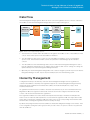
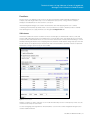
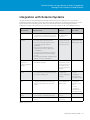
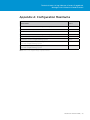
Base-rate calculation includes: time interval* rate cost* used units* rate factor.
Performing this calculation on the organization vDC for CPU (allocation), with a base rate of $0.1 USD GHz/hour
and no rate factor: 2 hours* $0.02 USD GHz/hour* 10GHz* 1.0 = $0.4 USD.
Doing the same for memory (allocation) with a base rate of $0.5 USD GB/hour and no rate factor yields the
following result: 2 hours* $0.05 USD GB/hour* 20GB* 1.0 = $2 USD.
If the billing policy is set to charge based on usage instead of allocation, the used units is the usage value for the
resource that is obtained from vCenter Server.
At the virtual machine level, the billing policy dictates whether costs are applied for the entire report duration or
for only the duration when a virtual machine is powered on.
Calculating Fixed Costs
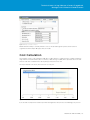
Fixed-cost calculation considers: time interval* fixed cost/duration of the resource.
Applying a weekly prorated fixed cost of $125 USD to the organization vDC and generating the report will result
in the following: 2 hours* $125 USD/168 hours in a week = $1.49 USD.
Calculating VM Instance Costs
The second virtual machine is powered off during the middle of the reporting interval. The time interval for this
virtual machine is approximately 70 minutes. If using VM Instance to apply costs, the fixed costs are not prorated
and are applied only for the duration when a virtual machine is powered on. The change in virtual machine size
will trigger a separate line item in the report, reflecting the configuration change and the new fixed cost applied.
The two totals are added together for the final cost.
User Management
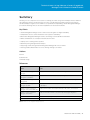
vCenter Chargeback Manager does not extract, consume or sync with vCloud Director user logins, roles or
permissions. After initial installation of vCenter Chargeback Manager, an administrator user is created in it, and
all the vCloud Director objects belong to this user. Only the administrator/supervisor user can grant permissions.
There are no per-organization users, and no vCloud Director user information is passed on to vCenter
Chargeback Manager.
Example use case: Grant vCloud Director organization administrators the ability to view and run cost reports for
their organizations.
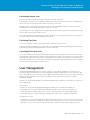
Creating users
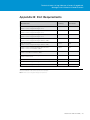
•Create local users in vCenter Chargeback Manager that map to those created in vCloud Director.
•Import LDAP users into vCenter Chargeback Manager that map to those created in vCloud Director.
vCenter Chargeback Manager supports Microsoft Active Directory but does not support OpenLDAP.
•Import LDAP groups into vCenter Chargeback Manager that map to those created in vCloud Director.
Assigning roles to users
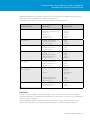
•Assigning a role on vCenter Chargeback Manager, other than the supervisor user role, defines only the actions
that the user can perform in the application. This does not implicitly give access to the resources created in the
application. To access a resource, the user either must have created it or explicitly be assigned a role for it.
T ECHNICAL W HI T E P A P E R / 2 1