1
English
5
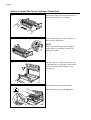
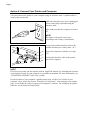
Unpack the toner cartridge and gently rock
it from side to side well before installing.
(①)
Then, remove the protective parts.( ② )
CAUTION
DO NOT MOVE THE SHUTTER LEVER
UNTIL THE CARTRIDGE IS
INSTALLED.
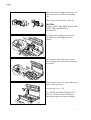
6
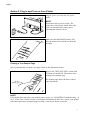
Install the toner cartridge into the drum
unit. Make sure that the ▲ marks are
aligned.
7
Gently pull the blue shutter lever on the
toner cartridge forward until the red arrows
are aligned.
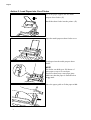
8
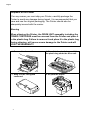
Close the drum cover ( ① ) and push gently
until it clicks into place.
Close the top cover. ( ② )
See “CHAPTER 5 MAINTENANCE” in
the User’s Guide for more information
about replacement of the toner cartridge.
3