1
English
Shipment of the Printer
If for any reason you must ship your Printer, carefully package the
Printer to avoid any damage during transit. It is recommended that you
save and use the original packaging. The Printer should also be
adequately insured with the carrier.
Warning
When shipping the Printer, the DRUM UNIT assembly including the
TONER CARTRIDGE must be removed from the Printer and place it
in the plastic bag. Failure to remove it and place it in the plastic bag
during shipping, will cause severe damage to the Printer and will
VOID THE WARRANTY.
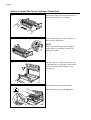
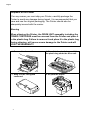
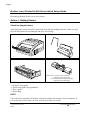
1 Remove the drum unit.
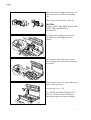
2 Place it in the plastic bag and fold
the plastic bag under the drum unit.
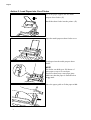
3 Wrap it in the corrugated
cardboard.
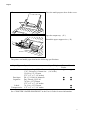
4 Re-pack the printer.
8