1
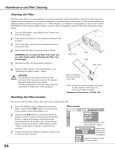
Cleaning the Filter
Air filters help prevent dust from accumulating on the optical elements inside the projector. To whatever extent the air filter s
become clogged with dust particles, the cooling fans' effectiveness is reduced, which may result in an internal heat build-up
and adversely affect the life of the projector. Therefore, for appropriate care and use of the projector, regular cleaning of t he
air filters is necessary.
How often the air filters should be cleaned really depends upon the environment in which the projector is being operated. As
a rough guide, under a normally clean operating environment, the air filters should be cleaned apporoximately every 200
hours of use. However, if the projector is being operated in a somewhat dusty or smoky environment, the air filters should be
cleaned more often; for consistently good projector operation and performance, timely cleaning of the air filters is a very
important factor. When appropriate, clean the air filters following the steps below.
1
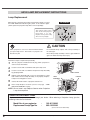
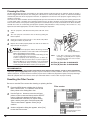
Turn off a projector, and disconnect AC power cord from an AC
outlet.
2
Turn over projector and remove the air filters by pulling the
latches upward.
3
Clean the air filters with a brush or rinse them softly. When
rinsing the air filters, dry them well.
4
Replace the air filters properly. Make sure that the air filters are
fully inserted to the projector.
A
B
CAUTION
Do not operate the projector with the Air Filter(s) removed.
Dust may accumulate on the LCD Panels and Projection
Mirrors degrading the picture quality.
Do not put anything into the air intake vents. Doing so may
result in a malfunction of the projector.
Failure to properly clean the projector's air filters (in
accordance with the instructions in your Projector's
Operating Manual, or more frequently in any environment
which is somewhat dusty or smoky) could result in
overheating and will void the warranty on the projector.
AIR FILTER
Pull up and remove.
NOTE:
If the dust cannot be removed by
cleaning, it is probably time to replace
the air filters with new ones. Please
consult your dealer.
Air Filter (A) Parts No. 10-A6103038773
Air Filter (B) Parts No. 10-A6103038780
RECOMMENDATION
We recommend avoiding dusty/smoky environments when operating the projector. Usage in these environments
may cause a poor image quality. When using the projector under dusty or smoky conditions, dust may accumulate on a lens,
liquid crystal panels, or optical elements inside the projector. Such condition may degrade the quality of the projected image.
When the symptoms above are noticed, contact your authorized dealer or service station for proper cleaning.
Resetting the Filter Counter
Be sure to reset the Filter counter after cleaning or replacing the filter.
1
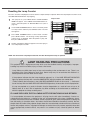
Press the MENU button to display the On-Screen
Menu. Use the Point 7 8 buttons to move the red
frame pointer to the Setting Menu icon.
2
Use the Point ed buttons to move the red frame
pointer to Filter counter and then press the SELECT
button. A dialog box appears showing the total
accumulated time of the filter use, a timer setting
option, and the reset option. Select Reset and the
“Filter counter Reset?” appears. Select [Yes] to
continue.
3
Another confirmation dialog box appears, select [Yes]
to reset the Filter counter.
Filter counter
Select Reset and the “Filter
counter Reset?” appears.
Select [Yes],
then another
confirmation
box appears.
Select [Yes] again to reset
the Filter counter.
4
013-100609-01 Rev. 1 (02/07)