1
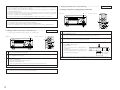
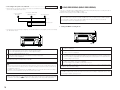
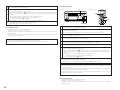
2. Stopping recording
10 VARIOUS RECORDING FUNCTIONS
1
(Main unit)
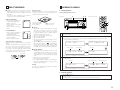
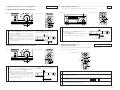
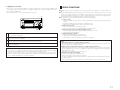
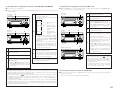
1. Adding track numbers during recording
(Remote control unit)
TITLE/CHARACTER
TIME
SYSTEM
POWER
• Track numbers can be added during recording regardless of the recording mode.
MINIDISC RECORDER DMD-M31
EDIT
POWER LOADING MECHANISM
CHARACTER/
MEMORY REC
RANDOM
SLEEP
EDIT
TIME/INPUT
TUNING
CD SRS
RDS
TUNING
ENTER
MEMORY
MULTI REC
REPEAT
ON / STANDBY
8
18Tr02m 46s
1
R
-40
-30
-20
-12
-6
MINIDISC RECORDER DMD-M31
TONE/SDB
9
FUNCTION
TUNER
L
dB -60
-2
0
PUSH
ENTER
POWER LOADING MECHANISM
PTY
PRESET
PROG/
DIRECT
BAND
CHARACTER/
MEMORY REC
EDIT
TIME/INPUT
GROUP
CT
CD-R
CD SRS
1
MD
MULTI REC
1
L
dB -60
-40
-30
-20
-12
-6
-2
PUSH
ENTER
0
R
1
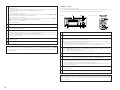
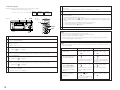
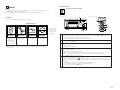
Press the 2 (stop) button.
• Recording stops and the TOC data is written on the MD.
• The stop mode is set automatically once the end of the recordable time is reached.
NOTES:
• When performing digital recording of CDs or MiniDiscs, the track numbers are recorded automatically. (Depending
on the recorded content on the CD or MiniDisc and on the type of CD player, the track numbers may differ from
those on the original CD or MiniDisc.)
• When recording on CDs or MiniDiscs, track numbers may be incremented by 1. If this happens, erase the
unnecessary track numbers. (See pages 21~23.)
• When recording DATs digitally, track numbers are automatically added when soundless sections are detected.
• Use analog recording to record sources that cannot be recorded digitally.
• During digital recording from CDs or MiniDiscs, the track number may not change if the same track is
programmed twice in a row or if the single track repeat mode is set.
• Monaural recording is not possible on this recorder.
• It is not possible to make digital recordings of MiniDiscs which have already been recorded digitally. This unit
includes a serial copy management system (SCMS). This system limits reproduction of digital signals on digital
audio devices to “one generation”. Use analog recording to record MiniDiscs originally recorded digitally.
• Should the “Copy Prohibit” or “Dig. Unlock” display appear during digital recording, the unit enter
the record pause mode, and you wish to eject the disc, press the 2 (stop) button, then press the 5 (eject) button
and eject the disc.
9
8
18Tr02m 46s
ON / STANDBY
VOLUME
1
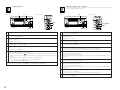
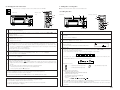
Press the MULTI REC button.
1
During recording, press the MULTI REC button.
• When the MULTI REC button is pressed during recording,
a track number is added at that point.
• A new track number cannot be added for approximately
4 seconds after the last track number.
1st track
2nd track
(Recording continues.)
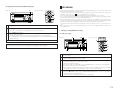
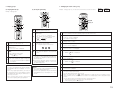
2. Stopping recording temporarily
• Recording can be stopped temporarily then resumed from the same point.
1
MINIDISC RECORDER DMD-M31
POWER LOADING MECHANISM
CHARACTER/
MEMORY REC
EDIT
TIME/INPUT
NOTE:
• When TOC writing starts, the “
” indicator flashes. Do not shake the main unit, or unplug the power supply
cord while the TOC is being written. If the data is not recorded properly, it will not be possible to play the disc.
CD SRS
MULTI REC
ON / STANDBY
8
18Tr02m 46s
1
L
dB -60
-40
-30
-20
-12
-6
-2
0
R
9
PUSH
ENTER
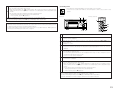
q Press the 1/3 (play/pause) button.
1
During recording, press the 1/3 (play/pause) button.
• When the 1 /3 (play/pause) button is pressed during
recording, the pause mode is set at that point and the
track number changes.
• Press the 1/3 (play/pause) button to resume recording.
1st track
2nd track
(Pause)
w Press the 1/3 (play/pause) button.
• A blank section of approximately 2 seconds is inserted before recording resumes.
15