1
IMPORTANT SAFEGUARDS AND WARNINGS
Observe the following warnings before installing and using this product.
1.
Installation and servicing should be done by qualified installation and service personnel only.
2.
Installation should be done according to all local and national electrical and mechanical codes, using only approved materials.
3.
Use only installation methods and materials capable of supporting four times the maximum specified load.
4.
A CCC-approved power cord must be used to power this equipment when used in
China.
Please thoroughly familiarize yourself with the information in this manual prior to installation
and operation.
DESCRIPTION
The PMC21A is a high-resolution color monitor that can be used in desktop applications or
rack mounted using the bezel rack mount that is provided as a standard accessory. The
rack mount is constructed of steel, has a black finish, and occupies 11 rack unit spaces. It is
supplied with eight flat-head screws to attach the rack mount to the monitor, and four 10-32
screws to attach the rack mount to a console.
The monitor supports NTSC and PAL video, as well as 120 VAC and 230 VAC input power.
An automatic switching system makes all the necessary changes for adapting to the required formats. Manual selection is not required. A separate power cord is supplied for each
voltage input.
The PMC21A features audio input and output, and has a steel housing and front panel controls. The S-VHS high-resolution video (420 horizontal lines at center) and digital comb filter
circuitry add to the superior picture quality.
INSTALLATION
CAUTION: Do
not install this
monitor in a
location having excessive
heat or in any way that
obstructs the ventilation
openings in the cabinet.
Premature component
failure or cabinet damage
may result.
To install the monitor in a rack, start at step 1. Otherwise, start at step 3.
1.
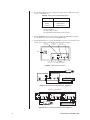
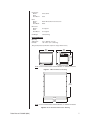
Slide the bezel rack mount onto the monitor from the rear and attach it to the monitor
with the eight M5 flat-head screws provided.
2.
Place the PMC21A monitor and rack mount into the console, align the mounting holes
of the rack mount with the mounting holes in the console, and insert and tighten the
four 10-32 screws provided. The face of the monitor protrudes approximately 4.8
inches (12.2 cm) from the front of the rack.
FLATHEAD SCREW (8)
BEZEL RACK
MOUNT
NOTE: Installation of the
monitor and rack mount into
the console may require two
persons.
PMC21A MONITOR
Figure 1. Bezel Rack Mount Installation
Pelco Manual C1959M (6/99)
3