1
Resetting and Initializing the Printer
In many cases, you can eliminate a problem by resetting or
initialking the printer.
Resetting the printer clears the printer memory without
affecting SelecType settings. Normally you reset the printer for
a problem related to a single print job.
Initialking the printer clears the memory and also returns all
SelecType settings to their factory default settings. Normally
you initialize the printer when the printer settings are not what
you want.
Resetting the printer
When you reset the printer, you clear the printer’s memory.
The print job currently loaded in memory is erased and the
printer is ready to accept another print job. SelecType settings
and downloaded fonts are not affected.
You might want to reset the printer if you suspect the print job
itself is bad and the printer cannot print it.
To reset the printer for the currently active interface, hold
down the Alt button while you press R-t. You can also reset
the active interface by turning off the printer for ten seconds,
and then turning it back on; however, all downloaded fonts
will be erased.
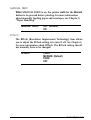
To reset all interfaces, hold down both the Alt and Reset
buttons until the message RESET ALL appears on the display.
6-2
Troubleshooting and Maintenance