1
4
Functions — Alphabetical List
MLPutRanges
Send data in Microsoft Excel named ranges to MATLAB
Syntax
= MLPutRanges()
MLPutRanges
out = MLPutRanges()
Description
= MLPutRanges() writes the named cell ranges in a Microsoft Excel spreadsheet into
MATLAB variables. The variables are named with the same name specified by the cell
range name in Microsoft Excel. To use this syntax, right-click in any Microsoft Excel cell
and enter this syntax and press Enter.
MLPutRanges writes the named cell ranges in a Microsoft Excel spreadsheet into
MATLAB variables. The variables are named with the same name specified by the cell
range name in Microsoft Excel. Use this syntax when working directly in a Microsoft
Visual Basic macro.
out = MLPutRanges() returns the named cell ranges in a Microsoft Excel spreadsheet
into MATLAB variables. The variables are named with the same name specified by the
cell range name in Microsoft Excel. In this case, out specifies whether the MLPutRanges
function executed successfully. Use this syntax when working directly in a Microsoft
Visual Basic macro.
Examples
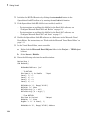
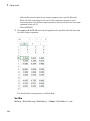
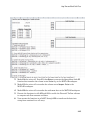
Send Microsoft Excel Named Ranges to MATLAB in a Microsoft Excel Cell
Define a name for a range of cells. For instructions about defining names, see Excel
Help and enter the search term: define and use names in formulas.
4-34