1
NOTE: Too much noise or poor reception due to weak signals might activate the BLUE SCREEN option, despite the presence of a broadcast signal. To continue watching TV under these condi‐
tions, switch the BLUE SCREEN “OFF”.
NOTE: While VCR input mode is selected, the BLUE SCREEN will not be shown on your TV even if the BLUE SCREEN is turned on.
Language
• Setting the ON SCREEN DISPLAY Language.
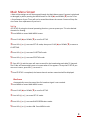
1 Press MENU to access MAIN MENU screen.
2 Press CH UP (S) or DOWN (T) to scroll to SET UP.
3 Press VOL (+) or (–) to access SET UP mode, then press CH UP (S) or DOWN (T) to scroll to to LANGUAGE.
4 Press VOL (+) or (–) to access LANGUAGE change mode.
5 Press CH UP (S) or DOWN (T) to select “ENGLISH”, “ESPAÑOL (SPANISH)” or “ (FRANÇAIS) FRENCH”. Press MENU to exit.
Video Adjust
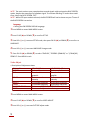
• Description of Adjustment Items
Selected Item PICTURE TNT COLOR BRIGHT SHARP FAVORITE COLOR RESET VOL UP (+) Button
VOL DOWN (+) Button To increase contrast To decrease contrast To make skin tones To make skin tones greenish purplish To increase color To decrease color intensity intensity To increase brightness To decrease brightness To increase sharpness To decrease sharpness To choose a RED, BLUE, or STANDARD color tone To return all adjustments to factory preset levels. 1 Press MENU to access MAIN MENU screen.
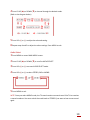
2 Press CH UP (S) or DOWN (T) to scroll to VIDEO ADJUST.
3 Press VOL (+) or (–) to access PICTURE adjust mode.
9