1
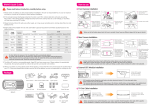
HOW TO INSTALL
ET23KHC QUICK GUIDE | 02
1 HDTV with built in speakers
HD-TV cable : Connect one end of the cable
to the HD socket on the backside
of the main device and the other end of the
cable to the HD socket on your HDTV.
※ Please make sure that the external input setting on your HDTV corresponds to
the external input on your HDTV, to which the karaoke device will be connected.
2 HDTV without built in speakers
For video output, follow the same instruction
as 1. above. For audio, use the tri-color RCA cable.
Connect the cable to the audio/video output
on the backside of the main device and
connect Red(right) end and White(left) end
of the cable to corresponding audio inputs on
speakers or other audio devices.
※ Please make sure that the external input setting on your HDTV
corresponds to the external input on your HDTV, to which the
karaoke device will be connected.
3 TV with built in speakers
Connect the Tri-Color RCA cable from the
audio/video output on the backside of
the main device to the corresponding
audio/video inputs on your TV.
4 TV without built in speakers
For the video output, connect Yellow(Video)
end of the cable to the TV video inputAudio.
For the audio output, connect Red(right)
end and White(left) end of the cable to audio
inputs on speakers or other audio devices.