1
Adaptec SCSI Card 39160 User’s Reference
SCSI hard disk drives running under other operating systems,
see the operating system documentation.
Using Ultra160 Hard Disk Drives
■
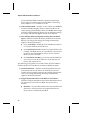
We recommend that you connect your LVD (Ultra160 and
Ultra2) SCSI devices to SCSI Channel B and your non-LVD
SCSI devices (if any) to SCSI Channel A. This allows the LVD
SCSI devices to run at their maximum performance levels of
160 MBytes/sec or 80 MBytes/sec. Or you can connect LVD
SCSI devices to both SCSI channels. If you combine LVD and
non-LVD SCSI devices on the same SCSI channel, the data
transfer rate of the LVD SCSI devices will drop down to nonLVD SCSI performance levels of up to 40 MBytes/sec.
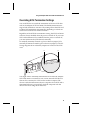
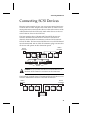
68-pin internal LVD/SE
connector Channel B
68-pin external
LVD/SE connector
Channel A
68-pin internal LVD/SE
connector Channel A
Narrow
connector
Channel A
68-pin external
LVD/SE connector
Channel B
■
Internal Ultra2 and Ultra160 SCSI devices come from the factory with termination disabled and cannot be changed. Proper
termination is provided by the terminator at the end of the
internal LVD SCSI cable.
Using Scanners
If you connect a scanner to the Adaptec SCSI Card 39160, you must
install the scanner manufacturer’s proprietary software drivers. See
your scanner’s documentation for details.
12