1
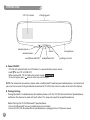
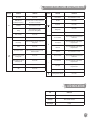
Button Functions and Operation
BUTTON
M
FUNCTION
OPERATION
Go to Menu
Press 1 time
DTMF (Dial Tone
Modulation Frequency)
Press and hold for 2 seconds (Activated only
when the line is connected)
Quick Dial
BUTTON
Press and hold for 2 seconds
(Screen shows “Pairing Mode”)
Mute / Un-mute
Press 1 time
Make / Receive call
Press 1 time
Voice dialing
Press and hold for 2 seconds to enter voice
dialing mode
OPERATION
Press and hold for 2 seconds
End Call
Press 1 time
Reject Call
Press 1 time
End L1 & receive L2 in call
waiting mode
Press 1 time
Press and hold for 2 seconds
Pairing
FUNCTION
Power ON/OFF
+
NO
Press 1 time
Increase Volume
Press repeatedly until you reach desired
volume level
Scroll Upward
Press repeatedly until you find desired
entry/menu item
Press repeatedly until you find desired
entry/menu item
Redial
Press 1 time
Move left
Conversation transfer
While conversation is ongoing, press and
hold for 2 seconds
Quick Dial
Press and hold for 2 seconds
Decrease Volume
Press repeatedly until you reach desired
volume level
Scroll downward
Press repeatedly until you find desired
entry/menu item
Move right
Press repeatedly until you find desired
entry/menu item
Quick Dial
Press and hold for 2 seconds
Parking Assistant ON/OFF
Press 1 time
Hold L1 & receive L2 in call
waiting mode
Press 1 time
Switch between L1 & L2 in
call waiting mode
Press 1 time
Bluetooth® link connection
Press 1 time
YES
Press 1 time
-
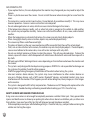
LED Indication
LED
INDICATION
RED Light
Device ON but No connection
BLUE Light
Device ON and connected
YELLOW Light
Standby
19