1
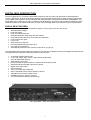
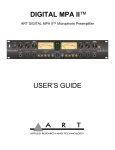
ART Digital MPA™ Microphone Preamplifier
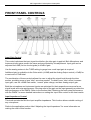
FRONT PANEL CONTROLS
Input Gain Control
This control optimizes the input signal level before the tube gain is applied. Both Microphone and
Instrument input gains remain the same and are affected by this adjustment. Input gain can be
adjusted from 0dB (for line level signals) to 45dB of gain.
Use the analog meters in the TUBE setting to gauge how much input gain is required.
Additional gain is available via the Gain switch (+20dB) and the Analog Output control (+10dB) for
a maximum of 75dB total.
The combination of these controls allows the user to adjust the signal level through the tube
section, providing more or less “tube” sound as needed. To obtain more “tube’ sound, increase
input gain, use the +20dB Gain switch, “normal” plate voltage, and less Analog output gain.
Both the microphone and instrument inputs are optimized for their respective sources as far as
signal levels and noise performance. Running most of the gain on the input generally provides the
best performance of the DMPA. Refer to the section titled “Obtaining the best noise performance
with the DMPA” for more detailed instructions on setting the Input Gain control for the best results.
Input Impedance Control
This knob controls the Mic/line input amplifier impedance. This function allows variable voicing of
any microphone.
Refer to the application section titled “Adjusting the Input Impedance” for more information on
making the most of this function.
4