1
Connecting to the Network
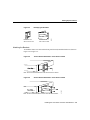
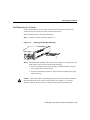
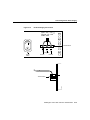
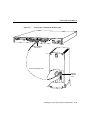
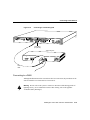
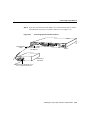
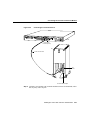
Step 2 If you have a 4-wire 56/64-kbps DSU/CSU module, use a straight-through
RJ-48S-to-RJ-48S cable to connect the RJ-48S port to an RJ-48S jack. (See
Figure 3-21.)
Connecting the 4-Wire 56/64-kbps DSU/CSU Module to an RJ-48S
Jack
H5261
Figure 3-21
4-WIRE
56K/64K
DSU/CSU
TX LB
CD
RX AL
SERIAL 0
SERIAL 1
BRI 0
Router
RJ-48S port
Straight-through
RJ-48S cable
RJ-48S jack
Installing the Cisco 2524 and Cisco 2525 Routers 3-21