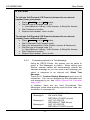
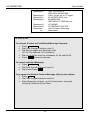
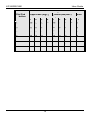
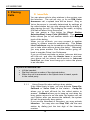
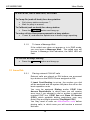
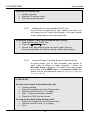
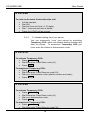
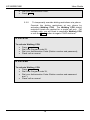
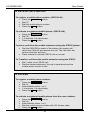
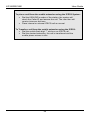
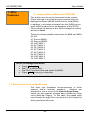
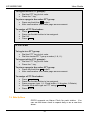
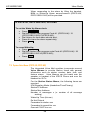
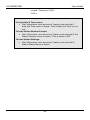
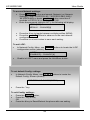
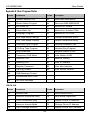
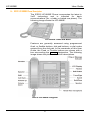
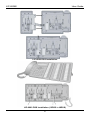
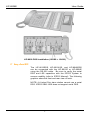
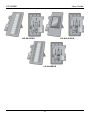
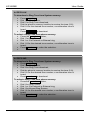
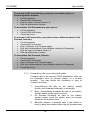
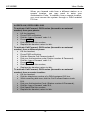
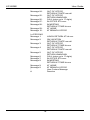
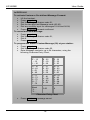
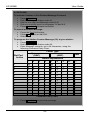
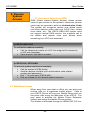
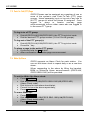
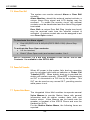
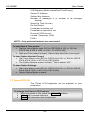
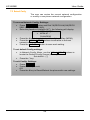
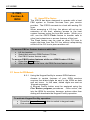
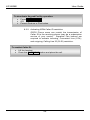
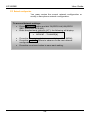
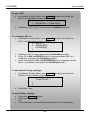
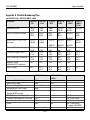
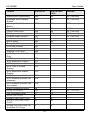
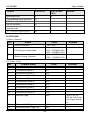
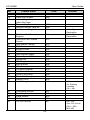
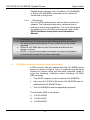
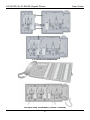
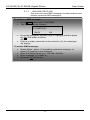
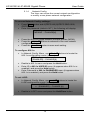
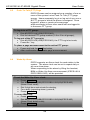
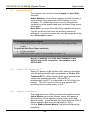
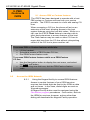
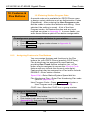
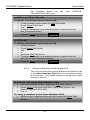
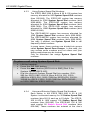
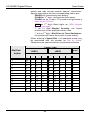
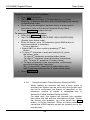
1
LIP-8002E/8002AE User Guide Please read this manual carefully before operating Phone. Retain it for future reference LIP-8002E/2AE User Guide Revision History Issue 1.0 1.1 Date Mar. 2012 Oct. 2012 Remark Initial Release Changed CI to Ericsson-LG Disposal of your old appliance 1. When the crossed-out wheeled bin symbol is attached to a product, it means the product is covered by the European Directive 2002/96/EC. 2. All electrical and electronic products should be disposed of separately from the municipal waste stream via designated collection facilities appointed by government or the local authorities. The correct disposal of your old appliance will help prevent potential negative consequences for the environment and human health. 4. For more detailed information about disposal of your old appliance, please contact your city office, waste disposal service or the shop where you purchased the product. Copyright© 2012 Ericsson-LG Co., Ltd. All Rights Reserved. This material is copyrighted by Ericsson-LG Co., Ltd. Any unauthorized reproductions, use or disclosure of this material, or any part thereof, is strictly prohibited and is a violation of Copyright Laws. Ericsson-LG reserves the right to make changes in specifications at any time without notice. The information furnished by Ericsson-LG in this material is believed to be accurate and reliable, but is not warranted to be true in all cases. iPECS is trademarks of Ericsson-LG Co., Ltd. All other brand and product names are trademarks or registered trademarks of their respective companies. LIP-8002E/2AE User Guide Important Safety Information To prevent unexpected danger or damage please read this information before installing or attempting to repair you phone. Warning and Caution information is provided to alert the consumer of known dangers: Warning: To reduce the possibility of electric shock, do not expose your phone to high humidity areas, such as a bathroom, swimming area, etc. Caution: Use only Ericsson-LG approved batteries and desktop chargers to avoid the damage to the phone. Using other batteries or chargers voids your warranty and may cause an explosion. 1. 2. 3. 4. 5. 6. 1. Only trained and qualified service personnel shall install, replace or service the phone. Do not spill liquid life water on the phone. If so, call the service center as this may result in fire or electric shock. If you see smoke or smell something during use, unplug the power cord and the phone line. Call the service center immediately. If the power adapter is used, do not touch the plug with wet hands. This may result in a fire or an electric shock or equipment damage. Do not use the phone during a thunderstorm. Lightning strike may result in fire, severe electrical or acoustic shock. Do not use the power adapter if the power cord or wall outlet is damaged. This may result in fire or an electric shock. Ensure that children do not pull on phone cords. This may injure children or result in equipment damage. 2. The ear-piece houses a magnetic device which may attract pins or small metal objects. Keep headset clear of such objects and check before use. 3. Avoid placing the phone in an area that is excessively dusty, damp or subject to vibration. 4. Choose a site for the phone that is well-ventilated and dry. 5. Do not plug multiple plug-packs into one power outlet. This may result in the plug overheating and may result in a fire or plug pack failure. 6. Do not put heavy things on the phone. 7. Do not drop or throw the phone. 8. Static electricity discharge will damage electronic components. 9. Keep out of direct sunlight and away from heat. 10. No user-serviceable parts inside. Do not insert a screwdriver or any metal objects into the phone. This may cause electric shock or damage the equipment and will render the warranty void. 11. Clean the phone with a soft, dry cloth only. Do not use volatile liquids such as petrol, alcohol, or acetone as this may cause a fire or result in discoloration or damage to plastics. Do not clean with wax or silicon products as these may enter the equipment and cause operation to become unstable. LIP-8002E/2AE User Guide [EU] European Union Declarations of Conformity Ericsson-LG Co., Ltd. declare that the equipment specified in this document bearing the “ CE” mark conforms to the European Union Radio and Telecommunications Terminal Equipment Directive(R&TTE 1999/5/EC), including the Electromagnetic Compatibility Directive(2004/108/EC) and Low Voltage Directive(2006/95/EC). Copies of these Declarations of Conformity (DoCs) can be obtained by contacting your local sales representative. [USA/CSA] FCC/IC Interference Statement This equipment has been tested and found to comply with the limits for a Class B digital device, pursuant to part 15 of the FCC Rules. These limits are designed to provide reasonable protection against harmful interference in a residential installation. This equipment generates, uses and can radiate radio frequency energy and, if not installed and used in accordance with the instructions, may cause harmful interference to radio communications. However, there is no guarantee that interference will not occur in a particular installation. If this equipment does cause harmful interference to radio or television reception, which can be determined by turning the equipment off and on, the user is encouraged to try to correct the interference by one or more of the following measures: Reorient or relocate the receiving antenna. Increase the separation between the equipment and receiver. Connect the equipment into an outlet on a circuit different from that to which the receiver is connected. Consult the dealer or an experienced radio/TV technician for help. This device complies with part 15 /RSS-GEN of the FCC/IC rules. Operation is subject to the following two conditions: (1)This device may not cause harmful interference; and (2) This device must accept any interference received, including interference that may cause undesired operation. This Class B digital apparatus complies with Canadian ICES-003. Cet appareil numérique de la classe B est conforme à la norme NMB-003 du Canada. The use of this device in a system operating either partially or completely outdoors may require the user to obtain a license for the system according to the Canadian regulations. CAUTION : Any changes or modifications in construction of this device which are not expressly approved by the party responsible for compliance could void the user's authority to operate the equipment. LIP-8002E/2AE User Guide Table of Contents 1. INTRODUCTION ................................................................................................. 1 1.1 1.2 1.3 1.4 1.5 GENERAL ................................................................................................................................................... 1 FEATURE INFORMATION ....................................................................................................................... 1 FEATURE GROUPINGS .......................................................................................................................... 1 IPECS LIP-8002E/2AE PHONE DESCRIPTION ....................................................................... 2 LIP-8002E/2AE PHONE INSTALLATION ...................................................................................... 3 1.5.1 1.5.2 1.5.3 Wiring Connectors ......................................................................................... 4 Power ............................................................................................................ 4 Wall Mount ..................................................................................................... 4 2. RECEIVING CALLS.......................................................................................... 5 2.1 2.2 2.3 2.4 2.5 2.6 ANSWERING A CALL W HILE IDLE ..................................................................................................... 5 RESPONDING TO A CALL W HILE BUSY .......................................................................................... 5 DIFFERENTIAL RING SIGNALS ........................................................................................................... 6 ANSWERING CALLS TO OTHER STATIONS ................................................................................... 7 USING DO-NOT-DISTURB (DND) TO BLOCK INCOMING CALLS .......................................... 8 FORWARDING CALLS............................................................................................................................ 8 2.6.1 2.6.2 2.6.3 Forwarding calls to another station or Voice Mail ........................................... 8 Forwarding calls to an external number.......................................................... 9 Forwarding callers to a Text Message .......................................................... 11 3. PLACING CALLS ............................................................................................ 15 3.1 INTERNAL CALLS ................................................................................................................................... 15 3.1.1 3.1.2 Using Camp-On when calling a busy station ................................................ 15 To leave a Message Wait ............................................................................. 16 3.2 EXTERNAL CALLS ................................................................................................................................. 16 3.2.1 3.2.2 3.2.3 3.2.4 3.2.5 Placing external CO/VoIP calls..................................................................... 16 Waiting for the next available CO/IP line ...................................................... 17 Account Codes: Tracking External calls for billing ........................................ 17 To disable dialing from your phone .............................................................. 18 To temporarily override dialing restrictions at a phone.................................. 19 3.3 USING AUTOMATED DIALING........................................................................................................... 20 3.3.1 3.3.2 3.3.3 3.3.4 3.3.5 3.3.6 Using Last Number Redial (LNR) ................................................................. 20 Using and Entering Saved Number Dial ....................................................... 20 Using System Speed Dial Numbers ............................................................. 21 Using and Entering Station Speed Dial Numbers ......................................... 21 Dial by Name and Entering Your Name........................................................ 23 ACNR: To retry a busy external number until answered ............................... 24 4. HANDLING ....................................................................................................... 25 i LIP-8002E/2AE User Guide 4.1 CALL TRANSFER: SENDING A CALL TO A DIFFERENT DESTINATION .................................. 25 4.2 CALL HOLD: PLACING A CALL IN A WAITING STATE ................................................................. 25 4.3 JOINING MULTIPLE PEOPLE IN A CONFERENCE ......................................................................... 26 4.3.1 Setting up a Conference Room .................................................................... 26 4.4 CALL PARK: PLACING A CALL ON HOLD TO PAGE .................................................................... 28 5. RETRIEVING & RESPONDING TO MESAGES ......................................... 29 5.1 RESPONDING TO A STATION MESSAGE W AITING INDICATION ............................................ 29 5.2 GETTING VOICE MAIL MESSAGES ................................................................................................ 29 6. REMOTE SYSTEM ACCESS ........................................................................ 32 6.1 DIRECT INWARD SYSTEM ACCESS (DISA) ............................................................................... 32 6.2 MOBILE PHONE EXTENSION ............................................................................................................ 32 7. MISC. FEATURES .......................................................................................... 35 7.1 7.2 7.3 7.4 7.5 BACKGROUND MUSIC AND MUSIC ON HOLD (IPECS-LIK)................................................. 35 USING INTERNAL, EXTERNAL AND MEET-ME PAGING .......................................................... 35 PUSH-TO-TALK (PTT) PAGE (IPECS-LIK, IPECS-MG) .................................................. 36 WAKE-UP ALARM ................................................................................................................................ 37 SYSTEM VOICE MEMO (IPECS-LIK, IPECS-MG) ............................................................... 38 8. SET FEATURES & FLEX BUTTONS.......................................................... 40 8.1 ENTERING STATION PROGRAM DATA .......................................................................................... 40 8.2 ASSIGNING FEATURES TO FLEX BUTTONS ................................................................................ 40 8.3 NETWORK CONFIGURATION .............................................................................................................. 41 APPENDIX A USER PROGRAM CODES ....................................................... 43 APPENDIX B USEFUL INFORMATION : OPEN SOURCE SOFTWARE NOTICE ................................................................................................................ 47 ii LIP-8002E/2AE 1. Introduction User Guide 1. Introduction 1.1 General Your telephone is connected to an advancedtechnology, highly-versatile, fully-featured telecom system designed to make office communications easy and productive. Employing state-of-the-art Voice over Internet Protocol (VoIP) technology, voice and data converge on a single IP packet network. Because each iPECS Phone is an IP appliance, it can be moved easily throughout the office LAN and maintain normal operation. 1.2 Feature Information We have taken every effort to make this user guide simple and straightforward. The guide starts with the simpler operations of the iPECS Phone, and moves on to receiving and placing calls, and then to more advanced features. Each section includes a brief and basic description of each feature and step-by-step operation instructions. The operations shown in this guide use the System’s base default Numbering Plan. Your specific Numbering Plan may be different. Some features may not be available for you to access or may be subject to certain limitations based on the set-up of the System (refer to your System. Under certain operation conditions, this equipment cannot be relied upon to make emergency calls (loss of power, etc.). Alternative arrangements should be made for access to emergency services. 1.3 Feature Groupings Every effort has been taken to divide the features into a logical and consistent sequence so that features can be quickly located. Features have been divided into groups, Receiving calls, Placing calls etc. Within each group, features are arranged according to the difficulty of operation and frequency of use. 1 LIP-8002E/2AE User Guide 1.4 iPECS LIP-8002E/2AE Phone Description The iPECS LIP-8002E/2AE Phone incorporates the latest in VoIP technology and is intended for basic communications (ex., a lobby or limited use phone). The following image shows the LIP-8002E/2AE. Features are generally accessed using programmed fixed, or flexible buttons, dial pad buttons, or dial codes entered from the dial pad. In the remainder of this User Guide, the Fixed or Flexible buttons are shown with a box surrounding the BUTTON designation. The following image shows the phone with button descriptions. iPECS LIP-8002E/2AE Diagram 2 LIP-8002E/2AE User Guide DND – Blocks all incoming calls. Speed – Access speed dialing, speed programming. Vol – Adjusts volume for ringing, headset, and speakerphone; adjusts LCD brightness. Trans/PGM – Call transfer, or programming mode. Hold – Places active call on hold or saves programming information. Call Back – Initiates call back request when calling a busy station; call is completed when busy station returns to idle status. Speaker – Allows User to place a call while on-hook. Toggle to activate. Flexible – Some are system pre-programmed for line appearance, and some are user programmable. Ring/MSG Indicator – Illuminates when ringing, or message waiting. LCD Display – Phone interface for status, dialing directories, and text message information. Hands-free Microphone – Used for hands-free speakerphone function. 1.5 LIP-8002E/2AE Phone Installation The LIP-8002E/2AE can be connected to any standard 10/100 Base-T Ethernet switch port. When the LIP8002AE is connected to an 802.3af compliant switch port (ex., POE8), The LIP-8002E/2AE obtains power from the Ethernet port. When LAN power is available, do not use AC/DC adaptor. When LAN power is not available, the AC/DC adaptor must be used. The following image shows how to connect the handset, power cord, and LAN cable to the phone.(The LIP8002AE isn’t support PoE and can use only the supplied adaptor) 3 LIP-8002E/2AE User Guide 1.5.1 Wiring Connectors The LIP-8002E/2AE has a two Ethernet ports one is connected to the LAN using a RJ-45 plug terminated category 5 cable supplied with the Phone, the other can be connected to a desktop PC. Using the cable, one RJ-45 plug is inserted into the "LAN" jack. The other RJ45 plug is inserted into the RJ-45 jack previously wired to an Ethernet switch port accessible by the iPECS system. To power the LIP Phone over the LAN, the switch port must support POE (Power over Ethernet) standard 802.3af. 1.5.2 Power The LIP-8002E/2AE can be powered by the AC/DC Adapter-K- (5 V @0.7A) or over the LAN cable using the POE8 or other 802.3af compliant switch. (The LIP8002AE isn’t support PoE and can use only the supplied adaptor) If using the AC/DC Adapter, after connecting the Phone to the LAN, the Adapter’s DC voltage plug is inserted into the power-input jack in the underside of the Phone. One end of the AC power cord is inserted into the mating receptacle of the AC Adapter, and the other end is inserted into the AC power outlet. 1.5.3 Wall Mount The LIP-8002E/2AE can be wall mounted as needed. The following instructions detail how to perform a wall mount installation: • • • • • Mark and drill two (2) 7mm holes for plastic wall anchors. Insert the two (2) anchors into the holes and insert and tighten each screw leaving about 2.5 mm (1/8-inch) of the screw exposed. Slide the LIP-8002E/2AE over the screws and assure the phone is secure. NOTE—It may be necessary to remove the phone and tighten or loosen the screws for a secure mounting. For the wall-mounting, sleeve of the CAT5 cable should be moved backward to prevent it protrude. 4 LIP-8002E/2AE User Guide 2. Receiving Calls 2. Receiving Calls 2.1 Answering a Call While Idle There are 3 basic types of incoming calls; internal/external calls, Intercom Voice Announce calls, and Hold recalls. Your phone may be assigned Ringing Line Preference; in this case, calls that ring are answered by lifting the handset. Otherwise, you must press the flashing Flex button. External calls are from CO lines or VoIP channels that are programmed to ring at your phone. For external calls, Delay Ring may be assigned allowing others to answer the call before the call rings at your phone. Calls can be forwarded in some manner from another user; if providing call coverage for other users, you may also receive Station Call Coverage calls. Calls placed on Hold, including Transfers, parked calls, etc., will Recall if left on hold for too long. ICM Voice Announce calls are answered based on the ICM Signaling mode at the receiving phone; in HandsFree (HF) mode, after the splash tone and announcement, speak normally into the microphone. In the Privacy (PV) mode, lift the handset to respond. The ICM Signaling mode can be assigned in Station Programming. In iPECS-LIK, iPECS SBG-1000, iPECS-MG To answer a call ringing at your phone: • Lift the handset, the call will be connected. To respond to an Intercom Voice Announce call: • Lift the handset to respond. 2.2 Responding to a Call While Busy While you are busy on another call, you may receive a Muted Ring, Camp-On tones, or Voice-Over announcements. Muted Ring is provided over the speaker of your Phone indicating a Call Waiting. You also may receive Camp On tones, a burst of tone on top 5 LIP-8002E/2AE User Guide of the existing call, as an indication of another call waiting. While busy, certain stations can activate Voice-Over to your phone. When used audio is received from both the active call and the Voice-Over announcement. Respond to any of these Off-hook Signals by: placing the existing call on Hold and responding to the new incoming call, activating One-time DND. To answer a Call Waiting: • Press HOLD , and/or • Press the FLEX button. To active One-time DND: • Press the DND button. 2.3 Differential Ring Signals When multiple phones in a small area ring, it can be difficult to tell which are ringing. The iPECS Phone has 14 Ring Tones available for differentiating one phone’s ringing from another. Four of the tones are stored in the phone permanent memory; the remaining ten tones are in the system memory. Four of these ten can be th downloaded into the phone memory for use as the 5 to th 8 Ring Tone In iPECS-LIK To download a Ring Tone from System memory: • Press TRANS/PGM , • Dial 1 for Ring Tones, • Dial 5 for Ring Tone download, • Dial the phone’s memory location to receive the tone (5-8), • Dial 0-9 for the desired tone number; a sample tone is played downloading the selected one. • Press HOLD to download and a confirmation tone is heard. To select a Ring Tone from phone memory: • Press the TRANS/PGM button, • Dial 1 for Ring Tones, • Dial 1 or 2 for Internal or External ring, • Dial 1-8 for the desired tone number; a sample tone is heard, • Press HOLD to make the selection 6 LIP-8002E/2AE User Guide In iPECS-MG To download a Ring Tone from System memory: • Press TRANS/PGM , • Dial 2 for Ring Tones, • Dial 3 for Ring Tone download, • Dial the phone’s memory location to receive the tone (5-8), • Dial 0-9 for the desired tone number; a sample tone is played downloading the selected one. • Press HOLD to download and a confirmation tone is heard. To select a Ring Tone from phone memory: • Press the TRANS/PGM button, • Dial 2 for Ring Tones, • Dial 1 or 2 for Internal or External ring, • Dial 1-8 for the desired tone number; a sample tone is heard, • Press HOLD to make the selection 2.4 Answering Calls to Other Stations When nearby stations are ringing, you may pick-up (answer) the call. Select to answer a call ringing at a specific station (Directed Call Pick-Up) or you may choose to answer the oldest call ringing to your station group (Group Call Pick-Up). Assign a Flex button with the Group Call Pick-Up code for one-touch access. NOTE—Pick-Up will not answer calls on the ringing station Private Line unless the line appears on your phone. To answer a call ringing at another station: • Lift the handset, • Dial Directed Call Pick-Up code, • Dial the Intercom Number of the ringing station; call is connected. To answer a call ringing at a station in your group: • Lift the handset, • Dial Group Call Pick-Up code, the call is connected. 7 LIP-8002E/2AE User Guide 2.5 Using Do-Not-Disturb (DND) to Block Incoming Calls Activate Do-Not-Disturb (DND) when you wish not to be interrupted by pressing the DND button; the phone will block incoming calls. Internal callers will receive a fast busy tone and the display will show the DND status. Activate Do-Not-Disturb while busy (One-Time DND); DND will be active only for the duration of the present call, and requires a DND button. When an Executive activates DND, calls are forwarded to the paired Secretary automatically. The Attendants and Secretary may be able to activate DND Override and Intrude on an active call. The Attendants may also cancel DND at other stations. 2.6 Forwarding Calls 2.6.1 Forwarding calls to another station or Voice Mail Incoming calls may be diverted to other resources of the system. Resources include other stations, Internal Voice Mail and External Voice Mail. Your LCD and the LCD of the forward receiver will both indicate the forward status. Call Forward can be activated from your phone or from a different station (Call Forward, Remote). You may define the conditions or ‘type of forward’ as below: 1: Unconditional—All calls to the station, except recalls, are forwarded. 2: Busy—Immediately forwards all calls, except recalls, when the station is busy. 3: No Answer—Forwards all calls to the station, except recalls, when the station does not answer within the No Answer timer. 4: Busy/No Answer—Forwards calls if the station is busy or does not answer within the No Answer timer. When you forward calls from a different station, you may need to enter your Authorization Code (station number and password). 8 LIP-8002E/2AE User Guide In iPECS-LIK, iPECS SBG-1000, iPECS-MG To activate Call Forward from your phone to another phone or internal system resource: • Press SPEAKER on and DND button, • Dial the type of forward code 1-4, 1= Unconditional, 2=Busy, 3=No Answer, 4=Busy/No Answer • Dial the destination number. • Press HOLD button or OK button to save. To deactivate Call Forward from your phone: • Press SPEAKER on, • Press DND button • Press the ‘#’ key. To activate Call Forward for your phone from a different phone (Call Forward, Remote): • Press SPEAKER on and DND button, • Dial 0 (Remote Call Forward code), • Dial your Authorization Code (Station number & Password), • Dial the type of forward code 1-4, • Dial the destination number, • Press HOLD button or OK button to save. To deactivate Call Forward, Remote: • Press SPEAKER on, • Press DND button, • Dial 0 (Remote Call Forward code), • Dial your Authorization Code (Station number & Password), • Press the ‘#’ key. 2.6.2 Forwarding calls to an external number Forward calls to an external CO/IP destination; calls can be forwarded from an internal station or a remote location. You may define the conditions or ‘type of forward’ as below: 1: Unconditional—All calls to the station, except recalls, are forwarded internally or externally. 9 LIP-8002E/2AE User Guide 2: 3: 4: Busy—Immediately forwards all calls to the station, except recalls, when station is busy. No Answer—Forwards all calls to the station, except recalls, when the station does not answer within the No Answer timer. Busy/No Answer—Forwards calls if the station is busy or does not answer within the No Answer timer. When you forward calls from a different station or a remote location, you may need to enter your Authorization Code (station number and password). In addition, from a remote location, you must access the system through a DISA enabled CO line. In iPECS-LIK, iPECS SBG-1000 To activate Call Forward, Off Premise (forward to an external number) from your phone: • Press SPEAKER on and DND button, • Dial the type of forward code 1-4, 1= Unconditional, 2=Busy, 3=No Answer, 4=Busy/No Answer, • Press SPEED , • Dial Speed Dial bin number. To activate Call Forward, Off Premise (forward to an external number) from a different phone: • Press SPEAKER on and DND button, • Dial 0 (Remote Call Forward code), • Dial your Authorization Code (Station number & Password), • Dial the type of forward code 1-4, 1= Unconditional, 2=Busy, 3=No Answer, 4=Busy/No Answer, • Press SPEED , • Dial Speed Dial bin number. To activate Call Forward, Off Premise (forward to an external number) from a remote location: • Dial the telephone number of a DISA assigned CO line, • While receiving dial-tone, dial the Call Forward feature code, • Dial your Authorization code (Station number & Password), • Dial the type of forward code 6-9, • Dial Speed Dial bin number. 10 LIP-8002E/2AE User Guide In iPECS-MG To activate Call Forward, Off Premise (forward to an external number) from your phone: • Press SPEAKER on and DND button, • Dial the type of forward code 1-4, 1= Unconditional, 2=Busy, 3=No Answer, 4=Busy/No Answer, • Dial Telephone number, • Replace the handset, return to idle. To activate Call Forward, Off Premise (forward to an external number) from a different phone: • Press SPEAKER on and DND button, • Dial 0 (Remote Call Forward code), • Dial your Authorization Code (Station number & Password), • Dial the type of forward code 1-4, 1= Unconditional, 2=Busy, 3=No Answer, 4=Busy/No Answer, • Dial Telephone number, • Replace the handset, return to idle. 2.6.3 Forwarding callers to a Text Message Using an iPECS Phone, the system can be setup to return a ‘Text Message’ to callers. When calling your Station, Internal callers will automatically receive the selected message or you can send a text message you select in response to an internal call, Silent Text Message. There are 11 Custom Display Messages each up to 24 characters. Ten can be assigned by the Attendant and one assigned by you, see Station Speed Dial Character entry chart. In addition, there are ten fixed Pre-defined Text Messages; some allow auxiliary input for time, date, etc. (as shown in message list). Message 1: Message 2: Message 3: Message 4: 11 LUNCH RETURN AT hh:mm ON VACATION RETURN AT DATE mm:dd OUT OF OFFICE RETURN AT TIME hh:mm OUT OF OFFICE RETURN AT DATE mm:dd LIP-8002E/2AE User Guide Message 5: Message 6: Message 7: Message 8: Message 9: Message 0: Message *: #: OUT OF OFFICE RETURN UNKNOWN CALL (enter up to 17 digits) IN OFFICE STA xxxx IN MEETING RETURN AT TIME hh:mm AT HOME AT BRANCH OFFICE User Custom Message Deactivate In iPECS-LIK To activate Custom or Pre-Defined Message Forward: • Press TRANS/PGM , • Dial User Program feature code 51, • Dial the two-digits text Message code (01-10: Pre-Defined, 00: Customer), • Dial any auxiliary input for messages 01-04 and 06-08, • Press HOLD , forward confirmed. To cancel activated Message: • Press TRANS/PGM , • Dial User Program feature code 51, • Dial # and Press HOLD To program the Station Custom Message (00) at your station: • Press TRANS , • Dial User Program feature code 52, • Enter Message contents, up to 24 characters, using the following Character Entry Chart: 12 LIP-8002E/2AE • User Guide Press Q – 11 Z – 12 . – 13 1 – 10 A - 21 B - 22 C - 23 2 - 20 D - 31 E - 32 F - 33 3 - 30 G – 41 H - 42 I - 43 4 - 40 J - 51 K - 52 L - 53 5 - 50 M - 61 N - 62 O - 63 6 - 60 P - 71 R - 72 S - 73 Q - 7* 7 - 70 T - 81 U - 82 V - 83 8 - 80 W - 91 X - 92 Y - 93 Z - 9# 9 - 90 Blank - *1 : - *2 , - *3 0-00 # HOLD , message saved. In iPECS-MG To activate Custom or Pre-Defined Message Forward: • Press TRANS/PGM , • Dial User Program feature code 41, • Dial the one-digits text Message code(0-9), • Dial any auxiliary input for messages 01-04 and 06-08, • Press HOLD , forward confirmed. To cancel activated Message: • Press TRANS/PGM , • Dial User Program feature code 41, • Dial # and Press HOLD To program the Station Custom Message (00) at your station: • Press TRANS , • Dial User Program feature code 42, • Enter Message contents, up to 24 characters, using the following Character Entry Chart: 13 LIP-8002E/2AE Dial Pad button User Guide Letter Type Uppercase (ABC) Lowercase(ABC) Button depressions 1 2 3 4 1 2 3 4 1 2 3 @ A D : B E / C F 4 G H 5 6 7 8 9 0 * # J M P T W . * # K N Q U X , < 1 @ a d : b e / c f I g h i 4 L O R V Y ? j m p t w . * # k n q u x , l o r v y ? 5 6 7 8 9 0 * # S Z ! 14 < Num s z ! 1 2 3 LIP-8002E/2AE User Guide 3. Placing Calls 3. Placing Calls 3.1 Internal Calls You can place calls to other stations in the system over the Intercom. The call will ring, or for an ICM Voice Announce call, a splash tone will be heard. Ring or Voice Announce is normally determined by settings at the called station but you may change this by dialing ‘#’ after placing the call. By changing the mode, a ringing ICM call will allow Voice Announce. You can assign a Flex button for Direct Station Selection/Busy Lamp Field (DSS/BLF). The DSS/BLF button allows you to call another station with a single touch of the button. When you go off-hook, you may connect to another station or system resource automatically. This Prime Line Preference may be immediate or delayed allowing you to take other actions during the delay. Otherwise, you may press another Flex button before going offhook to override Prime Line Preference. If you go off-hook and take no action, Intercom dial-tone will time-out, and after the Howler tone is received, your phone will be placed out-of-service in Intercom Lock-Out; you then must hang-up to return the phone to an idle state. To place an Intercom call: • Lift the handset, • Dial the Intercom number of the desired station, • When the call is answered or the Splash tone is heard, speak to the called party. 3.1.1 Using Camp-On when calling a busy station If the called party is busy, you may activate Camp-On, Callback or Voice Over at the station. Camp-On allows you to wait off-hook for the called station to answer. Callback allows you to hang-up, and when the busy station returns to an idle state, the system will call your Station; after you answer the callback, the system will call the previously busy station. If you are the Attendant or Secretary, you may activate Intrusion. You may also use Step Call; dial the next station by dialing just the last digit of the Intercom number. 15 LIP-8002E/2AE User Guide In iPECS-LIK, iPECS SBG-1000, iPECS-MG To Camp-On (wait off-hook) for a busy station: • Call a busy station and press ‘*’, • Wait for party to answer. To Callback (wait on-hook) for a busy station: • Press the CALL BACK button and hang-up. To make a Voice Over announcement to a busy station: • Press ‘#’, and after the Splash tone is heard, begin speaking. 3.1.2 To leave a Message Wait If the called user does not answer or is in DND mode, you may leave a Message Wait. The called user will receive a Message Wait indication; the MSG LED will flash. To activate Message Waiting: • Press the CALL BACK button and hang-up. 3.2 External Calls 3.2.1 Placing external CO/VoIP calls External calls are placed on DN buttons are accessed by a button on the iPECS Phone assigned as DN. If Least Cost Routing is set-up, the number you dial will be analyzed and the system will place the call on the least expensive route. You may be assigned Dialing and/or CO/IP Line Access Restrictions, in which case you will receive error tone if you attempt to dial or access a restricted number/CO/IP line. CO/IP line and Class Of Service (COS), which establish dialing restrictions, may vary during Day and Night operation (Day/Night COS). You may need to enter an Authorization code before placing calls, in which case you will receive a second dial tone. 16 LIP-8002E/2AE User Guide To place an external call: • Lift the Handset, • Dial the CO access code, • Dial the desired number. 3.2.2 Waiting for the next available CO/IP line If all the lines connected to your system are busy, you will receive an All Trunks Busy signal. You may request to be notified when a line becomes free. To activate a queue if the selected/dialed line is busy: • Select/dial a busy CO/IP line, • Press the CALL BACK button, • Return to an idle state by going on-hook; when the line becomes available, the Station will be notified with ringing. 3.2.3 Account Codes: Tracking External calls for billing In some cases, you or your company may desire to track calls for billing or other purposes. When an Account Code is entered, it is output from the system to a printer in the SMDR report. An Account Code Flex button can be programmed (refer to Assigning features to Flex buttons). In iPECS-LIK To enter an Account Code before the call: • Lift the handset, • Press the assigned Account Code button, • Dial the Account Code (1-12 digits), • Dial *, Intercom dial tone is heard, • Place the CO/IP call as normal. To enter an Account Code during a call: • Press the assigned Account Code button, • Dial the Account Code (1-12 digits), • Dial *. 17 LIP-8002E/2AE User Guide In iPECS-MG To enter an Account Code before the call: • Lift the handset, • Dial 550, • Dial the Account Code (1-12 digits), • Dial *, Intercom dial tone is heard, • Place the CO/IP call as normal. 3.2.4 To disable dialing from your phone You can temporarily ‘Lock’ your phone by activating Temporary COS, which will disable dialing outside calls from the phone. To deactivate Temporary COS you must enter the Station’s Authorization code. In iPECS-LIK To activate Temporary COS: • Press TRANS/PGM , • Dial Extension Class Down code (21), • Press HOLD . To deactivate Temporary COS: • Press TRANS/PGM , • Dial Extension Class Recover code (22), • Dial your Authorization code (station number and code), • Press HOLD . In iPECS-MG To activate Temporary COS: • Press TRANS/PGM , • Dial Extension Class Down code (31), • Dial your Authorization code, • Press HOLD . To deactivate Temporary COS: • Press TRANS/PGM , • Dial Extension Class Recover code (32), 18 LIP-8002E/2AE • • User Guide Dial your Authorization code, Press HOLD . 3.2.5 To temporarily override dialing restrictions at a phone Override the dialing restrictions at any phone by activating Walking COS. The Walking COS dialing restriction levels are applied for a single call only. For multiple calls, you will need to reactivate Walking COS or use the FLASH button to regain CO/IP dial-tone. In iPECS-LIK To activate Walking COS: • Press TRANS/PGM , • Dial User Program code 23, • Dial your Authorization Code (Station number and password), • Place call as normal. In iPECS-MG To activate Walking COS: • Press TRANS/PGM , • Dial User Program code 33, • Dial your Authorization Code (Station number and password and *), • Place call as normal. 19 LIP-8002E/2AE User Guide 3.3 Using Automated Dialing 3.3.1 Using Last Number Redial (LNR) The last number dialed on an external call is automatically saved in the Last Number Redial (LNR) buffer. In iPECS-LIK, iPECS SBG-1000 To dial the Last Number for an external call: • Dial Last Number Redial code Or • Press SPEED button and ‘*’, • Use Vol Up/Vol Down or Navigation buttons to select the desired number, • Press HOLD . In iPECS-MG To dial the Last Number for an external call: • Dial Redial code Or • Press SPEED button and ‘*’. 3.3.2 Using and Entering Saved Number Dial You may store the last number dialed on an external call to the Saved Number Dial buffer for convenient dialing at a later time. The Saved number is stored until a new number is saved. In iPECS-LIK, iPECS SBG-1000 To place a call using Saved Number Dial: • Lift the handset, • Press SPEED . • Dial # To store a number in the Saved Number Dial: • While on an outgoing external call, press SPEED twice. 20 LIP-8002E/2AE User Guide In iPECS-MG To place a call using Saved Number Dial: • Lift the handset, • Press SPEED . • Dial # To store a number in the Saved Number Dial: • While on an outgoing external call, press SPEED twice. 3.3.3 Using System Speed Dial Numbers The iPECS-CM system has 3000 System Speed Dial numbers. The iPECS SBG-1000 & Micro & 50 & 100 system has 800 System Speed Dial numbers. The iPECS-300 has 3000 System Speed Dial numbers. The iPECS-600 system has 6000 System Speed Dial numbers. The iPECS-1200 system has 12000 System Speed Dial numbers. You may, if allowed, use System Speed Dial to call frequently dialed numbers. In iPECS-LIK, iPECS SBG-1000, iPECS-MG To place a call using System Speed Dial Bin: • Press SPEED button, • Dial the desired System Speed dial bin number (200-999 for iPECS SBG-1000 & Micro & 50 & 100, 2000-4999 for iPECS300, 2000-7999 for iPECS-600, 20000-31999 for iPECS12000, 2000-2999 for iPECs-MG100 , or 2000-3999 for iPECS-MG300). Or • Press the assigned System Speed Dial button. 3.3.4 Using and Entering Station Speed Dial Numbers Each station in the iPECS-CM System is allocated memory for 100 Station Speed Dial numbers. The iPECS SBG-1000 & Micro & 50 & 100 support 20 Station Speed Dial numbers. The iPECS-300 & 600 & 1200 support 100 Station Speed Dial numbers. 21 LIP-8002E/2AE User Guide You can easily program each speed dial bin with telephone numbers, up to 23 digits, to meet your needs. The numbers may include several ‘special’ instructions: PAUSE will momentarily stop dialing. st FLASH as 1 digit—Activate dial tone detect. st FLASH not as 1 digit—The system will generate a flash on the CO line. When entering a Speed Dial, a 16 character name may be associated with the number for Dial by Name. In iPECS-LIK, iPECS SBG-1000, iPECS-MG To place a call using Station Speed Dial Bin: • Press SPEED button, • Dial the desired Station Speed dial bin number. Or • Press the assigned Station Speed Dial button, To enter a Station Speed Dial number with CO Line and Name: • Press TRANS/PGM and SPEED button, • Dial Speed bin number, • Dial CO Access Code, (Skip this step in iPECS SBG-1000) • Dial the desired number you wish to store, • Press HOLD , • Enter the name associated the number, if desired, using the following Character Entry Chart, • Press HOLD. Dial Pad Button 1 Letter Type Uppercase Lowercase (ABC) (ABC) Number of Button depression 2 3 4 1 2 3 4 < 1 1 @ : / @ : / 2 3 A D B E C F a d b e c f 2 3 4 G H I g h i 4 5 6 J M K N L O j m k n l o 5 6 22 < Num 1 LIP-8002E/2AE User Guide 7 8 P T Q U R V S p t q u r v s 7 8 9 0 W . X , Y ? Z ! w . x , y ? z ! 9 0 * # * # 3.3.5 * # Character Entry Chart * # Dial by Name and Entering Your Name Dial by Name employs three different Directories: Private directory (Station Speed dial), Public Directory (System Speed dial), or Intercom directory. NOTE—To allow others to contact you via the Intercom directory, you must enter a name for your station (up to 12 characters). Characters are entered with two keystrokes as in the chart below. Q – 11 Z – 12 . – 13 1 – 10 G – 41 H - 42 I - 43 4 - 40 P - 71 R - 72 S - 73 Q - 7* 7 - 70 *1 Blank *2 - : *3 - , A - 21 B - 22 C - 23 2 - 20 J - 51 K - 52 L - 53 5 - 50 T - 81 U - 82 V - 83 8 - 80 0-00 D - 31 E - 32 F - 33 3 - 30 M - 61 N - 62 O - 63 6 - 60 W - 91 X - 92 Y - 93 Z - 9# 9 - 90 # Character Entry 23 LIP-8002E/2AE User Guide 3.3.6 ACNR: To retry a busy external number until answered When making an external call and a busy signal is received, the system can be set to retry the number until the call is connected, the feature is cancelled, or the maximum number of retries is attempted—this is Automatic Called Number Redial (ACNR). For each retry, the system will activate your speaker then place the call with the microphone muted. When the remote end answers, you must select the SPEAKER button or lift the handset. Either of these actions will cancel the ACNR request as well as connect you to the remote party. A Redial button must be assigned at the station. In iPECS-LIK, iPECS SBG-1000, iPECS-MG To set up an ACNR, while on an outgoing call: • Press the assigned Redial button • Hang-up handset. To cancel the ACNR request: • Press the assigned Redial button 24 LIP-8002E/2AE 4. Call Handling User Guide 4. Handling 4.1 Call Transfer: Sending a call to a different destination You can send an active call to another station or other resource of the system, using Call Transfer. You can screen the transfer with the receiving party (Screened Call Transfer) or complete the transfer without screening (Unscreened Call Transfer). Transferred calls, internal or external, are placed in Transfer Hold. These calls will receive Music on Hold (MOH) and will recall if not answered in a timely manner. If an Unscreened Transfer call encounters an error or DND, it may immediately recall at your Station. DSS/BLF buttons may be used to transfer calls. To Transfer an active call: • While on an active call, press TRANS/PGM , • Call the transfer party, • Unscreened Call Transfer - Hang-up, OR • Screened Call Transfer - When call is answered or Splash tone is heard, announce the call and then hang-up. 4.2 Call Hold: Placing a call in a waiting state You may place an active Internal or External call in one of several holding states. In System Hold, other nonrestricted stations may pick-up the call. In Exclusive Hold, only the holding station may pick-up the call. The system is assigned a preferred hold type (System or Exclusive). You may override this Hold Preference by pressing the HOLD/SAVE button twice. There are also user operations such as pressing a DSS/BLF button that will place a call in Automatic Hold. Calls will remain in the held state for a period and then recall the user. This Hold Recall is provided with a different ring signal. If not answered in a timely manner, the Attendant will receive Attendant Hold Recall. To Place a call on Hold: • Press HOLD , 25 LIP-8002E/2AE User Guide 4.3 Joining multiple people in a Conference You can establish a Conference with up to 3 parties, 32 parties when using a MCIM (iPECS-LIK) or 128 parties when using a Multi-Party Conference Interface Module (VPCM). The other parties in the Conference may be internal or external. A Conference can be placed on Hold and is subject to Hold Recall. You may also use the Conference operation to join 2 external parties in a private conversation. This is an Unsupervised Conference, which is not subject to the normal Hold Recall operation. A CONF button should be programmed at first. In iPECS-LIK, iPECS SBG-1000 To establish an Conference: • Establish first call, • Press the assigned CONF button. The connected party is placed on exclusive hold and the user receives dial tone, • Place second call, • When connected, press the assigned CONF button, new call is placed on exclusive hold, • Press the assigned CONF button to establish conference. To set up an Unsupervised Conference: • Establish normal conference, • Press the assigned CONF button. To retrieve an Unsupervised Conference: • Lift the handset, • Press the assigned CONF button. 4.3.1 Setting up a Conference Room In addition to establishing a Conference, up to 9 (iPECS-LIK) Conference Rooms can be set up, letting up to 32 parties converse when using a MCIM or up to 128 parties converse when using a VPCM. When setting up a Conference Room, a password can be designated for invited parties (internal and external parties) to use for accessing the established Conference Room. 26 LIP-8002E/2AE User Guide In iPECS-LIK To set-up a Conference Room: • Press the TRANS/PGM button, • Dial 53 to create a Conference Room, • Dial the desired Conference Room number (1~9), • If desired, enter a password for the Conference Room (must be exactly 5 digits), • Press HOLD . To join a Conference Room: • Lift the handset, • Dial the Conference Room entry code, • Dial the Conference Room number, • Dial the Conference Room password. To delete a Conference Room: • Press the TRANS/PGM button, • Dial 54 (Conference Room delete code), • Dial the Conference Room number (1~9), • Dial the Conference Room password. • Press HOLD . In iPECS-MG To set-up a Conference Room: • Press the TRANS/PGM button, • Dial 54 to create a Conference Room, • Dial the desired Conference Room number (571-579), • If desired, enter a password for the Conference Room (up to 12 digits), • Press HOLD . To join a Conference Room: • Lift the handset, • Dial 571-579(Conference Room entry code), • Dial the Conference Room password. To delete a Conference Room: • Press the TRANS/PGM button, • Dial 55 (Conference Room delete code), • Dial the Conference Room number (571-579), • Dial the Conference Room password. • Press HOLD . 27 LIP-8002E/2AE User Guide 4.4 Call Park: Placing a call on hold to Page A user may transfer an active CO/IP call to a special holding location (Park Orbit), which can be accessed easily from any station in the system. Typically, this feature is used with Paging to notify the desired User of Call Park. Parked calls are subject to Hold Recall after the Call Park timer. In iPECS-LIK, iPECS SBG-1000 To park an active external call: • Press TRANS/PGM , • Dial the Call Park Location code, • Return to idle. To retrieve a parked call: • Lift the handset, • Dial the Call Park Location code. In iPECS-MG To park an active external call: • Press TRANS/PGM , • Dial the Park Orbit (541), • Dial the Park number (00~49) • Return to idle. To retrieve a parked call: • Lift the handset, • Dial the Park Orbit (541), • Dial the Park number (00~49). 28 LIP-8002E/2AE 5. Retrieving & Responding to Messages User Guide 5. Retrieving & Responding to Mesages 5.1 Responding to a Station Message Waiting Indication Another station can leave a Station Message Waiting indication when you do not answer or your phone is in DND. If Ring/Message Indicator LED is programmed to Message Wait Indication, then the Ring/Message indicator LED will be flashing to indicate a Message Waiting. As a further notification, a Message Wait Reminder Tone can be provided. You may respond with a call back. In iPECS-LIK, iPECS SBG-1000 To respond to your Station messages: • Press CALL BACK , either the message contents summary is shown or the station messages waiting is listed, • If the message contents summary is shown, dial ‘1’ to select ST (Station Message Wait), • Press CALL BACK to return a call for the oldest station message. In iPECS-MG To respond to your Station messages: • Press CALL BACK to return message. 5.2 Getting Voice Mail Messages When callers are forwarded or recall to your Voice Mail Box, they can leave a voice message. Your Voice Mail Box is part of the integrated Voice Mail module, an external Voice Mail system. These Voice Mail systems allow access to and management of the received voice messages. While in your Mail Box, you have control of your password and Mail Box greeting. In addition, you can remotely control Call Forward for your station to Voice Mail. You will need to register an Authorization Code (station number 29 LIP-8002E/2AE User Guide and password) for your station VSF/VMIM/VPCM Voice messages. to access In iPECS-LIK, iPECS SBG-1000 To retrieve Voice Mail locally using a Flex button: • Press the assigned VOICE MAIL Flex button, • Enter the authorization code(station number and password); the “Number of Messages” prompt is played, • Dial desired option codes, • At completion of session, hang-up to return to idle. To retrieve Voice Mail locally: • Press CALL BACK , either the message contents summary is shown or the number of voice mails is shown, • If the message contents summary is shown, dial ‘3’ (iPECSLIK) / ‘2’ (iPECS SBG-1000) to select VSF messages, • Press CALL BACK , • After the prompt enter your station number and password, • Dial desired option codes, • At completion of session, hang-up to return to idle. To access Voice Mail Box from a Remote Location: • Lift the handset, • Dial the telephone number of a CO line assigned for answer by the VSF Auto Attendant, • Upon answer, dial ‘#’, “Enter your password” prompt is played, • Enter the Authorization code(station number and password), • Dial desired option codes, • At completion of session, hang-up. In iPECS-MG To retrieve Voice Mail locally: • Press CALL BACK , • After the prompt enter your station number, password, • Dial desired option codes, • At completion of session, hang-up to return to idle. 30 LIP-8002E/2AE User Guide To access Voice Mail Box from a Remote Location: • Lift the handset, • Dial the telephone number of a DISA CO line assigned for answer by the Auto Attendant, • Upon answer, dial 523 (VMIB Access Code), • Dial the Mail Box and password to receive the ‘Number of Messages’ prompt. • Dial desired option codes, • At completion of session, hang-up. 31 LIP-8002E/2AE 6. Remote System Access User Guide 6. Remote System Access 6.1 Direct Inward System Access (DISA) DISA (Direct Inward System Access) allows remote users to gain access to the system’s resources (remote users may be required to enter an Authorization Code). The system will recognize remote user dialed inputs (call other stations, place calls over CO/IP lines, review voice mails, etc). The iPECS SBG-1000 system does not support normal DISA service, but supports call to the station and remote voice mail access when answering by a VSF auto attendant. In iPECS SBG-1000 To call to the station remotely: • Call the telephone number of a CO line assigned for answer by a VSF auto attendant, • Upon answer, dial station number In iPECS-LIK, iPECS-MG To access system resources remotely: • Call the system’s DISA facility, • Dial your Authorization code(station number and password), • Dial ‘*’ for end mark (iPECS-MG), • Dial as needed for the desired system resource. 6.2 Mobile Phone Extension When away from your desk or office you can place and receive calls on a registered mobile phone. Calls to your iPECS Phone will ring your Mobile Phone and you can place calls using the resources of the iPECS. You may need to activate the Mobile Phone Extension feature and assign the Mobile Phone number. This feature is activated through an ISDN/VOIP CO line. 32 LIP-8002E/2AE User Guide In iPECS-LIK, iPECS SBG-1000 To register a mobile phone number: (iPECS-LIK) • Press the TRANS/PGM button, • Dial 37, • Dial the mobile phone number, • Press the HOLD button. To activate a registered mobile phone: (iPECS-LIK) • Press the TRANS/PGM button, • Dial 38, • 1 to activate, 0 to deactivate, • Press the HOLD button. To place a call from the mobile extension using the iPECS System: • Dial the ISDN DID number of the station; the system will check the Caller ID and answer the call. The user then will receive intercom dial tone, • Place internal or external iPECS call as normal. To Transfer a call from the mobile extension using the iPECS: • Dial * while on an iPECS call, • Dial the desired extension, the call is transferred and the mobile phone returns to idle. In iPECS-MG To register a mobile phone number: • Press the TRANS/PGM button, • Dial 51, • Select Mobile Index 1 or 2, • 1 to activate, 0 to deactivate, • Press the HOLD button. To activate a registered mobile phone from the user’s station: • Press the TRANS/PGM button, • Dial 52, • Select Mobile Index 1 or 2, • Dial the mobile phone number with CO Access code, • Press the HOLD button. 33 LIP-8002E/2AE User Guide To place a call from the mobile extension using the iPECS System: • Dial the ISDN DID number of the station; the system will check the Caller ID and answer the call. The user then will receive intercom dial tone, • Place internal or external iPECS call as normal. To Transfer a call from the mobile extension using the iPECS: • Dial the mobile flash digit “*” while on an iPECS call, • Dial the desired extension, the call is transferred and the mobile phone returns to idle. 34 LIP-8002E/2AE 7. Misc. Features User Guide 7. Misc. Features 7.1 Background Music and Music on Hold (iPECS-LIK) Two audio sources can be connected to the system. These sources or an internal source provide input for Background Music (BGM) and Music On Hold (MOH). In addition, a recorded message from the VMIM can be used. BGM is played over the speakers of the iPECS Phone when the station is idle. MOH is played to callers placed on Hold. There are eleven possible selections for BGM and MOH: 00: Off 01: Source BGM1 02: Source BGM2 03: VSF MOH 1 04: SLT MOH 1 05: SLT MOH 2 06: SLT MOH 3 07: SLT MOH 4 08: SLT MOH 5 09: VSF MOH 2 10: VSF MOH 3 To turn on Background Music: • Press TRANS/PGM , • Dial ‘73’ to BGM code, • Dial 00-10 to select hear and select the BGM, • Press HOLD to save your selection. 7.2 Using Internal, External and Meet-Me Paging The User can broadcast announcements to other stations and/or external speakers. Stations are assigned to one or more of the Internal Page Zones. Users can also request a paged party answer the Page using Meet-Me Paging. In this case, the paged party may answer the page from any phone in the system by dialing the Meet-Me code. 35 LIP-8002E/2AE User Guide In iPECS-LIK, iPECS SBG-1000 To make a page: • Lift the handset, • Dial Page zone code, • If assigned, after page warning tone, make announcement. To answer a Meet-me-Page: • Lift the handset. • Dial Meet-Me-Page code. In iPECS-MG, To make a page: • Lift the handset, • Dial Page code and the desired Page zone, • If assigned, after page warning tone, make announcement. To answer a Meet-me-Page: • Lift the handset. • Dial 546(Meet-Me-Page code). 7.3 Push-To-Talk (PTT) Page (iPECS-LIK, iPECS-MG) iPECS Phones can be assigned as a member of one or more of the system’s nine Push-To-Talk (PTT) page groups. Users separately log-in or log-out of any one or all PTT groups to which the phone is assigned. Once logged in, place or receive one-way page announcements to/from other users who are logged in to the same PTT group. In iPECS-LIK To log-in to a PTT group: • Dial the PTT Log-in/out code. • Dial the desired PTT group number (1-9, 0 ). 36 LIP-8002E/2AE User Guide To log-out of the PTT group(s): • Dial the PTT Log-in/out code. • Press the * key. To place a page to the active PTT group: • Press and hold the PTT button. • After confirmation tone make page announcement. To assign a PTT Flex button: • Press TRANS/PGM , • Press the flexible button to be assigned. • Dial ‘99’ • Press HOLD . In iPECS-MG To log-in to a PTT group: • Dial the PTT Log-in/out code. • Dial the desired PTT group number (1-9, 0 ). To log-out of the PTT group(s): • Dial the PTT Log-in/out code. • Press the * key. To place a page to the active PTT group: • Press and hold the PTT button. • After confirmation tone make page announcement. To assign a PTT Flex button: • Press TRANS/PGM , • Press the flexible button to be assigned. • Press program type 1 (1: Fixed button, 2: Number, 0:Delete) • Choose the button type as PTT using VOL ▲▼ , • Press HOLD . 7.4 Wake-Up Alarm iPECS supports an Alarm Clock for each station. You can set the alarm clock to repeat daily or as a one-time alarm. 37 LIP-8002E/2AE User Guide When responding to the alarm by lifting the handset, BGM or Wake-Up Alarm announcement (iPECS-LIK, iPECS SBG-1000) will be provided. In iPECS-LIK, iPECS SBG-1000, iPECS-MG To set the Wake Up Alarm clock: • Press TRANS/PGM , • Dial the Station User program Code 41 (iPECS-LIK) / 21 (iPECS SBG-1000)/13(iPECS-MG), • Dial hh/mm for time alarm should alert, • Press # to have the alarm repeat daily, • Press HOLD . To erase Wake-Up: • Press TRANS/PGM , • Dial the Station User program code Code 42 (iPECS-LIK) / 22 (iPECS SBG-1000/14(iPECS-MG), • Press HOLD . 7.5 System Voice Memo (iPECS-LIK, iPECS-MG) The integrated Voice Mail modules incorporate several Voice Memos to provide Station Users with general information such as station number, date, time, and feature status. Voice Memos can be heard over the speaker or handset of the iPECS Phone and over the handset for SLTs. For the Station Status Memo, the following items are reported: ICM Signaling Mode (Handsfree/Tone/Privacy) Station IP Address Station Mac Address Number of messages x (x: number of all message waiting) Wake-Up Time (hh:mm) Do Not Disturb Forwarded to station xxx Forwarded to speed bin xxx Queued CO/IP line xxx 38 LIP-8002E/2AE User Guide Locked (Temporary COS) COS x To hear Date & Time memo: • Dial “Information voice announce” feature code and dial 1, date and Time memo is heard, “Date is May 2nd.Time is xx:xx pm”. To hear Station Number Prompt: • Dial “Information voice announce” feature code and dial 2, the Station Number memo is heard, “This is station 1500”. To hear Station Settings: • Dial “Information voice announce” feature code and dial 3, Station Status Memo is heard. 39 LIP-8002E/2AE 8. Set Features & Flex Buttons User Guide 8. Set Features & Flex Buttons 8.1 Entering Station Program Data A special code set is available for iPECS Phone users to assign certain attributes such as Authorization Codes (Passwords). After entering the User Program mode, dial the codes to select the attribute and setting. Once selected, the setting is saved. A list of the User Program codes, the feature/function and any input required are given in Appendix B. To assign User Programmable station attributes: • Press TRANS/PGM , • Dial desired User Program code, • Press HOLD . 8.2 Assigning Features to Flex Buttons You may assign features and functions to the Flex buttons on your iPECS Phone. If allowed, you may even assign CO/IP lines to the Flex buttons. Flex buttons may be assigned for most features providing One-Touch feature activation (e.g., a Flex button may be assigned to access the Account Code feature and may include the Account code digits, as a one-touch account code button). Features that may be assigned to a Flex button include: DSS/BLF—Enter station number. Flex Numbering Plan—Enter Flex Numbering Plan code see Appendix A(Number Plan is not assigned by default). User Program Code – Dial “Program Mode” code or press [TRANS/PGM] button in iPECS-LIK, iPECS SBG-1000 and enter a User Program code, see Appendix B, (Program Mode code is programmed in feature numbering plan by Administrator) CO Line—Enter the CO line access code. 40 LIP-8002E/2AE User Guide In iPECS-LIK, iPECS SBG-1000, iPECS-MG To assign a feature to a Flex button: • Press TRANS/PGM , • Press the desired Flex button, • Input number to dial • Press HOLD . To assign Fixed button to a Flex button: • Press TRANS/PGM , • Press the desired Flex button, • Press TRANS/PGM , and user program code (Refer to the appendix B.) • Press HOLD . To delete feature: • Press TRANS/PGM , • Press the desired Flex button, • Press HOLD . 8.3 Network configuration You many review the current network configuration or modify a new phone network configuration. 41 LIP-8002E/2AE User Guide To access Network settings: • Press TRANS/PGM button and search (Network) or (Network Settings) – Dial ‘78’(iPECS-LIK) / ‘38’(iPECS SBG-1000) / ‘80’(iPECS-MG) or press TRANS/PGM button more than 2 seconds in iPECS-LIK or iPECS SBG-1000. • Enter the password (default=147*); the following will display: MFIM #[1/2] ? MFIM #1 - CHANGE[#] • • • Press the # key to toggle between multiple profiles (MFIM), Press the VOL ▲▼ buttons to advance to the next network configuration item, Press the HOLD/SAVE button to save each setting. To set LLDP: • In Network Config. Menu, use VOL buttons to locate the LLDP configuration screen (shown), LLDP? [ENABLED] – CHANGE [#] • Enable in LLDP? menu and press the Hold/Save button. To set default Config. settings: • In Network Config. Menu, use VOL buttons to locate the Default Config. Screen (shown), SET DEFAULT CONFIG(DOT:*) • Press the * key. To exit Config. settings: • Press the SPEAKER button, • Press the * key to exit, OR • Press the # key to Reset/Reboot the phone with new setting. 42 LIP-8002E/2AE User Guide Appendix A User Program Codes Code Function Code Function 11 Answer Mode(H/T/P) 43 Send SMS MESSAGE 12 Station Name Program 44 Received SMS MESSAGE 13 Set Wake Up 51 Mobile-Ext. Enable 14 Reset Wake Up 52 Mobile-Ext. Number PGM 15 Language Program 53 Mobile-Ext. CLI PGM 16 LCD Date Mode Change 54 Create Conference Room 17 LCD Time Mode Change 55 Delete Conference Room 21 ICM Ring Type Program 61 Speaker/Headset PGM 22 CO Ring Type Program 62 Headset Ring Program 23 Ring Download 71 Register Station ICLID 31 Temporary COS Mode 72 View Station ICLID 32 Retrieve COS 80 Network Setting 33 Walking COS 81 View IP Address 34 Register Password 82 View Mac Address 35 Call Log Protect 83 View Keyset Version 36 SMS Message Protect 41 Preselected MSG PGM 42 Set User Message iPECS-LIK Code Function Code Function 10 Enblock Dial 73 Select BGM source 11 Intercom Differential Ring 74 User Name registration 12 CO/IP Differential Ring 75 Display Phone IP Address 13 Intercom Answer Mode 76 Change Phone IP Address 14 Call Coverage Attribute 77 Display Phone MAC Address 43 LIP-8002E/2AE User Guide Code Function Code Function 15 Station Ring Download 78 Network Configuration 19 Ear Mic Headset 79 Display Phone Version 21 Knock down Station COS 80 Record button 22 Restore Station COS 81 ISDN CLIR button 23 Walking COS 82 ISDN COLR button 24 ICR Scenario 83 ACD DND button 25 LIP Phone Statistics 84 Account Code button 31 Station Msg Wait Retrieve 85 LOOP button 32 CLI/IP Msg Wait Retrieve 86 Intrusion button 33 Register Authorization Code 87 ICM button 34 DID Call Wait 88 CAMP-ON button 35 Exec/Sec MWI 89 ISDN Keypad Facility button 36 Send SMS message 8# Voice Over button 37 Register Mobile Extension 90 Speed button 38 Activate Moble Extension 91 Conference button 39 Register Mobile Extension CLI 92 Callback button 41 Set Wake-Up Time 93 DND button 42 Erase Wake-Up Time 94 Flash button 51 Custom/Pre-selected Message 95 Mute button 52 Register Custom Message 96 Monitor button 53 Create Conference Room 97 Redial button 54 Delete Conference Room 98 Call Forward button 55 Monitor Conference Group 99 Push-To-Talk button 57 Call Log Display button *0 Hot Desk Login 61 Headset/Speakerphone mode ** Hot Desk Logout 62 Select Headset Ring type *7 Hunt Forced Call Forward 44 LIP-8002E/2AE User Guide Code Function Code Function 67 Call Coverage button *8 Register Bluetooth device 71 LCD Display Language *9 Activate Bluetooth device 72 Sys version display iPECS SBG-1000 Code Function Code Function 11 Intercom Answer Mode 38 Network Configuration 12 Headset/Speakerphone mode 41 Forced FWD to Destination 13 Select Headset Ring type 42 Call Log Display 21 Set Wake-Up Time 43 CLIR Service 22 Erase Wake-Up Time 44 COLR Service 31 LCD Display Language 4* LOOP button 32 Sys version display 50 CALLBACK button 33 Select BGM source 51 CONF button 34 User Name registration 52 MUTE button 35 Display Phone IP Address 53 ICM button 36 Display Phone MAC Address 54 REDIAL button 37 Display Phone Version iPECS-MG Code Function Remarks 11 Intercom Answer Mode 1:H, 2:T, 3:P 12 + Name User name creation 13 + Time Set wake-up alarm time 2 digit for each character HH/mm, 24-hour clock 14 Cancel Wake-up Alarm 15 Set language for the display 00-14 16 LCD Date Mode Change DD/MM/YY or MMDDYY 17 LCD Time Mode Change 12 Hour/24 Hour 18 Set Backlight 0-2 45 LIP-8002E/2AE User Guide Code Function 21 ICM Ring Type 22 TRK Ring Type 23 Ring Download 24 Back Ground Music 31 Temporary COS Auth. Code required 32 Auth. Code required 34 Retrieve COS COS Override (Walking COS) Register Password 35 Call Log Protect 36 41 + MSG number [xx] SMS Message Protect 33 Remarks LIP-Series Only Auth. Code required Set Pre-defined Message. LIP-Series/LDP6000-Series 0-9, MSG *: User Custom # Deactivation 43 Create a Station User Message Send SMS Message LIP Series/LDP6000 Series 44 Receive SMS Message LIP Series/LDP6000 Series 51 + x Activate a mobile phone X=1-2 52 + x Register the mobile number Register the mobile CLI number X=1-2 42 53 + x 54 + Rm & Auth Code 55 + Rm & Auth Code 61 X=1-2 Start a Conf Room Close a Conf Room Speaker/Headset Mode Speak/Headset/E-MIC 62 Headset Ring Mode Speaker/Headset/Both 71 Register Station ICLID 72 View Station ICLID 81 View IP Address IP Phone/ DTIM/SLTM 82 View Mac Address IP Phone/ DTIM/SLTM 83 View IP Phone version 80 Network Setting 91 System Version 92 System IP Address LIP Series 46 LIP-8002E/2AE User Guide Appendix B Useful Information : Open Source Software Notice Open Source Software Notice This following GPL (General Public License) software used in this product are subject to the GPL License Agreements. You can obtain a copy of the GPL licenses from Ericsson-LG Web Site (http://www.ericssonlg.com). GPL License: 1. u-boot 2. bash 3. linux 4. busybox 5. Alsa Libraries 6. udhcpc 7. ortp 8. Curl / LibCurl 9. libsrtp 10. Expat xml parser Ericsson-LG offers to provide source code to you on CD-ROM for a charge covering the cost of performing such distribution, such as the cost of media, shipping and handling upon e-mail request to Ericsson-LG at. : [email protected]. This offer is valid for a period of three (3) years from the date of the distribution of this product by Ericsson-LG. 47 LIP-8008E User Guide Please read this manual carefully before operating Phone. Retain it for future reference LIP-8008E User Guide Revision History Issue 1.0 1.1 Date Mar. 2012 Oct. 2012 Remark Initial Release Changed CI to Ericsson-LG Disposal of your old appliance 1. When the crossed-out wheeled bin symbol is attached to a product, it means the product is covered by the European Directive 2002/96/EC. 2. All electrical and electronic products should be disposed of separately from the municipal waste stream via designated collection facilities appointed by government or the local authorities. The correct disposal of your old appliance will help prevent potential negative consequences for the environment and human health. 4. For more detailed information about disposal of your old appliance, please contact your city office, waste disposal service or the shop where you purchased the product. Copyright© 2012 Ericsson-LG Co., Ltd. All Rights Reserved. This material is copyrighted by Ericsson-LG Co., Ltd. Any unauthorized reproductions, use or disclosure of this material, or any part thereof, is strictly prohibited and is a violation of Copyright Laws. Ericsson-LG reserves the right to make changes in specifications at any time without notice. The information furnished by Ericsson-LG in this material is believed to be accurate and reliable, but is not warranted to be true in all cases. iPECS is trademarks of Ericsson-LG Co., Ltd. All other brand and product names are trademarks or registered trademarks of their respective companies. LIP-8008E User Guide Important Safety Information To prevent unexpected danger or damage please read this information before installing or attempting to repair you phone. Warning and Caution information is provided to alert the consumer of known dangers: Warning: To reduce the possibility of electric shock, do not expose your phone to high humidity areas, such as a bathroom, swimming area, etc. Caution: Use only Ericsson-LG approved batteries and desktop chargers to avoid the damage to the phone. Using other batteries or chargers voids your warranty and may cause an explosion. 1. Only trained and qualified service personnel shall install, replace or service the phone. 2. Do not spill liquid life water on the phone. If so, call the service center as this may result in fire or electric shock. 3. If you see smoke or smell something during use, unplug the power cord and the phone line. Call the service center immediately. 4. If the power adapter is used, do not touch the plug with wet hands. This may result in a fire or an electric shock or equipment damage. 5. Do not use the phone during a thunderstorm. Lightning strike may result in fire, severe electrical or acoustic shock. 6. Do not use the power adapter if the power cord or wall outlet is damaged. This may result in fire or an electric shock. 1. Ensure that children do not pull on phone cords. This may injure children or result in equipment damage. 2. The ear-piece houses a magnetic device which may attract pins or small metal objects. Keep headset clear of such objects and check before use. 3. Avoid placing the phone in an area that is excessively dusty, damp or subject to vibration. 4. Choose a site for the phone that is well-ventilated and dry. 5. Do not plug multiple plug-packs into one power outlet. This may result in the plug overheating and may result in a fire or plug pack failure. 6. Do not put heavy things on the phone. 7. Do not drop or throw the phone. 8. Static electricity discharge will damage electronic components. 9. Keep out of direct sunlight and away from heat. 10. No user-serviceable parts inside. Do not insert a screwdriver or any metal objects into the phone. This may cause electric shock or damage the equipment and will render the warranty void. 11. Clean the phone with a soft, dry cloth only. Do not use volatile liquids such as petrol, alcohol, or acetone as this may cause a fire or result in discoloration or damage to plastics. Do not clean with wax or silicon products as these may enter the equipment and cause operation to become unstable. LIP-8008E User Guide [EU] European Union Declarations of Conformity Ericsson-LG Co., Ltd. declare that the equipment specified in this document bearing the “ CE” mark conforms to the European Union Radio and Telecommunications Terminal Equipment Directive(R&TTE 1999/5/EC), including the Electromagnetic Compatibility Directive(2004/108/EC) and Low Voltage Directive(2006/95/EC). Copies of these Declarations of Conformity (DoCs) can be obtained by contacting your local sales representative. [USA/CSA] FCC/IC Interference Statement This equipment has been tested and found to comply with the limits for a Class B digital device, pursuant to part 15 of the FCC Rules. These limits are designed to provide reasonable protection against harmful interference in a residential installation. This equipment generates, uses and can radiate radio frequency energy and, if not installed and used in accordance with the instructions, may cause harmful interference to radio communications. However, there is no guarantee that interference will not occur in a particular installation. If this equipment does cause harmful interference to radio or television reception, which can be determined by turning the equipment off and on, the user is encouraged to try to correct the interference by one or more of the following measures: Reorient or relocate the receiving antenna. Increase the separation between the equipment and receiver. Connect the equipment into an outlet on a circuit different from that to which the receiver is connected. Consult the dealer or an experienced radio/TV technician for help. This device complies with part 15 /RSS-GEN of the FCC/IC rules. Operation is subject to the following two conditions: (1)This device may not cause harmful interference; and (2) This device must accept any interference received, including interference that may cause undesired operation. This Class B digital apparatus complies with Canadian ICES-003. Cet appareil numérique de la classe B est conforme à la norme NMB-003 du Canada. The use of this device in a system operating either partially or completely outdoors may require the user to obtain a license for the system according to the Canadian regulations. CAUTION : Any changes or modifications in construction of this device which are not expressly approved by the party responsible for compliance could void the user's authority to operate the equipment. LIP-8008E User Guide TABLE OF CONTENTS 1. INTRODUCTION ................................................................................................................. 1 1.1 1.2 1.3 1.4 1.5 GENERAL .................................................................................................................................................................................1 FEATURE INFORMATION ...............................................................................................................................................1 FEATURE GROUPINGS ...................................................................................................................................................1 IPECS LIP-8008E PHONE DESCRIPTION ...................................................................................................2 LIP-8008E PHONE INSTALLATION .................................................................................................................... 3 1.5.1 Wiring Connectors ............................................................................................ 4 1.5.2 Power ............................................................................................................... 4 1.5.3 Wall Mount ....................................................................................................... 5 1.6 DSS(DIRECT STATION SELECT) CONSOLE INSTALLATION ............................................................. 5 1.7 USING A SERIAL DSS ...................................................................................................................................................7 2. RECEIVING CALLS ........................................................................................................10 2.1 2.2 2.3 2.4 2.5 2.6 2.7 ANSWERING A CALL WHILE IDLE ........................................................................................................................ 10 RESPONDING TO A CALL WHILE BUSY ........................................................................................................... 10 DIFFERENTIAL RING SIGNALS ................................................................................................................................ 11 ANSWERING CALLS AT NIGHT............................................................................................................................... 13 ANSWERING CALLS TO OTHER STATIONS ................................................................................................... 13 USING DO-NOT-DISTURB (DND) TO BLOCK INCOMING CALLS.................................................. 13 FORWARDING CALLS ................................................................................................................................................... 14 2.7.1 Forwarding calls to another station or Voice Mail .......................................... 14 2.7.2 Forwarding calls to an external number ......................................................... 15 2.7.3 Forwarding callers to a Text Message ........................................................... 17 3. PLACING CALLS ............................................................................................................ 21 3.1 INTERNAL CALLS ............................................................................................................................................................. 21 3.1.1 Using Camp-On when calling a busy station ................................................. 21 3.1.2 To leave a Message Wait ............................................................................... 22 3.2 EXTERNAL CALLS .......................................................................................................................................................... 22 3.2.1 Placing external CO/VoIP calls ...................................................................... 22 3.2.2 Waiting for the next available CO/IP line........................................................ 24 3.2.3 Account Codes: Tracking External calls for billing ......................................... 24 3.2.4 To disable dialing from your phone ................................................................ 25 3.2.5 To temporarily override dialing restrictions at a phone .................................. 25 3.3 USING AUTOMATED DIALING ................................................................................................................................ 26 3.3.1 Using Last Number Redial (LNR) ................................................................... 26 3.3.2 Using and Entering Saved Number Dial ........................................................ 26 3.3.3 Using System Speed Dial Numbers ............................................................... 26 3.3.4 Using and Entering Station Speed Dial Numbers .......................................... 27 i LIP-8008E User Guide 4. CALL HANDLING ...........................................................................................................29 4.1 4.2 4.3 4.4 CALL TRANSFER: SENDING A CALL TO A DIFFERENT DESTINATION.......................................... 29 CALL HOLD: PLACING A CALL IN A WAITING STATE ............................................................................... 29 BROKER CALL: SWITCHING BETWEEN TWO CALLS...............................................................................30 JOINING MULTIPLE PEOPLE IN A CONFERENCE .......................................................................................30 4.4.1 Setting up a Conference Room ...................................................................... 31 4.5 CALL PARK: PLACING A CALL ON HOLD TO PAGE.................................................................................. 32 5. RETRIEVING & RESPONDING TO MESSAGES ............................................ 34 5.1 RESPONDING TO A STATION MESSAGE WAITING INDICATION ..................................................... 34 5.2 GETTING VOICE MAIL MESSAGES .................................................................................................................... 34 6. REMOTE SYSTEM ACCESS ................................................................................... 36 6.1 DIRECT INWARD SYSTEM ACCESS (DISA) ...............................................................................................36 6.2 MOBILE PHONE EXTENSION..................................................................................................................................36 7. MISC. FEATURES ........................................................................................................ 39 7.1 7.2 7.3 7.4 7.5 7.6 7.7 7.8 7.9 BACKGROUND MUSIC AND MUSIC ON HOLD (IPECS-LIK) ......................................................... 39 USING INTERNAL, EXTERNAL AND MEET-ME PAGING ...................................................................... 39 PUSH-TO-TALK (PTT) PAGE ................................................................................................................................ 41 WAKE-UP ALARM........................................................................................................................................................... 41 ALARM/DOOR BELL ..................................................................................................................................................... 42 POWER FAIL TRANSFER........................................................................................................................................... 42 SYSTEM VOICE MEMO............................................................................................................................................... 42 CONTRAST (IPECS-LIK) ........................................................................................................................................ 43 NETWORK CONFIG....................................................................................................................................................... 44 8. PBX, CENTREX & ISDN .........................................................................................45 8.1 ACCESS PBX OR CENTREX .................................................................................................................................. 45 8.2 ACCESS THE ISDN NETWORK ............................................................................................................................ 45 8.2.1 Using the Keypad facility to access ISDN features ........................................ 45 8.2.2 Activating ISDN Caller ID restriction .............................................................. 46 9. SET FEATURES & FLEX BUTTONS ....................................................................47 9.1 ENTERING STATION PROGRAM DATA ............................................................................................................ 47 9.2 ASSIGNING FEATURES TO FLEX BUTTONS................................................................................................. 47 9.3 NETWORK CONFIGURATION ................................................................................................................................... 48 APPENDIX A FLEXIBLE NUMBERING PLAN ....................................................... 50 APPENDIX B USER PROGRAM CODES ................................................................ 56 APPENDIX C USEFUL INFORMATION : OPEN SOURCE SOFTWARE NOTICE .................................................................................................................................. 60 ii LIP-8008E 1. Introduction User Guide 1. Introduction 1.1 General Your telephone is connected to an advanced-technology, highly-versatile, fully-featured telecom system designed to make office communications easy and productive. Employing state-of-the-art Voice over Internet Protocol (VoIP) technology, voice and data converge on a single IP packet network. Because each iPECS Phone is an IP appliance, it can be moved easily throughout the office LAN and maintain normal operation. 1.2 Feature Information We have taken every effort to make this user guide simple and straightforward. The guide starts with the simpler operations of the iPECS Phone, and moves on to receiving and placing calls, and then to more advanced features. Each section includes a brief and basic description of each feature and step-by-step operation instructions. The operations shown in this guide use the System’s base default Numbering Plan. Your specific Numbering Plan may be different. Some features may not be available for you to access or may be subject to certain limitations based on the set-up of the System (refer to your System Administrator and/or iPECS Technical Manuals as needed). NOTE—Under certain operation conditions, this equipment cannot be relied upon to make emergency calls (loss of power, etc.). Alternative arrangements should be made for access to emergency services. 1.3 Feature Groupings Every effort has been taken to divide the features into a logical and consistent sequence so that features can be quickly located. Features have been divided into groups, Receiving calls, Placing calls etc. Within each group, features are arranged according to the difficulty of operation and frequency of use. 1 LIP-8008E User Guide 1.4 iPECS LIP-8008E Phone Description The iPECS LIP-8008E Phone incorporates the latest in VoIP technology and is intended for basic communications (ex., a lobby or limited use phone). The following image shows the LIP-8008E. LIP-8008E Front and Back Features are generally accessed using programmed fixed, or flexible buttons, dial pad buttons, or dial codes entered from the dial pad. In the remainder of this User Guide, the Fixed or Flexible buttons are shown with a box surrounding the BUTTON designation. The following image shows the phone with button descriptions. iPECS LIP-8008E Diagram 2 LIP-8008E User Guide DND – Blocks all incoming calls; red LED illuminates. Speed – Access speed dialing, speed programming. Vol – Adjusts volume for ringing, headset, and speakerphone; adjusts LCD brightness (in idle state). Trans/PGM –Call transfer, or programming mode. Hold/Save – Places active call on hold or saves programming information. Call Back – Initiates call back request when calling a busy station; call is completed when busy station returns to idle status. Speaker – Allows User to place a call while on-hook. Toggle to activate; red LED illuminates. Flexible – Some are system pre-programmed for line appearance, and some are user programmable. Ring/MSG Indicator – Illuminates when ringing, or message waiting. LCD Display – Phone interface for status, dialing directories, and text message information. Soft Buttons – Used with fixed and flexible features; use changes in relation to LCD display. Hands-free Microphone – Used for hands-free speakerphone function. 1.5 LIP-8008E Phone Installation LIP Phones can be connected to any standard 10/100 Base-T Ethernet switch port (shown in graphic). When connected to an 802.3af compliant switch port (ex., POE8), LIP Phones obtain power from the Ethernet port. When LAN power is available, do not use AC/DC adaptor. When LAN power is not available, the AC/DC adaptor must be used. The following image shows how to connect the handset, power cord, and LAN cable to the phone. 3 LIP-8008E User Guide iPECS LIP-8008E Connections 1.5.1 Wiring Connectors The LIP-8008E has a two Ethernet ports one is connected to the LAN using a RJ-45 plug terminated category 5 cable supplied with the Phone, the other can be connected to a desktop PC. Using the cable, one RJ-45 plug is inserted into the "LAN" jack in the bottom of the Phone. The other RJ-45 plug is inserted into the RJ-45 jack previously wired to an Ethernet switch port accessible by the iPECS system. To power the LIP Phone over the LAN, the switch port must support POE (Power over Ethernet) standard 802.3af. 1.5.2 Power All LIP-8000 series phones can be powered by the AC/DC Adapter-K- (48 VDC @0.3A) or over the LAN cable using the POE8 or other 802.3af compliant switch. If using the AC/DC Adapter, after connecting the Phone to the LAN, the Adapter’s DC voltage plug is inserted into the power-input jack in the underside of the Phone. One end of the AC power cord is inserted into the mating receptacle of the AC Adapter, and the other end is inserted into the AC power outlet. 4 LIP-8008E User Guide 1.5.3 Wall Mount The LIP-8000 series phones can be wall mounted as needed. The following instructions detail how to perform a wall mount installation: • • • • • 1.6 Mark and drill two (2) 7mm holes for plastic wall anchors. Insert the two (2) anchors into the holes and insert and tighten each screw leaving about 2.5 mm (1/8-inch) of the screw exposed. Slide the LIP-8000 phone over the screws and assure the phone is secure. NOTE—It may be necessary to remove the phone and tighten or loosen the screws for a secure mounting. For the wall-mounting, sleeve of the CAT5 cable should be moved backward to prevent it protrude. DSS(Direct Station Select) Console Installation A DSS console can be installed with the LIP-8000E series phone as shown in Figure. Up to 3 consoles may be daisy chained as shown using the flat cable provided. Keep in mind the following conditions when installing LIP-8000 DSS consoles. 1. The AC/DC adapter must be used for LIP-8048DSS. 2. Up to two (2) LIP-8012LSS and/or LIP-8012DSS can be installed with LIP-8000E Phone. 3. The LIP-8048DSS must be separately powered. The available DSS is as follows: 1) LIP-8012DSS 2) LIP-8012LSS 3) LIP-8048DSS 5 LIP-8008E User Guide LIP-8000 DSS Installation LIP-8000 DSS Installation (12DSS + 48DSS) 6 LIP-8008E User Guide LIP-8000 DSS Installation (12DSS + 12LSS) 1.7 Using a Serial DSS The LIP-8012ESS, LIP-8012LSS, and LIP-8048DSS can be connected with the LIP-8012E or LIP-8024E using the RS-232 cable. Be sure to verify the serial DSS and LSS capacities with the iPECS System to ensure usability (refer to iPECS Manual). The following graphics show the front and rear view of each. NOTE—A Linked Pair slave station cannot use a serial DSS. iPECS SBG-1000 does not support serial DSS. 7 LIP-8008E User Guide LIP-8012LDSS LIP-8012ESS LIP-8048DSS 8 LIP-8008E User Guide In iPECS-LIK To use a Serial DSS: • Verify the Station has Serial DSS Usage authority (Admin PGM111-Flex21), • Verify the DSS power is OFF (LIP-8048DSS only), • Power-OFF the phone, • Connect the serial DSS to the phone, • Power-ON the phone and the DSS (LIP-8048DSS only), • Program the DSS button using Web Admin Programming or PGM115, • Edit LSS label from Admin PGM129 (default label is provided from MFIM). To initialize Serial DSS Database: • Enter Admin PGM111-Flex21, • Select Station range to clear Serial DSS Database, • Dial 0, • Press the HOLD/SAVE button. In iPECS-MG To use a Serial DSS: • Set the Station’s Serial DSS Usage Map (Admin PGM120Flex2), • Verify the DSS power is OFF (LIP-8048DSS only), • Power-OFF the phone, • Connect the serial DSS to the phone, • Power-ON the phone and the DSS (LIP-8048DSS only), • Program the DSS button using Web Admin Programming or PGM126, • Edit LSS label from Admin PGM126. To initialize Serial DSS Database: • Clear the Station’s Serial DSS Usage Map (Admin PGM120Flex2), • Admin PGM120-Felx3 to reset the phone. 9 LIP-8008E 2. Receiving Calls User Guide 2. Receiving Calls 2.1 Answering a Call While Idle There are 3 basic types of incoming calls; internal/external calls, Intercom Voice Announce calls, and Hold recalls. Your phone may be assigned Ringing Line Preference; in this case, calls that ring are answered by lifting the handset. Otherwise, you must press the flashing Flex button. External calls to an iPECS Phone will appear under the CO/IP line button or a LOOP button. External calls are from CO lines or VoIP channels that are programmed to ring at your phone. For external calls, Delay Ring may be assigned allowing others to answer the call before the call rings at your phone. Calls can be forwarded in some manner from another user; if providing call coverage for other users, you may also receive Station Call Coverage calls. Calls placed on Hold, including Transfers, parked calls, etc., will Recall if left on hold for too long. ICM Voice Announce calls are answered based on the ICM Signaling mode at the receiving phone; in HandsFree (HF) mode, after the splash tone and announcement, speak normally into the microphone. In the Privacy (PV) mode, lift the handset to respond. The ICM Signaling mode can be assigned in Station Programming. To answer a call ringing at your phone: • Lift the handset and, then press the flashing Flex button (as needed), the call will be connected. To respond to an Intercom Voice Announce call: • Lift the handset to respond. 2.2 Responding to a Call While Busy While you are busy on another call, you may receive a Muted Ring, Camp-On tones, or Voice-Over announcements. Muted Ring is provided over the speaker of your Phone indicating a Call Waiting. You also may receive Camp On tones, a burst of tone on top 10 LIP-8008E User Guide of the existing call, as an indication of another call waiting. While busy, certain stations can activate Voice-Over to your phone. When used audio is received from both the active call and the Voice Over announcement. Respond to any of these Off-hook Signals by: placing the existing call on Hold and responding to the new incoming call, activating One-time DND, sending a Silent Text Message, or ignoring the new call. Silent Text Message requires a TEXT MESSAGE button (not available on a SLT or other non-display terminal). The Attendant or Secretary may use Intrusion to announce a call while you are busy. To answer a Call Waiting: • Press HOLD/SAVE, and/or • Press the flashing FLEX button. To activate One-time DND: • Press the DND button. To send a Silent Text Message: • Press the programmed TEXT MESSAGE button, • Select the desired message to send. 2.3 Differential Ring Signals When multiple phones in a small area ring, it can be difficult to tell which are ringing. The iPECS Phone has 14 Ring Tones available for differentiating one phone’s ringing from another. Four of the tones are stored in the phone permanent memory; the remaining ten tones are in the system memory. Four of these ten can be th downloaded into the phone memory for use as the 5 to th 8 Ring Tone. 11 LIP-8008E User Guide In iPECS-LIK To download a Ring Tone from System memory: • Press TRANS/PGM , • Dial 1 for Ring Tones, • Dial 5 for Ring Tone download, • Dial the phone’s memory location to receive the tone (5-8), • Dial 0-9 for the desired tone number; a confirmation tone is heard, • Press HOLD/SAVE to download. To select a Ring Tone from phone memory: • Press the TRANS/PGM button, • Dial 1 for Ring Tones, • Dial 1 or 2 for Internal or External ring, • Dial 1-8 for the desired tone number; a confirmation tone is heard, • Press HOLD/SAVE to make the selection. • In iPECS-MG To download a Ring Tone from System memory: • Press TRANS/PGM , • Dial 2 for Ring Tones, • Dial 3 for Ring Tone download, • Dial the phone’s memory location to receive the tone (5-8), • Dial 0-9 for the desired tone number; a confirmation tone is heard, • Press HOLD/SAVE to download. To select a Ring Tone from phone memory: • Press the TRANS/PGM button, • Dial 2 for Ring Tones, • Dial 1 or 2 for Internal or External ring, • Dial 1 for Keyset Ring Source, • Dial 1-8 for the desired tone number; a confirmation tone is heard, • Press HOLD/SAVE to make the selection. 12 LIP-8008E User Guide 2.4 Answering Calls at Night In the Night mode, Loud Bell Control may be used to send ring signals to external bells. You may answer these calls with Universal Night Answer (UNA). To answer a call ringing during night mode: • Lift the handset, • Dial 567(iPECS-LIK)/587(iPECS-MG) (UNA code). 2.5 Answering Calls to Other Stations When nearby stations are ringing, you may pick-up (answer) the call. Select to answer a call ringing at a specific station (Directed Call Pick-Up) or you may choose to answer the oldest call ringing to your station group (Group Call Pick-Up). Assign a Flex button with the Group Call Pick-Up code (566) for one-touch access. NOTE—Pick-Up will not answer calls on the ringing station Private Line unless the line appears on your phone. To answer a call ringing at another station: • Lift the handset, • Dial 7 (Directed Call Pick-Up code), • Dial the Intercom Number of the ringing station; call is connected. To answer a call ringing at a station in your group: • Lift the handset, • Dial 566 (Group Call Pick-Up code), the call is connected. 2.6 Using Do-Not-Disturb (DND) to Block Incoming Calls Activate Do-Not-Disturb (DND) when you wish not to be interrupted by pressing the DND button; the phone will block incoming calls. Internal callers will receive a fast busy tone and the display will show the DND status. Activate Do-Not-Disturb while busy (One-Time DND); DND will be active only for the duration of the present call, and requires a DND button. When an Executive activates DND, calls are forwarded to the paired Secretary automatically. 13 LIP-8008E User Guide The Attendants and Secretary may be able to activate DND Override and Intrude on an active call. The Attendants may also cancel DND at other stations. To toggle DND ON and OFF: • Press the DND button. 2.7 Forwarding Calls 2.7.1 Forwarding calls to another station or Voice Mail Incoming calls may be diverted to other resources of the system. Resources include other stations, VMIM/VSF Voice Mail and External Voice Mail. Your LCD and the LCD of the forward receiver will both indicate the forward status. Call Forward can be activated from your phone or from a different station (Call Forward, Remote). You may define the conditions or ‘type of forward’ as below: 1: Unconditional—All calls to the station, except recalls, are forwarded. 2: Busy—Immediately forwards all calls, except recalls, when the station is busy. 3: No Answer—Forwards all calls to the station, except recalls, when the station does not answer within the No Answer timer. 4: Busy/No Answer—Forwards calls if the station is busy or does not answer within the No Answer timer. When you forward calls from a different station, you may need to enter your Authorization Code. Calls on a Private Line will not forward except to a station with an appearance of the Private Line or to Voice Mail. 14 LIP-8008E User Guide To activate Call Forward from your phone to another phone or internal system resource: • Lift the handset, • Press FWD soft button , • Dial the type of forward code 1-4, • Dial the destination number. To deactivate Call Forward from your phone: • Lift the handset, • Press FWD soft button , • Press the # key. To activate Call Forward for your phone from a different phone (Call Forward, Remote): • Lift the handset, • Press FWD soft button , • Dial 0 (Remote Call Forward code), • Dial your Authorization Code (Station number & Password), • Dial the ‘type of forward’ code 1-4, • Dial the destination number. To deactivate Call Forward, Remote: • Lift the handset, • Press FWD soft button, • Dial 0 (Remote Call Forward code), • Dial your Authorization Code (Station number & Password), • Press the # key. 2.7.2 Forwarding calls to an external number Forward calls to an external CO/IP destination; calls can be forwarded from an internal station or a remote location. You may define the conditions or ‘type of forward’ as below: 1: 2: 3: 4: Unconditional—All calls to the station, except recalls, are forwarded internally or externally. Busy—Immediately forwards all calls to the station, except recalls, when station is busy. No Answer—Forwards all calls to the station, except recalls, when the station does not answer within the No Answer timer. Busy/No Answer—Forwards calls if the station is busy or does not answer within the No Answer timer. 15 LIP-8008E User Guide When you forward calls from a different station or a remote location, you may need to enter your Authorization Code. In addition, from a remote location, you must access the system through a DISA enabled CO line. In IPECS-LIK, iPECS SBG-1000 To activate Call Forward, Off Premise (forward to an external number) from your phone: • Lift the handset, • Press FWD soft button, • Dial the ‘type of forward’ code 1-4, • Press SPEED , • Dial Speed Dial bin number, • Replace the handset, return to idle. To activate Call Forward, Off Premise (forward to an external number) from a different phone: • Lift the handset, • Press FWD soft button, • Dial the Remote Call Forward code 0, • Dial your Authorization code (Station number & Password), • Dial the ‘type of forward’ code 1-4, • Press SPEED , • Dial Speed Dial bin number, • Replace the handset, return to idle. To activate Call Forward, Off Premise (forward to an external number) from a remote location: • Lift the handset, • Dial the telephone number of a DISA assigned CO line, • While receiving dial-tone, dial the Call Forward feature code 554, • Dial your Authorization Code (Station number & Password), • Dial the ‘type of forward’ code 6-9, • Dial Speed Dial bin number, • Replace the handset, return to idle. 16 LIP-8008E User Guide In iPECS-MG To activate Call Forward, Off Premise (forward to an external number) from your phone: • Lift the handset, • Dial 554 (Call Forward Register Feature Code), • Dial the type of Forward code (1-4), • Dial Telephone number, • Replace the handset, return to idle. To activate Call Forward, Off Premise (forward to an external number) from a different phone: • Lift the handset, • Dial 554 (Call Forward Register Feature Code), • Dial 0 (Remote Call Forward code), • Dial your Authorization code (your Station number + Password), • Dial the type of Forward code (1-4), • Dial Telephone number, • Replace the handset, return to idle. 2.7.3 Forwarding callers to a Text Message Using an iPECS Phone, the system can be setup to return a ‘Text Message’ to callers. When calling your Station, Internal callers will automatically receive the selected message or you can send a text message you select in response to an internal call, Silent Text Message. There are 11 Custom Display Messages each up to 24 characters. Ten can be assigned by the Attendant and one assigned by you, see Station Speed Dial Character entry chart. In addition, there are ten fixed Pre-defined Text Messages; some allow auxiliary input for time, date, etc. (as shown in message list). In iPECS-LIK Message 01: Message 02: LUNCH RETURN AT hh:mm ON VACATION RETURN AT DATE mm:dd OUT OF OFFICE RETURN AT TIME hh:mm Message 03: 17 LIP-8008E User Guide Message 04: OUT OF OFFICE RETURN AT DATE mm:dd OUT OF OFFICE RETURN UNKNOWN CALL (enter up to 17 digits) IN OFFICE STA xxxx IN MEETING RETURN AT TIME hh:mm AT HOME AT BRANCH OFFICE Message 05: Message 06: Message 07: Message 08: Message 09: Message 10: In iPECS-MG Message 1: Message 2: LUNCH RETURN AT hh:mm ON VACATION RETURN AT DATE mm:dd OUT OF OFFICE RETURN AT TIME hh:mm OUT OF OFFICE RETURN AT DATE mm:dd OUT OF OFFICE RETURN UNKNOWN CALL (enter up to 17 digits) IN OFFICE STA xxxx IN MEETING RETURN AT TIME hh:mm AT HOME AT BRANCH OFFICE User Custom Message Deactive Message 3: Message 4: Message 5: Message 6: Message 7: Message 8: Message 9: Message 0: * # 18 LIP-8008E User Guide In iPECS-LIK To activate Custom or Pre-defined Message Forward: • Lift the handset, • Press TRANS/PGM , • Dial User Program feature code 51, • Dial the two-digit text Message code (00-20), • Dial any auxiliary input for messages 01-04 and 06-08, • Press HOLD/SAVE , forward confirmed. To cancel activated Message: • Press TRANS/PGM , • Dial User Program feature code 51, • Dial #. • Press HOLD/SAVE To program the Station Custom Message (00) at your station: • Press TRANS/PGM , • Dial User Program feature code 52, • Enter Message contents, up to 24 characters, using the following Character Entry Chart, Q – 11 A - 21 D - 31 Z – 12 B - 22 E - 32 . – 13 C - 23 F - 33 1 – 10 2 - 20 3 - 30 G – 41 J - 51 M - 61 H - 42 K - 52 N - 62 I - 43 L - 53 O - 63 4 - 40 5 - 50 6 - 60 P - 71 W - 91 T - 81 R - 72 X - 92 U - 82 S - 73 Y - 93 V - 83 Q - 7* Z - 9# 8 - 80 7 - 70 9 - 90 *1 Blank 0-00 # *2 - : *3 - , Character Entry Chart • Press HOLD/SAVE , message saved. 19 LIP-8008E User Guide In iPECS-MG To activate Custom or Pre-Defined Message Forward: • Press TRANS/PGM , • Dial User Program feature code 41, • Dial the one-digit text Message code (0-9), • Dial any auxiliary input for messages 1-4 and 6-8, • Press HOLD/SAVE , forward confirmed. To cancel activated Message: • Press the Fwd Soft button, • Press FWD button or dial 554, • Dial #. To program the Station Custom Message (00) at your station: • Press TRANS/PGM , • Dial User Program feature code 42, • Enter Message contents, up to 24 characters, using the following Character Entry Chart: Dial Pad button 1 Letter Type Uppercase Lowercase (ABC) (ABC) Button depressions 2 3 4 1 2 3 1 2 3 @ A D : B E / C F 4 G H I 5 6 7 8 9 0 * # J M P T W . * # K N Q U X , L O R V Y ? • Press < < 1 : b e / c f g h i 4 l o r v y ? 5 6 7 8 9 0 * # to save the message. 20 4 @ a d j k m n S p q t u Z w x ! . , * # Character Entry Chart HOLD/SAVE , Num s z ! 1 2 3 LIP-8008E 3. Placing Calls User Guide 3. Placing Calls 3.1 Internal Calls You can place calls to other stations in the system over the Intercom. The call will ring, or for an ICM Voice Announce call, a splash tone will be heard. Ring or Voice Announce is normally determined by settings at the called station but you may change this by dialing ‘#’ after placing the call. By changing the mode, a Voice Announce call will ring or a ringing ICM call will allow Voice Announce (toggle). You can assign a Flex button for Direct Station Selection/Busy Lamp Field (DSS/BLF). The DSS/BLF button allows you to call another station with a single tuch of the button. The button LED will display the other station’s status (ON=busy, OFF=idle). When you go off-hook, you may connect to another station or system resource automatically. This Prime Line Preference may be immediate or delayed allowing you to take other actions during the delay. Otherwise, you may press another Flex button before going offhook to override Prime Line Preference. If you go off-hook and take no action, Intercom dial-tone will time-out, and after the Howler tone is received, your phone will be placed out-of-service in Intercom Lock-Out; you then must hang-up to return the phone to an idle state. To place an Intercom call: • Lift the handset, • Dial the Intercom number of the desired station, • When the call is answered or the Splash tone is heard, speak to the called party. 3.1.1 Using Camp-On when calling a busy station If the called party is busy, you may activate Camp-On, Callback or Voice Over at the station. Camp-On allows you to wait off-hook for the called station to answer. Callback allows you to hang-up, and when the busy station returns to an idle state, the system will call your Station; after you answer the callback, the system will call the previously busy station. 21 LIP-8008E User Guide If you are the Attendant or Secretary, you may activate Intrusion. You may also use Step Call; dial the next station by dialing just the last digit of the Intercom number. To Camp-On (wait off-hook) for a busy station: • While placing a call to a busy station, dial * and wait for an answer. To Callback (wait on-hook) for a busy station: • While placing a call to a busy station, press the button and hang-up. CALL BACK To make a Voice Over announcement to a busy station: • Dial #, and after the Splash tone is heard, begin speaking. 3.1.2 To leave a Message Wait If the called user does not answer or is in DND mode, you may leave a Message Wait. The called user will receive a Message Wait indication; the MSG LED will flash. To activate Message Waiting: • Press the CALL BACK button and hang-up. 3.2 External Calls 3.2.1 Placing external CO/VoIP calls External calls are placed on CO/IP lines. These ‘lines’ are accessed either using a button on the iPECS Phone assigned as a CO/IP line or using dial codes. The CO/IP lines are grouped for different types of calls, local, long distance, etc. Using the CO/IP line group code, you will be able to access any line from the group. A Flex button on the iPECS Phone assigned as a LOOP button lets you access a line from a group. Dial codes for access to CO/IP lines are: Individual CO/IP line access 88 + Line number (01-10 for iPECS SBG-1000, 01-42 for iPECS-50 & 100, 001-200 for iPECS-300, 001400 for iPECS-600, or 001-600 for iPECS-1200). 22 LIP-8008E User Guide or 88 + Line number (01-80 for iPECS-MG100, or 001-240 for iPECS-MG300). CO/IP Group access 801-805 for iPECS SBG-1000, 801-820 for iPECS- 50 & 100, 801-872 for iPECS-300 & 600, or 8900`-89100 for iPECS-1200 or 801-824 for iPECS-MG100, or 801-872 for iPECSMG300 Any CO/IP Line access 9 When dialing on a CO line, which uses pulse style signals, you may activate Dial Pulse to Tone Switchover changing to DTMF style dialing for banking services, etc. When placing an IP call, you must dial an IP address using the ‘*’ key in place of the dot. If Least Cost Routing is set-up, the number you dial will be analyzed and the system will place the call on the least expensive route. You may be assigned Dialing and/or CO/IP Line Access Restrictions, in which case you will receive error tone if you attempt to dial or access a restricted number/CO/IP line. CO/IP line and Station Class Of Service (COS), which establish dialing restrictions, may vary during Day and Night operation (Day/Night COS). You may need to enter an Authorization code before placing calls, in which case you will receive a second dial tone. Your external calls may be subject to Call Time Restrictions, you will receive a Call Warning Tone prior to disconnect. NOTE—In the event of an emergency, assigned Emergency numbers (ex., a 911 call) may be dialed from any station in the System, regardless of a Station’s dialing restrictions (COS). 23 LIP-8008E User Guide To place an external call: • Lift the handset, • Select/dial the CO/IP line/group, • Dial the desired number. 3.2.2 Waiting for the next available CO/IP line If all the lines connected to your system are busy, you will receive an All Trunks Busy signal. You may request to be notified when a line becomes free. To activate a queue if the selected/dialed line is busy: • Select/dial a busy CO/IP line, • Press the CALL BACK button, • Return to an idle state by going on-hook; when the line becomes available, the Station will be notified with ringing. 3.2.3 Account Codes: Tracking External calls for billing In some cases, you or your company may desire to track calls for billing or other purposes. When an Account Code is entered, it is output from the system to a printer in the SMDR report. An Account Code Flex button can be programmed (refer to Assigning features to Flex buttons). In iPECS-LIK To enter an Account Code before the call: • Lift the handset, • Press the assigned ACCOUNT CODE button, • Dial the Account Code (1-12 digits), • Press *, Intercom dial tone is heard, • Place the CO/IP call as normal. To enter an Account Code during a call: • Press the assigned ACCOUNT CODE button, • Dial the Account Code (1-12 digits), • Press *. 24 LIP-8008E User Guide In iPECS-MG To enter an Account Code before the call: • Lift the handset, • Dial 550, • Dial the Account Code (1-12 digits), • Press *, Intercom dial tone is heard, • Place the CO/IP call as normal. 3.2.4 To disable dialing from your phone You can temporarily ‘Lock’ your phone by activating Temporary COS, which will disable dialing outside calls from the phone. To deactivate Temporary COS you must enter the Station’s Authorization code. To activate Temporary COS: • Press TRANS/PGM , • Dial 21(iPECS-LIK)/31(iPECS-MG) (User Program code), • Dial your Authorization code(iPECS-MG), • Press HOLD/SAVE . To deactivate Temporary COS: • Press TRANS/PGM , • Dial 22(iPECS-LIK)/32(iPECS-MG) (User Program code), • Dial your Authorization code, • Press HOLD/SAVE . 3.2.5 To temporarily override dialing restrictions at a phone Override the dialing restrictions at any phone by activating Walking COS. The Walking COS dialing restriction levels are applied for a single call only. For multiple calls, you will need to reactivate Walking COS or use the FLASH button to regain CO/IP dial-tone. To activate Walking COS: • Press TRANS/PGM , • Dial 23(iPECS-LIK)/33(iPECS-MG) (User Program code), • Dial your Authorization Code (Station number and password), • Dial ‘*’ (iPECS-MG), • Place call as normal. 25 LIP-8008E User Guide 3.3 Using Automated Dialing 3.3.1 Using Last Number Redial (LNR) The last number dialed on an external call is automatically saved in the Last Number Redial (LNR) buffer. In iPECS-LIK, iPECS SBG-1000 To dial the Last Number for an external call: • Lift the handset, • Press SPEED , • Dial *, • Press the Vol Up/Vol Down to select the desired number, • Press HOLD/SAVE . In iPECS-MG To dial the Last Number for an external call: • Lift the handset, • Press SPEED , • Dial *. 3.3.2 Using and Entering Saved Number Dial You may store the last number dialed on an external call to the Saved Number Dial buffer for convenient dialing at a later time. The Saved number is stored until a new number is saved. To place a call using Saved Number Dial: • Lift the handset, • Press SPEED . • Dial # To store a number in the Saved Number Dial: • While on an outgoing external call, press SPEED twice. 3.3.3 Using System Speed Dial Numbers The iPECS SBG-1000 & 50 & 100 systems each have memory allocated for 800 System Speed Dial numbers (bins 200-999). The iPECS-300 system has memory allocated for 3000 System Speed Dial numbers (bins 26 LIP-8008E User Guide 2000-4999). The iPECS-600 system has memory allocated for 6000 System Speed Dial numbers (bins 2000-7999). The iPECS-1200 system has memory allocated for 12000 System Speed Dial numbers (bins 20000-31999). The iPECS-MG100 system has memory allocated for 1000 System Speed Dial numbers (bins 2000-2999). The iPECS-MG300 system has memory allocated for 2000 System Speed Dial numbers (bins 2000-3999). You may, if allowed, use System Speed Dial to call frequently dialed numbers. In some cases, these numbers are divided into groups called System Speed Zone Groups. In this case, you may access some numbers and not others and your dialing restrictions may be invoked. Only an Attendant can assign System Speed Dial numbers. To place a call using System Speed Dial: • Lift the handset, • Press SPEED , • Dial the desired System Speed Dial bin number (200-999 for iPECS SBG-1000 & 50 & 100, 2000-4999 for iPECS-300, 2000-7999 for iPECS-600, 20000-31999 for iPECS-12000, 2000-2999 for iPECs-MG100 , or 2000-3999 for iPECS3.3.4 Using and Entering Station Speed Dial Numbers Each station in the iPECS SBG-1000 & 50 & 100 System is allocated memory for 20 Station Speed Dial numbers (bins 00-19) each up to 23 digits. The iPECS300 & 600 & 1200 each support 100 Station Speed Dial numbers (bins 000-099). The iPECS-MG 100 & 300 each support 50 Station Speed Dial numbers (bins 000-049). These numbers are entered at the user’s station and may include several ‘special’ instructions. Special instructions and the corresponding button are: PAUSE will momentarily stop dialing. FLASH as 1st digit—Activate dial tone detect. st FLASH not as 1 digit—The system will generate a flash on the CO line. st CALL BACK as 1 digit—Send digits as ISDN Keypad Facility message. st ‘*’ as 1 digit—Display Security, the stored number will not be displayed when used. 27 LIP-8008E User Guide ‘*’ not as 1st digit—Dial Pulse to Tone Switchover, the system will switch from pulse to tone dialing. When entering a Speed Dial, a 16 character name may be associated with the number for Dial by Name. To place a call using Station Speed Dial: • Lift the handset, • Press SPEED , • Dial the desired Station Speed Dial bin number (00-19 or 000099 or 000-049). To enter a Station Speed Dial number with CO Line and Name: • Press TRANS/PGM , • Press SPEED , • Dial the desired Station Speed Dial bin number, • Select/dial the CO/IP line/group, (Skip this step in iPECS SBG1000) • Dial the desired number to be stored, • Press HOLD/SAVE , • Enter the associated name, if desired, • Press HOLD/SAVE . 28 LIP-8008E 4. Call Handling User Guide 4. Call Handling 4.1 Call Transfer: Sending a call to a different destination You can send an active call to another station or other resource of the system, using Call Transfer. You can screen the transfer with the receiving party (Screened Call Transfer) or complete the transfer without screening (Unscreened Call Transfer). Transferred calls, internal or external, are placed in Transfer Hold. These calls will receive Music on Hold (MOH) and will recall if not answered in a timely manner. If an Unscreened Transfer call encounters an error or DND, it may immediately recall at your Station. DSS/BLF buttons may be used to transfer calls. To Transfer an active call: • Press TRANS/PGM , • Call the transfer party, • Unscreened Call Transfer - Hang-up, OR • Screened Call Transfer - When call is answered or Splash tone is heard, announce the call and then hang-up. 4.2 Call Hold: Placing a call in a waiting state You may place an active Internal or External call in one of several holding states. In System Hold, other nonrestricted stations may pick-up the call. In Exclusive Hold, only the holding station may pick-up the call. The system is assigned a preferred hold type (System or Exclusive). You may override this Hold Preference by pressing the HOLD/SAVE button twice. The LEDs for CO/IP line buttons flash at distinctive rates for the holding station and other iPECS Phone users. There are also user operations such as pressing a DSS/BLF button that will place a call in Automatic Hold. Calls will remain in the held state for a period and then recall the user. This Hold Recall is provided with a different ring signal. If not answered in a timely manner, the Attendant will receive Attendant Hold Recall. To place a call on Hold: • Press HOLD/SAVE . 29 LIP-8008E User Guide 4.3 Broker Call: Switching between two calls You may switch between the active call and a call on Hold, placing the active call on Hold acting as a broker between two or more parties, Broker Call. iPECS Phone users may ‘broker’ for multiple calls up to the number of CO/IP line buttons. To switch between two calls, Broker Call: • Press the desired CO/IP line button. 4.4 Joining multiple people in a Conference You can establish a Conference with up to 3 parties(iPECS-LIK)/13 parties(iPECS-MG), or 32 parties when using a Multi-Party Conference Interface Module (MCIM)(iPECS-LIK). The other parties in the Conference may be internal or external. A Conference can be placed on Hold and is subject to Hold Recall. You may also use the Conference operation to join 2 external parties in a private conversation. This is an Unsupervised Conference, which is not subject to the normal Hold Recall operation. A CONF button is required. To establish a Conference: • Establish call with one of the desired conference parties, • Press CONF . • Establish call with the other conference party, • Press CONF . • Repeat to add additional parties to the conference • Press CONF . To place a Conference on Hold: • Press the HOLD/SAVE button. 30 LIP-8008E User Guide To retrieve the Conference from Hold: • Press the CONF button. To establish an Unsupervised Conference: • Establish conference with two external parties, • Press the CONF button. • Hand-up handset. • To retrieve an Unsupervised Conference: • Lift the handset, • Press the CONF button 4.4.1 Setting up a Conference Room In addition to establishing a Conference, up to 9 Conference Rooms can be set up, letting up to 32 parties converse when using a MCIM. When setting up a Conference Room, a password can be designated for invited parties (internal and external parties) to use for accessing the established Conference Room. In iPECS-LIK To set-up a Conference Room: • Press the TRANS/PGM button, • Dial 53 to create a Conference Room, • Dial the desired Conference Room number (1-9), • If desired enter a password for the Conference Room (up to 12 digits), • Press HOLD/SAVE to establish the Room. To join a Conference Room: • Press the TRANS/PGM button, • Dial 59 (Conference Room entry code), • Dial the Conference Room Number, • Dial the Conference Room password. To delete a Conference Room: • Press the TRANS/PGM button, • Dial 54 (delete Conference Room code), • Dial the Conference Room number (1-9), • Dial the Conference Room password, • Press HOLD/SAVE to delete the Conference Room. 31 LIP-8008E User Guide In iPECS-MG To set-up a Conference Room: • Press the TRANS/PGM button, • Dial 54 to create a Conference Room, • Dial the desired Conference Room number (571-579), • If desired enter a password for the Conference Room (up to 12 digits), • Press HOLD/SAVE to establish the Room. To join a Conference Room: • Lift the handset, • Dial 571-579 (Conference Room entry code), • Dial the Conference Room password. To delete a Conference Room: • Press the TRANS/PGM button, • Dial 55 (Conference Room delete code), • Dial the Conference Room number (571-579), • Dial the Conference Room password, • Press HOLD/SAVE to delete the Conference Room. 4.5 Call Park: Placing a call on hold to Page A user may transfer an active CO/IP call to a special holding location (Park Orbit), which can be accessed easily from any station in the system. Typically, this feature is used with Paging to notify the desired User of Call Park. Parked calls are subject to Hold Recall after the Call Park timer. In iPECS-LIK To park an active external call: • Press TRANS/PGM , • Dial the Park Orbit code (601-610 for iPECS SBG-1000 & Micro & 50 & 100, 601-619 for iPECS-300 & 600 or 601-800 for iPECS-1200), • Return to idle. To retrieve a parked call: • Lift the handset, • Dial the Park Orbit code (601-610 for iPECS SBG-1000 & Micro & 50 & 100, 601-619 for iPECS-300 & 600 or 601-800 for iPECS-1200). 32 LIP-8008E User Guide In iPECS-MG To park an active external call: • Press TRANS/PGM , • Dial the Park Orbit (541), • Dial the Park number (00-49) • Return to idle. To retrieve a parked call: • Lift the handset, • Dial the Park Orbit (541), • Dial the Park number (00-49) 33 LIP-8008E 5. Retrieving & Responding to Messages User Guide 5. Retrieving & Responding to Messages 5.1 Responding to a Station Message Waiting Indication Another station can leave a Station Message Waiting indication when you do not answer or your phone is in DND. A flashing CALL BACK LED on the iPECS Phone indicates a Message Waiting. As a further notification, a Message Wait Reminder Tone can be provided. You may respond with a call back. To respond to your Station messages: • Press CALL BACK to return message. 5.2 Getting Voice Mail Messages When callers are forwarded or recall to your Voice Mail Box, they can leave a voice message. Your Voice Mail Box is part of the integrated Voice Mail module, the iPECS Feature Server or an external Voice Mail system. These Voice Mail systems allow access to and management of the received voice messages. While in your Mail Box, you have control of your password and Mail Box greeting. In addition, you can remotely control Call Forward for your station to Voice Mail. You will need to register an Authorization Code for your station to access VMIM/VSF Voice messages. 34 LIP-8008E User Guide To retrieve Voice Mail locally: • Press CALL BACK , • After the prompt enter your station number and password, • Dial desired option codes, • At completion of session, hang-up to return to idle. To access Voice Mail Box from a Remote Location: • Lift the handset, • Dial the telephone number of a DISA CO line assigned for answer by the Auto Attendant, • Upon answer, • dial # to receive the ‘Mail Box & Password’ prompt(iPECS-LIK & SBG) • Or • dial 523 (VMIB Access Code)(iPECS-MG), • Dial the Mail Box and password to receive the ‘Number of Messages’ prompt, • Dial desired option codes, • At completion of session, hang-up. 35 LIP-8008E 6. Remote System Access User Guide 6. Remote System Access 6.1 Direct Inward System Access (DISA) DISA (Direct Inward System Access) allows remote users to gain access to the system’s resources (remote users may be required to enter an Authorization Code). The system will recognize remote user dialed inputs (call other stations, place calls over CO/IP lines, review voice mails, etc). The iPECS SBG-1000 system does not support normal DISA service, but supports call to the station and remote voice mail access when answering by a VSF auto attendant. In iPECS SBG-1000 To call to the station remotely: • Call the telephone number of a CO line assigned for answer by a VSF auto attendant, • Upon answer, dial station number. In iPECS-LIK, iPECS-MG To access system resources remotely: • Call the system’s DISA facility, • Await an answer and dial your authorization code (station number and password), • Dial “*” for end mark (iPECS-MG), • Dial as needed for the desired system resource. 6.2 Mobile Phone Extension When away from your desk or office you can place and receive calls on a registered mobile phone. Calls to your iPECS Phone will ring your Mobile Phone and you can place calls using the resources of the iPECS. You may need to activate the Mobile Phone Extension feature and assign the Mobile Phone number. This feature is activated through an ISDN/VOIP CO line. 36 LIP-8008E User Guide NOTE—The mobile extension may reconnect to the transfer by pressing the # key. In iPECS-LIK, iPECS SBG-1000 To register a mobile phone number: (iPECS-LIK) • Press the TRANS/PGM button, • Dial 37. • Dial the mobile phone number. • Press the HOLD/SAVE button. To activate a registered mobile phone: (iPECS-LIK) • Press the TRANS/PGM button. • Dial 38. • 1 to activate, 0 to deactivate, • Press the HOLD/SAVE button. To place a call from the mobile extension using the iPECS: • Dial the ISDN DID number of the station, the system will check the Caller ID, answer the call and the user will receive intercom dial tone, • Place internal or external iPECS calls as normal. To Transfer a call from the mobile extension using the iPECS: • Dial * while on an iPECS call, • Dial the desired extension, the call is transferred and the mobile phone returns to idle. 37 LIP-8008E User Guide In iPECS-MG To register a mobile phone number: • Press the TRANS/PGM button, • Dial 51, • Select Mobile Index 1 or 2, • 1 to activate, 0 to deactivate, • Press the HOLD/SAVE button. To activate a registered mobile phone from the user’s station: • Press the TRANS/PGM button, • Dial 52, • Select Mobile Index 1 or 2, • Dial the mobile phone number with CO Access code, • Press the HOLD/SAVE button. To place a call from the mobile extension using the iPECS System: • Dial the ISDN DID number of the station; the system will check the Caller ID and answer the call. The user then will receive intercom dial tone, • Place internal or external iPECS call as normal. To Transfer a call from the mobile extension using the iPECS: • Dial the mobile flash digit “*” while on an iPECS call, • Dial the desired extension, the call is transferred and the mobile phone returns to idle. NOTE—The mobile extension may reconnect to the transfer call by pressing the mobile flash digit(*). 38 LIP-8008E 7. Misc. Features User Guide 7. Misc. Features 7.1 Background Music and Music on Hold (iPECS-LIK) Two audio sources can be connected to the system. These sources or an internal source provide input for Background Music (BGM) and Music On Hold (MOH). In addition, a recorded message from the VMIM can be used. BGM is played over the speakers of the iPECS Phone when the station is idle. MOH is played to callers placed on Hold. There are eleven possible selections for BGM and MOH: 00: Off 01: Source BGM1 02: Source BGM2 03: VSF MOH 1 04: SLT MOH 1 05: SLT MOH 2 06: SLT MOH 3 07: SLT MOH 4 08: SLT MOH 5 09: VSF MOH 2 10: VSF MOH 3 To turn on Background Music: • Press HOLD/SAVE to cycle through the BGM selections. 7.2 Using Internal, External and Meet-Me Paging The User can broadcast announcements to other stations and/or external speakers. Stations are assigned to one or more of the Internal Page Zones. The system has two External Page Zones that can be connected to external speakers. In iPECS-LIK, Page Zone codes are: Internal Page Zones 501-510 (iPECS SBG-1000 & 50 & 100), 501-535 (iPECS-300 & 600), 301-400 (iPECS-1200) Internal All Call Page 543 39 LIP-8008E User Guide External Page Zones 545-546 External All Call Page 548 All Call Page 549 In iPECS-MG, Page Zone codes are: Internal Page Zones : 543 + Zone No(01~15) (iPECS-MG100) 543 + Zone No(01~30) (iPECS-MG300) Internal All Call Page 543 + 00 External Page Zones 548 All Call Page 549 If the desired Page Zone is busy, the User can elect to be recalled when their turn comes in the queue. Users can also request a paged party answer the Page using Meet-Me Paging. In this case, the paged party may answer the page from any phone in the system by dialing the Meet-Me code. To make a page: • Lift the handset, • Dial the desired Page zone, • If assigned, after page warning tone, make announcement. To queue for a page when busy is received(iPECS-LIK & SBG): • Press CALL BACK , • Replace the handset returning to idle. To answer a Meet-me-Page: • Lift the handset. • Dial 544(iPECS-LIK)/511(iPECS SBG-1000)/546(iPECS-MG) (Meet-Me-Page code). 40 LIP-8008E User Guide 7.3 Push-To-Talk (PTT) Page iPECS Phones can be assigned as a member of one or more of the system’s nine Push-To-Talk (PTT) page groups. Users separately log-in or log-out of any one or all PTT groups to which the phone is assigned. Once logged in, place or receive one-way page announcements to/from other users who are logged in to the same PTT group. To log-in to a PTT group: • Dial #0(iPECS-LIK)/538(iPECS-MG), the PTT Log-in/out code. • Dial the desired PTT group number (1-9 or 0 for all groups). To log-out of the PTT group(s): • Dial #0(iPECS-LIK)/538(iPECS-MG), the PTT Log-in/out code. • Press the * key. To place a page to the active PTT group: • Press and hold the PTT button. • After confirmation tone make page announcement. 7.4 Wake-Up Alarm iPECS supports an Alarm Clock for each station. You can set the alarm clock to repeat daily or as a one-time alarm. When responding to the alarm by lifting the handset, BGM or Wake-Up Alarm announcement (iPECS-LIK, iPECS SBG-1000) will be provided. To set the Wake Up Alarm clock: • Press TRANS/PGM , • Dial 41(iPECS-LIK)/21(iPECS SBG-1000)/13(iPECS-MG) (Alarm Clock code). • Dial hh/mm for time alarm should alert, • Press # to have the alarm repeat daily, • Press HOLD/SAVE . To erase Wake-Up: • Press TRANS/PGM , • Dial 42(iPECS-LIK)/ 22(iPECS SBG-1000)/14(iPECS-MG) (Alarm Clock delete code) • Press HOLD/SAVE . 41 LIP-8008E User Guide 7.5 Alarm/Door Bell The system can monitor external Alarm or Door Bell contacts: Alarm Monitor—should the external contact activate, a unique Alarm Ring signal and LCD display may be received. To restart the monitor circuit, the external contacts must be deactivated and the Alarm Ring signal terminated. Door Bell—a unique Door Bell Ring (single tone burst) may be received each time the external contact is activated. A system contact also can be assigned to act as a Door Open contact. To terminate the Alarm signal: • Dial 565(iPECS-LIK & MG)/65(iPECS SBG-1000) (Alarm Stop code). To activate the Door Open contacts: • Lift the handset, • Dial #* (Door Open code) and contact number 1 to 4. NOTE—Contacts 3 & 4 are only available in the iPECS -300 & 600. Contacts 1 is available in the iPECS -MG. 7.6 Power Fail Transfer When AC power to the system fails, back-up operation may be provided with back-up batteries or Power Fail Transfer (PFT). When battery back-up is provided the station will operate normally. When PFT is implemented, an SLT is connected to a CO line by the system. This SLT can be used as any normal SLT, providing service while power is out. 7.7 System Voice Memo The integrated Voice Mail modules incorporate several Voice Memos to provide Station Users with general information such as station number, date, time, and feature status. Voice Memos can be heard over the speaker or handset of the iPECS Phone and over the handset for SLTs. For the Station Status Memo, the following items are reported: 42 LIP-8008E User Guide ICM Signaling Mode (Handsfree/Tone/Privacy) Station IP Address Station Mac Address Number of messages x (x: number of all message waiting) Wake-Up Time (hh:mm) Do Not Disturb Forwarded to station xxx Forwarded to speed bin xxx Queued CO/IP line xxx Locked (Temporary COS) COS x NOTE—Only activated features are announced. To hear Date & Time memo: • Dial the Voice Memo code (661 for iPECS-50 & 100, or *661 for iPECS-300 & 600 & 1200, or 675+1 for iPECS-MG), • Date and Time memo is heard, “Date is May 2nd.Time is xx:xx pm”. To hear Station Number Prompt: • Dial Voice Memo code (662 for iPECS-50 & 100, or *662 for iPECS300 & 600 & 1200, or 675+2 for iPECS-MG), • The Station Number memo is heard, “This is station 150”. To hear Station Settings: • Dial Voice Memo code (663 for iPECS-50 & 100, or *663 for iPECS300 & 600 & 1200, or 675+3 for iPECS-MG), • Station Status Memo is heard. 7.8 Contrast (iPECS-LIK) The Phone LCD brightness can be adjusted to your preference. To change the Phone LCD Contrast: • While the phone is idle, press the VOL ▲▼ buttons. • VOL ▲ will increase darkness. • VOL ▼ will decrease dark (brightness). 43 LIP-8008E User Guide 7.9 Network Config. The user can review the current network configuration or modify a new phone network configuration. To access Network Config. Settings: • Press TRANS/PGM button and Dial 78(iPECS-LIK)/38(iPECS SBG-1000)/80(iPECS-MG), • Enter the password (default=147*), the following will display: • MFIM #[1/2] ? • MFIM #1 – CHANGE[#] • Press the # key to toggle between multiple profiles (MFIM), • Press the VOL ▲ VOL ▼ buttons to advance to the next network configuration item, • Press the HOLD/SAVE button to save each setting. To set default Config settings: • In Network Config. Menu, use the VOL ▲ VOL ▼ buttons to locate the Default Config Screen (shown), Set default – [*] • Press the * key. To exit Config. Settings: • Press SPEAKER , • Press the * key to exit, OR • Press the # key to Reset/Reboot the phone with new settings. 44 LIP-8008E 8. PBX, Centrex & ISDN User Guide 8. PBX, Centrex & ISDN 8.1 Access PBX or Centrex The iPECS has been designed to operate with a host PBX system or Centrex services from your service provider. The iPECS connects to a host with analog CO lines. When accessing a CO line, the phone will act as an extension of the host, allowing access to the host system features using the host dial codes. While on a call, use the iPECS Flash feature to transfer calls to other host extensions or access features of the host. The Flash feature may be used on other CO lines to regain dial tone from the CO line without relinquishing control of the CO line to place another call. To access PBX or Centrex features while idle: • Lift the handset, • Select/dial access a PBX/Centrex CO line, • Dial PBX/Centrex feature code. To access PBX/Centrex features while on a PBX/Centrex CO line: • Press the FLASH button • After receiving new dial tone, dial PBX/Centrex feature code. 8.2 Access the ISDN Network 8.2.1 Using the Keypad facility to access ISDN features Access to certain features of your ISDN services requires that dialed digits be sent to the ISDN as data and not tones. In this case, dialed digits are sent as ‘Keypad messages’. A Keypad Facility button must be assigned using the Flex Button program procedures. Once active, dial into the ISDN for services; however, actions other than dialing will deactivate the Keypad Facility operation. To activate Keypad Facility operation: • Press the KEYPAD FACILITY button to switch to keypad mode, • Dial as desired. 45 LIP-8008E User Guide To deactivate Keypad Facility operation: • Press KEYPAD FACILITY , • OR • Press a Feature or Flex button. 8.2.2 Activating ISDN Caller ID restriction iPECS Phone users can restrict the transmission of Caller ID to the receiving phone (may be a subscription service of your carrier). Separate Flex buttons are required to activate incoming, Connected Line (COL), and outgoing, Calling Line ID (CLID) restriction. To restrict Caller ID: • Lift the handset, • Press the CLIR/COLR button and place the call. 46 LIP-8008E 9. Set Features & Flex Buttons User Guide 9. Set Features & Flex Buttons 9.1 Entering Station Program Data A special code set is available for iPECS Phone users to assign certain attributes such as Authorization Codes (Passwords). After entering the User Program mode, dial the codes to select the attribute and setting. Once selected, the setting is saved. A list of the User Program codes, the feature/function and any input required are given in Appendix B. To assign User Programmable station attributes: • Press TRANS/PGM , • Dial desired User Program codes shown in Appendix B, • Press HOLD/SAVE . 9.2 Assigning Features to Flex Buttons You may assign features and functions to the Flex buttons on your iPECS Phone. If allowed, you may even assign CO/IP lines to the Flex buttons. Flex buttons may be assigned for most features providing One-Touch feature activation (e.g., a Flex button may be assigned to access the Account Code feature and may include the Account code digits, as a one-touch account code button). Features that may be assigned to a Flex button include: DSS/BLF—Enter station number. Speed Dial—Enter Station/System Speed dial bin number. Flex Numbering Plan—Enter Flex Numbering Plan code (refer to Appendix A). User Program Code—Press TRANS/PGM and enter a User Program code (refer to Appendix B). CO/IP Line—Enter the CO/IP line or group number. To assign a feature to a Flex button: • Press TRANS/PGM , • Press the desired Flex button, • Dial desired code and required inputs. For User Program codes, first press the TRANS/PGM , • Press HOLD/SAVE . 47 LIP-8008E User Guide 9.3 Network configuration You many review the current network configuration or modify a new phone network configuration. To access Network settings: • Press TRANS/PGM button and dial 78(iPECS-LIK)/38(iPECS SBG-1000)/80(iPECS-MG), • Enter the password (default=147*); the following will display: • MFIM #[1/2] ? • MFIM #1 - CHANGE[#] • • • Press the # key to toggle between multiple profiles (MFIM), Press the VOL ▲▼ buttons to advance to the next network configuration item, Press the HOLD/SAVE button to save each setting. 48 LIP-8008E User Guide To set LLDP: • In Network Config. Menu, use VOL ▲▼ buttons to locate the 802.1x configuration screen (shown), • LLDP? • [ENABLED] – CHANGE [#] • Enable in LLDP? menu and press the Hold/Save button. To configure 802.1x: • In Network Config. Menu, use VOL ▲▼ buttons to locate the 802.1x configuration screen (shown), • 802.1x ? • [ENABLED] – CHANGE[#] • • • • Enable in 802.1x menu and press the Hold/Save button. Enter ID in 802.1x USER ID menu (It appears when 802.1x is enabled.) and press the Hold/Save button. Enter Password in 802.1x PASSWORD menu (It appears when 802.1x is enabled.) and press the Hold/Save button. To set default Config. settings: • In Network Config. Menu, use VOL ▲▼ buttons to locate the Default Config. Screen (shown), • SET DEFAULT CONFIG(DOT:*) • • • Press the * key. To exit Config. settings: • Press the SPEAKER button, • Press the * key to exit, OR • Press the # key to Reset/Reboot the phone with new setting. 49 LIP-8008E User Guide Appendix A Flexible Numbering Plan In iPECS-LIK, iPECS SBG-1000 Feature iPECS -50 iPECS -100 iPECS -300 iPECS -600 iPECS -1200 iPECS SBG1000 Intercom Call 100 149 801 – 820 100 169 801 820 100 399 801 872 1000 1599 801 872 10-33 Individual CO/IP Line Access 8801 – 8842 8801 – 8842 Group Pilot Number 620 – 659 501 510 601 – 610 66 620 659 501 510 601610 66 88001 – 88200 620 667 501 535 601 619 *66 88001 – 88400 620 667 501 535 601 619 *66 1000 2199 89001 89200 88001 – 88600 401 500 301 400 601 800 *66 #*1 #*1 #*2 #*1 #*4 #*1 #*4 #*1 #*4 #* CO/IP Group Access Internal Page Zone Call Parking Locations Station User VMIM/VSF Features Door Open Feature iPECS-LIK iPECS SBG1000 Internal All Call Page Meet Me Page External Page Zone 1-2 External All Call Page All Call Page (Internal/External) SMDR Account Code Enter Flash Command to CO Line Last Number Redial DND 543 544 545 - 546 548 549 550 551 552 553 52 53 Call Forward 554 54 801 805 8801 – 8810 620 – 631 501510 601 – 610 Remark 511 500 50 SLT use only SLT use only SLT use only SLT use only; Toggle ON/OFF LIP-8008E User Guide Feature iPECS-LIK iPECS SBG1000 Remark Speed Dial Programming Message Wait/Callback Enable Message Wait/Callback Return Speed Dial Access Cancel DND/FWD CO System Hold Program Mode Access Attendant Unavailable Alarm Reset Group Call Pickup Universal Answer Account Code with bin Walking COS Code ACD Supervisor On/Off Duty ACD Supervisor Login ACD Supervisor Logout ACD Help Code ACD Calls In Queue Display ACD Supervisor Status Display ACD Supervisor Monitor ACD Reroute Queued Call w/answer ACD Reroute Queued Call w/o answer Enter Conference Room Camp-On Answer Call Coverage button Direct Call Pickup Retrieve Last Held CO/IP Retrieve Individual Held CO/IP Access CO Line in the 1st Available CO Group 555 556 55 56 SLT use only SLT use only 557 57 SLT use only 558 559 560 561 562 565 566 567 568 569 571 58 59 67 SLT use only SLT use only SLT use only SLT use only 65 ** 572 573 574 575 576 577 578 579 59 600 67 7 8* 8# 66 *# 7 8* 8# 9 9 51 SLT use only LIP-8008E User Guide Feature iPECS-LIK iPECS SBG1000 Attendant Call VM Message Wait Enabled VM Message Wait Disable MCID Request Unsupervised Conference extend code PTT Group Login/Logout 0 *8 *9 *0 ## 0 Remark #0 In iPECS-MG 1) Basic Number No 1 Code Name 2 9, 801 ~ 872(MG-300) 801 ~ 824(MG-100) 620 ~ 669(MG-300) 620 ~ 639(MG-100) CO Group Access Code 3 Remark 100 ~ 4xx Station Number Station Group Number 2) Feature Code No Feature Name Code 1 Attendant Call 0 2 Conference Room 1 571 3 Conference Room 2 572 4 Conference Room 3 573 5 Conference Room 4 574 6 Conference Room 5 575 7 Conference Room 6 576 8 Conference Room 7 577 9 Conference Room 8 578 10 Conference Room 9 579 11 Internal Page 543 12 13 Personal VM Page Announcement Page For 544 545 52 Remark 543 + 00, xx 00: All Call Page Xx: Page Group # LIP-8008E No 14 15 User Guide Feature Name Attendant Page Auto Answer Code 546 547 16 Internal Page Answer (Meet-Me Page) External Page 17 18 Internal-External Page All Call Forward Register 549 554 19 514 21 Pilot Hunt Call Forward Register Pilot Hunt Call Forward Cancel DND Status Change 22 23 24 25 26 DND Delete Account Code CO Flash Last Number Redial Station Speed PGM 517 550 551 552 553 27 28 29 30 31 32 33 34 35 36 Speed Dial MWI Register MWI Answer MWI Cancel Call Back Register Call Back Cancel Group Call Pickup Direct Call Pickup Walking COS Call Parking Location 555 557 558 559 518 519 564 7 520 541 37 38 PGM Mode Access Two-Way Record 521 522 39 40 41 VMIB Access AME Access CO Line Access 523 524 88 20 Remark 548 554 + Type + Destination 514 + Type + Destination 515 516 53 541 + xx Xx: Parking Location (00 ~ 49) 88 + xxx Xxx: CO Line # (001 ~ 200 : MG-300 LIP-8008E No User Guide Feature Name Code Remark 01 ~ 80 : MG100) 42 VM MWI Enable *8 43 VM MWI Cancel *9 44 MCID Request *0 45 Unsupervised Conf Extend 5## 46 PTT Group Access 524 47 48 49 Hot Desk Log In/Log out Name Register Create Conf Room 525 526 527 50 Delete Conf Room 528 51 52 53 54 55 56 57 58 59 60 61 Wake Up Register Wake Up Cancel Temporarily COS Down Cancel Temp COS Down Password Change Inter-Phone Group Access Call Wait Request Preselected MSG PGM Forced Handsfree Call Call Based CLIR CLIR Access 529 530 531 532 533 534 535 536 537 582 583 62 COLR Access 584 63 Pilot Hunt Call 585 64 Command Call Oneway 581 65 Command Call Conf 580 66 Intrude Register 589 67 Camp On Register 590 68 OHVO Register 591 69 Mobile Num Register 592 54 524 + (0~9,*) 0 ~ 9: PTT Group # *: Log out 527 + Conf. Room # 528 + Conf. Room # 529 + HH:MM LIP-8008E No User Guide Feature Name Code 70 Mobile CLI Register 593 71 Mobile Access 594 72 CCR Access 670 73 CCR Access And Drop 671 74 System Hold 560 75 Return Held CO 8** 76 Sys Memo 675 77 DISA Tone Service 678 78 All Feature Cancel 679 79 Add Conf Member 680 80 System Alarm Reset 565 81 Fault Alarm Reset 566 82 Door Open #*1 83 Keypad Facility ##* 84 T-Net Log-In/Out 586 85 Universal Answer 587 86 USB Call Record 588 87 Delete All VM Message 681 88 VM Page Message Record 682 89 Direct VM Transfer 683 90 Loop Key 684 91 Call Log 685 55 Remark LIP-8008E User Guide Appendix B User Program Codes In iPECS-LIK Code 10 11 x 12 x Function Enblock Mode Dialing Differential Ring, Intercom Differential Ring, CO/IP line 13 x Intercom Answer Mode 14 x 15 x 19 21 22 23 30 31 32 52 xx Call Coverage Attribute Setting Station Ring Download Ear&Mic Headset Usage Knock Down Station COS Restore Station COS Walking COS VM Mobile Notify Station Message Wait Retrieve CLI/IP Message Wait Retrieve Authorization Code (Password) Entry Assign DID CALL WAIT Button Message Wait in Executive/Secretary pair Send SMS Message Register Mobile Extension Activate Mobile Extension Register Mobile Ext. CLI Set Wake-Up Time Erase Wake-Up Time Custom/Pre-defined Message Display Register Custom Message 53 x Create Conference Room 54 x Delete Conference Room 55 61 x Monitor Conf. Room Headset/Speakerphone Mode 62 x Headset Ring Mode 71 72 73 74 x LCD Display Mode Version Display Background Music Station User Name Registration 33 x 34 35 36 37 38 39 41 xx 42 51 xx Remarks Select Ring Tone 1-8 Select Ring Tone 1-8 Select ICM Signal mode, 1: HF, 2: TONE, 3: Privacy 1+: ON/OFF, 2+: ring delay (0-9) Select download Ring Tone 0-9 May require Authorization code May require Authorization code Station number +up to 12 digits, no Flex button Input time, 24 hour clock Select Message 00-20 Input up to 24 characters Input Conf Room (1-9) & password Input Conf Room (1-9) & optional password 1: Speakerphone, 2: Headset, 3: both 56 Input up to 12 characters LIP-8008E User Guide Code 75 76 77 78 79 80 81 82 84 85 86 87 88 89 8# 91 94 95 96 97 98 Function Display Phone IP Address Change Phone IP Address Display Phone MAC IP Address Network Configuration Display Phone Version Assign RECORD Button Assign ISDN CLIR Button ISDN COLR Button Assign ACCOUNT CODE Button Assign LOOP Button Assign ATD INTRUSION Button ICM Button Assign CAMP-ON Button Assign KEYPAD FACILITY Button Assign OHVO Button CONF Button Assignment FLASH Button Assignment MUTE Button Assignment MONITOR Button Assignment REDIAL Button Assignment FWD Button Assignment 99 Assign PTT Button {IN-ROOM INDICATION} Button Assignment Hot Desk Login Code Hot Desk Log out Code Force Fwd to Dest. 9* xx *0 ** *7 Remarks Requires VSF/External SMDI VM (xx : 01~10) In iPECS SBG-1000 Code Function Remarks 11 Intercom Answer Mode 12 Headset/Speakerphone Mode 13 Select Headset Ring Type 21 22 31 32 33 34 Set Wake-Up Time Erase Wake-Up Time LCD Display Language SBG Version Display Background Music Station User Name Registration Select ICM Signal mode, 1: HF, 2: TONE, 3: Privacy 0:Headset, 1:Speaker 1: Speakerphone, 2: Headset, 3: both Input time, 24 hour clock 57 Input up to 12 characters LIP-8008E Code 35 36 37 38 41 42 43 44 4* 50 51 52 53 53 User Guide Function Display Phone IP Address Display Phone MAC IP Address Display Phone Version Network Configuration Forced FWD to Destination Call Log Display CLIR Service COLR Service Assign LOOP Button Assign CALL BACK Button Assign CONF Button Assign MUTE Button Assign ICM Button Assign REDIAL Button Remarks May require Authorization code In iPECS-MG Code Function Remarks 11 Intercom Answer Mode 1:H, 2:T, 3:P 12 + Name User name creation 13 + Time Set wake-up alarm time 2 digit for each character HH/mm, 24-hour clock 14 Cancel Wake-up Alarm 15 Set language for the display 00-14 16 LCD Date Mode Change DD/MM/YY or MMDDYY 17 LCD Time Mode Change 12 Hour/24 Hour 18 Set Backlight 0-2 21 ICM Ring Type 22 TRK Ring Type 23 Ring Download 24 Back Ground Music 31 Temporary COS Auth. Code required 32 Auth. Code required 34 Retrieve COS COS Override (Walking COS) Register Password 35 Call Log Protect 36 SMS Message Protect 33 LIP-Series Only Auth. Code required 58 LIP-Series/LDP6000-Series LIP-8008E Code 41 + MSG number [xx] User Guide Function Remarks Set Pre-defined Message. 0-9, MSG *: User Custom # Deactivation 43 Create a Station User Message Send SMS Message LIP Series/LDP6000 Series 44 Receive SMS Message LIP Series/LDP6000 Series 51 + x Activate a mobile phone X=1-2 52 + x Register the mobile number Register the mobile CLI number X=1-2 42 53 + x 54 + Rm & Auth Code 55 + Rm & Auth Code 61 X=1-2 Start a Conf Room Close a Conf Room Speaker/Headset Mode Speak/Headset/E-MIC 62 Headset Ring Mode Speaker/Headset/Both 71 Register Station ICLID 72 View Station ICLID 81 View IP Address IP Phone/ DTIM/SLTM 82 View Mac Address IP Phone/ DTIM/SLTM 83 View IP Phone version 80 Network Setting 91 System Version 92 System IP Address LIP Series 59 LIP-8008E User Guide Appendix C Useful Information : Open Source Software Notice Open Source Software Notice This following GPL (General Public License) software used in this product are subject to the GPL License Agreements. You can obtain a copy of the GPL licenses from Ericsson-LG Web Site (http://www.ericssonlg.com). GPL License: 4. u-boot 5. bash 6. linux 7. busybox 8. Alsa Libraries 9. udhcpc 10. ortp 11. Curl / LibCurl 12. libsrtp 13. Expat xml parser Ericsson-LG offers to provide source code to you on CD-ROM for a charge covering the cost of performing such distribution, such as the cost of media, shipping and handling upon e-mail request to Ericsson-LG at. : [email protected]. This offer is valid for a period of three (3) years from the date of the distribution of this product by Ericsson-LG. 60 LIP-8012E/8024E User Guide Please read this manual carefully before operating Phone. Retain it for future reference LIP-8012E & LIP-8024E Gigabit Phone User Guide Revision History Issue 1.0 1.1 Date Mar. 2012 Oct. 2012 Remark Initial Release Changed CI to Ericsson-LG Disposal of your old appliance 1. When the crossed-out wheeled bin symbol is attached to a product, it means the product is covered by the European Directive 2002/96/EC. 2. All electrical and electronic products should be disposed of separately from the municipal waste stream via designated collection facilities appointed by government or the local authorities. The correct disposal of your old appliance will help prevent potential negative consequences for the environment and human health. 4. For more detailed information about disposal of your old appliance, please contact your city office, waste disposal service or the shop where you purchased the product. Copyright© 2012 Ericsson-LG Co., Ltd. All Rights Reserved. This material is copyrighted by Ericsson-LG Co., Ltd. Any unauthorized reproductions, use or disclosure of this material, or any part thereof, is strictly prohibited and is a violation of Copyright Laws. Ericsson-LG reserves the right to make changes in specifications at any time without notice. The information furnished by Ericsson-LG in this material is believed to be accurate and reliable, but is not warranted to be true in all cases. iPECS is trademarks of Ericsson-LG Co., Ltd. All other brand and product names are trademarks or registered trademarks of their respective companies. LIP-8012E & 8024E Gigabit Phone User Guide Important Safety Information To prevent unexpected danger or damage please read this information before installing or attempting to repair you phone. Warning and Caution information is provided to alert the consumer of known dangers: Warning: To reduce the possibility of electric shock, do not expose your phone to high humidity areas, such as a bathroom, swimming area, etc. Caution: Use only Ericsson-LG approved batteries and desktop chargers to avoid the damage to the phone. Using other batteries or chargers voids your warranty and may cause an explosion. 1. 2. 3. 4. 5. 6. 1. Only trained and qualified service personnel shall install, replace or service the phone. Do not spill liquid life water on the phone. If so, call the service center as this may result in fire or electric shock. If you see smoke or smell something during use, unplug the power cord and the phone line. Call the service center immediately. If the power adapter is used, do not touch the plug with wet hands. This may result in a fire or an electric shock or equipment damage. Do not use the phone during a thunderstorm. Lightning strike may result in fire, severe electrical or acoustic shock. Do not use the power adapter if the power cord or wall outlet is damaged. This may result in fire or an electric shock. Ensure that children do not pull on phone cords. This may injure children or result in equipment damage. 2. The ear-piece houses a magnetic device which may attract pins or small metal objects. Keep headset clear of such objects and check before use. 3. Avoid placing the phone in an area that is excessively dusty, damp or subject to vibration. 4. Choose a site for the phone that is well-ventilated and dry. 5. Do not plug multiple plug-packs into one power outlet. This may result in the plug overheating and may result in a fire or plug pack failure. 6. Do not put heavy things on the phone. 7. Do not drop or throw the phone. 8. Static electricity discharge will damage electronic components. 9. Keep out of direct sunlight and away from heat. 10. No user-serviceable parts inside. Do not insert a screwdriver or any metal objects into the phone. This may cause electric shock or damage the equipment and will render the warranty void. 11. Clean the phone with a soft, dry cloth only. Do not use volatile liquids such as petrol, alcohol, or acetone as this may cause a fire or result in discoloration or damage to plastics. Do not clean with wax or silicon products as these may enter the equipment and cause operation to become unstable. LIP-8012E & 8024E Gigabit Phone User Guide [EU] European Union Declarations of Conformity Ericsson-LG Co., Ltd. declare that the equipment specified in this document bearing the “ CE” mark conforms to the European Union Radio and Telecommunications Terminal Equipment Directive(R&TTE 1999/5/EC), including the Electromagnetic Compatibility Directive(2004/108/EC) and Low Voltage Directive(2006/95/EC). Copies of these Declarations of Conformity (DoCs) can be obtained by contacting your local sales representative. [USA/CSA] FCC/IC Interference Statement This equipment has been tested and found to comply with the limits for a Class B digital device, pursuant to part 15 of the FCC Rules. These limits are designed to provide reasonable protection against harmful interference in a residential installation. This equipment generates, uses and can radiate radio frequency energy and, if not installed and used in accordance with the instructions, may cause harmful interference to radio communications. However, there is no guarantee that interference will not occur in a particular installation. If this equipment does cause harmful interference to radio or television reception, which can be determined by turning the equipment off and on, the user is encouraged to try to correct the interference by one or more of the following measures: Reorient or relocate the receiving antenna. Increase the separation between the equipment and receiver. Connect the equipment into an outlet on a circuit different from that to which the receiver is connected. Consult the dealer or an experienced radio/TV technician for help. This device complies with part 15 /RSS-GEN of the FCC/IC rules. Operation is subject to the following two conditions: (1)This device may not cause harmful interference; and (2) This device must accept any interference received, including interference that may cause undesired operation. This Class B digital apparatus complies with Canadian ICES-003. Cet appareil numérique de la classe B est conforme à la norme NMB-003 du Canada. The use of this device in a system operating either partially or completely outdoors may require the user to obtain a license for the system according to the Canadian regulations. CAUTION : Any changes or modifications in construction of this device which are not expressly approved by the party responsible for compliance could void the user's authority to operate the equipment. LIP-8012E & LIP-8024E Gigabit Phone User Guide TABLE OF CONTENTS 1. INTRODUCTION ............................................................................................ 1 1.1 1.2 1.3 1.4 1.5 General ......................................................................................................... 1 Feature Information ...................................................................................... 1 Feature Groupings........................................................................................ 1 iPECS LIP-8012E & 8024E Gigabit Phone Description ................................ 2 LIP-8012E & 8024E Phone Installation ........................................................ 3 1.5.1 Phone Connections ........................................................................... 3 1.5.2 Wiring Connectors ............................................................................. 4 1.5.3 Power ................................................................................................ 4 1.5.4 Wall Mount ........................................................................................ 5 1.6 DSS(Direct Station Select) Console Installation ........................................... 5 2. LCD, SPEAKERPHONE & RELATED FEATURES ............................................. 8 2.1 Using the Display Menu ................................................................................ 8 2.1.1 Phone Setting .................................................................................... 9 2.1.2 Conference Room (iPECS-LIK) ....................................................... 10 2.1.3 ICM SMS (iPECS-LIK) .................................................................... 11 2.1.4 Network Config................................................................................ 12 2.1.5 Attendant menu (iPECS-LIK & iPECS SBG-1000) .......................... 14 2.2 Using the Speakerphone ............................................................................ 15 2.3 Using a Serial DSS ..................................................................................... 16 3. RECEIVING CALLS ..................................................................................... 18 3.1 3.2 3.3 3.4 3.5 3.6 3.7 3.8 Answering a Call While Idle ........................................................................ 18 Responding to a Call While Busy ............................................................... 19 Using Answering Machine Emulation (AME) .............................................. 19 Differential Ring Signals ............................................................................. 21 Answering Calls at Night ............................................................................ 22 Answering Calls to Other Stations .............................................................. 22 Using Do-Not-Disturb (DND) to Block Incoming Calls ................................ 22 Forwarding Calls......................................................................................... 23 3.8.1 Forwarding calls to another Station or Voice Mail ........................... 23 3.8.2 Forwarding calls to an external number .......................................... 24 3.8.3 Forwarding callers to a Text Message............................................. 26 4. PLACING A CALL ....................................................................................... 30 4.1 Internal Calls............................................................................................... 30 4.1.1 Using Camp-On when calling a busy station ................................... 30 4.1.2 Leaving a Message Wait ................................................................. 31 4.2 External Calls ............................................................................................. 31 4.2.1 Placing external CO/VoIP calls ....................................................... 31 i LIP-8012E & LIP-8024E Gigabit Phone User Guide 4.2.2 Waiting for the next available CO/IP line ......................................... 33 4.2.3 Account Codes: Tracking External calls for billing........................... 33 4.2.4 Disable dialing from your phone ...................................................... 34 4.2.5 Temporarily override dialing restrictions at a phone ........................ 34 4.3 Using Directory ........................................................................................... 35 4.3.1 Using Last Number Redial (LNR) .................................................... 35 4.3.2 Using and Entering Saved Number Dial .......................................... 35 4.3.3 Using System Speed Dial Numbers ................................................ 36 4.3.4 Using and Entering Station Speed Dial Numbers ............................ 37 4.3.5 Using Dial by Name and Entering Your Name ................................ 38 4.3.6 Using Automatic Called Number Redial (ACNR) ............................. 40 5. TRANSFER, CONFERENCE & OTHER CALL HANDLING ................................. 41 5.1 5.2 5.3 5.4 Call Transfer: Sending a call to a different destination ............................... 41 Call Hold: Placing a call in a waiting state .................................................. 41 Broker Call: Switching between two calls ................................................... 42 Joining Multiple People in a Conference .................................................... 42 5.4.1 Setting up a Conference Room ....................................................... 43 5.5 Call Park: Placing a call on Hold to Page ................................................... 45 5.6 Two-Way Record: Recording a call ............................................................ 45 6. SEND & RETRIEVE MESSAGES................................................................... 46 6.1 Responding to a Station Message Waiting Indication................................. 46 6.2 Getting Voice Mail Messages ..................................................................... 47 6.3 Sending and Receiving Short Text Messages ............................................ 48 7. REMOTE SYSTEM ACCESS ......................................................................... 51 7.1 Direct Inward System Access (DISA) ......................................................... 51 7.2 Mobile Phone Extension ............................................................................. 51 8. MISC. FEATURES....................................................................................... 54 8.1 Call Log ...................................................................................................... 54 8.2 Contrast (iPECS-LIK) ................................................................................. 56 8.3 Background Music and Music on Hold (iPECS-LIK) ................................... 56 8.4 Using Internal, External and Meet-Me Paging ............................................ 57 8.5 Push-To-Talk (PTT) Page .......................................................................... 58 8.6 Wake-Up Alarm .......................................................................................... 58 8.7 Alarm/Door Bell .......................................................................................... 59 8.8 Power Fail Transfer (PFT) .......................................................................... 59 8.9 System Voice Memo................................................................................... 59 8.10 Hot Desk ..................................................................................................... 60 9. PBX, CENTREX & ISDN FEATURES ........................................................... 62 9.1 Access PBX or Centrex features ................................................................ 62 9.2 Access the ISDN Network .......................................................................... 62 9.2.1 Using the Keypad facility to access ISDN features ......................... 62 ii LIP-8012E & LIP-8024E Gigabit Phone User Guide 9.2.2 Using ISDN Supplementary Services .............................................. 63 9.2.3 Activating ISDN Caller ID Restriction .............................................. 63 10. FEATURES & FLEX BUTTONS ..................................................................... 64 10.1 Entering Station Program Data ................................................................... 64 10.2 Assigning Features to Flex Buttons ............................................................ 64 APPENDIX A FLEXIBLE NUMBERING PLAN ....................................................... 65 APPENDIX B USER PROGRAM CODES.............................................................. 71 APPENDIX C USEFUL INFORMATION : OPEN SOURCE SOFTWARE NOTICE ......... 75 iii LIP-8012E & LIP-8024E Gigabit Phone 1. Introduction User Guide 1. INTRODUCTION 1.1 General Your telephone is connected to an advancedtechnology, highly-versatile, fully-featured telecom system designed to make office communications easy and productive. Employing state-of-the-art Voice over Internet Protocol (VoIP) technology, voice and data converge on a single IP packet network. Because each iPECS Phone is an IP appliance, it can be moved easily throughout the office LAN and maintain normal operation. 1.2 Feature Information We have taken every effort to make this user guide simple and straightforward. The guide starts with the simpler operations of the iPECS Phone Speakerphone, moves on to receiving and placing calls, and then to more advanced features. Each section includes a brief and basic description of each feature and step-by-step operation instructions. The operations shown in this guide use the System’s base default Numbering Plan. Your specific Numbering Plan may be different. Some features may not be available for you to access or may be subject to certain limitations based on the set-up of the System. Under certain operating conditions, this equipment may not be able to make emergency calls. Alternative arrangements should be made for access to emergency services. 1.3 Feature Groupings Every effort has been taken to divide the features into a logical and consistent sequence so that features can be quickly located. Features have been divided into groups, Receiving Calls, Placing Calls etc. Within each group, features are arranged according to the difficulty of operation and frequency of use. 1 LIP-8012E & LIP-8024E Gigabit Phone 1.4 User Guide iPECS LIP-8012E & 8024E Gigabit Phone Description The iPECS LIP-8012E and LIP-8024E Gigabit Phones (shown) incorporate the latest in VoIP technology and user interface to provide you with a cost effective, simple to use, productive communications tool. It includes a large 3-line (LIP-8012E) or 4-line (LIP-8024E) 24-character per line LCD (refer to Phone Diagrams, next page). The bottom line of the display is an interactive menu accessed with the 3 Soft buttons just below the display. The Navigation button in the lower center of the Phone allows you to move through the menu choices when more than three selections are available. Features and functions of your iPECS are accessed either using the Fixed or Flexible buttons or by selecting a menu item using the Soft buttons. In the remainder of this User Guide, the Fixed or Flexible buttons are shown with a box surrounding the BUTTON designation while Soft button menu selections are shown with a double underline. The LCD display screens shown in this User Guide are captured from the LIP-8024E. The screen may differ slightly in the LIP-8012E. LIP-8012E Gigabit Phone LIP-8024E Gigabit Phone 2 LIP-8012E & LIP-8024E Gigabit Phone User Guide LIP-8024E Gigabit Phone Diagram 1.5 LIP-8012E & 8024E Phone Installation LIP Gigabit Phones and Consoles can be connected to any standard 10/100 Base-T Ethernet switch port (shown in graphic). When connected to an 802.3af compliant switch port (ex., POE8), LIP Gigabit Phones and series consoles can derive power from the Ethernet port. When LAN power is not available, the optional AC/DC adaptor must be used. The following image shows how to connect the handset, power cord, and LAN cable to the phone. 1.5.1 Phone Connections The LIP-8012E and LIP-8024E each have 2 RJ-45 and 10/100 Base-T LAN connection ports (refer to following graphic). One port is for connecting to the LAN (‘D’ in graphic), and the other can be connected to a desktop data device such as a PC (‘B’ in graphic), or another LAN interface terminal (refer to iPECS Hardware and Installation Manual). 3 LIP-8012E & LIP-8024E Gigabit Phone User Guide (B) (D) (C) (A) iPECS LIP-8012E & 8024E Connections 1.5.2 Wiring Connectors The LIP-8012E & LIP-8024E each have two (2) 10/100 Base-T Ethernet ports, a “LAN” port and a “PC” port. An intelligent switch, which implements voice packet priority, connects the two (2) ports. This permits the LAN to be shared between the LIP Gigabit Phone and the desktop PC or other Ethernet terminal without significant affect on the voice or data traffic. The “LAN” port is connected to the LAN as described above for the single port Phones. The “PC” port is connected to a desktop device using any standard straight through category 5 cable. 1.5.3 Power All LIP-8000 series phones can be powered by the AC/DC Adapter-K- (48 VDC @0.3A) or over the LAN cable using the POE8 or other 802.3af compliant switch. If using the AC/DC Adapter, after connecting the Phone to the LAN, the Adapter’s DC voltage plug is inserted into the power-input jack in the underside of the Phone. One end of the AC power cord is inserted into the mating receptacle of the AC Adapter, and the other end is inserted into the AC power outlet. NOTE—LIP-8000 series consoles are powered through the flat cable used to connect the console to the IP 4 LIP-8012E & LIP-8024E Gigabit Phone User Guide Gigabit phone (shown). Up to 2(without LIP-8048DSS) or 4(with LIP-8048DSS) consoles can be chain-link connected to the phone. 1.5.4 Wall Mount The LIP-8000 series phones can be wall mounted as needed. The following instructions describe how to perform a wall mount installation. For more information on installing your LIP-8000 series phone, refer to the iPECS Hardware Description and Installation Manual. • • • • 1.6 Mark and drill two (2) 7mm holes for plastic wall anchors. Insert the two (2) anchors into the holes and insert and tighten the each screw leaving about 2.5 mm (1/8-inch) of the screw exposed. Slide the LIP-8000 phone over the screws and assure the phone is secure. NOTE—It may be necessary to remove the phone and tighten or loosen the screws for a secure mounting. DSS(Direct Station Select) Console Installation A DSS console can be installed with the LIP-8000E series phone as shown in Figure. Up to 3 consoles may be daisy chained as shown using the flat cable provided. Keep in mind the following conditions when installing LIP-8000 DSS consoles. 1. The AC/DC adapter must be used for LIP-8048DSS. 2. Up to two (2) LIP-8012LSS and/or LIP-8012DSS can be installed with LIP-8000E Phone. 3. The LIP-8048DSS must be separately powered. The available DSS is as follows: 1) LIP-8012DSS 2) LIP-8012LSS 3) LIP-8048DSS 5 LIP-8012E & LIP-8024E Gigabit Phone LIP-8000 DSS Installation LIP-8000 DSS Installation (12DSS + 48DSS) 6 User Guide LIP-8012E & LIP-8024E Gigabit Phone LIP-8000 DSS Installation (12DSS + 12LSS) 7 User Guide LIP-8012E & LIP-8024E Gigabit Phone 2. LCD, Speakerphone & Related Featrues User Guide 2. LCD, SPEAKERPHONE & RELATED FEATURES 2.1 Using the Display Menu The Liquid Crystal Display (LCD) of the iPECS LIP8012E has three lines, and the LIP-8024E has four lines of 24 characters each. The LCD is used to convey information to you. It provides the date, time and station number on the display while idle. It will also provide called/calling name/number display, feature status and an interactive menu to guide you through feature access and User Program selections: In iPECS-LIK To activate the Display Menu: • • • Press MENU button, Press the Navigation up/down buttons and press the OK Soft button to select, OR Dial the associated digit (Menu selections shown): 1. PHONE SETTING 2. CONFERENCE ROOM PGM 3. ICM SMS BACK OK 4. NETWORK CONFIG 0. ATTENDANT • BACK OK In iPECS SBG-1000 To activate the Display Menu: • • • Press MENU button, Press the Navigation up/down buttons and press the OK Soft button to select, OR Dial the associated digit (Menu selections shown): 1. PHONE SETTING 2. NETWORK CONFIG BACK OK 8 LIP-8012E & LIP-8024E Gigabit Phone User Guide In iPECS-MG To activate the Display Menu: • • • Press MENU button, Press the Navigation up/down buttons and press the OK Soft button to select, OR Dial the associated digit (Menu selections shown): 1. PHONE SETTING 2. NETWORK CONFIG BACK 2.1.1 OK EXIT Phone Setting In iPECS-LIK & iPECS SBG-1000 To configure the Phone: • • • • • • • Press MENU button and 1 (Phone Setting), The following menu displays: 1. STATION NAME PROGRAM 2. ICM RING 3. CO RING BACK OK 4. PASSWORD PROGRAM 5. LANGUAGE PROGRAM 6. STA RING DOWNLOAD • BACK OK 7. BACKLIGHT 8. FONT PROGRAM BACK OK Station Name Program—Input up to 12 digits using the keypad (press DND button to backspace/delete a character), then press the OK Soft button. To input characters: Press the second Soft button to select ABC> or abc> mode, To input the first character of a button, press the button 1 time (ex., for ‘a’, press 2 button once), To input the second character of a button, press the button 2 times (ex., for ‘b’, press the 2 button twice. To input the third character of a button, press the button 3 times (ex., for ‘f’, press the 3 button three times. 9 LIP-8012E & LIP-8024E Gigabit Phone • • • • • • User Guide ICM Ring/CO Ring—Use Next Soft button to move through list of ring types, and press OK Soft button to select. Password Program—Enter the current password and press the OK Soft button, then enter the new password and press the OK Soft button. Language Program—Use Navigation up/down buttons to highlight available languages supported, and press OK Soft button to select. Station Ring Download—Select the ring position (5-8) and select the ring file; press the SAVE Soft button to select. Backlight—Use Navigation up/down buttons to select the operation of the backlight, and press the OK Soft button to select. Font Program— Use Navigation up/down buttons to select the LCD Font, and press the OK Soft button to select. In iPECS-MG • Set Font Type—Select the font type(0 for new roman, 1 for gothic), and press the OK Soft button to select. • Set Contrast—Press the VOL buttons or Use Navigation up/down buttons to adjust the brightness, then press the OK Soft button to select. 2.1.2 Conference Room (iPECS-LIK) The User can create and delete Conference rooms. To configure a Conference Room: • • • • • • Press MENU button and 2 (Conference Room), The following menu displays: 1. CREATE CONF ROOM 2. DELETE CONF ROOM • BACK OK Press the Navigation up/down keys to highlight and then press the OK Soft button to select, OR Dial the number associated to the selection, Enter the room number and dial the password, Press the OK Soft button. 10 LIP-8012E & LIP-8024E Gigabit Phone 2.1.3 User Guide ICM SMS (iPECS-LIK) The user can send SMS messages to other stations and retrieve received SMS messages. To retrieve a SMS message: • • • • Press MENU button and 3 (ICM SMS), The following menu displays: 1. SEND MESSAGE 2. IN BOX(03) BACK OK Press the Navigation up/down keys to highlight and then press the OK Soft button to select, OR Dial the number associated to the selection (2); the messages will display. To send a SMS message: • • • • Select Mode - select 1 if resending a previous message, or select 2 if sending a new message, Enter the Station range (ex., 100-105=100105), Enter message (if in mode 2), Press the OK Soft button. 11 LIP-8012E & LIP-8024E Gigabit Phone 2.1.4 User Guide Network Config. The User can review the current network configuration or modify a new phone network configuration. To access Network Config. settings: • • • • • Press MENU button and 4(iPECS-LIK)/2(iPECS SBG-1000, iPECS-MG), Enter the password (default=147*); the following will display: MFIM #[1/2] ? MFIM #1 - CHANGE[#] Press the # key to toggle between multiple profiles (MFIM), Press the VOL buttons to advance to the next network configuration item, Press the HOLD/SAVE button to save each setting. To configure 802.1x: • In Network Config. Menu, use VOL buttons to locate the 802.1x configuration screen (shown), 802.1x ? [ENABLED] – CHANGE[#] • • Enable in 802.1x menu and press the Hold button. Enter ID in 802.1x USER ID menu (It appears when 802.1x is enabled.) and press the Hold button. Enter Password in 802.1x PASSWORD menu (It appears when 802.1x is enabled.) and press the Hold button. • To set LLDP: • In Network Config. Menu, use VOL buttons to locate the LLDP configuration screen (shown), • LLDP? • [ENABLED] – CHANGE [#] • Enable in LLDP? menu and press the Hold/Save button. 12 LIP-8012E & LIP-8024E Gigabit Phone User Guide To configure VPN: • • • • • • • • • In Network Config. Menu, use VOL buttons to locate the DNS Address menu. Enter DNS address in DNS ADDRESS menu Use VOL buttons to locate the VPN configuration screen (shown), VPN ? [ENABLED] – CHANGE[#] Enable in VPN Menu and press the Hold button. Following steps are available when VPN is enabled. Enter VPN Server address in VPN SERVER IP menu and press the Hold button. Enter TCP/UDP port number for both local and remote in VPN PORT and press the Hold button. The default value is 1194. In VPN USER ID, enter ID and press the Hold button. In VPN USER PASSWORD, enter Password and press the Hold button. To set default Config. settings: • • In Network Config. Menu, use VOL buttons to locate the Default Config. Screen (shown), SET DEFAULT CONFIG(DOT:*) • Press the * key. To exit Config. settings: • • • Press the SPEAKER button, Press the * key to exit, OR Press the # key to Reset/Reboot the phone with new setting. 13 LIP-8012E & LIP-8024E Gigabit Phone 2.1.5 User Guide Attendant menu (iPECS-LIK & iPECS SBG-1000) The Attendant menu is only available on the System Attendant phone. In iPECS-LIK To access the Attendant menu: • • • • • • Press MENU button and 0 (Attendant); the following will display: 1. DATE/TIME SET 2. SET ICM ONLY MODE 3. RESTORE COS BACK OK 4. MONITOR CONF ROOM 5. DELETE CONF ROOM BACK OK Date/Time Set—Enter mm/dd/yy, and press OK Soft button; enter hh/mm, and press OK Soft button. Set ICM Only Mode—Dial the Station Range for ICM only calls (ex., 103-108=103108), and press the OK Soft button. Restore COS—Dial the Station Range for COS restoring (ex., 103-108=103108), and press the OK Soft button. Monitor Conference Room—Enter the Conference Room number to view the number of attendees in the Conference Room. Delete Conference Room—Enter the Conference Room number and press the OK Soft button to delete. In iPECS SBG-1000 To access the Attendant menu: • • • Press MENU button and 0 (Attendant); the following will display: 1. SET ICM ONLY MODE 2. RESTORE COS BACK OK Set ICM Only Mode—Dial the Station Range for ICM only calls (ex., 103-108=103108), and press the OK Soft button. Restore COS—Dial the Station Range for COS restoring (ex., 103-108=103108), and press the OK Soft button. 14 LIP-8012E & LIP-8024E Gigabit Phone 2.2 User Guide Using the Speakerphone Activate the iPECS Speakerphone at any time (except forPaging) in place of lifting the handset to receive or place calls. Additionally, you may switch between the handset and Speakerphone during a call. By keeping the handset Off-hook, the Group Listen feature is activated, which provides incoming audio over the speaker with outgoing audio from the handset. This permits a local ‘group’ to listen to both sides of the conversation without interfering with the conversation. While in a conversation using the Speakerphone, Mute the microphone using the MUTE button. When Mute is active, the MUTE button LED will be illuminated. To turn off Mute, press the MUTE button again.. With Auto Speaker Select, activating or accessing a feature by pressing its button will activate the Speakerphone automatically. When using a Headset, the SPEAKER button controls the ON/OFF-hook state for the phone. To use the Speakerphone to answer or place a call: • Press SPEAKER , the phone goes off-hook and sends audio to the speaker and the microphone. To control the volume of the Speakerphone or handset: • Press the ▼ VOLUME ▲ button. To Mute the microphone: • Select the MUTE button. To turn off Mute (turn the microphone ON): • Press the MUTE button. To activate Group Listen while on an active handset call: • Press the SPEAKER button. 15 LIP-8012E & LIP-8024E Gigabit Phone 2.3 User Guide Using a Serial DSS The LIP-8012ESS, LIP-8012LSS, and LIP-8048DSS can be connected with the LIP-8012E or LIP-8024E using the RS-232 cable. Be sure to verify the serial DSS and LSS capacities with the iPECS System to ensure usability (refer to iPECS Manual). The following graphics show the front and rear view of each. NOTE—A Linked Pair slave station cannot use a serial DSS. iPECS SBG-1000 does not support serial DSS. LIP-8012ESS LIP-8012LDSS LIP-8048DSS 16 LIP-8012E & LIP-8024E Gigabit Phone User Guide In iPECS-LIK To use a Serial DSS: • • • • • • • Verify the Station has Serial DSS Usage authority (Admin PGM111-Flex21), Verify the DSS power is OFF (LIP-8048DSS only), Power-OFF the phone, Connect the serial DSS to the phone, Power-ON the phone and the DSS (LIP-8048DSS only), Program the DSS button using Web Admin Programming or PGM115, Edit LSS label from Admin PGM129 (default label is provided from MFIM). To initialize Serial DSS Database: • • • • Enter Admin PGM111-Flex21, Select Station range to clear Serial DSS Database, Dial 0, Press the HOLD/SAVE button. In iPECS-MG To use a Serial DSS: • • • • • • • Set the Station’s Serial DSS Usage Map (Admin PGM120Flex2), Verify the DSS power is OFF (LIP-8048DSS only), Power-OFF the phone, Connect the serial DSS to the phone, Power-ON the phone and the DSS (LIP-8048DSS only), Program the DSS button using Web Admin Programming or PGM126, Edit LSS label from Admin PGM126. To initialize Serial DSS Database: • • Clear the Station’s Serial DSS Usage Map (Admin PGM120Flex2), Admin PGM120-Felx3 to reset the phone. 17 LIP-8012E & LIP-8024E Gigabit Phone 3. Receiving Calls User Guide 3. RECEIVING CALLS 3.1 Answering a Call While Idle There are 3 basic types of incoming calls; internal/external ringing calls, Intercom Voice Announce calls, and Hold recalls. Your phone may be assigned Ringing Line Preference; in this case, calls that ring are answered by lifting the handset. Otherwise, you must press the flashing Flex button. External calls to an iPECS Phone will appear under the CO/IP line or a LOOP button. External calls are from CO lines or VoIP channels that are programmed to ring at your phone. For external calls, Delay Ring may be assigned allowing others to answer the call before the call rings at your phone. Calls can be forwarded in some manner from another user; if providing call coverage for other users, you may also receive Station Call Coverage calls. Calls placed on Hold, including Transfers, parked calls, etc. will recall if left on hold for too long. ICM Voice Announce calls are answered based on the ICM Signaling mode at the receiving phone; in Handsfree (HF) mode, after the splash tone and announcement, speak normally into the microphone. In the Privacy (PV) mode, lift the handset to respond. The ICM Signaling mode can be assigned in Station Programming. The LCD will display the calling number or, if available, the name of the station or CO/VoIP line, CO Line Name Display. To answer a call ringing at your phone: • Lift the handset or press the flashing Flex button (as needed), the call will be connected. To respond to an Intercom Voice Announce call: • • • In HF mode, simply speak as normal into the microphone, OR In PV mode, lift the handset to respond. 18 LIP-8012E & LIP-8024E Gigabit Phone 3.2 User Guide Responding to a Call While Busy While you are busy on another call, you may receive a Muted Ring, Camp-On tones, or Voice-Over announcements. Muted Ring is provided over the speaker of your Phone indicating a Call Waiting. You also may receive Camp On tones, a burst of tones on top of the existing call, as an indication of another call waiting. While busy, certain stations can activate Voice-Over to your phone. In this case, audio is received from both the active call and the Voice Over announcement at the same time. Respond to any of these Off-hook Signals in one of several ways; place the existing call on Hold and respond to the new incoming call, activate One-time DND, send a Silent Text Message, or ignore the new call. Silent Text Message requires a TEXT MESSAGE button (not available on a SLT or other non-display terminal). The Attendant or Secretary may use Intrusion to announce a call while you are busy. To answer a Call Waiting: • • Press HOLD/SAVE, and/or Press the flashing CO/IP LINE button. To activate One-time DND: • Press the DND button. To send a Silent Text Message: • • 3.3 Press the programmed TEXT MESSAGE button, Select the desired message to send. Using Answering Machine Emulation (AME) When a call is connected to your voice mail, you can screen the call as with a normal Answering Machine. The caller’s voice is played over your speaker while the message is being recorded. There are two methods of notification and call screening provided, LED blink mode or Speaker hearing mode. Ring Mode (iPECS-LIK & SBG)/LED Blink Mode (iPECS-MG)—the Answering Machine Emulation (AME) Flex button will flash to notify you of a call. You may press the Flex button to hear the caller as the voice message is stored. 19 LIP-8012E & LIP-8024E Gigabit Phone User Guide Speaker Mode (iPECS-LIK & SBG)/Speaker Hearing Mode (iPECS-MG)—when the call is sent to the voice mailbox, the caller’s voice is automatically broadcast over the speaker of your iPECS Phone. You may terminate screening, leaving the caller in voice mail to record a message, talk with the caller and record the conversation in the mailbox, or answer the call and disconnect the Voicemail. The AME feature is only available when using the iPECS VMIB Voice Mail; a MUTE and AME button should be programmed (refer to Appendix A User Program Codes). To screen a call in Ring mode (iPECS-LIK & SBG)/LED blink mode (iPECS-MG): • Press the flashing AME button, the caller’s voice is broadcast over the station speaker and stored in the voice mailbox (in the Speaker hearing mode, broadcast is automatic). To stop the voice broadcast and leave the caller in Voice Mail: • Press the illuminated SPEAKER button. To talk with the caller and record the conversation in Voice Mail: • Press the MUTE button. To answer the call and cancel the voice message recording: • Press the illuminated AME button, the caller is connected and the Voice Mail disconnected. 20 LIP-8012E & LIP-8024E Gigabit Phone 3.4 User Guide Differential Ring Signals When multiple phones in a small area ring, it can be difficult to tell which are ringing. The iPECS Phone has 14 Ring Tones available for differentiating one phone’s ringing from another. Four of the tones are stored in the phone permanent memory; the remaining ten tones are in the system memory. Four of these ten can be th downloaded into the phone memory for use as the 5 to th 8 Ring Tone. In iPECS-LIK To download a Ring Tone from System memory: • • • • • • Press TRANS/PGM , Dial 1 for Ring Tones, Dial 5 for Ring Tone download, Dial the phone’s memory location to receive the tone (5-8), Dial 0-9 for the desired tone number; a confirmation tone is heard, Press HOLD/SAVE to download. To select a Ring Tone from phone memory: • • • • • Press the TRANS/PGM button, Dial 1 for Ring Tones, Dial 1 or 2 for Internal or External ring, Dial 1-8 for the desired tone number; a confirmation tone is heard, Press HOLD/SAVE to make the selection. In iPECS-MG To download a Ring Tone from System memory: • • • • • • Press TRANS/PGM , Dial 2 for Ring Tones, Dial 3 for Ring Tone download, Dial the phone’s memory location to receive the tone (5-8), Dial 0-9 for the desired tone number; a confirmation tone is heard, Press HOLD/SAVE to download. To select a Ring Tone from phone memory: • • • • • • Press the TRANS/PGM button, Dial 2 for Ring Tones, Dial 1 or 2 for Internal or External ring, Dial 1 for Keyset Ring Source, Dial 1-8 for the desired tone number; a confirmation tone is heard, Press HOLD/SAVE to make the selection. 21 LIP-8012E & LIP-8024E Gigabit Phone 3.5 User Guide Answering Calls at Night In the Night mode, Loud Bell Control may be used to send ring signals to external bells. You may answer these calls with Universal Night Answer (UNA). To answer a call ringing during night mode: • • 3.6 Lift the handset, Dial 567(iPECS-Lik)/587(iPECS-MG) (UNA code). Answering Calls to Other Stations When nearby stations are ringing, you may pick-up (answer) the call. Select to answer a call ringing at a specific station (Directed Call Pick-Up) or you may choose to answer the oldest call ringing to your station group (Group Call Pick-Up). Assign a Flex button with the Group Call Pick-Up code (566) for one-touch access. NOTE—Pick-Up will not answer calls on the ringing station Private Line unless the line appears on your phone. To answer a call ringing at another station: • • • Lift the handset, Dial 7 (Directed Call Pick-Up code), Dial the Intercom Number of the ringing station; the call will be connected. To answer a call ringing at a station in your group: • • 3.7 Lift the handset, Dial 566 (Group Call Pick-Up code), the call is connected. Using Do-Not-Disturb (DND) to Block Incoming Calls Activate Do-Not-Disturb when you wish to not be interrupted; the phone will block incoming calls. Internal callers will receive a fast busy tone and the display will show the DND status. Activate Do-Not-Disturb while ringing(One-Time DND); Ringing terminates and the caller will get a fast busy tone and it requires a DND button. When an Executive activates DND, calls are forwarded to the paired Secretary automatically. 22 LIP-8012E & LIP-8024E Gigabit Phone User Guide The Attendants and Secretary may be able to activate DND Override and Intrude on an active call. The Attendants may also cancel DND at other stations. To toggle DND ON and OFF: • 3.8 Press the DND button. Forwarding Calls 3.8.1 Forwarding calls to another Station or Voice Mail Incoming calls may be diverted to other resources of the system. Resources include other stations, VMIM/VSF Voice Mail and External Voice Mail. Your LCD and the LCD of the forward receiver will both indicate the forward status. Call Forward can be activated from your phone or from a different station (Call Forward, Remote). You may define the conditions or ‘type of forward’ as below: 1: Unconditional—all calls to the station, except recalls, are forwarded. 2: Busy—Immediately forwards all calls, except recalls, when the station is busy. 3: No Answer—forwards all calls to the station, except recalls, when the station does not answer within the No Answer timer. 4: Busy/No Answer—forwards calls if the station is busy or does not answer within the No Answer timer. When you forward calls from a different station, you may need to enter your Authorization Code. Calls on a Private Line will not forward except to a station with an appearance of the Private Line or to Voice Mail. 23 LIP-8012E & LIP-8024E Gigabit Phone User Guide To activate Call Forward from your phone to another phone or internal system resource: • • • • Lift the handset, Press the Fwd Soft button, Dial the type of forward code 1-4, Dial the destination number. To deactivate Call Forward from your phone: • • • Lift the handset, Press the Fwd Soft button, Dial #. To activate Call Forward for your phone from a different phone within the System (Call Forward, Remote): • • • • • • Lift the handset, Press the Fwd Soft button, Dial 0 (Remote Call Forward code), Dial your Authorization code (Station number & Password), Dial the ‘type of forward’ code 1-4, Dial the destination number. To deactivate Call Forward, Remote: • • • • • Lift the handset, Press the Fwd Soft button, Dial 0 (Remote Call Forward code), Dial your Authorization code (Station number & Password), Press the # key. 3.8.2 Forwarding calls to an external number Forward calls to an external destination; calls can be forwarded from an internal station or a remote location. You may define the conditions or ‘type of forward’ as listed below: 1: Unconditional—all calls to the station, except recalls, are forwarded. 2: Busy—Immediately forwards all calls to the station, except recalls, when station is busy. 3: No Answer—forwards all calls to the station, except recalls, when the station does not answer within the No Answer timer. 4: Busy/No Answer—forwards calls if the station is busy or does not answer within the No Answer timer. 24 LIP-8012E & LIP-8024E Gigabit Phone User Guide When you forward calls from a different station or a remote location, you may need to enter your Authorization Code. In addition, from a remote location, you must access the system through a DISA enabled CO line. In iPECS-LIK & iPECS SBG-1000 To activate Call Forward, Off Premise (forward to an external number) from your phone: • • • • • • Lift the handset, Press the Fwd Soft button, Dial the type of Forward code (1-4), Press Speed Soft button, Dial Speed Dial bin number, Replace the handset, return to idle. To activate Call Forward, Off Premise (forward to an external number) from a different phone within the System: • • • • • • • • Lift the handset, Press the Fwd Soft button, Dial 0 (Remote Call Forward code), Dial your Authorization code (your Station number + Password), Dial the type of Forward code (1-4), Press Speed Soft button, Dial Speed Dial bin number, Replace the handset, return to idle. To activate Call Forward, Off Premise (forward to an external number) from a remote location: • • • • • • • Lift the handset, Dial the telephone number of a DISA assigned CO line, While receiving dial-tone, dial 554 (Call Forward feature code), Dial your Authorization Code (your Station number + Password), Dial the type of Forward code (6-9), Dial Speed Dial bin number, Replace the handset, return to idle. 25 LIP-8012E & LIP-8024E Gigabit Phone User Guide In iPECS-MG To activate Call Forward, Off Premise (forward to an external number) from your phone: • • • • • Lift the handset, Press the Fwd Soft button or dial 554 Dial the type of Forward code (1-4), Dial Telephone number, Replace the handset, return to idle. To activate Call Forward, Off Premise (forward to an external number) from a different phone: • • • • • • • Lift the handset, Press the Fwd Soft button or dial 554, Dial 0 (Remote Call Forward code), Dial your Authorization code (your Station number + Password), Dial the type of Forward code (1-4), Dial Telephone number, Replace the handset, return to idle. 3.8.3 Forwarding callers to a Text Message Using an iPECS Phone, the system can be setup to return a ‘Text Message’ to internal callers. When calling your Station, internal callers will automatically receive the selected message or you can send a text message you select in response to an internal call, Silent Text Message. There are 11 Custom Display Messages each up to 24 characters. Ten can be assigned by the Attendant and one assigned by you. In addition, there are ten fix Pre-Defined Text Messages; some allow auxiliary input for time, date, etc. (as shown in message list). In iPECS-LIK Message 01: Message 02: LUNCH RETURN AT hh:mm ON VACATION RETURN AT DATE mm:dd OUT OF OFFICE RETURN AT TIME hh:mm OUT OF OFFICE RETURN AT DATE mm:dd OUT OF OFFICE RETURN UNKNOWN Message 03: Message 04: Message 05: 26 LIP-8012E & LIP-8024E Gigabit Phone Message 06: Message 07: Message 08: User Guide CALL (enter up to 17 digits) IN OFFICE STA xxxx IN MEETING RETURN AT TIME hh:mm AT HOME AT BRANCH OFFICE Message 09: Message 10: In iPECS-MG Message 1: Message 2: LUNCH RETURN AT hh:mm ON VACATION RETURN AT DATE mm:dd OUT OF OFFICE RETURN AT TIME hh:mm OUT OF OFFICE RETURN AT DATE mm:dd OUT OF OFFICE RETURN UNKNOWN CALL (enter up to 17 digits) IN OFFICE STA xxxx IN MEETING RETURN AT TIME hh:mm AT HOME AT BRANCH OFFICE User Custom Message Deactive Message 3: Message 4: Message 5: Message 6: Message 7: Message 8: Message 9: Message 0: * # 27 LIP-8012E & LIP-8024E Gigabit Phone In iPECS-LIK To activate Custom or Pre-Defined Message Forward: • • • • • Press TRANS/PGM , Dial User Program feature code 51, Dial the two-digit text Message code (00-20), Dial any auxiliary input for messages 01-04 and 06-08, Press HOLD/SAVE , forward confirmed. To cancel activated Message: • • Press the Fwd Soft button, Dial #. To program the Station Custom Message (00) at your station: • • • Press TRANS/PGM , Dial User Program feature code 52, Enter Message contents, up to 24 characters, using the following Character Entry Chart: • Q – 11 A - 21 D - 31 Z – 12 B - 22 E - 32 . – 13 C - 23 F - 33 1 – 10 2 - 20 3 - 30 G – 41 J - 51 M - 61 H - 42 K - 52 N - 62 I - 43 L - 53 O - 63 4 - 40 5 - 50 6 - 60 P - 71 W - 91 T - 81 R - 72 X - 92 U - 82 S - 73 Y - 93 V - 83 Q - 7* Z - 9# 8 - 80 7 - 70 9 - 90 *1 Blank 0-00 # *2 - : *3 - , Character Entry Chart • Press HOLD/SAVE , to save the message. 28 User Guide LIP-8012E & LIP-8024E Gigabit Phone User Guide In iPECS-MG To activate Custom or Pre-Defined Message Forward: • • • • • Press TRANS/PGM , Dial User Program feature code 41, Dial the one-digit text Message code (0-9), Dial any auxiliary input for messages 1-4 and 6-8, Press HOLD/SAVE , forward confirmed. To cancel activated Message: • • • Press the Fwd Soft button, Press FWD button or dial 554, Dial #. To program the Station Custom Message (00) at your station: • • • Press TRANS/PGM , Dial User Program feature code 42, Enter Message contents, up to 24 characters, using the following Character Entry Chart: Dial Pad button 1 Letter Type Uppercase Lowercase (ABC) (ABC) Button depressions 2 3 4 1 2 3 : B / C 3 D E F 4 G H I g h i 4 5 J K L j k l 5 6 7 M P N Q O R S m p n q o r 8 9 T W U X V Y Z t w u x 0 * . * , ? ! . * , # # HOLD/SAVE , : b / c d e f # Character Entry Chart to save the message. 29 < 1 @ A Press @ a 4 1 2 • < Num 1 2 3 s 6 7 v y z 8 9 ? ! 0 * # LIP-8012E & LIP-8024E Gigabit Phone User Guide 4. PLACING A CALL 4. Placing Calls 4.1 Internal Calls You can place calls to other stations in the system over the Intercom. The call will ring, or for an ICM Voice Announce call, a splash tone will be heard. Ring or Voice Announce is normally determined by settings at the called station but you may change this by dialing ‘#’ after placing the call. By changing the mode, a Voice Announce call will ring or a ringing ICM call will allow Voice Announce (toggle). You can assign a Flex button for Direct Station Selection/Busy Lamp Field (DSS/BLF). The DSS/BLF button allows you to call another station with the single of a button. The button LED will display the other station’s status (ON=busy, OFF=idle). When you go off-hook, you may connect to another station or system resource automatically. This Prime Line Preference may be immediate or delayed allowing you to take other actions during the delay. Otherwise, you may press another Flex button before going offhook to override Prime Line Preference. If you go off-hook and take no action, Intercom dial-tone will time-out, and after the Howler tone is received, your phone will be placed out-of-service in Intercom Lock-Out; you then must hang-up to return the phone to an idle state. To place an Intercom call: • • • Lift the handset, Dial the Intercom number of the desired station, When the call is answered or the Splash tone is heard, begin speaking with the called party. 4.1.1 Using Camp-On when calling a busy station If the called party is busy, you may activate Camp-On, Callback or Voice Over at the station. Camp-On allows you to wait off-hook for the called station to answer. Callback allows you to hang-up, and when the busy station returns to an idle state, the system will call your Station; after you answer the callback, the system will call the previously busy station. 30 LIP-8012E & LIP-8024E Gigabit Phone User Guide If you are the Attendant or Secretary, you may activate Intrusion. You may also use Step Call; dial the next station by dialing the last digit of the Intercom number. To Camp-On (wait off-hook) for a busy station: • Press * and await an answer. To request a Callback (wait on-hook) for a busy station: • Press the MSG button and hang-up. To make a Voice Over announcement to a busy station: • • Dial #, After the Splash tone is heard, begin speaking. 4.1.2 Leaving a Message Wait If the called user does not answer or is in DND mode, you may leave a Message Wait. The called user will receive a Message Wait indication; the message icon will be displayed in the LIP-8024E. If the ring/message LED is set to Message Wait Indication, the ring/message LED will flash. To activate Message Waiting: • 4.2 Press the MSG button and hang-up. External Calls 4.2.1 Placing external CO/VoIP calls External calls are placed on CO/IP lines. These ‘lines’ are accessed either using a button on the iPECS Phone assigned as a CO/IP line or using dial codes. The CO/IP lines are grouped for different types of calls, local, long distance, etc. Using the CO/IP line group code, you will be able to access any line from the group. A Flex button on the iPECS Phone assigned as a LOOP button lets you access a line from a group. Dial codes for access to CO/IP lines are: Individual CO/IP line access— 88 + Line number (01-10 for iPECS SBG-1000, 01-42 for iPECS-50 & 100, 001-200 for iPECS-300, 001400 for iPECS-600, or 001-600 for iPECS-1200). 31 LIP-8012E & LIP-8024E Gigabit Phone User Guide or 88 + Line number (01-80 for iPECS-MG100, or 001-240 for iPECS-MG300). CO/IP Group access— 801-805 for iPECS SBG-1000, 801-820 for iPECS- 50 & 100, 801-872 for iPECS-300 & 600, or 8900`-89100 for iPECS-1200 or 801-824 for iPECS-MG100, or 801-872 for iPECSMG300 Any CO/IP Line access— 9 When dialing on a CO line which uses pulse style signals, you may activate Dial Pulse to Tone Switchover changing to DTMF style dialing (for banking services, etc.). When placing an IP call, you must dial an IP address using the ‘*’ key in place of the dot. If Least Cost Routing is set-up, the number you dial will be analyzed and the system will place the call on the least expensive route. You may be assigned Dialing and/or CO/IP Line Access Restrictions, in which case you will receive error tone if you attempt to dial or access a restricted number/CO/IP line. CO/IP line and Station Class Of Service (COS), which establish dialing restrictions, may vary during Day and Night operation (Day/Night COS). You may need to enter an Authorization code before placing calls, in which case you will receive a second dial tone. Your external calls may be subject to Call Time Restrictions, you will receive a Call Warning Tone prior to disconnect. NOTE—In the event of an emergency, assigned Emergency numbers (ex., a 911 call) may be dialed from any station in the System, regardless of a Station’s dialing restrictions (COS). 32 LIP-8012E & LIP-8024E Gigabit Phone User Guide To place an external call: • • • Lift the handset, Dial the CO/IP line/group, Dial the desired number. 4.2.2 Waiting for the next available CO/IP line If all the lines connected to your system are busy, you will receive an All Trunks Busy signal. You may request to be notified when a line becomes free. To activate a queue if the selected/dialed line is busy: • • Select the desired CO/IP line button; when the busy notification is returned, press the MSG button, Return to an idle state by going on-hook; when the line is available, the Station will be notified (ringing). 4.2.3 Account Codes: Tracking External calls for billing In some cases, you or your company may desire to track calls for billing or other purposes. You may enter an Account Code, which is output from the system to a printer in the SMDR report. You may have an Account Code Flex button (refer to Assigning features to Flex buttons). In iPECS-LIK To enter an Account Code before the call: • • • • • Lift the handset, Press the assigned ACCOUNT CODE button, Dial the Account Code (1-12 digits), Press *, Intercom dial tone is heard, Place the CO/IP call as normal. To enter an Account Code during a call: • • • Press the assigned ACCOUNT CODE button, Dial the Account Code (1-12 digits), Press *. 33 LIP-8012E & LIP-8024E Gigabit Phone User Guide In iPECS-MG To enter an Account Code before the call: • • • • • Lift the handset, Dial 550, Dial the Account Code (1-12 digits), Press *, Interncom dial tone is heard, Place the CO/IP call as normal. 4.2.4 Disable dialing from your phone You can temporarily ‘Lock’ your phone by activating Temporary COS, which will disable all dialing from the phone. To deactivate Temporary COS you must enter the station’s Authorization code. To activate Temporary COS: • • • • Press TRANS/PGM , Dial 21(iPECS-LIK)/31(iPECS-MG) (User Program code), Dial your Authorization code(iPECS-MG), Press HOLD/SAVE . To deactivate Temporary COS: • • • • Press TRANS/PGM , Dial 22(iPECS-LIK)/32(iPECS-MG) (User Program code), Dial your Authorization code, Press HOLD/SAVE . 4.2.5 Temporarily override dialing restrictions at a phone Override the dialing restrictions at any phone by activating Walking COS. The Walking COS dialing restriction levels are applied for a single call only. For multiple calls, you will need to reactivate Walking COS or use the FLASH button to regain CO/IP dial-tone. To activate Walking COS: • • • • • Press TRANS/PGM , Dial 23(iPECS-LIK)/33(iPECS-MG) (User Program code), Dial your Authorization Code (station number and password), Dial ‘*’ (iPECS-MG), Place call as normal. 34 LIP-8012E & LIP-8024E Gigabit Phone 4.3 User Guide Using Directory 4.3.1 Using Last Number Redial (LNR) The last number dialed on an external call is automatically saved in the Last Number Redial (LNR) buffer. The iPECS Display Phone, the system will store the numbers dialed on the last 15(iPECSLIK)/100(iPECS-MG) calls. In iPECS-LIK & iPECS SBG-1000 To dial the Last Number for an external call: • • • • • Lift the handset, and/or press the DIR Soft button, Press Speed Soft button, Dial *, Press the Navigation up and down buttons to select from the last 15 numbers dialed, Press the Send Soft button or HOLD/SAVE . In iPECS-MG To dial the Last Number for an external call: • • • • • • • Lift the handset, Press Speed Soft button, Dial *, or press the LOG Soft button, Press the Navigation up and down buttons to select from the last 100 numbers dialed or received, Press the Send Soft button or HOLD/SAVE . 4.3.2 Using and Entering Saved Number Dial You may store the last number dialed on an external call to the Saved Number Dial buffer for convenient dialing at a later time. The Saved number is stored until a new number is saved. 35 LIP-8012E & LIP-8024E Gigabit Phone User Guide To place a call using Save Number Dial: • • • Lift the handset, and/or press the DIR Soft button, Press Speed Soft button(iPECS-LIK & SBG)/Dial 1 for Station Speed(iPECS-MG), Dial #. To store a number in the Save Number Dial: • While on an outgoing external call, press the Save Soft button. 4.3.3 Using System Speed Dial Numbers The iPECS SBG-1000 & Micro & 50 & 100 systems each have memory allocated for 800 System Speed Dial numbers (bins 200-999). The iPECS-300 system has memory allocated for 3000 System Speed Dial numbers (bins 2000-4999). The iPECS-600 system has memory allocated for 6000 System Speed Dial numbers (bins 2000-7999). The iPECS-1200 system has memory allocated for 12000 System Speed Dial numbers (bins 20000-31999). The iPECS-MG100 system has memory allocated for 1000 System Speed Dial numbers (bins 2000-2999). The iPECS-MG300 system has memory allocated for 2000 System Speed Dial numbers (bins 2000-3999). You may, if allowed, use System Speed Dial to call frequently dialed numbers. In some cases, these numbers are divided into groups called System Speed Zone Groups. In this case, you may access some numbers and not others and your dialing restrictions may be invoked. Only an Attendant can assign System Speed Dial numbers. To place a call using System Speed Dial: • • • • Lift the handset, Press the DIR Soft button, Press the speed button(iPECS-LIK & SBG)/Dial 2 for System Speed(iPECS-MG), Dial the desired System Speed Dial bin number (200-999 for iPECS SBG-1000 & Micro & 50 & 100, 2000-4999 for iPECS300, 2000-7999 for iPECS-600, 20000-31999 for iPECS12000, 2000-2999 for iPECs-MG100 , or 2000-3999 for iPECSMG300). 36 LIP-8012E & LIP-8024E Gigabit Phone 4.3.4 User Guide Using and Entering Station Speed Dial Numbers Each station in the iPECS SBG-1000 & 50 & 100 System is allocated memory for 20 Station Speed Dial numbers (bins 00-19) each up to 23 digits. The iPECS300 & 600 & 1200 support 100 Station Speed Dial numbers (bins 000-099). The iPECS-MG 100 & 300 each support 50 Station Speed Dial numbers (bins 000-049). These numbers are entered at the user’s station and may include several ‘special’ instructions. Special instructions and the corresponding button are: PAUSE will momentarily stop dialing. st FLASH as 1 digit—Activate dial tone detect. st FLASH not as 1 digit—The system will generate a flash on the CO line. st MSG as 1 digit—Send digits as ISDN Keypad Facility message. st ‘*’ as 1 digit—Display Security, the stored number will not be displayed when used. st ‘*’ not as 1 digit—Dial Pulse to Tone Switchover, the system will switch from pulse to tone dialing. When entering a Speed Dial, a 16 character name may be associated with the number for Dial by Name. Dial Pad button Letter Type Uppercase(ABC) Lowercase(ABC) Button depressions 1 2 3 4 1 2 3 4 1 2 @ A : B / C 3 D E 4 G 5 6 < 1 @ a : b / c F d e f 3 H I g h i 4 J M K N L O j m k n l o 5 6 7 8 P T Q U R V S p t q u r v s 7 8 9 0 W . X , Y ? Z ! w . x , y ? z ! 9 0 * * * * # # # # Character Entry Chart 37 < Num 1 2 LIP-8012E & LIP-8024E Gigabit Phone User Guide To place a call using Station Speed Dial: • • • Lift the handset, and/or press the DIR Soft button, Press the Speed Soft button(iPECS-LIK, & SBG)/Dial ‘1’ for station speed(iPECS-MG), Dial the desired Station Speed Dial bin number (00-19 , 000099 or 000-049). To enter a Station Speed Dial number with CO Line and Name: • • • • • • • • • Lift the handset, and/or press the DIR Soft button, Press the Speed Soft button(iPECS-LIK & SBG)/Dial ‘1’ for station speed(iPECS-MG), Press the ADD Soft button, Dial the desired Station Speed Dial bin number, Select/dial the CO/IP line/group, (Skip this step in iPECS SBG1000) Dial the desired number to be stored, Press HOLD/SAVE , Enter the associated name if desired, using the Character Entry Chart, Press HOLD/SAVE . To assign a Station Speed Dial number directly to a Flex button: • • • • • • • • Press TRANS/PGM , Press the desired Flex button, Select the Tel Num Soft button(iPECS-LIK)/Dial ‘1’ for Number(iPECS-MG), Select/dial the CO/IP line/group, (Skip this step in iPECS SBG1000) Dial the desired number, Press HOLD/SAVE , Enter the associated name if desired, using the Character Entry chart(iPECS-LIK), Press HOLD/SAVE . 4.3.5 Using Dial by Name and Entering Your Name Dial by Name employs three different Directories: Private directory (Station Speed dial), Public Directory (System Speed dial), or Intercom directory. NOTE—To allow others to contact you via the Intercom directory, you must enter a name for your station (up to 12 characters). 38 LIP-8012E & LIP-8024E Gigabit Phone User Guide Characters are entered with two keystrokes as in the chart below. A - 21 D - 31 Q – 11 B - 22 E - 32 Z – 12 C - 23 F - 33 . – 13 1 – 10 2 - 20 3 - 30 G – 41 J - 51 M - 61 H - 42 K - 52 N - 62 I - 43 L - 53 O - 63 4 - 40 5 - 50 6 - 60 P - 71 W - 91 T - 81 R - 72 X - 92 U - 82 S - 73 Y - 93 V - 83 Q - 7* Z - 9# 8 - 80 7 - 70 9 - 90 *1 Blank 0-00 # *2 - : *3 - , Character Entry Chart To place a call using Dial by Name: • • • • Press DIR Soft button, Dial the desired directory, 1: Private directory, 2: Public directory, 3: Intercom directory, the LCD will display the names in alphabetical order, Scroll using the Navigation up/down keys, or enter search characters (refer to the above Character Entry Chart). Press HOLD/SAVE to place the call. To enter your station user name: • • • • • • • • Press the TRANS/PGM button, Dial 74(iPECS-LIK)/34(iPECS SBG-1000)/12(iPECS-MG) (Station User Name code), Enter the Name, up to 12 characters (press DND button to backspace/delete a character). To input characters: Press the second Soft button to select ABC> or abc> mode, To input the first character of a button, press the button 1 time (ex., for ‘a’, press 2 button once), To input the second character of a button, press the button 2 times (ex., for ‘b’, press the 2 button twice. To input the third character of a button, press the button 3 times (ex., for ‘f’, press the 3 button three times. Press HOLD/SAVE . 39 LIP-8012E & LIP-8024E Gigabit Phone 4.3.6 User Guide Using Automatic Called Number Redial (ACNR) When making an external call and a busy signal is received, the system can be set to retry the number until the call is connected, the feature is cancelled, or the maximum number of retries is attempted—this is Automatic Called Number Redial (ACNR). For each retry, the system will activate your speaker then place the call with the microphone muted. When the remote end answers, you must select the MUTE button, or lift the handset. Either of these actions will cancel the ACNR request as well as connect you to the remote party. To set up ACNR, while on an outgoing call: • • Use the Navigation button to display the next menu and select the ACNR Soft button, Hang-up handset. To cancel the ACNR request: • Press the Stop Soft button. 40 LIP-8012E & LIP-8024E Gigabit Phone 5. Call Handling User Guide 5. TRANSFER, CONFERENCE & OTHER CALL HANDLING 5.1 Call Transfer: Sending a call to a different destination You can send an active call to another station or other resource of the system, Call Transfer. You can screen the transfer with the receiving party (Screened Call Transfer) or complete the transfer without screening (Unscreened Call Transfer). Transferred calls, internal or external, are place in Transfer Hold. These calls will receive Music on Hold (MOH) and will recall if not answered in a timely manner. If an Unscreened Transfer call encounters an error or DND, it may immediately recall at your Station. DSS/BLF buttons may be employed to transfer calls. To Transfer an active call: • • • • 5.2 Press TRANS/PGM , Call the transfer party, Unscreened Call Transfer- Hang-up, Screened Call Transfer– When call is answered or Splash tone is heard, announce the call and hang-up. Call Hold: Placing a call in a waiting state You may place an active Internal or External call in one of several holding states. In System Hold, other nonrestricted stations may pick-up the call. In Exclusive Hold, only the holding station may pick-up the call. The system is assigned a preferred hold type (System or Exclusive). You may override this Hold Preference by pressing the HOLD/SAVE button twice. The LEDs for CO/IP line buttons flash at distinctive rates for the holding station and other iPECS Phone users. There are also user operations such as pressing a DSS/BLF button that will place a call in Automatic Hold. Calls will remain in the held state for a period and then recall the user. This Hold Recall is provided with a different ring signal. If not answered in a timely manner, the Attendant will receive Attendant Hold Recall. 41 LIP-8012E & LIP-8024E Gigabit Phone User Guide To place a call on Hold: • 5.3 Press HOLD/SAVE . Broker Call: Switching between two calls You may switch between the active call and a call on Hold, placing the active call on Hold acting as a broker between two or more parties, Broker Call. iPECS Phone users may ‘broker’ for multiple calls up to the number of CO/IP line buttons. To switch between two calls (Broker Call): • 5.4 Press the desired CO/IP line button. Joining Multiple People in a Conference You can establish a Conference with up to 3 parties(iPECS-LIK)/13 parties(iPECS-MG), or 32 parties when using a Multi-Party Conference Interface Module (MCIM)(iPECS-LIK). The other parties in the Conference may be internal or external. A Conference can be placed on Hold and is subject to Hold Recall. You may also use the Conference operation to join 2 external parties in a private conversation. This is an Unsupervised Conference, which is not subject to the normal Hold Recall operation. 42 LIP-8012E & LIP-8024E Gigabit Phone User Guide To establish a Conference: • • • • • Establish call with one of the desired conference parties, Select the Conf Soft button, Establish call with the other conference party, Select the Conf Soft button, Select the Conf Soft button again to establish the conference. To place a Conference on Hold: • Press the HOLD/SAVE button. To retrieve the Conference from Hold: • Select the Conf Soft button. To establish an Unsupervised Conference: • • • Establish conference with two external parties, Select the Conf Soft button, Hand-up handset. To retrieve an Unsupervised Conference: • • Lift the handset, Select the Conf Soft button. 5.4.1 Setting up a Conference Room In addition to establishing a Conference, up to 9 Conference Rooms can be set up, letting up to 32 parties converse when using a MCIM. When setting up a Conference Room, a password can be designated for invited parties (internal and external parties) to use for accessing the established Conference Room. 43 LIP-8012E & LIP-8024E Gigabit Phone In iPECS-LIK To set-up a Conference Room: • • • • • Press the TRANS/PGM button, Dial 53 to create a Conference Room, Dial the desired Conference Room number (1-9), If desired enter a password for the Conference Room (up to 12 digits), Press HOLD/SAVE to establish the Room. To join a Conference Room: • • • • Lift the handset, Dial 59 (Conference Room entry code), Dial the Conference Room Number, Dial the Conference Room password. To delete a Conference Room: • • • • • Press the TRANS/PGM button, Dial 54 (Conference Room delete code), Dial the Conference Room number (1-9), Dial the Conference Room password, Press HOLD/SAVE to delete the Conference Room. In iPECS-MG To set-up a Conference Room: • • • • • Press the TRANS/PGM button, Dial 54 to create a Conference Room, Dial the desired Conference Room number (571-579), If desired enter a password for the Conference Room (up to 12 digits), Press HOLD/SAVE to establish the Room. To join a Conference Room: • • • Lift the handset, Dial 571-579 (Conference Room entry code), Dial the Conference Room password. To delete a Conference Room: • • • • • Press the TRANS/PGM button, Dial 55 (Conference Room delete code), Dial the Conference Room number (571-579), Dial the Conference Room password, Press HOLD/SAVE to delete the Conference Room. 44 User Guide LIP-8012E & LIP-8024E Gigabit Phone 5.5 User Guide Call Park: Placing a call on Hold to Page A user may transfer an active CO/IP call to a special holding location (Park Orbit), which can be accessed easily from any station in the system. Typically, this feature is used with Paging to notify the desired user of a parked call. Parked calls are subject to Hold Recall after the Call Park timer. In iPECS-LIK & iPECS SBG-1000 To park an active external call: • • • Press TRANS/PGM , Dial the Park Orbit (601-610 for iPECS SBG-1000 & 50 & 100, 601-619 for iPECS-300 & 600 or 601-800 for iPECS-1200), Return to idle. To retrieve a parked call: • • Lift the handset, Dial the Park Orbit. In iPECS-MG To park an active external call: • • • • Press TRANS/PGM , Dial the Park Orbit (541), Dial the Park number (00-49) Return to idle. To retrieve a parked call: • • • 5.6 Lift the handset, Dial the Park Orbit (541), Dial the Park number (00-49) Two-Way Record: Recording a call You may record an active external conversation in your Voice Mail Box. To activate Two-Way Record while on a CO/IP call: • Use the Navigation button to display the next Menu and select the Record Soft button, record warning tone is heard and recording starts. To stop Two-Way Record while on a CO/IP call: • • Use the Navigation button to display the next menu, and select the Record Soft button or, Hang-up, return to idle. 45 LIP-8012E & LIP-8024E Gigabit Phone 6. Send & Retrieve Messages User Guide 6. SEND & RETRIEVE MESSAGES 6.1 Responding to a Station Message Waiting Indication Another station can leave a Station Message Waiting indication (MWI) when you do not answer or your phone is in DND mode. The message icon will be displayed on the LCD screen in LIP-8024E. If programmed, a flashing MSG LED on the iPECS Phone also will indicate when there is a Message Waiting. As a further notification, a Message Wait Reminder Tone can be provided. You may review and delete messages as well as respond with a call back. To review your Station messages: • • • Press the MSG button, the LCD shows the Message Summary display: 1. ICM MWI(002) 2. VSF MSG(002) 3. VMS MSG(001) BACK OK Dial 1 to view Station messages, Press the navigation up/down button to scroll through the messages. To return a call from the list of Intercom (MWI): • • Press the navigation up/down buttons to scroll through the Intercom messages, Press the OK Soft button to select and place the return call. To delete a Station MWI: • • • Press the navigation up/down buttons to scroll through the Station messages, Press the Delete Soft button to select, Dial 1 (Delete MWI). To delete all Station MWIs: • • Press the Delete Soft button, Press 3 (Delete All MWIs). 46 LIP-8012E & LIP-8024E Gigabit Phone 6.2 User Guide Getting Voice Mail Messages When callers are forwarded or recall to your Voice Mail Box, they can leave a voice message. Your Voice Mail Box is part of the integrated VMIM/VSF/VMIB module, the iPECS Feature Server or an external Voice Mail system. The Voice Mail system allows access to and management of received voice messages. While in your Mail Box, you have control of your password and Mail Box greeting. In addition, you can remotely control Call Forward for your station from the VMIM/VSF/VMIB. You will need to register an Authorization Code for your station to access the VMIM/VSF/VMIB Voice messages. To retrieve Voice Mail locally using a Flex button: • • • • Press the programmed VOICE MAIL Flex button, Dial your Mail Box number and corresponding password to receive the ‘Number of Messages’ prompt, Dial desired option codes, At completion of session, hang-up to return to idle. To retrieve Voice Mail locally using the MSG button: • • • • • • Press the flashing MSG button, the LCD shows the Message Summary display: 1. ICM MWI(002) 2. VSF MSG(002) 3. VMS MSG(001) BACK OK Press the Navigation down key, to display additional items: 4. UMS MSG(003) 5. ICM SMS(003) BACK OK Dial 2 for VMIM/VSF, 3 for external VM or 4 for Feature Server Voice Mail, After the prompt enter your station number and password, Dial desired option codes, At completion of session, hang-up to return to idle. 47 LIP-8012E & LIP-8024E Gigabit Phone User Guide To access your Voice Mail Box from a Remote Location: • • • • • • • • • • 6.3 Lift the handset, Dial the telephone number of a DISA CO line answered by the VMIM/VSF/VMIB Auto Attendant, At answer, dial # to receive the ‘Mail Box & Password’ prompt(iPECS-LIK & SBG), Or dial 523 (VMIB Access Code)(iPECS-MG), Dial the Mail Box and password to receive the ‘Number of Messages’ prompt, Dial ‘*’ (iPECS-MG), Dial desired option codes, At completion of session, hang-up. Sending and Receiving Short Text Messages You can exchange short text messages (up to 100 alphanumeric characters) with other iPECS display phone users. These messages will activate the message icon on the LCD (LIP-8024E). If the ring/message LED is set to Message Wait indication, the ring/message LED will flash. 48 LIP-8012E & LIP-8024E Gigabit Phone User Guide In iPECS-LIK To send an SMS message to another iPECS display Phone: • • • • • • Press the TRANS/PGM button, Dial 36 (SMS send code), Dial 1 to resend an existing message, or 2 to send a new or edit an existing message, Enter the station range to receive the message, to send to a single station enter the station number twice, Dial your message using 2 key strokes for each character (refer to Character Entry Chart(iPECS-LIK) in Section 4.3.4). Press HOLD/SAVE to send your message. To view your received Short text messages: • • • Press the MSG button, and press the Navigation down key four times (LIP-8012E) or three times (LIP-8024E), the LCD will display the Message Summary display, 4. UMS MSG(003) 5. ICM SMS(003) • BACK OK Dial 5; the first two (LIP-8012E) or three (LIP-8024E) SMS messages are shown in brief, Dial the Message number to view the entire SMS message. To delete received Short text messages: • • Press the Delete Soft button, Dial 1 to Delete the message, 2 to Cancel, or 3 to Delete all received Short text messages. 49 LIP-8012E & LIP-8024E Gigabit Phone User Guide In iPECS-MG To send an SMS message to another iPECS display Phone: • • • • • • • Press the TRANS/PGM button, Dial 43 (SMS send code), Dial the station number to receive the message, Press the Add Soft button to append the next station number and Dial the station number, Press the Finish Soft button, Enter your mssage (refer to Character Entry Chart(iPECS-MG) in Section 4.3.4), Press HOLD/SAVE to send your message. To view your received Short text messages: • • • Press the Msg Soft button, the LCD will display the Message Summary display, MWI(00) VMS(00) SMS(01) ENTER (MWI:1, VMS:2, SMS:3) • Dial 3 to view the SMS message. Press the Next Soft button to view the next SMS message. To delete received Short text messages: • Press the Delete Soft button. 50 LIP-8012E & LIP-8024E Gigabit Phone 7. Remote System Access User Guide 7. REMOTE SYSTEM ACCESS 7.1 Direct Inward System Access (DISA) DISA (Direct Inward System Access) allows remote users to gain access to the system’s resources (remote users may be required to enter an Authorization Code). The system will recognize remote user dialed inputs (call other stations, place calls over CO/IP lines, review voice mails, etc). The iPECS SBG-1000 system does not support normal DISA service, but supports call to the station and remote voice mail access when answering by a VSF auto attendant. In iPECS SBG-1000 To call to the station remotely: • • Call the telephone number of a CO line assigned for answer by a VSF auto attendant, Upon answer, dial station number. In iPECS-LIK, iPECS-MG To access system resources remotely: • • • • 7.2 Call the system’s DISA facility, Await answer and dial your authorization code (station number and password), Dial “*” for end mark (iPECS-MG), Dial as needed for the desired system resource. Mobile Phone Extension When away from your desk or office you can place and receive iPECS calls on a registered mobile phone. You may need to activate the Mobile Phone Extension feature and assign the Mobile Phone number. This feature is only effective with an ISDN/VOIP CO line. 51 LIP-8012E & LIP-8024E Gigabit Phone User Guide In iPECS-LIK & iPECS SBG-1000 To register a mobile phone number: (iPECS-LIK) • • • • Press the TRANS/PGM button, Dial 37, Dial the mobile phone number, Press the HOLD/SAVE button. To activate a registered mobile phone: (iPECS-LIK) • • • • Press the TRANS/PGM button, Dial 38, 1 to activate, 0 to deactivate, Press the HOLD/SAVE button. To place a call from the mobile extension using the iPECS System: • • Dial the ISDN DID number of the station; the system will check the Caller ID and answer the call. The user then will receive intercom dial tone, Place internal or external iPECS call as normal. To Transfer a call from the mobile extension using the iPECS: • • Dial “*” while on an iPECS call, Dial the desired extension, the call is transferred and the mobile phone returns to idle. NOTE—The mobile may reconnect to the transfer call by pressing the # key. 52 LIP-8012E & LIP-8024E Gigabit Phone User Guide In iPECS-MG To register a mobile phone number: • • • • • Press the TRANS/PGM button, Dial 51, Select Mobile Index 1 or 2, 1 to activate, 0 to deactivate, Press the HOLD/SAVE button. To activate a registered mobile phone from the user’s station: • • • • • Press the TRANS/PGM button, Dial 52, Select Mobile Index 1 or 2, Dial the mobile phone number with CO Access code, Press the HOLD/SAVE button. To place a call from the mobile extension using the iPECS System: • • Dial the ISDN DID number of the station; the system will check the Caller ID and answer the call. The user then will receive intercom dial tone, Place internal or external iPECS call as normal. To Transfer a call from the mobile extension using the iPECS: • • Dial the mobile flash digit “*” while on an iPECS call, Dial the desired extension, the call is transferred and the mobile phone returns to idle. NOTE—The mobile extension may reconnect to the transfer call by pressing the mobile flash digit(*). 53 LIP-8012E & LIP-8024E Gigabit Phone 8. Misc. Features User Guide 8. MISC. FEATURES 8.1 Call Log Users can view a log of incoming, outgoing and missed calls on the display (up to 99 records). A LOG Soft button provides simple access to incoming (called), outgoing (dialed) and missed (lost) calls. NOTE—if a call is missed, the LOG Soft button will be displayed as LOG(M); the missed call icon also will appear on the LCD (LIP-8024E). To access the Call Log menu: • • • Press the LOG Soft button, Using the Navigation up/down keys, to view items (Called, Dialed, or Lost), 01. ▶ CO1 01112345678 02. ◀ 101 03. CO2 LEE K D • BACK SELECT SEND ▶ Log codes include: ◀- Incoming call ▶- Outgoing call - Missed call To place a call using numbers stored in the Call Log: • • From the Call Log, use the Navigation up/down keys, to view items (Called, Dialed, or Lost), 01. ▶ CO1 01112345678 02. ◀ 101 03. CO2 LEE K D • BACK SELECT SEND ▶ Highlight the desired item, and press the Send Soft button to place the call. To save an external call to the Station Speed Dial: • • • Use the Navigation up/down buttons to highlight the desired external call item, Press the Select Soft button, Press the Save Soft button. The CO code in a log item is used to seize the co line when placing an external call using the call log. Up to 5 CO codes can be saved. 54 LIP-8012E & LIP-8024E Gigabit Phone User Guide The first CO code is sent from the system in the saved call log. Normally the first CO code is ‘9’, but if the telephone number is equal to a number in the Speed Dial list, the first CO code will be the access code of the saved CO line of the speed dial. Therefore the first CO code of each call log can be different and is not be editable. CO Codes 2 - 5 are the user-defined codes. If a code 2 - is selected, the selected code will be used in placing all of the external calls in the call log. To select a CO Code: • • From the Call Log, use the right Navigation key, to advance to the next 3 Soft button items, 01. ▶ CO1 01112345678 02. ◀ 101 03. CO2 LEE K D • DEL CO CODE Press the CO CODE Soft button (code displaying the + symbol is the currently selected item), • 1. +88001 2. • 3. • BACK EDIT SELECT To edit the CO code (positions 2-5 only): • • Use Navigation up/down buttons to highlight the desired item, Press the Edit Soft button to modify selection. To select the CO code: • • Use Navigation up/down buttons to highlight the desired item, Press the Select Soft button. 55 LIP-8012E & LIP-8024E Gigabit Phone 8.2 User Guide Contrast (iPECS-LIK) LCD contrast can be adjusted to enhance viewing ability. To change the LCD Contrast: • 8.3 While in an idle state, press the VOL buttons to adjust the brightness. - increase (darker) - decrease (brighter) Background Music and Music on Hold (iPECS-LIK) Two audio sources can be connected to the system. These sources or an internal source provide input for Background Music (BGM) and Music On Hold (MOH). In addition, a recorded message from the VMIM can be used. BGM is played over the speakers of the iPECS Phone when the station is idle. MOH is played to callers placed on Hold. There are eleven possible selections for BGM and MOH: 00: Off 01: Source BGM1 02: Source BGM2 03: VSF MOH 1 04: SLT MOH 1 05: SLT MOH 2 06: SLT MOH 3 07: SLT MOH 4 08: SLT MOH 5 09: VSF MOH 2 10: VSF MOH 3 To turn on Background Music: • Press HOLD/SAVE to cycle through the BGM selections. 56 LIP-8012E & LIP-8024E Gigabit Phone 8.4 User Guide Using Internal, External and Meet-Me Paging The User can broadcast announcements to other stations and/or external speakers. Stations are assigned to one or more of the Internal Page Zones. The system has two External Page Zones that can be connected to external speakers. In iPECS-LIK, Page Zone codes are: Internal Page Zones 501-510 (iPECS SBG-1000 & 50 & 100), 501-535 (iPECS-300 & 600), 301-400 (iPECS-1200) Internal All Call Page 543 External Page Zones 545-546 External All Call Page 548 All Call Page 549 In iPECS-MG, Page Zone codes are: Internal Page Zones : 543 + Zone No(01~15) (iPECS-MG100) 543 + Zone No(01~30) (iPECS-MG300) Internal All Call Page 543 + 00 External Page Zones 548 All Call Page 549 If the desired Page Zone is busy, the User can elect to be recalled when their turn comes in the queue. Users can also request a paged party answer the Page using Meet-Me Paging. In this case, the paged party may answer the page from any phone in the system by dialing the Meet-Me code. To make a page: • • • Lift the handset, Dial the desired Page zone, If assigned, after page warning tone, make announcement. To queue for a page when busy is received(iPECS-LIK & SBG): • • Press the MSG button, Replace the handset returning to idle. To answer a Meet-me-Page: • • Lift the handset. Dial 544(iPECS-LIK)/511(iPECS SBG-1000)/546(iPECS-MG) (Meet-Me-Page code). 57 LIP-8012E & LIP-8024E Gigabit Phone 8.5 User Guide Push-To-Talk (PTT) Page iPECS Phones can be assigned as a member of one or more of the system’s nine Push-To-Talk (PTT) page groups. Users separately log-in or log-out of any one or all PTT groups to which the phone is assigned. Once logged in, place or receive one-way page announcements to/from other users who are logged in to the same PTT group. To log-in to a PTT group: • • Dial #0(iPECS-LIK)/538(iPECS-MG), Dial the desired PTT group number (1-9 or 0 for all groups), To log-out of the PTT group(s): • • Dial #0(iPECS-LIK)/538(iPECS-MG), the PTT Log-in/out code, Press the * key. To place a page announcement to the active PTT group: • • 8.6 Press and hold the PTT Flex button, After confirmation tone, make page announcement. Wake-Up Alarm iPECS supports an Alarm clock for each station in the system. The alarm clock can be set to repeat daily or as a one-time alarm. When responding to the alarm by lifting the handset, BGM or Wake-Up Alarm announcement (iPECS-LIK & iPECS SBG-1000) will be provided. To set the Wake Up Alarm clock: • • • • • Press TRANS/PGM , Dial 41(iPECS-LIK)/21(iPECS SBG-1000)/13(iPECS-MG) (Alarm Clock code), Dial 2-digit hour and minute for alerting, For a daily (repeating alarm), press #, Press HOLD/SAVE . To erase Wake-Up: • • • Press TRANS/PGM , Dial 42(iPECS-LIK)/22(iPECS SBG-1000)/14(iPECS-MG) (Alarm Clock delete code), Press HOLD/SAVE . 58 LIP-8012E & LIP-8024E Gigabit Phone 8.7 User Guide Alarm/Door Bell The system can monitor external Alarm or Door Bell contacts: Alarm Monitor—should the external contact activate, a unique Alarm Ring signal and LCD display may be received. To restart the monitor circuit, the external contacts must be deactivated and the Alarm Ring signal terminated. Door Bell—a unique Door Bell Ring (single tone burst) may be received each time the external contact is activated. A system contact also can be assigned to act as a Door Open contact. To terminate the Alarm signal: • Dial 565(iPECS-LIK & MG)/65(iPECS SBG-1000) (Alarm Stop code). To activate the Door Open contacts: • • Lift the handset, Dial Door Open code, #* and contact number 1-4. NOTE—Contacts 3 & 4 are only available in the iPECS-300 & 600. Contacts 1 is available in the iPECS -MG. 8.8 Power Fail Transfer (PFT) When AC power to the system fails, back-up operation may be provided with back-up batteries or Power Fail Transfer (PFT). When battery back-up is provided the station will operate normally. When PFT is implemented, an SLT is connected to a CO line by the system. This SLT can be used as any normal SLT, providing service while power is out. 8.9 System Voice Memo The integrated Voice Mail modules incorporate several Voice Memos to provide Station Users with general information such as station number, date, time, and feature status. Voice Memos are heard over the iPECS Phone speaker and over the handset for SLTs. For the Station Status Memo, the following items are reported: 59 LIP-8012E & LIP-8024E Gigabit Phone User Guide ICM Signaling Mode (Handsfree/Tone/Privacy) Station IP Address Station Mac Address Number of messages x (x: number of all message waiting) Wake-Up Time (hh:mm) Do Not Disturb Forwarded to station xxx Forwarded to speed bin xxx Queued CO/IP line xxx Locked (Temporary COS) COS x To hear Date & Time memo: • • Dial the Voice Memo code (661 for iPECS-50 & 100, *661 for iPECS-300 & 600 & 1200, or 675+1 for iPECS-MG), Date and Time memo is heard, “Date is May 2nd.Time is xx:xx pm”. To hear Station Number Prompt: • • Dial Voice Memo code (662 for iPECS-50 & 100, *662 for iPECS-300 & 600 & 1200, or 675+2 for iPECS-MG), The Station Number memo is heard, “This is station 150”. To hear Station Settings: • • Dial Voice Memo code (663 for iPECS-50 & 100, *663 for iPECS-300 & 600 & 1200, or 675+3 for iPECS-MG), Station Status Memo is heard. NOTE—only activated features are announced. 8.10 Hot Desk iPECS phones in the system may be assigned for Hot Desk operation. These Hot Desk phones let you log-on and use the Hot Desk phone as if it were your station. Once logged-on, the Hot Desk station will take on the attributes assigned to your station number and you can make calls as normal. When logged-out, calls to your station number are forwarded to the chosen destination. 60 LIP-8012E & LIP-8024E Gigabit Phone User Guide In iPECS-LIK To Log on to a Hot Desk station: • • • Press the TRANS/PGM button, Dial *0, Dial your Authorization Code (Station Number and Password). To Log out of the Hot Desk station: • • • • Press the TRANS/PGM button, Dial * twice, Use the VOL buttons to select a call forward destination for your calls, speed dial, joined mobile phone, VMIM/VSF, or VM group, Press the HOLD/SAVE button. In iPECS-MG To Log on to a Hot Desk station: • • • Lift the handset, Dial 525 Dial your Authorization Code (Station Number and Password). To Log out of the Hot Desk station: • • • • Press the TRANS/PGM button, Dial 525, Input Call forward destination number optionally Press the HOLD/SAVE button. 61 LIP-8012E & LIP-8024E Gigabit Phone 9. PBX, Centrex & ISDN User Guide 9. PBX, CENTREX & ISDN FEATURES 9.1 Access PBX or Centrex features The iPECS has been designed to operate with a host PBX system or Centrex services from your service provider. The iPECS connects to a host with analog CO lines. When accessing a CO line, the phone will act as an extension of the host, allowing access to the host system features using the host dial codes. While on a call, use the iPECS Flash feature to transfer calls to other host extensions or access features of the host. The Flash feature may be used on other CO lines to regain dial tone from the CO line without relinquishing control of the CO line to place another call. To access PBX or Centrex features while idle: • • • Lift the handset, Select/dial access a PBX/Centrex CO line, Dial PBX/Centrex feature code. To access PBX/Centrex features while on a PBX/Centrex CO line: • • 9.2 Use the Navigation button to display the next menu, and select the Flash soft button, After receiving new dial tone, dial the PBX/Centrex feature code. Access the ISDN Network 9.2.1 Using the Keypad facility to access ISDN features Access to certain features of your ISDN services requires that dialed digits be sent to the ISDN as data and not tones. In this case, dialed digits are sent as ‘Keypad messages’. A Keypad Facility button must be assigned using the Flex Button program procedures. Once active, dial into the ISDN for services; however, actions other than dialing will deactivate the Keypad Facility operation. 62 LIP-8012E & LIP-8024E Gigabit Phone User Guide To activate Keypad Facility operation: • • Press the KEYPAD FACILITY button to switch to keypad mode, Dial as desired. To deactivate Keypad Facility operation: • • Press KEYPAD FACILITY , OR Press a Feature or Flex button. 9.2.2 Using ISDN Supplementary Services ISDN service providers may incorporate features similar to those of Centrex. These ISDN Supplementary services are provided on a subscription basis, and as with Centrex, are accessed using the Flash button on an iPECS phone. Using supplementary services an ISDN line can be placed on Hold and a second call placed on the line. You may then alternate between the two held calls (Broker Call) using the hold button. An ISDN line conference can be established using the Flash and Conf Soft buttons. A conference can also be placed on hold. While on an ISDN CO line, to access ISDN Supplementary services: • • Press Flash, Press HOLD/SAVE , Conf, or CO line button to activate the desired feature. 9.2.3 Activating ISDN Caller ID Restriction iPECS Phone users can restrict the transmission of Caller ID to the far-end. This may be a subscription service of your carrier. Separate Flex buttons are required to activate outgoing, Connected Line (COL), and incoming, Calling Line ID (CLID) restriction. To restrict Caller ID: • • Lift the handset, Press programmed CLIR/COLR button to place call. 63 LIP-8012E & LIP-8024E Gigabit Phone 10. Features & Flex Buttons 10. User Guide FEATURES & FLEX BUTTONS 10.1Entering Station Program Data A special code set is available for iPECS Phone users to assign certain attributes such as Authorization Codes (Passwords). After entering the User Program mode, dial the codes to select the attribute and setting. Once selected, the setting is saved. A list of the User Program codes, the feature/function and any input required are given in Appendix B. In some cases, you enter these codes as part of Flex button assignments. To assign user programmable attributes to your station: • • • 10.2 Press TRANS/PGM , Dial desired User Program codes shown in Appendix B, Press HOLD/SAVE . Assigning Features to Flex Buttons You may assign features and functions to the Flex buttons on your iPECS Phone (possibly CO/IP lines). Flex buttons may be assigned for most features providing One-Touch feature activation (ex., a Flex button may be assigned to access the Account Code feature and may include the Account code digits). Features that may be assigned to a Flex button include: DSS/BLF—Enter station number. Speed Dial—Enter Station/System Speed dial bin. Flex Numbering Plan—Enter Flex Numbering Plan code (refer to Appendix A). User Program Code—Press TRANS/PGM and enter a User Program code (refer to Appendix B). CO/IP Line—Enter the CO/IP line or group number. To assign a feature to a Flex button: • • • • Press TRANS/PGM , Press the desired Flex button, Dial desired code and required inputs; for User Program codes Appendix B), first press the TRANS/PGM , Press HOLD/SAVE . 64 LIP-8012E & LIP-8024E Gigabit Phone User Guide APPENDIX A FLEXIBLE NUMBERING PLAN In iPECS-LIK & iPECS SBG-1000 Feature iPECS -50 iPECS -100 iPECS -300 iPECS -600 iPECS -1200 Intercom Call 100 149 801 – 820 100 169 801 820 100 399 801 872 1000 1599 801 872 Individual CO/IP Line Access 8801 – 8842 8801 – 8842 Group Pilot Number 620 – 659 501 510 601 – 610 66 620 659 501 510 601610 66 88001 – 88200 620 667 501 535 601 619 *66 88001 – 88400 620 667 501 535 601 619 *66 1000 2199 89001 89200 88001 – 88600 401 500 301 400 601 800 *66 #*1 #*1 #*2 #*1 #*4 #*1 #*4 #*1 #*4 CO/IP Group Access Internal Page Zone Call Parking Locations Station User VMIM/VSF Features Door Open iPECS SBG1000 iPECS SBG1000 10-33 801 805 8801 – 8810 620 – 631 501510 601 – 610 #* Feature iPECS-LIK Remark Internal All Call Page Meet Me Page External Page Zone 1-2 External All Call Page All Call Page (Internal/External) SMDR Account Code Enter Flash Command to CO Line Last Number Redial DND 543 544 545 - 546 548 549 550 551 552 553 52 53 Call Forward Speed Dial Programming Message Wait/Callback Enable Message Wait/Callback Return Speed Dial Access Cancel DND/FWD 554 555 556 54 55 56 SLT use only SLT use only 557 57 SLT use only 558 559 58 59 SLT use only SLT use only 511 500 65 SLT use only SLT use only SLT use only SLT use only; Toggle ON/OFF LIP-8012E & LIP-8024E Gigabit Phone Feature iPECS-LIK CO System Hold Program Mode Access Attendant Unavailable Alarm Reset Group Call Pickup Universal Answer Account Code with bin Walking COS Code ACD Supervisor On/Off Duty ACD Supervisor Login ACD Supervisor Logout ACD Help Code ACD Calls In Queue Display ACD Supervisor Status Display ACD Supervisor Monitor ACD Reroute Queued Call w/answer ACD Reroute Queued Call w/o answer Enter Conference Room Camp-On Answer Call Coverage button Direct Call Pickup Retrieve Last Held CO/IP Retrieve Individual Held CO/IP Access CO Line in the 1st Available CO Group Attendant Call VM Message Wait Enabled VM Message Wait Disable MCID Request Unsupervised Conference extend code PTT Group Login/Logout 560 561 562 565 566 567 568 569 571 User Guide iPECS SBG1000 67 Remark SLT use only SLT use only 65 ** 572 573 574 575 576 577 578 579 59 600 67 7 8* 8# 66 *# 7 8* 8# 9 9 0 *8 *9 *0 ## 0 #0 66 SLT use only LIP-8012E & LIP-8024E Gigabit Phone User Guide In iPECS-MG 1) Basic Number No 1 Code Name 100 ~ 4xx Station Number 2 9, 801 ~ 872(MG-300) 801 ~ 824(MG-100) 620 ~ 669(MG-300) 620 ~ 639(MG-100) CO Group Access Code 3 Station Group Number 2) Feature Code No Feature Name Code 1 Attendant Call 0 2 Conference Room 1 571 3 Conference Room 2 572 4 Conference Room 3 573 5 Conference Room 4 574 6 Conference Room 5 575 7 Conference Room 6 576 8 Conference Room 7 577 9 Conference Room 8 578 10 Conference Room 9 579 11 Internal Page 543 12 13 Personal VM Page Announcement Page For Attendant Page Auto Answer 544 545 547 16 Internal Page Answer (Meet-Me Page) External Page 17 18 Internal-External Page All Call Forward Register 549 554 19 Pilot Hunt Call Forward Register 514 14 15 Remark Remark 543 + 00, xx 00: All Call Page Xx: Page Group # 546 548 67 554 + Type + Destination 514 + Type + Destination LIP-8012E & LIP-8024E Gigabit Phone No 20 User Guide Feature Name Code 515 21 Pilot Hunt Call Forward Cancel DND Status Change 22 23 24 25 26 DND Delete Account Code CO Flash Last Number Redial Station Speed PGM 517 550 551 552 553 27 28 29 30 31 32 33 34 35 36 Speed Dial MWI Register MWI Answer MWI Cancel Call Back Register Call Back Cancel Group Call Pickup Direct Call Pickup Walking COS Call Parking Location 555 557 558 559 518 519 564 7 520 541 37 38 PGM Mode Access Two-Way Record 521 522 39 40 41 VMIB Access AME Access CO Line Access 523 524 88 42 VM MWI Enable *8 43 VM MWI Cancel *9 44 MCID Request *0 45 Unsupervised Conf Extend 5## 46 PTT Group Access 524 Remark 516 68 541 + xx Xx: Parking Location (00 ~ 49) 88 + xxx Xxx: CO Line # (001 ~ 200 : MG-300 01 ~ 80 : MG100) 524 + (0~9,*) 0 ~ 9: PTT Group # LIP-8012E & LIP-8024E Gigabit Phone No User Guide Feature Name Code Remark *: Log out 47 48 49 Hot Desk Log In/Log out Name Register Create Conf Room 525 526 527 50 Delete Conf Room 528 51 52 53 54 55 56 57 58 Wake Up Register Wake Up Cancel Temporarily COS Down Cancel Temp COS Down Password Change Inter-Phone Group Access Call Wait Request Preselected MSG PGM 529 530 531 532 533 534 535 536 59 60 61 Forced Handsfree Call Call Based CLIR CLIR Access 537 582 583 62 COLR Access 584 63 Pilot Hunt Call 585 64 Command Call Oneway 581 65 Command Call Conf 580 66 Intrude Register 589 67 Camp On Register 590 68 OHVO Register 591 69 Mobile Num Register 592 70 Mobile CLI Register 593 71 Mobile Access 594 72 CCR Access 670 73 CCR Access And Drop 671 74 System Hold 560 75 Return Held CO 8** 76 Sys Memo 675 77 DISA Tone Service 678 78 All Feature Cancel 679 79 Add Conf Member 680 69 527 + Conf. Room # 528 + Conf. Room # 529 + HH:MM LIP-8012E & LIP-8024E Gigabit Phone No User Guide Feature Name Code 80 System Alarm Reset 565 81 Fault Alarm Reset 566 82 Door Open #*1 83 Keypad Facility ##* 84 T-Net Log-In/Out 586 85 Universal Answer 587 86 USB Call Record 588 87 Delete All VM Message 681 88 VM Page Message Record 682 89 Direct VM Transfer 683 90 Loop Key 684 91 Call Log 685 70 Remark LIP-8012E & LIP-8024E Gigabit Phone User Guide APPENDIX B USER PROGRAM CODES In iPECS-LIK CODE 10 11 x 12 x FUNCTION Enblock Mode Dialing Differential Ring, Intercom Differential Ring, CO/IP line 13 x Intercom Answer Mode 14 x Call Coverage Attribute Setting 15 x Station Ring Download 19 21 Ear&Mic Headset Usage Knock Down Station COS 22 Restore Station COS 23 Walking COS 30 31 32 52 xx VM Mobile Notify Station Message Wait Retrieve CLI/IP Message Wait Retrieve Authorization Code (Password) Entry Assign DID CALL W AIT Button Message Wait in Executive/Secretary pair Send SMS Message Register Mobile Extension Activate Mobile Extension Register Mobile Ext. CLI Set Wake-Up Time Erase Wake-Up Time Custom/Pre-defined Message Display Register Custom Message 53 x Create Conference Room 54 x Delete Conference Room 55 61 x Monitor Conf. Room Headset/Speakerphone Mode 62 x Headset Ring Mode 71 72 LCD Display Mode Version Display 33 x 34 35 36 37 38 39 41 xx 42 51 xx REMARK iPECS LIP-7000 only Select Ring Tone 1-8 Select Ring Tone 1-8 Select ICM Signal mode, 1: HF, 2: TONE, 3: Privacy 1+: ON/OFF, 2+: ring delay (0-9) Select download Ring Tone 0-9 iPECS LIP-7000 only May require Authorization code May require Authorization code Station number +up to 12 digits, no Flex button Input time, 24 hour clock Select Message 00-20 Input up to 24 characters Input Conf Room (1-9) & password Input Conf Room (1-9) & optional password 1: Speakerphone, 2: Headset, 3: both 71 LIP-8012E & LIP-8024E Gigabit Phone CODE 73 74 x 75 76 77 78 79 FUNCTION Background Music Station User Name Registration Display Phone IP Address Change Phone IP Address Display Phone MAC IP Address Network Configuration Display Phone Version 80 Assign RECORD Button 81 82 84 85 86 87 88 89 8# 90 91 92 93 94 95 96 97 98 Assign ISDN CLIR Button ISDN COLR Button Assign ACCOUNT CODE Button Assign LOOP Button Assign ATD INTRUSION Button ICM Button Assign CAMP-ON Button Assign KEYPAD FACILITY Button Assign OHVO Button SPEED Button Assignment CONF Button Assignment CALL BACK Button Assignment DND Button Assignment FLASH Button Assignment MUTE Button Assignment MONITOR Button Assignment REDIAL Button Assignment FWD Button Assignment 99 *0 ** *7 *8 *9 Assign PTT Button Hot Desk Login Code Hot Desk Log out Code Force Fwd to Dest. Register Bluetooth Bluetooth Usage User Guide REMARK Input up to 7 characters Requires VSF/External SMDI VM In iPECS SBG-1000 Code Function 11 Intercom Answer Mode 12 Headset/Speakerphone Mode 13 Select Headset Ring Type 72 iPECS LIP-7000 only iPECS LIP-7000 only iPECS LIP-7000 only iPECS LIP-7000 only iPECS LIP-7000 only iPECS LIP-7000 only iPECS LIP-7000 only iPECS LIP-7000 only iPECS LIP-7000 only Remarks Select ICM Signal mode, 1: HF, 2: TONE, 3: Privacy 0:Headset, 1:Speaker 1: Speakerphone, 2: Headset, 3: both LIP-8012E & LIP-8024E Gigabit Phone Code 21 22 31 32 33 34 35 36 37 38 41 42 43 44 4* 50 51 52 53 53 Function Set Wake-Up Time Erase Wake-Up Time LCD Display Language SBG Version Display Background Music Station User Name Registration Display Phone IP Address Display Phone MAC IP Address Display Phone Version Network Configuration Forced FWD to Destination Call Log Display CLIR Service COLR Service Assign LOOP Button Assign CALL BACK Button Assign CONF Button Assign MUTE Button Assign ICM Button Assign REDIAL Button User Guide Remarks Input time, 24 hour clock Input up to 12 characters May require Authorization code In iPECS-MG Code Function Remarks 11 12 + Name 13 + Time 14 Intercom Answer Mode 1:H, 2:T, 3:P User name creation 2 digit for each character Set wake-up alarm time HH/mm, 24-hour clock Cancel Wake-up Alarm 15 Set language for the display 00-14 16 LCD Date Mode Change DD/MM/YY or MMDDYY 17 LCD Time Mode Change 12 Hour/24 Hour 18 Set Backlight 0-2 21 ICM Ring Type 22 TRK Ring Type 23 Ring Download 24 Back Ground Music 31 Temporary COS Auth. Code required 32 Retrieve COS Auth. Code required LIP-Series Only 73 LIP-8012E & LIP-8024E Gigabit Phone Code Function User Guide Remarks 34 COS Override (Walking COS) Register Password 35 Call Log Protect 36 41 + MSG number [xx] 42 SMS Message Protect LIP-Series/LDP6000-Series Set Pre-defined Message. 0-9, MSG *: User Custom # Deactivation 43 Send SMS Message LIP Series/LDP6000 Series 44 Receive SMS Message LIP Series/LDP6000 Series 51 + x Activate a mobile phone X=1-2 52 + x Register the mobile number X=1-2 53 + x 54 + Rm & Auth Code 55 + Rm & Auth Code 61 Register the mobile CLI number X=1-2 33 Auth. Code required Create a Station User Message Start a Conf Room Close a Conf Room Speaker/Headset Mode Speak/Headset/E-MIC 62 Headset Ring Mode Speaker/Headset/Both 71 Register Station ICLID 72 View Station ICLID 81 View IP Address 82 View Mac Address 83 View IP Phone version 80 Network Setting 91 System Version 92 System IP Address IP Gigabit Phone/ DTIM/SLTM IP Gigabit Phone/ DTIM/SLTM LIP Series 74 LIP-8012E & LIP-8024E Gigabit Phone User Guide Appendix C Useful Information : Open Source Software Notice Open Source Software Notice This following GPL (General Public License) software used in this product are subject to the GPL License Agreements. You can obtain a copy of the GPL licenses from Ericsson-LG Web Site (http://www.ericssonlg.com). GPL License: 4. u-boot 5. bash 6. linux 7. busybox 8. Alsa Libraries 9. udhcpc 10. ortp 11. Curl / LibCurl 12. libsrtp 13. Expat xml parser Ericsson-LG offers to provide source code to you on CD-ROM for a charge covering the cost of performing such distribution, such as the cost of media, shipping and handling upon e-mail request to Ericsson-LG at. : [email protected]. This offer is valid for a period of three (3) years from the date of the distribution of this product by Ericsson-LG. 75 LIP-8040E User Guide Please read this manual carefully before operating Phone. Retain it for future reference LIP-8040E Gigabit Phone User Guide Revision History Issue 1.0 1.1 Date Mar. 2012 Oct. 2012 Remark Initial Release Changed CI to Ericsson-LG Disposal of your old appliance 1. When the crossed-out wheeled bin symbol is attached to a product, it means the product is covered by the European Directive 2002/96/EC. 2. All electrical and electronic products should be disposed of separately from the municipal waste stream via designated collection facilities appointed by government or the local authorities. The correct disposal of your old appliance will help prevent potential negative consequences for the environment and human health. 4. For more detailed information about disposal of your old appliance, please contact your city office, waste disposal service or the shop where you purchased the product. Copyright© 2012 Ericsson-LG Co., Ltd. All Rights Reserved. This material is copyrighted by Ericsson-LG Co., Ltd. Any unauthorized reproductions, use or disclosure of this material, or any part thereof, is strictly prohibited and is a violation of Copyright Laws. Ericsson-LG reserves the right to make changes in specifications at any time without notice. The information furnished by Ericsson-LG in this material is believed to be accurate and reliable, but is not warranted to be true in all cases. iPECS is trademarks of Ericsson-LG Co., Ltd. All other brand and product names are trademarks or registered trademarks of their respective companies. LIP-8040E Gigabit Phone User Guide Important Safety Information To prevent unexpected danger or damage please read this information before installing or attempting to repair you phone. Warning and Caution information is provided to alert the consumer of known dangers: Warning: To reduce the possibility of electric shock, do not expose your phone to high humidity areas, such as a bathroom, swimming area, etc. Caution: Use only Ericsson-LG approved batteries and desktop chargers to avoid the damage to the phone. Using other batteries or chargers voids your warranty and may cause an explosion. 1. 2. 3. 4. 5. 6. 1. Only trained and qualified service personnel shall install, replace or service the phone. Do not spill liquid life water on the phone. If so, call the service center as this may result in fire or electric shock. If you see smoke or smell something during use, unplug the power cord and the phone line. Call the service center immediately. If the power adapter is used, do not touch the plug with wet hands. This may result in a fire or an electric shock or equipment damage. Do not use the phone during a thunderstorm. Lightning strike may result in fire, severe electrical or acoustic shock. Do not use the power adapter if the power cord or wall outlet is damaged. This may result in fire or an electric shock. Ensure that children do not pull on phone cords. This may injure children or result in equipment damage. 2. The ear-piece houses a magnetic device which may attract pins or small metal objects. Keep headset clear of such objects and check before use. 3. Avoid placing the phone in an area that is excessively dusty, damp or subject to vibration. 4. Choose a site for the phone that is well-ventilated and dry. 5. Do not plug multiple plug-packs into one power outlet. This may result in the plug overheating and may result in a fire or plug pack failure. 6. Do not put heavy things on the phone. 7. Do not drop or throw the phone. 8. Static electricity discharge will damage electronic components. 9. Keep out of direct sunlight and away from heat. 10. No user-serviceable parts inside. Do not insert a screwdriver or any metal objects into the phone. This may cause electric shock or damage the equipment and will render the warranty void. 11. Clean the phone with a soft, dry cloth only. Do not use volatile liquids such as petrol, alcohol, or acetone as this may cause a fire or result in discoloration or damage to plastics. Do not clean with wax or silicon products as these may enter the equipment and cause operation to become unstable. LIP-8040E Gigabit Phone User Guide [EU] European Union Declarations of Conformity Ericsson-LG Co., Ltd. declare that the equipment specified in this document bearing the “ CE” mark conforms to the European Union Radio and Telecommunications Terminal Equipment Directive(R&TTE 1999/5/EC), including the Electromagnetic Compatibility Directive(2004/108/EC) and Low Voltage Directive(2006/95/EC). Copies of these Declarations of Conformity (DoCs) can be obtained by contacting your local sales representative. [USA/CSA] FCC/IC Interference Statement This equipment has been tested and found to comply with the limits for a Class B digital device, pursuant to part 15 of the FCC Rules. These limits are designed to provide reasonable protection against harmful interference in a residential installation. This equipment generates, uses and can radiate radio frequency energy and, if not installed and used in accordance with the instructions, may cause harmful interference to radio communications. However, there is no guarantee that interference will not occur in a particular installation. If this equipment does cause harmful interference to radio or television reception, which can be determined by turning the equipment off and on, the user is encouraged to try to correct the interference by one or more of the following measures: Reorient or relocate the receiving antenna. Increase the separation between the equipment and receiver. Connect the equipment into an outlet on a circuit different from that to which the receiver is connected. Consult the dealer or an experienced radio/TV technician for help. This device complies with part 15 /RSS-GEN of the FCC/IC rules. Operation is subject to the following two conditions: (1)This device may not cause harmful interference; and (2) This device must accept any interference received, including interference that may cause undesired operation. This Class B digital apparatus complies with Canadian ICES-003. Cet appareil numérique de la classe B est conforme à la norme NMB-003 du Canada. The use of this device in a system operating either partially or completely outdoors may require the user to obtain a license for the system according to the Canadian regulations. CAUTION : Any changes or modifications in construction of this device which are not expressly approved by the party responsible for compliance could void the user's authority to operate the equipment. LIP-8040E Gigabit Phone User Guide TABLE OF CONTENTS 1. INTRODUCTION ............................................................................................ 1 General ................................................................................. 1 Feature Information ................................................................... 1 Feature Groupings .................................................................... 2 iPECS LIP-8040E Gigabit Phone Description .................................... 2 LIP-8040E Gigabit Phone Installation ............................................. 3 1.5.1 Power .......................................................................... 4 1.5.2 Wall Mount .................................................................... 4 1.6 DSS (Direct Station Select) Console Installation ................................ 5 1.1 1.2 1.3 1.4 1.5 2. LCD, SPEAKERPHONE & RELATED FEATURES ............................................. 7 2.1 Using the LCD ......................................................................... 7 2.2 Display Menu .......................................................................... 7 2.2.1 Phone Setting ................................................................. 9 2.2.2 Conference Room (iPECS-LIK) .......................................... 11 2.2.3 ICM SMS (iPECS-LIK) .................................................... 12 2.2.4 Network Configuration ..................................................... 13 2.2.5 Attendant menu (iPECS-LIK, iPECS SBG-1000) ..................... 15 2.3 Using the Speakerphone .......................................................... 16 2.4 Using a Serial DSS ................................................................. 18 3. RECEIVING CALLS ..................................................................................... 20 3.1 3.2 3.3 3.4 3.5 3.6 3.7 3.8 Answering a Call While Idle ....................................................... 20 Responding to a Call While Busy................................................. 21 Using Answering Machine Emulation (AME) ................................... 21 Differential Ring Signals ........................................................... 22 Answering Calls at Night ........................................................... 24 Answering Calls to Other Stations ............................................... 24 Using Do-Not-Disturb (DND) to Block Incoming Calls ........................ 24 Forwarding Calls .................................................................... 25 3.8.1 Forwarding calls to another Station or Voice Mail .................... 25 3.8.2 Forwarding calls to an external number ................................ 26 3.8.3 Forwarding callers to a Text Message .................................. 28 4. PLACING A CALL ....................................................................................... 32 4.1 Internal Calls ......................................................................... 32 4.1.1 Using Camp-On when calling a busy station .......................... 32 4.1.2 Leaving a Message Wait .................................................. 33 4.2 External Calls ........................................................................ 33 4.2.1 Placing external CO/VoIP calls .......................................... 33 4.2.2 Waiting for the next available CO/IP line ............................... 35 4.2.3 Account Codes: Tracking External calls for billing .................... 35 i LIP-8040E Gigabit Phone User Guide 4.2.4 Disable dialing from your phone ......................................... 36 4.2.5 Temporarily override dialing restrictions at a phone .................. 36 4.3 Using Directory ...................................................................... 36 4.3.1 Using Last Number Redial (LNR)........................................ 36 4.3.2 Using and Entering Saved Number Dial ................................ 37 4.3.3 Using System Speed Dial Numbers ..................................... 38 4.3.4 Using and Entering Station Speed Dial Numbers ..................... 38 4.3.5 Using Dial by Name and Entering Your Name ........................ 40 4.3.6 Using Automatic Called Number Redial (ACNR)...................... 42 5. TRANSFER, CONFERENCE & OTHER CALL ................................................. 44 Call Transfer: Sending a call to a different destination........................ 44 Call Hold: Placing a call in a waiting state ...................................... 44 Broker Call: Switching between two calls ....................................... 45 Joining Multiple People in a Conference ........................................ 45 5.4.1 Setting up a Conference Room .......................................... 46 5.5 Call Park: Placing a call on Hold to Page ....................................... 47 5.6 Two-Way Record: Recording a call .............................................. 48 5.1 5.2 5.3 5.4 6. SEND & RETRIEVE MESSAGES................................................................... 49 6.1 Responding to a Station Message Waiting Indication......................... 49 6.2 Getting Voice Mail Messages ..................................................... 50 6.3 Sending and Receiving Short Text Messages ................................. 51 7. REMOTE SYSTEM ACCESS ......................................................................... 53 7.1 Direct Inward System Access (DISA) ............................................ 53 7.2 Mobile Phone Extension ........................................................... 53 8. MISC. FEATURES....................................................................................... 56 8.1 Call Log ............................................................................... 56 8.2 Contrast (iPECS-LIK)............................................................... 58 8.3 Background Music and Music on Hold (iPECS-LIK) .......................... 58 8.4 Using Internal, External and Meet-Me Paging.................................. 59 8.5 Push-To-Talk (PTT) Page ......................................................... 60 8.6 Wake-Up Alarm ..................................................................... 61 8.7 Alarm/Door Bell...................................................................... 61 8.8 Power Fail Transfer (PFT) ......................................................... 62 8.9 System Voice Memo ............................................................... 62 8.10 Hot Desk.............................................................................. 63 9. PBX, CENTREX & ISDN FEATURES ........................................................... 65 9.1 Access PBX or Centrex features ................................................. 65 9.2 Access the ISDN Network ......................................................... 65 9.2.1 Using the Keypad facility to access ISDN features ................... 65 9.2.2 Using ISDN Supplementary Services ................................... 66 9.2.3 Activating ISDN Caller ID Restriction ................................... 66 ii LIP-8040E Gigabit Phone User Guide 10. FEATURES & FLEX BUTTONS ..................................................................... 67 10.1 Entering Station Program Data ................................................... 67 10.2 Assigning Features to Flex Buttons .............................................. 67 APPENDIX A FLEXIBLE NUMBERING PLAN ....................................................... 68 APPENDIX B USER PROGRAM CODES.............................................................. 74 APPENDIX C USEFUL INFORMATION : OPEN SOURCE SOFTWARE NOTICE ......... 78 iii LIP-8040E Gigabit Phone User Guide 1. Introduction 1. INTRODUCTION 1.1 General Your telephone is connected to an advancedtechnology, highly-versatile, fully-featured telecom system designed to make office communications easy and productive. Employing state-of-the-art Voice over Internet Protocol (VoIP) technology, voice and data converge on a single IP packet network. Because each iPECS Phone is an IP appliance, it can be moved easily throughout the office LAN and maintain normal operation. 1.2 Feature Information We have taken every effort to make this user guide simple and straightforward. The guide starts with the simpler operations of the iPECS Phone Speakerphone, moves on to receiving and placing calls, and then to more advanced features. Each section includes a brief and basic description of each feature and step-by-step operation instructions. The operations shown in this guide use the System’s base default Numbering Plan. Your specific Numbering Plan may be different. Some features may not be available for you to access or may be subject to certain limitations based on the set-up of the System (refer to your System Administrator, or the iPECS Technical Manuals for further information). NOTE—Under certain operating conditions, this equipment may not be able to make emergency calls. Alternative arrangements should be made for access to emergency services. 1 LIP-8040E Gigabit Phone 1.3 User Guide Feature Groupings Every effort has been taken to divide the features into a logical and consistent sequence so that features can be quickly located. Features have been divided into groups, Receiving Calls, Placing Calls, etc. Within each group, features are arranged according to the difficulty of operation and frequency of use. 1.4 iPECS LIP-8040E Gigabit Phone Description The iPECS LIP-8040E Gigabit Phone (shown) incorporate the latest in VoIP technology and user interface to provide you with a cost effective, simple to use, productive communications tool. It includes a large 9-line 24-character per line LCD (refer to Phone Diagrams, next page). The bottom line of the display incorporates an interactive menu accessed with the 3 Soft buttons just below the display. The Navigation button in the lower center of the Phone allows you to move through the menu choices when more than three selections are available. Features and functions of your iPECS are accessed either using the Fixed or Flexible buttons or by selecting a menu item using the Soft buttons. In the remainder of this User Guide, the Fixed or Flexible buttons are shown with a box surrounding the BUTTON designation while Soft button menu selections are shown with a double underline. LIP-8040E Gigabit Phone Front and Back View 2 LIP-8040E Gigabit Phone User Guide LIP-8040E Gigabit Phone Diagram 1.5 LIP-8040E Gigabit Phone Installation The phone handset is attached as shown (A). The LIP8040E has 2 RJ-45 and 10/100 Base-T LAN connection ports (shown). One port is for connecting to the LAN (D), and the other can be connected to a desktop data device or PC (B), or another LAN interface terminal. (B) (D) (C) (A) LIP-8040E Gigabit Phone Connections 3 LIP-8040E Gigabit Phone 1.5.1 User Guide Power All LIP-8000 series phones can be powered by the AC/DC Adapter-K- (48 VDC @0.3A; shown “C” in previous graphic) or over the LAN cable using the POE8 or other 802.3af compliant switch. If using the AC/DC Adapter, after connecting the Phone to the LAN, the Adapter’s DC voltage plug is inserted into the power-input jack in the underside of the Phone. One end of the AC power cord is inserted into the mating receptacle of the AC Adapter, and the other end is inserted into the AC power outlet. NOTE—LIP-8000 series consoles are powered through the flat cable used to connect the console to the IP Gigabit phone (shown). Up to 2(without LIP-8048DSS) or 4(with LIP-8048DSS) consoles can be chain-link connected to the phone. 1.5.2 Wall Mount The LIP-8000 series phones can be wall mounted as needed. The following instructions describe how to perform a wall mount installation. For more detailed instruction, refer to the iPECS Hardware Description and Installation Manual. • • • • Mark and drill two (2) 7mm holes for plastic wall anchors. Insert the two (2) anchors into the holes and insert and tighten the each screw leaving about 2.5 mm (1/8inch) of the screw exposed. Slide the LIP-8000 phone over the screws and assure the phone is secure. NOTE—It may be necessary to remove the phone and tighten or loosen the screws for a secure mounting. 4 LIP-8040E Gigabit Phone 1.6 User Guide DSS (Direct Station Select) Console Installation A DSS console can be installed with the LIP-8000E series phone as shown in Figure. Up to 3 consoles may be daisy chained as shown using the flat cable provided. Keep in mind the following conditions when installing LIP-8000 DSS consoles. 1. The AC/DC adapter must be used for LIP-8048DSS. 2. Up to two (2) LIP-8012LSS and/or LIP-8012DSS can be installed with LIP-8000E Phone. 3. The LIP-8048DSS must be separately powered. The available DSS is as follows: 1) LIP-8012DSS 2) LIP-8012LSS 3) LIP-8048DSS LIP-8000 DSS Installation 5 LIP-8040E Gigabit Phone User Guide LIP-8000 DSS Installation (12DSS + 48DSS) LIP-8000 DSS Installation (12DSS + 12LSS) 6 LIP-8040E Gigabit Phone 2. LCD, Speakerphone & Related Featrues User Guide 2. LCD, SPEAKERPHONE & RELATED FEATURES 2.1 Using the LCD The iPECS LIP-8040E has a large 9-line, 24 character across Liquid Crystal Display (LCD) which is divided into 3 sections. The upper section consists of 3 lines. The nd rd first line displays various icons. The 2 and 3 line are used to convey information to you. They provide the date, time and station number display while idle. It will also provide called/calling name/number display, feature status, etc. The middle section displays the string of flex button or a monthly calendar. The user can select by pressing CALENDR Soft button of next page in idle state. The lower section, which consists of a single line, is an interactive menu to guide you through feature access and User Program selections. The Navigation button is used to move through Display Menu items. STATION 1003 (T) JUL 31 06 12:41 pm CO 001 CO CO 002 006 CO CO 003 007 CO 004 CO CO 005 008 CO 009 CO 010 FWD DIR LOG▶ 2.2 Display Menu With the Display Menu, you can access the Network Configuration menu as well as other phone features through simple menu trees. The Display Menu is activated using the Menu button. 7 LIP-8040E Gigabit Phone User Guide In iPECS-LIK To activate the Display Menu: • • • Press MENU button, Press the Navigation up/down buttons and press the OK Soft button to select, OR Dial the associated digit (Menu selections shown): SELECT (0 - 4) 1. PHONE SETTING 2. CONFERENCE ROOM PGM 3. ICM SMS 4. NETWORK CONFIG 0. ATTENDANT BACK OK NOTE—The ‘0. Attendant’ selection display on the System Attendant phone. will only In iPECS SBG-1000 To activate the Display Menu: • • • Press MENU button, Press the Navigation up/down buttons and press the OK Soft button to select, OR Dial the associated digit (Menu selections shown): SELECT (1 - 2) 1. PHONE SETTING 2. NETWORK CONFIG BACK OK 8 LIP-8040E Gigabit Phone User Guide In iPECS-MG To activate the Display Menu: • • • Press MENU button, Press the Navigation up/down buttons and press the OK Soft button to select, OR Dial the associated digit (Menu selections shown): 1. PHONE SETTING 2. NETWORK CONFIG BACK 2.2.1 OK EXIT Phone Setting In iPECS-LIK, iPECS SBG-1000 To configure the Phone: • • Press MENU button and 1 (Phone Setting), The following menu displays: SELECT (1 - 8) 1. STATION NAME PROGRAM 2. ICM RING 3. CO RING 4. PASSWORD PROGRAM 5. LANGUAGE PROGRAM BACK OK SELECT (1 - 8) 6. STA RING DOWNLOAD 7. BACKLIGHT 8. FONT PROGRAM BACK OK 9 LIP-8040E Gigabit Phone • • • • • • • User Guide Station Name Program—Input up to 12 digits using the keypad (press DND button to backspace/delete a character), then press the OK Soft button. To input characters: o Press the second Soft button to select ABC> or abc> mode, o To input the first character of a button, press the button 1 time (ex., for ‘a’, press 2 button once), o To input the second character of a button, press the button 2 times (ex., for ‘b’, press the 2 button twice. o To input the third character of a button, press the button 3 times (ex., for ‘f’, press the 3 button three times. ICM Ring/CO Ring—Use Next Soft button to move through list of ring types, and press OK Soft button to select. Password Program—Enter the current password and press the OK Soft button, then enter the new password and press the OK Soft button. Language Program—Use Navigation up/down buttons to highlight available languages supported, and press OK Soft button to select. Station Ring Download—Select the ring position (5-8) and select the ring file; press the SAVE Soft button to select. Backlight—Use Navigation up/down buttons to select the operation of the backlight, and press the OK Soft button to select. Font Program— Use Navigation up/down buttons to select the LCD Font, and press the OK Soft button to select. In iPECS-MG • Set Font Type—Select the font type(0 for new roman, 1 for gothic), and press the OK Soft button to select. • Set Contrast—Press the VOL buttons or Use Navigation up/down buttons to adjust the brightness, then press the OK Soft button to select. 10 LIP-8040E Gigabit Phone 2.2.2 User Guide Conference Room (iPECS-LIK) The User can create and delete Conference rooms. To configure a Conference Room: • • Press MENU button and 2 (Conference Room), The following menu displays: SELECT (1-2) 1. CREATE CONF ROOM 2. DELETE CONF ROOM • • • • BACK OK Press the Navigation up/down keys to highlight and then press the OK Soft button to select, OR Dial the number associated to the selection, Enter the room number and dial the password, Press the OK Soft button. 11 LIP-8040E Gigabit Phone 2.2.3 User Guide ICM SMS (iPECS-LIK) The user can send SMS messages to other stations and retrieve received SMS messages. To send a SMS message: • • Press MENU button and 3 (ICM SMS), The following menu displays: SELECT (1-2) 1. SEND MESSAGE 2. IN BOX(03) • • • • • BACK OK Press the Navigation up/down keys to highlight and then press the OK Soft button to select, OR Dial 1 to send a message, Dial 1 if resending, or 2 to send a new message (edit), Enter the Station number and message (if sending message), Press the OK Soft button. To retrieve a SMS message: • • Press MENU button and 3 (ICM SMS), The following menu displays: SELECT (1-2) 1. SEND MESSAGE 2. IN BOX(03) • • • • • • BACK OK Press the Navigation up/down keys to highlight and then press the OK Soft button to select, OR Dial 2 to retrieve a message. Dial 1 to send a message, Dial 1 if resending, or 2 to send a new message (edit), Enter the Station number and message (if sending message), Press the OK Soft button. 12 LIP-8040E Gigabit Phone 2.2.4 User Guide Network Configuration The User can review the current network configuration or modify a new phone network configuration. To access Network Config. settings: Press MENU button and 4(iPECS-LIK)/2(iPECS SBG-1000, iPECSMG), Enter the password (default=147*); the following will display: MFIM #[1/2] ? MFIM #1 - CHANGE[#] Press the # key to toggle between multiple profiles (MFIM), Press the VOL buttons to advance to the next network configuration item, Press the HOLD/SAVE button to save each setting. To configure 802.1x: In Network Config. Menu, use VOL buttons to locate the 802.1x configuration screen (shown), 802.1x ? [ENABLED] – CHANGE[#] Enable in 802.1x menu and press the Hold button. Enter ID in 802.1x USER ID menu (It appears when 802.1x is enabled.) and press the Hold button. Enter Password in 802.1x PASSWORD menu (It appears when 802.1x is enabled.) and press the Hold button. To set LLDP: In Network Config. Menu, use VOL buttons to locate the LLDP configuration screen (shown), LLDP? [ENABLED] – CHANGE [#] Enable in LLDP? menu and press the Hold/Save button. 13 LIP-8040E Gigabit Phone User Guide To configure VPN: In Network Config. Menu, use VOL buttons to locate the DNS Address menu. Enter DNS address in DNS ADDRESS menu Use VOL buttons to locate the VPN configuration screen (shown), VPN ? [ENABLED] – CHANGE[#] Enable in VPN Menu and press the Hold button. Following steps are available when VPN is enabled. Enter VPN Server address in VPN SERVER IP menu and press the Hold button. Enter TCP/UDP port number for both local and remote in VPN PORT and press the Hold button. The default value is 1194. In VPN USER ID, enter ID and press the Hold button. In VPN USER PASSWORD, enter Password and press the Hold button. To set default Config. settings: In Network Config. Menu, use VOL buttons to locate the Default Config. Screen (shown), SET DEFAULT CONFIG(DOT:*) Press the * key. To exit Config. settings: Press the SPEAKER button, Press the * key to exit, OR Press the # key to Reset/Reboot the phone with new setting. 14 LIP-8040E Gigabit Phone 2.2.5 User Guide Attendant menu (iPECS-LIK, iPECS SBG-1000) The Attendant menu is only available on the System Attendant phone. In iPECS-LIK To access the Attendant menu: • • From the Attendant Station phone, press the MENU button, Press 0 (Attendant); the following will display: SELECT (1 - 5) 1. DATE/TIME SET 2. SET ICM ONLY MODE 3. RESTORE COS 4. MONITOR CONF ROOM 5. DELETE CONF ROOM BACK OK • • • • • Date/Time Set—Enter mm/dd/yy, and press OK Soft button; enter hh/mm, and press OK Soft button. Set ICM Only Mode—Dial the Station Range for ICM only calls (ex., 103-108=103108), and press the OK Soft button. Restore COS—Dial the Station Range for COS restoring (ex., 103-108=103108), and press the OK Soft button. Monitor Conference Room—Enter the Conference Room number to view the number of attendees in the Conference Room. Delete Conference Room—Enter the Conference Room number and press the OK Soft button to delete. 15 LIP-8040E Gigabit Phone User Guide In iPECS SBG-1000 To access the Attendant menu: • • From the Attendant Station phone, press the MENU button, Press 0 (Attendant); the following will display: SELECT (1 - 2) 1. SET ICM ONLY MODE 2. RESTORE COS BACK • • 2.3 OK Set ICM Only Mode—Dial the Station Range for ICM only calls (ex., 103-108=103108), and press the OK Soft button. Restore COS—Dial the Station Range for COS restoring (ex., 103-108=103108), and press the OK Using the Speakerphone Activate the iPECS Speakerphone at any time (except for Paging) in place of lifting the handset to receive or place calls. Additionally, you may switch between the handset and Speakerphone during a call. By keeping the handset Off-hook, the Group Listen feature is activated, which provides incoming audio over the speaker with outgoing audio from the handset. This permits a local ‘group’ to listen to both sides of the conversation without interfering with the conversation. While in a conversation using the Speakerphone, Mute the microphone using the MUTE button. When Mute is active, the MUTE button LED will be illuminated. To turn off Mute, press the MUTE button again. With Auto Speaker Select, activating or accessing a feature by pressing its button will activate the Speakerphone automatically. 16 LIP-8040E Gigabit Phone User Guide When using a Headset, the SPEAKER button controls the ON/OFF-hook state for the phone. To use the Speakerphone to answer or place a call: • Press SPEAKER , the phone goes off-hook and sends audio to the speaker and the microphone. To control the volume of the Speakerphone or handset: • Press the VOL▲ VOL▼ button. To Mute the microphone: • Select the MUTE button. To turn off Mute (turn the microphone ON): • Press the MUTE button. To activate Group Listen while on an active handset call: • Press the SPEAKER button. 17 LIP-8040E Gigabit Phone 2.4 User Guide Using a Serial DSS The LIP-8012DSS, LIP-8012LSS, and LIP-8048DSS can be connected with the LIP-8040E using the RS-232 cable. Be sure to verify the serial DSS and LSS capacities with the iPECS System to ensure usability (refer to iPECS Manual). The following graphics show the front and rear view of each. NOTE—A Linked Pair slave station cannot use a serial DSS. iPECS SBG-1000 does not support serial DSS. LIP-8012DSS LIP-8012LDSS LIP-8048DSS 18 LIP-8040E Gigabit Phone User Guide In iPECS-MG To use a Serial DSS: • • • • • • • Set the Station’s Serial DSS Usage Map (Admin PGM120-Flex2), Verify the DSS power is OFF (LIP-8048DSS only), Power-OFF the phone, Connect the serial DSS to the phone, Power-ON the phone and the DSS (LIP-8048DSS only), Program the DSS button using Web Admin Programming or PGM126, Edit LSS label from Admin PGM126. To initialize Serial DSS Database: • • Clear the Station’s Serial DSS Usage Map (Admin PGM120-Flex2), Admin PGM120-Felx3 to reset the phone. In iPECS-LIK To use a Serial DSS: • • • • • • • Verify the Station has Serial DSS Usage authority (Admin PGM111-Flex21), Verify the DSS power is OFF (LIP-8048DSS only), Power-OFF the phone, Connect the serial DSS to the phone, Power-ON the phone and the DSS (LIP-8048DSS only), Program the DSS button using Web Admin Programming or PGM115, Edit LSS label from Admin PGM129 (default label is provided from MFIM). To initialize Serial DSS Database: • • • Enter Admin PGM111-Flex21, Select Station range to clear Serial DSS Database, Dial 0, and press the HOLD/SAVE button. 19 LIP-8040E Gigabit Phone 3. Receiving Calls User Guide 3. RECEIVING CALLS 3.1 Answering a Call While Idle There are 3 basic types of incoming calls; internal/external ringing calls, Intercom Voice Announce calls, and Hold recalls. Your phone may be assigned Ringing Line Preference; in this case, calls that ring are answered by lifting the handset. Otherwise, you must press the flashing Flex button. External calls to an iPECS Phone will appear under the CO/IP line or a LOOP button. External calls are from CO lines or VoIP channels that are programmed to ring at your phone. For external calls, Delay Ring may be assigned allowing others to answer the call before the call rings at your phone. Calls can be forwarded in some manner from another user; if providing call coverage for other users, you may also receive Station Call Coverage calls. Calls placed on Hold, including Transfers, parked calls, etc. will recall if left on hold for too long. ICM Voice Announce calls are answered based on the ICM Signaling mode at the receiving phone; in Handsfree (HF) mode, after the splash tone and announcement, speak normally into the microphone. In the Privacy (PV) mode, lift the handset to respond. The ICM Signaling mode can be assigned in Station Programming. The LCD will display the calling number or, if available, the name of the station or CO/VoIP line, CO Line Name Display. To answer a call ringing at your phone: • Lift the handset or press the flashing Flex button (as needed), the call will be connected. To respond to an Intercom Voice Announce call: • • In HF mode, simply speak as normal into the microphone, OR In PV mode, lift the handset to respond. 20 LIP-8040E Gigabit Phone 3.2 User Guide Responding to a Call While Busy While you are busy on another call, you may receive a Muted Ring, Camp-On tones, or Voice-Over announcements. Muted Ring is provided over the speaker of your Phone indicating a Call Waiting. You also may receive Camp On tones, a burst of tones on top of the existing call, as an indication of another call waiting. While busy, certain stations can activate Voice-Over to your phone. In this case, audio is received from both the active call and the Voice Over announcement at the same time. Respond to any of these Off-hook Signals in one of several ways; place the existing call on Hold and respond to the new incoming call, activate One-time DND, send a Silent Text Message, or ignore the new call. Silent Text Message requires a TEXT MESSAGE button (not available on a SLT or other non-display terminal). The Attendant or Secretary may use Intrusion to announce a call while you are busy. To answer a Call Waiting: • • Press HOLD/SAVE, and/or Press the flashing CO/IP LINE button. To activate One-time DND: • Press the DND button. To send a Silent Text Message: • • 3.3 Press the programmed TEXT MESSAGE button, Select the desired message to send. Using Answering Machine Emulation (AME) When a call is connected to your voice mail, you can screen the call as if using a normal Answering Machine. The caller’s voice is played over your speaker while the message is being recorded. There are two methods of notification and call screening provided, Ring or Speaker mode. Ring mode (iPECS-LIK & SBG)/LED Blink Mode (iPECS-MG)—the Answering Machine Emulation (AME) Flex button will flash to notify you of a call. You may 21 LIP-8040E Gigabit Phone User Guide press the Flex button to hear the caller as the voice message is stored. Speaker mode (iPECS-LIK & SBG)/Speaker Hearing Mode (iPECS-MG)—when the call is sent to the voice mailbox, the caller’s voice is automatically broadcast over the speaker of your iPECS Phone. You may terminate screening, leaving the caller in voice mail to record a message, talk with the caller and record the conversation in the mailbox, or answer the call and disconnect the Voicemail. The AME feature is only available when using the iPECS VMIM/VSF Voice Mail; a MUTE and AME button should be programmed (refer to Appendix A User Program Codes). To screen a call in Ring mode(iPECS-LIK & SBG)/LED blink mode(iPECS-MG): • Press the flashing AME button, the caller’s voice is broadcast over the station speaker and stored in the voice mailbox (in the Speaker mode, broadcast is automatic). To stop the voice broadcast and leave the caller in Voice Mail: • Press the illuminated SPEAKER button. To talk with the caller and record the conversation in Voice Mail: • Press the MUTE button. To answer the call and cancel the voice message recording: • 3.4 Press the illuminated AME button, the caller is connected and the Voice Mail disconnected. Differential Ring Signals When multiple phones in a small area ring, it can be difficult to tell which are ringing. The iPECS Phone has 14 Ring Tones available for differentiating one phone’s ringing from another. Four of the tones are stored in the phone permanent memory; the remaining ten tones are in the system memory. Four of these ten can be th downloaded into the phone memory for use as the 5 to th 8 Ring Tone. 22 LIP-8040E Gigabit Phone User Guide In iPECS-LIK To download a Ring Tone from System memory: • • • • • • Press TRANS/PGM , Dial 1 for Ring Tones, Dial 5 for Ring Tone download, Dial the phone’s memory location to receive the tone (5-8), Dial 0-9 for the desired tone number; a confirmation tone is heard, Press HOLD/SAVE to download. To select a Ring Tone from phone memory: • • • • • Press the TRANS/PGM button, Dial 1 for Ring Tones, Dial 1 or 2 for Internal or External ring, Dial 1-8 for the desired tone number; a confirmation tone is heard, Press HOLD/SAVE to make the selection. In iPECS-MG To download a Ring Tone from System memory: • • • • • • Press TRANS/PGM , Dial 2 for Ring Tones, Dial 3 for Ring Tone download, Dial the phone’s memory location to receive the tone (5-8), Dial 0-9 for the desired tone number; a confirmation tone is heard, Press HOLD/SAVE to download. To select a Ring Tone from phone memory: • • • • • • Press the TRANS/PGM button, Dial 2 for Ring Tones, Dial 1 or 2 for Internal or External ring, Dial 1 for Keyset Ring Source, Dial 1-8 for the desired tone number; a confirmation tone is heard, Press HOLD/SAVE to make the selection. 23 LIP-8040E Gigabit Phone 3.5 User Guide Answering Calls at Night In the Night mode, Loud Bell Control may be used to send ring signals to external bells. You may answer these calls with Universal Night Answer (UNA). To answer a call ringing during night mode: • • 3.6 Lift the handset, Dial 567 (iPECS-Lik)/ 587(iPECS-MG) (UNA code). Answering Calls to Other Stations When nearby stations are ringing, you may pick-up (answer) the call. Select to answer a call ringing at a specific station (Directed Call Pick-Up) or you may choose to answer the oldest call ringing to your station group (Group Call Pick-Up). Assign a Flex button with the Group Call Pick-Up code (566) for one-touch access. NOTE—Pick-Up will not answer calls on the ringing station Private Line unless the line appears on your phone. To answer a call ringing at another station: • • • Lift the handset, Dial 7 (Directed Call Pick-Up code), Dial the Intercom Number of the ringing station; the call will be connected. To answer a call ringing at a station in your group: • • 3.7 Lift the handset, Dial 566 (Group Call Pick-Up code), the call is connected. Using Do-Not-Disturb (DND) to Block Incoming Calls Activate Do-Not-Disturb when you wish to not be interrupted; the phone will block incoming calls. Internal callers will receive a fast busy tone and the display will show the DND status. Activate Do-Not-Disturb while ringing(One-Time DND); Ringing terminates and the caller will get a fast busy tone and it requires a DND button. 24 LIP-8040E Gigabit Phone User Guide When an Executive activates DND, calls are forwarded to the paired Secretary automatically. The Attendants and Secretary may be able to activate DND Override and Intrude on an active call. The Attendants may also cancel DND at other stations. To toggle DND ON and OFF: • 3.8 Press the DND button. Forwarding Calls 3.8.1 Forwarding calls to another Station or Voice Mail Incoming calls may be diverted to other resources of the system. Resources include other stations, VMIM/VSF Voice Mail and External Voice Mail. Your LCD and the LCD of the forward receiver will both indicate the forward status. Call Forward can be activated from your phone or from a different station (Call Forward, Remote). You may define the conditions or ‘type of forward’ as below: 1: Unconditional—all calls to the station, except recalls, are forwarded. 2: Busy—Immediately forwards all calls, except recalls, when the station is busy. 3: No Answer—forwards all calls to the station, except recalls, when the station does not answer within the No Answer timer. 4: Busy/No Answer—forwards calls if the station is busy or does not answer within the No Answer timer. When you forward calls from a different station, you may need to enter your Authorization Code. 25 LIP-8040E Gigabit Phone User Guide Calls on a Private Line will not forward except to a station with an appearance of the Private Line or to Voice Mail. To activate Call Forward from your phone to another phone or internal system resource: • • • • Lift the handset, Press the Fwd Soft button, Dial the type of forward code 1-4, Dial the destination number. To deactivate Call Forward from your phone: • • • Lift the handset, Press the Fwd Soft button, Dial #. To activate Call Forward for your phone from a different phone within the System (Call Forward, Remote): • • • • • • Lift the handset, Press the Fwd Soft button, Dial 0 (Remote Call Forward code), Dial your Authorization code (Station number & Password), Dial the ‘type of forward’ code 1-4, Dial the destination number. To deactivate Call Forward, Remote: • • • • • Lift the handset, Press the Fwd Soft button, Dial 0 (Remote Call Forward code), Dial your Authorization code (Station number & Password), Press the # key. 3.8.2 Forwarding calls to an external number Forward calls to an external destination; calls can be forwarded from an internal station or a remote location. You may define the conditions or ‘type of forward’ as listed below: 1: Unconditional—all calls to the station, except recalls, are forwarded. 2: Busy—Immediately forwards all calls to the station, except recalls, when station is busy. 26 LIP-8040E Gigabit Phone 3: 4: User Guide No Answer—forwards all calls to the station, except recalls, when the station does not answer within the No Answer timer. Busy/No Answer—forwards calls if the station is busy or does not answer within the No Answer timer. When you forward calls from a different station or a remote location, enter your Authorization Code. In addition, from a remote location, you must access the system through a DISA enabled CO line. In iPECS-LIK, iPECS SBG-1000 To activate Call Forward, Off Premise (forward to an external number) from your phone: • • • • • • Lift the handset, Press the Fwd Soft button, Dial the type of Forward code (1-4), Press Speed Soft button, Dial Speed Dial bin number, Replace the handset, return to idle. To activate Call Forward, Off Premise (forward to an external number) from a different phone within the System: • • • • • • • • Lift the handset, Press the Fwd Soft button, Dial 0 (Remote Call Forward code), Dial your Authorization code (your Station number + Password), Dial the type of Forward code (1-4), Press Speed Soft button, Dial Speed Dial bin number, Replace the handset, return to idle. To activate Call Forward, Off Premise (forward to an external number) from a remote location: • • • • • • • Lift the handset, Dial the telephone number of a DISA assigned CO line, While receiving dial-tone, dial 554 (Call Forward feature code), Dial your Authorization Code (your Station number + Password), Dial the type of Forward code (6-9), Dial Speed Dial bin number, Replace the handset, return to idle. 27 LIP-8040E Gigabit Phone User Guide In iPECS-MG To activate Call Forward, Off Premise (forward to an external number) from your phone: • • • • • Lift the handset, Press the Fwd Soft button or dial 554 Dial the type of Forward code (1-4), Dial Telephone number, Replace the handset, return to idle. To activate Call Forward, Off Premise (forward to an external number) from a different phone: • • • • • • • Lift the handset, Press the Fwd Soft button or dial 554, Dial 0 (Remote Call Forward code), Dial your Authorization code (your Station number + Password), Dial the type of Forward code (1-4), Dial Telephone number, Replace the handset, return to idle. 3.8.3 Forwarding callers to a Text Message Using an iPECS Phone, the system can be setup to return a ‘Text Message’ to internal callers. When calling your Station, internal callers will automatically receive the selected message or you can send a text message you select in response to an internal call, Silent Text Message. There are 11 Custom Display Messages each up to 24 characters. Ten can be assigned by the Attendant and one assigned by you. In addition, there are ten fix Pre-Defined Text Messages; some allow auxiliary input for time, date, etc. (as shown in message list). In iPECS-LIK Message 01: Message 02: LUNCH RETURN AT hh:mm ON VACATION RETURN AT DATE mm:dd OUT OF OFFICE RETURN AT TIME hh:mm OUT OF OFFICE RETURN AT DATE mm:dd OUT OF OFFICE RETURN UNKNOWN Message 03: Message 04: Message 05: 28 LIP-8040E Gigabit Phone User Guide Message 06: Message 07: Message 08: CALL (enter up to 17 digits) IN OFFICE STA xxxx IN MEETING RETURN AT TIME hh:mm AT HOME AT BRANCH OFFICE Message 09: Message 10: In iPECS-MG Message 1: Message 2: LUNCH RETURN AT hh:mm ON VACATION RETURN AT DATE mm:dd OUT OF OFFICE RETURN AT TIME hh:mm OUT OF OFFICE RETURN AT DATE mm:dd OUT OF OFFICE RETURN UNKNOWN CALL (enter up to 17 digits) IN OFFICE STA xxxx IN MEETING RETURN AT TIME hh:mm AT HOME AT BRANCH OFFICE User Custom Message Deactive Message 3: Message 4: Message 5: Message 6: Message 7: Message 8: Message 9: Message 0: * # 29 LIP-8040E Gigabit Phone User Guide In iPECS-LIK To activate Custom or Pre-Defined Message Forward: • • • • • Press TRANS/PGM , Dial User Program feature code 51, Dial the two-digit text Message code (00-20), Dial any auxiliary input for messages 01-04 and 06-08, Press HOLD/SAVE , forward confirmed. To cancel activated Message: • • Press the Fwd Soft button, Dial #. To program the Station Custom Message (00) at your station: • • • Press TRANS/PGM , Dial User Program feature code 52, Enter Message contents, up to 24 characters, using the following Character Entry Chart: Q – 11 A - 21 D - 31 Z – 12 B - 22 E - 32 . – 13 C - 23 F - 33 1 – 10 2 - 20 3 - 30 G – 41 J - 51 M - 61 H - 42 K - 52 N - 62 I - 43 L - 53 O - 63 4 - 40 5 - 50 6 - 60 P - 71 W - 91 T - 81 R - 72 X - 92 U - 82 S - 73 Y - 93 V - 83 Q - 7* Z - 9# 8 - 80 7 - 70 9 - 90 *1 Blank 0-00 # *2 - : *3 - , Character Entry Chart • Press HOLD/SAVE , to save the message. 30 LIP-8040E Gigabit Phone User Guide In iPECS-MG To activate Custom or Pre-Defined Message Forward: • • • • • Press TRANS/PGM , Dial User Program feature code 41, Dial the one-digit text Message code (0-9), Dial any auxiliary input for messages 1-4 and 6-8, Press HOLD/SAVE , forward confirmed. To cancel activated Message: • • • Press the Fwd Soft button, Press FWD button or dial 554, Dial #. To program the Station Custom Message (00) at your station: • • • Press TRANS/PGM , Dial User Program feature code 42, Enter Message contents, up to 24 characters, using the following Character Entry Chart: Dial Pad button 1 Letter Type Uppercase Lowercase (ABC) (ABC) Button depressions 2 3 4 1 2 3 : B / C 3 D E F 4 G H I g h i 4 5 J K L j k l 5 6 7 M P N Q O R S m p n q o r 8 9 T W U X V Y Z t w u x 0 * . * , ? ! . * , # # HOLD/SAVE , : b / c d e f # Character Entry Chart to save the message. 31 < 1 @ A Press @ a 4 1 2 • < Num 1 2 3 s 6 7 v y z 8 9 ? ! 0 * # LIP-8040E Gigabit Phone User Guide 4. Placing Calls 4. PLACING A CALL 4.1 Internal Calls You can place calls to other stations in the system over the Intercom. The call will ring, or for an ICM Voice Announce call, a splash tone will be heard. Ring or Voice Announce is normally determined by settings at the called station but you may change this by dialing ‘#’ after placing the call. By changing the mode, a Voice Announce call will ring or a ringing ICM call will allow Voice Announce (toggle). You can assign a Flex button for Direct Station Selection/Busy Lamp Field (DSS/BLF). The DSS/BLF button allows you to call another station with the single touch of a button. The button LED will display the other station’s status (ON=busy, OFF=idle). When you go off-hook, you may connect to another station or system resource automatically. This Prime Line Preference may be immediate or delayed allowing you to take other actions during the delay. Otherwise, you may press another Flex button before going offhook to override Prime Line Preference. If you go off-hook and take no action, Intercom dial-tone will time-out, and after the Howler tone is received, your phone will be placed out-of-service in Intercom Lock-Out; you then must hang-up to return the phone to an idle state. To place an Intercom call: • • • Lift the handset, Dial the Intercom number of the desired station, When the call is answered or the Splash tone is heard, begin speaking with the called party. 4.1.1 Using Camp-On when calling a busy station If the called party is busy, you may activate Camp-On, Callback or Voice Over at the station. Camp-On allows you to wait off-hook for the called station to answer. Callback allows you to hang-up, and when the busy station returns to an idle state, the system will call 32 LIP-8040E Gigabit Phone User Guide your Station; after you answer the callback, the system will call the previously busy station. If you are the Attendant or Secretary, you may activate Intrusion. You may also use Step Call; dial the next station by dialing the last digit of the Intercom number. To Camp-On (wait off-hook) for a busy station: • Press * and await an answer. To request a Callback (wait on-hook) for a busy station: • Press the MSG button and hang-up. To make a Voice Over announcement to a busy station: • • Dial #, After the Splash tone is heard, begin speaking. 4.1.2 Leaving a Message Wait If the called user does not answer or is in DND mode, you may leave a Message Wait. The called user will receive a Message Wait indication; the message icon will be displayed. If the ring/message LED is set to Message Wait Indication, the ring/message LED will flash. To activate Message Waiting: • 4.2 When calling a number that is busy or in DND mode, press the MSG button and hang-up. External Calls 4.2.1 Placing external CO/VoIP calls External calls are placed on CO/IP lines. These ‘lines’ are accessed either using a button on the iPECS Phone assigned as a CO/IP line or using dial codes. The CO/IP lines are grouped for different types of calls, local, long distance, etc. Using the CO/IP line group code, you will be able to access any line from the group. A Flex button on the iPECS Phone assigned as a LOOP button lets you access a line from a group. Dial codes for access to CO/IP lines are: Individual CO/IP line access— 33 LIP-8040E Gigabit Phone User Guide 88 + Line number (01-10 for iPECS SBG-1000, 01-42 for iPECS-50 & 100, 001-200 for iPECS-300, 001400 for iPECS-600, or 001-600 for iPECS-1200). or 88 + Line number (01-80 for iPECS-MG100, or 001-240 for iPECS-MG300). CO/IP Group access— 801-805 for iPECS SBG-1000, 801-820 for iPECS- 50 & 100, 801-872 for iPECS-300 & 600, or 8900`-89100 for iPECS-1200 or 801-824 for iPECS-MG100, or 801-872 for iPECSMG300 Any CO/IP Line access— 9 When dialing on a CO line which uses pulse style signals, you may activate Dial Pulse to Tone Switchover changing to DTMF style dialing (for banking services, etc.). When placing an IP call, you must dial an IP address using the ‘*’ key in place of the dot. If Least Cost Routing is set-up, the number you dial will be analyzed and the system will place the call on the least expensive route. You may be assigned Dialing and/or CO/IP Line Access Restrictions, in which case you will receive error tone if you attempt to dial or access a restricted number/CO/IP line. CO/IP line and Station Class Of Service (COS), which establish dialing restrictions, may vary during Day and Night operation (Day/Night COS). You may need to enter an Authorization code before placing calls, in which case you will receive a second dial tone. Your external calls may be subject to Call Time Restrictions, you will receive a Call Warning Tone prior to disconnect. NOTE—In the event of an emergency, assigned Emergency numbers (ex., a 911 call) may be dialed from any station in the System, regardless of a Station’s dialing restrictions (COS). 34 LIP-8040E Gigabit Phone User Guide To place an external call: • • • Lift the handset, Dial the CO/IP line/group, Dial the desired number. 4.2.2 Waiting for the next available CO/IP line If all the lines connected to your system are busy, you will receive an All Trunks Busy signal. You may request to be notified when a line is available for use. To activate a queue if the selected/dialed line is busy: • • Select the desired CO/IP line button; when the busy notification is returned, press the MSG button, Return to an idle state by going on-hook; when the line is available, the Station will be notified (ringing). 4.2.3 Account Codes: Tracking External calls for billing In some cases, you or your company may desire to track calls for billing or other purposes. You may enter an Account Code, which is output from the system to a printer in the SMDR report. You may have an Account Code Flex button (refer to Assigning features to Flex buttons). To enter an Account Code before the call: • • • • • Lift the handset, Press the assigned ACCOUNT CODE button, Dial the Account Code (1-12 digits), Press *, Intercom dial tone is heard, Place the CO/IP call as normal. To enter an Account Code during a call: • • • Press the assigned ACCOUNT CODE button, Dial the Account Code (1-12 digits), Press *. 35 LIP-8040E Gigabit Phone 4.2.4 User Guide Disable dialing from your phone You can temporarily ‘Lock’ your phone by activating Temporary COS, which will disable all dialing from the phone. To deactivate Temporary COS you must enter the station’s Authorization code. To activate Temporary COS: • • • • Press TRANS/PGM , Dial 21(iPECS-LIK)/31(iPECS-MG) (User Program code), Dial your Authorization code(iPECS-MG), Press HOLD/SAVE . To deactivate Temporary COS: • • • • Press TRANS/PGM , Dial 22(iPECS-LIK)/32(iPECS-MG) (User Program code), Dial your Authorization code, Press HOLD/SAVE . 4.2.5 Temporarily override dialing restrictions at a phone Override the dialing restrictions at any phone by activating Walking COS. The Walking COS dialing restriction levels are applied for a single call only. For multiple calls, you will need to reactivate Walking COS or use the Flash Soft button to regain CO/IP dial-tone. To activate Walking COS: • • • • • 4.3 Press TRANS/PGM , Dial 23(iPECS-LIK)/33(iPECS-MG) (User Program code), Dial your Authorization Code (station number and password), Dial ‘*’ (iPECS-MG) Place call as normal. Using Directory 4.3.1 Using Last Number Redial (LNR) The last number dialed on an external call is automatically saved in the Last Number Redial (LNR) buffer. The iPECS Display Phone, the system will store 36 LIP-8040E Gigabit Phone User Guide the numbers dialed on LIK)/100(iPECS-MG) calls. the last 15(iPECS- In iPECS-LIK, iPECS SBG-1000 To dial the Last Number for an external call: • • • • • Lift the handset, and/or press the DIR Soft button, Press Speed Soft button, Dial *, Press the Navigation up and down buttons to select from the last 15 numbers dialed, Press the Send Soft button or HOLD/SAVE . In iPECS-MG To dial the Last Number for an external call: • • • • • • • Lift the handset, Press Speed Soft button, Dial *, or press the LOG Soft button, Press the Navigation up and down buttons to select from the last 100 numbers dialed or received, Press the Send Soft button or HOLD/SAVE . 4.3.2 Using and Entering Saved Number Dial You may store the last number dialed on an external call to the Saved Number Dial buffer for convenient dialing at a later time. The Saved number is stored until a new number is saved. To place a call using Save Number Dial: • • • Lift the handset, and/or press the DIR Soft button, Press Speed Soft button(iPECS-LIK & SBG)/Dial 1 for Station Speed(iPECS-MG), Dial #. To store a number in the Save Number Dial: • While on an outgoing external call, press the Save Soft button. 37 LIP-8040E Gigabit Phone 4.3.3 User Guide Using System Speed Dial Numbers The iPECS SBG-1000 & Micro & 50 & 100 system has memory allocated for 800 System Speed Dial numbers (bins 200-999). The iPECS-300 system has memory allocated for 3000 System Speed Dial numbers (bins 2000-4999). The iPECS-600 system has memory allocated for 6000 System Speed Dial numbers (bins 2000-7999). The iPECS-1200 system has memory allocated for 12000 System Speed Dial numbers (bins 20000-31999). The iPECS-MG100 system has memory allocated for 1000 System Speed Dial numbers (bins 2000-2999). The iPECS-MG300 system has memory allocated for 2000 System Speed Dial numbers (bins 2000-3999). You may, if allowed, use System Speed Dial to call frequently dialed numbers. In some cases, these numbers are divided into groups called System Speed Zone Groups. In this case, you may access some numbers and not others and your dialing restrictions may be invoked. Only an Attendant can assign System Speed Dial numbers. To place a call using System Speed Dial: • • • • Lift the handset, Press the DIR Soft button, Press the speed button(iPECS-LIK & SBG)/Dial 2 for System Speed(iPECS-MG), Dial the desired System Speed Dial bin number (200999 for iPECS SBG-1000 & Micro & 50 & 100, 20004999 for iPECS-300, 2000-7999 for iPECS-600, 2000031999 for iPECS-12000 ,2000-2999 for iPECs-MG100 , or 2000-3999 for iPECS-MG300). 4.3.4 Using and Entering Station Speed Dial Numbers Each station in the iPECS SBG-1000 & 50 & 100 System is allocated memory for 20 Station Speed Dial numbers (bins 00-19) each up to 23 digits. The iPECS300 & 600 & 1200 support 100 Station Speed Dial numbers (bins 000-099). The iPECS-MG 100 & 300 each support 50 Station Speed Dial numbers (bins 000-049). These numbers are entered at the user’s 38 LIP-8040E Gigabit Phone User Guide station and may include several ‘special’ instructions. Special instructions and the corresponding button are: PAUSE will momentarily stop dialing. st FLASH as 1 digit—Activate dial tone detect. st FLASH not as 1 digit—The system will generate a flash on the CO line. st MSG as 1 digit—Send digits as ISDN Keypad Facility message. st ‘*’ as 1 digit—Display Security, the stored number will not be displayed when used. st ‘*’ not as 1 digit—Dial Pulse to Tone Switchover, the system will switch from pulse to tone dialing. When entering a Speed Dial, a 16-character name may be associated with the number for Dial by Name. Characters are entered with two keystrokes as shown. Dial Pad button 1 Letter Type Uppercase Lowercase (ABC) (ABC) Button depressions 2 3 4 1 2 3 < @ a : b / c d e f Num 4 1 2 @ A : B / C 3 D E F 4 G H I g h i 4 5 6 J M K N L O j m k n l o 5 6 7 8 P T Q U R V S p t q u r v s 7 8 9 0 W . X , Y ? Z ! w . x , y ? z ! 9 0 * # * # * # Character Entry Chart 39 < 1 1 2 3 * # LIP-8040E Gigabit Phone User Guide To place a call using Station Speed Dial: • • • Lift the handset, and/or press the DIR Soft button, Press the Speed Soft button(iPECS-LIK & SBG)/Dial ‘1’ for station speed(iPECS-MG), Dial the desired Station Speed Dial bin number (00-19 or 000099 or 000-049). To enter a Station Speed Dial number with CO Line and Name: • • • • • • • • • Lift the handset, and/or press the DIR Soft button, Press the Speed Soft button(iPECS-LIK & SBG)/Dial ‘1’ for station speed(iPECS-MG), Press the ADD Soft button, Dial the desired Station Speed Dial bin number, Select/dial the CO/IP line/group, (Skip this step in iPECS SBG1000) Dial the desired number to be stored, Press HOLD/SAVE , Enter the associated name if desired, using the Character Entry Chart, Press HOLD/SAVE . To assign a Station Speed Dial number directly to a Flex button: • • • • • • • • Press TRANS/PGM , Press the desired Flex button, Select the Tel Num Soft button(iPECS-LIK)/Dial ‘1’ for Number(iPECS-MG), Select/dial the CO/IP line/group, (Skip this step in iPECS SBG1000) Dial the desired number, Press HOLD/SAVE , Enter the associated name if desired, using the Character Entry chart(iPECS-LIK), Press HOLD/SAVE . 4.3.5 Using Dial by Name and Entering Your Name Dial by Name employs three different Directories: Private directory (Station Speed dial), Public Directory (System Speed dial), or Intercom directory. NOTE—To allow others to contact you via the Intercom directory, you must enter a name for your station (up to 12 characters). 40 LIP-8040E Gigabit Phone User Guide Q – 11 A - 21 D - 31 Z – 12 B - 22 E - 32 . – 13 C - 23 F - 33 1 – 10 2 - 20 3 - 30 G – 41 J - 51 M - 61 H - 42 K - 52 N - 62 I - 43 L - 53 O - 63 4 - 40 5 - 50 6 - 60 P - 71 W - 91 T - 81 R - 72 X - 92 U - 82 S - 73 Y - 93 V - 83 Q - 7* Z - 9# 8 - 80 7 - 70 9 - 90 *1 Blank 0-00 # *2 - : *3 - , Character Entry Chart 41 LIP-8040E Gigabit Phone User Guide To place a call using Dial by Name: • • • • Press DIR Soft button, Dial the desired directory, 1: Private directory, 2: Public directory, 3: Intercom directory, the LCD will display the names in alphabetical order, Scroll using the Navigation up/down keys, or enter search characters (refer to the above Character Entry Chart). Press HOLD/SAVE to place the call. To enter your station user name: • • Press the TRANS/PGM button, Dial 74(iPECS-LIK)/34(iPECS SBG-1000)/12(iPECS-MG) (Station User Name code), • Enter the Name, up to 12 characters (press DND button to backspace/delete a character): - To input alphabet nd 1. Select ABC> or abc> mode by pressing 2 Soft Button, st 2. To input 1 character in each dial button(2~9), press the button, once, nd To input 2 character, press the button, twice, rd To input 3 character, press the button, three times, (Ex., To input ‘K’, press the ‘5’ button, twice). 3. To input a character in the same button, continuously press the button after 2 seconds. (Ex., in case of KL, press the ‘5’ button twice, then wait 2 seconds and press the ‘5’ button three times). • Press HOLD/SAVE . 4.3.6 Using Automatic Called Number Redial (ACNR) When making an external call and a busy signal is received, the system can be set to retry the number until the call is connected, the feature is cancelled, or the maximum number of retries is attempted—this is Automatic Called Number Redial (ACNR). For each retry, the system will activate your speaker then place the call with the microphone muted. When the remote end answers, you must select the MUTE button, or lift the handset. Either of these actions will cancel the ACNR request as well as connect you to the remote party. 42 LIP-8040E Gigabit Phone User Guide To set up ACNR, while on an outgoing call: • • Use the Navigation button to display the next menu and select the ACNR Soft button, Hang-up handset. To cancel the ACNR request: • Press the Stop Soft button. 43 LIP-8040E Gigabit Phone 5. Call Handling User Guide 5. TRANSFER, CONFERENCE & OTHER CALL 5.1 Call Transfer: Sending a call to a different destination You can send an active call to another station or other resource of the system, Call Transfer. You can screen the transfer with the receiving party (Screened Call Transfer) or complete the transfer without screening (Unscreened Call Transfer). Transferred calls, internal or external, are place in Transfer Hold. These calls will receive Music on Hold (MOH) and will recall if not answered in a timely manner. If an Unscreened Transfer call encounters an error or DND, it may immediately recall at your Station. DSS/BLF buttons may be employed to transfer calls. To Transfer an active call: • • • • 5.2 Press TRANS/PGM , Call the transfer party, Unscreened Call Transfer- Hang-up, Screened Call Transfer– When call is answered or Splash tone is heard, announce the call then hang-up. Call Hold: Placing a call in a waiting state You may place an active Internal or External call in one of several holding states. In System Hold, other nonrestricted stations may pick-up the call. In Exclusive Hold, only the holding station may pick-up the call. The system is assigned a preferred hold type (System or Exclusive). You may override this Hold Preference by pressing the HOLD/SAVE button twice. The LEDs for CO/IP line buttons flash at distinctive rates for the holding station and other iPECS Phone users. There are also user operations such as pressing a DSS/BLF button that will place a call in Automatic Hold. Calls will remain in the held state for a period and then recall the user. This Hold Recall is provided with a different ring signal. If not answered in a timely manner, the Attendant will receive Attendant Hold Recall. To place a call on Hold: • Press HOLD/SAVE . 44 LIP-8040E Gigabit Phone 5.3 User Guide Broker Call: Switching between two calls You may switch between the active call and a call on Hold, placing the active call on Hold acting as a broker between two or more parties (Broker Call). iPECS Phone users may ‘broker’ for multiple calls up to the number of CO/IP line buttons. To switch between two calls (Broker Call): • 5.4 Press the desired CO/IP line button. Joining Multiple People in a Conference You can establish a Conference with up to 3 parties(iPECS-LIK)/13 parties(iPECS-MG), or 32 parties when using a Multi-Party Conference Interface Module (MCIM)(iPECS-LIK). The other parties in the Conference may be internal or external. A Conference can be placed on Hold and is subject to Hold Recall. You may also use the Conference operation to join 2 external parties in a private conversation. This is an Unsupervised Conference, which is not subject to the normal Hold Recall operation. To establish a Conference: • • • • • Establish call with one of the desired conference parties, Select the Conf Soft button, Establish call with the other conference party, Select the Conf Soft button, Select the Conf Soft button again to establish the conference. 45 LIP-8040E Gigabit Phone User Guide To place a Conference on Hold: • Press the HOLD/SAVE button. To retrieve the Conference from Hold: • Select the Conf Soft button. To establish an Unsupervised Conference: • • • Establish conference with two external parties, Select the Conf Soft button, Hang-up the handset. To retrieve an Unsupervised Conference: • • Lift the handset, Select the Conf Soft button. 5.4.1 Setting up a Conference Room In addition to establishing a Conference, up to 9 Conference Rooms can be set up, letting up to 32 parties converse when using a MCIM. When setting up a Conference Room, a password can be designated for invited parties (internal and external parties) to use for accessing the established Conference Room. In iPECS-LIK To set-up a Conference Room: • • • • • Press the TRANS/PGM button, Dial 53 to create a Conference Room, Dial the desired Conference Room number (1-9), If desired enter a password for the Conference Room (up to 12 digits), Press HOLD/SAVE to establish the Room. To join a Conference Room: • • • • Lift the handset, Dial 59 (Conference Room entry code), Dial the Conference Room Number, Dial the Conference Room password. To delete a Conference Room: • • • • • Press the TRANS/PGM button, Dial 54 (Conference Room delete code), Dial the Conference Room number (1-9), Dial the Conference Room password, Press HOLD/SAVE to delete the Conference Room. 46 LIP-8040E Gigabit Phone User Guide In iPECS-MG To set-up a Conference Room: • • • • • Press the TRANS/PGM button, Dial 54 to create a Conference Room, Dial the desired Conference Room number (571-579), If desired enter a password for the Conference Room (up to 12 digits), Press HOLD/SAVE to establish the Room. To join a Conference Room: • • • Lift the handset, Dial 571-579 (Conference Room entry code), Dial the Conference Room password. To delete a Conference Room: • • • • • 5.5 Press the TRANS/PGM button, Dial 55 (Conference Room delete code), Dial the Conference Room number (571-579), Dial the Conference Room password, Press HOLD/SAVE to delete the Conference Room. Call Park: Placing a call on Hold to Page A user may transfer an active CO/IP call to a special holding location (Park Orbit), which can be accessed easily from any station in the system. Typically, this feature is used with Paging to notify the desired user of a parked call. Parked calls are subject to Hold Recall after the Call Park timer. In iPECS-LIK, iPECS SBG-1000 To park an active external call: • • • Press TRANS/PGM , Dial the Park Orbit (601-610 for iPECS SBG-1000 & 50 & 100, or 601-619 for iPECS-300 & 600 or 601-800 for iPECS-1200), Return to idle. To retrieve a parked call: • • Lift the handset, Dial the Park Orbit. 47 LIP-8040E Gigabit Phone User Guide In iPECS-MG To park an active external call: • • • • Press TRANS/PGM , Dial the Park Orbit (541), Dial the Park number (00-49) Return to idle. To retrieve a parked call: • • • 5.6 Lift the handset, Dial the Park Orbit (541), Dial the Park number (00-49) Two-Way Record: Recording a call You may record an active external conversation in your Voice Mail Box. To activate Two-Way Record while on a CO/IP call: • Use the Navigation button to display the next Menu and select the Record Soft button, record warning tone is heard and recording starts. To stop Two-Way Record while on a CO/IP call: • • Use the Navigation button to display the next menu, and select the Record Soft button or, Hang-up, return to idle. 48 LIP-8040E Gigabit Phone 6. Send & Retrieve Messages User Guide 6. SEND & RETRIEVE MESSAGES 6.1 Responding to a Station Message Waiting Indication Another station can leave a Station Message Waiting indication (MWI) when you do not answer or your phone is in DND mode. The message icon will be displayed on the LCD screen. If programmed, a flashing MSG LED on the iPECS Phone also will indicate when there is a Message Waiting. As a further notification, a Message Wait Reminder Tone can be provided. You may review and delete messages as well as respond with a call back. To review your Station messages: • Press the MSG button, the LCD shows the Message Summary display: 1. ICM MWI(002) 2. VSF MSG(002) 3. VMS MSG(001) 4. UMS MSG(003) 5. ICM SMS(00) BACK OK • • Dial 1 to view Station messages, Press the navigation up/down button to scroll through the messages. To return a call from the list of Intercom (MWI): • • Press the navigation up/down buttons to scroll through the Intercom messages, Press the OK Soft button to select and place the return call. To delete a Station MWI: • • • Press the navigation up/down buttons to scroll through the Station messages, Press the Delete Soft button to select, Dial 1 (Delete MWI). To delete all Station MWIs: • • Press the Delete Soft button, Press 3 (Delete All MWIs). 49 LIP-8040E Gigabit Phone 6.2 User Guide Getting Voice Mail Messages When callers are forwarded or recall to your Voice Mail Box, they can leave a voice message, as part of the integrated VMIM/VSF/VMIB module, the iPECS Feature Server or an external Voice Mail system. The Voice Mail system allows access to and management of received voice messages. While in your Mail Box, you have control of your password and Mail Box greeting. In addition, you can remotely control Call Forward for your station from the VMIM/VSF/VMIB. You will need to register an Authorization Code for your station to access the VMIM/VSF/VMIB Voice messages. To retrieve Voice Mail locally using a Flex button: • • • • Press the programmed VOICE MAIL Flex button, Dial your Mail Box number and corresponding password to receive the ‘Number of Messages’ prompt, Dial desired option codes, At completion of session, hang-up to return to idle. To retrieve Voice Mail locally using the MSG button: • • • • • • • • • Press the flashing MSG button, the LCD shows the Message Summary display: 1. ICM MWI(002) 2. VSF MSG(002) 3. VMS MSG(001) 4. UMS MSG(003) 5. ICM SMS(00) BACK OK Dial 2 for VMIM/VSF, 3 for external VM or 4 for Feature Server Voice Mail, etc. After the prompt enter your station number and password, Dial desired option codes, At completion of session, hang-up to return to idle. Press the programmed VOICE MAIL Flex button, Dial your Mail Box number and corresponding password to receive the ‘Number of Messages’ prompt, Dial desired option codes, At completion of session, hang-up to return to idle. 50 LIP-8040E Gigabit Phone User Guide To access your Voice Mail Box from a Remote Location: • • • • • • • 6.3 Lift the handset, Dial the telephone number of a DISA CO line answered by the VMIM/VSF/VMIB Auto Attendant, At answer, dial # to receive the ‘Mail Box & Password’ prompt (iPECS-LIK & SBG), dial 523 (VMIB Access Code)(iPECS-MG),, Dial the Mail Box and password to receive the ‘Number of Messages’ prompt, Dial ‘*’ (iPECS-MG), Dial desired option codes, At completion of session, hang-up. Sending and Receiving Short Text Messages You can exchange short text messages (up to 100 alphanumeric characters) with other iPECS display phone users. If there are messages, the message icon will be displayed on the LCD screen in LIP-8024D. If the ring/message LED is set to Message Wait Indication (PGM111-FLEX10), the ring/message LED will flash. In iPECS-LIK To send an SMS message to another iPECS display Phone: • • • • • • Press the TRANS/PGM button, Dial 36 (SMS send code), Dial 1 to resend an existing message, or 2 to send a new or edit an existing message, Enter the station range to receive the message, to send to a single station enter the station number twice, Dial your message using 2 key strokes for each character (refer to Character Entry Chart(iPECS-LIK) in Section 4.3.4). Press HOLD/SAVE to send your message. 51 LIP-8040E Gigabit Phone User Guide To view your received Short text messages: • • • Press the MSG button, the LCD will display the Message Summary display: 1. ICM MWI(002) 2. VSF MSG(002) 3. VMS MSG(001) 4. UMS MSG(003) 5. ICM SMS(003) BACK OK Dial 5; the first few SMS messages are shown in brief, Dial the Message number to view the entire SMS message. To delete received Short text messages: • • Press the DELETE Soft button, Dial 1 to Delete the message, 2 to Cancel, or 3 to Delete all received Short text messages. In iPECS-MG To send an SMS message to another iPECS display Phone: • • • • • • • Press the TRANS/PGM button, Dial 43 (SMS send code), Dial the station number to receive the message, Press the Add Soft button to append the next station number and Dial the station number, Press the Finish Soft button, Enter your mssage (refer to Character Entry Chart(iPECS-MG) in Section 4.3.4), Press HOLD/SAVE to send your message. To view your received Short text messages: • Press the Msg Soft button, the LCD will display the Message Summary display, MWI(00) VMS(00) SMS(01) ENTER (MWI:1, VMS:2, SMS:3) • • Dial 3 to view the SMS message. Press the Next Soft button to view the next SMS message. To delete received Short text messages: • Press the Delete Soft button. 52 LIP-8040E Gigabit Phone 7. Remote System Access User Guide 7. REMOTE SYSTEM ACCESS 7.1 (DISA) Direct Inward System Access DISA (Direct Inward System Access) allows remote users to gain access to the system’s resources (remote users may be required to enter an Authorization Code). The system will recognize remote user dialed inputs (call other stations, place calls over CO/IP lines, review voice mails, etc). The iPECS SBG-1000 system does not support normal DISA service, but supports call to the station and remote voice mail access when answering by a VSF auto attendant. In iPECS-LIK, iPECS-MG To call to the station remotely: • • Call the telephone number of a CO line assigned for answer by a VSF auto attendant, Upon answer, dial station number. In iPECS-LIK, iPECS-MG To access system resources remotely: • • • • 7.2 Call the system’s DISA facility, Await answer and dial your authorization code (station number and password), Dial “*” for end mark (iPECS-MG) Dial as needed for the desired system resource. Mobile Phone Extension When away from your desk or office you can place and receive iPECS calls on a registered mobile phone. You may need to activate the Mobile Phone Extension feature and assign the Mobile Phone number. 53 LIP-8040E Gigabit Phone User Guide In iPECS-LIK, iPECS SBG-1000 To register a mobile phone number: (iPECS-LIK) • • • • Press the TRANS/PGM button, Dial 37, Dial the mobile phone number, Press the HOLD/SAVE button. To activate a registered mobile phone: (iPECS-LIK) • • • • Press the TRANS/PGM button, Dial 38, 1 to activate, 0 to deactivate, Press the HOLD/SAVE button. To place a call from the mobile extension using the iPECS System: • • Dial the ISDN DID number of the station; the system will check the Caller ID and answer the call. The user then will receive intercom dial tone, Place internal or external iPECS call as normal. To Transfer a call from the mobile extension using the iPECS: • • • Dial “*” while on an iPECS call, Dial the desired extension, the call is transferred and the mobile phone returns to idle. Reconnect to the transfer by pressing the # key. NOTE— This feature is only effective with an ISDN CO line. 54 LIP-8040E Gigabit Phone User Guide In iPECS-MG To register a mobile phone number: • • • • • Press the TRANS/PGM button, Dial 51, Select Mobile Index 1 or 2, 1 to activate, 0 to deactivate, Press the HOLD/SAVE button. To activate a registered mobile phone from the user’s station: • • • • • Press the TRANS/PGM button, Dial 52, Select Mobile Index 1 or 2, Dial the mobile phone number with CO Access code, Press the HOLD/SAVE button. To place a call from the mobile extension using the iPECS System: • • Dial the ISDN DID number of the station; the system will check the Caller ID and answer the call. The user then will receive intercom dial tone, Place internal or external iPECS call as normal. To Transfer a call from the mobile extension using the iPECS: • • Dial the mobile flash digit “*” while on an iPECS call, Dial the desired extension, the call is transferred and the mobile phone returns to idle. NOTE—The mobile extension may reconnect to the transfer call by pressing the mobile flash digit(*). 55 LIP-8040E Gigabit Phone 8. Misc. Features User Guide 8. MISC. FEATURES 8.1 Call Log Users can view a log of incoming, outgoing and missed calls on the display (up to 99 records). A LOG Soft button provides simple access to incoming (called), outgoing (dialed) and missed (lost) calls. NOTE—if a call is missed, the LOG Soft button will be displayed as LOG(M); the missed call icon also will appear on the LCD. To access the Call Log menu: • • • Press the LOG Soft button, Use the Navigation up/down keys, to view items (Called, Dialed, or Lost), 01. ▶ CO1 01112345678 02. ◀ 101 03. CO2 LEE K D 04. ▶ KIM M J 05. 103 BACK SELECT SEND ▶ Log codes include: ◀- Incoming call ▶- Outgoing call - Missed call To place a call using numbers stored in the Call Log: • • From the Call Log, use the Navigation up/down keys, to view items (Called, Dialed, or Lost), 01. ▶ CO1 01112345678 02. ◀ 101 03. CO2 LEE K D 04. ▶ KIM M J 05. 103 BACK SELECT SEND ▶ Highlight the desired item, and press the Send Soft button to place the call. 56 LIP-8040E Gigabit Phone User Guide To save an external call to the Station Speed dial: • • • Use Navigation up/down buttons to highlight the desired external call item, Press the Select Soft button, Press the Save Soft button. The CO code in a log item is used to seize the co line when placing an external call using the call log. Up to 5 CO codes can be saved. The first CO code is sent from the system in the saved call log. Normally the first CO code is ‘9’, but if the telephone number is equal to a number in the Speed Dial list, the first CO code will be the access code of the saved CO line of the speed dial. Therefore the first CO code of each call log can be different and is not be editable. CO Codes 2 - 5 are the user-defined codes. If a code 2 is selected, the selected code will be used in placing all of the external calls in the call log. To select a CO Code: • • From the Call Log, use the right Navigation key, to advance to the next 3 Soft button items, 01. ▶ CO1 01112345678 02. ◀ 101 03. CO2 LEE K D 04. ▶ KIM M J 05. 103 DEL CO CODE Press the CO CODE Soft button (code displaying the + symbol is the currently selected item), 1. +88001 2. 3. 4. 5. BACK EDIT SELECT 57 LIP-8040E Gigabit Phone User Guide To edit the CO code (positions 2-5 only): • • Use Navigation up/down buttons to highlight the desired item, Press the Edit Soft button to modify selection. To select the CO code: • • 8.2 Use Navigation up/down buttons to highlight the desired item, Press the Select Soft button. Contrast (iPECS-LIK) LCD contrast can be adjusted to enhance viewing ability. To change the LCD Contrast: • 8.3 While in an idle state, press the VOL VOL buttons to adjust the brightness. - increase (darker) - decrease (brighter) Background Music and Music on Hold (iPECS-LIK) Two audio sources can be connected to the system. These sources or an internal source provide input for Background Music (BGM) and Music On Hold (MOH). In addition, a recorded message from the VMIM can be used. BGM is played over the speakers of the iPECS Phone when the station is idle. MOH is played to callers placed on Hold. There are eleven possible selections for BGM and MOH: 00: Off 01: Source BGM1 02: Source BGM2 03: VSF MOH 1 04: SLT MOH 1 05: SLT MOH 2 06: SLT MOH 3 07: SLT MOH 4 08: SLT MOH 5 09: VSF MOH 2 10: VSF MOH 3 58 LIP-8040E Gigabit Phone User Guide To turn on Background Music: • 8.4 Press HOLD/SAVE to cycle through the BGM selections. Using Internal, External and Meet-Me Paging The User can broadcast announcements to other stations and/or external speakers. Stations are assigned to one or more of the Internal Page Zones. The system has two External Page Zones that can be connected to external speakers. In iPECS-LIK, Page Zone codes are: Internal Page Zones 501-510 (iPECS SBG-1000 & 50 & 100), 501-535 (iPECS-300 & 600), 301-400 (iPECS-1200) Internal All Call Page 543 External Page Zones 545-546 External All Call Page 548 All Call Page 549 In iPECS-MG, Page Zone codes are: Internal Page Zones : 543 + Zone No(01~15) (iPECS-MG100) 543 + Zone No(01~30) (iPECS-MG300) Internal All Call Page 543 + 00 External Page Zones 548 All Call Page 549 59 LIP-8040E Gigabit Phone User Guide If the desired Page Zone is busy, the User can elect to be recalled when their turn comes in the queue. Users can also request a paged party answer the Page using Meet-Me Paging. In this case, the paged party may answer the page from any phone in the system by dialing the Meet-Me code. To make a page: • • • Lift the handset, Dial the desired Page zone, If assigned, after page warning tone, make announcement. To queue for a page when busy is received(iPECS-LIK & SBG): • • Press the MSG button, Replace the handset returning to idle. To answer a Meet-me-Page: • • 8.5 Lift the handset. Dial 544(iPECS-LIK)/511(iPECS SBG-1000)/546(iPECS-MG) (Meet-Me-Page code). Push-To-Talk (PTT) Page iPECS Phones can be assigned as a member of one or more of the system’s nine Push-To-Talk (PTT) page groups. Users separately log-in or log-out of any one or all PTT groups to which the phone is assigned. Once logged in, place or receive one-way page announcements to/from other users who are logged in to the same PTT group. To log-in to a PTT group: • • Dial #0(iPECS-LIK)/538(iPECS-MG), Dial the desired PTT group number (1-9 or 0 for all groups), To log-out of the PTT group(s): • • Dial #0(iPECS-LIK)/538(iPECS-MG), the PTT Log-in/out code, Press the * key. To place a page announcement to the active PTT group: • • Press and hold the PTT Flex button, After confirmation tone, make page announcement. 60 LIP-8040E Gigabit Phone 8.6 User Guide Wake-Up Alarm iPECS supports an Alarm clock for each station in the system. The alarm clock can be set to repeat daily or as a one-time alarm. When responding to the alarm by lifting the handset, BGM will be provided. To set the Wake Up Alarm clock: • • • • • Press TRANS/PGM , Dial 41(iPECS-LIK) )/21(iPECS SBG-1000)/13(iPECSMG) (Alarm Clock code), Dial 2-digit hour and minute (hh/mm) for alerting, For a daily (repeating alarm), press #, Press HOLD/SAVE . To erase Wake-Up: • • • 8.7 Press TRANS/PGM , Dial 42(iPECS-LIK)/22(iPECS SBG-1000)/14(iPECSMG) (Alarm Clock delete code), Press HOLD/SAVE . Alarm/Door Bell The system can monitor external Alarm or Door Bell contacts: Alarm Monitor—should the external contact activate, a unique Alarm Ring signal and LCD display may be received. To restart the monitor circuit, the external contacts must be deactivated and the Alarm Ring signal terminated. Door Bell—a unique Door Bell Ring (single tone burst) may be received each time the external contact is activated. A system contact also can be assigned to act as a Door Open contact. To terminate the Alarm signal: • Dial 565(iPECS-LIK & MG)/65(iPECS SBG-1000) (Alarm Stop code). To activate the Door Open contacts: • • Lift the handset, Dial Door Open code, #* and contact number 1-4. 61 LIP-8040E Gigabit Phone User Guide NOTE—Contacts 3 & 4 are only available in the iPECS -300 & 600. Contacts 1 is available in the iPECS -MG. 8.8 Power Fail Transfer (PFT) When AC power to the system fails, back-up operation may be provided with back-up batteries or Power Fail Transfer (PFT). When battery back-up is provided the station will operate normally. When PFT is implemented, an SLT is connected to a CO line by the system. This SLT can be used as any normal SLT, providing service while power is out. 8.9 System Voice Memo The integrated Voice Mail modules incorporate several Voice Memos to provide Station Users with general information such as station number, date, time, and feature status. Voice Memos are heard over the iPECS Phone speaker and over the handset for SLTs. For the Station Status Memo, the following items are reported: ICM Signaling Mode (Handsfree/Tone/Privacy) Station IP Address Station Mac Address Number of messages x (x: number of all message waiting) Wake-Up Time (hh:mm) Do Not Disturb Forwarded to station xxx Forwarded to speed bin xxx Queued CO/IP line xxx Locked (Temporary COS) COS x 62 LIP-8040E Gigabit Phone User Guide To hear Date & Time memo: • • Dial the Voice Memo code (661 for iPECS-50 & 100, or *661 for iPECS-300 & 600, or 675+1 for iPECS-MG), Date and Time memo is heard, “Date is May 2nd.Time is xx:xx pm”. To hear Station Number Prompt: • • Dial Voice Memo code (662 for iPECS-50 & 100, or *662 for iPECS-300 & 600, or 675+2 for iPECS-MG), The Station Number memo is heard, “This is station 150”. To hear Station Settings: • • Dial Voice Memo code (663 for iPECS-50 & 100, or *663 for iPECS-300 & 600, or 675+3 for iPECS-MG), Station Status Memo is heard. NOTE—only activated features are announced. 8.10 Hot Desk iPECS phones in the system may be assigned for Hot Desk operation. These Hot Desk phones let you log-on and use the Hot Desk phone as if it were your station. Once logged-on, the Hot Desk station will take on the attributes assigned to your station number and you can make calls as normal. When logged-out, calls to your station number are forwarded to the chosen destination. In iPECS-LIK To Log on to a Hot Desk station: • • • Press the TRANS/PGM button, Dial *0, Dial your Authorization Code (Station Number and Password). To Log out of the Hot Desk station: • • • • Press the TRANS/PGM button, Dial * twice, Use the VOL buttons to select a call forward destination for your calls, speed dial, joined mobile phone, VMIM/VSF, or VM group, Press the HOLD/SAVE button. 63 LIP-8040E Gigabit Phone User Guide In iPECS-MG To Log on to a Hot Desk station: • • • Lift the handset, Dial 525 Dial your Authorization Code (Station Number and Password). To Log out of the Hot Desk station: • • • • Press the TRANS/PGM button, Dial 525, Input Call forward destination number optionally Press the HOLD/SAVE button. 64 LIP-8040E Gigabit Phone 9. PBX, Centrex & ISDN User Guide 9. PBX, CENTREX & ISDN FEATURES 9.1 Access PBX or Centrex features The iPECS has been designed to operate with a host PBX system or Centrex services from your service provider. The iPECS connects to a host with analog CO lines. When accessing a CO line, the phone will act as an extension of the host, allowing access to the host system features using the host dial codes. While on a call, use the iPECS Flash feature to transfer calls to other host extensions or access features of the host. The Flash feature may be used on other CO lines to regain dial tone from the CO line without relinquishing control of the CO line to place another call. To access PBX or Centrex features while idle: • • • Lift the handset, Select/dial access a PBX/Centrex CO line, Dial PBX/Centrex feature code. To access PBX/Centrex features while on a PBX/Centrex CO line: • • 9.2 Use the Navigation button to display the next menu, and select the Flash soft button, After receiving new dial tone, dial the PBX/Centrex feature code. Access the ISDN Network 9.2.1 Using the Keypad facility to access ISDN features Access to certain features of your ISDN services requires that dialed digits be sent to the ISDN as data and not tones. In this case, dialed digits are sent as ‘Keypad messages’. A Keypad Facility button must be assigned using the Flex Button program procedures. Once active, dial into the ISDN for services; however, actions other than dialing will deactivate the Keypad Facility operation. 65 LIP-8040E Gigabit Phone User Guide To activate Keypad Facility operation: • • Press the programmed keypad mode, Dial as desired. KEYPAD FACILITY button to switch to To deactivate Keypad Facility operation: • • Press KEYPAD FACILITY , OR Press a Feature or Flex button. 9.2.2 Using ISDN Supplementary Services ISDN service providers may incorporate features similar to those of Centrex. These ISDN Supplementary services are provided on a subscription basis, and as with Centrex, are accessed using the Flash button on an iPECS phone. Using supplementary services an ISDN line can be placed on Hold and a second call placed on the line. You may then alternate between the two held calls (Broker Call) using the hold button. An ISDN line conference can be established using the Flash and Conf Soft buttons. A conference can also be placed on hold. While on an ISDN CO line, to access ISDN Supplementary services: • • Press Flash, Press HOLD/SAVE , Conf, or CO line button to activate the desired feature. 9.2.3 Activating ISDN Caller ID Restriction iPECS Phone users can restrict the transmission of Caller ID to the far-end. This may be a subscription service of your carrier. Separate Flex buttons are required to activate outgoing, Connected Line (COL), and incoming, Calling Line ID (CLID) restriction. To restrict Caller ID: • • Lift the handset, Press programmed CLIR/COLR button to place call. 66 LIP-8040E Gigabit Phone 10. Features & Flex Buttons User Guide 10. FEATURES & FLEX BUTTONS 10.1 Entering Station Program Data A special code set is available for iPECS Phone users to assign certain attributes such as Authorization Codes (Passwords). After entering the User Program mode, dial the codes to select the attribute and setting. Once selected, the setting is saved. A list of the User Program codes, the feature/function and any input required are given in Appendix B. In some cases, you enter these codes as part of Flex button assignments. To assign user programmable attributes to your station: • • • Press TRANS/PGM , Dial desired User Program codes shown in Appendix B, Press HOLD/SAVE . 10.2 Assigning Features to Flex Buttons You may assign features and functions to the Flex buttons on your iPECS Phone (possibly CO/IP lines). Flex buttons may be assigned for most features providing One-Touch feature activation (ex., a Flex button may be assigned to access the Account Code feature and may include the Account code digits). Features that may be assigned to a Flex button include: DSS/BLF—Enter station number. Speed Dial—Enter Station/System Speed dial bin. Flex Numbering Plan—Enter Flex Numbering Plan code (refer to Appendix A). User Program Code—Press TRANS/PGM and enter a User Program code (refer to Appendix B). CO/IP Line—Enter the CO/IP line or group number. To assign a feature to a Flex button: • • • • Press TRANS/PGM , Press the desired Flex button, Dial desired code and required inputs; for User Program codes Appendix B), first press the TRANS/PGM , Press HOLD/SAVE . 67 LIP-8040E Gigabit Phone User Guide APPENDIX A FLEXIBLE NUMBERING PLAN In iPECS-LIK, iPECS SBG-1000 Feature iPECS -50 iPECS -100 iPECS -300 iPECS -600 iPECS -1200 Intercom Call 100 149 801 – 820 100 169 801 820 100 399 801 872 1000 1599 801 872 Individual CO/IP Line Access 8801 – 8842 8801 – 8842 Group Pilot Number 620 – 659 501 510 601 – 610 66 620 659 501 510 601610 66 88001 – 88200 620 667 501 535 601 619 *66 88001 – 88400 620 667 501 535 601 619 *66 1000 2199 89001 89200 88001 – 88600 401 500 301 400 601 800 *66 #*1 #*1 #*2 #*1 #*4 #*1 #*4 #*1 #*4 CO/IP Group Access Internal Page Zone Call Parking Locations Station User VMIM/VSF Features Door Open 801 805 8801 – 8810 620 – 631 501510 601 – 610 #* Feature iPECS-LIK Internal All Call Page Meet Me Page External Page Zone 1-2 External All Call Page All Call Page (Internal/External) SMDR Account Code Enter Flash Command to CO Line Last Number Redial DND 543 544 545 - 546 548 549 550 551 552 553 52 53 Call Forward Speed Dial Programming Message Wait/Callback Enable Message Wait/Callback Return Speed Dial Access Cancel DND/FWD 554 555 556 54 55 56 SLT use only SLT use only 557 57 SLT use only 558 559 58 59 SLT use only SLT use only 68 iPECS SBG1000 iPECS SBG1000 10-33 Remark 511 500 SLT use only SLT use only SLT use only SLT use only; Toggle ON/OFF LIP-8040E Gigabit Phone User Guide Feature iPECS-LIK CO System Hold Program Mode Access Attendant Unavailable Alarm Reset Group Call Pickup Universal Answer Account Code with bin Walking COS Code ACD Supervisor On/Off Duty ACD Supervisor Login ACD Supervisor Logout ACD Help Code ACD Calls In Queue Display ACD Supervisor Status Display ACD Supervisor Monitor ACD Reroute Queued Call w/answer ACD Reroute Queued Call w/o answer Enter Conference Room Camp-On Answer Call Coverage button Direct Call Pickup Retrieve Last Held CO/IP Retrieve Individual Held CO/IP Access CO Line in the 1st Available CO Group Attendant Call VM Message Wait Enabled VM Message Wait Disable MCID Request Unsupervised Conference extend code PTT Group Login/Logout 560 561 562 565 566 567 568 569 571 iPECS SBG1000 67 Remark SLT use only SLT use only 65 ** 572 573 574 575 576 577 578 579 59 600 67 7 8* 8# 66 *# 7 8* 8# 9 9 0 *8 *9 *0 ## 0 #0 69 SLT use only LIP-8040E Gigabit Phone User Guide In iPECS-MG 1) Basic Number No 1 Name Code 100 ~ 4xx Station Number 2 9, 801 ~ 872(MG-300) 801 ~ 824(MG-100) 620 ~ 669(MG-300) 620 ~ 639(MG-100) CO Group Access Code 3 Remark Station Group Number 2) Feature Code No Feature Name Code 1 2 Attendant Call Conference Room 1 0 571 3 Conference Room 2 572 4 Conference Room 3 573 5 Conference Room 4 574 6 Conference Room 5 575 7 Conference Room 6 576 8 Conference Room 7 577 9 Conference Room 8 578 10 Conference Room 9 579 11 Internal Page 543 12 Personal VM Page 544 13 Announcement Page For Attendant 545 14 Page Auto Answer 546 15 547 16 Internal Page Answer (Meet-Me Page) External Page 17 Internal-External Page All 549 18 Call Forward Register 554 Remark 543 + 00, xx 00: All Call Page Xx: Page Group # 548 70 554 + Type + LIP-8040E Gigabit Phone No User Guide Feature Name Code Remark Destination 19 Pilot Hunt Call Forward Register 514 20 Pilot Hunt Call Forward Cancel 515 21 DND Status Change 516 22 DND Delete 517 23 Account Code 550 24 CO Flash 551 25 Last Number Redial 552 26 Station Speed PGM 553 27 Speed Dial 555 28 MWI Register 557 29 MWI Answer 558 30 MWI Cancel 559 31 Call Back Register 518 32 Call Back Cancel 519 33 Group Call Pickup 564 34 Direct Call Pickup 7 35 Walking COS 520 36 Call Parking Location 541 37 38 39 40 41 PGM Mode Access Two-Way Record VMIB Access AME Access CO Line Access 521 522 523 524 88 71 514 + Type + Destination 541 + xx Xx: Parking Location (00 ~ 49) 88 + xxx Xxx: CO Line # (001 ~ 200 : MG300 01 ~ 80 : MG- LIP-8040E Gigabit Phone No User Guide Feature Name Code Remark 100) 42 43 44 45 46 VM MWI Enable VM MWI Cancel MCID Request Unsupervised Conf Extend PTT Group Access *8 *9 *0 5## 524 47 48 49 Hot Desk Log In/Log out Name Register Create Conf Room 525 526 527 50 Delete Conf Room 528 51 Wake Up Register 529 52 53 Wake Up Cancel Temporarily COS Down 530 531 54 55 56 57 58 59 60 61 62 63 64 65 66 Cancel Temp COS Down Password Change Inter-Phone Group Access Call Wait Request Preselected MSG PGM Forced Handsfree Call Call Based CLIR CLIR Access COLR Access Pilot Hunt Call Command Call Oneway Command Call Conf Intrude Register 532 533 534 535 536 537 582 583 584 585 581 580 589 72 524 + (0~9,*) 0 ~ 9: PTT Group # *: Log out 527 + Conf. Room # 528 + Conf. Room # 529 + HH:MM LIP-8040E Gigabit Phone No 67 68 69 70 71 72 73 74 75 76 77 78 79 80 81 82 83 84 85 86 87 88 89 90 91 User Guide Feature Name Code Camp On Register OHVO Register Mobile Num Register Mobile CLI Register Mobile Access CCR Access CCR Access And Drop System Hold Return Held CO Sys Memo DISA Tone Service All Feature Cancel Add Conf Member System Alarm Reset Fault Alarm Reset Door Open Keypad Facility T-Net Log-In/Out Universal Answer USB Call Record Delete All VM Message VM Page Message Record Direct VM Transfer Loop Key Call Log 590 591 592 593 594 670 671 560 8** 675 678 679 680 565 566 #*1 ##* 586 587 588 681 682 683 684 685 73 Remark LIP-8040E Gigabit Phone User Guide APPENDIX B USER PROGRAM CODES In iPECS-LIK CODE 10 11 x 12 x FUNCTION Enblock Mode Dialing Differential Ring, Intercom Differential Ring, CO/IP line 13 x Intercom Answer Mode 14 x Call Coverage Attribute Setting 15 x Station Ring Download 19 21 Ear&Mic Headset Usage Knock Down Station COS 22 Restore Station COS 23 Walking COS 30 31 32 52 xx VM Mobile Notify Station Message Wait Retrieve CLI/IP Message Wait Retrieve Authorization Code (Password) Entry Assign DID CALL W AIT Button Message Wait in Executive/Secretary pair Send SMS Message Register Mobile Extension Activate Mobile Extension Register Mobile Ext. CLI Set Wake-Up Time Erase Wake-Up Time Custom/Pre-defined Message Display Register Custom Message 53 x Create Conference Room 54 x Delete Conference Room 55 61 x Monitor Conf. Room Headset/Speakerphone Mode 62 x Headset Ring Mode 71 LCD Display Mode 33 x 34 35 36 37 38 39 41 xx 42 51 xx REMARK iPECS LIP-7000 only Select Ring Tone 1-8 Select Ring Tone 1-8 Select ICM Signal mode, 1: HF, 2: TONE, 3: Privacy 1+: ON/OFF, 2+: ring delay (0-9) Select download Ring Tone 0-9 iPECS LIP-7000 only May require Authorization code May require Authorization code Station number +up to 12 digits, no Flex button Input time, 24 hour clock Select Message 00-20 Input up to 24 characters Input Conf Room (1-9) & password Input Conf Room (1-9) & optional password 1: Speakerphone, 2: Headset, 3: both 74 LIP-8040E Gigabit Phone User Guide CODE 72 73 74 x 75 76 77 78 79 FUNCTION Version Display Background Music Station User Name Registration Display Phone IP Address Change Phone IP Address Display Phone MAC IP Address Network Configuration Display Phone Version 80 Assign RECORD Button 81 82 84 85 86 87 88 89 8# 91 92 93 94 95 96 97 98 Assign ISDN CLIR Button ISDN COLR Button Assign ACCOUNT CODE Button Assign LOOP Button Assign ATD INTRUSION Button ICM Button Assign CAMP-ON Button Assign KEYPAD FACILITY Button Assign OHVO Button CONF Button Assignment CALL BACK Button Assignment DND Button Assignment FLASH Button Assignment MUTE Button Assignment MONITOR Button Assignment REDIAL Button Assignment FWD Button Assignment 99 *0 ** *7 *8 *9 Assign PTT Button Hot Desk Login Code Hot Desk Log out Code Force Fwd to Dest. Register Bluetooth Bluetooth Usage REMARK Input up to 12 characters Requires VSF/External SMDI VM 75 LIP-8040E Gigabit Phone User Guide In iPECS SBG-1000 Code Function 11 Intercom Answer Mode 12 Headset/Speakerphone Mode 13 Select Headset Ring Type 21 22 31 32 33 34 35 36 37 38 41 42 43 44 4* 50 51 52 53 53 Set Wake-Up Time Erase Wake-Up Time LCD Display Language SBG Version Display Background Music Station User Name Registration Display Phone IP Address Display Phone MAC IP Address Display Phone Version Network Configuration Forced FWD to Destination Call Log Display CLIR Service COLR Service Assign LOOP Button Assign CALL BACK Button Assign CONF Button Assign MUTE Button Assign ICM Button Assign REDIAL Button Remarks Select ICM Signal mode, 1: HF, 2: TONE, 3: Privacy 0:Headset, 1:Speaker 1: Speakerphone, 2: Headset, 3: both Input time, 24 hour clock Input up to 12 characters May require Authorization code In iPECS-MG Code Function Remarks 11 Intercom Answer Mode 1:H, 2:T, 3:P 12 + Name User name creation 13 + Time Set wake-up alarm time 2 digit for each character HH/mm, 24-hour clock 14 Cancel Wake-up Alarm 15 Set language for the display 00-14 16 LCD Date Mode Change DD/MM/YY or MMDDYY 17 LCD Time Mode Change 12 Hour/24 Hour 18 Set Backlight 0-2 21 ICM Ring Type 22 TRK Ring Type 76 LIP-8040E Gigabit Phone User Guide Code Function Remarks 23 Ring Download LIP-Series Only 24 Back Ground Music 31 Temporary COS Auth. Code required 32 Auth. Code required 34 Retrieve COS COS Override (Walking COS) Register Password 35 Call Log Protect 36 41 + MSG number [xx] SMS Message Protect 33 Auth. Code required Set Pre-defined Message. LIP-Series/LDP6000-Series 0-9, MSG *: User Custom # Deactivation 43 Create a Station User Message Send SMS Message LIP Series/LDP6000 Series 44 Receive SMS Message LIP Series/LDP6000 Series 51 + x Activate a mobile phone X=1-2 52 + x Register the mobile number Register the mobile CLI number X=1-2 42 53 + x 54 + Rm & Auth Code 55 + Rm & Auth Code 61 X=1-2 Start a Conf Room Close a Conf Room Speaker/Headset Mode Speak/Headset/E-MIC 62 Headset Ring Mode Speaker/Headset/Both 71 Register Station ICLID 72 View Station ICLID 81 View IP Address IP Gigabit Phone/ DTIM/SLTM 82 View Mac Address IP Gigabit Phone/ DTIM/SLTM 83 View IP Phone version 80 Network Setting 91 System Version 92 System IP Address LIP Series 77 LIP-8040E Gigabit Phone User Guide Appendix C Useful Information : Open Source Software Notice Open Source Software Notice This following GPL (General Public License) software used in this product are subject to the GPL License Agreements. You can obtain a copy of the GPL licenses from Ericsson-LG Web Site (http://www.ericssonlg.com). GPL License: 1. u-boot 2. bash 3. linux 4. busybox 5. Alsa Libraries 6. udhcpc 7. ortp 8. Curl / LibCurl 9. libsrtp 10. Expat xml parser Ericsson-LG offers to provide source code to you on CD-ROM for a charge covering the cost of performing such distribution, such as the cost of media, shipping and handling upon e-mail request to Ericsson-LG at. : [email protected]. This offer is valid for a period of three (3) years from the date of the distribution of this product by Ericsson-LG. 78 ● IP KEY TELEPHONE SYSTEM / SLT User Guide iPECS-50/100/300/600/1200 SLT User Guide for iPECS System To activate Call Forward to Voice Mail Group, ● Lift handset. ● Dial 5 5 4. ● Dial Call Forward type number (1~4) ● Dial Voice Mail Group Number. ● Hang up. To deactivate Call Forward to VMIB, Lift handset. ● Dial 5 5 4. ● Dial # . ● Hang up. ● To hear the recorded voice Message, Lift handset. ● Dial the Voice Mail Group to receive the “Mailbox & Password” prompt. ● Dial the station number and authorization code to receive the “Number of Messages” prompt. ● Dial ‘1’, for hearing voice message. ● To hear current voice message again, dial 1. ● To save current voice message and hear next message, dial 2. ● To delete current voice message, dial 3. ● To forward current voice message, dial 4. ● To call sender of voice message, dial 5. ● To skip current voice message and hear next message, dial 6. ● To add preamble memo on voice message, dial 7. ● Programming Authorization Code ● ● ● ● ● Lift handset. Dial 5 6 1, the SLT Programming code. Dial 3 3, the Station User Program code. Dial Authorization Code (1 to 12 digits) . Momentarily press the Hook-switch receive confirmation tone Following features are only available with iPECS Hotel S/W. Baby Listening This feature allows a guest to monitor his room from any other party of the hotel. You can hear the room which is set baby listening but the room will not be disturbed. To activate baby listening at guest’s room, ● Lift the handset. ● Dial the guest’s own room number. (Confirmation tone is heard.) To cancel baby listening at guest’s room, Replace the handset. ● To operate baby listening from any other phone in the system, ● Lift the handset. ● Dial the guest’s own room number. ● DND tone will be heard and dial the guest’s own room number again. ● After confirmation tone, baby listening is operated. Maid Status The Maid can update the maid status of any room. To register “Cleaned” at a guest station, ● Dial SLT PGM code. ● Dial 6 4. (Confirmation tone is heard.) To register “Dirty” at a guest station, Dial SLT PGM code. ● Dial 6 5. (Confirmation tone is heard.) ● Programming Your Name ● ● ● ● ● Lift handset. Dial 5 6 1, the SLT Programming code. Dial 7 4, the SLT Name Program Code. Enter name, refer Alphanumeric Chart. Momentarily press the Hook-switch receive confirmation tone Entering an Account Code To identify a call, system provides the user with an account code field in the Call Logging printout by entering an account code while on an outside call. After dialing or during a conversation with an external party, ● Press hook switch. ● Dial 550 and account code. (An account code can be up to 12 digits.) ● Press ‘*’. ● Continue conversation and hang up to finish the call. Handset Off-hook Alarm Should the handset be left off the cradle unattended, for any length of time, the user will receive a high pitched signal. ● To cancel the signal, hang up. 4