1
20
NAT/DDNS
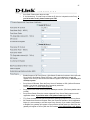
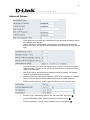
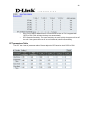
NAT Traversal
If a Gateway is set up under an IP sharing you can select NAT or STUN protocol.
NAT: The IP address used by Gateway should be a virtual address. Further, users must
set the Virtual Server Mapping in the NAT Server (A virtual server is defined as a
Service Port,and all requests to this port will be redirected to this specified the server IP
address ).
The default port is listed below:
Listen Port (UDP): 5060
RTP Port Base (UDP): 9000~9031 (Channel used for telephone communication).
Http Port (TCP): 80 (The port can remain disable if users are not going to login from a
remote end for the setting).
NAT IP/Domain: Enter the NAT Server IP address (Real External IP address of NAT
Server). If using DDNS (Please refer to the next setting item), then fill in the URL
(Uniform Resource Locator).
STUN: Use STUN protocol prevents problems setting IP sharing, but some NAT do not
support this protocol.
STUN Server and Port: Enter the STUN server IP address and Listen Port number.
Uses UPnP: Add a new function to enable the gateway’s IP traffic to pass through a NAT
server. This function only works when the NAT server support UPnP and has it enabled.
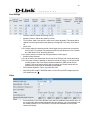
Setting up the DDNS (Dynamic Domain Name Service) to solve the problem of general Gateway,
which cannot be set up under NAT (which uses a dynamic IP address).