1
INTRODUCTION TO TOUCH SCREEN
Your new Sharp Smart & Easy Touch Screen Microwave Oven features a large screen on the Control Panel
which, not only provides much information to make using the oven easy, but also, is used to input information
directly about the food being cooked, quantity or desired doneness.
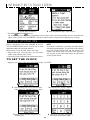
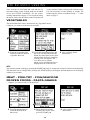
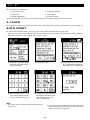
Example 1: Home Page
The Home Page is the beginning. It shows the time of day, if
the clock has been set. It also shows Minute Plus +, where by
touching the screen the next screen appears, making it easy to
select one of twelve commonly used times. Touching Kitchen
Timer tells the oven that the time set is only for timing, not
for cooking.
Note that if cooking time is touched on the screen, that Minute
Plus + and Kitchen Timer disappear and Power Level appears.
Touching Power Level leads to the next screen for selecting
the desired Power Level.
Example 2: Suppose you want to cook meat loaf in 6 x 6 NO GUESS COOKING:
1 Press Meat on the Control
Panel in 6x6 NO GUESS
COOKING.
2 Note that six meat
selections appear on the
TOUCH SCREEN.
Touch Meat Loaf.
3 Follow directions on the
TOUCH SCREEN.
Example 3: Suppose you want to cook Spicy Couscous in More From Your Microwave:
1 Press More From Your
Microwave on the
Control Panel.
2 Touch One Dish Dinners on
the TOUCH SCREEN.
11