1
FO-2080 Online Manual
Start
Click this "Start" button.
Introduction
This manual describes the printer and scanner functions of the FO-2080 digital multifunctional system.
●
Note
For information on the following topics, please refer to the Operation Manual for the digital multifunctional system.
• Basic machine procedures (adding paper, replacing the TD cartridge, removing misfeeds, using peripheral devices)
• Copier functions
• Scanning from the operation panel of the machine
• Specifications
● Where "FO-xxxx" appears in this manual, please substitute the name of your model for "xxxx".
● This manual refers to the Reversing Single Pass Feeder as the "RSPF".
● The screen images and procedures that appear in this manual are mainly for Windows Vista. With other versions of Windows,
some screen images may be different from those in this manual.
● For information on using your operating system, refer to your operating system's manual or online Help.
Trademark Acknowledgments
Microsoft®, Windows®, Windows® 2000, Windows® XP, Windows Vista® and Internet Explorer® are registered trademarks or
trademarks of Microsoft Corporation in the U.S.A. and other countries.
● Adobe, the Adobe logo, Acrobat, the Adobe PDF logo, and Reader are registered trademarks or trademarks of Adobe Systems
Incorporated in the United States and other countries.
● All other trademarks and copyrights are the property of their respective owners.
●
The display screens, messages, and key names shown in the manual may differ from those on the actual machine due to product
improvements and modifications.
CONTENTS
I N D E X
2
How to Use the Online Manual
This section explains how to view the online manual. Please read this section before using the online manual.
For information on using Acrobat Reader, see Acrobat Reader Help.
How to Control the Online Manual
Following Links
In this manual, the following buttons are displayed at the bottom
of each page. Click these buttons to move quickly to pages that
you wish to view.
This manual uses a link function that allows you to jump to a
related page. If you click green, underlined text, the related
page will be displayed. (In the Contents and Index sections, the
linked areas are not underlined.)
Example: ☞Contents
To return to the previous page, click the button on the menu
bar of Acrobat Reader.
CO N T EN T S
Displays the Contents of this manual. Click on a topic in the
Contents to jump directly to that section.
Using Bookmarks
Bookmarks have been created on the left side of this manual.
You can click on a bookmark to jump directly to that section.
I N D E X
Displays the Index of this manual. Click on a topic in the Index
to jump directly to that section.
How to Print Out This Manual
To print this manual, select "Print" from the "File" menu of
Acrobat Reader. Select the desired printer settings in the "Print"
dialog box, and then click the "OK" button.
Takes you forward page by page.
Takes you back page by page.
CONTENTS
I N D E X
3
Contents
Introduction
How to Use the Online Manual
2
3
3 TROUBLESHOOTING
Troubleshooting
If a Notice Page is printed
1 PRINT
Basic Printing
Opening the Printer Driver From the "Start" Button
Printer Driver Settings
Printing Multiple Pages on One Page
Fitting the Printed Image to the Paper
Two-sided Printing
Rotating the Print Image 180 Degrees
Printing a Watermark
Outline of the Print Status Window
5
7
8
9
10
11
12
13
14
29
35
4 PRINTER DRIVER FEATURES
Printer Driver Features
36
5 WEB PAGE IN THE MACHINE
About the Web Page
38
6 INDEX
2 SCAN
Scanning Overview
Scanning from a TWAIN-Compliant Application
Scanning from a WIA-Compliant Application (Windows XP/Vista)
Scanning from the "Scanner and Camera Wizard" (Windows XP)
Outline of Button Manager
Button Manager Settings
CONTENTS
I N D E X
15
16
21
23
26
27
4
1
PRINT
Basic Printing
(part 1)
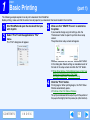
The following example explains how to print a document from WordPad.
Before printing, make sure that the correct size of paper for your document has been loaded in the machine.
1
2
Start WordPad and open the document that you
wish to print.
3
Make sure that "SHARP FO-xxxx" is selected as
the printer.
If you need to change any print settings, click the
"Preferences" button to open the printer driver setup
screen.
The printer driver setup screen will appear.
Select "Print" from the application's "File"
menu.
The "Print" dialog box will appear.
Windows 2000 does not have the "Preferences" button
in this dialog box. Select settings as needed on each of
the tabs in the setup screen and click the "OK" button.
☞Printer Driver Settings, Printing Multiple Pages on One Page,
Fitting the Printed Image to the Paper,
Printing a Watermark, Two-sided Printing
4
CONTENTS
I N D E X
Click the "Print" button.
Printing begins. When printing begins, the Print Status
Window automatically opens.
(☞Outline of the Print Status Window)
The print job is delivered to the output tray, with the position of
the paper offset slightly from the previous job (offset function).
5
PRINT
1
Basic Printing
(part 2)
If the tray runs out of paper during printing
When "Paper Source" is set to "Auto Select"
Printing will automatically resume when paper is loaded in the
tray.
When using the bypass tray, select printer mode with the mode
select key on the machine, load paper as instructed by the
message in the display, and then press the [START] key to
resume printing.
Note that if the "AUTO TRAY SWITCH" setting in the user
programs is enabled and there is the same size of paper in
another tray, the machine will automatically switch to the other
tray and continue printing.
If "Paper Source" is set to "Auto Select" in the "Paper" tab of the
printer driver setup screen and the correct size of paper for a
print job is not loaded in the machine, the printing procedure will
vary depending on the "FORCED OUTPUT" setting in the user
programs (see "USER PROGRAMS" in the Operation Manual).
Cancel a print job
Printing takes place on the paper loaded in the machine, even
though the paper size is different from the print image size.
1
Select printer mode with the [MODE SELECT] key on
the operation panel of the machine, and then press
the [CLEAR] key ( ) or the [CLEAR ALL] key ( ).
2
"CANCEL PRINT JOB?" will appear in the
display. Make sure that a checkmark appears in
front of "YES" and press the [ENTER] key.
Caution
When "FORCED OUTPUT" is set to "OFF"
Select printer mode with the mode select key on the machine,
check the message in the display, load paper in the bypass tray,
and then press the [START] key to begin printing.
When "FORCED OUTPUT" is set to "ON"
When the machine is connected to your computer using
the USB 2.0 (Hi-Speed) ports on each, be sure to read
"System requirements for USB 2.0 (Hi-Speed mode)" in
the Operation Manual.
CONTENTS
I N D E X
6
PRINT
1
Opening the Printer Driver From the "Start" Button
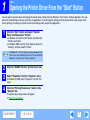
You can open the printer driver and change the printer driver settings from the Windows "start" button. Settings adjusted in this way
will be the initial settings when you print from an application. (If you change the settings from the printer driver setup screen at the
time of printing, the settings will revert to the initial settings when you quit the application.)
1
Click the "Start" button and select "Control
Panel" and then select "Printer".
In Windows XP, click the "start" button, and then click
"Printers and Faxes".
● In Windows 2000, click the "Start" button and point to
"Settings", and then select "Printers".
●
Note
In Windows XP, if "Printers and Faxes" does not appear in the
"start" menu, select "Control Panel", select "Printers and Other
Hardware", and then select "Printers and Faxes".
2
3
Click the "SHARP FO-xxxx" printer driver icon.
4
Click the "Printing Preferences" button in the
"General" tab.
Select "Properties" from the "Organize" menu.
In Windows XP/2000, select "Properties" from the "File"
menu.
The printer driver setup screen will appear.
☞Printer Driver Settings
CONTENTS
I N D E X
7
1
PRINT
Printer Driver Settings
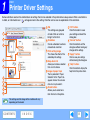
Some restrictions exist on the combinations of settings that can be selected in the printer driver setup screen. When a restriction is
in effect, an information icon (
) will appear next to the setting. Click the icon to view an explanation of the restriction.
1 Tab
1
2
2
3
3
4
4
5
5
6
7
8
9
6
10
Note
The settings are grouped
on tabs. Click on a tab to
bring it to the front.
Checkbox
Click on a checkbox to activate
or deactivate a function.
Print setting image
This shows the effect of the
selected print settings.
Drop-down list
Allows you to make a selection
from a list of choices.
Image of paper trays
The tray selected in "Paper
Selection" in the "Paper" tab
appears in blue. You can also
click on a tray to select it.
Check button
Allows you to select one
item from a list of options.
7 "OK" button
Click this button to save
your settings and exit the
dialog box.
8 "Cancel" button
Click this button to exit the
dialog box without making any
changes to the settings.
9 "Apply" button
Click to save your settings
without closing the dialog box.
10 "Help" button
Click this button to display the
help file for the printer driver.
The settings and the image of the machine will vary
depending on the model.
CONTENTS
I N D E X
8
1
PRINT
Printing Multiple Pages on One Page
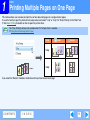
This feature allows you to reduce and print two or four document pages on a single sheet of paper.
To use this function, open the printer driver setup screen and select "2-Up" or "4-Up" for "N-Up Printing" on the "Main" tab.
☞See Basic Printing for details on how to open the printer driver.
Note
The "N-Up Printing" setting is not available when "Fit To Paper Size" is selected.
☞Fitting the Printed Image to the Paper
N-Up
Border
Border
"2-Up"
"4-Up"
If you select the "Border" checkbox, borderlines will be printed around each page.
CONTENTS
I N D E X
9
PRINT
1
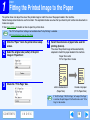
Fitting the Printed Image to the Paper
The printer driver can adjust the size of the printed image to match the size of the paper loaded in the machine.
Follow the steps shown below to use this function. The explanation below assumes that you intend to print a letter size document on
invoice size paper.
☞See Basic Printing for details on how to open the printer driver.
Note
1
The "Fit To Paper Size" setting is not available when "N-Up Printing" is selected.
☞Printing Multiple Pages on One Page
Click the "Paper" tab in the printer driver setup
screen.
2
Select the original size (Letter) of the print
image in "Paper Size".
3
Check the "Fit to Page" box.
4
Select the actual size of paper to be used for
printing (Invoice).
The size of the printed image will be automatically
adjusted to match the paper loaded in the machine.
Paper Size: Letter
Fit To Paper Size: Invoice
Letter size document
(Paper Size)
Note
CONTENTS
I N D E X
Invoice size paper
(Fit To Paper Size)
If "A3 (Fit to Page)", "B4 (Fit to Page)", or "Ledger (Fit to Page)"
is selected, the print image is fit to the letter size even if "Fit to
Page" is not selected.
10
1
PRINT
Two-sided Printing
This feature allows you to print on both sides of the paper.
To use this function, open the printer driver setup screen and select "2-Sided (Book)" or
"2-Sided (Tablet)" from "Document Style" in the "Main" tab.
☞See Basic Printing for details on how to open the printer driver.
●
Note
●
Paper sizes that can be used for two-sided printing are Letter, Legal, Folio*, Invoice, A4, A5, B5, Foolscap, and 16K.
When using two-sided printing, select a source other than "Bypass Tray" for the "Paper Source" in the "Paper" tab.
* For two-sided printing on Folio size paper, "Tray 1" or "Tray 2" (if Tray 2 has been installed) must be selected in the "Paper
Source" on the "Paper" tab.
The following example shows the result when portrait data is printed on both sides of the paper.
Print data
Printing result
2-Sided (Book)
The pages are printed so that
they can be bound at the side.
CONTENTS
I N D E X
2-Sided (Tablet)
The pages are printed so that
they can be bound at the top.
11
1
PRINT
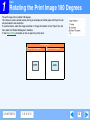
Rotating the Print Image 180 Degrees
The print image can be rotated 180 degrees.
This feature is used to enable correct printing on envelopes and other paper with flaps that can
only be loaded in one orientation.
To use the feature, select the image orientation in "Image Orientation" on the "Paper" tab, and
then select the "Rotate 180 degrees" checkbox.
☞See Basic Printing for details on how to open the printer driver.
Printing result
Rotate 180 degrees
ABCD
CONTENTS
I N D E X
Rotate 180 degrees
ABCD
12
1
PRINT
Printing a Watermark
You can print a watermark such as "CONFIDENTIAL" on your document. To print a watermark, open the printer driver, click the
"Watermarks" tab, and follow the steps below.
See Basic Printing for details on how to open the printer driver.
How to Print a Watermark
From the "Watermark" drop-down list, select the watermark that you wish to print (for example "CONFIDENTIAL"), and start printing.
Print sample
You can enter text to create your own custom watermark. For details on watermark settings, view printer driver Help.
☞Printer Driver Settings
CONTENTS
I N D E X
13
1
PRINT
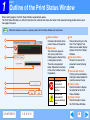
Outline of the Print Status Window
When printing begins, the Print Status Window automatically opens.
The Print Status Window is a utility that monitors the machine and shows the name of the document being printed and any error
messages that occur.
Note
When the machine is used as a network printer, the Print Status Window will not function.
1 Status window
1
Provides information on the
current status of the printer.
2 Status icon
The status icons appear to
alert you to printer errors.
Nothing appears when printing
is taking place normally.
The icons are explained
below. Follow the instructions
in the status window to solve
the problem.
2
3
4
Icon
5
6
7
CONTENTS
I N D E X
Print Status
An error has
occurred that
requires immediate
attention.
An error has
occurred that
requires attention
soon.
3 Tab
4
5
6
7
Click a tab to bring it to the
front. The "Options" tab
allows you to select display
options for the Print Status
Window.
Document Name
Shows the name of the
document currently being
printed.
"Cancel Job" button
Printing can be canceled by
clicking this button before the
machine receives the job.
"Help" button
Click this button to display
the help file for the Print
Status Window.
"Close" button
Click this button to close
the Print Status Window.
14
2
SCAN
Scanning Overview
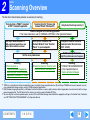
The flow chart shown below provides an overview of scanning.
Scanning from a TWAIN*1-compliant
or WIA*2-compliant application
Scanning from the "Scanner and
Camera Wizard" (Windows XP)
Using the machine to begin scanning*3
Place the original in the scanning position
☞For more information, refer to "NORMAL COPYING" in the Operation Manual.
Start up a Twain-compliant or
WIA-compliant application, and
select the machine's scanner
Start up the "Scanner and
Camera Wizard" from "Control
Panel" in your computer.
Set the scan preferences
Scanning
☞Scanning from a
TWAIN-Compliant Application,
Scanning from a WIA-Compliant
Application (Windows XP/Vista)
Scanning
☞Scanning from the "Scanner and
Camera Wizard" (Windows XP)
Change the machine to scanner
mode and select the scan menu.
(SC1: to SC6:)
Set the scan preferences
(only if the preferences are set to appear)
Scanning
☞"USING THE SCANNER MODE"
in the Operation Manual,
Outline of Button Manager
*1 TWAIN is an international interface standard for scanners and other image acquisition devices. By installing a TWAIN driver on your computer, you can
scan and work with images using a variety of TWAIN-compliant applications.
*2 WIA (Windows Imaging Acquisition) is a Windows function that allows a scanner, digital camera or other imaging device to communicate with an image
processing application. The WIA driver for this machine can only be used in Windows XP/Vista.
*3 To scan using the machine's operation panel, you must first install Button Manager and establish the appropriate settings in the Control Panel. For details,
see "SETTING UP BUTTON MANAGER" in the Operation Manual.
CONTENTS
I N D E X
15
2
SCAN
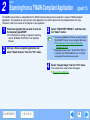
Scanning from a TWAIN-Compliant Application
(part 1)
The SHARP scanner driver is compatible with the TWAIN standard, allowing it to be used with a variety of TWAIN-compliant
applications. The procedure for scanning from some applications may differ in places from the procedure below. For more
information, refer to the manual or the help file of your application.
1
Place the original(s) that you wish to scan on
the document glass/RSPF.
3
☞For information on setting an original for scanning,
refer to "NORMAL COPYING" in the Operation
Manual.
2
●
Note
Start up a Twain-compliant application and
select "Select Scanner" from the "File" menu.
4
CONTENTS
I N D E X
Select "SHARP MFP TWAIN X", and then click
the "Select" button.
If you are using Windows XP/Vista, you can also select
"WIA-SHARP FO-xxxx" to scan using the WIA driver.
☞Scanning from a WIA-Compliant Application
(Windows XP/Vista)
● Depending on your system, "SHARP MFP TWAIN X
1.0 (32-32)" and "WIA-SHARP FO-xxxx 1.0 (32-32)"
may appear in the select source screen.
Select "Acquire Image" from the "File" menu.
The scanner driver setup screen will appear.
☞Scanner Driver Settings
16
SCAN
2
5
Scanning from a TWAIN-Compliant Application
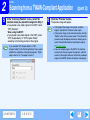
In the "Scanning Position" menu, select the
location where you placed the original in Step 1.
If you placed a one-sided original in the RSPF, select
"SPF (Simplex)".
When using the RSPF:
● If you placed a two-sided original in the RSPF, select
"SPF (Duplex-Book)" or "SPF (Duplex-Tablet)"
according to the binding position of the original.
6
Click the "Preview" button.
The preview image will appear.
●
Note
If you selected "SPF (Duplex-Book)" or "SPF
(Duplex-Tablet)" in the "Scanning Position" menu, select
whether the orientation of the placed original is "Right
edge is fed first" or "Top edge is fed first".
CONTENTS
I N D E X
(part 2)
●
Note
If the angle of the image is not correct, reset the
original, and click the "Preview" button again.
● If the preview image is not oriented correctly, click the
"Rotate" button in the preview screen. This rotates the
preview image 90 degrees clockwise, allowing you to
correct the orientation without resetting the original.
☞Preview screen
● If you set multiple pages in the RSPF, the machine
previews only the top page of the originals, and then
sends it to the original exit area. Return the previewed
original to the RSPF before starting the scanning job.
17
SCAN
2
7
Scanning from a TWAIN-Compliant Application
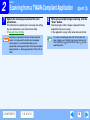
Specify the scanning area and set the scan
preferences.
For information on specifying the scan area and setting
the scan preferences, see scanner driver Help.
☞Scanner Driver Settings
Caution
Scanning a large area in full color at high resolution
results in a large quantity of data and a prolonged
scanning time. It is recommended that you set
appropriate scanning preferences for the type of original
being scanned, i.e., Web page (monitor), Photo, FAX, or
OCR.
CONTENTS
I N D E X
8
(part 3)
When you are ready to begin scanning, click the
"Scan" button.
Scanning begins and the image is acquired into the
application that you are using.
In the application, assign a file name and save the file.
Note
To cancel a scanning job after the "Scan" button has
been clicked, press the [Esc] key on your keyboard, or
the [CLEAR] key ( ) or [CLEAR ALL] key ( ) on the
operation panel.
18
2
SCAN
Scanning from a TWAIN-Compliant Application
(part 4)
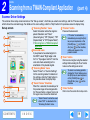
Scanner Driver Settings
The scanner driver setup screen consists of the "Set-up screen", which lets you select scan settings, and the "Preview screen",
which shows the scanned image. For details on the scan settings, click the "Help" button in the preview screen to display Help.
1 "Scanning Position" menu
5 "Preview" button
Set-up screen
Select the location where the original is
Previews the document.
placed. Selections are "Platen"
If "Preview" is canceled by
Note
(document glass), "SPF (Simplex)", "SPF
1
immediately pressing the [Esc]
(Duplex-Book)" or "SPF (Duplex-Tablet)".
key on your keyboard, or the
☞
Scanning from a TWAIN-Compliant
[CLEAR] key ( ) or [CLEAR
2
Application
ALL] key ( ) on the machine,
nothing will appear in the
2 Scan side menu
3
preview screen.
If you placed a two-sided original in
the RSPF, select "Right edge is fed
6 "Scan" button
first" or "Top edge is fed first" from the
Click to scan an original using the selected
scan side menu according to the
settings. Before clicking the "Scan" button,
orientation of the placed original.
make sure the settings are correct.
3 "Scanning Mode" menu
To cancel a scanning job after
Select "Preset" or "Custom Settings"
Note
clicking the "Scan" button, press
for the scanning mode. For details on
the [Esc] key on your keyboard,
the settings, click the "Help" button in
or the [CLEAR] key ( ) or
the preview screen to display Help.
[CLEAR ALL] key ( ) on the
4 "Zoom Preview" Checkbox
machine.
When
this
is
selected,
the
selected
part
of
4
7 "Close" button
the preview image will be enlarged when
Click to close the scanner driver setup screen.
the "Preview" button is clicked. To return to
5
the regular view, remove the checkmark.
6
7
CONTENTS
Note
I N D E X
"Zoom Preview" cannot be used
when "SPF" is selected in the
"Scanning Position" menu.
19
2
SCAN
Scanning from a TWAIN-Compliant Application
(part 5)
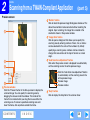
Preview screen
2 "Rotate" button
Click to rotate the preview image 90 degrees clockwise. This
allows the orientation to be corrected without resetting the
original. Upon scanning, the image file is created in the
orientation shown in the preview window.
3 "Image Size" button
Click to open a dialog box that allows you to specify the
scanning area by entering numbers. Pixels, mm, or inches
can be selected for the units of the numbers. By initially
specifying a scanning area, numbers can be entered to
change that area relative to the top left corner as a fixed
origin.
4 "Auto Scan Area Adjustment" button
Click when the preview screen is displayed to automatically
set the scanning area to the entire preview image.
1
2
3
Click the "Auto Scan Area Adjustment" button
to automatically set the scanning area to the
entire preview image.
Preview image
Preview window
4
5
1 Preview window
Click the "Preview" button in the Set-up screen to display the
scanned image. You can specify the scanning area by
dragging the mouse inside the window. The inside of the
frame that is created when you drag the mouse will be the
scanning area. To cancel a specified scanning area and
clear the frame, click anywhere outside the frame.
CONTENTS
I N D E X
5 "Help" button
Click to display the help file for the scanner driver.
20
SCAN
2
Scanning from a WIA-Compliant Application (Windows XP/Vista)
(part 1)
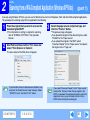
If you are using Windows XP/Vista, you can use the WIA driver to scan from Sharpdesk, Paint and other WIA-compliant applications.
The procedure for scanning using Paint is explained in the following.
1
Place the original that you wish to scan on the
document glass/RSPF.
☞For information on setting an original for scanning,
refer to "NORMAL COPYING" in the Operation
Manual.
2
Start Paint and then click the "File" menu and
select "From Scanner or Camera".
3
Select the paper source and picture type, and
click the "Preview" button.
The preview image will appear.
If you placed the original on the document glass, select
"Flatbed" for the "Paper source".
● If you placed the original in the RSPF, select
"Document Feeder" for the "Paper source" and specify
the original size in "Page size".
●
●
The scan screen of the WIA driver will appear.
Note
If you have WIA drivers for other devices installed in your
computer, the "Select Device" screen will open. Select
"SHARP FO-xxxx" and click the "OK" button.
CONTENTS
I N D E X
Note
If you select "Document Feeder" for the "Paper source"
and click the "Preview" button, the top original in the
RSPF is previewed. The previewed original is sent to the
original exit area, so you will need to return it to the
RSPF before starting the scanning job.
21
SCAN
2
4
Scanning from a WIA-Compliant Application (Windows XP/Vista)
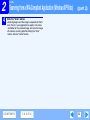
(part 2)
Click the "Scan" button.
Scanning begins and the image is acquired into Paint.
Use "Save" in your application to specify a file name
and folder for the scanned image, and save the image.
● To cancel a scanning job after clicking the "Scan"
button, click the "Cancel" button.
●
●
CONTENTS
I N D E X
22
2
SCAN
Scanning from the "Scanner and Camera Wizard" (Windows XP)
(part 1)
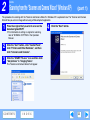
The procedure for scanning with the "Scanner and Camera Wizard" in Windows XP is explained here. The "Scanner and Camera
Wizard" lets you scan an image without using a WIA-compliant application.
1
Place the original that you wish to scan on the
document glass/RSPF.
4
Click the "Next" button.
☞For information on setting an original for scanning,
refer to "NORMAL COPYING" in the Operation
Manual.
2
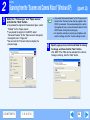
Click the "start" button, click "Control Panel",
click "Printers and Other Hardware", and then
click "Scanners and Cameras".
3
Click the "SHARP FO-xxxx" icon and then click
"Get pictures" in "Imaging Tasks".
The "Scanner and Camera Wizard" will appear.
CONTENTS
I N D E X
23
SCAN
2
5
Scanning from the "Scanner and Camera Wizard" (Windows XP)
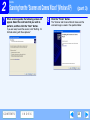
Select the "Picture type" and "Paper source",
and click the "Next" button.
If you placed the original on the document glass, select
"Flatbed" for the "Paper source".
● If you placed the original in the RSPF, select
"Document Feeder" for the "Paper source" and specify
the original size in "Page size".
● You can click the "Preview" button to display the
preview image.
●
Note
●
CONTENTS
I N D E X
(part 2)
6
If you select "Document Feeder" for the "Paper source"
and click the "Preview" button, the top original in the
RSPF is previewed. The previewed original is sent to
the original exit area, so you will need to return it to the
RSPF before starting the scanning job.
● To adjust the resolution, picture type, brightness and
contrast settings, click the "Custom settings" button.
Specify a group name, format and folder for saving
the image, and then click the "Next" button.
JPG, BMP, TIF or PNG can be selected for the format.
To begin scanning, click the "Next" button.
24
2
7
SCAN
Scanning from the "Scanner and Camera Wizard" (Windows XP)
When scanning ends, the following screen will
appear. Select the next task that you wish to
perform, and then click the "Next" button.
8
(part 3)
Click the "Finish" button.
The "Scanner and Camera Wizard" closes and the
scanned image is saved in the specified folder.
If you are ready to end the session, click "Nothing. I'm
finished working with these pictures".
CONTENTS
I N D E X
25
2
SCAN
Outline of Button Manager
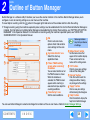
Button Manager is a software utility that allows you to use the scanner function at the machine. Button Manager allows you to
configure six sets of scanning settings as a scan menu on the machine.
To view Help for a setting, click the
button in the upper right-hand corner of the window and then click the setting.
☞To begin scanning using the machine's operation panel, settings must be established in the Control Panel after Button Manager is
installed. For information on installing Button Manager and establishing the Control Panel settings, see "SETTING UP BUTTON
MANAGER" in the Operation Manual. For information on scanning using the machine's operation panel, see "USING THE
SCANNER MODE" in the Operation Manual.
1 Tab
Some applications
Note
Click to set scan menu
may limit your choice
1
options. Each tab contains
of settings.
scan settings for the scan
2
menu.
5 "Menu Name" button
2 "Application Selection" area
Set the menu names that
3
appear in the machine display.
Select the start-up
These will also be the tab
application here.
names of this setting screen.
4
3 "Show TWAIN setting
screen when scanning"
6 "OK" button
Checkbox
Click to save your settings
You can select whether or not
and exit the dialog box.
the TWAIN screen is shown.
7 "Cancel" button
When
the
checkbox
is
Click this button to exit the
5
selected, the TWAIN screen
dialog box without making
6
any changes to the settings.
appears when scanning is
7
8 "Apply" button
executed to let you adjust the
Click to save your settings
scanning conditions.
8
without closing the dialog box.
4 "Scan Setup" area
9
9 "Help" button
Set the scan conditions.
Click this button to display the
help file for Button Manager.
You can use Button Manager to select and change the functions of the six scan menus. Refer to Button Manager Settings.
CONTENTS
I N D E X
26
SCAN
2
Button Manager Settings
(part 1)
Once installed, Button Manager normally runs in the background in the Windows operating system. If you need to change Button
Manager settings, follow the steps below.
For details on Button Manager settings, see Button Manager Help.
☞Outline of Button Manager
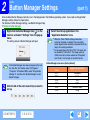
1
Right-click the Button Manager icon ( ) on the
task bar, and select "Settings" from the pop-up
menu.
The setting screen of Button Manager will open.
Note
2
If the Button Manager icon does not appear on the task
bar, click the "start" button, select "All Programs"
("Programs" in Windows 2000), select "Sharp Button
Manager X", and then click "Button Manager" to start
Button Manager.
Click the tab of the scan menu that you want to
set up.
CONTENTS
I N D E X
3
Select the start-up application in the
"Application Selection" area.
●
Note
When the "Show TWAIN setting screen when
scanning" checkbox is selected, the scan setting
screen appears when scanning is executed to let you
adjust the scanning conditions.
● On the applications other than "FAX", the format can
be selected in "File Format". The image quality of
JPEG format (only can be selected on "Sharpdesk"
and "Email") is not as high as the other formats.
Button Manager scan menu (factory default)
Display/Button Manager
menu
SC1:
SC2:
SC3:
SC4:
SC5:
SC6:
Application that starts
Sharpdesk
Email
FAX
OCR
Microsoft Word
Filing
27
SCAN
2
4
Button Manager Settings
(part 2)
Set up the "Color Mode", "Edge" and other scan
settings in the "Scan Setup" area.
The tab names are initially "SC1:" to "SC6:". To assign a name to
a tab, click the "Menu Name" button and enter the desired name.
After entering the name, click the "Apply" button or the
"OK" button in the setting screen. The assigned names will
appear in the machine display when you select a scan
menu at the machine. (Example: SC1:xxxxx)
Note
5
If a character that the machine cannot display is entered
in the "Menu Name", "?" is displayed on the machine.
Click the "OK" button.
This completes the settings.
CONTENTS
I N D E X
28
3
TROUBLESHOOTING
Troubleshooting
(part 1)
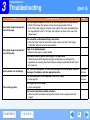
If you experience difficulty using the machine, check the following troubleshooting guide before calling for service.
Many problems can be easily resolved by the user. If you are unable to solve the problem using the troubleshooting guide, turn off
the power switch and unplug the machine, and contact your SHARP service center.
PRINTING AND SCANNING PROBLEMS
In addition to this section, troubleshooting information can also be found in the README files for each of the software programs. The
README file (readme.txt) is copied to your computer when the software is installed, and can be found in the "Program Files" "SHARP" - "FO2080" folder on the drive where you installed the software.
Problem
The machine does not print.
CONTENTS
Cause and solution
Page
The machine is not correctly connected to your computer.
→ Check both ends of the USB cable or LAN cable, and make sure you have a solid
connection. Try a known good cable.
Operation
Manual
If the machine is used as a network printer,
1. The IP address has changed automatically because "Get IP Address
Automatically" was selected.
2. The machine's IP address was changed to an incorrect IP address using "Set
the IP Address".
→ If you are assigning an IP address using "Set the IP Address", select "Assign IP
Address" and manually enter the correct IP address.
Operation
Manual
If the machine is used as a shared printer, the name of the computer to which the
machine is connected or the share settings have changed.
→ Reconfigure the port setting of the shared printer.
-
The machine is not selected in the application.
→ After choosing "Print" from the "File" menu, make sure that "SHARP FO-xxxx" is
selected as the printer in the "Print" window.
5
I N D E X
29
3
TROUBLESHOOTING
Troubleshooting
Problem
The machine does not print.
(part 2)
Cause and solution
Page
The printer driver has not been installed properly.
→ Follow these steps to check and see if the printer driver is installed.
1 Click the "start" button, click "Control Panel", click "Printers and Other Hardware",
and then click "Printers and Faxes".
● On Windows Vista, click the "Start" button, select "Control Panel", and then click
"Printer".
● On Windows 2000, click the "Start" button, select "Settings" and then click
"Printers".
2 Does the "SHARP FO-xxxx" printer driver icon appear?
3 If the icon is shown but you still cannot print, the printer driver may not have been
installed correctly.
In this case, delete the software and then reinstall it.
Operation
Manual
A copy job is in progress.
→ Wait until the copy job is finished.
CONTENTS
-
The size of paper loaded in the tray is different from the paper size setting in the
machine.
→ Make sure that the size of paper loaded in the tray and the machine's paper size
setting agree.
Operation
Manual
The specified size of paper has not been loaded.
→ Load the specified size of paper in the paper tray.
Operation
Manual
I N D E X
30
3
TROUBLESHOOTING
Troubleshooting
Problem
(part 3)
Cause and solution
Page
The machine does not print.
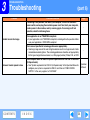
The "FORCED OUTPUT" setting is set to "OFF".
→ When "FORCED OUTPUT" is set to "OFF" and there is no paper in the machine that
is the same size as the print image, load paper in the bypass tray as instructed by the
message in the display and press the [START] key to begin printing. (The bypass tray
cannot be used for two-sided printing.) If "FORCED OUTPUT" is set to "ON", the job
will be printed on the paper in the machine even though it is a different size.
6
Printing is slow.
Simultaneous use of two or more application software programs.
→ Start printing after quitting all unused application software programs.
-
The printed image is light and
uneven.
The paper is loaded so that printing takes place on the back side of the paper.
→ Some paper types have a front and back side. If the paper is loaded so that printing
takes place on the back side, toner will not adhere well to the paper and a good image
will not be obtained.
Operation
Manual
You are using paper that is outside the specified size and weight range.
→ Use copy paper within the specified range.
Operation
Manual
The printed image is dirty.
CONTENTS
Paper is curled or damp.
→ Do not use curled or crimped paper. Replace with dry copy paper. During periods
when the machine is not used for a long time, remove the paper from the tray and
store it in a dark place in a bag to prevent moisture absorption.
-
You did not set sufficient margins in the paper settings of your application.
→ The top and bottom of the paper may be dirty if the margins are set outside of the
specified print quality area.
→ Set the margins in the software application within the specified print quality area.
-
I N D E X
31
3
TROUBLESHOOTING
Troubleshooting
Problem
The printed image is skewed or it
runs off the paper.
The printed image is skewed or it
runs off the paper.
Error indicator is lit or blinking.
Poor scanning quality.
CONTENTS
(part 4)
Cause and solution
Page
The size of paper loaded in the tray is not the size specified in the printer driver.
→ Check if the "Paper Size" options suit the size of paper loaded in the tray.
→ If the "Fit to Page" setting is activated, make sure that the paper size selected from
the drop-down list of the "Fit To Paper Size" option is the same as the size of the
loaded paper.
-
The orientation of document setting is not correct.
→ Click the "Paper" tab in the printer driver setup screen, and verify if the "Image
Orientation" option is set to your requirements.
-
Paper is not loaded properly.
→ Make sure the paper is properly loaded.
-
You did not correctly specify the margins in the application.
→ Check the layout of the document margins and the paper size settings in the
application you are using. Also check if the print settings are specified correctly to suit
the paper size.
-
See "DISPLAY MESSAGES" to check the meaning of the error indicator and error
message in the display, and take appropriate action.
Operation
Manual
The document glass or the underside of the RSPF is dirty.
→ Clean regularly.
Operation
Manual
The original is dirty or rough.
→ Use a clean original.
-
You have not specified a suitable resolution.
→ Make sure that the resolution setting in the scanner driver is appropriate for the
original.
-
I N D E X
32
3
TROUBLESHOOTING
Troubleshooting
Problem
Poor scanning quality.
(part 5)
Cause and solution
Page
You have not specified a suitable value for the "B/W Threshold" setting.
→ If you are scanning with a TWAIN-compliant application and are using "Red", "Green"
or "Blue" mode from "Light Source" menu, make sure that a suitable value is specified
for the "B/W Threshold" setting. A larger threshold value makes your output darker,
while a small threshold value makes it lighter. To adjust the threshold automatically,
click the "Auto Threshold" button on the "Image" tab of the "Custom Settings" screen.
-
The brightness and contrast settings are not suitable.
→ If you are scanning with a TWAIN-compliant application and the resulting image has
unsuitable brightness or contrast (for example it is too bright), click the "Auto
Brightness/Contrast Adjustment" button on the "Color" tab of the "Custom Settings"
screen. Click the "Brightness/Contrast" button to adjust the brightness and the
contrast while viewing the scanned output image on the screen. If you are scanning
with a WIA-compliant application or the "Scanner and Camera Wizard", click "Adjust
the quality of the scanned picture" or the "Custom settings" button, and adjust the
brightness and contrast in the screen that appears.
-
The original is not placed face up in the RSPF or face down on the document glass.
→ Place the original face up in the RSPF or face down on the document glass.
Operation
Manual
The original was not placed in the correct position.
→ Place the original correctly.
Operation
Manual
"Quick Scan" has been selected.
→ If scanning is performed when the "Quick Scan" option has been selected, image
quality may be degraded. This is because the scanned data is transferred using
JPEG compression. If image quality is poor, then perform scanning again without
selecting the "Quick Scan" option. ("Quick Scan" is not selected by default.)
CONTENTS
I N D E X
-
33
3
TROUBLESHOOTING
Troubleshooting
Problem
Unable to scan the image.
Scanner transfer speed is slow.
CONTENTS
(part 6)
Cause and solution
Page
If scanning is not possible, shut down your computer, turn off the machine's
power switch, and unplug the machine's power cord. Next, start your computer,
restore power to the machine, and try scanning again. If scanning is still not
possible, check the following items.
-
Your application is not TWAIN/WIA compliant.
→ If your application is not TWAIN/WIA compliant, scanning will not be possible. Make
sure your application is TWAIN/WIA compliant.
-
You have not specified all scanning preferences appropriately.
→ Scanning a large area in full color at high resolution results in a large amount of data
and extended scanning times. The scanning preferences should be set appropriately
for the type of original to be scanned, i.e., Web page (monitor), Photo, FAX, or OCR.
-
Your computer does not meet the system requirements for the USB 2.0 interface
(Hi-Speed mode).
→ See "System requirements for USB 2.0 (Hi-Speed mode)" in the Operation Manual to
configure your system as required for USB 2.0, and then set "USB2.0 MODE
SWITCH" in the user programs to "HI-SPEED".
Operation
Manual
I N D E X
34
3
TROUBLESHOOTING
If a Notice Page is printed
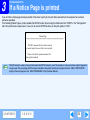
If you find that a notice page has been printed at the end of a print job, the print data received from the computer has not been
printed as specified.
If the following Notice Page is printed, disable the ROPM function by removing the checkmark from "ROPM" in the "Configuration"
tab of the printer driver setup screen. If you wish to use the ROPM function, set the print quality to "Draft".
****************************************************
Notice Page
****************************************************
The IMC memory full error had occurred,
a normal output was not able to be executed.
Please refer to the operation manual for
the solution method.
Note
The IMC memory is used to store print data when the ROPM function is used. This memory is also used to store original image data
in copy mode. The percentage of IMC memory allocated to the printer function can be adjusted on the "MEM. FOR PRINTER"
setting in the user programs (see "USER PROGRAMS" in the Operation Manual).
CONTENTS
I N D E X
35
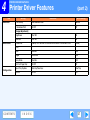
4
PRINTER DRIVER FEATURES
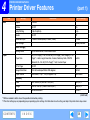
Printer Driver Features
Tab
Main
Setting
(part 1)
Selections
Initial setting
Copies
1 to 999
1
Collate
On/Off
On
N-Up Printing
1-Up/2-Up/4-Up
1-Up
Border
On/Off
Off
Document Style
1-Sided/2-Sided (Book)/2-Sided (Tablet)
1-Sided
User Settings
-
Factory Defaults
Setting Name
Up to seven names, 20 characters each
-
Paper Size
A3 [Fit To Page]*1, A4, A5, A6, B4 [Fit To Page]*1, B5, Ledger [Fit To
Page]*1, Letter, Legal, Executive, Invoice, Foolscap, Folio, COM10,
Monarch, DL, C5, 8K [Fit To Page]*1, 16K, Custom Paper
Letter*2
Fit To Page
On/Off
Off
Image Orientation
Portrait/Landscape/Rotate 180 degrees
Portrait
Paper Source
Auto Select, Tray 1, Tray 2, Bypass Tray
Auto Select
Width
3.87 to 8.50 (in.)/98.3 to 215.9 (mm.)
3.87 (in.)*2
Length
5.83 to 14.00 (in.)/148.0 to 355.6 (mm.)
5.83 (in.)*2
Size
inches/millimeters
inches*2
[User Settings]
Paper
[Custom]
(continued)
*1 Will be reduced to letter size or the specified size before printing.
*2 This initial setting may vary depending on your operating system settings. For information on each setting, see Help in the printer driver setup screen.
CONTENTS
I N D E X
36
PRINTER DRIVER FEATURES
4
Printer Driver Features
Tab
Advanced
Setting
(part 2)
Selections
Initial setting
Print Quality
Draft/Normal/Photo
Normal
2 Gradation Print
On/Off
Off
Brightness
0 to 100
50
Contrast
0 to 100
50
Watermark
(None)/TOP SECRET/CONFIDENTIAL/DRAFT/ORIGINAL/COPY
(None)
Text
-
-
Size
6 to 300
200
Angle
-90 to +90
+45
Gray Scale
0 to 255
192
On First Page Only
On/Off
Off
Input Tray Options
One tray/Two trays
One Tray
ROPM
On/Off
On
[Image Adjustment]
Watermarks
Configuration
CONTENTS
I N D E X
37
WEB PAGE IN THE MACHINE
5
About the Web Page
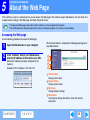
If the machine is used as a network printer, you can access the Web page in the machine using a Web browser. You can check and
change network settings in the Web page, and check the printer status.
●
Note
●
To access the Web page in the machine, the IP address must be assigned to the machine.
For the Web browser, Internet Explorer 6.0 (or later) or Netscape Navigator 7.0 (or later) is recommended.
Accessing the Web page
Use the following procedure to access the Web page.
When the connection is completed, the Web page will appear in
your Web browser.
1
Open the Web browser on your computer.
2
In the "Address" field of your Web browser,
enter the IP address of the machine as a URL.
1
Enter the IP address previously configured in the
machine.
Example: If the IP address is 192.168.1.43;
3
2
4
1 Printer Status
Display printer status.
2 System Status
Display system status.
3 NIC Setup
Change network settings.
4 NIC Restart
To make new settings take effect, restart the network
connection.
CONTENTS
I N D E X
38
5
WEB PAGE IN THE MACHINE
Configuration via the Web Page
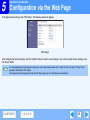
To change network settings, click "NIC Setup". The following screen will appear.
[NIC Setup]
After changing the network settings, click the "Submit" button to store the new settings. If you wish to cancel the new settings, click
the "Reset" button.
Note
If a message appears prompting you to enter your user name and password, enter "admin" for the user name, "Sharp" for the
password, and click the "OK" button.
The password can be changed in the above NIC Setup page. (Up to 7 characters can be entered.)
CONTENTS
I N D E X
39
6
INDEX
Index
For detailed information on the settings in the printer driver, Print Status Window, scanner driver, and Button Manager, see the help
files for each.
Scanning Mode.................. 19
A
H
P
Scanning Overview ............ 15
About the Web Page .......... 38 Help
Paper................................. 36 Scanning Position .............. 19
Select Device ..................... 21
Advanced ........................... 37
Button Manager .............. 26 "Preview" button
Settings
Application Selection.......... 26
Print Status Window ....... 14
Scanner and Camera
Button Manager .............. 27
"Auto Scan Area Adjustment"
Printer driver..................... 8
Wizard ............................ 24
Printer driver ..................... 8
button ................................. 20
Scanner driver
TWAIN driver.................. 19
Scanner driver
TWAIN driver ............... 20
WIA driver ...................... 21
B
Scanner and Camera Wizard 24
How to Use the Online Manual. 3 Preview Screen ................. 20
TWAIN driver ............... 19
Print..................................... 5
Basic Printing ....................... 5
I
WIA driver.................... 22
Print
Status
Window..........
14
Border .................................. 9
Set-up
Screen.................... 19
Button Manager ................. 26 Image Orientation .............. 12 Printer Driver Features ...... 36
Button Manager Settings ... 27 "Image Size" button ........... 20 Printer Driver Settings ......... 8 Show TWAIN setting screen
IMC memory ...................... 35 Printing a Watermark ........ 13 when scanning................... 26
C
Introduction.......................... 2
T
R
Cancel a print job ................. 6
M
Rotate 180 degrees........... 12 To cancel a scanning job ... 18
"Close" button .................... 19
Configuration...................... 37 Main................................... 36 "Rotate" button .................. 20 Troubleshooting.................. 29
TWAIN ............................... 15
Menu Name ....................... 26
S
Two-sided Printing ............. 11
D
N
Scan .................................. 15
Document Style.................. 11
W
Notice Page ....................... 35 "Scan" button
F
TWAIN driver .................. 19 Watermark ......................... 13
N-Up Printing ....................... 9
WIA driver ...................... 22 Watermarks ....................... 37
Fit to Page.......................... 10
O
Scan Setup........................ 26 Web page........................... 38
WIA .................................... 15
Outline of Button Manager. 26 Scanner and Camera Wizard. 15
Scanning an Image
Outline of the Print Status
Z
Scanner and Camera Wizard 23
Window .............................. 14
TWAIN driver.................. 16 Zoom Preview .................... 19
WIA driver ...................... 21
CONTENTS
40
FO2080-US1