1
Table of Contents
About ScanGear Toolbox CS ........................................................................... 4
Installing ScanGear Toolbox CS ....................................................................... 5
System Requirements ................................................................................. 5
Installing/Uninstalling ................................................................................. 5
Starting and Closing ScanGear Toolbox CS ..................................................... 8
Starting ...................................................................................................... 8
Closing..................................................................................................... 11
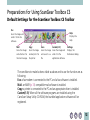
Preparations for Using ScanGear Toolbox CS ................................................. 12
Default Settings for the ScanGear Toolbox CS Toolbar .............................. 12
Linkable Drivers and Programs .................................................................. 13
Faxing.................................................................................................. 13
Mail ..................................................................................................... 13
Copying ............................................................................................... 14
Custom Buttons 1-3 ............................................................................ 14
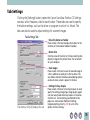
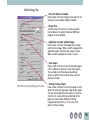
Tab Settings ............................................................................................. 15
Fax Setting Tab .................................................................................... 15
Mail Setting Tab ................................................................................... 16
Copy Setting Tab ................................................................................. 17
Save Setting Tab .................................................................................. 18
Custom 1-3 Setting Tab ....................................................................... 19
Default Settings on the Prefs Tab .............................................................. 20
2