1
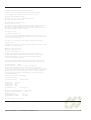
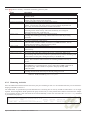
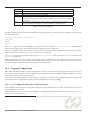
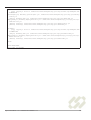
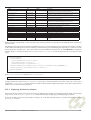
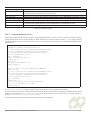
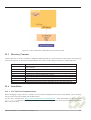
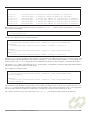
Name
ListeningPoints
Type
java.lang.String
Default
0.0.0.0:5060/[udp|tcp]
ExtensionMethods
java.lang.String
OutboundProxy
java.lang.String
UDPThreads
TCPThreads
RetransmissionFilter
java.lang.Integer
java.lang.Integer
java.lang.Boolean
1
1
False
AutomaticDialogSupport
java.lang.Boolean
False
Keystore
KeystoreType
KeystorePassword
Truststore
TruststoreType
TruststorePassword
CRLURL
CRLRefreshTimeout
CRLLoadFailureRetryTimeout
CRLNoCRLLoadFailureRetryTimeout
ClientAuthentication
java.lang.String
java.lang.String
java.lang.String
java.lang.String
java.lang.String
java.lang.String
java.lang.String
java.lang.Integer
java.lang.Integer
java.lang.Integer
java.lang.String
sip-ra-ssl.keystore
jks
sip-ra-ssl.truststore
jks
86400
900
60
NEED
Description
List of endpoints that the SIP stack will listen on. Must be specified as a
list of host:port/transport triples, separated by semicolons.
SIP methods that can initiate dialogs, in addition to the standard INVITE
and SUBSCRIBE methods.
Default proxy for the stack to use if it cannot route a request
(JAIN SIP javax.sip.OUTBOUND_PROXY property).
The number of UDP Threads to use.
The number of TCP Threads to use.
Controls whether the stack automatically retransmits 200 OK and ACK
messages during INVITE transactions
(JAIN SIP javax.sip.RETRANSMISSION_FILTER property).
If true, SIP dialogs are created automatically by the stack. Otherwise
the application must request that a dialog be created.
The keystore used to store the public certificates.
The encryption type of the keystore.
The keystore password.
The keystore containing a private certificate.
The encryption type of the keystore.
The trust keystore password.
The certificate revocation list location.
The certificate revocation list refresh timeout.
The certificate revocation list load failure timeout.
The certificate revocation list load failure retry timeout.
Indicate that clients need to be authenticated against certificates in the
keystore.
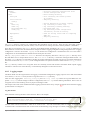
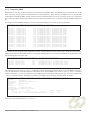
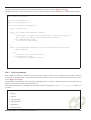
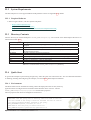
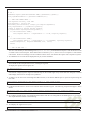
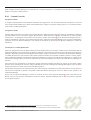
Readers familiar with JAIN SIP 1.1 may note that some of these properties are equivalent to the JAIN SIP stack properties of
the same name.
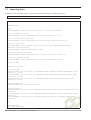
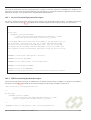
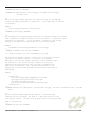
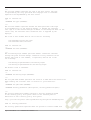
The default values for these RA properties are defined in the the “oc-resource-adaptor-jar.xml” deployment descriptor, in the RA
jar file. Rather than editing the oc-resource-adaptor-jar.xml file directly, and reassembling the RA jar file, it is easier to override
the RA properties at deploy time. This can be done by passing additional arguments to the createRAEntity management
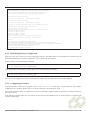
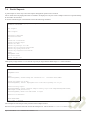
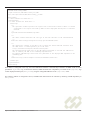
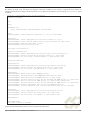
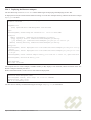
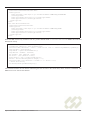
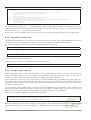
interface. Below is an excerpt from the $RHINO_HOME/examples/sip/build.xml file showing how this can be done in an Ant
script:
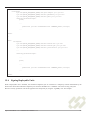
...
<slee-management>
<createraentity
resourceadaptorid="${sip.ra.name}"
entityname="${sip.ra.entity}"
properties="${sip.ra.properties}" />
<bindralinkname entityname="${sip.ra.entity}" linkname="${SIP_LINKNAME}" />
<activateraentity entityname="${sip.ra.entity}"/>
</slee-management>
...
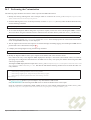
Where sip.ra.properties is defined in build.properties
sip.ra.properties=ListeningPoints=0.0.0.0:5060/udp;0.0.0.0:5060/tcp
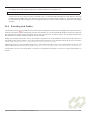
Config-properties are passed to the createRAEntity task using a comma-separated list of name=value pairs. In the above
example the ListeningPoints property has been customised. When the RA is deployed using the Ant script (as shown below)
the RA will be created with these properties.
22.5.2
Deploying the Resource Adaptor
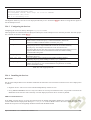
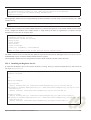
After setting these properties correctly for the system, the SIP Resource Adaptor can be deployed into the SLEE. The Ant build
script $RHINO_HOME/examples/sip/build.xml contains build targets for deploying and undeploying the SIP RA.
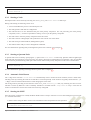
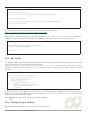
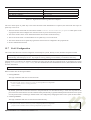
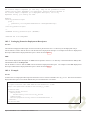
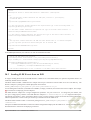
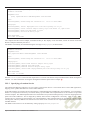
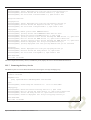
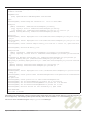
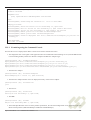
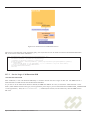
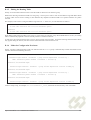
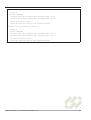
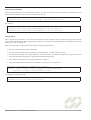
To deploy the SIP RA, first ensure the SLEE is running. Go to the SIP examples directory, and then execute the Ant target
deploysipra as shown:
Open Cloud Rhino 1.4.3 Administration Manual v1.1
136