1
DACOR RANGE SERVICE MANUAL
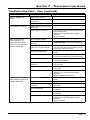
Troubleshooting Chart - Oven (continued)
PROBLEM
POSSIBLE CAUSES
Foods over or under cook. Incorrect cooking time or
temperature.
WHAT TO CHECK
• Follow instructions in Operating Instructions section.
Items not being cooked on
rack level that will provide
best results.
• See Understanding the Various Cooking Modes
section.
Food placed in oven during
pre-heat.
• Make sure pre-heat indicator on display is off before
putting food in oven (does not apply to broil modes).
Oven set to incorrect
temperature scale.
• See Setting the Temperature Scale section.
Relay stuck closed on
power board.
• Power board.
Defective temperature
sensor.
• Temperature sensor.
Elements not wired
correctly.
• Check for correct element wiring.
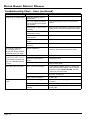
Cooling fan continues
to run after oven is
turned off. Shuts off after
extended period of time.
Normal operation.
• The cooling fan may run for a while after the oven is
turned off, until the internal parts have cooled.
Cooling fan runs
continuously after oven is
off and does not shut off
after an extended period
of time.
Power board problems.
• Power board.
Defective temperature
sensor.
• Temperature sensor.
Control panel problems.
• Cable from power board to oven controller board.
• Oven controller board.
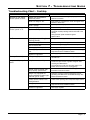
Oven door will not open.
Oven is set to self-clean.
• Check display. If “LOCK” appears on display oven
door cannot be opened. Wait for oven to complete
self-clean or press CANCEL/SECURE. Door will
unlock once oven has cooled.
Door latch problems.
• Door latch wiring.
• Door latch and switches.
Power board problems.
• Power board.
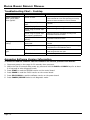
Meat probe not plugged in.
• Make sure meat probe is plugged into meat probe
connector.
Meat probe defective.
• Check meat probe continuity.
Meat probe connector
problem.
• Wiring from meat probe to power board.
• Power board.
Meat probe does not
work.
Page 7-4