1
4
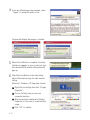
If you see following message window, select
“I agree” to accept the terms of use.
Program will display the progress as below.
5
When the installation is complete, the mimo
setting icon appears on your system tray and
the connected USB monitor information will
pop-up.
6
After finish installation of the mimo driver,
please follow below steps for multi-monitor
setting.
(Microsoft® Windows® XP Operating System)
1 Right-click on desktop then click “Display
Properties”.
2 Choose ‘Setting’ then you may see
connected monitors.
3 Align the monitors displayed in [Display
Properties] as the same as actual monitor
usage.
4 Click “OK” to confirm.
1 0 |