1
OPERATING INSTRUCTIONS
• Turn from position I to 0.
0 = Off
• The lamp (LS) extinguishes.
• Switch off the power isolator (H) (only available as an
option).
Turn from position I to 0.
0 = Off
The appliance can be switched off before cooking has been
completed.
If the function buttons (TT), (DT) and (ZT) are switched on and
switching off is only done by means of the control switch (S),
all the functions and previously set data for temperature, cooking time and starting time remain saved and active when the
switch (S) is turned on again.
If the appliance develops a fault, the electrical switch in the
building must also be switched off.
4.5
Additional functions
SOFT
Pressing the Soft button (R) adapts the power supply to the
food, i.e. reduces it.
The lamp (LR) on the button (R) lights up if the soft setting has
been switched on.
The following functions are activated by pressing button (Q):
1. All displays
Food temperature (AT)
Cooking time (AD)Starting time (AZ)
flash indicating the nominal value that has been programmed in.
2. Acknowledgement of the acoustic signal when cooking has
been completed.
3. Acknowledgement of error messages (see section 12,
Troubleshooting).
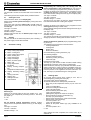
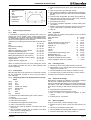
ZT
LZ
LR
Q
R
Button, starting time
Lamp, starting time
Lamp, soft settings
Button, acoustic signal
Button, soft
Fig. 3
Right console
HACCP
Appliances can be optionally equipped with the program-linked
cooking process procedure THERMACAM. Cooking processes can be programmed, analyzed, logged and documented and are thus part of the HACCP system (HACCP =
hazard analysis and critical control points).
• The program system is started by pressing the HACCP
button (C).
• The lamp (LC) lights up.
• The number of the cooking program appears on the display (AZ): HP 00 to 99.
• The program number can be changed by turning the knob
(Z).
• After setting the desired program, the cooking process is
started by pressing the key (TT).
• The nominal temperature is shown on the display (AT) and
the cooking time appears on the display (AD).
• The program-linked cooking process is switched off by
pressing the HACCP button (C). The appliance is then
switched off according to 4.4.
A separate set of operating instructions contains information
on the programming, analyzing, logging and documenting of
cooking processes using an external computer.
4.6
Altering the pan settings
Altering the nominal values while working
All the nominal values programmed in originally can be easily
altered during the working process by setting the buttons for
temperature (T), for the cooking time (D) and for the starting
time (Z) to the new values. When the buttons are turned, the
nominal value will appear flashing on the relevant display. If
the nominal value is not altered for a few seconds, the display
reverts to the actual value.
Altering the cooking programmes while working
Switching off the button (TT) will interrupt the heating/cooking
process. Switching off the cooking time button (DT) reverts to
continuous cooking. Switching off the starting time button (ZT)
deletes the programmed-in starting time. The appliance can be
started manually.
Manual cooling
If steam condensation is not to be automated using the programme, cooling can be switched on manually when cooking
is completed. However, it is necessary to determine the start
and duration of cooling manually. Procedure: halt the cooking
process by deactivating the button (TT); the cooling is
switched on by pressing button (V); lamp (LV) will flash. Deactivate button (V) to turn off the cooling again. Lamp (LV) will
extinguish.
Cooking using the SOFT setting
Normally (Soft setting deactivated), the food is heated up at
maximum power and in the shortest possible heating-up time.
This method of operation is suited to food with a high water
content and which has good heat conductivity properties.
When maximum power is used to heat them up, viscous, pasty
and difficult to heat food (dairy products) tends to dry out along
the heated surface of the pan, to turn dark and to burn. When
the Soft setting is activated, the heating power is automatically
adapted via the temperature difference to the type of food.
Heating-up times are extended a little although the pre-set
temperature is reached without the food sticking or burning.
CLOCK TIME
Display (AZ) shows the clock time and display (AT) shows
the actual temperature of the pan when the control switch (S)
alone is switched on.
62.9696.01
Page 7