1
CONSOLE GOLD OPERATION
K B
H
A
M O
N
C
P
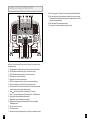
Q) Audio in jack: plug your cd / mp3 player into the console using the included audio adaptor cable.
R) Audio out / headphone jack: plug your headphones into this jack to listen to your music through
the headphones. Note: when headphones are plugged into the headphone jack the sound will no
longer come out through the speakers.
S) Water bottle pockets: holds personal workout equipment.
T) Safety key position: enables treadmill when safety key is inserted.
L
P
S
S
Q
I
F D
T
E G
J
R
Note: There is a thin protective sheet of clear plastic on the overlay of the console that should
be removed before use.
A) LED display windows: time, distance, calories, heart rate, speed, incline and workout profiles.
B) Target LED indicators: indicate what target (if any) is set for the current program.
C) Workout LED indicators: indicate what workout is set for the current program.
D) Select target: press to select your desired target.
E) Select workout: press to select your desired workout.
F) START: press to begin exercising, start your workout, or resume exercising after pause.
G) Stop: press to pause/end your workout. Hold for 3 seconds to reset the console.
H) Cool down: press to enter cool down mode. Cool down lasts for 4 minutes and reduces speed
and incline to allow your heart to readjust to decreased demand.
I) Incline / keys: used to adjust incline in small increments (0.5% Increments).
J) Speed + / - keys: used to adjust speed in small increments (0.1 Mph or 0.1 KMph increments).
K) Incline quick keys: used to reach desired incline more quickly.
L) Speed quick keys: used to reach desired speed more quickly.
M) Enter/Display: used to adjust target and workout settings. Press enter to change display
feedback during workout.
N) Fan key: press to turn fan on and off.
O) Fan: personal workout fan.
P) Speakers: music plays through speakers when your cd / mp3 player is connected to the console.
12
13